mode HONDA CR-Z 2013 1.G Owner's Guide
[x] Cancel search | Manufacturer: HONDA, Model Year: 2013, Model line: CR-Z, Model: HONDA CR-Z 2013 1.GPages: 325, PDF Size: 11.73 MB
Page 77 of 325
76
uuIndicatorsu
Instrument Panel
*1:The driving mode message on the multi-information display appears for a few seconds when you press the appropriate mode button.
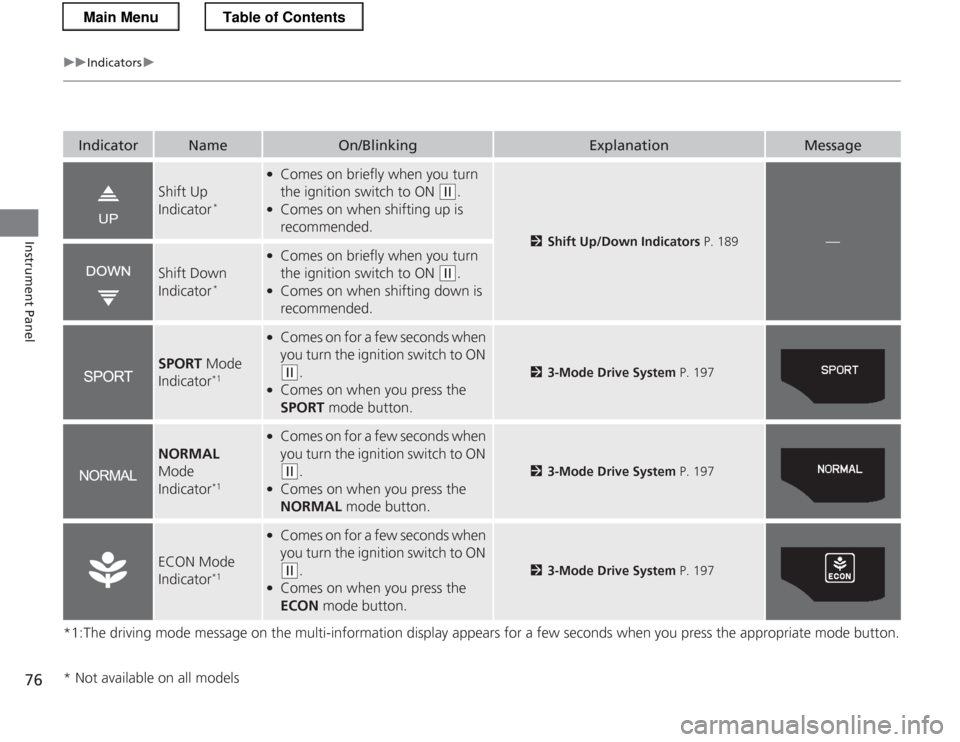
IndicatorNameOn/BlinkingExplanationMessage
Shift Up
Indicator*
●
Comes on briefly when you turn
the ignition switch to ON
(w .
● Comes on when shifting up is
recommended.
2 Shift Up/Down Indicators P. 189—
Shift Down
Indicator*
●
Comes on briefly when you turn
the ignition switch to ON
(w .
● Comes on when shifting down is
recommended.
SPORT Mode
Indicator *1
●
Comes on for a few seconds when
you turn the ignition switch to ON
(w .
● Comes on when you press the
SPORT mode button.23-Mode Drive System P. 197
NORMAL
Mode
Indicator *1
●
Comes on for a few seconds when
you turn the ignition switch to ON
(w .
● Comes on when you press the
NORMAL mode button.23-Mode Drive System P. 197
ECON Mode
Indicator*1
●
Comes on for a few seconds when
you turn the ignition switch to ON
(w .
● Comes on when you press the
ECON mode button.23-Mode Drive System P. 197
* Not available on all models
Main MenuTable of Contents
Page 79 of 325
78
uuIndicatorsuMulti-Information Display Warning and Information Messages
Instrument Panel
Multi-Information Display Warning and Information Messages
The following messages appear only on the multi-information display. Pres s the (information) button to see the message again
with the system message indicator on.
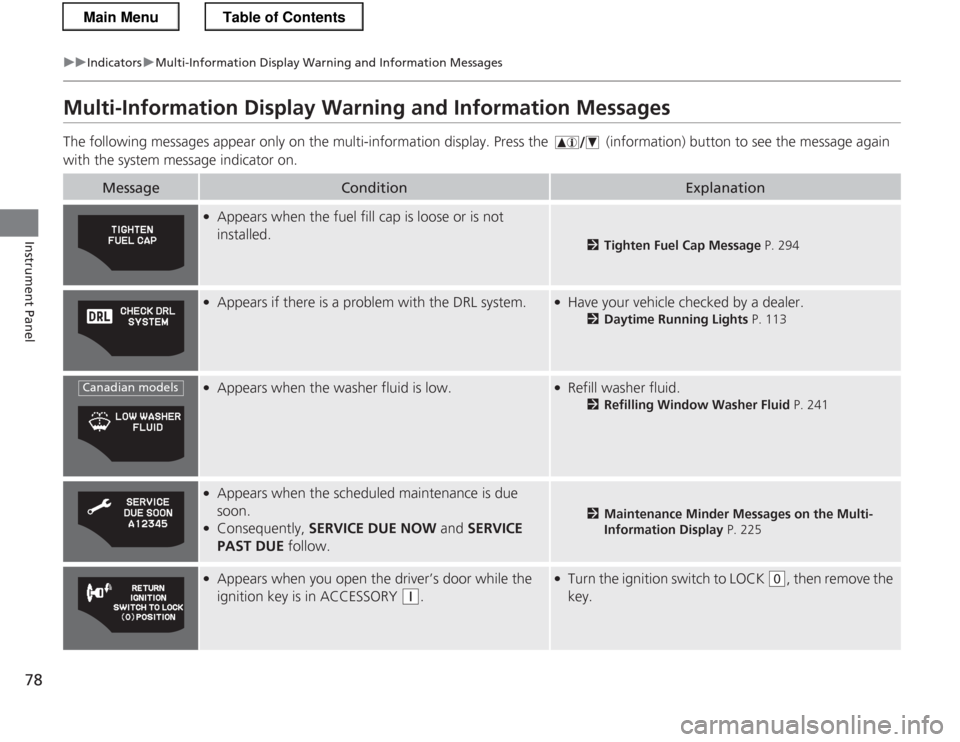
MessageConditionExplanation
● Appears when the fuel fill cap is loose or is not installed.
2 Tighten Fuel Cap Message P. 294
●
Appears if there is a problem with the DRL system.●Have your vehicle checked by a dealer.
2Daytime Running Lights P. 113
●
Appears when the washer fluid is low.●Refill washer fluid.
2Refilling Window Washer Fluid P. 241
●
Appears when the scheduled maintenance is due
soon.
● Consequently, SERVICE DUE NOW and SERVICE
PAST DUE follow.
2Maintenance Minder Messages on the Multi-
Information Display P. 225
●
Appears when you open the driver’s door while the
ignition key is in ACCESSORY
(q .
●
Turn the ignition switch to LOCK (0 , then remove the
key.
Canadian models
Main MenuTable of Contents
Page 80 of 325
79
uuIndicatorsuMulti-Information Display Warning and Information Messages
Continued
Instrument Panel
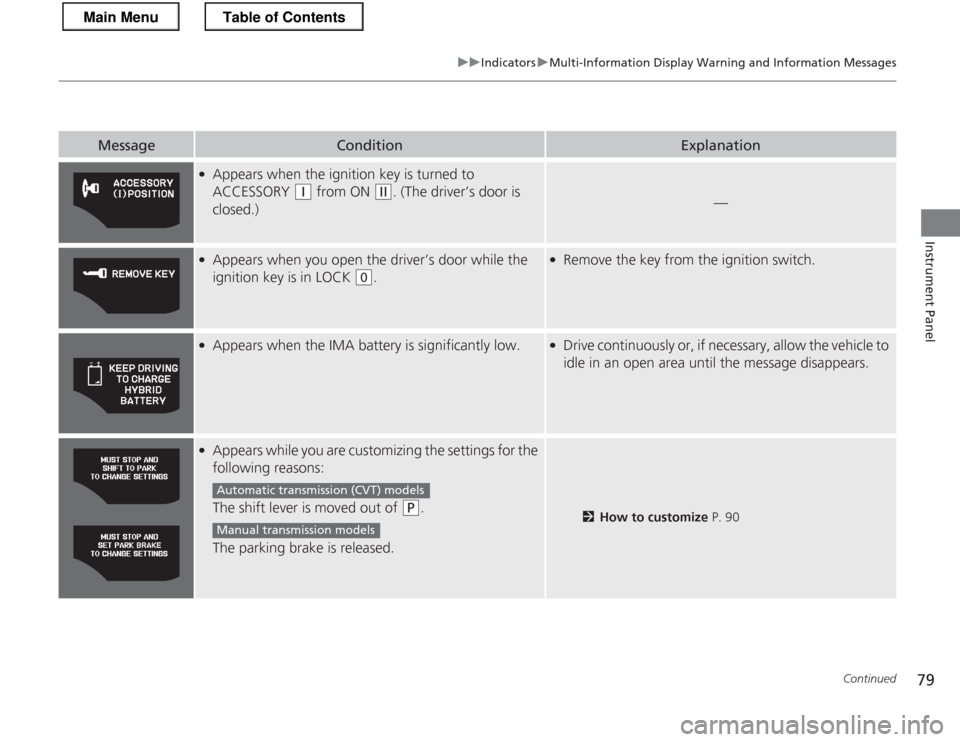
MessageConditionExplanation
●Appears when the ignition key is turned to
ACCESSORY
(q from ON (w. (The driver’s door is
closed.)—
● Appears when you open the driver’s door while the
ignition key is in LOCK
(0 .
●
Remove the key from the ignition switch.
●
Appears when the IMA battery is significantly low.●Drive continuously or, if necessary, allow the vehicle to
idle in an open area until the message disappears.
●Appears while you are customizing the settings for the
following reasons:
The shift lever is moved out of
(P .
The parking brake is released.2 How to customize P. 90
Automatic transmiss ion (CVT) models
Manual transmission models
Main MenuTable of Contents
Page 81 of 325
80
uuIndicatorsuMulti-Information Display Warning and Information Messages
Instrument Panel
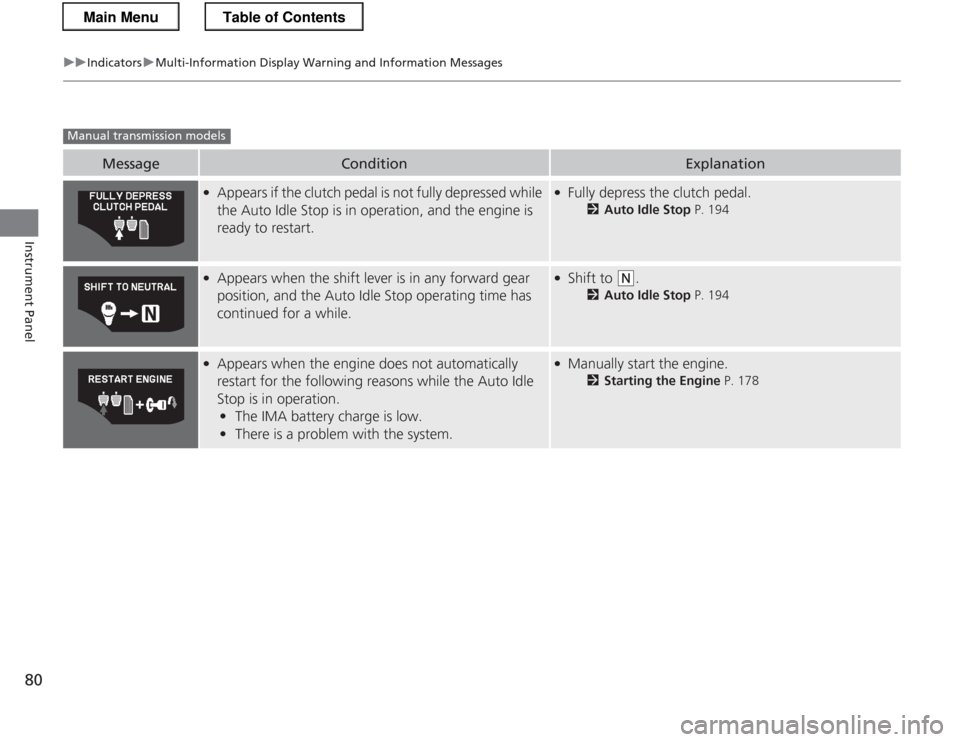
MessageConditionExplanation
●
Appears if the clutch pedal is not fully depressed while
the Auto Idle Stop is in operation, and the engine is
ready to restart.●Fully depress the clutch pedal.
2Auto Idle Stop P. 194
●
Appears when the shift lever is in any forward gear
position, and the Auto Idle Stop operating time has
continued for a while.●Shift to (N .
2 Auto Idle Stop P. 194
●
Appears when the engine does not automatically
restart for the following reasons while the Auto Idle
Stop is in operation.
• The IMA battery charge is low.
• There is a problem with the system.●
Manually start the engine.
2Starting the Engine P. 178
Manual transmission models
Main MenuTable of Contents
Page 84 of 325
83
uuGauges and Multi-Information DisplayuMulti-Information Display
Continued
Instrument Panel
Multi-Information Display
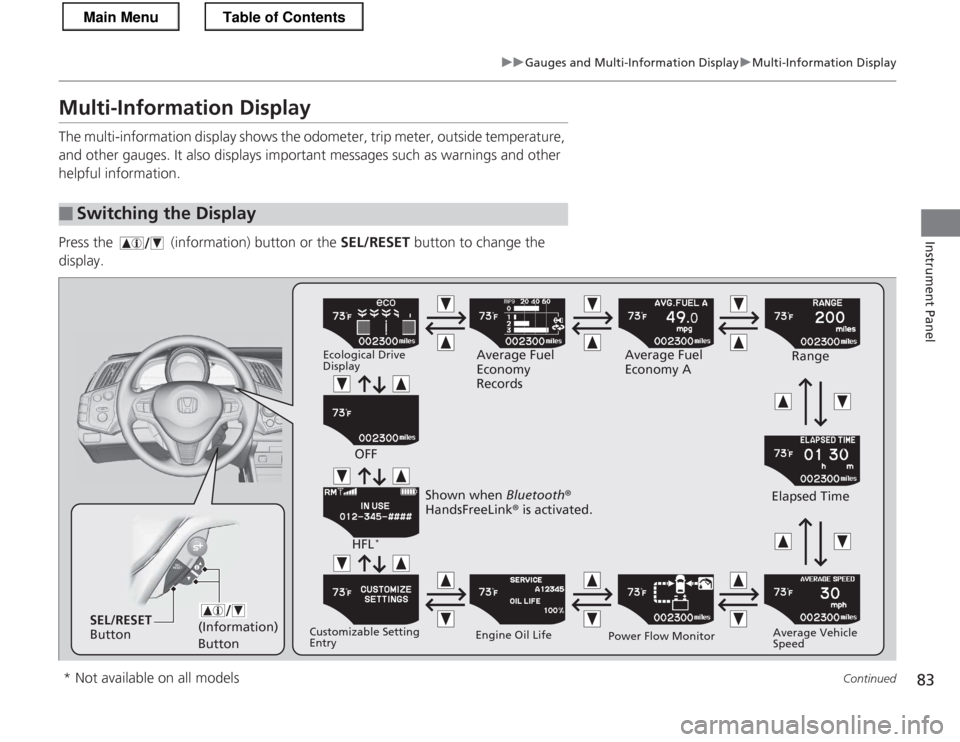
The multi-information display shows the odometer, trip meter, outside temperature,
and other gauges. It also displays important messages such as warnings and other
helpful information.
Press the (information) button or the SEL/RESET button to change the
display.
■Switching the Display
(Information) ButtonSEL/RESET
Button Ecological Drive Display
Average Fuel
Economy
RecordsAverage Fuel
Economy A
Range
Elapsed Time Average Vehicle
Speed
Power Flow Monitor
Engine Oil Life
Customizable Setting Entry HFL
*
OFF
Shown when Bluetooth®
HandsFreeLink ® is activated.
* Not available on all models
Main MenuTable of Contents
Page 87 of 325
uuGauges and Multi-Information DisplayuMulti-Information Display
86
Instrument Panel
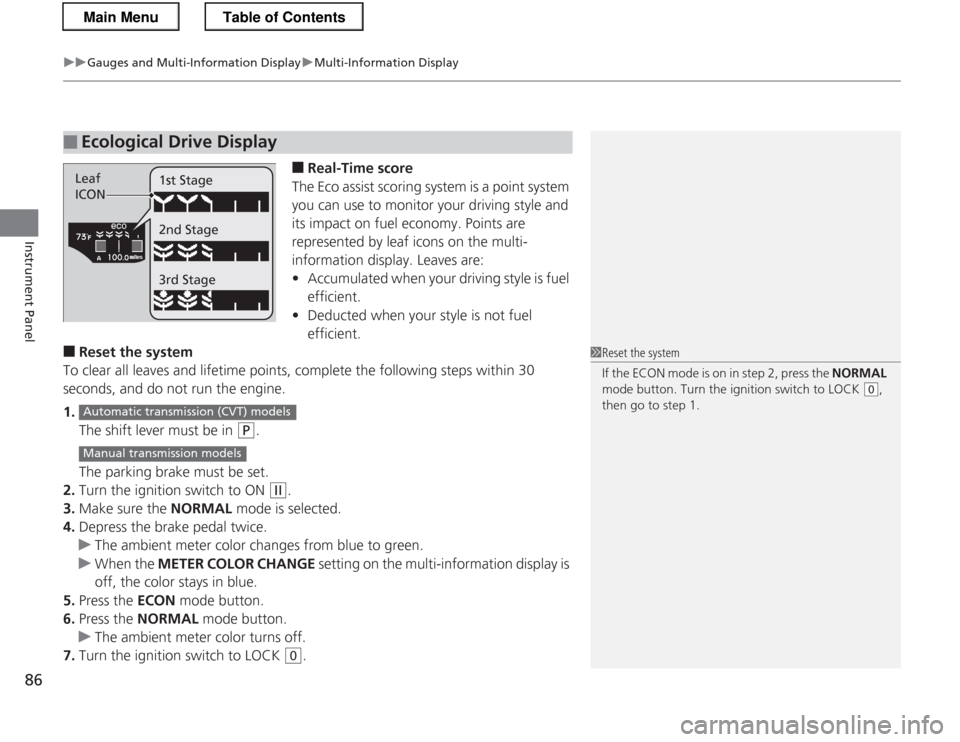
■ Real-Time score
The Eco assist scoring system is a point system
you can use to monitor your driving style and
its impact on fuel economy. Points are
represented by leaf icons on the multi-
information display. Leaves are:• Accumulated when your driving style is fuel
efficient.
• Deducted when your style is not fuel efficient.
■ Reset the system
To clear all leaves and lifetime points, complete the following steps within 30
seconds, and do not run the engine. 1. The shift lever must be in
(P .
The parking brake must be set.
2. Turn the ignition switch to ON
(w .
3. Make sure the NORMAL mode is selected.
4. Depress the brake pedal twice.
uThe ambient meter color changes from blue to green.
uWhen the METER COLOR CHANGE setting on the multi-information display is
off, the color stays in blue.
5. Press the ECON mode button.
6. Press the NORMAL mode button.
uThe ambient meter color turns off.
7. Turn the ignition switch to LOCK
(0 .
■Ecological Drive Display
Leaf
ICON 1st Stage 2nd Stage 3rd Stage
1Reset the system
If the ECON mode is on in step 2, press the
NORMAL
mode button. Turn the ignition switch to LOCK
(0 ,
then go to step 1.
Automatic transmiss ion (CVT) models
Manual transmission models
Main MenuTable of Contents
Page 88 of 325
Continued87
uuGauges and Multi-Information DisplayuMulti-Information Display
Instrument Panel
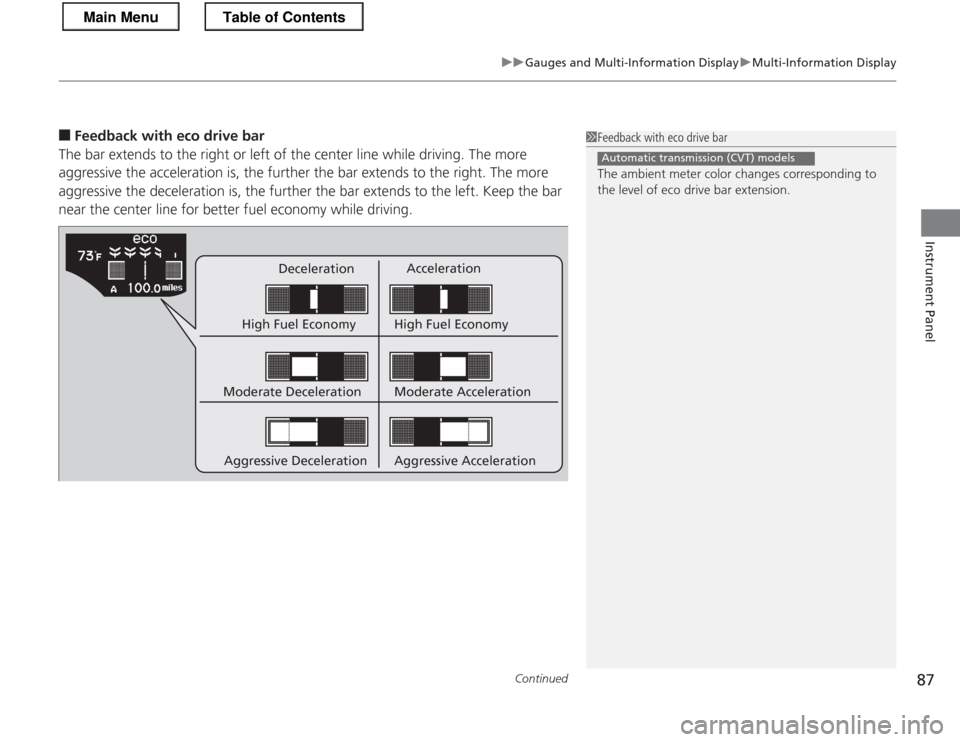
■Feedback with eco drive bar
The bar extends to the right or left of the center line while driving. The more
aggressive the acceleration is, the further the bar extends to the right. The more
aggressive the deceleration is, the further the bar extends to the left. Keep the bar
near the center line for better fu el economy while driving.
Deceleration Acceleration
High Fuel Economy High Fuel Economy
Moderate Deceleration
Aggressive Deceleration Moderate Acceleration
Aggressive Acceleration
1Feedback with eco drive bar
The ambient meter color changes corresponding to the level of eco drive bar extension.
Automatic transmission (CVT) models
Main MenuTable of Contents
Page 91 of 325
uuGauges and Multi-Information DisplayuMulti-Information Display
90
Instrument Panel
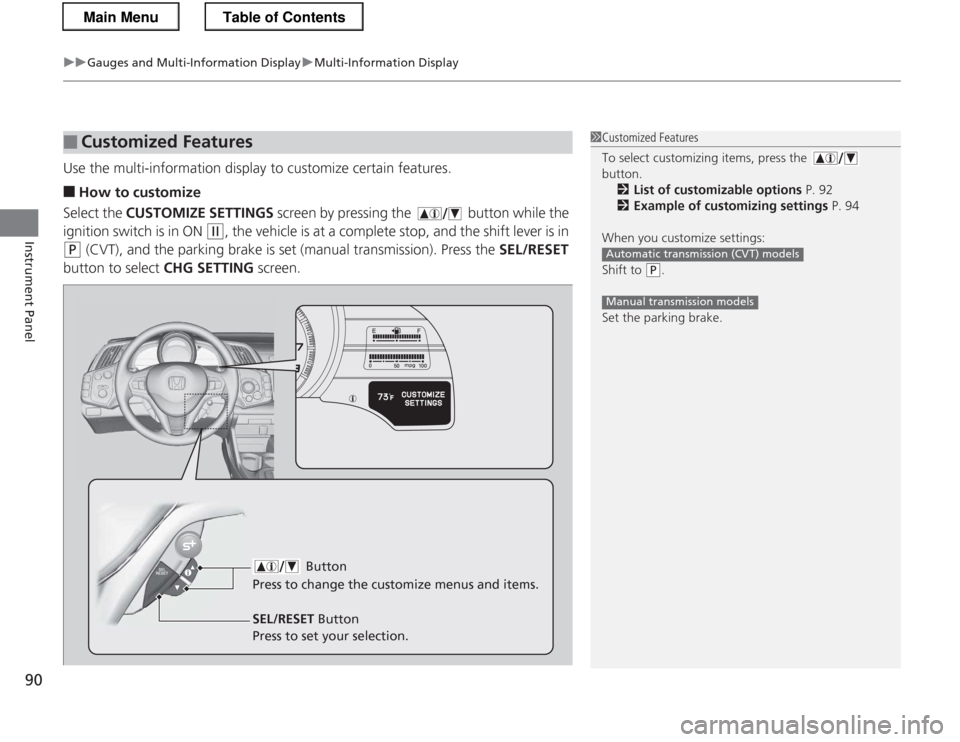
Use the multi-information display to customize certain features. ■ How to customize
Select the CUSTOMIZE SETTINGS screen by pressing the button while the
ignition switch is in ON
(w , the vehicle is at a complete stop, and the shift lever is in
(P (CVT), and the parking brake is set (manual transmission). Press the SEL/RESET
button to select CHG SETTING screen.
■Customized Features1Customized Features
To select customizing items, press the button.
2 List of customizable options P. 92
2 Example of customizing settings P. 94
When you customize settings:
Shift to
(P .
Set the parking brake.
Automatic transmission (CVT) models
Manual transmission models
Button
Press to change the cu stomize menus and items.
SEL/RESET Button
Press to set your selection.
Main MenuTable of Contents
Page 92 of 325

91
uuGauges and Multi-Information DisplayuMulti-Information Display
Continued
Instrument Panel
■Customization flow
Press the button.
DEFAULT ALL
EXIT
DOOR SETUP
ADJUST OUTSIDE TEMP. DISPLAY
TRIP A RESET with REFUEL
ELAPSED TIME RESET
INTERIOR LIGHT DIMMING TIME
AUTO LIGHT SENSITIVITY *
AUTO DOOR UNLOCK
DOOR LOCK MODE
KEYLESS LOCK ACKNOWLEDGMENT
SECURITY RELOCK TIMER
AUTO DOOR LOCK
LANGUAGE SELECTIONSEL/RESET
SEL/RESET
SEL/RESET
SEL/RESET
SEL/RESET
SEL/RESET
METER SETUP
LIGHTING SETUP
CHG SETTING
EXIT
CUSTOMIZE SETTINGS
HOLD ECON MODE
METER COLOR CHANGE
DISPLAY KM/MILES
Auto Light Sensitivity
*
4
3
4
3
4
3
4
3
4
3
4
3
4
3
* Not available on all models
Main MenuTable of Contents
Page 94 of 325
93
uuGauges and Multi-Information DisplayuMulti-Information Display
Continued
Instrument Panel
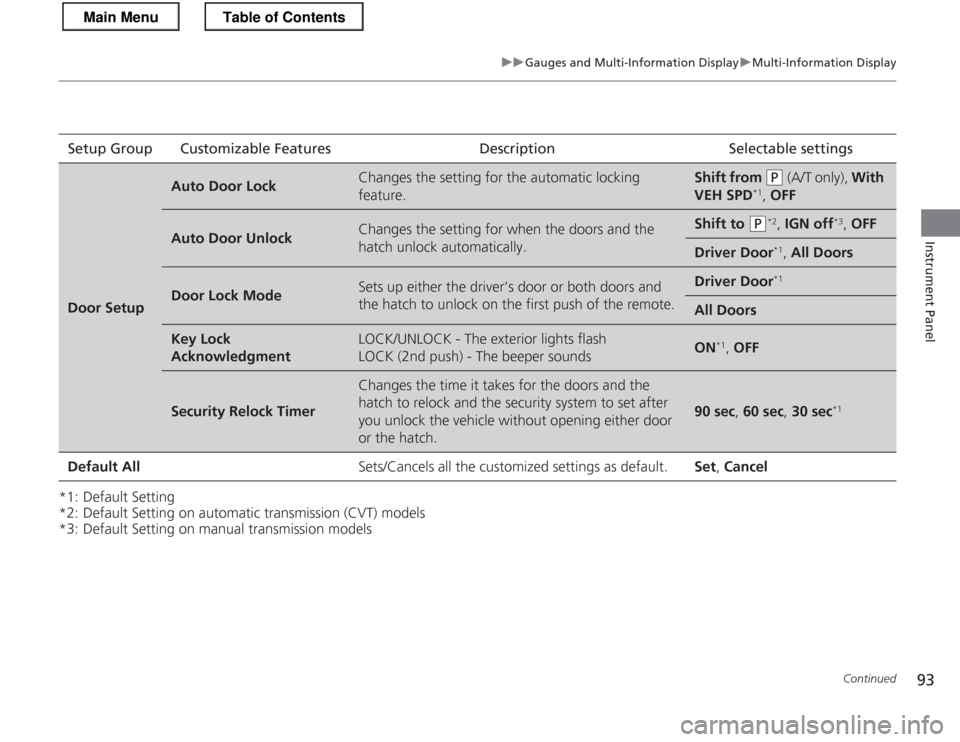
*1: Default Setting
*2: Default Setting on automatic transmission (CVT) models
*3: Default Setting on manual transmission modelsSetup Group Customizable Features Description Selectable settings
Door Setup
Auto Door LockChanges the setting for the automatic locking
feature.Shift from (P
(A/T only), With
VEH SPD *1
, OFF
Auto Door UnlockChanges the setting for when the doors and the
hatch unlock automatically.Shift to (P *2
, IGN off *3
, OFF
Driver Door *1
, All Doors
Door Lock ModeSets up either the driver’s door or both doors and
the hatch to unlock on the first push of the remote.Driver Door *1
All Doors
Key Lock AcknowledgmentLOCK/UNLOCK - The exterior lights flash
LOCK (2nd push) - The beeper soundsON*1
, OFF
Security Relock Timer
Changes the time it takes for the doors and the
hatch to relock and the security system to set after
you unlock the vehicle without opening either door
or the hatch.
90 sec , 60 sec , 30 sec *1
Default All Sets/Cancels all the customized settings as default. Set, Cancel
Main MenuTable of Contents