ignition HONDA CR-Z 2013 1.G Workshop Manual
[x] Cancel search | Manufacturer: HONDA, Model Year: 2013, Model line: CR-Z, Model: HONDA CR-Z 2013 1.GPages: 325, PDF Size: 11.73 MB
Page 165 of 325
uuBluetooth® HandsFreeLink ®uHFL Menus
164
Features
You can make calls using any phone number or a name in the HFL phonebook, and
redial the last number called.
■ Direct dialing a phone number
1. Say “Call” or “Dial.”
2. Say the number you want to dial after the prompts.
3. Say “Call” or “Dial” after the prompts.
■ From the HFL phonebook
1. Say “Call” or “Dial.”
2. Say the name stored in the HFL phonebook after the prompts.
3. Follow the HFL prompts.
■ To redial the last number called by HFL
Say “Redial.”
■ To end a call
Press the (HFL back) button.
■Making a Call1Making a Call
Press the button and wait for a beep before
giving a command.
HFL uses a Class 2 Bluetooth, with has a maximum range of about 30 feet (10 meters).
HFL allows you to talk up to 30 minutes after you
remove the key from the ignition switch. However,
this may weaken the vehicle's 12 volt battery.
Once a call is connected, you can hear the voice of
the person you are calling through the audio
speakers.
Main MenuTable of Contents
Page 170 of 325
169
uuBluetooth® HandsFreeLink ®uHFL Menus
Features
■To activate or deactiva te the auto transfer function
The call on your cell phone can be automatically transferred to HFL when you get
into the vehicle and turn on the ignition switch. 1. Say “System Setup.”
2. Say “Auto Transfer” after the prompts. HFL lets you know the current status.
3. Follow the HFL prompts to change the setting.
■ To clear the system
Paired phones, all stored or imported phonebook data, and any passcodes are
erased. 1. Say “System Setup.”
2. Say “Clear” after the prompts.
3. Follow the HFL prompts.
You can set the system la nguage to French or English.
1. Say “Change Language.”
2. Follow the HFL prompts.
If you have not named your paired phone in the selected language, HFL will ask you to name it in that language.
■Change Language *
1System Setup
Press the button before a command.
You can clear the system when you have forgotten
the passcode and cannot access HFL.
When HFL asks you for the passcode, say
“System
Clear.”
1Change Language *
Press the button before a command.
Quick Language Selection
If you want to change the language, to French for
example, say “Fran
Page 180 of 325
Continued179
uuWhen DrivinguStarting the Engine
Driving
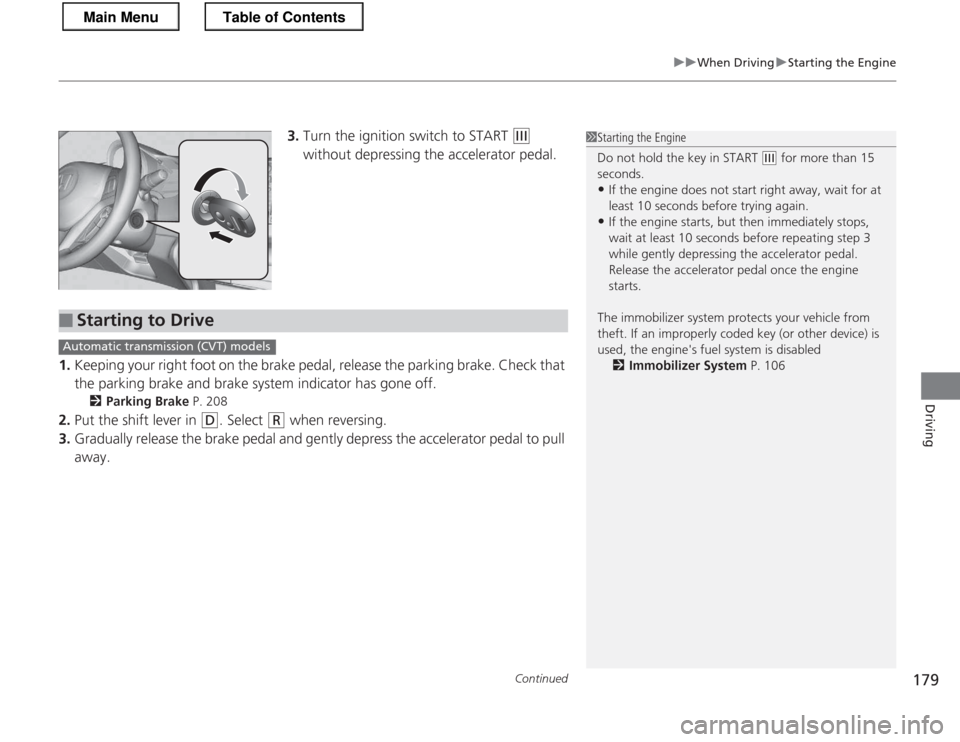
3.Turn the ignition switch to START (e
without depressing the accelerator pedal.
1. Keeping your right foot on the brake pedal, release the parking brake. Check that
the parking brake and brake system indicator has gone off.
2 Parking Brake P. 208
2. Put the shift lever in
(D . Select (R when reversing.
3. Gradually release the brake pedal and gently depress the accelerator pedal to pull
away.
1Starting the Engine
Do not hold the key in START
(e for more than 15
seconds.
• If the engine does not start right away, wait for at least 10 seconds before trying again.
• If the engine starts, but then immediately stops,
wait at least 10 seconds before repeating step 3
while gently depressing the acce lerator pedal.
Release the accelerator pedal once the engine
starts.
The immobilizer system protects your vehicle from
theft. If an improperly coded key (or other device) is
used, the engine's fuel system is disabled 2 Immobilizer System P. 106
■Starting to Drive
Automatic transmission (CVT) models
Main MenuTable of Contents
Page 182 of 325
181
uuWhen DrivinguPrecautions While Driving
Driving
Precautions While Driving
Avoid driving in deep water and on flooded roads. This can damage the engine and
driveline, and cause electrical component failure.
If there is a strong impact with something under the vehicle, stop in a safe location.
Check the underside of the vehicle for damage or any fluid leaks.
■In Rain
■Other Precautions
1Precautions While Driving
NOTICE
Do not operate the shift lever while pressing the
accelerator pedal. You could damage the
transmission.
If the ignition switch is turned to ACCESSORY
(q or
LOCK
(0 while driving, the engine will shut down
and all steering and brake power assist functions will
stop, making it difficult to control the vehicle.
Do not put the shift lever in
(N , as you will lose
engine braking (and acceleration) performance.
During the first 600 miles (1,000 km) of operation,
avoid sudden acceleration or full throttle operation so
as to not damage the engine or powertrain.
Avoid hard braking for the first 200 miles (300 km).
You should also follow this when the brake pads are replaced.
NOTICE
Following can damage the under spoiler: • Parking the vehicle by a parking block
• Parallel parking along the road shoulder
• Driving towards the bottom of a hill
• Driving up or down to a different surface level
(such as a road shoulder)
• Driving on a rutted or bumpy road
• Driving on a road with potholes
Main MenuTable of Contents
Page 184 of 325
183
uuWhen DrivinguShifting
Continued
Driving
Shifting
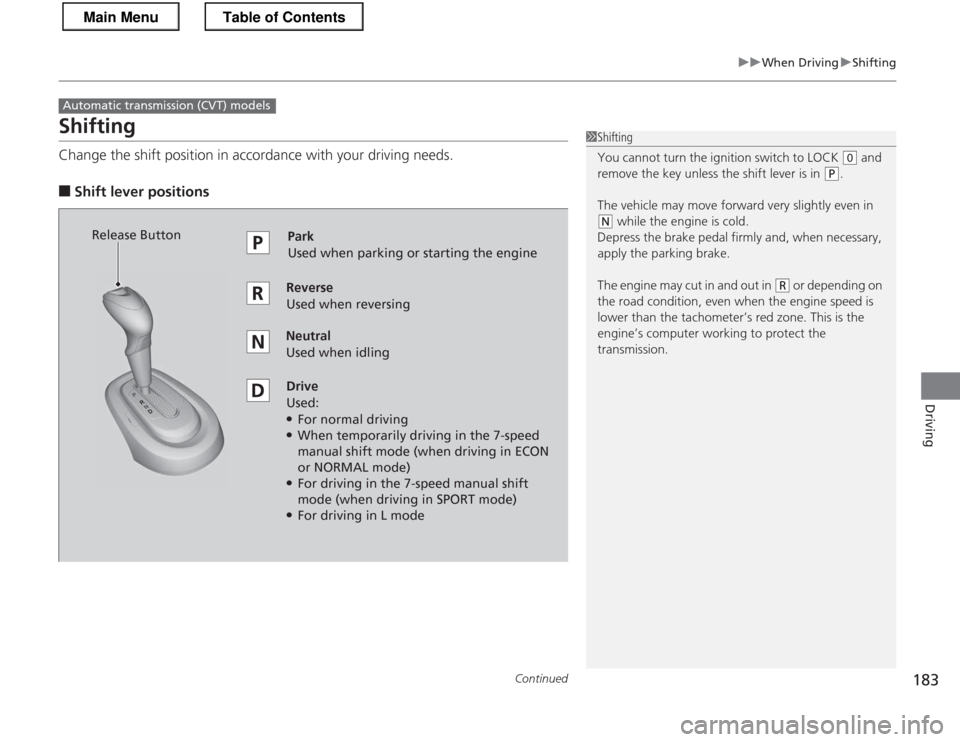
Change the shift position in accordance with your driving needs.
■ Shift lever positions
Automatic transmiss ion (CVT) models
1Shifting
You cannot turn the ignition switch to LOCK
(0 and
remove the key unless the shift lever is in
(P.
The vehicle may move forward very slightly even in
(N while the engine is cold.
Depress the brake pedal firmly and, when necessary,
apply the parking brake.
The engine may cut in and out in
(R or depending on
the road condition, even when the engine speed is
lower than the ta chometer’s red zone. This is the
engine’s computer working to protect the
transmission.
Park
Used when parking or starting the engine
ReverseUsed when reversing
Neutral Used when idling
Drive Used:● For normal driving
● When temporarily driving in the 7-speed
manual shift mode (when driving in ECON
or NORMAL mode)
● For driving in the 7-speed manual shift
mode (when driving in SPORT mode)
● For driving in L mode
Release Button
Main MenuTable of Contents
Page 191 of 325
190
uuWhen DrivinguShifting
Driving
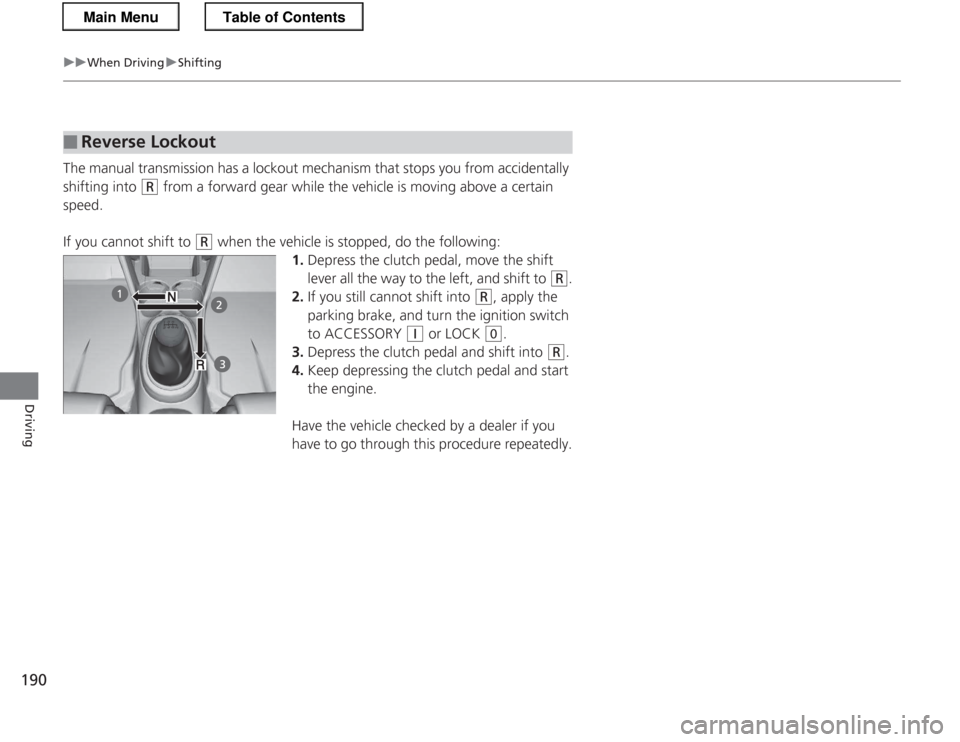
The manual transmission has a lockout mechanism that stops you from accidentally
shifting into
(R from a forward gear while the vehicle is moving above a certain
speed.
If you cannot shift to
(R when the vehicle is stopped, do the following:
1.Depress the clutch pedal, move the shift
lever all the way to the left, and shift to
(R .
2. If you still cannot shift into
(R , apply the
parking brake, and turn the ignition switch
to ACCESSORY
(q or LOCK (0 .
3. Depress the clutch pedal and shift into
(R .
4. Keep depressing the clutch pedal and start
the engine.
Have the vehicle checked by a dealer if you
have to go through this procedure repeatedly.
■Reverse Lockout
Main MenuTable of Contents
Page 198 of 325
197
uuWhen Drivingu3-Mode Drive System
Driving
3-Mode Drive System
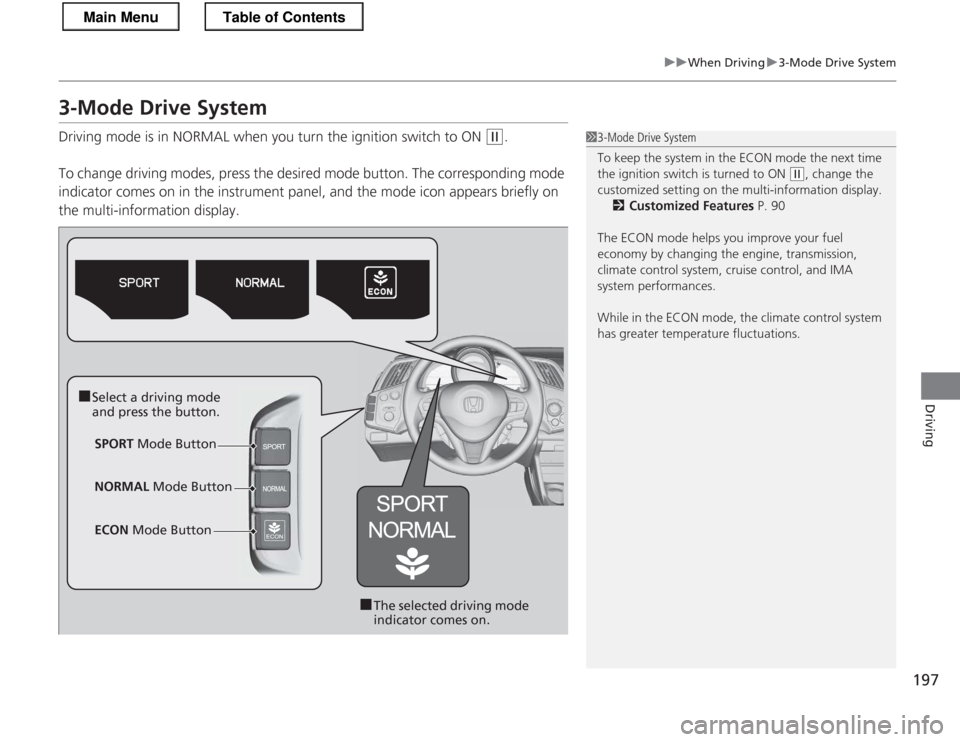
Driving mode is in NORMAL when you turn the ignition switch to ON
(w.
To change driving modes, press the de sired mode button. The corresponding mode
indicator comes on in the instrument panel, and the mode icon appears briefly on the multi-information display.13-Mode Drive System
To keep the system in the ECON mode the next time
the ignition switch is turned to ON
(w , change the
customized setting on the multi-information display.
2 Customized Features P. 90
The ECON mode helps you improve your fuel
economy by changing the engine, transmission,
climate control system, cruise control, and IMA
system performances.
While in the ECON mode, the climate control system
has greater temperature fluctuations.
■ Select a driving mode
and press the button.
SPORT Mode Button
■The selected driving mode
indicator comes on.
NORMAL
Mode Button
ECON Mode Button
Main MenuTable of Contents
Page 272 of 325
271
Continued
Handling the Unexpected
If a Tire Goes Flat
Changing a Flat Tire *
If a tire goes flat while driving, grasp the steering wheel firmly, and brake gradually
to reduce speed. Then, stop in a safe place. Replace the flat tire with a compact
spare tire. Go to a dealer as soon as possible to have the full-size tire repaired or
replaced. 1. Park the vehicle on firm, level, and non-slippery surface and apply the parking brake.
2. Move the shift lever to
(P .
2. Move the shift lever to
(R .
3. Turn on the hazard warning lights and turn the ignition switch to LOCK
(0 .
1Changing a Flat Tire *
Follow compact spare precautions:
Periodically check the tire pressure of the compact
spare. It should be set to the specified pressure.
Specified Pressure: 60 psi (420 kPa, 4.2 kgf/cm 2
)
When driving with the compact spare tire, keep the
vehicle speed under 50 mph (80 km/h). Replace with
a full-size tire as soon as possible.
The compact spare tire and wheel in your vehicle are
specifically for this model.
Do not use them with another vehicle.
Do not use another type of compact spare tire or
wheel with your vehicle.
Do not mount tire chains on a compact spare tire.
If a chain-mounted front tire goes flat, remove one of
the full-size rear tires and replace it with the compact
spare tire. Remove the flat front tire and replace it
with the full-size tire th at was removed from the rear.
Mount the tire chains on the front tire.
NOTICE
Do not use a puncture-repairing agent, other than
the one provided in the kit that came with your
vehicle. If used, you may permanently damage the
tire pressure sensor.
Automatic transmiss ion (CVT) models
Manual transmission models
All models
* Not available on all models
Main MenuTable of Contents
Page 278 of 325
277
uuIf a Tire Goes FlatuTemporarily Repairing a Flat Tire
Continued
Handling the Unexpected
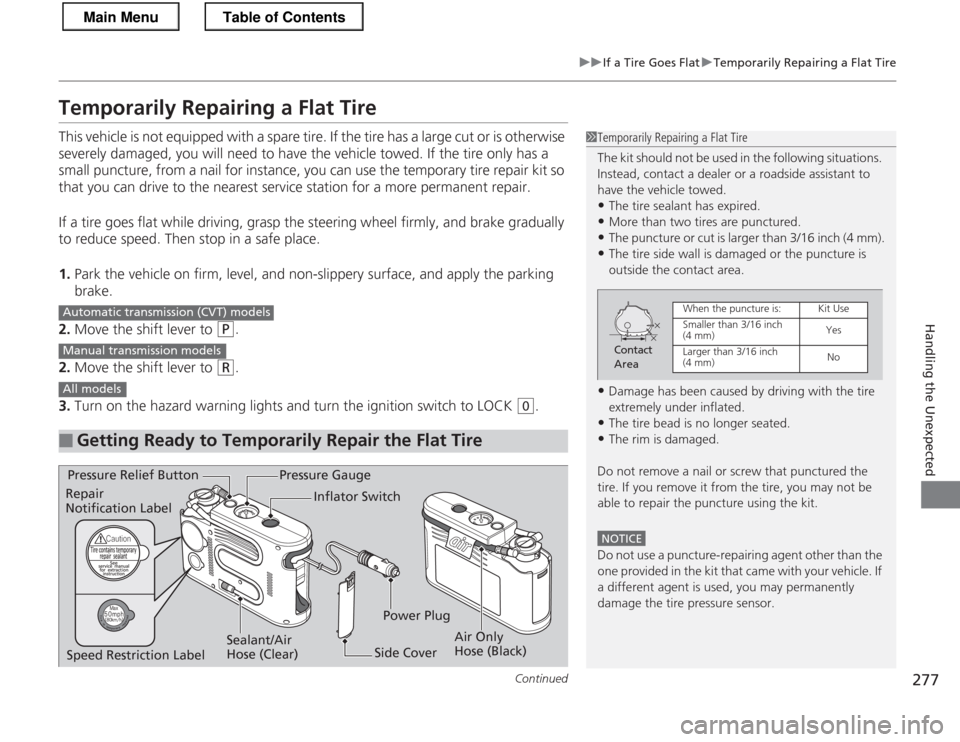
Temporarily Repairing a Flat Tire
This vehicle is not equipped with a spare tire. If the tire has a large cut or is otherwise
severely damaged, you will need to have the vehicle towed. If the tire only has a
small puncture, from a nail for instance, you can use the temporary tire repair kit so
that you can drive to the nearest service station for a more permanent repair.
If a tire goes flat while driving, grasp the steering wheel firmly, and brake gradually
to reduce speed. Then stop in a safe place. 1.Park the vehicle on firm, level, and non-slippery surface, and apply the parking brake.
2. Move the shift lever to
(P .
2. Move the shift lever to
(R .
3. Turn on the hazard warning lights and turn the ignition switch to LOCK
(0 .
■Getting Ready to Temporarily Repair the Flat Tire
1Temporarily Repairing a Flat Tire
The kit should not be used in the following situations.
Instead, contact a dealer or a roadside assistant to
have the vehicle towed.
• The tire sealant has expired.
• More than two tires are punctured.
• The puncture or cut is larger than 3/16 inch (4 mm).
• The tire side wall is damaged or the puncture is
outside the contact area.
• Damage has been caused by driving with the tire
extremely under inflated.
• The tire bead is no longer seated.
• The rim is damaged.
Do not remove a nail or screw that punctured the
tire. If you remove it from the tire, you may not be
able to repair the puncture using the kit.
NOTICE
Do not use a puncture-repairing agent other than the
one provided in the ki t that came with your vehicle. If
a different agent is used, you may permanently damage the tire pressure sensor.
Contact
Area
When the puncture is:Kit Use
Smaller than 3/16 inch (4 mm)Yes
Larger than 3/16 inch (4 mm) No
Automatic transmiss ion (CVT) models
Manual transmission models
All models
Pressure Gauge
Sealant/Air
Hose (Clear)
Pressure Relief Button
Air Only
Hose (Black)
Inflator Switch
Side Cover
Repair Notification Label
Power Plug
Speed Restriction Label
Main MenuTable of Contents
Page 287 of 325
286
Handling the Unexpected
Engine Does Not Start
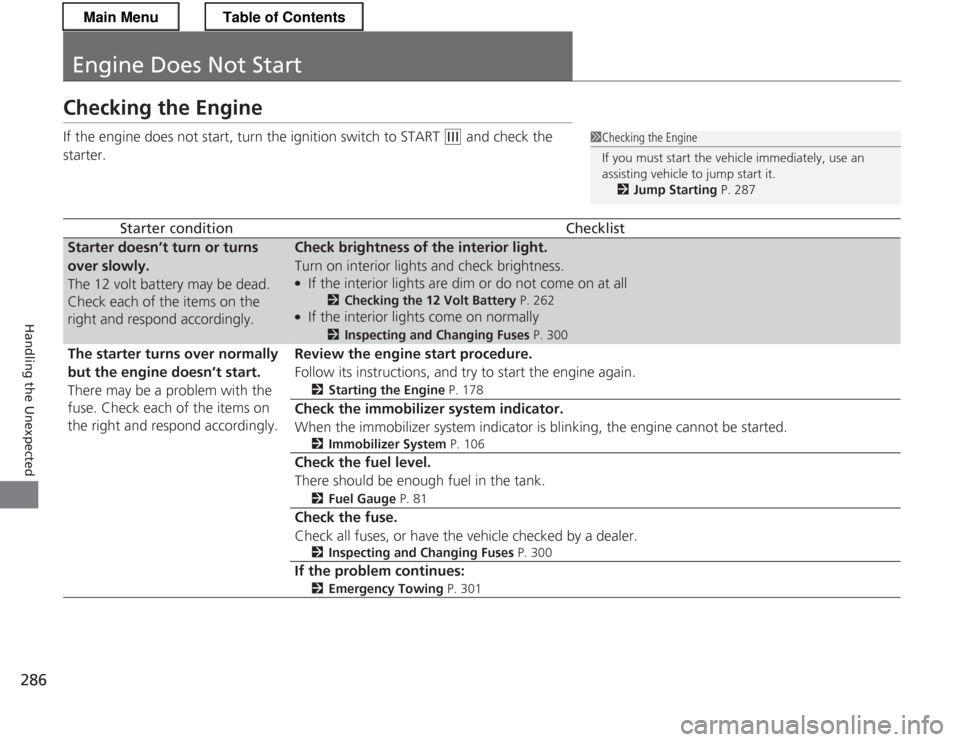
Checking the Engine
If the engine does not start, turn the ignition switch to START
(e and check the
starter.
Starter conditionChecklist
Starter doesn’t turn or turns over slowly.
The 12 volt battery may be dead.
Check each of the items on the
right and respond accordingly.Check brightness of the interior light.
Turn on interior lights and check brightness. ● If the interior lights are dim or do not come on at all
2Checking the 12 Volt Battery P. 262
● If the interior lights come on normally 2
Inspecting and Changing Fuses P. 300
The starter turns over normally
but the engine doesn’t start.
There may be a problem with the
fuse. Check each of the items on
the right and respond accordingly.Review the engine start procedure.
Follow its instructions, and try to start the engine again. 2Starting the Engine P. 178
Check the immobilizer system indicator.
When the immobilizer system indicator is blinking, the engine cannot be started.
2Immobilizer System P. 106
Check the fuel level. There should be enough fuel in the tank. 2Fuel Gauge P. 81
Check the fuse.
Check all fuses, or have the vehicle checked by a dealer.
2Inspecting and Changing Fuses P. 300
If the problem continues:
2 Emergency Towing P. 301
1Checking the Engine
If you must start the vehicle immediately, use an assisting vehicle to jump start it.
2 Jump Starting P. 287
Main MenuTable of Contents