lights HONDA CR-Z 2013 1.G Owners Manual
[x] Cancel search | Manufacturer: HONDA, Model Year: 2013, Model line: CR-Z, Model: HONDA CR-Z 2013 1.GPages: 325, PDF Size: 11.73 MB
Page 1 of 325
Contents
This owner’s manual should be considered a permanent part of the
vehicle and should remain with the vehicle when it is sold.
This owner’s manual covers all models of your vehicle. You may find
descriptions of equipment and features that are not on your
particular model.
Images throughout this owner’s manual (including the front cover)
represent features and equipment that are available on some, but
not all, models. Your particular model may not have some of these features.
This owner's manual is for vehicles sold in the United States and Canada.
The information and specifications included in this publication were
in effect at the time of approval for printing. Honda Motor Co., Ltd.
reserves the right, however, to discontinue or change specifications
or design at any time without notice and without incurring any
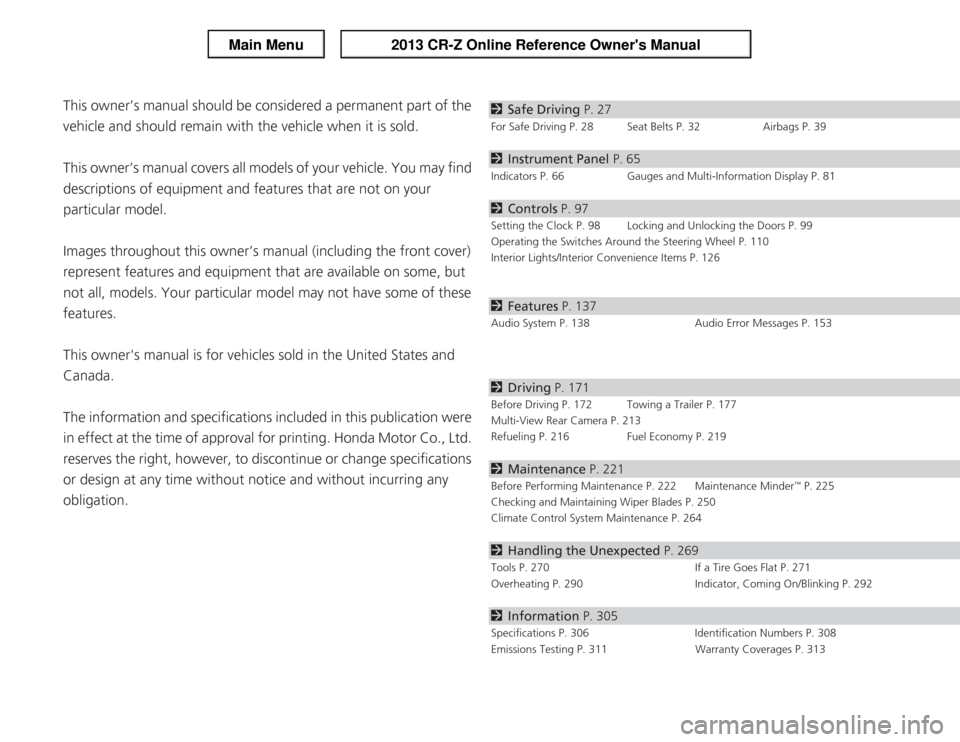
obligation.2 Safe Driving P. 27
For Safe Driving P. 28 Seat Belts P. 32 Airbags P. 39
2Instrument Panel P. 65
Indicators P. 66 Gauges and Multi-Information Display P. 81
2Controls P. 97
Setting the Clock P. 98 Locking and Unlocking the Doors P. 99
Operating the Switches Around the Steering Wheel P. 110
Interior Lights/Interior Convenience Items P. 126
2Features P. 137
Audio System P. 138 Audio Error Messages P. 153
2Driving P. 171
Before Driving P. 172 Towing a Trailer P. 177
Multi-View Rear Camera P. 213
Refueling P. 216 Fuel Economy P. 219
2Maintenance P. 221
Before Performing Maintenance P. 222 Maintenance Minder
Page 4 of 325
3
Quick Reference Guide
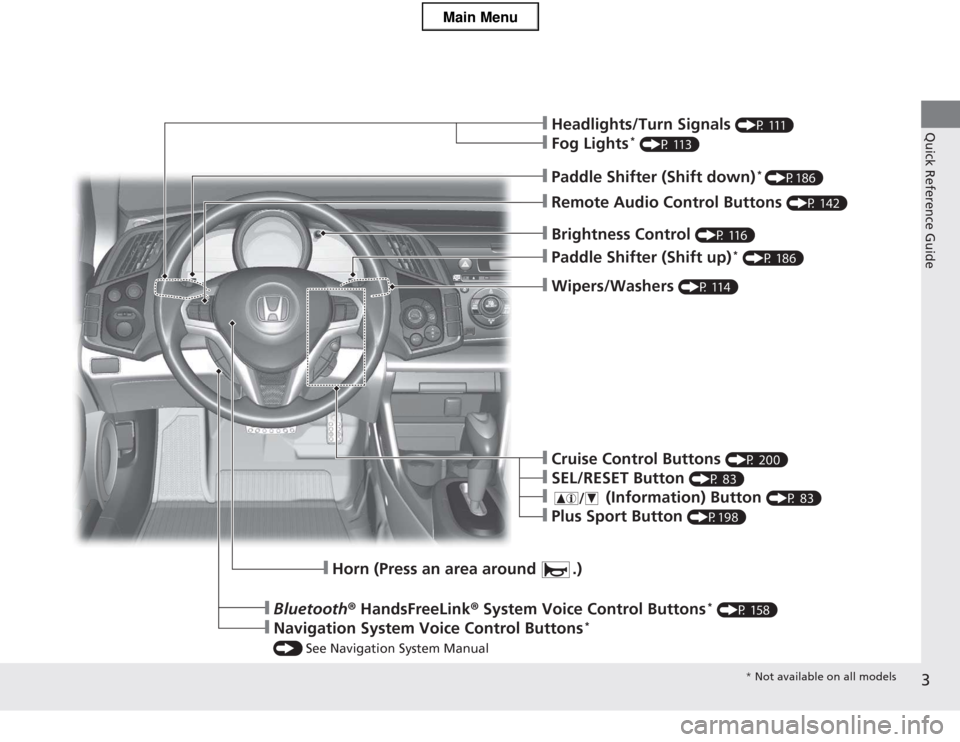
❙Wipers/Washers (P 114)
❙Paddle Shifter (Shift up) *
(P 186)
❙Brightness Control (P 116)
❙Headlights/Turn Signals (P 111)
❙Fog Lights*
(P 113)
❙Remote Audio Control Buttons (P 142)
❙Paddle Shifter (Shift down)*
(P186)
❙Horn (Press an area around .)
❙Bluetooth ® HandsFreeLink ® System Voice Control Buttons *
(P 158)
❙Navigation System Voice Control Buttons *
() See Navigation System Manual
❙Cruise Control Buttons (P 200)
❙SEL/RESET Button (P 83)
❙ (Information) Button (P 83)
❙Plus Sport Button (P198)
* Not available on all models
Main Menu
Page 6 of 325
5
Quick Reference Guide
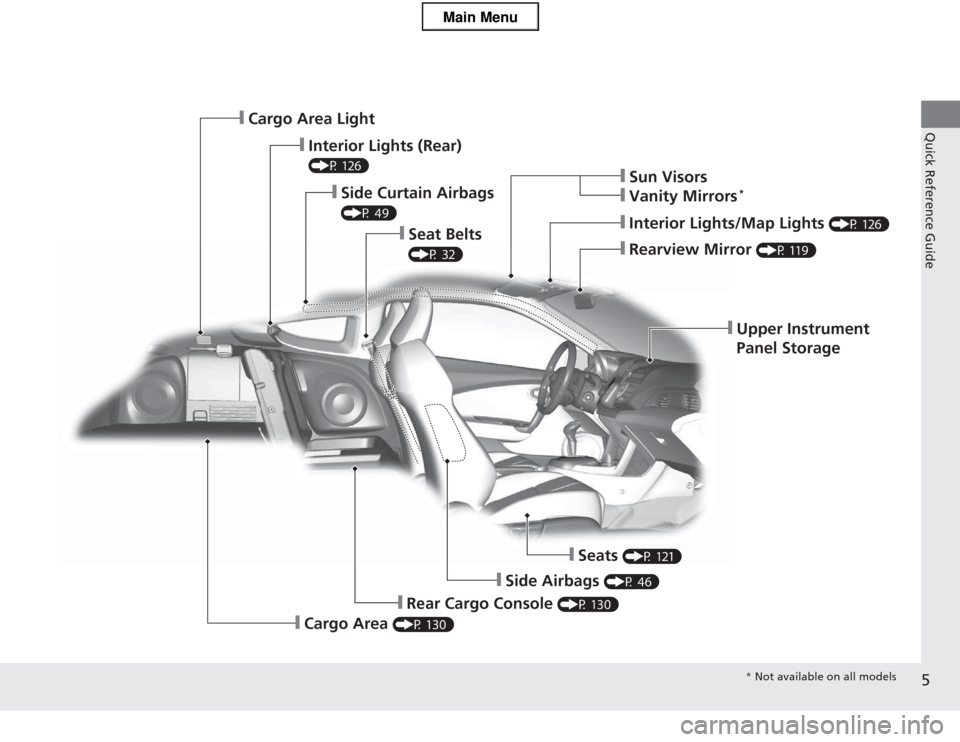
❙Upper Instrument
Panel Storage
❙Rearview Mirror (P 119)
❙Interior Lights/Map Lights (P 126)
❙Sun Visors
❙Vanity Mirrors*
❙Seat Belts
(P 32)
❙Side Curtain Airbags
(P 49)
❙Interior Lights (Rear)
(P 126)
❙Cargo Area Light
❙Seats
(P 121)
❙Side Airbags (P 46)
❙Rear Cargo Console (P 130)
❙Cargo Area (P 130)
* Not available on all models
Main Menu
Page 7 of 325
Visual Index
6
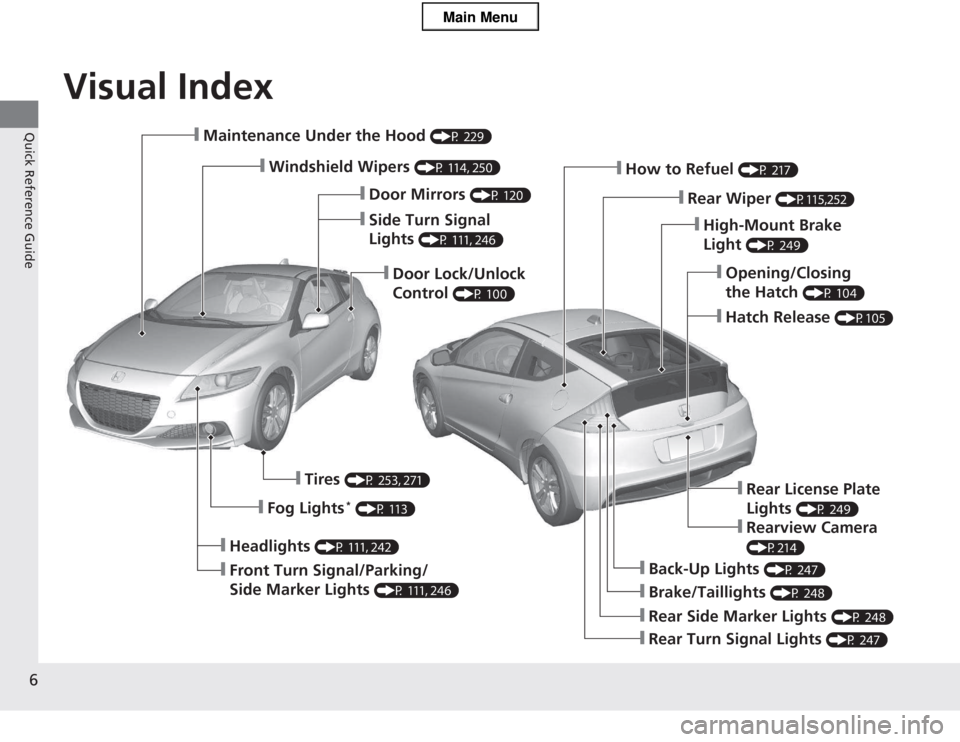
Quick Reference Guide❙Maintenance Under the Hood (P 229)
❙Windshield Wipers (P 114, 250)
❙Door Lock/Unlock Control (P 100)
❙Headlights
(P 111, 242)
❙Front Turn Signal/Parking/
Side Marker Lights (P 111, 246)
❙Tires
(P 253, 271)
❙Fog Lights *
(P 113)
❙Brake/Taillights (P 248)
❙Back-Up Lights (P 247)
❙Rear Turn Signal Lights (P 247)
❙Rear Side Marker Lights (P 248)
❙High-Mount Brake Light (P 249)
❙How to Refuel
(P 217)
❙Rear Wiper (P115,252)
❙Opening/Closing the Hatch (P 104)
❙Hatch Release
(P105)
❙Side Turn Signal Lights (P 111, 246)
❙Door Mirrors
(P 120)
❙Rear License Plate Lights (P 249)
❙Rearview Camera
(P214)
Main Menu
Page 15 of 325
14
Quick Reference Guide
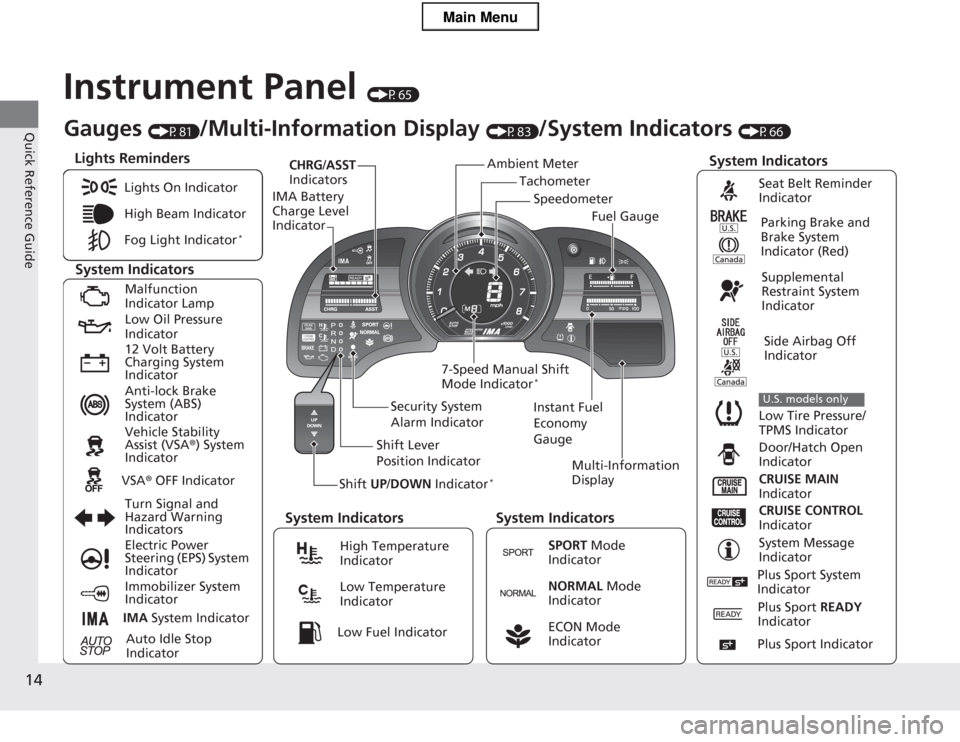
Instrument Panel (P65)
Tachometer
CHRG
/ASST
Indicators
IMA Battery Charge Level Indicator
Shift UP/DOWN Indicator * Multi-Information
Display
7-Speed Manual Shift Mode Indicator
*
System Indicators
Lights Reminders
Instant Fuel
Economy GaugeSpeedometer
Fuel Gauge
Security System
Alarm Indicator
Shift Lever
Position Indicator
Gauges
(P81)/Multi-Information Display (P83)/System Indicators (P66)
Ambient Meter
System Indicators System Indicators System Indicators
Lights On Indicator
High Beam Indicator
Fog Light Indicator
*
Malfunction
Indicator Lamp
Low Oil Pressure Indicator
12 Volt Battery
Charging System Indicator
Anti-lock Brake
System (ABS) Indicator
Vehicle Stability Assist (VSA
®) System
Indicator
VSA ® OFF Indicator
Turn Signal and
Hazard Warning
Indicators
Electric Power
Steering (EPS) System Indicator
Immobilizer System Indicator
IMA System Indicator
Auto Idle Stop
Indicator
Seat Belt Reminder
Indicator
Parking Brake and
Brake System Indicator (Red)
Supplemental
Restraint System
Indicator
Side Airbag Off
Indicator
Low Tire Pressure/
TPMS Indicator
U.S. models only
Door/Hatch Open
Indicator
CRUISE MAIN
Indicator
CRUISE CONTROL
Indicator
System Message
IndicatorHigh Temperature Indicator
Low Temperature Indicator
SPORT Mode
Indicator
NORMAL Mode
Indicator
ECON Mode
Indicator Low Fuel Indicator
Plus Sport System
Indicator
Plus Sport READY
Indicator
Plus Sport Indicator
Main Menu
Page 16 of 325
15
Quick Reference Guide
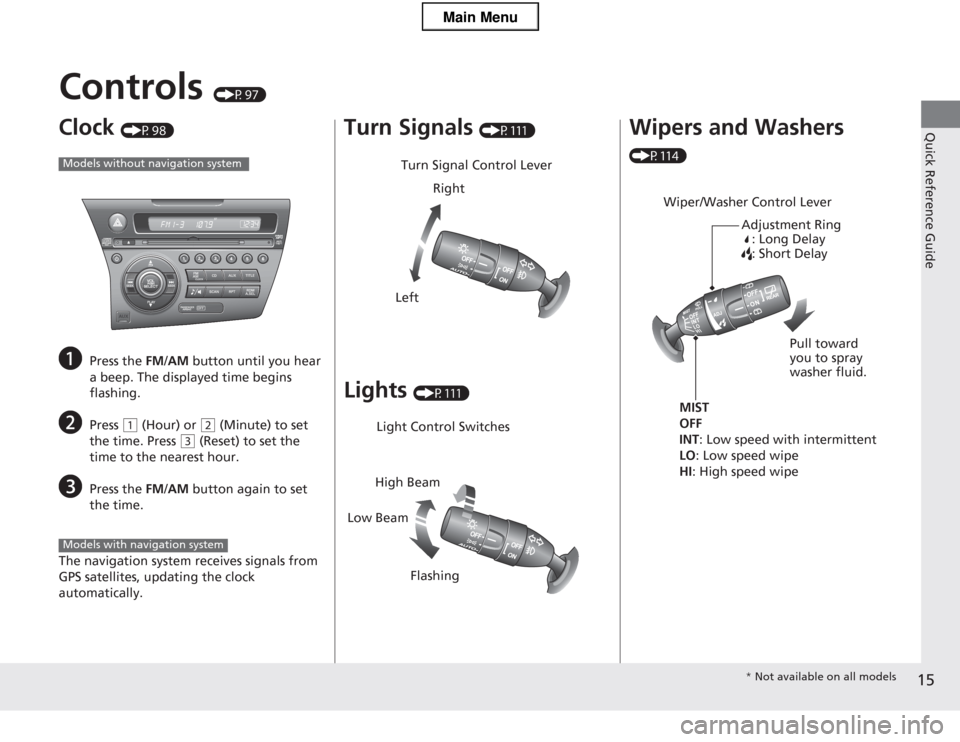
Controls (P97)
Clock (P98)
a Press the FM/AM button until you hear
a beep. The displayed time begins
flashing.
b Press
(1 (Hour) or (2 (Minute) to set
the time. Press
(3 (Reset) to set the
time to the nearest hour.
c Press the FM/AM button again to set
the time.
The navigation system receives signals from
GPS satellites, updating the clock automatically.
Models without navigation system
Models with navigation system
Turn Signals (P111)
Lights (P111)
Turn Signal Control Lever
Right
Left
Light Control Switches
Low Beam High Beam
Flashing
Wipers and Washers
(P114)
Wiper/Washer Control Lever Adjustment Ring: Long Delay
: Short Delay
MIST
OFF INT : Low speed with intermittent
LO : Low speed wipe
HI : High speed wipe Pull toward you to spray
washer fluid.
*
Not available on all models
Main Menu
Page 22 of 325
21
Quick Reference Guide
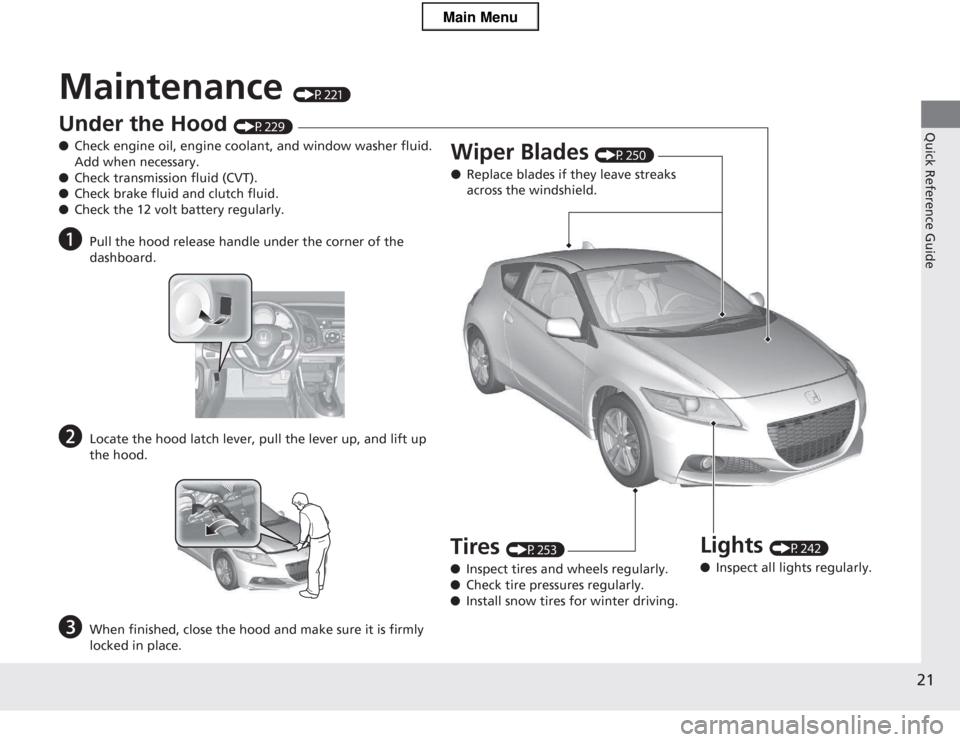
Maintenance (P221)
Under the Hood (P229)
● Check engine oil, engine coolant, and window washer fluid. Add when necessary.
● Check transmission fluid (CVT).
● Check brake fluid and clutch fluid.
● Check the 12 volt battery regularly.
a Pull the hood release handle under the corner of the
dashboard.
b Locate the hood latch lever, pull the lever up, and lift up
the hood.
c When finished, close the hood and make sure it is firmly
locked in place.
Lights (P242)
● Inspect all lights regularly.
Wiper Blades
(P250)
● Replace blades if they leave streaks
across the windshield.
Tires (P253)
● Inspect tires and wheels regularly.
● Check tire pressures regularly.
● Install snow tires for winter driving.
Main Menu
Page 25 of 325
24
Quick Reference Guide
Why does the beeper
sound when I open the driver's door?The beeper sounds when: ●The key is left in the ignition switch.
● The exterior lights are left on.
● The Auto Idle Stop is in operation.
Why does the beeper
sound when I start driving?The beeper sounds when: ●Driver and/or passenger are not wearing their seat belts.
● The parking brake lever is not fully released.
Why do I hear a screeching
sound when I apply the
brake pedal?The brake pads may need to be replaced. Have your vehicle
inspected by a dealer.
Main Menu
Page 74 of 325
73
uuIndicatorsu
Continued
Instrument Panel
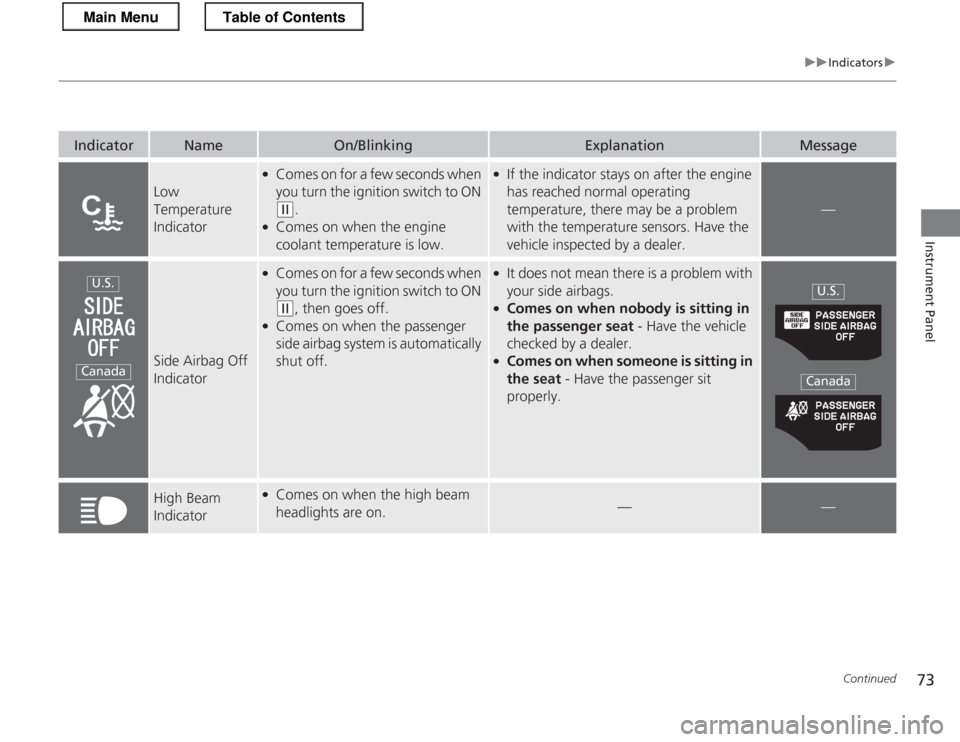
IndicatorNameOn/BlinkingExplanationMessage
Low Temperature
Indicator
●Comes on for a few seconds when
you turn the ignition switch to ON
(w .
● Comes on when the engine coolant temperature is low.
●If the indicator stays on after the engine
has reached normal operating
temperature, there may be a problem
with the temperature sensors. Have the
vehicle inspected by a dealer.
—
Side Airbag Off
Indicator
●
Comes on for a few seconds when
you turn the ignition switch to ON
(w , then goes off.
● Comes on when the passenger
side airbag system is automatically shut off.
●
It does not mean there is a problem with
your side airbags.
● Comes on when nobody is sitting in
the passenger seat - Have the vehicle
checked by a dealer.
● Comes on when someone is sitting in
the seat - Have the passenger sit
properly.
High Beam
Indicator● Comes on when the high beam
headlights are on.
——
U.S.
Canada
U.S.
Canada
Main MenuTable of Contents
Page 75 of 325
74
uuIndicatorsu
Instrument Panel
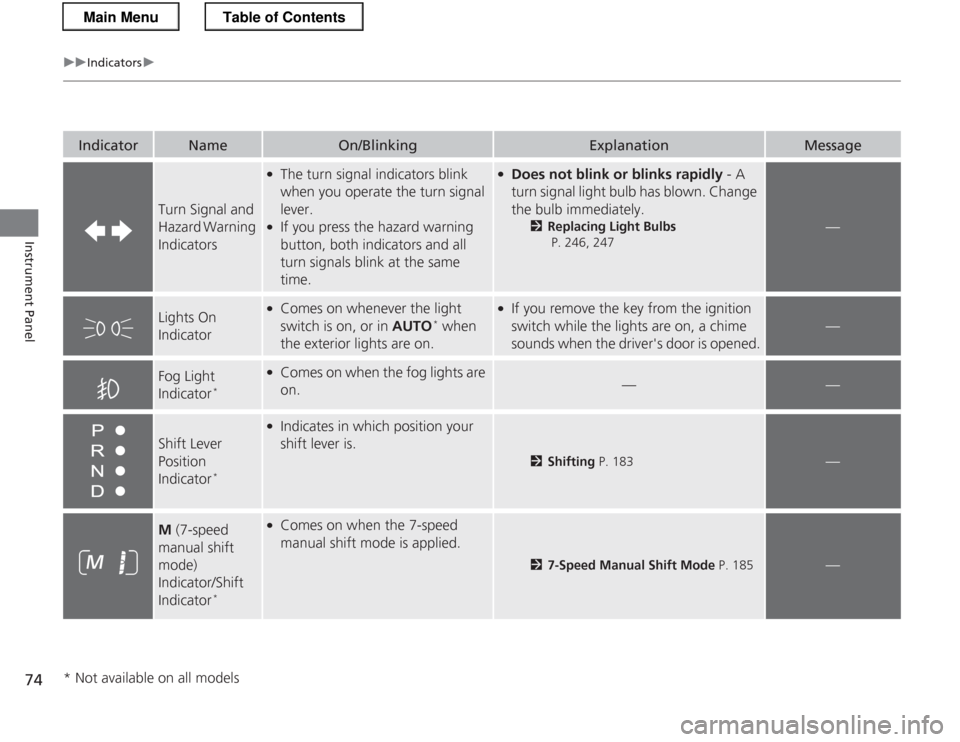
IndicatorNameOn/BlinkingExplanationMessage
Turn Signal and
Hazard Warning Indicators
●The turn signal indicators blink
when you operate the turn signal lever.
● If you press the hazard warning
button, both indicators and all
turn signals blink at the same
time.● Does not blink or blinks rapidly - A
turn signal light bulb has blown. Change
the bulb immediately. 2Replacing Light Bulbs
P. 246, 247
—
Lights On
Indicator●
Comes on whenever the light
switch is on, or in AUTO*
when
the exterior lights are on.● If you remove the key from the ignition
switch while the lights are on, a chime
sounds when the dr iver's door is opened.
—
Fog Light
Indicator*●
Comes on when the fog lights are
on.
——
Shift Lever Position
Indicator *
●
Indicates in which position your shift lever is.
2 Shifting P. 183—
M (7-speed
manual shift
mode) Indicator/Shift
Indicator *●
Comes on when the 7-speed
manual shift mode is applied.
2 7-Speed Manual Shift Mode P. 185—
* Not available on all models
Main MenuTable of Contents