bluetooth HONDA CR-Z 2016 1.G User Guide
[x] Cancel search | Manufacturer: HONDA, Model Year: 2016, Model line: CR-Z, Model: HONDA CR-Z 2016 1.GPages: 409, PDF Size: 19.68 MB
Page 186 of 409
185
uuAudio System Basic Operation uPlaying Internet Radio
Features
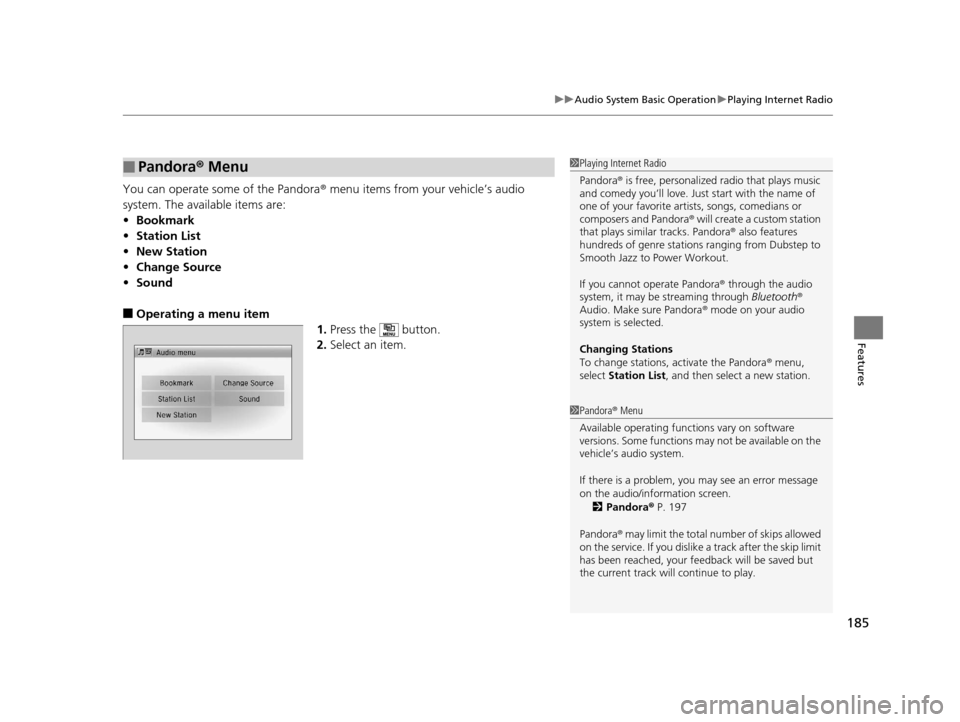
You can operate some of the Pandora ® menu items from your vehicle’s audio
system. The available items are:
• Bookmark
• Station List
• New Station
• Change Source
• Sound
■Operating a menu item
1.Press the button.
2. Select an item.
■Pandora ® Menu1 Playing Internet Radio
Pandora ® is free, personalized radio that plays music
and comedy you’ll love. Just start with the name of
one of your favorite arti sts, songs, comedians or
composers and Pandora ® will create a custom station
that plays similar tracks. Pandora® also features
hundreds of genre stations ranging from Dubstep to
Smooth Jazz to Power Workout.
If you cannot operate Pandora ® through the audio
system, it may be streaming through Bluetooth®
Audio. Make sure Pandora ® mode on your audio
system is selected.
Changing Stations
To change stations, activate the Pandora ® menu,
select Station List , and then select a new station.
1Pandora ® Menu
Available operating functi ons vary on software
versions. Some functions ma y not be available on the
vehicle’s audio system.
If there is a problem, you may see an error message
on the audio/information screen.
2 Pandora ® P. 197
Pandora ® may limit the total number of skips allowed
on the service. If you dislike a track after the skip limit
has been reached, your fe edback will be saved but
the current track will continue to play.
16 CR-Z-31SZT6500.book 185 ページ 2015年9月11日 金曜日 午前11時47分
Page 190 of 409
189
uuAudio System Basic Operation uPlaying Bluetooth ® Audio
Continued
Features
Playing Bluetooth ® Audio
Your audio system allows you to listen to music from your Bluetooth-compatible
phone.
This function is available when the phone is paired an d connected to the vehicle’s
Bluetooth ® HandsFreeLink ® (HFL) system.
2Phone Setup P. 220
*1:Depending on the Bluetooth® device you connect, some or all of the lists may not
be displayed.
1 Playing Bluetooth ® Audio
Not all Bluetooth -enabled phones with streaming
audio capabilities are compatible with the system.
For a list of compatible phones:
•U.S.: Visit www.handsfreelink.honda.com , or call
1-888-528-7876.
•Canada: Visit www.handsfreelink.ca , or call 1-888-
528-7876.
In some states, it may be illegal to operate devices
that use data while driving.
Only one phone can be used with HFL at a time.
When there are more than two paired phones in the
vehicle, the first paired phone the system finds is
automatically connected.
If more than one phone is paired to the HFL system,
there may be a delay before the system begins to play.
In some cases, the name of the artist, album, or track
may not appear correctly.
Some functions may not be available on some
devices.
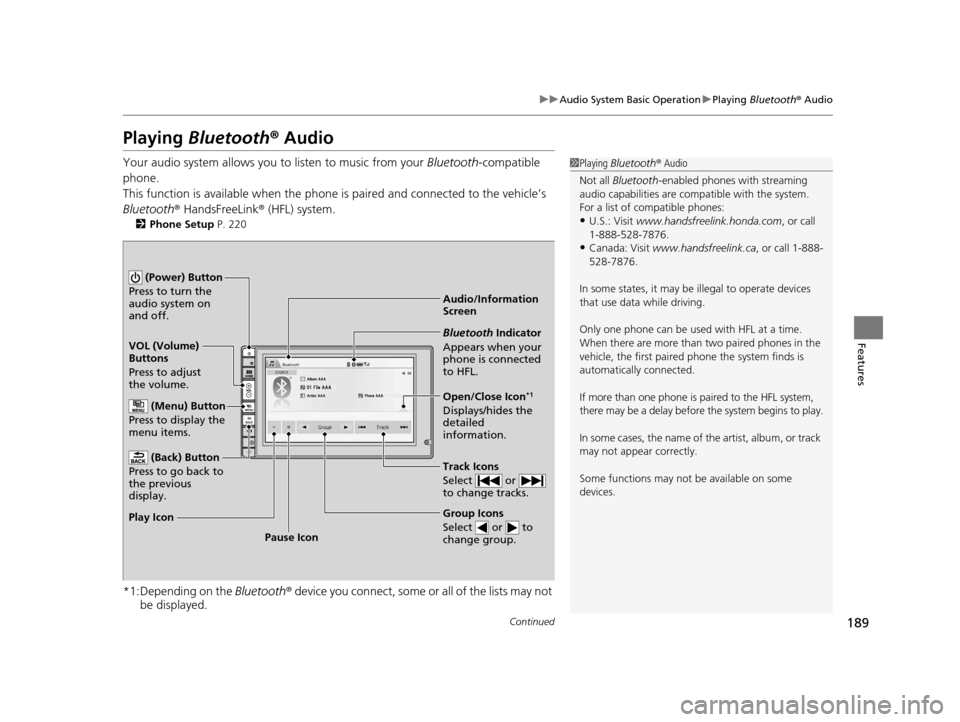
Audio/Information
Screen
VOL (Volume)
Buttons
Press to adjust
the volume.
(Back) Button
Press to go back to
the previous
display.
(Power) Button
Press to turn the
audio system on
and off.
(Menu) Button
Press to display the
menu items.
Group Icons
Select or to
change group.
Pause Icon
Play Icon
Bluetooth Indicator
Appears when your
phone is connected
to HFL.
Track Icons
Select or
to change tracks.
Open/Close Icon*1
Displays/hides the
detailed
information.
16 CR-Z-31SZT6500.book 189 ページ 2015年9月11日 金曜日 午前11時47分
Page 191 of 409
uuAudio System Basic Operation uPlaying Bluetooth ® Audio
190
Features
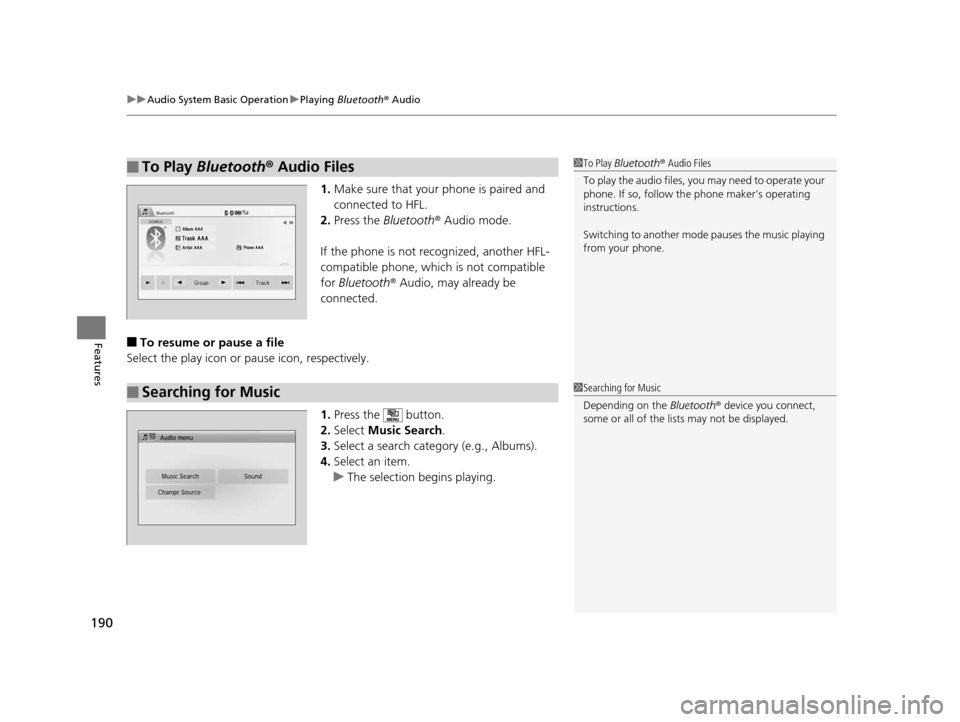
1. Make sure that your phone is paired and
connected to HFL.
2. Press the Bluetooth ® Audio mode.
If the phone is not recognized, another HFL-
compatible phone, which is not compatible
for Bluetooth ® Audio, may already be
connected.
■To resume or pause a file
Select the play icon or pause icon, respectively.
1.Press the button.
2. Select Music Search.
3. Select a search cate gory (e.g., Albums).
4. Select an item.
u The selection begins playing.
■To Play Bluetooth® Audio Files1To Play Bluetooth ® Audio Files
To play the audio files, y ou may need to operate your
phone. If so, follow the phone maker's operating
instructions.
Switching to another mode pauses the music playing
from your phone.
■Searching for Music1 Searching for Music
Depending on the Bluetooth® device you connect,
some or all of the list s may not be displayed.
16 CR-Z-31SZT6500.book 190 ページ 2015年9月11日 金曜日 午前11時47分
Page 194 of 409
193
uuAudio System Basic Operation uSmartphone Apps
Features
Smartphone Apps
You can connect a compatible smartphone to the system to enable integration
between the smartphone’s appr oved apps and the vehicle. This allows you to
control the phone through the vehicle display. To check smart phone compatibility,
download the HondaLink® app, and view connecti on instructions, visit
handsfreelink.honda.com . For the latest apps and feature details, check
hondalink.com .1Smartphone Apps
Park in a safe place be fore connecting your phone
and while operating the displayed apps.
Not all phones and apps ar e compatible with the
system. The system does not display all the available
apps on smartphone, and so me apps need to be
preinstalled. Ask a dealer for details.
You need to switch the Bluetooth® connection to
your smartphone if another electronic device is
connected. 2 Changing the currently paired phone
P. 221
The following may vary by phone type:
•Connection methods.•How to connect a smartphone to the system.
•Apps that can be operated on the screen.
•Display response ti me/update time.
We do not support every app operation on the
display audio.
Ask the app provider for an y questions on the app’s
features.
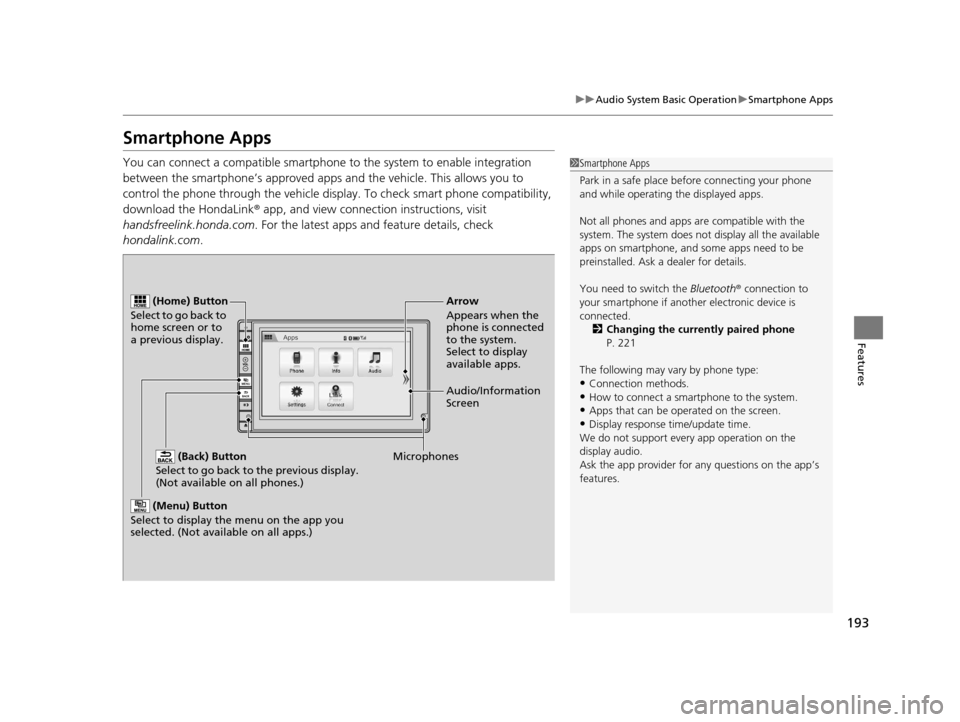
(Back) Button
Select to go back to the previous display.
(Not available on all phones.)
(Home) Button
Select to go back to
home screen or to
a previous display.
Microphones Audio/Information
Screen Arrow
Appears when the
phone is connected
to the system.
Select to display
available apps.
(Menu) Button
Select to display the menu on the app you
selected. (Not available on all apps.)
16 CR-Z-31SZT6500.book 193 ページ 2015年9月11日 金曜日 午前11時47分
Page 195 of 409
194
uuAudio System Basic Operation uSiri ® Eyes Free
Features
Siri ® Eyes Free
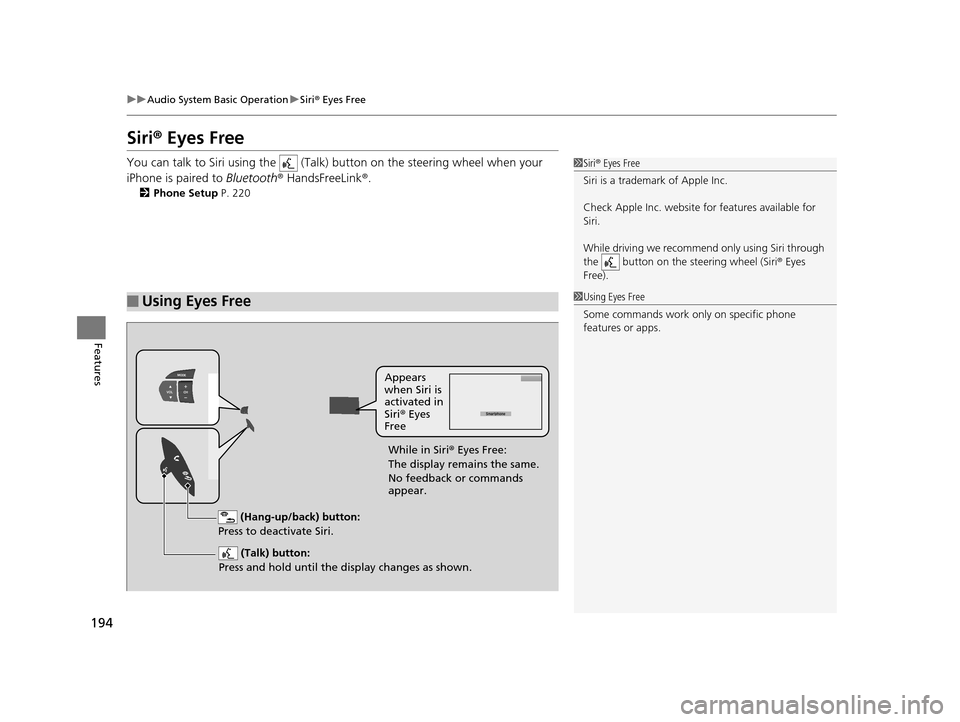
You can talk to Siri using the (Talk) button on the steering wheel when your
iPhone is paired to Bluetooth® HandsFreeLink ®.
2Phone Setup P. 220
■Using Eyes Free
1Siri ® Eyes Free
Siri is a trademark of Apple Inc.
Check Apple Inc. website for features available for
Siri.
While driving we recomme nd only using Siri through
the button on the steering wheel (Siri® Eyes
Free).
1 Using Eyes Free
Some commands work only on specific phone
features or apps.
(Hang-up/back) button:
Press to deactivate Siri.
(Talk) button:
Press and hold until the display changes as shown.
Appears
when Siri is
activated in
Siri ® Eyes
Free
While in Siri ® Eyes Free:
The display remains the same.
No feedback or commands
appear.
16 CR-Z-31SZT6500.book 194 ページ 2015年9月11日 金曜日 午前11時47分
Page 199 of 409
198
uuAudio Error Messages uPandora®
Features
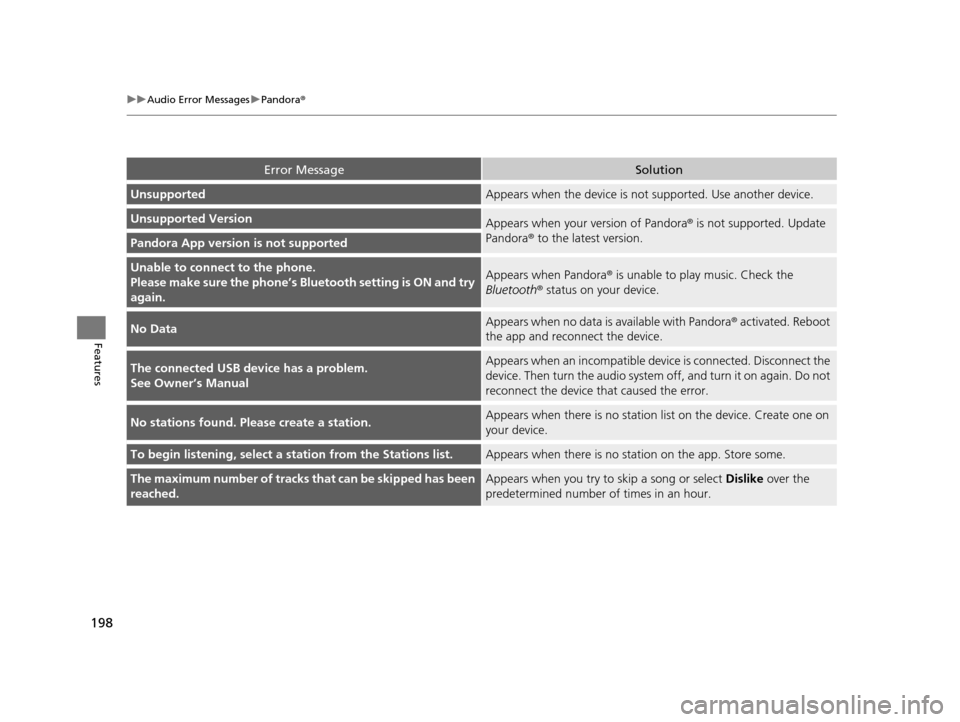
Error MessageSolution
UnsupportedAppears when the device is not supported. Use another device.
Unsupported VersionAppears when your version of Pandora ® is not supported. Update
Pandora® to the latest version.
Pandora App version is not supported
Unable to connec t to the phone.
Please make sure the phone’s Bl uetooth setting is ON and try
again.Appears when Pandora® is unable to play music. Check the
Bluetooth ® status on your device.
No DataAppears when no data is available with Pandora ® activated. Reboot
the app and reconnect the device.
The connected USB device has a problem.
See Owner’s ManualAppears when an incompatible devi ce is connected. Disconnect the
device. Then turn the a udio system off, and turn it on again. Do not
reconnect the device that caused the error.
No stations found. Please create a station.Appears when there is no statio n list on the device. Create one on
your device.
To begin listening, select a station from the Stations list.Appears when there is no stat ion on the app. Store some.
The maximum number of tracks that can be skipped has been
reached.Appears when you try to skip a song or select Dislike over the
predetermined number of times in an hour.
16 CR-Z-31SZT6500.book 198 ページ 2015年9月11日 金曜日 午前11時47分
Page 205 of 409
![HONDA CR-Z 2016 1.G User Guide 204
uuCustomized Features u
Features
*1:May change depending on your currently selected source.
Sound
Color
Tint
Audio
Audio Source Pop-Up
[Your selected media] Cover Art*1
Color
Display Adjustment*1](/img/13/5820/w960_5820-204.png "HONDA CR-Z 2016 1.G User Guide 204
uuCustomized Features u
Features
*1:May change depending on your currently selected source.
Sound
Color
Tint
Audio
Audio Source Pop-Up
[Your selected media] Cover Art*1
Color
Display Adjustment*1")
204
uuCustomized Features u
Features
*1:May change depending on your currently selected source.
Sound
Color
Tint
Audio
Audio Source Pop-Up
[Your selected media] Cover Art*1
Color
Display Adjustment*1DisplayBrightness
Contrast
Black Level
Aspect Ratio Adjustment*1
Bluetooth Device List*1
Change Bluetooth Audio Device*1
Default
RDS INFO*1
Clock Format
ClockClock/Wallpaper TypeClock
Wallpaper
Clock Adjustment
Clock Display
Clock Location
Clock Reset
Default
InfoInfo Screen Preference
Clock/Info
16 CR-Z-31SZT6500.book 204 ページ 2015年9月11日 金曜日 午前11時47分
Page 206 of 409
205
uuCustomized Features u
Continued
Features
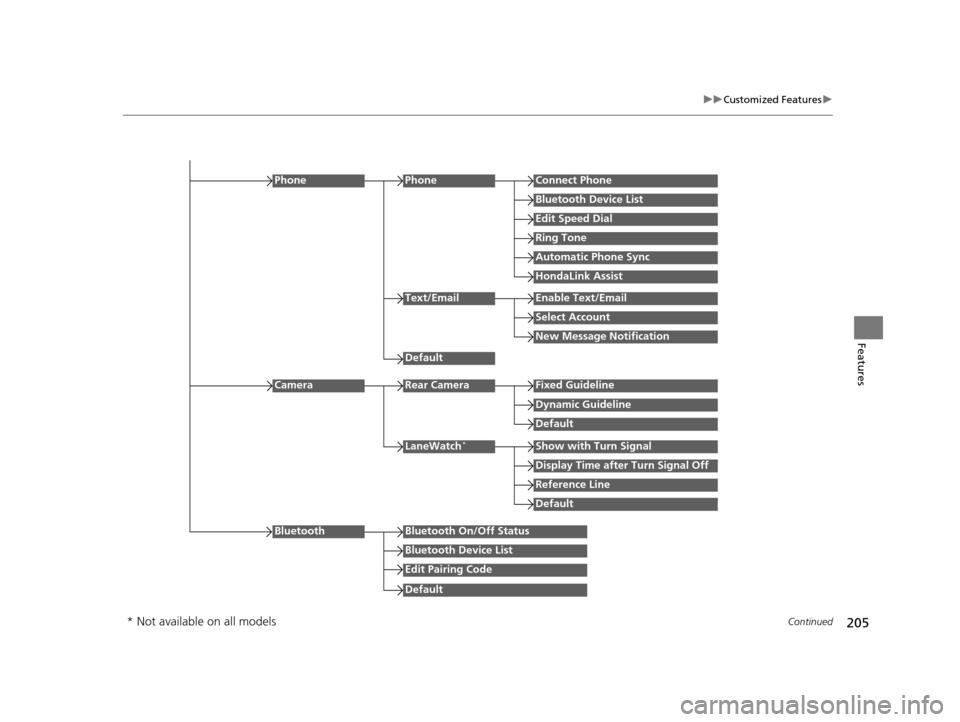
Edit Speed Dial
PhoneConnect Phone
Bluetooth Device List
Ring Tone
Automatic Phone Sync
HondaLink Assist
Phone
Default
Text/EmailEnable Text/Email
Select Account
New Message Notification
Reference Line
LaneWatch*Show with Turn Signal
Display Time after Turn Signal Off
Default
Camera
Default
Rear CameraFixed Guideline
Dynamic Guideline
Default
Bluetooth On/Off Status
Bluetooth Device List
Edit Pairing Code
Bluetooth
* Not available on all models
16 CR-Z-31SZT6500.book 205 ページ 2015年9月11日 金曜日 午前11時47分
Page 210 of 409
209
uuCustomized Features u
Continued
Features
*1:Default Setting
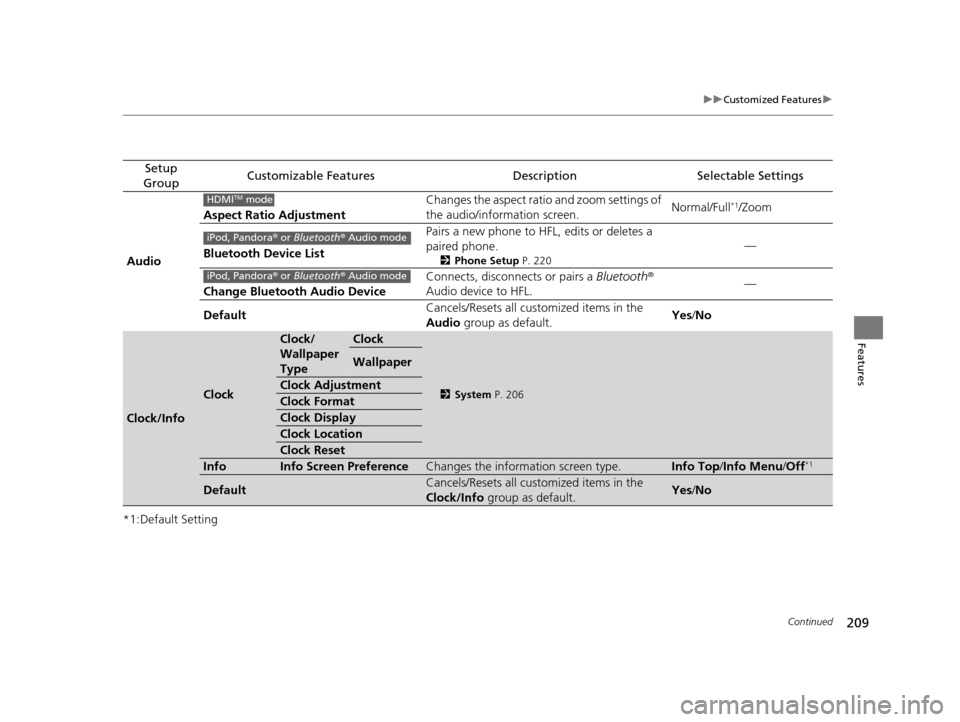
Setup
GroupCustomizable FeaturesDescriptionSelectable Settings
Audio Aspect Ratio Adjustment
Changes the aspect ratio and zoom settings of
the audio/information screen.
Normal/Full
*1/Zoom
Bluetooth Device List Pairs a new phone to HFL, edits or deletes a
paired phone.
2
Phone Setup P. 220
—
Change Bluetooth Audio Device Connects, disconnects or pairs a
Bluetooth®
Audio device to HFL. —
Default Cancels/Resets all customized items in the
Audio
group as default. Yes
/No
Clock/Info
Clock
Clock/
Wallpaper
TypeClock
2 System P. 206
Wallpaper
Clock Adjustment
Clock Format
Clock Display
Clock Location
Clock Reset
InfoInfo Screen PreferenceChanges the information screen type.Info Top /Info Menu/ Off*1
DefaultCancels/Resets all customized items in the
Clock/Info group as default.Yes/No
HDMITM mode
iPod, Pandora ® or Bluetooth® Audio mode
iPod, Pandora ® or Bluetooth® Audio mode
16 CR-Z-31SZT6500.book 209 ページ 2015年9月11日 金曜日 午前11時47分
Page 211 of 409
210
uuCustomized Features u
Features
*1:Default Setting
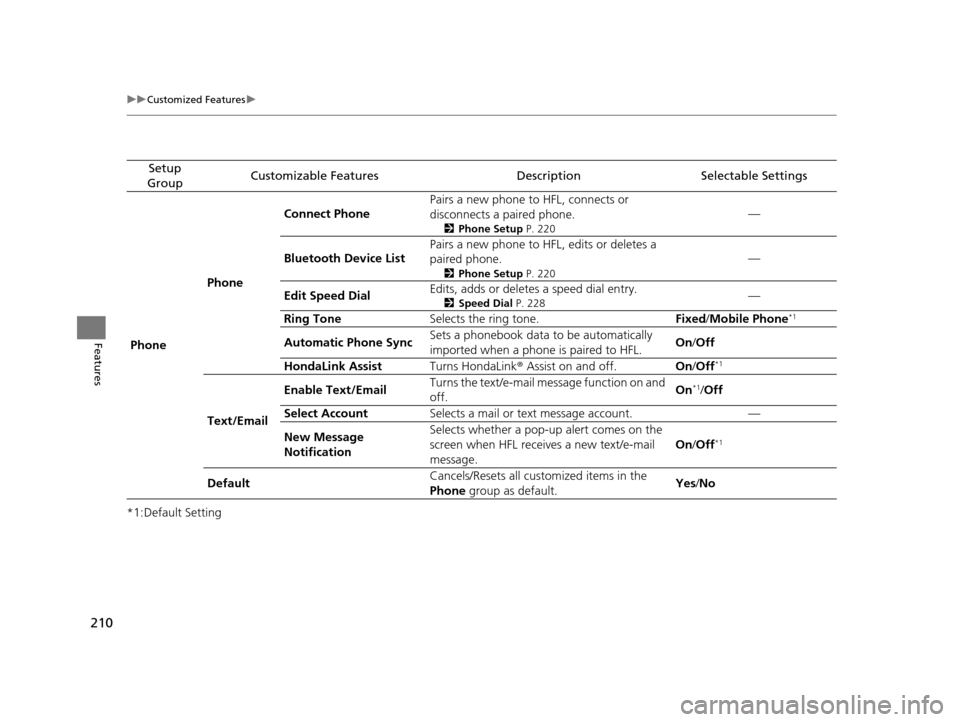
Setup
GroupCustomizable FeaturesDescriptionSelectable Settings
Phone PhoneConnect Phone
Pairs a new phone to HFL, connects or
disconnects a paired phone.
2
Phone Setup P. 220
—
Bluetooth Device List Pairs a new phone to HFL, edits or deletes a
paired phone.
2
Phone Setup P. 220
—
Edit Speed Dial Edits, adds or deletes a speed dial entry.
2
Speed Dial P. 228—
Ring Tone Selects the ring tone. Fixed/Mobile Phone
*1
Automatic Phone Sync Sets a phonebook data to be automatically
imported when a phone is paired to HFL. On
/Off
HondaLink Assist Turns HondaLink® Assist on and off. On/Off
*1
Text/Email Enable Text/Email
Turns the text/e-mail me
ssage function on and
off. On
*1/
Off
Select Account Selects a mail or text message account. —
New Message
Notification Selects whether a pop-up
alert comes on the
screen when HFL receives a new text/e-mail
message. On
/Off
*1
Default Cancels/Resets all customized items in the
Phone
group as default. Yes
/No
16 CR-Z-31SZT6500.book 210 ページ 2015年9月11日 金曜日 午前11時47分