bluetooth HONDA CR-Z 2016 1.G Owners Manual
[x] Cancel search | Manufacturer: HONDA, Model Year: 2016, Model line: CR-Z, Model: HONDA CR-Z 2016 1.GPages: 409, PDF Size: 19.68 MB
Page 3 of 409
Contents
This owner’s manual should be considered a permanent part of the
vehicle and should remain with the vehicle when it is sold.
This owner’s manual covers all models of your vehicle. You may find
descriptions of equipment and features that are not on your
particular model.
Images throughout this owner’s manu al (including the front cover)
represent features and equipment that are available on some, but
not all, models. Your particular mo del may not have some of these
features.
This owner's manual is for vehicles sold in the United States and
Canada.
The information and specifications in cluded in this publication were
in effect at the time of approval for printing. Honda Motor Co., Ltd.
reserves the right, however, to discontinue or change specifications
or design at any time without notice and without incurring any
obligation.2 Safe Driving P. 31
For Safe Driving P. 32 Seat Belts P. 36 Airbags P. 43
2Instrument Panel P. 69
Indicators P. 70 Gauges and Multi-Information Display P. 89
2Controls P. 107
Clock P. 108 Locking and Unlocking the Doors P. 109
Operating the Switches Ar ound the Steering Wheel P. 126
Interior Lights/Interior Convenience Items P. 146
2 Features P. 159
Audio System P. 160 Audio System Basic Operation P. 166
Customized Features P. 202 Bluetooth® HandsFreeLink ® P. 213
2 Driving P. 243
Before Driving P. 244 Towing a Trailer P. 250
Multi-View Rear Camera P. 291
2Maintenance P. 299
Before Performing Maintenance P. 300 Maintenance MinderTM P. 303
Checking and Maintaining Wiper Blades P. 328
Climate Control System Maintenance P. 343
2Handling the Unexpected P. 349
Tools P. 350 If a Tire Goes Flat P. 351
Overheating P. 370 Indicator, Coming On/Blinking P. 372
2Information P. 387
Specifications P. 388 Identification Numbers P. 390
Emissions Testing P. 393 Warranty Coverages P. 395
16 CR-Z-31SZT6500.book 2 ページ 2015年9月11日 金曜日 午前11時47分
Page 6 of 409
5
Quick Reference Guide
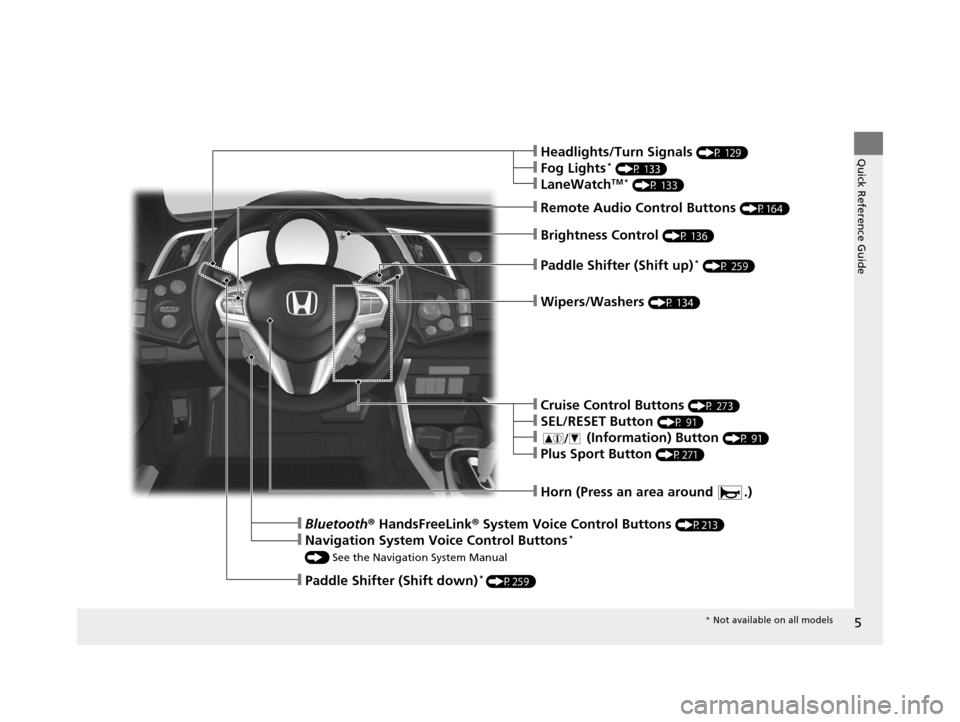
❙Paddle Shifter (Shift up)* (P 259)
❙Remote Audio Control Buttons (P164)
❙Paddle Shifter (Shift down)* (P259)
❙Horn (Press an area around .)
❙Bluetooth® HandsFreeLink® System Voice Control Buttons (P213)
❙Navigation System Voice Control Buttons*
() See the Navigation System Manual
❙Cruise Control Buttons (P 273)
❙SEL/RESET Button (P 91)
❙ (Information) Button (P 91)
❙Plus Sport Button (P271)
❙Wipers/Washers (P 134)
❙Brightness Control (P 136)
❙Headlights/Turn Signals (P 129)
❙Fog Lights* (P 133)
❙LaneWatchTM * (P 133)
* Not available on all models
16 CR-Z-31SZT6500.book 5 ページ 2015年9月11日 金曜日 午前11時47分
Page 23 of 409
22
Quick Reference Guide
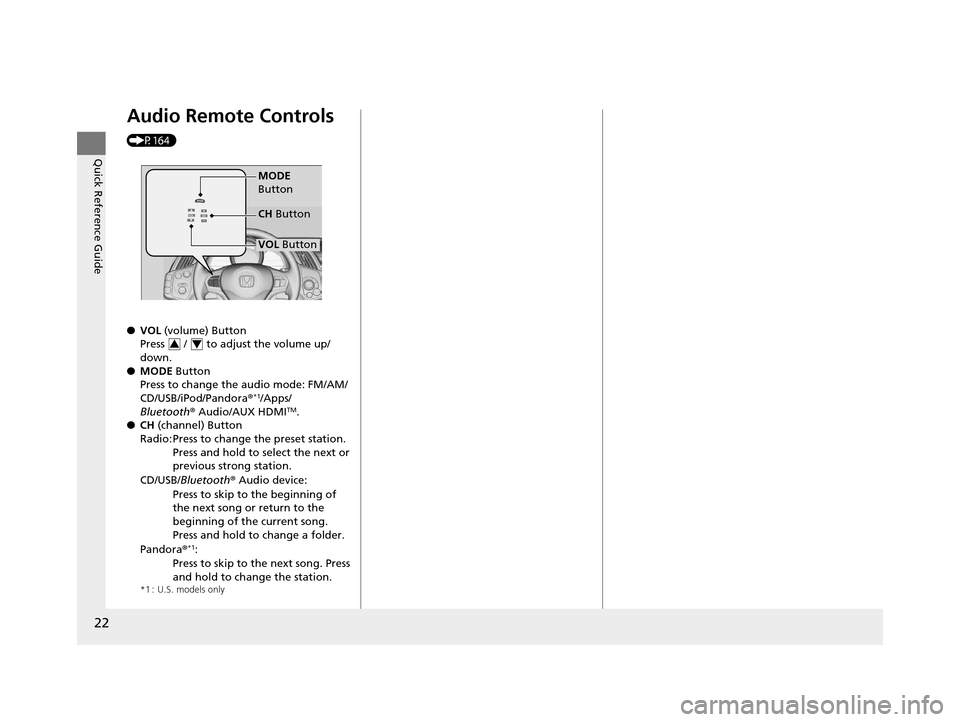
Audio Remote Controls
(P164)
●VOL (volume) Button
Press / to adjust the volume up/
down.
● MODE Button
Press to change the audio mode: FM/AM/
CD/USB/iPod/Pandora®
*1/Apps/
Bluetooth ® Audio/AUX HDMITM.
● CH (channel) Button
*1 : U.S. models only
Radio: Press to change the preset station.
Press and hold to select the next or
previous strong station.
CD/USB/ Bluetooth ® Audio device:
Press to skip to the beginning of
the next song or return to the
beginning of the current song.
Press and hold to change a folder.
Pandora®
*1:
Press to skip to the next song. Press
and hold to change the station.
MODE
Button
VOL Button
CH
Button
34
16 CR-Z-31SZT6500.book 22 ページ 2015年9月11日 金曜日 午前11時47分
Page 92 of 409
91
uuGauges and Multi-Information Display uMulti-Information Display
Continued
Instrument Panel
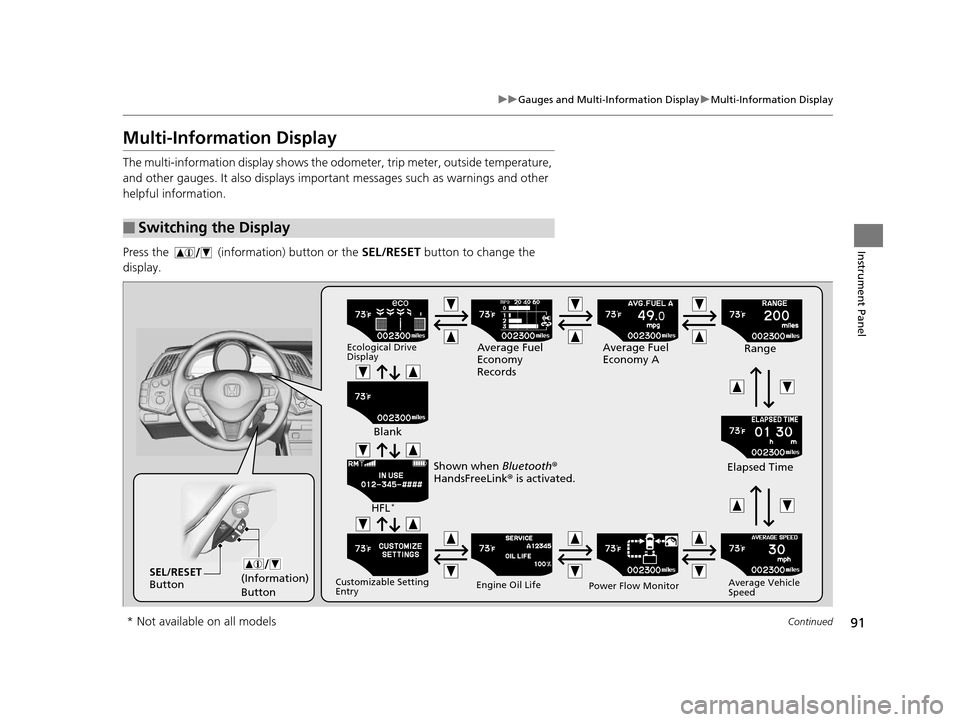
Multi-Information Display
The multi-information display shows the odom eter, trip meter, outside temperature,
and other gauges. It also displays important messages such as warnings and other
helpful information.
Press the (information) button or the SEL/RESET button to change the
display.
■Switching the Display
(Information)
ButtonSEL/RESET
Button
Ecological Drive
DisplayAverage Fuel
Economy
Records Average Fuel
Economy A
Range
Elapsed Time
Average Vehicle
Speed
Power Flow Monitor
Engine Oil Life
Customizable Setting
Entry
HFL*
Blank
Shown when Bluetooth ®
HandsFreeLink ® is activated.
* Not available on all models
16 CR-Z-31SZT6500.book 91 ページ 2015年9月11日 金曜日 午前11時47分
Page 97 of 409
uuGauges and Multi-Information Display uMulti-Information Display
96
Instrument Panel
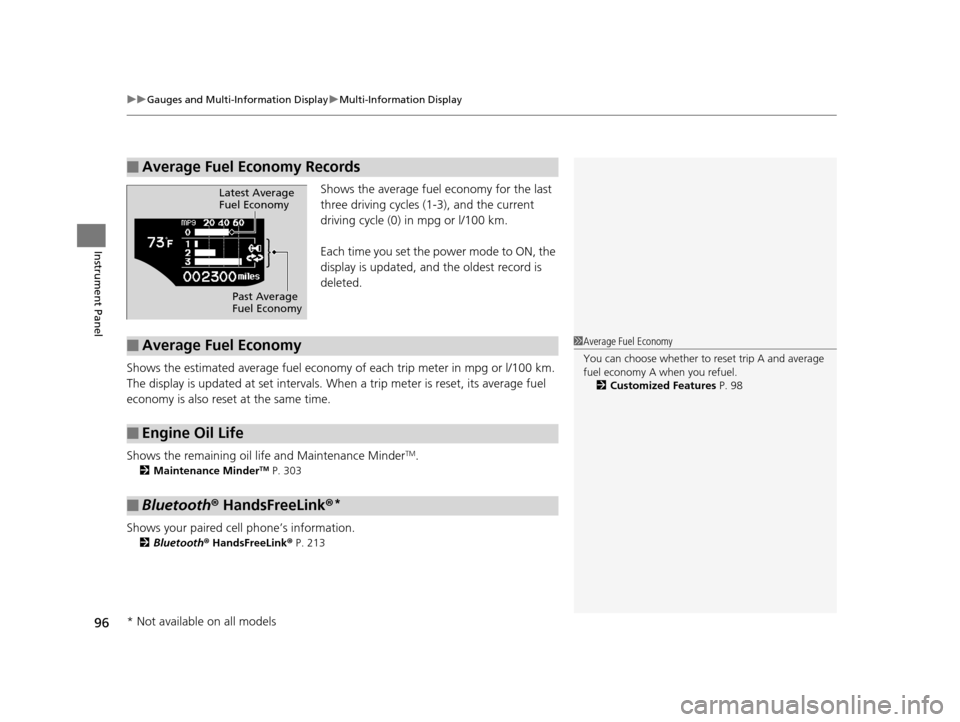
Shows the average fuel economy for the last
three driving cycles (1-3), and the current
driving cycle (0) in mpg or l/100 km.
Each time you set the power mode to ON, the
display is updated, and the oldest record is
deleted.
Shows the estimated average fuel economy of each trip meter in mpg or l/100 km.
The display is updated at set intervals. Wh en a trip meter is reset, its average fuel
economy is also reset at the same time.
Shows the remaining oil life and Maintenance Minder
TM.
2 Maintenance MinderTM P. 303
Shows your paired cell phone’s information.
2Bluetooth® HandsFreeLink ® P. 213
■Average Fuel Economy Records
Latest Average
Fuel Economy
Past Average
Fuel Economy
■Average Fuel Economy
■Engine Oil Life
■Bluetooth® HandsFreeLink ®*
1Average Fuel Economy
You can choose whether to reset trip A and average
fuel economy A when you refuel.
2 Customized Features P. 98
* Not available on all models
16 CR-Z-31SZT6500.book 96 ページ 2015年9月11日 金曜日 午前11時47分
Page 160 of 409
159
Features
This chapter describes how to operate technology features.
Audio System
About Your Audio System ................ 160
USB Ports ......................................... 161
HDMI
TM Port ..................................... 162
Audio System Theft Protection ......... 163
Audio Remote Controls .................... 164
Audio System Basic Operation Audio/Information Screen ................ 168
Adjusting the Sound ........................ 173
Display Setup ................................... 174
Playing AM/FM Radio ....................... 175
Playing a CD .................................... 178 Playing Internet Radio ...................... 184
Playing a USB Flash Drive ................. 186
Playing
Bluetooth ® Audio................. 189
Playing a Video Using the HDMITM.... 191
Smartphone Apps ............................ 193
Siri ® Eyes Free .................................. 194
Audio Error Messages ...................... 195
CD Player ......................................... 195
iPod/USB Flash Drive ........................ 196
Pandora ®......................................... 197 General Information on the Audio
System ............................................. 199
Recommended CDs ......................... 199
Compatible iPod, iP hone and USB Flash
Drives ............................................ 201
Customized Features Defaulting All the Settings ............... 212
Bluetooth ® HandsFreeLink®
Using HFL ........................................ 213
HFL Menus ...................................... 215
16 CR-Z-31SZT6500.book 159 ページ 2015年9月11日 金曜日 午前11時47分
Page 161 of 409
160
Features
Audio System
About Your Audio System
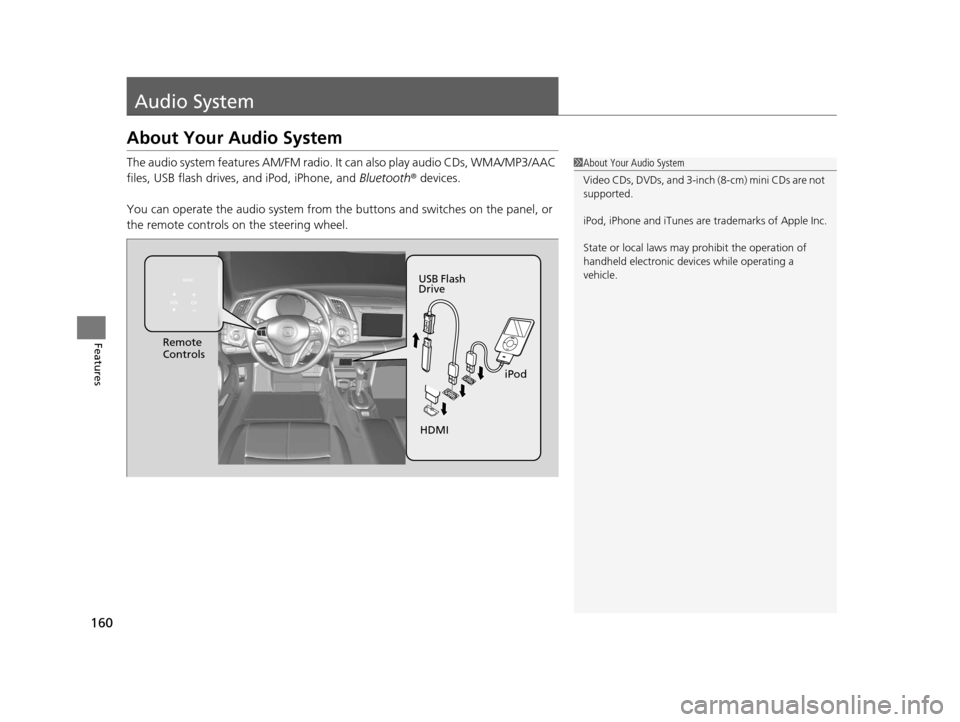
The audio system features AM/FM radio. It can also play audio CDs, WMA/MP3/AAC
files, USB flash drives, and iPod, iPhone, and Bluetooth® devices.
You can operate the audio system from the buttons and switches on the panel, or
the remote controls on the steering wheel.1About Your Audio System
Video CDs, DVDs, and 3-inch (8-cm) mini CDs are not
supported.
iPod, iPhone and iTunes are trademarks of Apple Inc.
State or local laws may pr ohibit the operation of
handheld electronic devi ces while operating a
vehicle.
Remote
Controls
iPod
USB Flash
Drive
HDMI
16 CR-Z-31SZT6500.book 160 ページ 2015年9月11日 金曜日 午前11時47分
Page 165 of 409
164
uuAudio System uAudio Remote Controls
Features
Audio Remote Controls
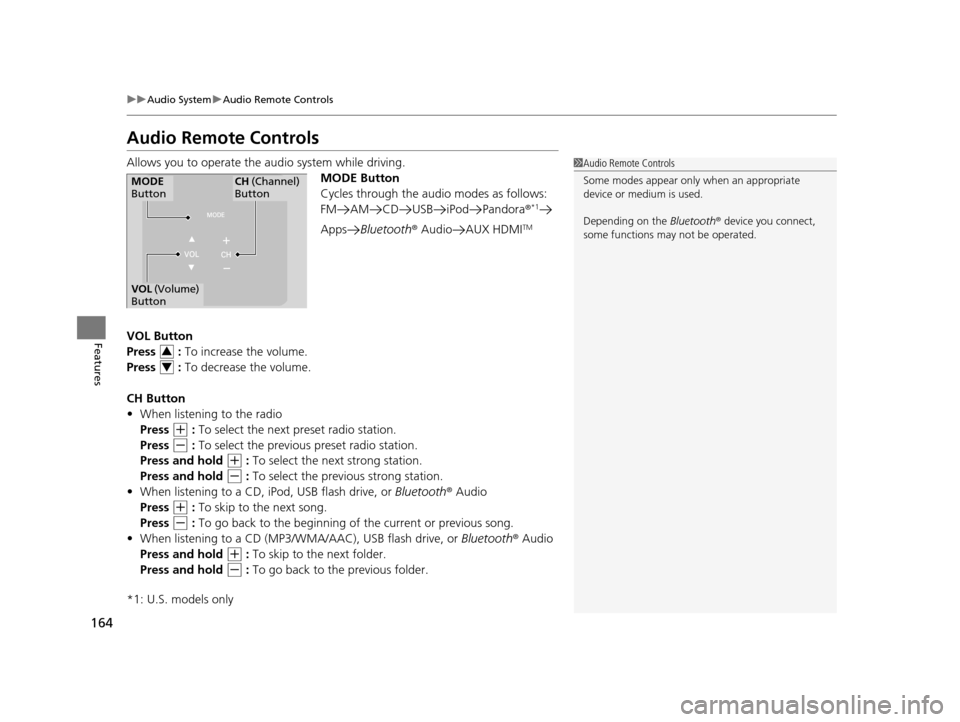
Allows you to operate the audio system while driving.
MODE Button
Cycles through the audio modes as follows:
FM AM CD USB iPod Pandora ®
*1
AppsBluetooth ® Audio AUX HDMITM
VOL Button
Press : To increase the volume.
Press : To decrease the volume.
CH Button
• When listening to the radio
Press
(+ : To select the next preset radio station.
Press
(- : To select the previous preset radio station.
Press and hold
(+ : To select the next strong station.
Press and hold
(- : To select the previous strong station.
• When listening to a CD, iPod, USB flash drive, or Bluetooth® Audio
Press
(+ : To skip to the next song.
Press
(- : To go back to the beginning of the current or previous song.
• When listening to a CD (MP3/W MA/AAC), USB flash drive, or Bluetooth® Audio
Press and hold
(+ : To skip to the next folder.
Press and hold
(- : To go back to the previous folder.
*1: U.S. models only
1 Audio Remote Controls
Some modes appear only when an appropriate
device or medium is used.
Depending on the Bluetooth® device you connect,
some functions ma y not be operated.
MODE
ButtonCH (Channel)
Button
VOL (Volume)
Button
3
4
16 CR-Z-31SZT6500.book 164 ページ 2015年9月11日 金曜日 午前11時47分
Page 169 of 409
168
uuAudio System Basic Operation uAudio/Information Screen
Features
Audio/Information Screen
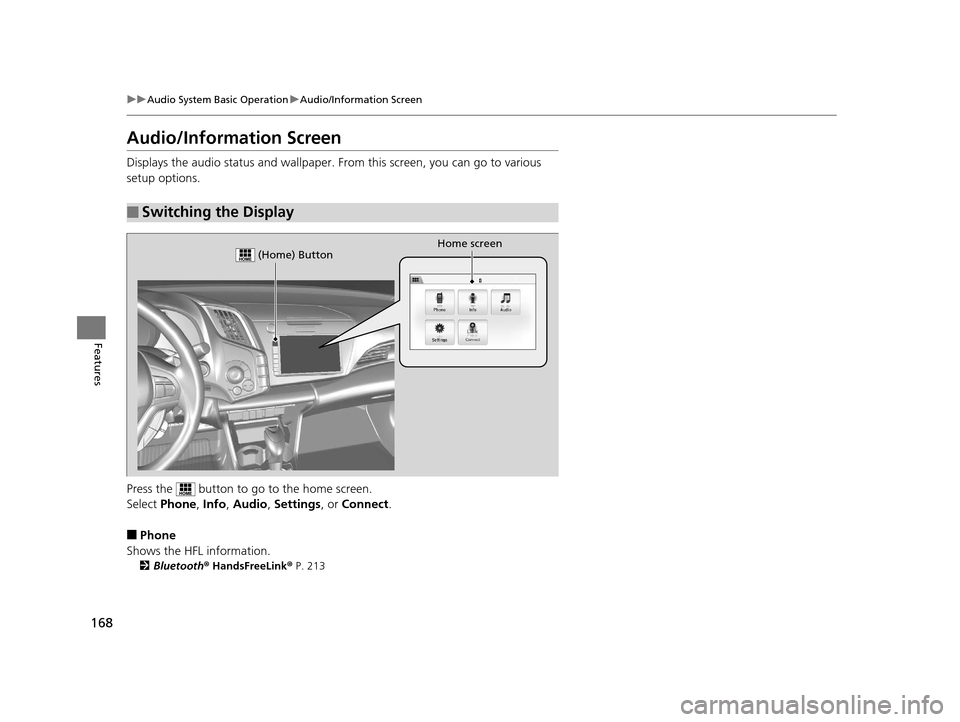
Displays the audio status and wallpaper. From this screen, you can go to various
setup options.
Press the button to go to the home screen.
Select Phone, Info, Audio , Settings , or Connect .
■Phone
Shows the HFL information.
2 Bluetooth® HandsFreeLink ® P. 213
■Switching the Display
Home screen (Home) Button
16 CR-Z-31SZT6500.book 168 ページ 2015年9月11日 金曜日 午前11時47分
Page 185 of 409
184
uuAudio System Basic Operation uPlaying Internet Radio
Features
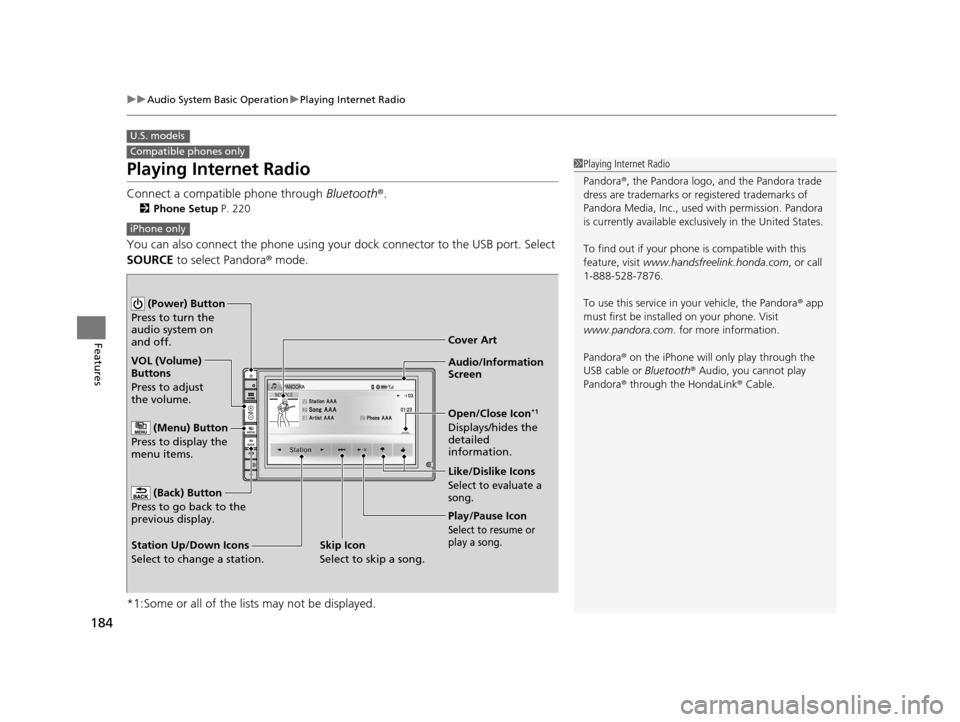
Playing Internet Radio
Connect a compatible phone through Bluetooth®.
2Phone Setup P. 220
You can also connect the phone using your dock connector to the USB port. Select
SOURCE to select Pandora ® mode.
*1:Some or all of the lists may not be displayed.
U.S. models
Compatible phones only1 Playing Internet Radio
Pandora ®, the Pandora logo, and the Pandora trade
dress are trademarks or registered trademarks of
Pandora Media, Inc., used with permission. Pandora
is currently available exclusively in the United States.
To find out if your phone is compatible with this
feature, visit www.handsfreelink.honda.com , or call
1-888-528-7876.
To use this service in your vehicle, the Pandora ® app
must first be installed on your phone. Visit
www.pandora.com . for more information.
Pandora ® on the iPhone will only play through the
USB cable or Bluetooth® Audio, you cannot play
Pandora ® through the HondaLink® Cable.
iPhone only
Audio/Information
Screen Cover Art
VOL (Volume)
Buttons
Press to adjust
the volume.
(Back) Button
Press to go back to the
previous display.
(Power) Button
Press to turn the
audio system on
and off.
(Menu) Button
Press to display the
menu items.
Play/Pause Icon
Select to resume or
play a song.
Open/Close Icon*1
Displays/hides the
detailed
information.
Station Up/Down Icons
Select to change a station. Like/Dislike Icons
Select to evaluate a
song.
Skip Icon
Select to skip a song.
16 CR-Z-31SZT6500.book 184 ページ 2015年9月11日 金曜日 午前11時47分