remote control HONDA CR-Z 2016 1.G User Guide
[x] Cancel search | Manufacturer: HONDA, Model Year: 2016, Model line: CR-Z, Model: HONDA CR-Z 2016 1.GPages: 409, PDF Size: 19.68 MB
Page 122 of 409
121
uuOpening and Closing the Hatch uUsing the Remote Transmitter
Controls
Using the Remote Transmitter
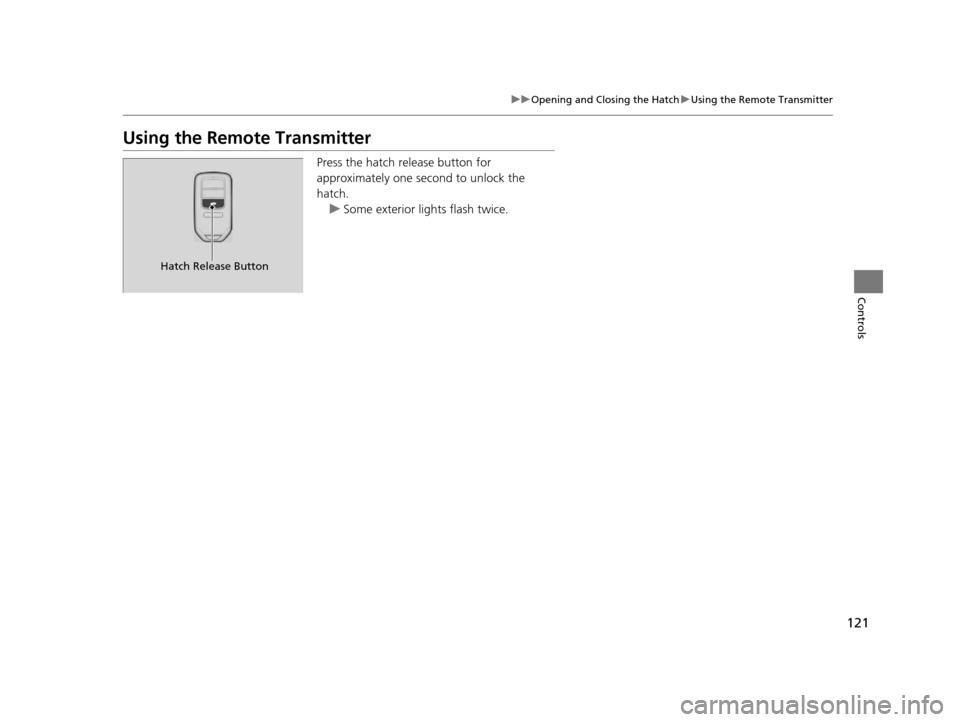
Press the hatch release button for
approximately one second to unlock the
hatch.
u Some exterior lights flash twice.
Hatch Release Button
16 CR-Z-31SZT6500.book 121 ページ 2015年9月11日 金曜日 午前11時47分
Page 123 of 409
122
Controls
Security System
Immobilizer System
The immobilizer system prevents a key that has not been pre-registered from
starting the engine. Each key contains electronic transmitters that use electronic
signals to verify the key.
Pay attention to the follo wing when pressing the ENGINE START/STOP button:
• Do not allow objects that emit strong radio waves near the ENGINE START/
STOP button.
• Make sure the key is not covered by or touching a metal object.
• Do not bring a key from another vehi cle's immobilizer system near the ENGINE
START/STOP button.
Security System Alarm
The security system alarm activates when the hatch, hood or doors are forcibly
opened. The alarm does not go off if the hatch or doors are opened with the key,
remote transmitter or smart entry system.
However, the alarm goes off when a door is opened with the key, then the shift
lever is moved out of
(P(Continuously variable transmission models) or the hood is
opened before the power mode is set to ON.
■When the security sy stem alarm activates
The horn sounds intermittently, and all of the exterior lights flash.
■To deactivate the security system alarm
Unlock the vehicle using the key or remote transmitter or the power mode is set to
ON. The system, along with the horn an d flashing lights, is deactivated.
1Immobilizer System
NOTICE
Leaving the key in the vehicl e can result in theft or
accidental movement of the vehicle.
Always take the key with you whenever you leave the
vehicle unattended.
Do not alter the system or add other devices to it.
Doing so may damage the system and make your
vehicle inoperable.
1 Security System Alarm
The security alarm continues for a maximum of two
minutes until the security system alarm deactivates.
16 CR-Z-31SZT6500.book 122 ページ 2015年9月11日 金曜日 午前11時47分
Page 124 of 409
123
uuSecurity System uSecurity System Alarm
Controls
■Setting the security system alarm
The security system alarm automatically sets when the following conditions have
been met:
• The power mode is set to VEHICLE OFF (LOCK).
• The hood is closed.
• Both doors and the hatch are locked with the key or the remote transmitter, or
smart entry system.
■When the security system alarm sets
The security system alarm indicator in the instrument panel blinks. When the
blinking interval changes after about 15 se conds, the security system alarm is set.
■To cancel the security system alarm
The security system alarm is canceled when the vehicle is unlocked using the key or
remote transmitter, or the power mode is set to ON. The security system alarm
indicator goes off at the same time or the power mode is set to ON.
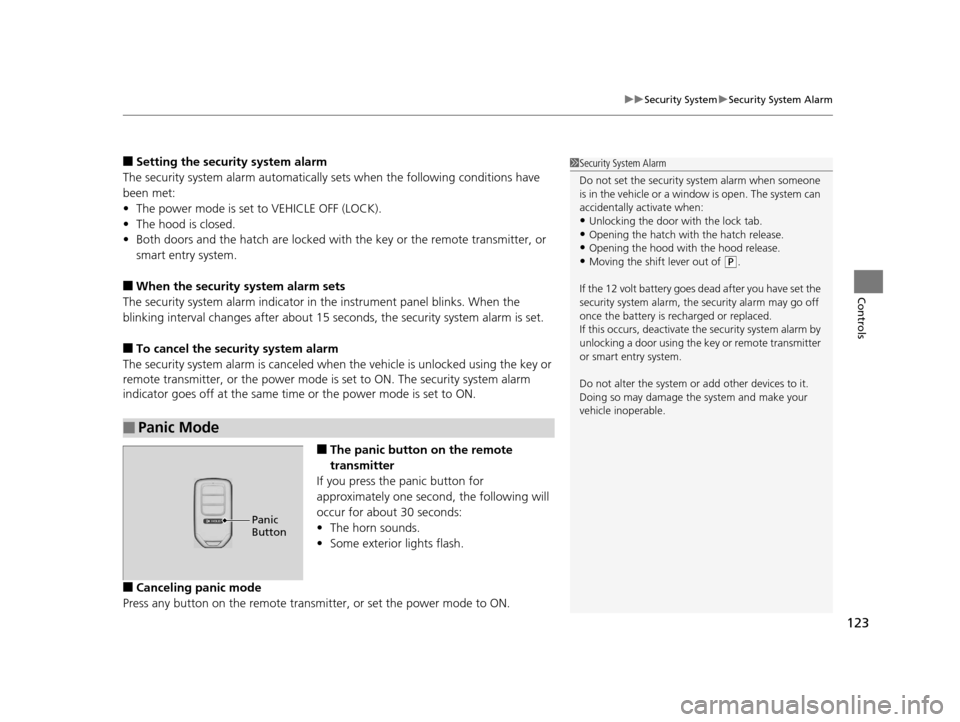
■The panic button on the remote
transmitter
If you press the panic button for
approximately one second, the following will
occur for about 30 seconds:
• The horn sounds.
• Some exterior lights flash.
■Canceling panic mode
Press any button on the remote transmi tter, or set the power mode to ON.
■Panic Mode
1Security System Alarm
Do not set the security system alarm when someone
is in the vehicle or a window is open. The system can
accidentally activate when:
•Unlocking the door with the lock tab.•Opening the hatch with the hatch release.
•Opening the hood with the hood release.
•Moving the shift lever out of ( P.
If the 12 volt battery goes dead after you have set the
security system alarm, the security alarm may go off
once the battery is re charged or replaced.
If this occurs, deactivate the security system alarm by
unlocking a door using the ke y or remote transmitter
or smart entry system.
Do not alter the system or add other devices to it.
Doing so may damage the system and make your
vehicle inoperable.
Panic
Button
16 CR-Z-31SZT6500.book 123 ページ 2015年9月11日 金曜日 午前11時47分
Page 127 of 409
126
Controls
Operating the Switches Around the Steering Wheel
ENGINE START/STOP Button
*1:Except U.S. models with continuously Variable Transmission
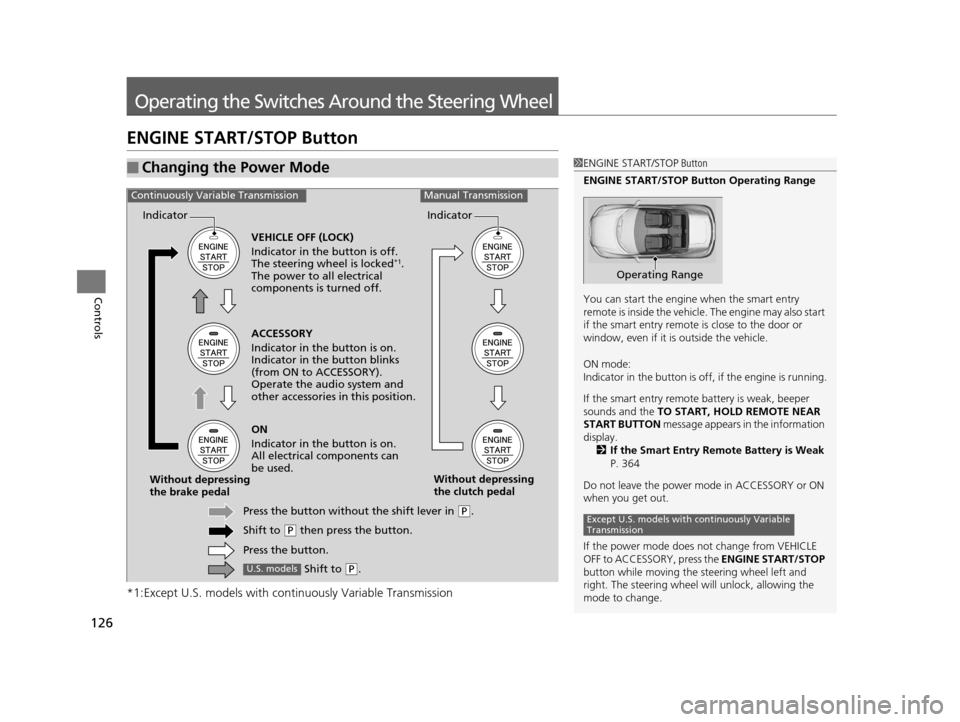
■Changing the Power Mode1ENGINE START/STOP Button
ENGINE START/STOP Button Operating Range
You can start the engine when the smart entry
remote is inside the vehicle. The engine may also start
if the smart entry remote is close to the door or
window, even if it is outside the vehicle.
ON mode:
Indicator in the button is of f, if the engine is running.
If the smart entry remote battery is weak, beeper
sounds and the TO START, HOLD REMOTE NEAR
START BUTTON message appears in the information
display.
2 If the Smart Entry Remote Battery is Weak
P. 364
Do not leave the power mode in ACCESSORY or ON
when you get out.
If the power mode does not change from VEHICLE
OFF to ACCESSORY, press the ENGINE START/STOP
button while moving the st eering wheel left and
right. The steering wheel will unlock, allowing the
mode to change.
Operating Range
Except U.S. models with continuously Variable
Transmission
ACCESSORY
Indicator in the button is on.
Indicator in th e button blinks
(from ON to ACCESSORY).
Operate the audio system and
other accessories in this position.
Continuously Variable TransmissionManual Transmission
VEHICLE OFF (LOCK)
Indicator in the button is off.
The steering wheel is locked
*1.
The power to all electrical
components is turned off.
ON
Indicator in the button is on.
All electrical components can
be used.
Press the button withou t the shift lever in
(P.
Shift to
( P then press the button.
Press the button.
Without depressing
the brake pedal
Without depressing
the clutch pedal
Indicator Indicator
Shift to (
P.U.S. models
16 CR-Z-31SZT6500.book 126 ページ 2015年9月11日 金曜日 午前11時47分
Page 128 of 409
127
uuOperating the Switches Around the Steering Wheel uENGINE START/STOP Button
Continued
Controls
If you leave the vehicle for 30 to 60 minutes with the shift lever in (P*1 and the
power mode in ACCESSORY, the vehicle automa tically goes into the mode similar to
VEHICLE OFF (LOCK) to avoid the battery drain.
When in this mode:
The steering wheel does not lock.
You cannot lock or unlock doors with th e remote transmitter or the smart entry
system.
Press the ENGINE START/STOP button three times to switch the mode to VEHICLE
OFF (LOCK).
*1: Continuously variable transmission models
■Automatic Power Off
Except U.S. models with cont inuously Variable Transmission
16 CR-Z-31SZT6500.book 127 ページ 2015年9月11日 金曜日 午前11時47分
Page 129 of 409
uuOperating the Switches Around the Steering Wheel uENGINE START/STOP Button
128
Controls
If you open the driver’s doo r when the power mode is set to ACCESSORY, a warning
buzzer sounds.
Warning buzzers may sound from inside or/
and outside the vehicle to remind you that the
smart entry remote is out of the vehicle. If the
buzzer continues even after the remote is put
back inside, place it to be within its
operational range.
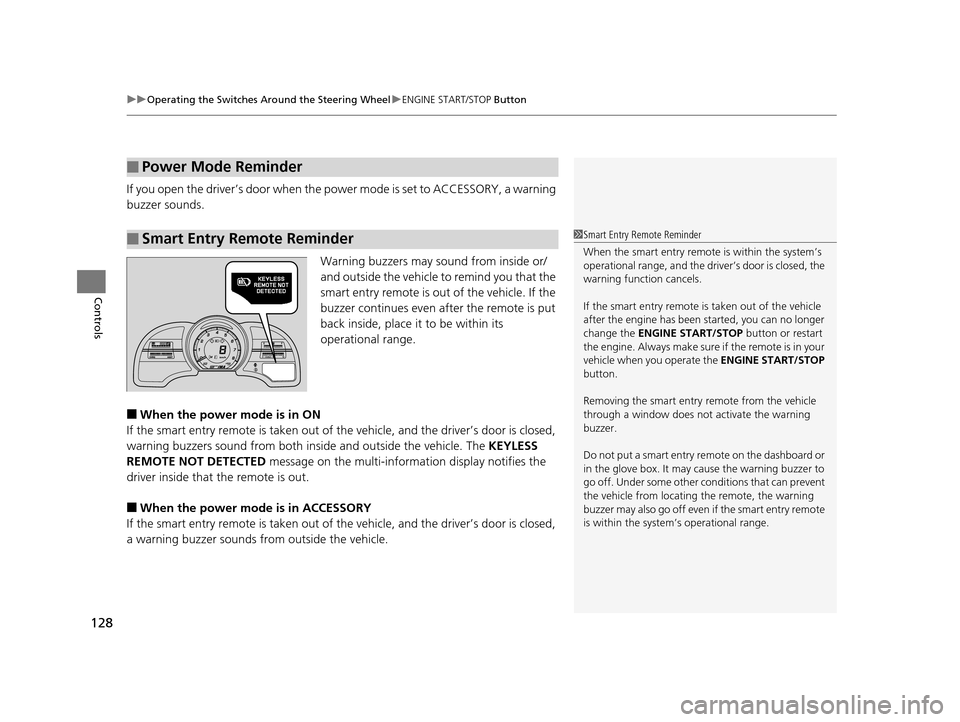
■When the power mode is in ON
If the smart entry remote is taken out of th e vehicle, and the driver’s door is closed,
warning buzzers sound from both insi de and outside the vehicle. The KEYLESS
REMOTE NOT DETECTED message on the multi-information display notifies the
driver inside that the remote is out.
■When the power mode is in ACCESSORY
If the smart entry remote is taken out of th e vehicle, and the driver’s door is closed,
a warning buzzer sounds from outside the vehicle.
■Power Mode Reminder
■Smart Entry Remote Reminder1Smart Entry Remote Reminder
When the smart entry remote is within the system’s
operational range, and the driv er’s door is closed, the
warning function cancels.
If the smart entry remote is taken out of the vehicle
after the engine has been started, you can no longer
change the ENGINE START/STOP button or restart
the engin e. Always make sure if the remote is in your
vehicle when you operate the ENGINE START/STOP
button.
Removing the smart entry remote from the vehicle
through a window does not activate the warning
buzzer.
Do not put a smart entry re mote on the dashboard or
in the glove box. It may cause the warning buzzer to
go off. Under some other c onditions that can prevent
the vehicle from locating the remote, the warning
buzzer may also go off even if the smart entry remote
is within the system’s operational range.
16 CR-Z-31SZT6500.book 128 ページ 2015年9月11日 金曜日 午前11時47分
Page 160 of 409
159
Features
This chapter describes how to operate technology features.
Audio System
About Your Audio System ................ 160
USB Ports ......................................... 161
HDMI
TM Port ..................................... 162
Audio System Theft Protection ......... 163
Audio Remote Controls .................... 164
Audio System Basic Operation Audio/Information Screen ................ 168
Adjusting the Sound ........................ 173
Display Setup ................................... 174
Playing AM/FM Radio ....................... 175
Playing a CD .................................... 178 Playing Internet Radio ...................... 184
Playing a USB Flash Drive ................. 186
Playing
Bluetooth ® Audio................. 189
Playing a Video Using the HDMITM.... 191
Smartphone Apps ............................ 193
Siri ® Eyes Free .................................. 194
Audio Error Messages ...................... 195
CD Player ......................................... 195
iPod/USB Flash Drive ........................ 196
Pandora ®......................................... 197 General Information on the Audio
System ............................................. 199
Recommended CDs ......................... 199
Compatible iPod, iP hone and USB Flash
Drives ............................................ 201
Customized Features Defaulting All the Settings ............... 212
Bluetooth ® HandsFreeLink®
Using HFL ........................................ 213
HFL Menus ...................................... 215
16 CR-Z-31SZT6500.book 159 ページ 2015年9月11日 金曜日 午前11時47分
Page 161 of 409
160
Features
Audio System
About Your Audio System
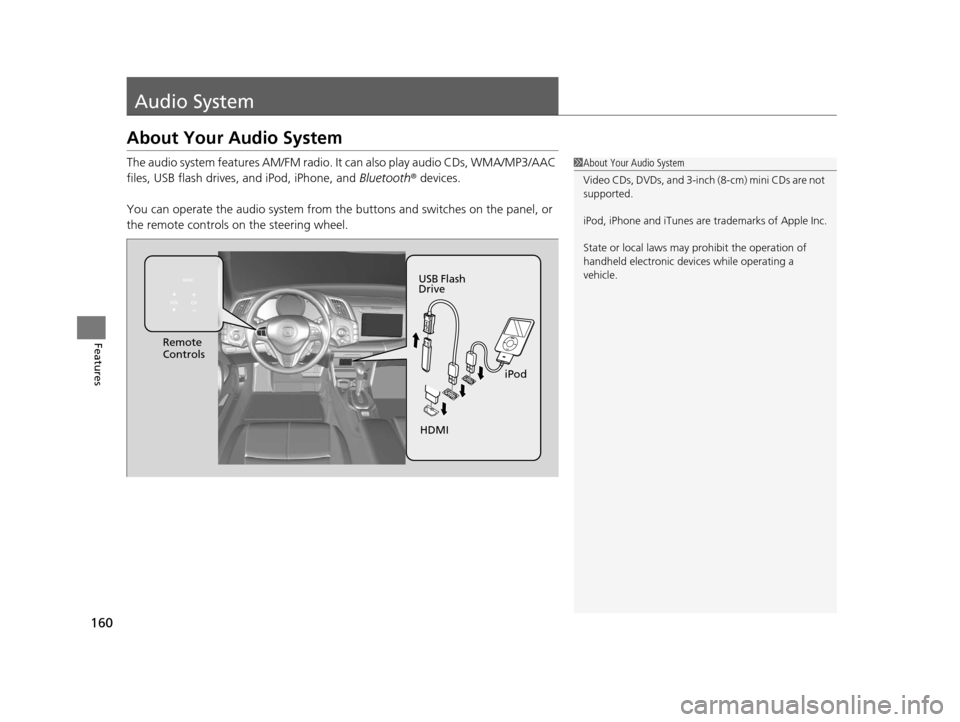
The audio system features AM/FM radio. It can also play audio CDs, WMA/MP3/AAC
files, USB flash drives, and iPod, iPhone, and Bluetooth® devices.
You can operate the audio system from the buttons and switches on the panel, or
the remote controls on the steering wheel.1About Your Audio System
Video CDs, DVDs, and 3-inch (8-cm) mini CDs are not
supported.
iPod, iPhone and iTunes are trademarks of Apple Inc.
State or local laws may pr ohibit the operation of
handheld electronic devi ces while operating a
vehicle.
Remote
Controls
iPod
USB Flash
Drive
HDMI
16 CR-Z-31SZT6500.book 160 ページ 2015年9月11日 金曜日 午前11時47分
Page 165 of 409
164
uuAudio System uAudio Remote Controls
Features
Audio Remote Controls
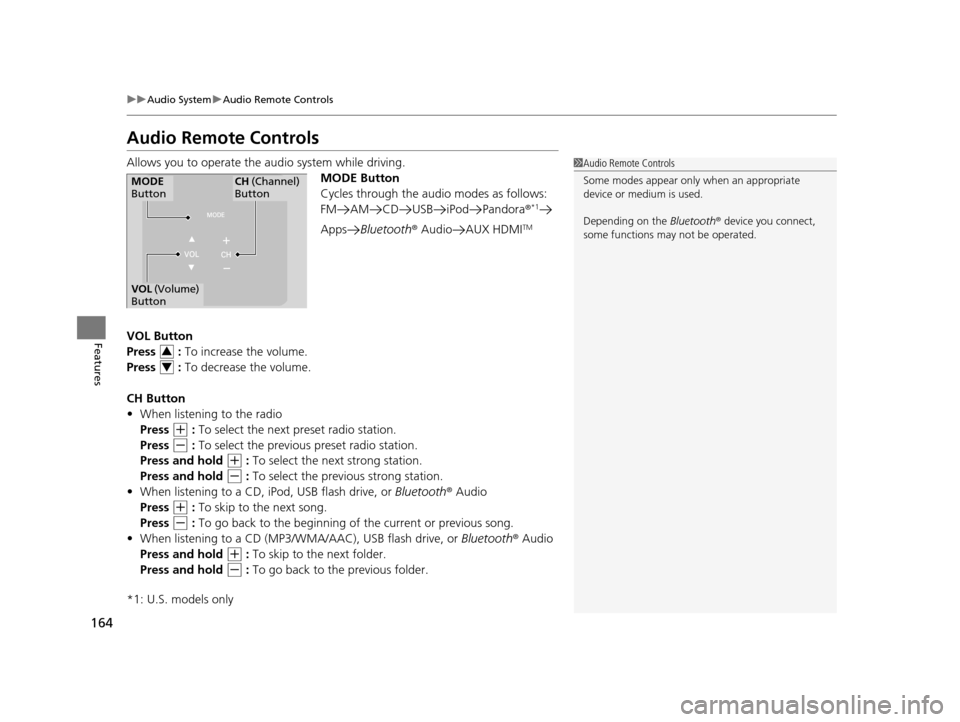
Allows you to operate the audio system while driving.
MODE Button
Cycles through the audio modes as follows:
FM AM CD USB iPod Pandora ®
*1
AppsBluetooth ® Audio AUX HDMITM
VOL Button
Press : To increase the volume.
Press : To decrease the volume.
CH Button
• When listening to the radio
Press
(+ : To select the next preset radio station.
Press
(- : To select the previous preset radio station.
Press and hold
(+ : To select the next strong station.
Press and hold
(- : To select the previous strong station.
• When listening to a CD, iPod, USB flash drive, or Bluetooth® Audio
Press
(+ : To skip to the next song.
Press
(- : To go back to the beginning of the current or previous song.
• When listening to a CD (MP3/W MA/AAC), USB flash drive, or Bluetooth® Audio
Press and hold
(+ : To skip to the next folder.
Press and hold
(- : To go back to the previous folder.
*1: U.S. models only
1 Audio Remote Controls
Some modes appear only when an appropriate
device or medium is used.
Depending on the Bluetooth® device you connect,
some functions ma y not be operated.
MODE
ButtonCH (Channel)
Button
VOL (Volume)
Button
3
4
16 CR-Z-31SZT6500.book 164 ページ 2015年9月11日 金曜日 午前11時47分
Page 166 of 409
165
uuAudio System uAudio Remote Controls
Features
• When listening to Pandora®
Press
(+ : To skip to the next song.
Press and hold
(+ : To select the next station.
Press and hold
(- : To select the previous station.
U.S. models
Compatible phones only
16 CR-Z-31SZT6500.book 165 ページ 2015年9月11日 金曜日 午前11時47分