keyless HONDA CR-Z 2016 1.G Owners Manual
[x] Cancel search | Manufacturer: HONDA, Model Year: 2016, Model line: CR-Z, Model: HONDA CR-Z 2016 1.GPages: 409, PDF Size: 19.68 MB
Page 86 of 409
85
uuIndicators uMulti-Information Display Warning and Information Messages
Continued
Instrument Panel
MessageConditionExplanation
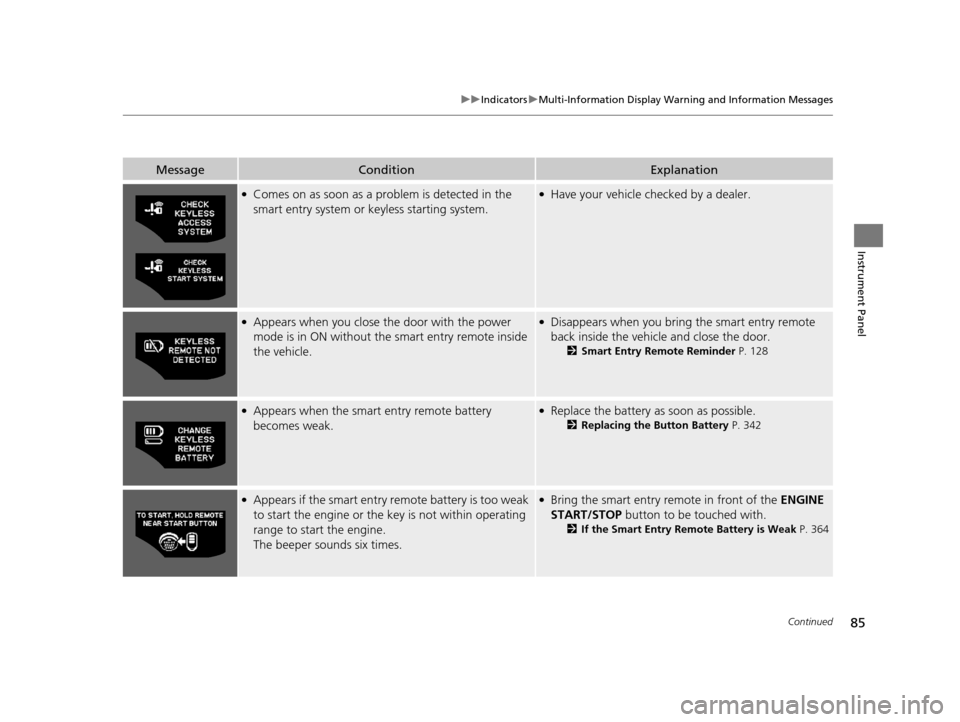
●Comes on as soon as a problem is detected in the
smart entry system or keyless starting system.●Have your vehicle checked by a dealer.
●Appears when you close the door with the power
mode is in ON without the smart entry remote inside
the vehicle.●Disappears when you bring the smart entry remote
back inside the vehicle and close the door.
2 Smart Entry Remote Reminder P. 128
●Appears when the smart entry remote battery
becomes weak.●Replace the battery as soon as possible.
2Replacing the Button Battery P. 342
●Appears if the smart entry remote battery is too weak
to start the engine or the key is not within operating
range to start the engine.
The beeper sounds six times.●Bring the smart entry remote in front of the ENGINE
START/STOP button to be touched with.
2If the Smart Entry Remote Battery is Weak P. 364
16 CR-Z-31SZT6500.book 85 ページ 2015年9月11日 金曜日 午前11時47分
Page 100 of 409
99
uuGauges and Multi-Information Display uMulti-Information Display
Continued
Instrument Panel
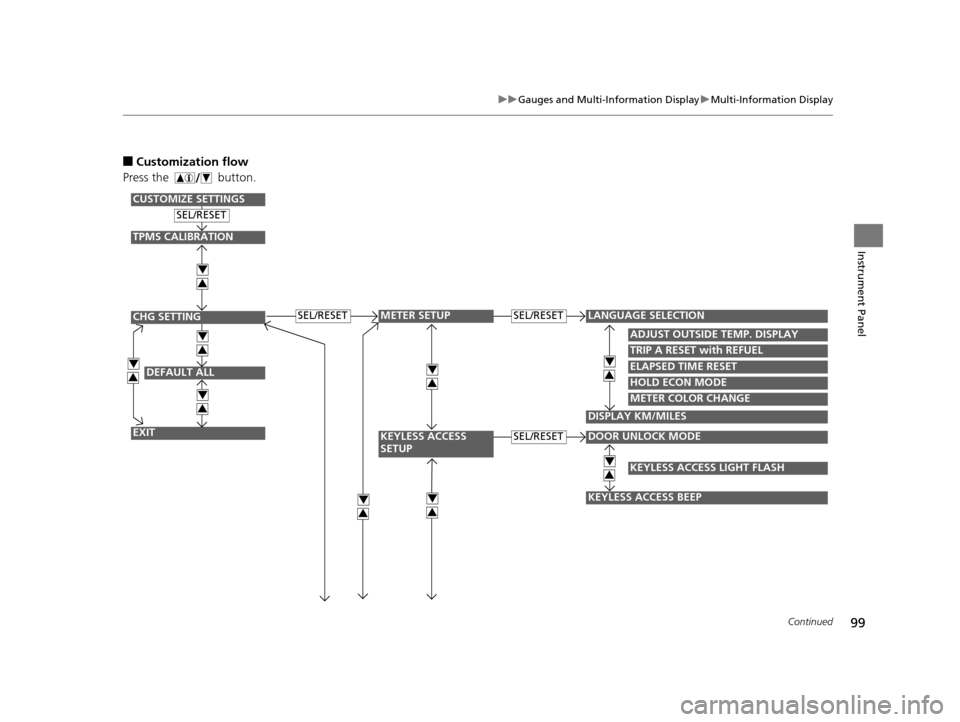
■Customization flow
Press the button.
DEFAULT ALL
EXIT
ADJUST OUTSIDE TEMP. DISPLAY
TRIP A RESET with REFUEL
ELAPSED TIME RESET
DOOR UNLOCK MODE
KEYLESS ACCESS BEEP
LANGUAGE SELECTIONSEL/RESET
SEL/RESET
SEL/RESET
SEL/RESET
METER SETUP
KEYLESS ACCESS
SETUP
CHG SETTING
CUSTOMIZE SETTINGS
HOLD ECON MODE
METER COLOR CHANGE
DISPLAY KM/MILES
4
3
4
3
4
3
4
3
4
3
4
3
TPMS CALIBRATION
4
3
KEYLESS ACCESS LIGHT FLASH
4
34
3
16 CR-Z-31SZT6500.book 99 ページ 2015年9月11日 金曜日 午前11時47分
Page 101 of 409
100
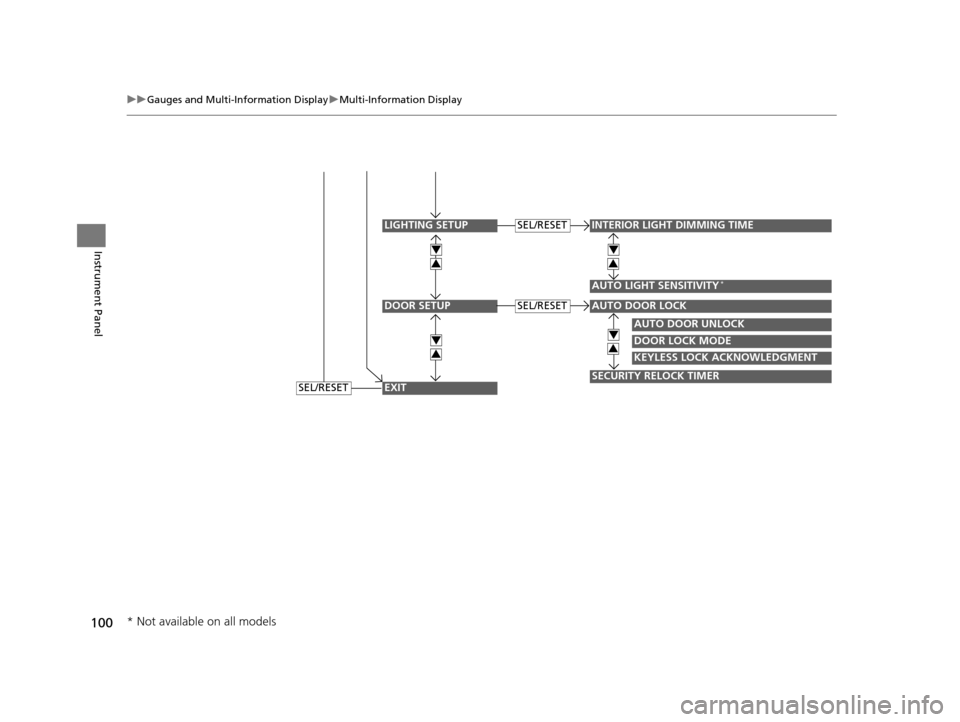
uuGauges and Multi-Information Display uMulti-Information Display
Instrument Panel
DOOR SETUP
INTERIOR LIGHT DIMMING TIME
AUTO LIGHT SENSITIVITY*
AUTO DOOR UNLOCK
DOOR LOCK MODE
KEYLESS LOCK ACKNOWLEDGMENT
SECURITY RELOCK TIMER
AUTO DOOR LOCK
SEL/RESET
SEL/RESET
LIGHTING SETUP
EXIT
4
3
4
3
4
3
4
3
SEL/RESET
* Not available on all models
16 CR-Z-31SZT6500.book 100 ページ 2015年9月11日 金曜日 午前11時47分
Page 103 of 409
102
uuGauges and Multi-Information Display uMulti-Information Display
Instrument Panel
*1: Default Setting
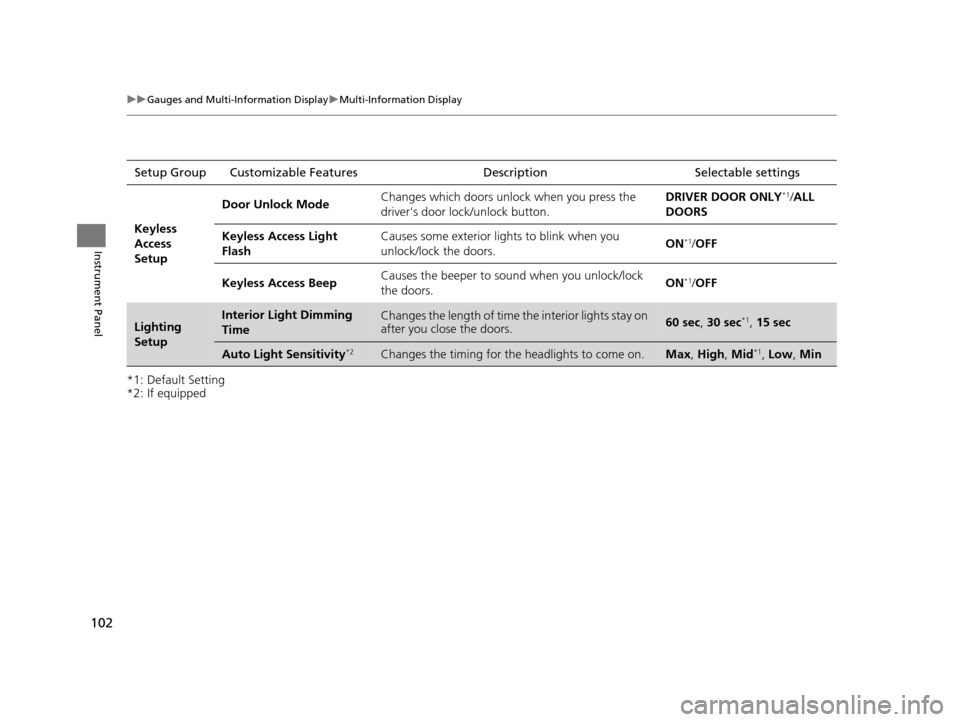
*2: If equippedSetup Group Customizabl
e Features Description Selectable settings
Keyless
Access
Setup
Door Unlock ModeChanges which doors unlock when you press the
driver's door lock/unlock button.DRIVER DOOR ONLY*1/ALL
DOORS
Keyless Access Light
FlashCauses some exterior lights to blink when you
unlock/lock the doors.ON*1/ OFF
Keyless Access BeepCauses the beeper to sound when you unlock/lock
the doors.ON*1/OFF
Lighting
SetupInterior Light Dimming
TimeChanges the length of time the interior lights stay on
after you close the doors.60 sec, 30 sec*1, 15 sec
Auto Light Sensitivity*2Changes the timing for the headlights to come on.Max, High , Mid*1, Low , Min
16 CR-Z-31SZT6500.book 102 ページ 2015年9月11日 金曜日 午前11時47分
Page 104 of 409
103
uuGauges and Multi-Information Display uMulti-Information Display
Continued
Instrument Panel
*1: Default Setting
*2: Default Setting on continuously variable transmission models
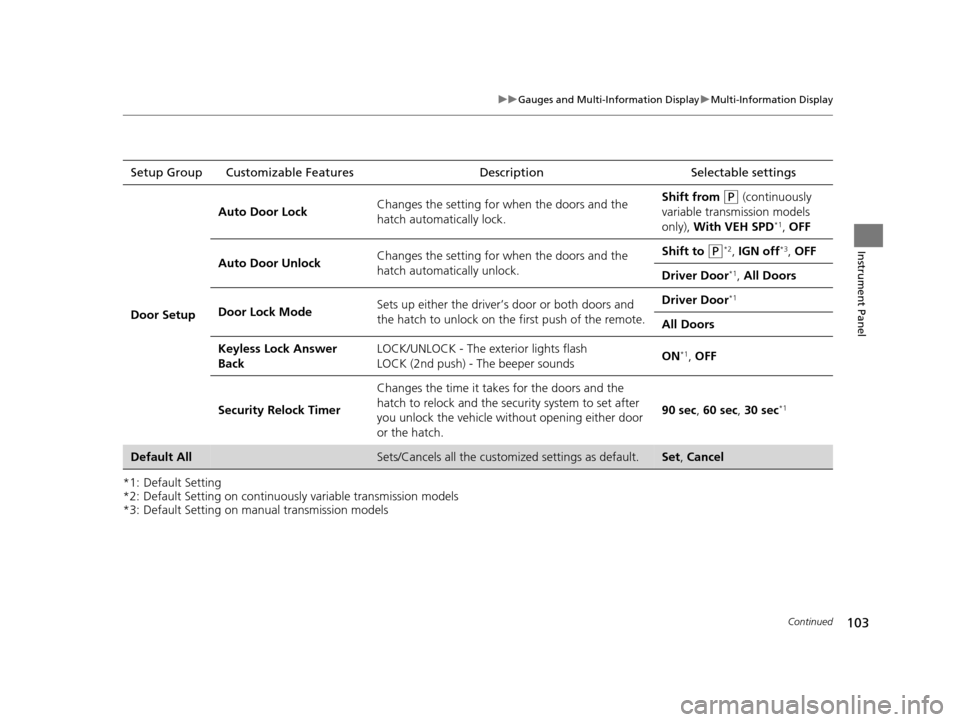
*3: Default Setting on manual transmission modelsSetup Group Customizable Features
Description Selectable settings
Door Setup
Auto Door LockChanges the setting for when the doors and the
hatch automatically lock.Shift from (P (continuously
variable transmission models
only), With VEH SPD
*1, OFF
Auto Door UnlockChanges the setting for when the doors and the
hatch automatically unlock.Shift to (P*2, IGN off*3, OFF
Driver Door*1, All Doors
Door Lock ModeSets up either the driver’s door or both doors and
the hatch to unlock on th e first push of the remote.Driver Door*1
All Doors
Keyless Lock Answer
BackLOCK/UNLOCK - The exterior lights flash
LOCK (2nd push) - The beeper soundsON*1, OFF
Security Relock Timer
Changes the time it takes for the doors and the
hatch to relock and the security system to set after
you unlock the vehicle without opening either door
or the hatch.
90 sec , 60 sec, 30 sec*1
Default AllSets/Cancels all the customiz ed settings as default.Set, Cancel
16 CR-Z-31SZT6500.book 103 ページ 2015年9月11日 金曜日 午前11時47分
Page 114 of 409
Continued113
uuLocking and Unlocking the Doors uLocking/Unlocking the Doors from the Outside
Controls
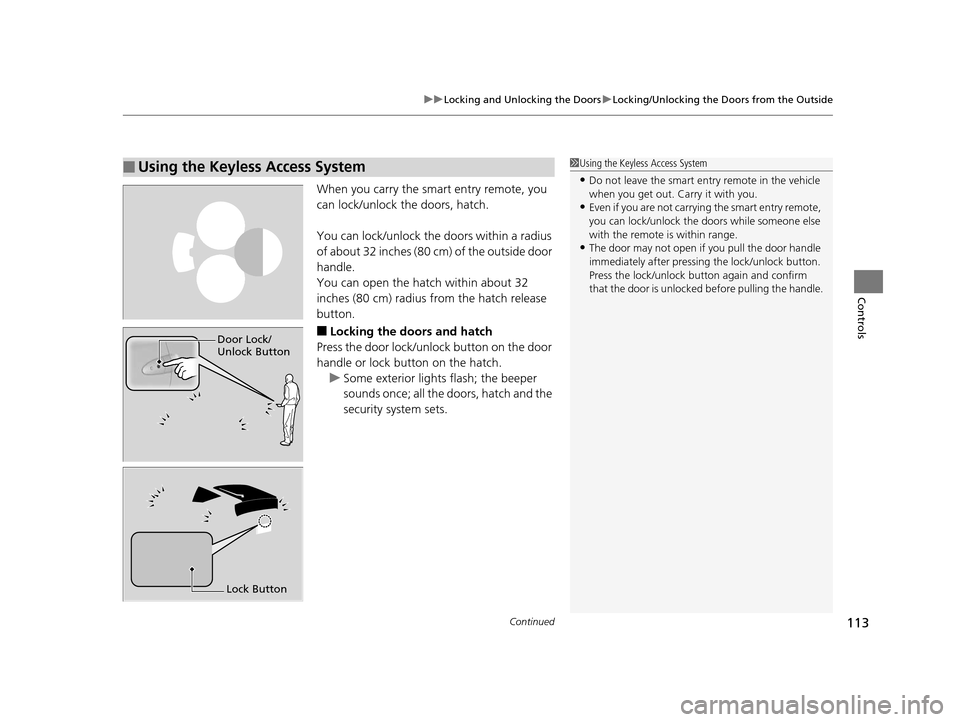
When you carry the smart entry remote, you
can lock/unlock the doors, hatch.
You can lock/unlock the doors within a radius
of about 32 inches (80 cm) of the outside door
handle.
You can open the hatch within about 32
inches (80 cm) radius from the hatch release
button.
■Locking the doors and hatch
Press the door lock/unlock button on the door
handle or lock button on the hatch.
u Some exterior lights flash; the beeper
sounds once; all the doors, hatch and the
security system sets.
■Using the Keyless Access System1Using the Keyless Access System
•Do not leave the smart entry remote in the vehicle
when you get out. Carry it with you.
•Even if you are not carrying the smart entry remote,
you can lock/unlock the doors while someone else
with the remote is within range.
•The door may not open if you pull the door handle
immediately after pressing the lock/unlock button.
Press the lock/unlock but ton again and confirm
that the door is unlocked before pulling the handle.
Door Lock/
Unlock Button
Lock Button
16 CR-Z-31SZT6500.book 113 ページ 2015年9月11日 金曜日 午前11時47分
Page 115 of 409
uuLocking and Unlocking the Doors uLocking/Unlocking the Doors from the Outside
114
Controls
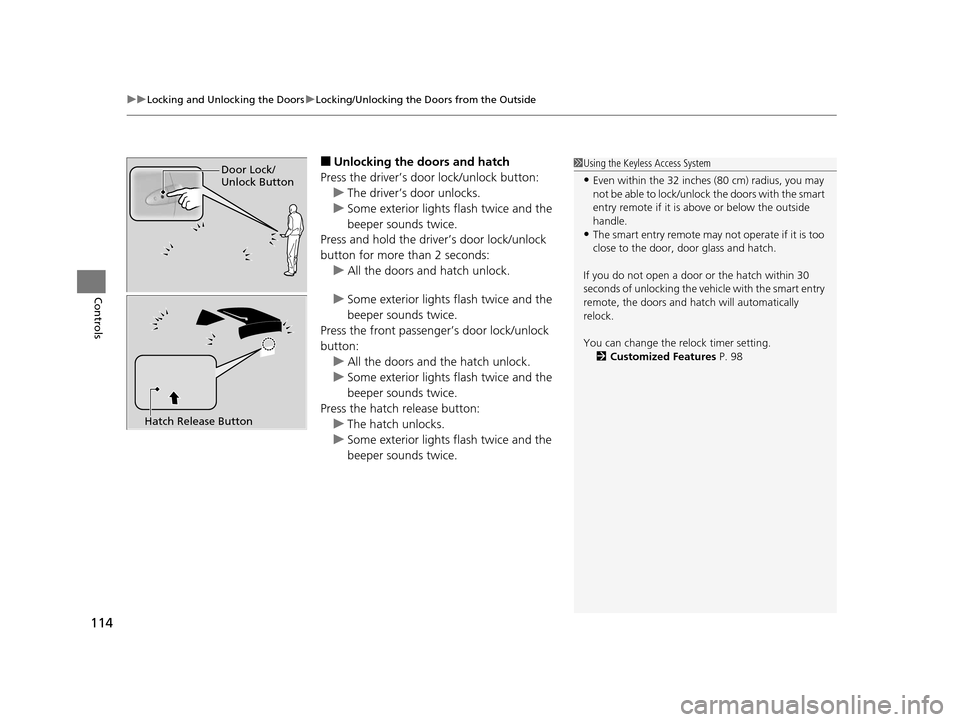
■Unlocking the doors and hatch
Press the driver’s door lock/unlock button: u The driver’s door unlocks.
u Some exterior lights flash twice and the
beeper sounds twice.
Press and hold the driver’s door lock/unlock
button for more than 2 seconds:
u All the doors and hatch unlock.
u Some exterior lights flash twice and the
beeper sounds twice.
Press the front passenger’s door lock/unlock
button: u All the doors and the hatch unlock.
u Some exterior lights flash twice and the
beeper sounds twice.
Press the hatch release button: u The hatch unlocks.
u Some exterior lights flash twice and the
beeper sounds twice.1Using the Keyless Access System
•Even within the 32 inches (80 cm) radius, you may
not be able to lock/unlock the doors with the smart
entry remote if it is a bove or below the outside
handle.
•The smart entry remote may not operate if it is too
close to the door, door glass and hatch.
If you do not open a door or the hatch within 30
seconds of unlocking the vehi cle with the smart entry
remote, the doors and hatch will automatically
relock.
You can change the relock timer setting. 2 Customized Features P. 98
Door Lock/
Unlock Button
Hatch Release Button
16 CR-Z-31SZT6500.book 114 ページ 2015年9月11日 金曜日 午前11時47分
Page 116 of 409
115
uuLocking and Unlocking the Doors uLocking/Unlocking the Doors from the Outside
Controls
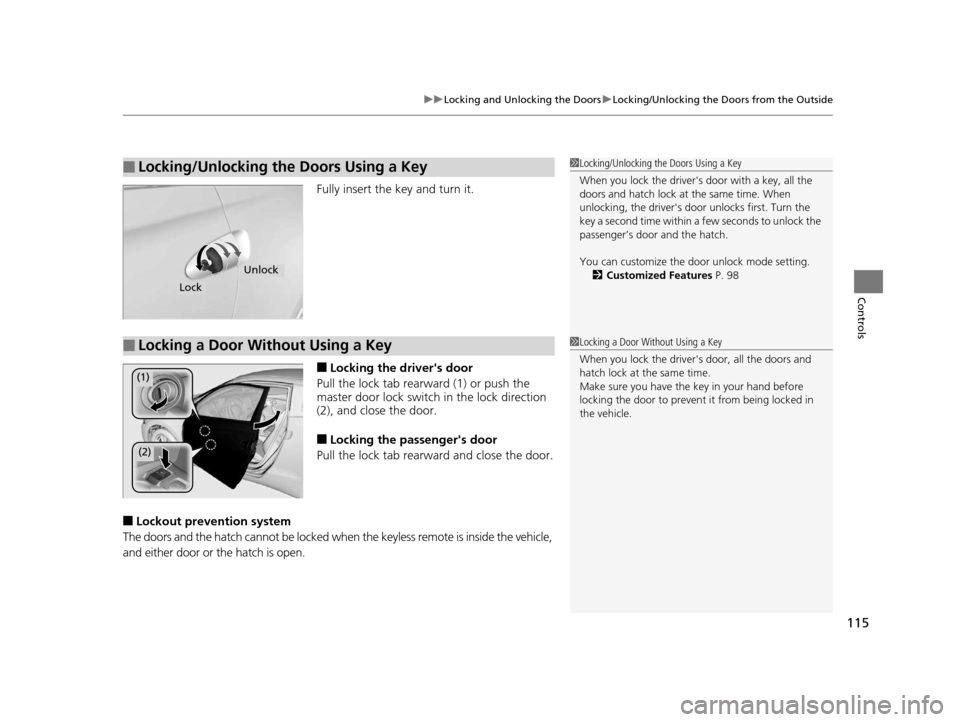
Fully insert the key and turn it.
■Locking the driver's door
Pull the lock tab rearward (1) or push the
master door lock switch in the lock direction
(2), and clos e the door.
■Locking the passenger's door
Pull the lock tab rearward and close the door.
■Lockout prevention system
The doors and the hatch cannot be locked when the keyless remote is inside the vehicle,
and either door or the hatch is open.
■Locking/Unlocking the Doors Using a Key1 Locking/Unlocking the Doors Using a Key
When you lock the driver's door with a key, all the
doors and hatch lock at the same time. When
unlocking, the driver's door unlocks first. Turn the
key a second time within a few seconds to unlock the
passenger’s door and the hatch.
You can customize the door unlock mode setting.
2 Customized Features P. 98
Lock
Unlock
■Locking a Door Without Using a Key1Locking a Door Without Using a Key
When you lock the driver's door, all the doors and
hatch lock at the same time.
Make sure you have the key in your hand before
locking the door to prevent it from being locked in
the vehicle.
(1)
(2)
16 CR-Z-31SZT6500.book 115 ページ 2015年9月11日 金曜日 午前11時47分
Page 129 of 409
uuOperating the Switches Around the Steering Wheel uENGINE START/STOP Button
128
Controls
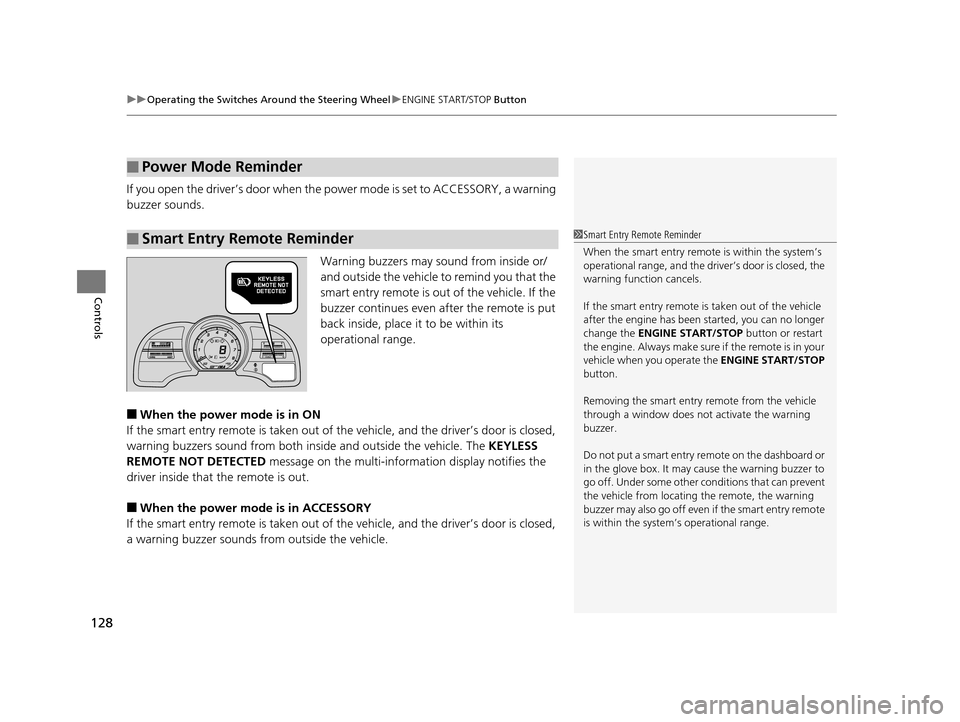
If you open the driver’s doo r when the power mode is set to ACCESSORY, a warning
buzzer sounds.
Warning buzzers may sound from inside or/
and outside the vehicle to remind you that the
smart entry remote is out of the vehicle. If the
buzzer continues even after the remote is put
back inside, place it to be within its
operational range.
■When the power mode is in ON
If the smart entry remote is taken out of th e vehicle, and the driver’s door is closed,
warning buzzers sound from both insi de and outside the vehicle. The KEYLESS
REMOTE NOT DETECTED message on the multi-information display notifies the
driver inside that the remote is out.
■When the power mode is in ACCESSORY
If the smart entry remote is taken out of th e vehicle, and the driver’s door is closed,
a warning buzzer sounds from outside the vehicle.
■Power Mode Reminder
■Smart Entry Remote Reminder1Smart Entry Remote Reminder
When the smart entry remote is within the system’s
operational range, and the driv er’s door is closed, the
warning function cancels.
If the smart entry remote is taken out of the vehicle
after the engine has been started, you can no longer
change the ENGINE START/STOP button or restart
the engin e. Always make sure if the remote is in your
vehicle when you operate the ENGINE START/STOP
button.
Removing the smart entry remote from the vehicle
through a window does not activate the warning
buzzer.
Do not put a smart entry re mote on the dashboard or
in the glove box. It may cause the warning buzzer to
go off. Under some other c onditions that can prevent
the vehicle from locating the remote, the warning
buzzer may also go off even if the smart entry remote
is within the system’s operational range.
16 CR-Z-31SZT6500.book 128 ページ 2015年9月11日 金曜日 午前11時47分
Page 392 of 409
391
Information
Devices that Emit Radio Waves
The following products and systems on your vehicle emit radio waves when in
operation.
Each of the above complies with the appropriate requirements or the required
standards of FCC (Federal Communications Commission) and Industry Canada
Standard, described below:
As required by the FCC:
This device complies with Part 15 of the FCC rules. Operation is
subject to the following two cond itions: (1) This device may not
cause harmful interferenc e, and (2) this device must accept any
interference received, including interference that may cause
undesired operation.
Changes or modifications not ex pressly approved by the party
responsible for compliance could void the user's authority to
operate the equipment.
This device complies with Industry Canada licence-exempt RSS standard(s).
Operation is subject to the following two conditions: (1) this device may not cause
interference, and (2) this device must accept any interference, including interference
that may cause undesired operation of the device.
Audio System
Bluetooth ® HandsFreeLink ®
Bluetooth® Audio
Immobilizer System
Remote Transmitter
Keyless Access System
16 CR-Z-31SZT6500.book 391 ページ 2015年9月11日 金曜日 午前11時47分