display HONDA CR-Z 2016 1.G Owner's Manual
[x] Cancel search | Manufacturer: HONDA, Model Year: 2016, Model line: CR-Z, Model: HONDA CR-Z 2016 1.GPages: 409, PDF Size: 19.68 MB
Page 93 of 409
uuGauges and Multi-Information Display uMulti-Information Display
92
Instrument Panel
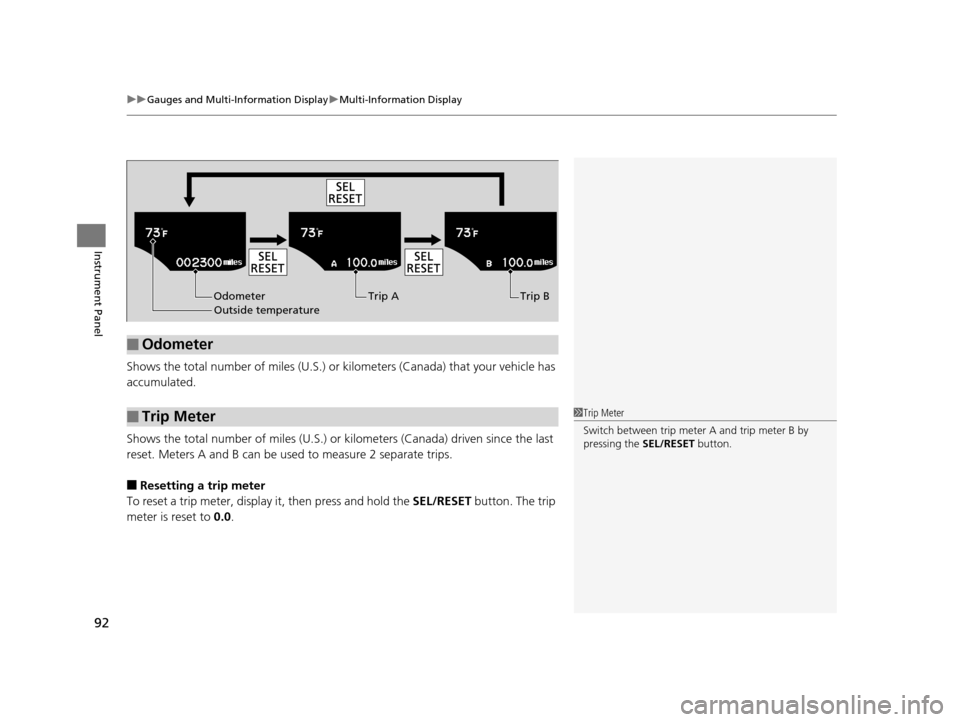
Shows the total number of miles (U.S.) or ki lometers (Canada) that your vehicle has
accumulated.
Shows the total number of miles (U.S.) or kilometers (Canada) driven since the last
reset. Meters A and B can be us ed to measure 2 separate trips.
■Resetting a trip meter
To reset a trip meter, display it, then press and hold the SEL/RESET button. The trip
meter is reset to 0.0.
■Odometer
■Trip Meter
Odometer
Outside temperature Trip A Trip B
1
Trip Meter
Switch between trip meter A and trip meter B by
pressing the SEL/RESET button.
16 CR-Z-31SZT6500.book 92 ページ 2015年9月11日 金曜日 午前11時47分
Page 94 of 409
Continued93
uuGauges and Multi-Information Display uMulti-Information Display
Instrument Panel
Shows the outside temperature in Fahr enheit (U.S.) or Celsius (Canada).
■Adjusting the outside temperature display
Adjust the temperature reading up to ±5 °F or ±3°C if the temperature reading
seems incorrect.
Shows the estimated distance you can travel on the remaining fuel. This distance is
estimated from the fuel economy of your previous trips.
The elapsed time display shows the time during one drive cycle.
Shows the average speed in mph or km/h since Trip A was reset.
■Outside Temperature
■Range
■Elapsed Time
■Average Speed
1 Outside Temperature
The temperature sensor is in the front bumper. Road
heat and exhaust from anothe r vehicle can affect the
temperature reading when your vehicle speed is less
than 19 mph (30 km/h).
It may take several minutes for the display to be
updated after the temperature reading has stabilized.
Use the multi-information display’s customized
features to correct the temperature. 2 Customized Features P. 98
1Elapsed Time
You can change the elapsed time reset criteria.
2 Customized Features P. 98
16 CR-Z-31SZT6500.book 93 ページ 2015年9月11日 金曜日 午前11時47分
Page 95 of 409
uuGauges and Multi-Information Display uMulti-Information Display
94
Instrument Panel
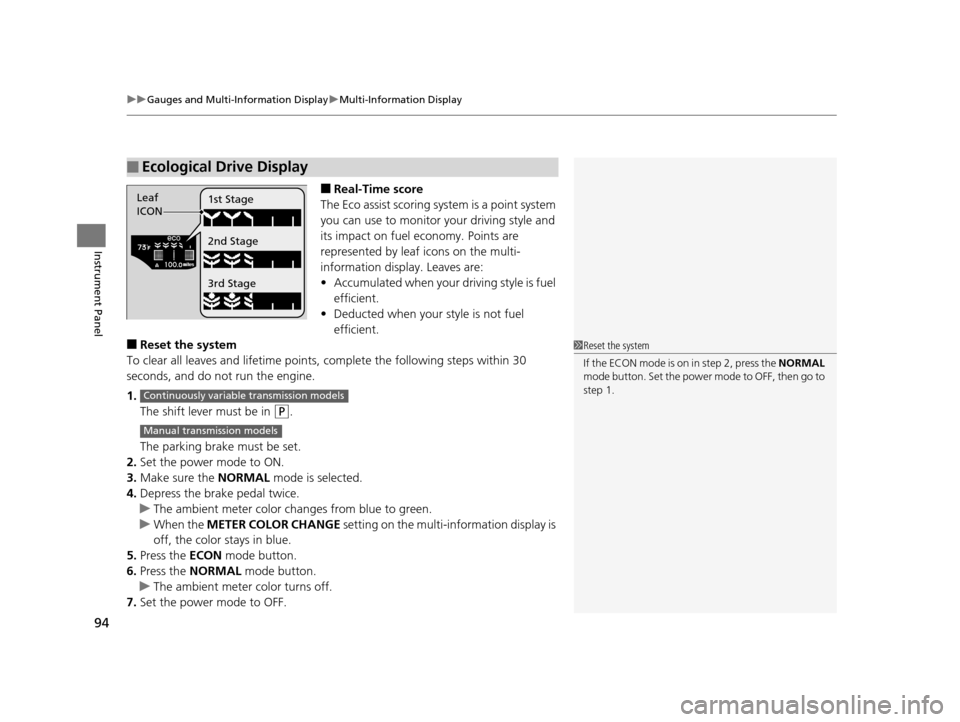
■Real-Time score
The Eco assist scoring system is a point system
you can use to monitor your driving style and
its impact on fuel economy. Points are
represented by leaf icons on the multi-
information displa y. Leaves are:
• Accumulated when your driving style is fuel
efficient.
• Deducted when your style is not fuel
efficient.
■Reset the system
To clear all leaves and lifetime points, complete the following steps within 30
seconds, and do not run the engine.
1. The shift lever must be in
(P.
The parking brake must be set.
2. Set the power mode to ON.
3. Make sure the NORMAL mode is selected.
4. Depress the brake pedal twice.
u The ambient meter color ch anges from blue to green.
u When the METER COLOR CHANGE setting on the multi-information display is
off, the color stays in blue.
5. Press the ECON mode button.
6. Press the NORMAL mode button.
u The ambient meter color turns off.
7. Set the power mode to OFF.
■Ecological Drive Display
Leaf
ICON 1st Stage
2nd Stage
3rd Stage
1
Reset the system
If the ECON mode is on in step 2, press the NORMAL
mode button. Set the power mode to OFF, then go to
step 1.
Continuously variable transmission models
Manual transmission models
16 CR-Z-31SZT6500.book 94 ページ 2015年9月11日 金曜日 午前11時47分
Page 96 of 409
Continued95
uuGauges and Multi-Information Display uMulti-Information Display
Instrument Panel
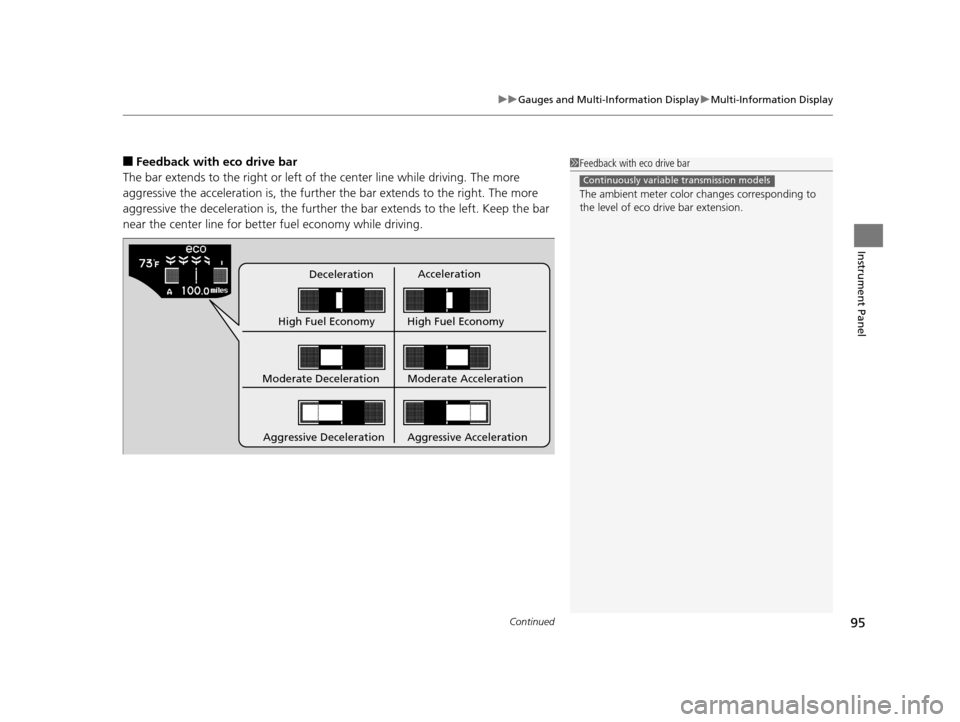
■Feedback with eco drive bar
The bar extends to the right or left of the center line while driving. The more
aggressive the acceleration is, the further the bar extends to the right. The more
aggressive the deceleration is, the further the bar extends to the left. Keep the bar
near the center line for bette r fuel economy while driving.
DecelerationAcceleration
High Fuel Economy High Fuel Economy
Moderate Deceleration
Aggressive Deceleration Moderate Acceleration
Aggressive Acceleration
1 Feedback with eco drive bar
The ambient meter color changes corresponding to
the level of eco drive bar extension.
Continuously variable transmission models
16 CR-Z-31SZT6500.book 95 ページ 2015年9月11日 金曜日 午前11時47分
Page 97 of 409
uuGauges and Multi-Information Display uMulti-Information Display
96
Instrument Panel
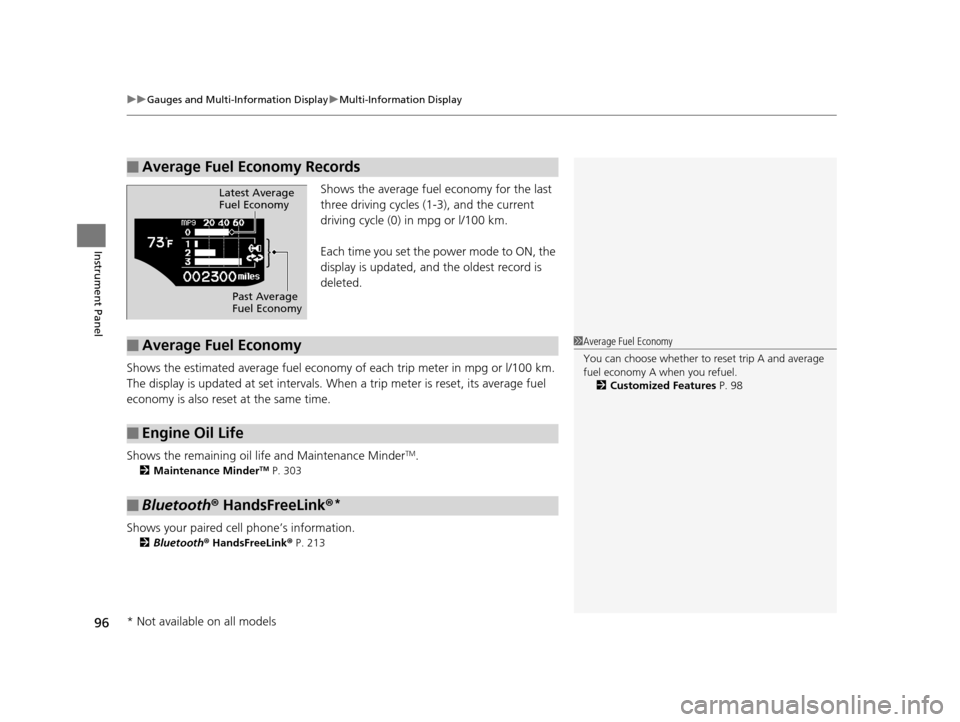
Shows the average fuel economy for the last
three driving cycles (1-3), and the current
driving cycle (0) in mpg or l/100 km.
Each time you set the power mode to ON, the
display is updated, and the oldest record is
deleted.
Shows the estimated average fuel economy of each trip meter in mpg or l/100 km.
The display is updated at set intervals. Wh en a trip meter is reset, its average fuel
economy is also reset at the same time.
Shows the remaining oil life and Maintenance Minder
TM.
2 Maintenance MinderTM P. 303
Shows your paired cell phone’s information.
2Bluetooth® HandsFreeLink ® P. 213
■Average Fuel Economy Records
Latest Average
Fuel Economy
Past Average
Fuel Economy
■Average Fuel Economy
■Engine Oil Life
■Bluetooth® HandsFreeLink ®*
1Average Fuel Economy
You can choose whether to reset trip A and average
fuel economy A when you refuel.
2 Customized Features P. 98
* Not available on all models
16 CR-Z-31SZT6500.book 96 ページ 2015年9月11日 金曜日 午前11時47分
Page 98 of 409
Continued97
uuGauges and Multi-Information Display uMulti-Information Display
Instrument Panel
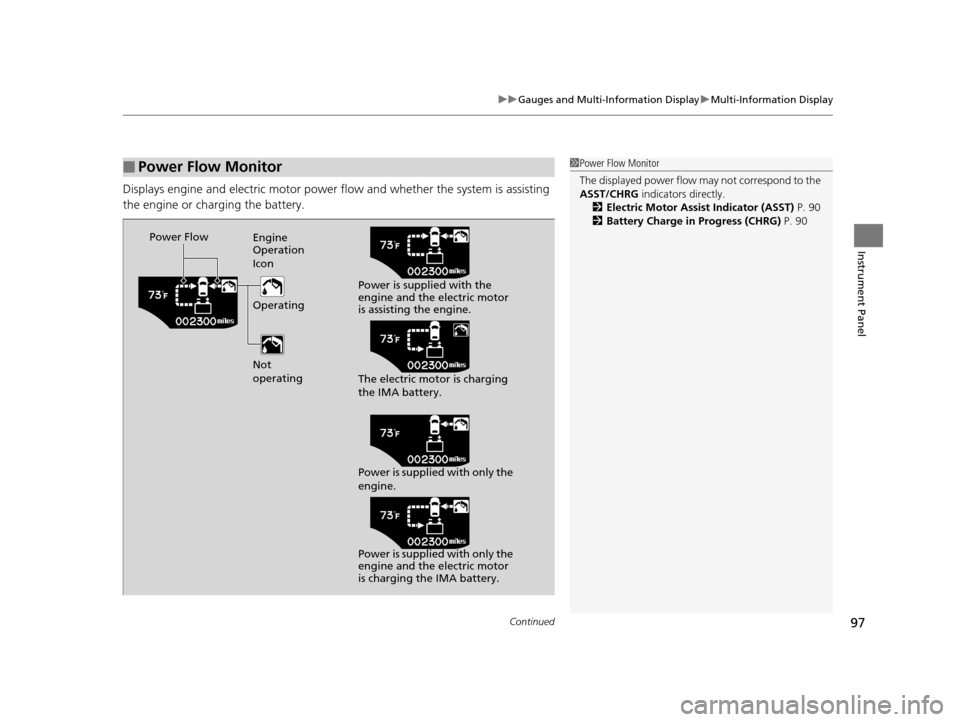
Displays engine and electric motor power flow and whether the system is assisting
the engine or charging the battery.
■Power Flow Monitor1Power Flow Monitor
The displayed power flow may not correspond to the
ASST/CHRG indicators directly.
2 Electric Motor Assist Indicator (ASST) P. 90
2 Battery Charge in Progress (CHRG) P. 90
Power Flow
Engine
Operation
Icon
Operating
Not
operating Power is supplied with the
engine and the electric motor
is assisting the engine.
The electric motor is charging
the IMA battery.
Power is supplied with only the
engine.
Power is supplied with only the
engine and the electric motor
is charging the IMA battery.
16 CR-Z-31SZT6500.book 97 ページ 2015年9月11日 金曜日 午前11時47分
Page 99 of 409
uuGauges and Multi-Information Display uMulti-Information Display
98
Instrument Panel
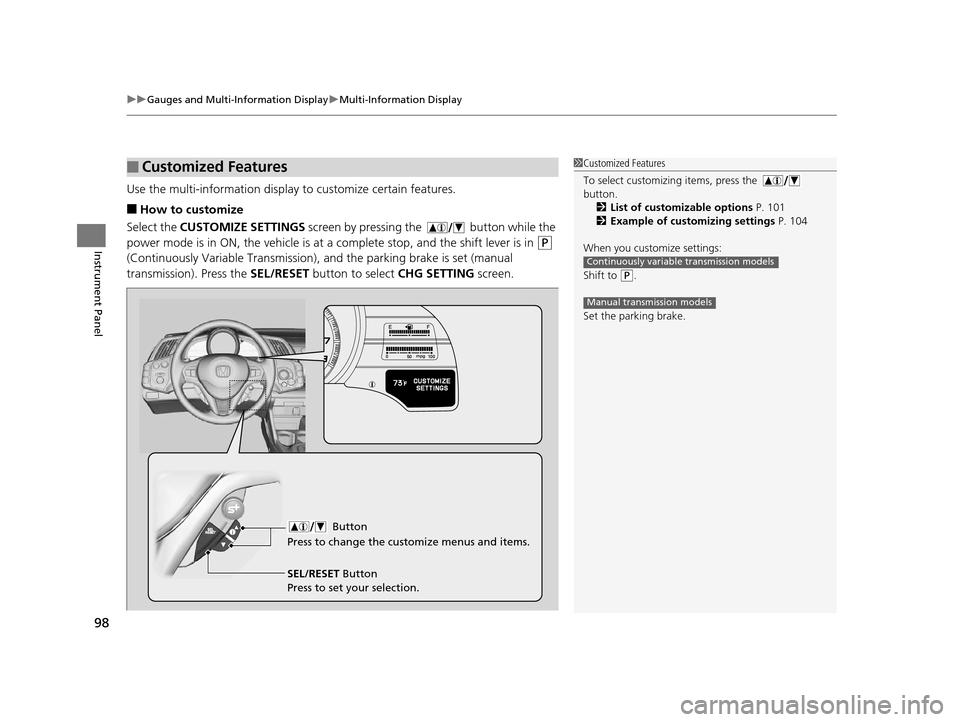
Use the multi-information display to customize certain features.
■How to customize
Select the CUSTOMIZE SETTINGS screen by pressing the button while the
power mode is in ON, the vehicle is at a complete stop, and the shift lever is in
(P
(Continuously Variable Transmission), an d the parking brake is set (manual
transmission). Press the SEL/RESET button to select CHG SETTING screen.
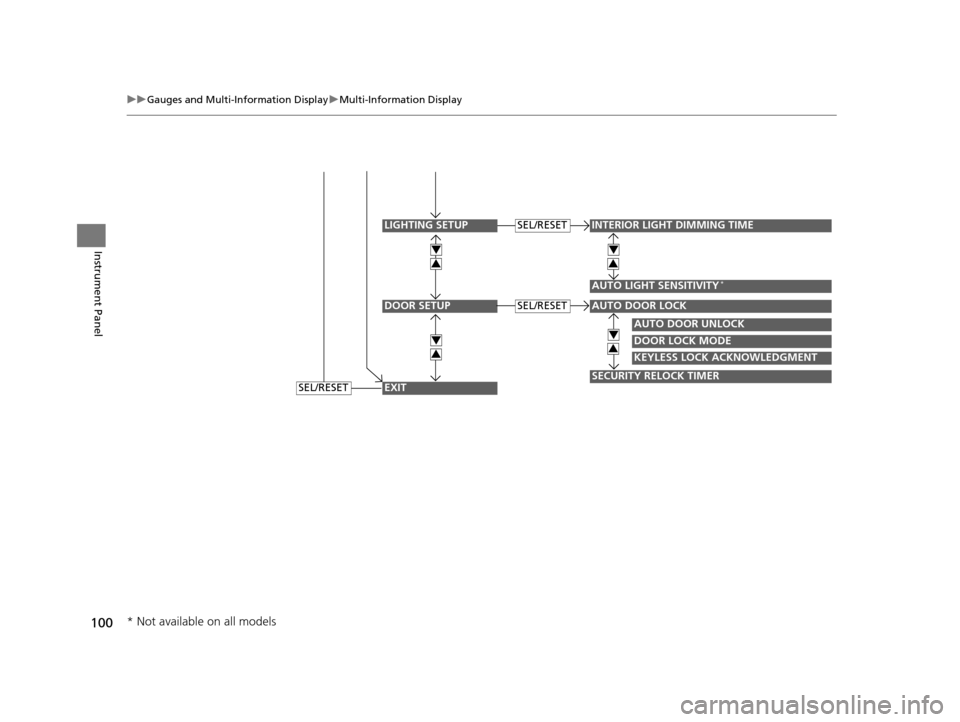
■Customized Features1Customized Features
To select customizing items, press the
button.
2 List of customizable options P. 101
2 Example of customizing settings P. 104
When you customize settings:
Shift to
( P.
Set the parking brake.
Continuously variable transmission models
Manual transmission models
Button
Press to change the cu stomize menus and items.
SEL/RESET Button
Press to set your selection.
16 CR-Z-31SZT6500.book 98 ページ 2015年9月11日 金曜日 午前11時47分
Page 100 of 409
99
uuGauges and Multi-Information Display uMulti-Information Display
Continued
Instrument Panel
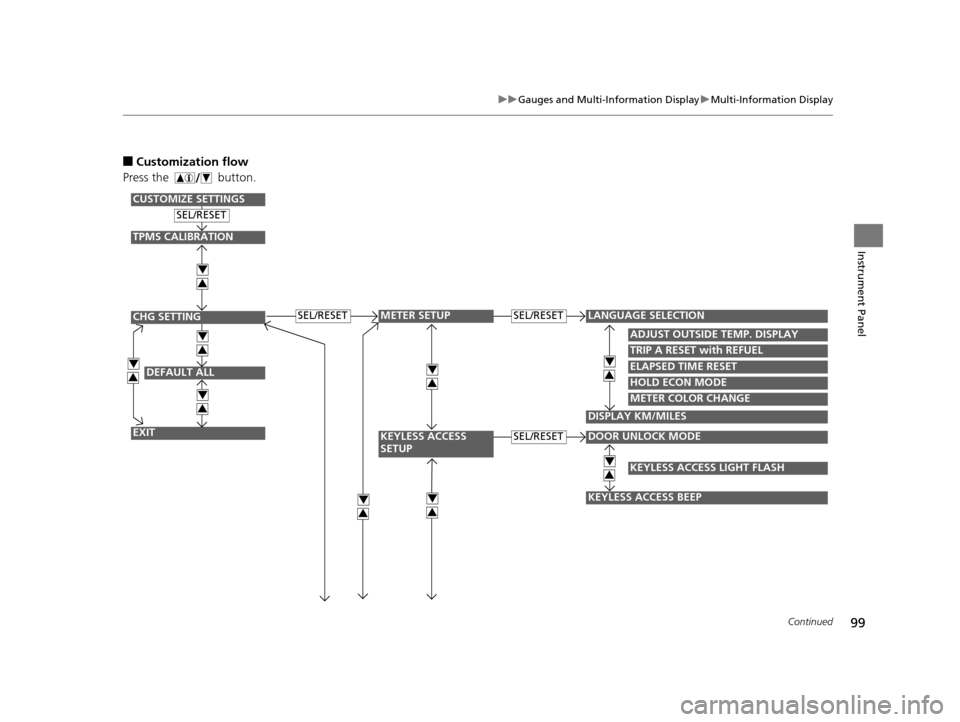
■Customization flow
Press the button.
DEFAULT ALL
EXIT
ADJUST OUTSIDE TEMP. DISPLAY
TRIP A RESET with REFUEL
ELAPSED TIME RESET
DOOR UNLOCK MODE
KEYLESS ACCESS BEEP
LANGUAGE SELECTIONSEL/RESET
SEL/RESET
SEL/RESET
SEL/RESET
METER SETUP
KEYLESS ACCESS
SETUP
CHG SETTING
CUSTOMIZE SETTINGS
HOLD ECON MODE
METER COLOR CHANGE
DISPLAY KM/MILES
4
3
4
3
4
3
4
3
4
3
4
3
TPMS CALIBRATION
4
3
KEYLESS ACCESS LIGHT FLASH
4
34
3
16 CR-Z-31SZT6500.book 99 ページ 2015年9月11日 金曜日 午前11時47分
Page 101 of 409
100
uuGauges and Multi-Information Display uMulti-Information Display
Instrument Panel
DOOR SETUP
INTERIOR LIGHT DIMMING TIME
AUTO LIGHT SENSITIVITY*
AUTO DOOR UNLOCK
DOOR LOCK MODE
KEYLESS LOCK ACKNOWLEDGMENT
SECURITY RELOCK TIMER
AUTO DOOR LOCK
SEL/RESET
SEL/RESET
LIGHTING SETUP
EXIT
4
3
4
3
4
3
4
3
SEL/RESET
* Not available on all models
16 CR-Z-31SZT6500.book 100 ページ 2015年9月11日 金曜日 午前11時47分
Page 102 of 409
101
uuGauges and Multi-Information Display uMulti-Information Display
Continued
Instrument Panel
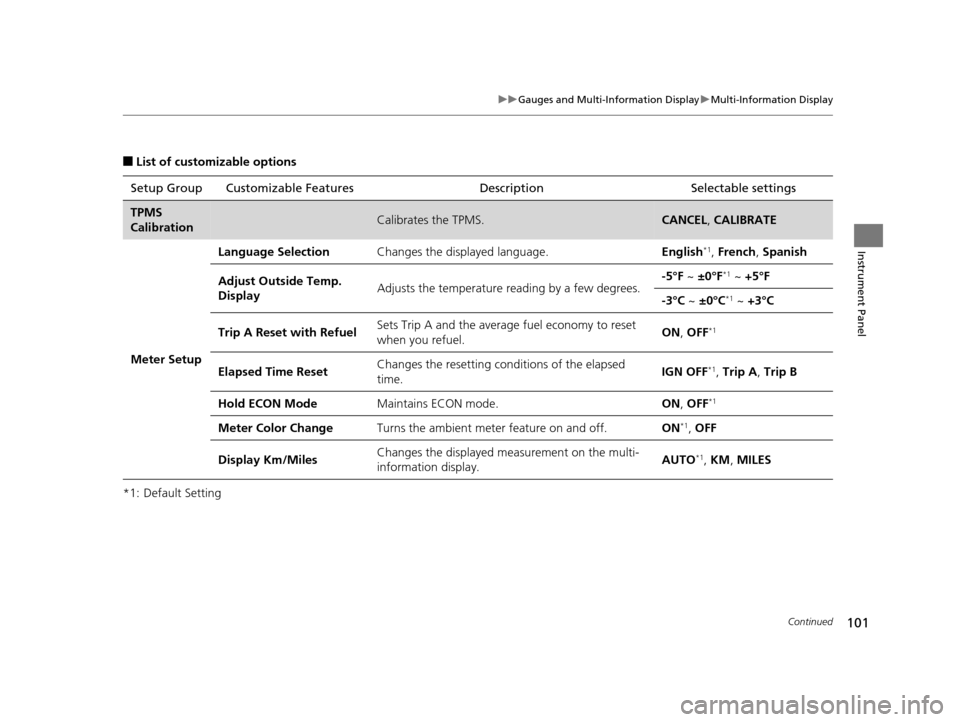
■List of customizable options
*1: Default Setting Setup Group Customizable Features
Description Selectable settings
TPMS
CalibrationCalibrates the TPMS.CANCEL, CALIBRATE
Meter Setup
Language SelectionChanges the displayed language.English*1, French , Spanish
Adjust Outside Temp.
DisplayAdjusts the temperature r eading by a few degrees.-5°F ~ ±0°F*1 ~ +5°F
-3°C ~ ±0°C*1 ~ +3°C
Trip A Reset with RefuelSets Trip A and the average fuel economy to reset
when you refuel.ON , OFF*1
Elapsed Time ResetChanges the resetting conditions of the elapsed
time.IGN OFF*1, Trip A , Trip B
Hold ECON ModeMaintains ECON mode.ON , OFF*1
Meter Color ChangeTurns the ambient meter feature on and off.ON*1, OFF
Display Km/MilesChanges the displayed m easurement on the multi-
information display.AUTO*1, KM , MILES
16 CR-Z-31SZT6500.book 101 ページ 2015年9月11日 金曜日 午前11時47分