mirror HONDA CROSSTOUR 2012 1.G User Guide
[x] Cancel search | Manufacturer: HONDA, Model Year: 2012, Model line: CROSSTOUR, Model: HONDA CROSSTOUR 2012 1.GPages: 435, PDF Size: 10.13 MB
Page 109 of 435
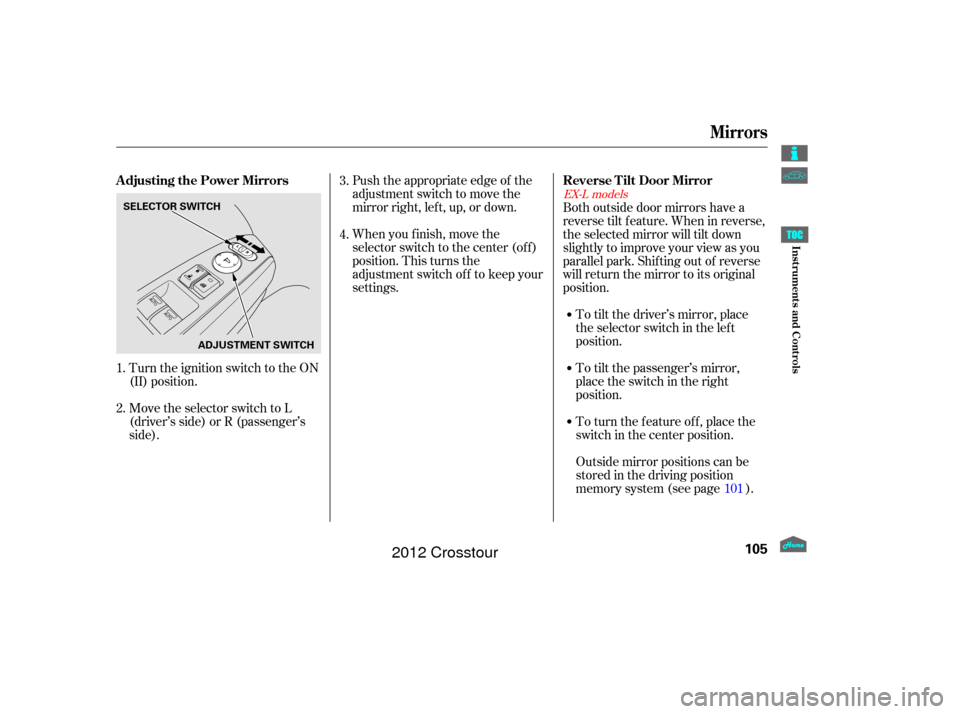
Turn the ignition switch to the ON
(II) position.
Move the selector switch to L
(driver’s side) or R (passenger’s
side).Push the appropriate edge of the
adjustment switch to move the
mirrorright,left,up,ordown.
When you f inish, move the
selector switch to the center (off)
position. This turns the
adjustment switch of f to keep your
settings.
To turn the feature off, place the
switch in the center position. To tilt the passenger’s mirror,
place the switch in the right
position. To tilt the driver’s mirror, place
the selector switch in the left
position.
Both outside door mirrors have a
reverse tilt f eature. When in reverse,
the selected mirror will tilt down
slightly to improve your view as you
parallel park. Shif ting out of reverse
will return the mirror to its original
position.
Outside mirror positions can be
stored in the driving position
memory system (see page ).
1. 3.
2. 4.
101
EX-L models
Adjusting the Power Mirrors Reverse Tilt Door Mirror
Mirrors
105
SELECTOR SWITCH
ADJUSTMENT SWITCH
Inst rument s and Cont rols
2012 Crosstour
Page 110 of 435
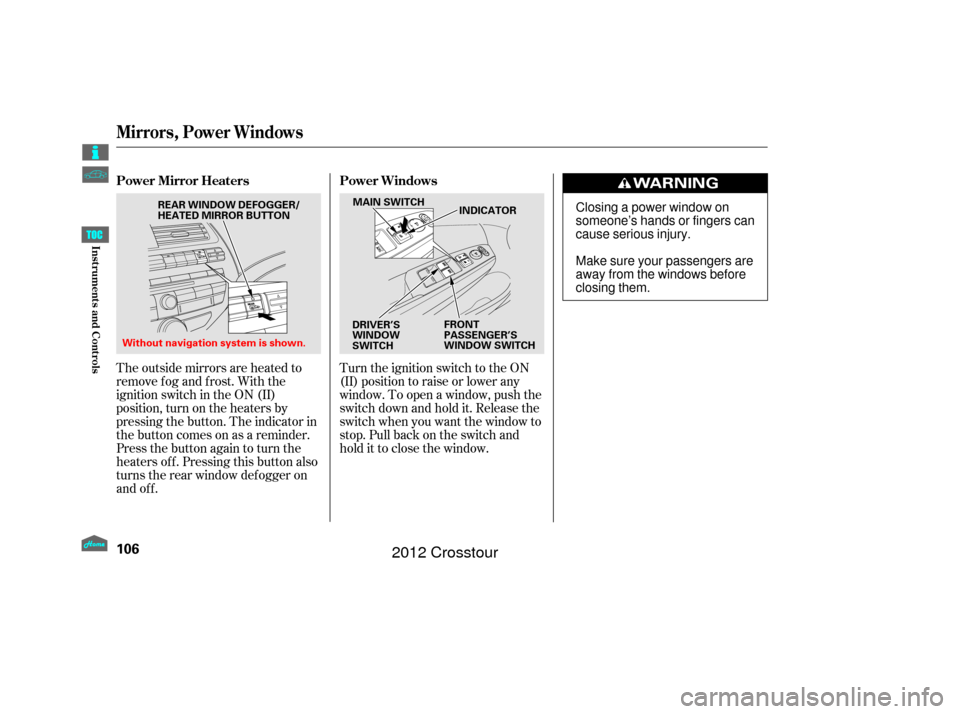
Turn the ignition switch to the ON
(II) position to raise or lower any
window. To open a window, push the
switchdownandholdit.Releasethe
switch when you want the window to
stop. Pull back on the switch and
hold it to close the window.
The outside mirrors are heated to
remove fog and frost. With the
ignition switch in the ON (II)
position, turn on the heaters by
pressing the button. The indicator in
the button comes on as a reminder.
Press the button again to turn the
heaters off. Pressing this button also
turns the rear window def ogger on
and off. PowerMirrorHeaters
PowerWindows
Mirrors, Power Windows
106
MAIN SWITCH
FRONT
PASSENGER’S
WINDOW SWITCHINDICATOR
DRIVER’S
WINDOW
SWITCH
Without navigation system is shown. REAR WINDOW DEFOGGER/
HEATED MIRROR BUTTONClosing a power window on
someone’s hands or fingers can
cause serious injury.
Make sure your passengers are
away from the windows before
closing them.
Inst rument s and Cont rols
2012 Crosstour
Page 117 of 435
Interior Convenience Items
113
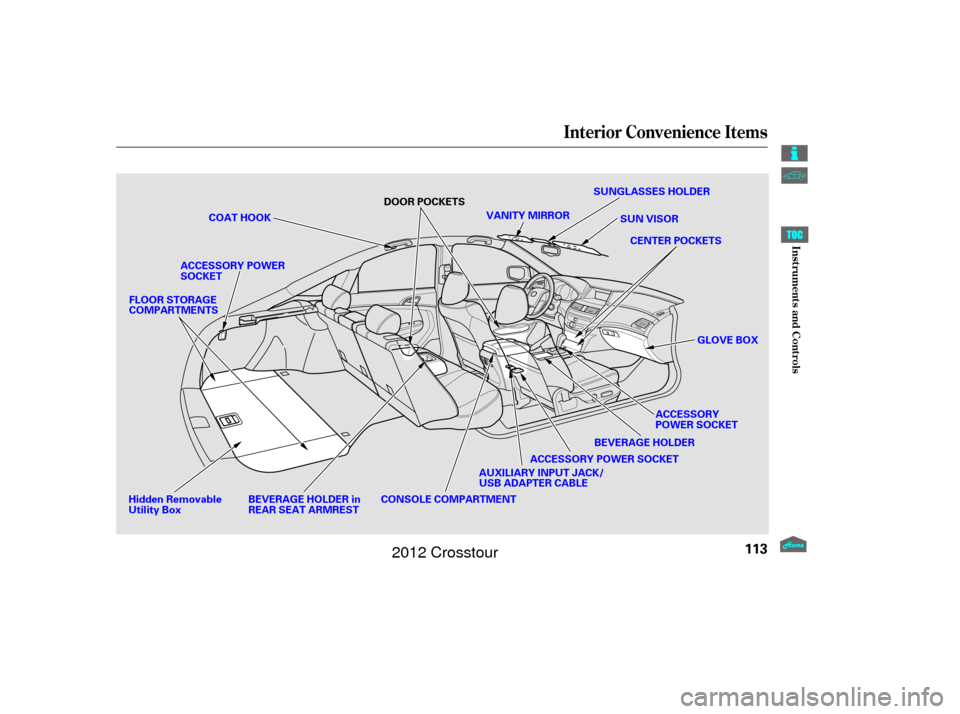
SUNGLASSES HOLDER
VANITY MIRROR SUN VISOR
CENTER POCKETS
COAT HOOK
BEVERAGE HOLDER in
REAR SEAT ARMREST BEVERAGE HOLDER
CONSOLE COMPARTMENT DOOR POCKETS
GLOVE BOX
ACCESSORY POWER SOCKET
FLOOR STORAGE
COMPARTMENTS
ACCESSORY
POWER SOCKET
AUXILIARY INPUT JACK/
USB ADAPTER CABLE
ACCESSORY POWER
SOCKET
Hidden Removable
Utility Box
Inst rument s and Cont rols
2012 Crosstour
Page 121 of 435
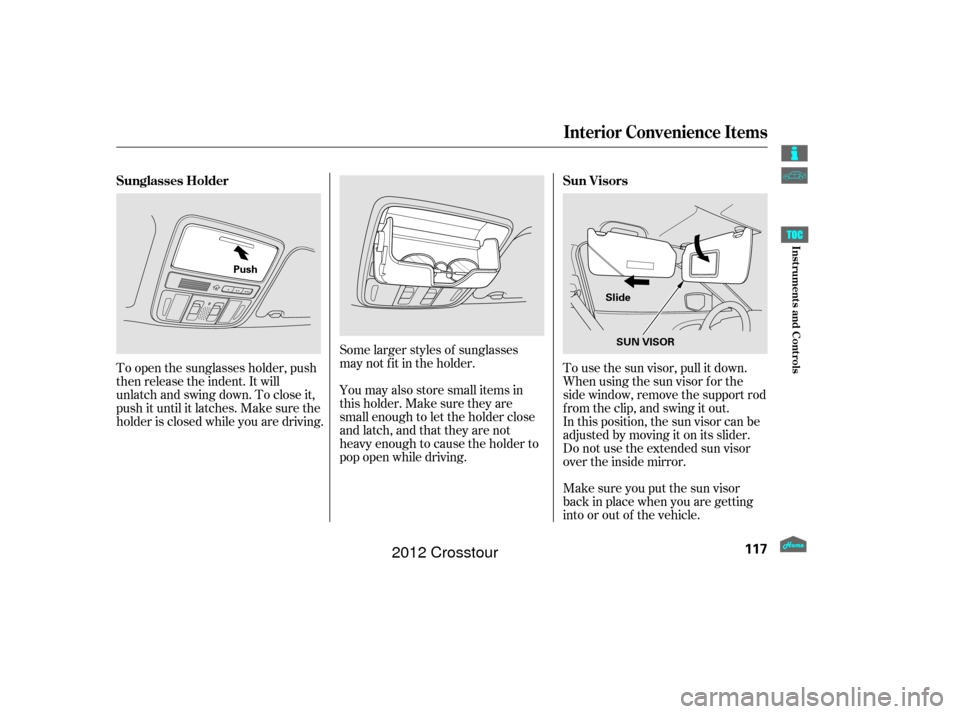
Make sure you put the sun visor
back in place when you are getting
into or out of the vehicle. In this position, the sun visor can be
adjusted by moving it on its slider.
Do not use the extended sun visor
over the inside mirror. To use the sun visor, pull it down.
Whenusingthesunvisorforthe
side window, remove the support rod
f rom the clip, and swing it out.
Some larger styles of sunglasses
may not f it in the holder.
You may also store small items in
this holder. Make sure they are
small enough to let the holder close
and latch, and that they are not
heavy enough to cause the holder to
pop open while driving.
To open the sunglasses holder, push
then release the indent. It will
unlatch and swing down. To close it,
push it until it latches. Make sure the
holder is closed while you are driving. Sun Visors
Sunglasses Holder
Interior Convenience Items
117
SUN VISOR
Slide
Push
Inst rument s and Cont rols
2012 Crosstour
Page 124 of 435
Tousethevanitymirrorontheback
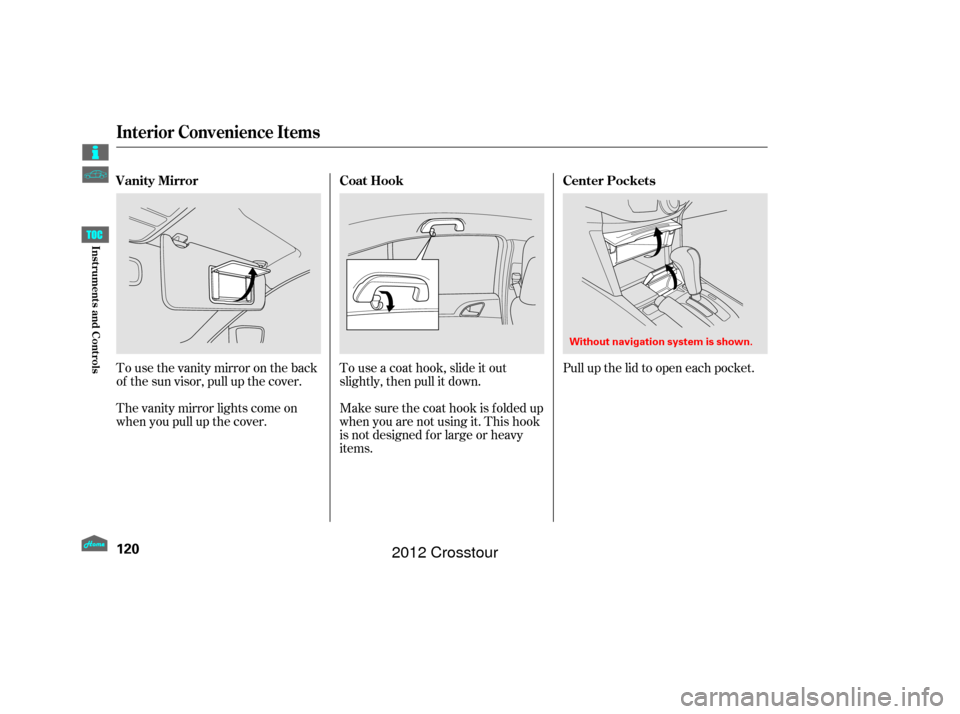
of the sun visor, pull up the cover.
The vanity mirror lights come on
when you pull up the cover.Touseacoathook,slideitout
slightly, then pull it down.
Make sure the coat hook is f olded up
when you are not using it. This hook
is not designed f or large or heavy
items.Pull up the lid to open each pocket.
Vanity Mirror
Coat HookCenter Pockets
Interior Convenience Items
120
Without navigation system is shown.
Inst rument s and Cont rols
2012 Crosstour
Page 129 of 435
The security system helps to dis-
courage vandalism and thef t of your
vehicle. Your vehicle has an anti-theft audio
system that requires a code number
to enable it. The standard audio system has
many f eatures. This section
describes those f eatures and how to
use them. The climate control system in your
vehicle provides a comfortable
driving environment in all weather
conditions................
Climate Control System . 126
................................
Audio System .134
................................
Audio System .135
..........
Playing the FM/AM Radio . 136
................
Playing the XM
Radio . 143
.................................
Playing Discs .149
...
Disc Changer Error Messages . 158
............................
PlayinganiPod
. 159
.................
iPod
Error Messages . 167
Playing a USB Flash Memory ........................................
Device .168
USB Flash Memory Device ........................
Error Messages .176
................................
Audio System .177
..........
Playing the FM/AM Radio . 178
................
Playing the XM
Radio . 190
.................................
Playing Discs .197
...
Disc Changer Error Messages . 208
............................
PlayinganiPod
. 209
.................
i
Pod
Error Messages . 218
Playing a USB Flash Memory ........................................
Device .219 USB Flash Memory Device
........................
Error Messages .228
............
FM/AM Radio Reception . 229
..................
Protecting Your Discs . 231
................
Remote Audio Controls . 234
......................
Auxiliary Input Jack .236
.................
Radio Thef t Protection . 237
..........................
Setting the Clock .238
............................
Security System .241
.........................................
Compass .242
...............................
Cruise Control .246
HomeLink
Universal ................................
Transceiver .249
........
HandsFreeLink. 253
...
Rearview Camera and Monitor . 277
Rearview Mirror with Rearview .........................
Camera Display .278
Models without navigation system
Models with navigation system Bluetooth
Features
Features
125
2012 Crosstour
Page 130 of 435
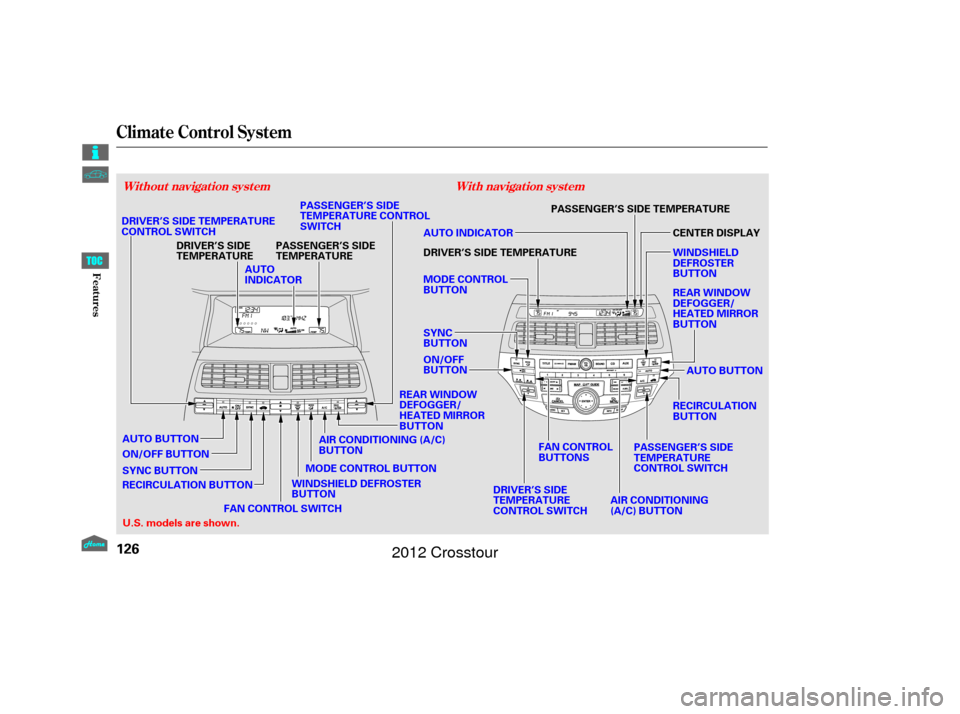
Climate Control System
With navigation system
Without navigation system
126
AUTO
INDICATOR
DRIVER’S SIDE
TEMPERATURE
WINDSHIELD DEFROSTER
BUTTON
DRIVER’S SIDE TEMPERATURE
CONTROL SWITCH
MODE CONTROL BUTTON
PASSENGER’S SIDE
TEMPERATURE
ON/OFF BUTTON
SYNC BUTTON PASSENGER’S SIDE
TEMPERATURE CONTROL
SWITCH
MODE CONTROL
BUTTON
SYNC
BUTTON
U.S. models are shown. PASSENGER’S SIDE TEMPERATURE
AUTO BUTTON
PASSENGER’S SIDE
TEMPERATURE
CONTROL SWITCH
DRIVER’S SIDE
TEMPERATURE
CONTROL SWITCH AIR CONDITIONING
(A/C) BUTTON
ON/OFF
BUTTON DRIVER’S SIDE TEMPERATURE AUTO INDICATOR
REAR WINDOW
DEFOGGER/
HEATED MIRROR
BUTTON RECIRCULATION
BUTTON REAR WINDOW
DEFOGGER/
HEATED MIRROR
BUTTON CENTER DISPLAY
WINDSHIELD
DEFROSTER
BUTTON
FAN CONTROL
BUTTONS
AIR CONDITIONING (A/C)
BUTTON
RECIRCULATION BUTTON FAN CONTROL SWITCH
AUTO BUTTON
Features
2012 Crosstour
Page 134 of 435
Pushing this button also turns the
power mirror heaters on and of f .
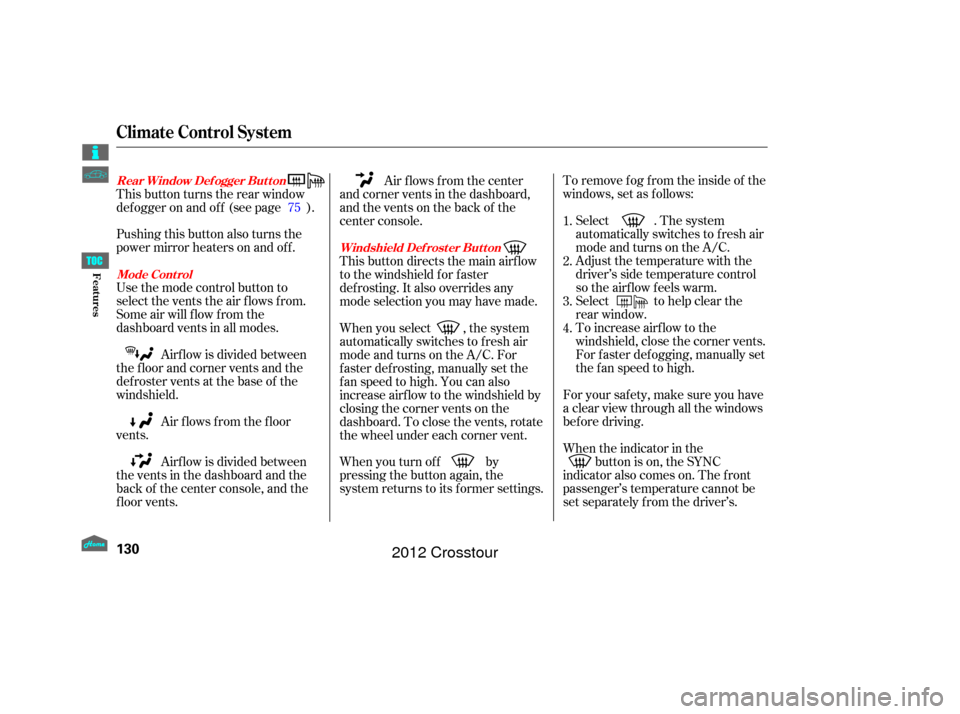
Use the mode control button to
select the vents the air flows from.
Some air will flow from the
dashboard vents in all modes.To remove f og f rom the inside of the
windows, set as follows:
Airf low is divided between
the f loor and corner vents and the
defroster vents at the base of the
windshield.
Air f lows f rom the f loor
vents. Select . The system
automatically switches to f resh air
mode and turns on the A/C.
Adjust the temperature with the
driver’s side temperature control
so the airf low f eels warm.
Select to help clear the
rear window.
To increase airf low to the
windshield, close the corner vents.
For f aster def ogging, manually set
the fan speed to high.
For your saf ety, make sure you have
a clear view through all the windows
bef ore driving.
When the indicator in the button is on, the SYNC
indicator also comes on. The f ront
passenger’s temperature cannot be
set separately f rom the driver’s.
Airf low is divided between
the vents in the dashboard and the
back of the center console, and the
f loor vents. Air flows from the center
and corner vents in the dashboard,
and the vents on the back of the
center console.
This button directs the main airflow
to the windshield for faster
def rosting. It also overrides any
mode selection you may have made.
When you select , the system
automatically switches to f resh air
mode and turns on the A/C. For
f aster def rosting, manually set the
fanspeedtohigh.Youcanalso
increase airf low to the windshield by
closing the corner vents on the
dashboard. To close the vents, rotate
the wheel under each corner vent.
When you turn of f by
pressing the button again, the
system returns to its former settings.
This button turns the rear window
def ogger on and of f (see page ).
1.
2.
3.
4.
75
Rear Window Def ogger But t on
Mode Cont rol Windshield Def rost er But t on
Climate Control System
130
Features
2012 Crosstour
Page 282 of 435
If equipped
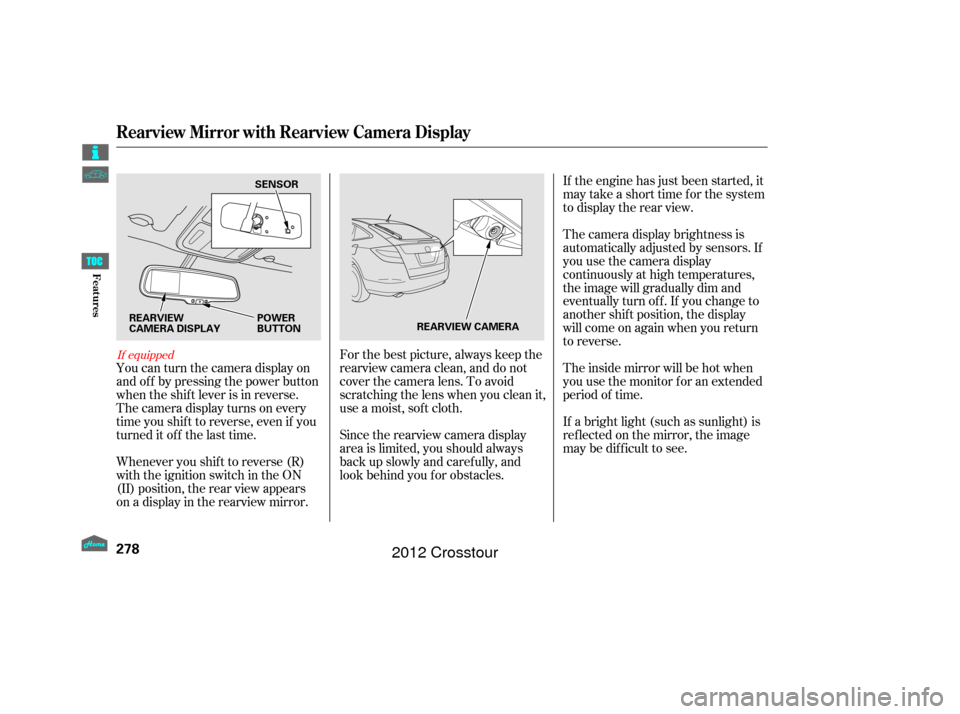
You can turn the camera display on
and of f by pressing the power button
when the shif t lever is in reverse.
The camera display turns on every
time you shif t to reverse, even if you
turned it of f the last time.
Whenever you shif t to reverse (R)
with the ignition switch in the ON
(II) position, the rear view appears
on a display in the rearview mirror.For the best picture, always keep the
rearview camera clean, and do not
cover the camera lens. To avoid
scratching the lens when you clean it,
use a moist, sof t cloth.
Since the rearview camera display
area is limited, you should always
back up slowly and caref ully, and
look behind you f or obstacles.If the engine has just been started, it
maytakeashorttimeforthesystem
to display the rear view.
The camera display brightness is
automatically adjusted by sensors. If
you use the camera display
continuously at high temperatures,
the image will gradually dim and
eventually turn of f . If you change to
another shif t position, the display
will come on again when you return
to reverse.
The inside mirror will be hot when
you use the monitor f or an extended
period of time.
If a bright light (such as sunlight) is
ref lected on the mirror, the image
maybedifficulttosee.
Rearview Mirror with Rearview Camera Display
278
SENSOR
REARVIEW
CAMERA DISPLAY POWER
BUTTON
REARVIEW CAMERA
Features
2012 Crosstour
Page 283 of 435
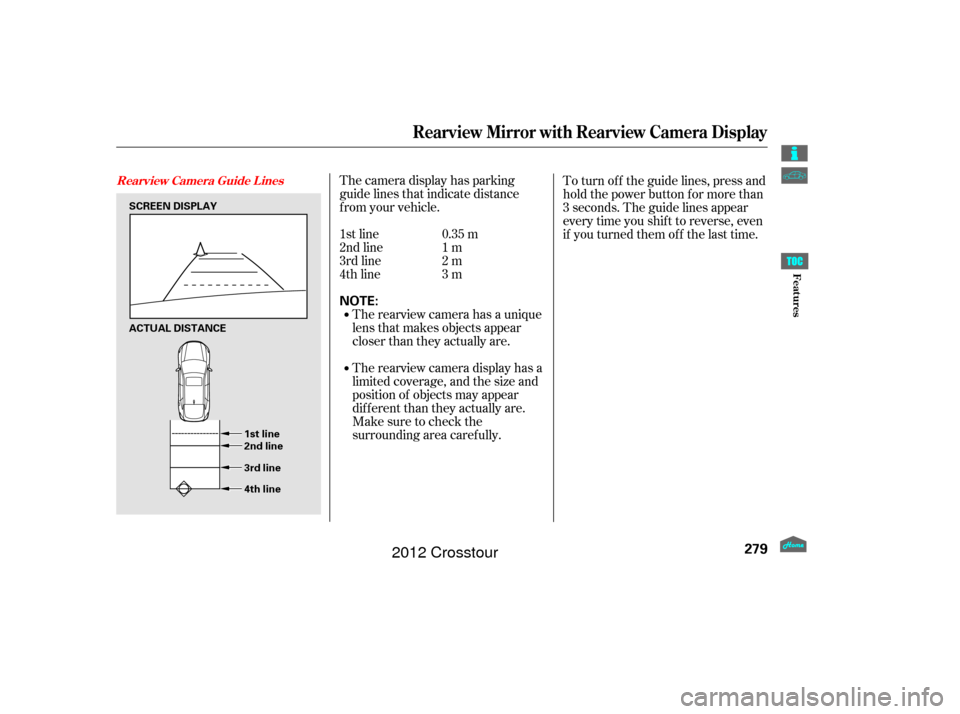
The camera display has parking
guide lines that indicate distance
f rom your vehicle.The rearview camera has a unique
lens that makes objects appear
closer than they actually are.
The rearview camera display has a
limited coverage, and the size and
position of objects may appear
different than they actually are.
Make sure to check the
surrounding area caref ully.
1st line
2nd line
3rd line
4th line
0.35 m
1m
2m
3m To turn of f the guide lines, press and
hold the power button for more than
3 seconds. The guide lines appear
every time you shif t to reverse, even
if you turned them of f the last time.
Rearview Mirror with Rearview Camera Display
Rearview Camera Guide L ines
279
NOTE:
SCREEN DISPLAY
ACTUAL DISTANCE
1st line
2nd line
3rd line
4th line
Features
2012 Crosstour