display HONDA CROSSTOUR 2013 1.G Owners Manual
[x] Cancel search | Manufacturer: HONDA, Model Year: 2013, Model line: CROSSTOUR, Model: HONDA CROSSTOUR 2013 1.GPages: 573, PDF Size: 25.21 MB
Page 310 of 573
309
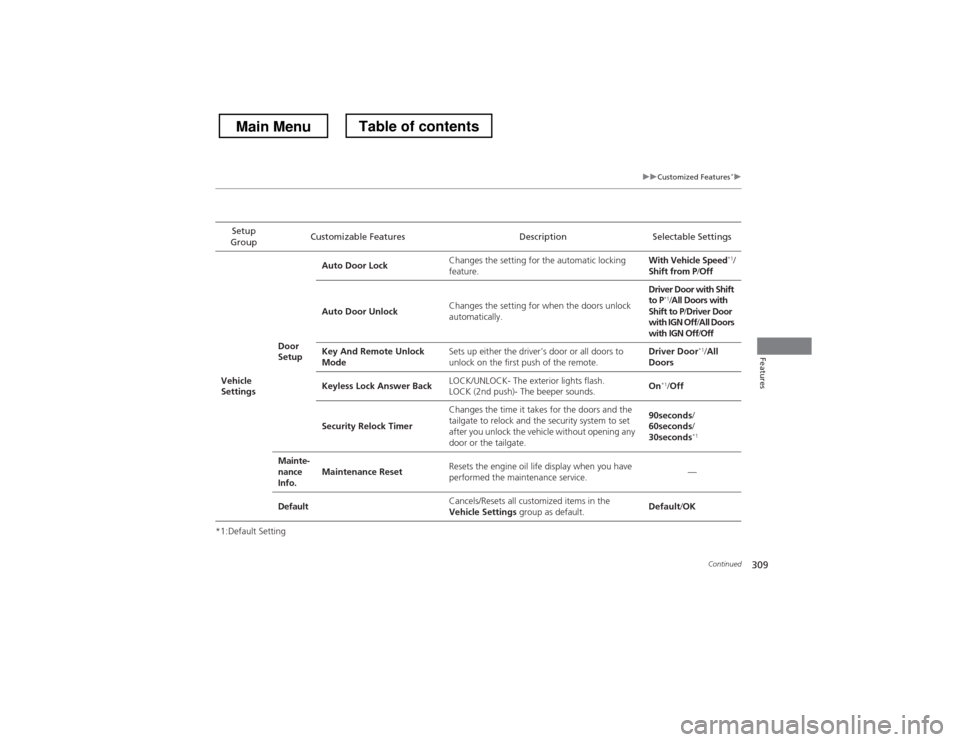
uuCustomized Features*u
Continued
Features
*1:Default SettingSetup
Group Customizable Features Description Selectable Settings
Vehicle
Settings Door
SetupAuto Door Lock
Changes the setting for the automatic locking
feature. With Vehicle Speed
*1
/
Shift from P /Off
Auto Door Unlock Changes the setting for when the doors unlock
automatically. Driver Door with Shift to P
*1
/All Doors with
Shift to P /Driver Door
with IGN Off /All Doors
with IGN Off /Off
Key And Remote Unlock
Mode Sets up either the driver’s door or all doors to
unlock on the first push of the remote. Driver Door
*1
/All
Doors
Keyless Lock Answer Back LOCK/UNLOCK- The exterior lights flash.
LOCK (2nd push)- The beeper sounds. On
*1
/Off
Security Relock Timer Changes the time it takes for the doors and the
tailgate to relock and the security system to set
after you unlock the vehicle without opening any
door or the tailgate. 90seconds
/
60seconds /
30seconds *1
Mainte-
nance
Info. Maintenance Reset
Resets the engine oil life display when you have
performed the maintenance service. —
Default Cancels/Resets all customized items in the
Vehicle Settings
group as default. Default
/OK
Main MenuTable of contents
Page 311 of 573
310
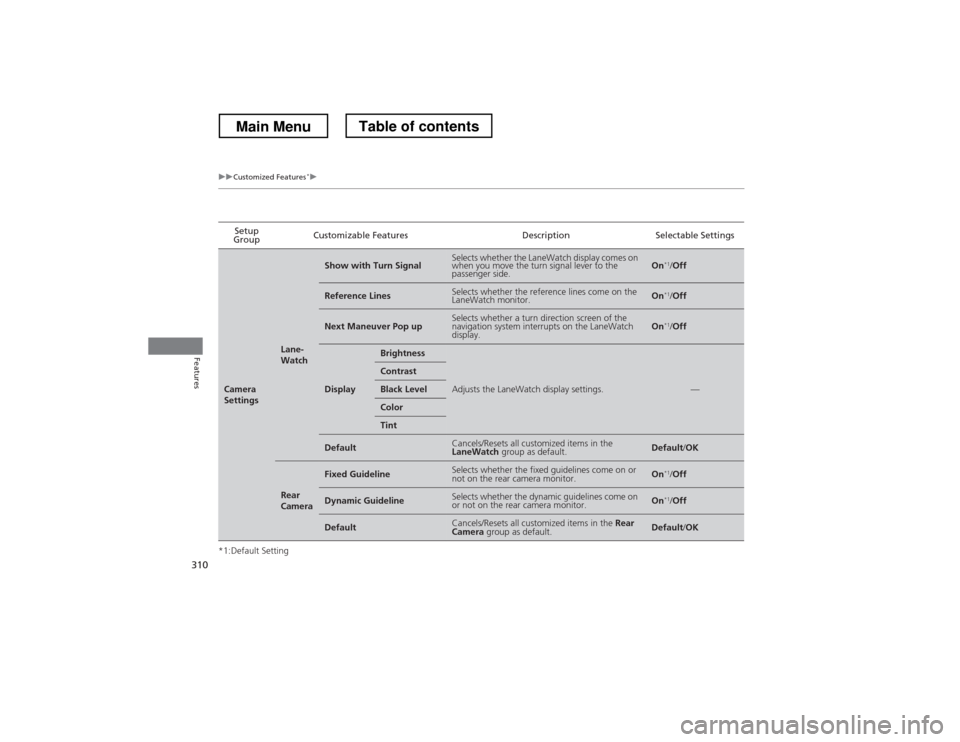
uuCustomized Features*u
Features
*1:Default SettingSetup
Group Customizable Features Description Selectable Settings
Camera
Settings
Lane-
Watch
Show with Turn SignalSelects whether the LaneWatch display comes on
when you move the turn signal lever to the
passenger side.On
*1
/Off
Reference LinesSelects whether the reference lines come on the
LaneWatch monitor.On *1
/Off
Next Maneuver Pop upSelects whether a turn direction screen of the
navigation system interrupts on the LaneWatch
display.On *1
/Off
Display
Brightness
Adjusts the LaneWatch display settings.—
Contrast
Black Level
Color
Tint
DefaultCancels/Resets all customized items in the LaneWatch group as default.Default/OK
Rear
Camera
Fixed GuidelineSelects whether the fixed guidelines come on or
not on the rear camera monitor.On *1
/Off
Dynamic GuidelineSelects whether the dynamic guidelines come on
or not on the rear camera monitor.On *1
/Off
DefaultCancels/Resets all customized items in the Rear
Camera group as default.Default/OK
Main MenuTable of contents
Page 312 of 573
311
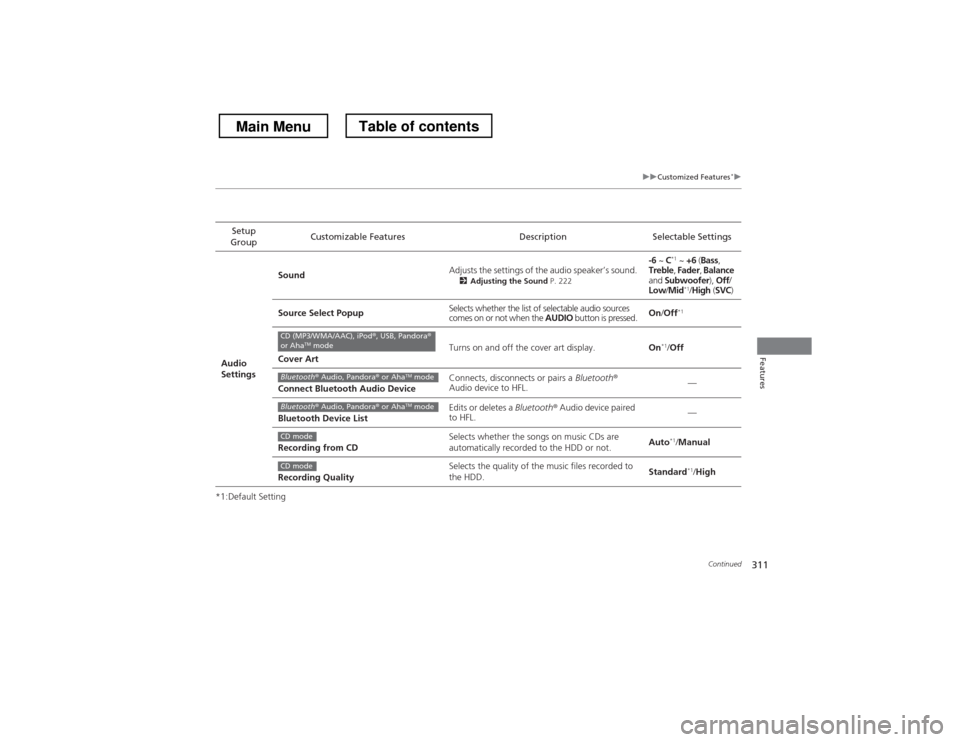
uuCustomized Features*u
Continued
Features
*1:Default SettingSetup
Group Customizable Features Description Selectable Settings
Audio
Settings Sound
Adjusts the settings of the audio speaker’s sound.
2Adjusting the Sound P. 222 -6
~ C*1
~ +6 (Bass ,
Treble , Fader , Balance
and Subwoofer ), Off /
Low /Mid *1
/High (SVC )
Source Select Popup Selects whether the list of selectable audio sources
comes on or not when the
AUDIO button is pressed. On
/Off *1
Cover Art Turns on and off the cover art display.
On*1
/Off
Connect Bluetooth Audio Device Connects, disconnects or pairs a
Bluetooth®
Audio device to HFL. —
Bluetooth Device List Edits or deletes a
Bluetooth® Audio device paired
to HFL. —
Recording from CD Selects whether the songs on music CDs are
automatically recorded to the HDD or not.
Auto
*1
/Manual
Recording Quality Selects the quality of the music files recorded to
the HDD.
Standard
*1
/High
CD (MP3/WMA/AAC), iPod ®, USB, Pandora ®
or Aha TM
mode
Bluetooth ® Audio, Pandora ® or Aha TM
mode
Bluetooth ® Audio, Pandora ® or Aha TM
mode
CD mode
CD mode
Main MenuTable of contents
Page 313 of 573
312
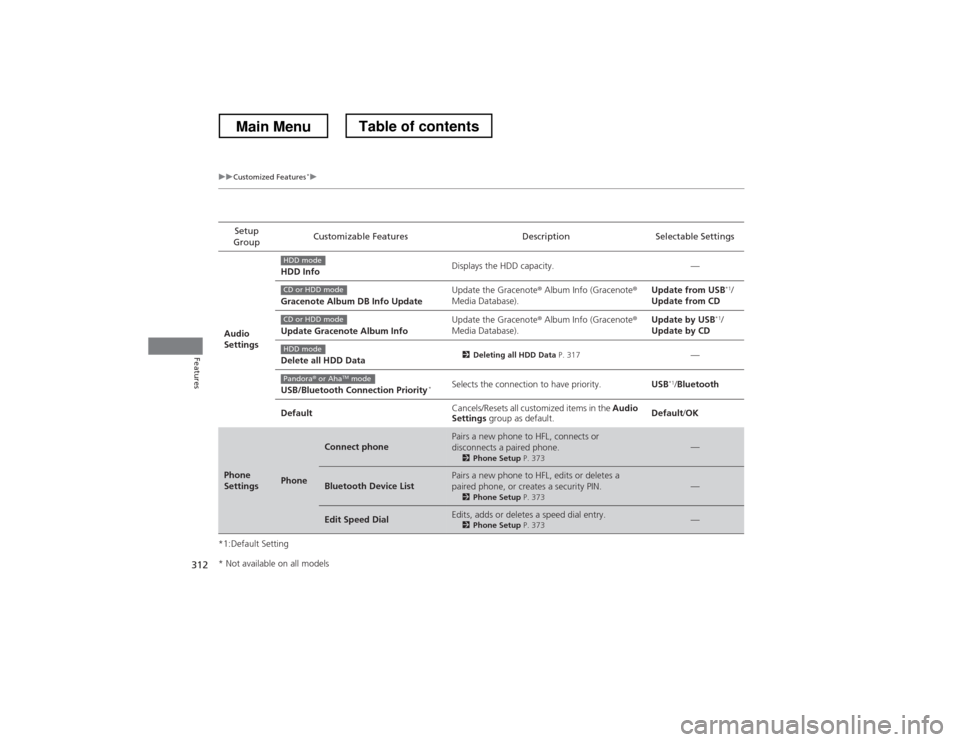
uuCustomized Features*u
Features
*1:Default SettingSetup
Group Customizable Features Description Selectable Settings
Audio
Settings HDD Info
Displays the HDD capacity. —
Gracenote Album DB Info Update Update the Gracenote
® Album Info (Gracenote ®
Media Database). Update from USB
*1
/
Update from CD
Update Gracenote Album Info Update the Gracenote
® Album Info (Gracenote ®
Media Database). Update by USB
*1
/
Update by CD
Delete all HDD Data 2
Deleting all HDD Data P. 317
—
USB/Bluetooth Connection Priority *Selects the connection to have priority.
USB*1
/Bluetooth
Default Cancels/Resets all customized items in the
Audio
Settings group as default. Default
/OK
Phone
SettingsPhone
Connect phonePairs a new phone to HFL, connects or
disconnects a paired phone.
2Phone Setup P. 373—
Bluetooth Device ListPairs a new phone to HFL, edits or deletes a
paired phone, or creates a security PIN.
2Phone Setup P. 373—
Edit Speed DialEdits, adds or deletes a speed dial entry.
2Phone Setup P. 373—
HDD mode
CD or HDD mode
CD or HDD mode
HDD mode
Pandora® or Aha TM
mode
* Not available on all models
Main MenuTable of contents
Page 314 of 573
313
uuCustomized Features*u
Continued
Features
*1:Default SettingSetup
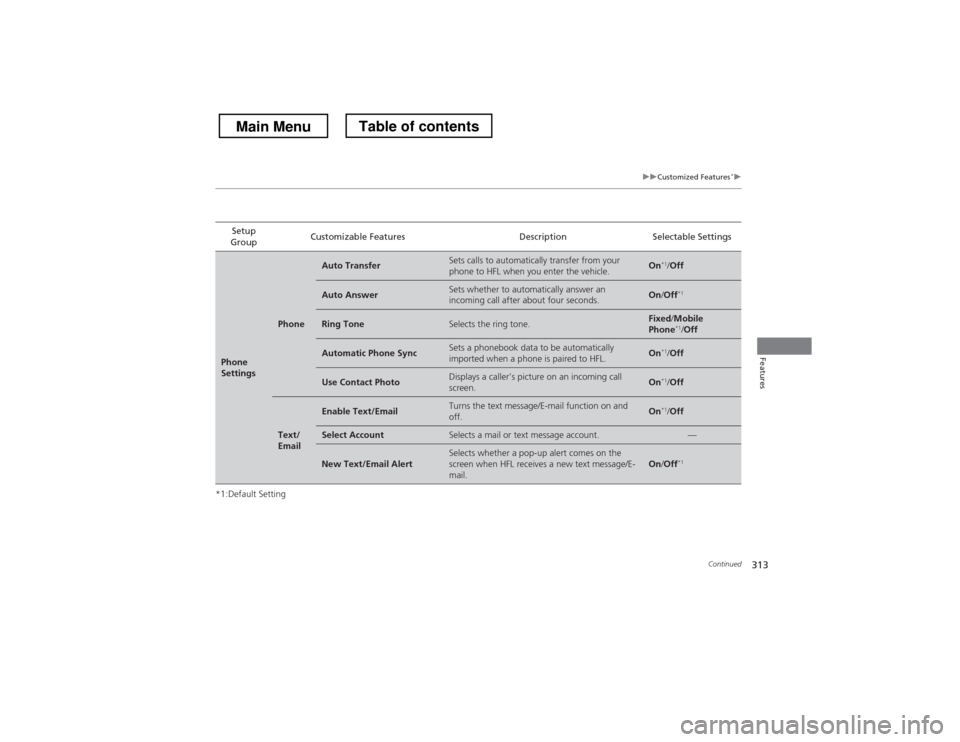
Group Customizable Features Description Selectable Settings
Phone
Settings
Phone
Auto TransferSets calls to automatically transfer from your
phone to HFL when you enter the vehicle.On
*1
/Off
Auto AnswerSets whether to automatically answer an
incoming call after about four seconds.On /Off *1
Ring ToneSelects the ring tone.Fixed
/Mobile
Phone *1
/Off
Automatic Phone SyncSets a phonebook data to be automatically
imported when a phone is paired to HFL.On *1
/Off
Use Contact PhotoDisplays a caller’s picture on an incoming call
screen.On *1
/Off
Text/
Email
Enable Text/EmailTurns the text message/E-mail function on and off.On *1
/Off
Select AccountSelects a mail or text message account.—
New Text/Email AlertSelects whether a pop-up alert comes on the
screen when HFL receives a new text message/E-
mail.On /Off *1
Main MenuTable of contents
Page 322 of 573
321
uuBluetooth® HandsFreeLink ®uUsing HFL
Features
•To hear general HFL information and help, say “Tutorial.”
• Say “Hands-free help” or “Help” any time to get help or hear a list of commands.
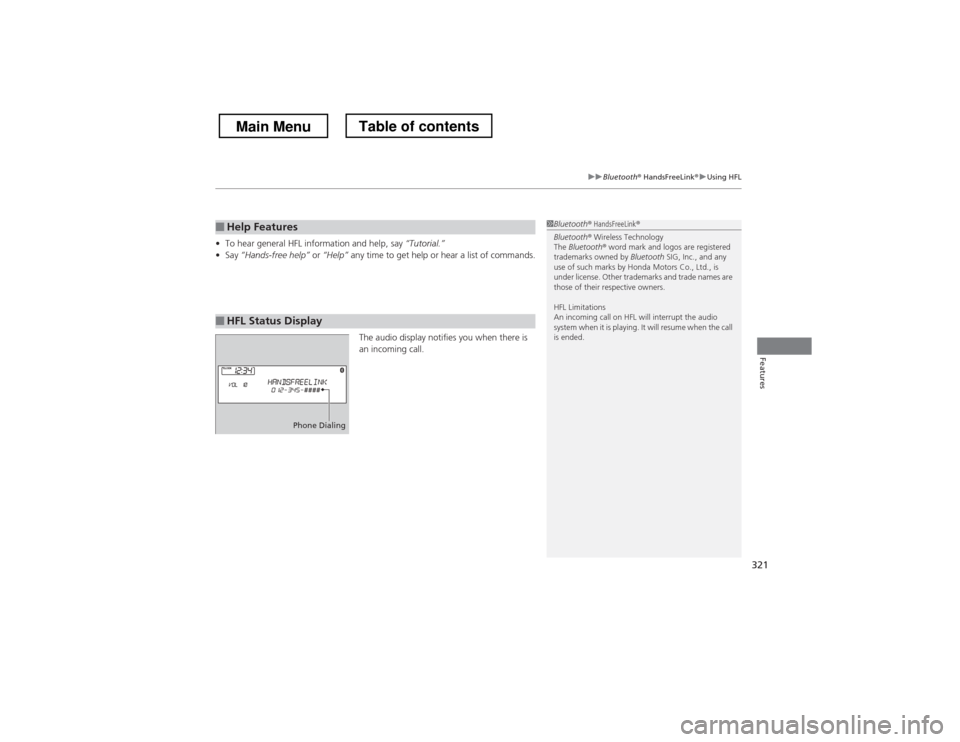
The audio display notifies you when there is
an incoming call.
■Help Features
■HFL Status Display
1Bluetooth ® HandsFreeLink ®
Bluetooth ® Wireless Technology
The Bluetooth ® word mark and logos are registered
trademarks owned by Bluetooth SIG, Inc., and any
use of such marks by Honda Motors Co., Ltd., is
under license. Other trademarks and trade names are
those of their respective owners.
HFL Limitations
An incoming call on HFL will interrupt the audio
system when it is playing. It will resume when the call is ended.
Phone Dialing
Main MenuTable of contents
Page 333 of 573
332
Features
Bluetooth® HandsFreeLink ®
Bluetooth® HandsFreeLink ® (HFL) allows you to place and receive phone calls using
your vehicle’s audio system, without handling your cell phone.
Using HFL
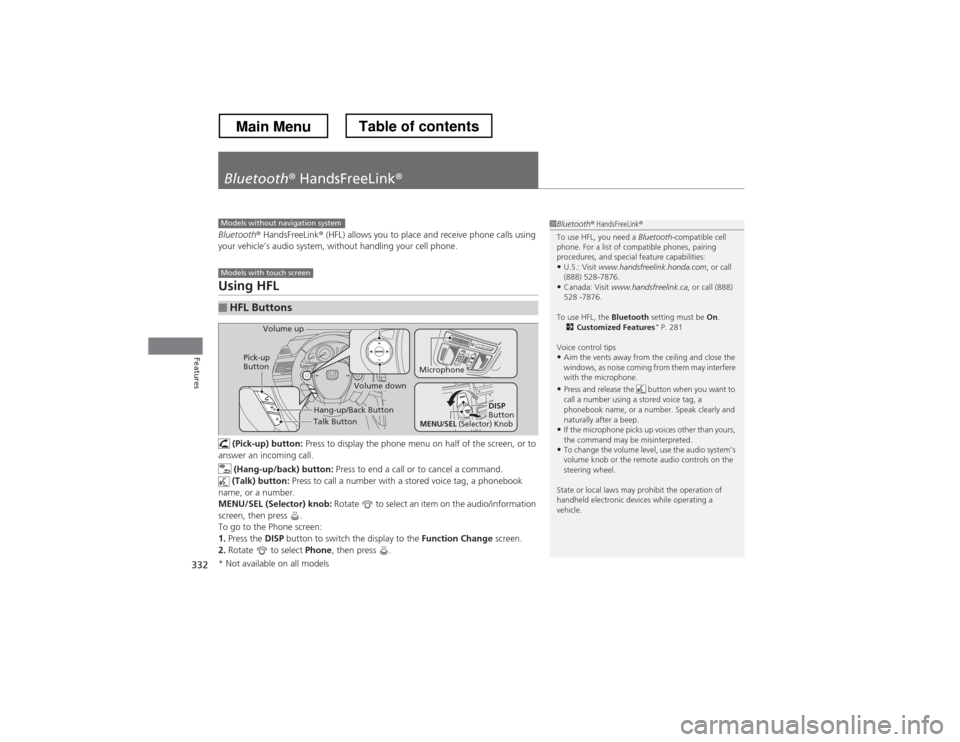
(Pick-up) button: Press to display the phone menu on half of the screen, or to
answer an incoming call.
(Hang-up/back) button: Press to end a call or to cancel a command.
(Talk) button: Press to call a number with a stored voice tag, a phonebook
name, or a number.
MENU/SEL (Selector) knob: Rotate to select an item on the audio/information
screen, then press .
To go to the Phone screen:1. Press the DISP button to switch the display to the Function Change screen.
2. Rotate to select Phone, then press .
■HFL Buttons
1Bluetooth ® HandsFreeLink ®
To use HFL, you need a Bluetooth-compatible cell
phone. For a list of compatible phones, pairing
procedures, and special feature capabilities:
• U.S.: Visit www.handsfreelink.honda.com , or call
(888) 528-7876.
• Canada: Visit www.handsfreelink.ca , or call (888)
528 -7876.
To use HFL, the Bluetooth setting must be On.
2 Customized Features *
P. 281
Voice control tips • Aim the vents away from the ceiling and close the
windows, as noise coming from them may interfere
with the microphone.
• Press and release the button when you want to
call a number using a stored voice tag, a
phonebook name, or a number. Speak clearly and
naturally after a beep.
• If the microphone picks up voices other than yours,
the command may be misinterpreted.
• To change the volume level, use the audio system’s
volume knob or the remote audio controls on the
steering wheel.
State or local laws may prohibit the operation of
handheld electronic devices while operating a
vehicle.Models without navigation system
Models with touch screen
Talk Button
Volume up
Microphone
Hang-up/Back Button
Pick-up
Button
Volume down
DISP
Button
MENU/SEL (Selector) Knob
* Not available on all models
Main MenuTable of contents
Page 334 of 573
333
uuBluetooth® HandsFreeLink ®uUsing HFL
Features
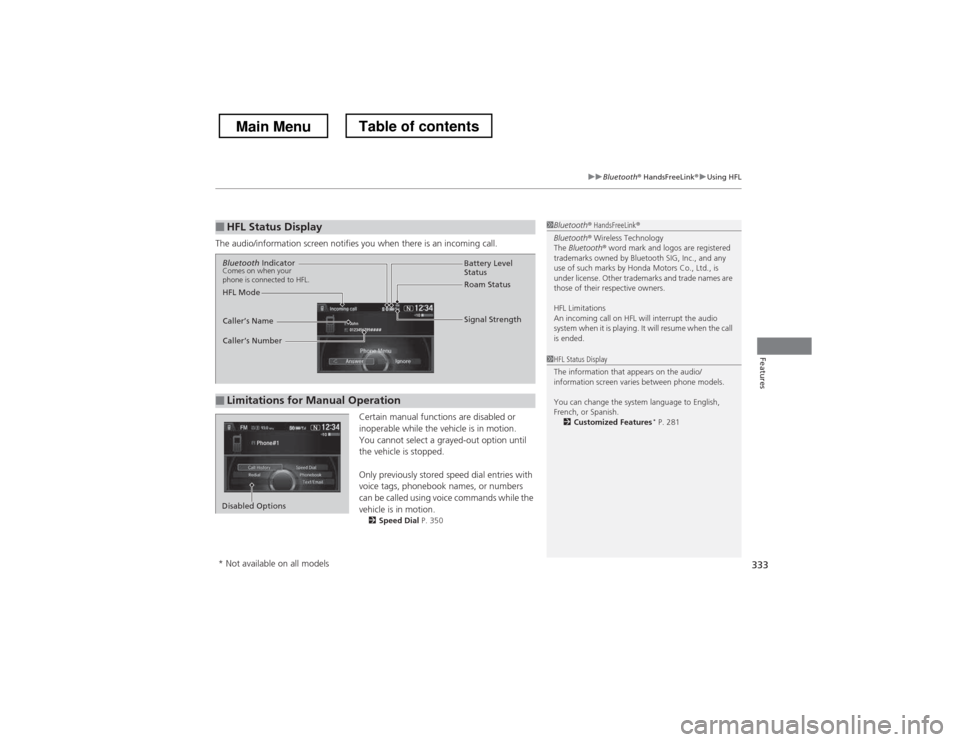
The audio/information screen notifies you when there is an incoming call.
Certain manual functions are disabled or
inoperable while the vehicle is in motion.
You cannot select a grayed-out option until
the vehicle is stopped.
Only previously stored speed dial entries with
voice tags, phonebook names, or numbers
can be called using voice commands while the vehicle is in motion.2 Speed Dial P. 350
■HFL Status Display1Bluetooth® HandsFreeLink ®
Bluetooth ® Wireless Technology
The Bluetooth ® word mark and logos are registered
trademarks owned by Bluetooth SIG, Inc., and any
use of such marks by Honda Motors Co., Ltd., is
under license. Other trademarks and trade names are
those of their respective owners.
HFL Limitations
An incoming call on HFL will interrupt the audio
system when it is playing. It will resume when the call is ended.
■Limitations for Manual Operation
Bluetooth Indicator
Comes on when your
phone is connected to HFL.
Signal Strength
HFL Mode Battery Level
Status
Roam Status
Caller
Page 336 of 573
335
uuBluetooth® HandsFreeLink ®uHFL Menus
Continued
Features
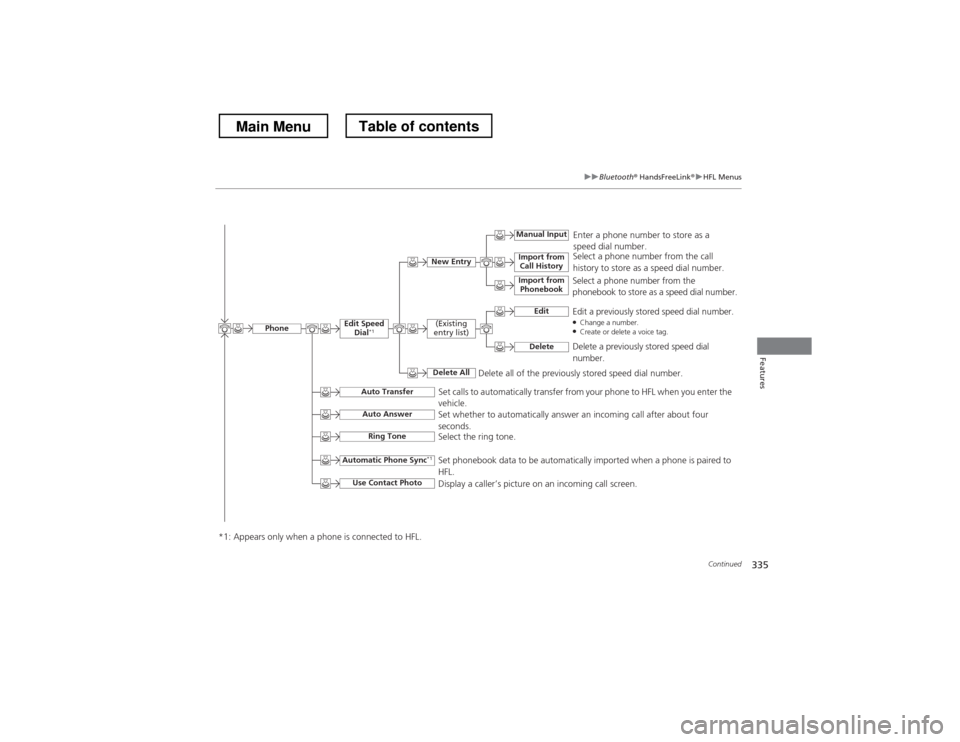
Select a phone number from the call
history to store as a speed dial number.
Manual Input
New Entry Import from
Call History
Import from Phonebook
Enter a phone number to store as a
speed dial number.
Delete all of the previously stored speed dial number. Select a phone number from the
phonebook to store as a speed dial number.
EditEdit a previously stored speed dial number. ●
Change a number.
● Create or delete a voice tag.
Delete
Delete a previously stored speed dial number.
(Existing
entry list)
Delete All
Edit Speed Dial *1
Set calls to automatically transfer from your phone to HFL when you enter the vehicle.
Auto Transfer
Auto Answer
Ring Tone
Set whether to automatically answer an incoming call after about four
seconds.
Select the ring tone.
Automatic Phone Sync
*1
Use Contact Photo
Set phonebook data to be automatically imported when a phone is paired to HFL.
Display a caller’s picture on an incoming call screen.
Phone
*1: Appears only when a phone is connected to HFL.
Main MenuTable of contents
Page 338 of 573
337
uuBluetooth® HandsFreeLink ®uHFL Menus
Continued
Features
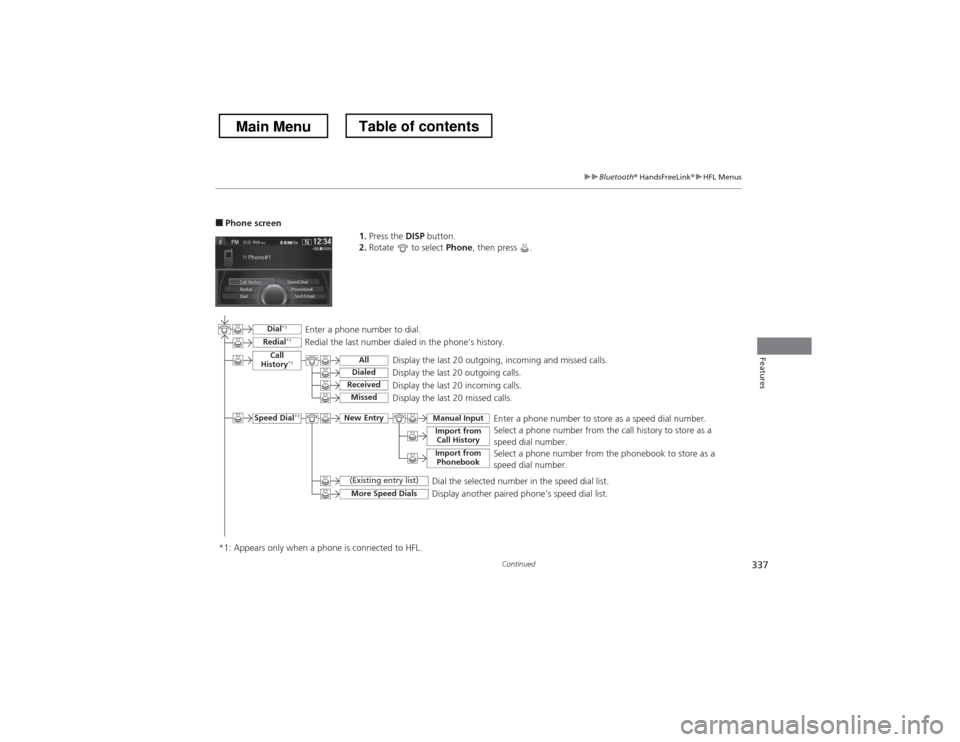
■Phone screen
1.Press the DISP button.
2. Rotate to select Phone, then press .
Display the last 20 outgoing, incoming and missed calls.
Select a phone number from the call history to store as a
speed dial number.
Call
History *1
Speed Dial *1
All
Manual Input
Dialed
ReceivedDisplay the last 20 outgoing calls.
Display the last 20 incoming calls.
New Entry
Import from
Call History
Import from PhonebookSelect a phone number from the phonebook to store as a
speed dial number.Enter a phone number to store as a speed dial number.
More Speed Dials
Display another paired phone’s speed dial list.
*1: Appears only when a phone is connected to HFL.
MissedDisplay the last 20 missed calls.
Dial
*1
Redial *1Enter a phone number to dial.
Redial the last number dialed in the phone’s history.
(Existing entry list)
Dial the selected number in the speed dial list.
Main MenuTable of contents