mirror HONDA CROSSTOUR 2013 1.G User Guide
[x] Cancel search | Manufacturer: HONDA, Model Year: 2013, Model line: CROSSTOUR, Model: HONDA CROSSTOUR 2013 1.GPages: 573, PDF Size: 25.21 MB
Page 128 of 573
127
uuOperating the Switches Around the Steering WheeluDriving Position Memory System*
Continued
Controls
Driving Position Memory System *
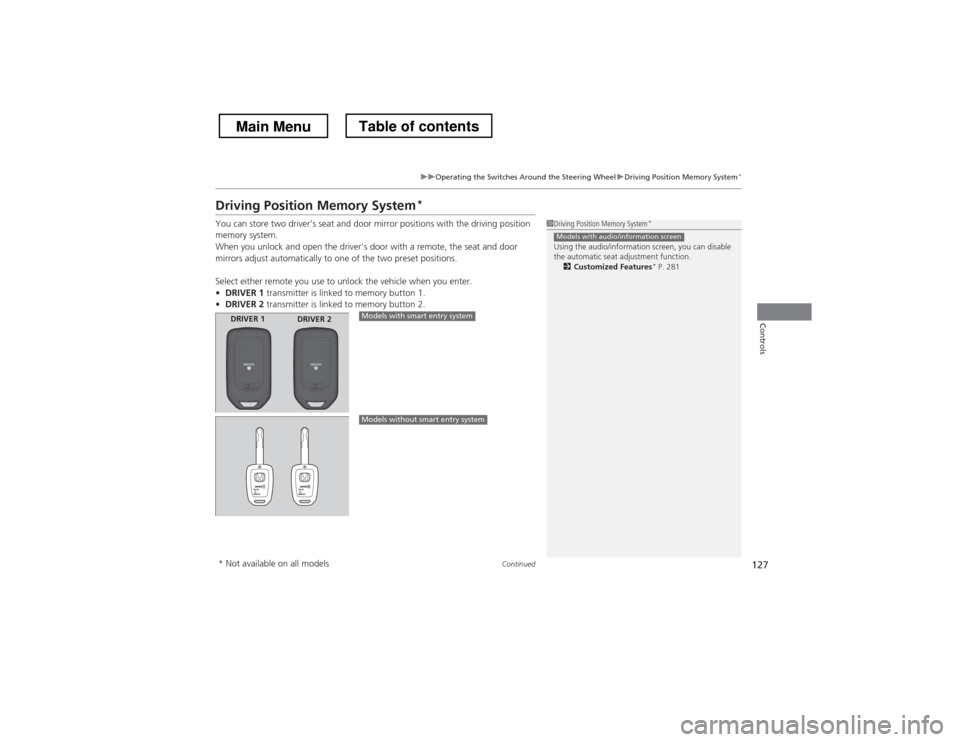
You can store two driver’s seat and door mirror positions with the driving position
memory system.
When you unlock and open the driver’s door with a remote, the seat and door
mirrors adjust automatically to one of the two preset positions.
Select either remote you use to unlock the vehicle when you enter. • DRIVER 1 transmitter is linked to memory button 1.
• DRIVER 2 transmitter is linked to memory button 2.
1Driving Position Memory System *
Using the audio/information screen, you can disable
the automatic seat adjustment function. 2 Customized Features *
P. 281
Models with audio/information screen
DRIVER 1 DRIVER 2Models with smart entry system
Models without smart entry system
* Not available on all models
Main MenuTable of contents
Page 129 of 573
uuOperating the Switches Around the Steering WheeluDriving Position Memory System*
128
Controls
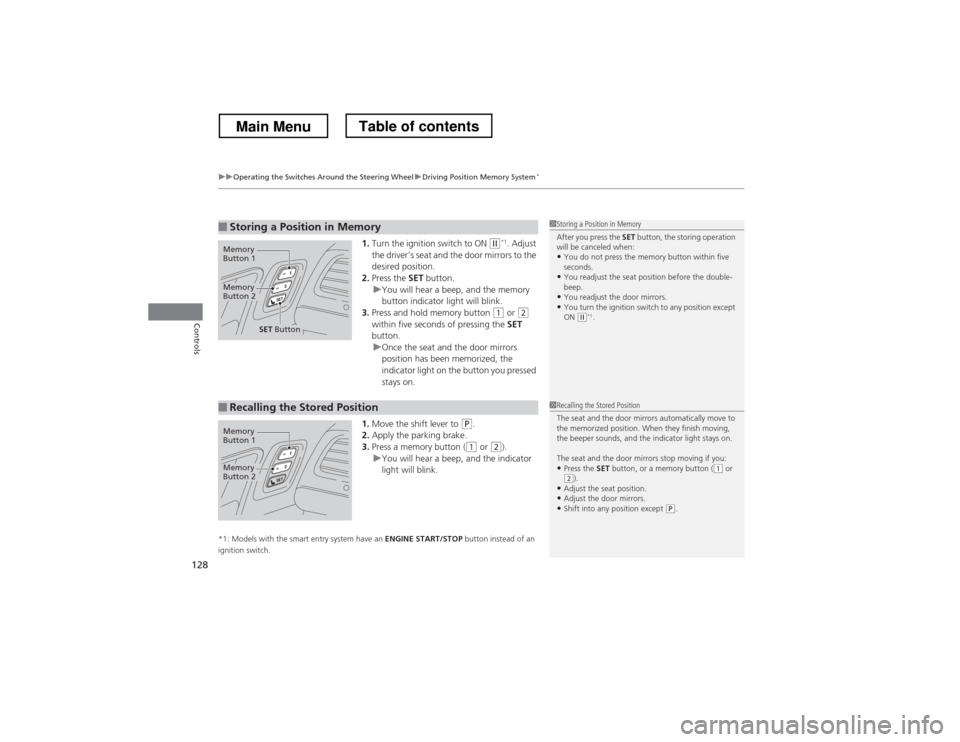
1. Turn the ignition switch to ON (w *1
. Adjust
the driver’s seat and the door mirrors to the
desired position.
2. Press the SET button.
uYou will hear a beep, and the memory
button indicator light will blink.
3. Press and hold memory button
(1 or (2
within five seconds of pressing the SET
button.
uOnce the seat and the door mirrors
position has been memorized, the
indicator light on the button you pressed stays on.
1. Move the shift lever to
(P .
2. Apply the parking brake.
3. Press a memory button (
(1 or (2).uYou will hear a beep, and the indicator
light will blink.
*1: Models with the smart entry system have an ENGINE START/STOP button instead of an
ignition switch.
■Storing a Position in Memory1Storing a Position in Memory
After you press the SET button, the storing operation
will be canceled when:
• You do not press the memory button within five
seconds.
• You readjust the seat position before the double-beep.
• You readjust the door mirrors.
• You turn the ignition switch to any position except
ON
(w *1
.
Memory
Button 1
Memory
Button 2
SET Button
■Recalling the Stored Position1Recalling the Stored Position
The seat and the door mirrors automatically move to
the memorized position. When they finish moving,
the beeper sounds, and the indicator light stays on.
The seat and the door mirrors stop moving if you:
• Press the SET button, or a memory button (
(1 or (2).
• Adjust the seat position.
• Adjust the door mirrors.
• Shift into any position except
(P .
Memory
Button 1
Memory
Button 2
Main MenuTable of contents
Page 131 of 573
130
Controls
Adjusting the Mirrors
Interior Rearview Mirror
Adjust the angle of the rearview mirror when you are sitting in the correct driving
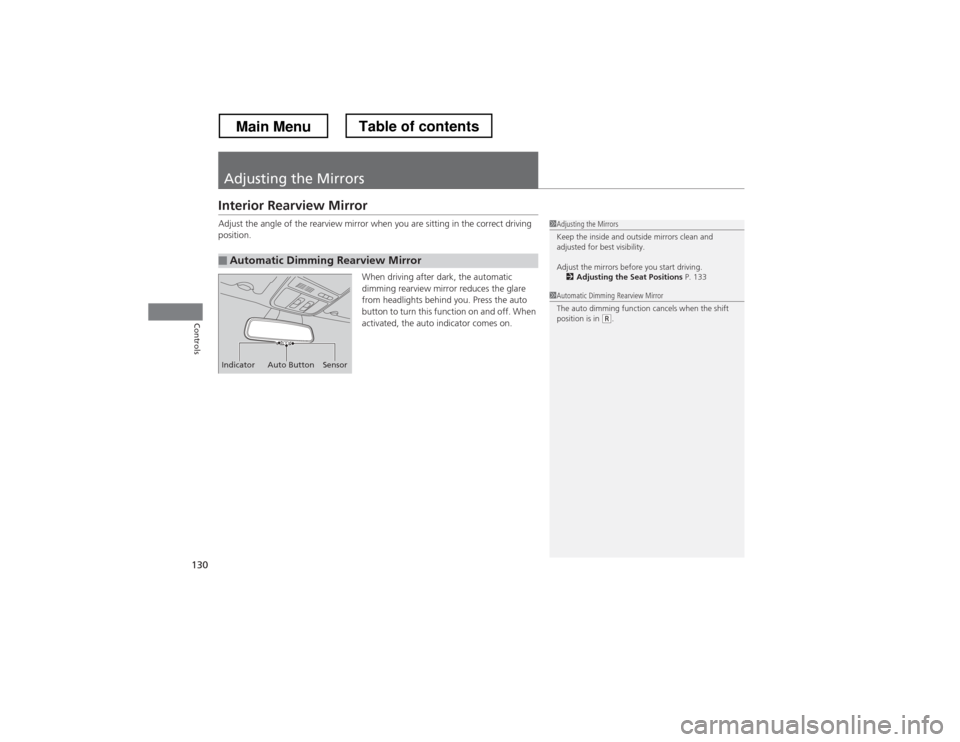
position.When driving after dark, the automatic
dimming rearview mirror reduces the glare
from headlights behind you. Press the auto
button to turn this function on and off. When
activated, the auto indicator comes on.
■Automatic Dimming Rearview Mirror
1Adjusting the Mirrors
Keep the inside and outside mirrors clean and
adjusted for best visibility.
Adjust the mirrors before you start driving.2 Adjusting the Seat Positions P. 133
Indicator Auto Button Sensor
1Automatic Dimming Rearview Mirror
The auto dimming function cancels when the shift
position is in
(R.
Main MenuTable of contents
Page 132 of 573
131
uuAdjusting the MirrorsuPower Door Mirrors
Continued
Controls
Power Door MirrorsYou can adjust the door mirrors when the
ignition switch is in ON
(w*1
.
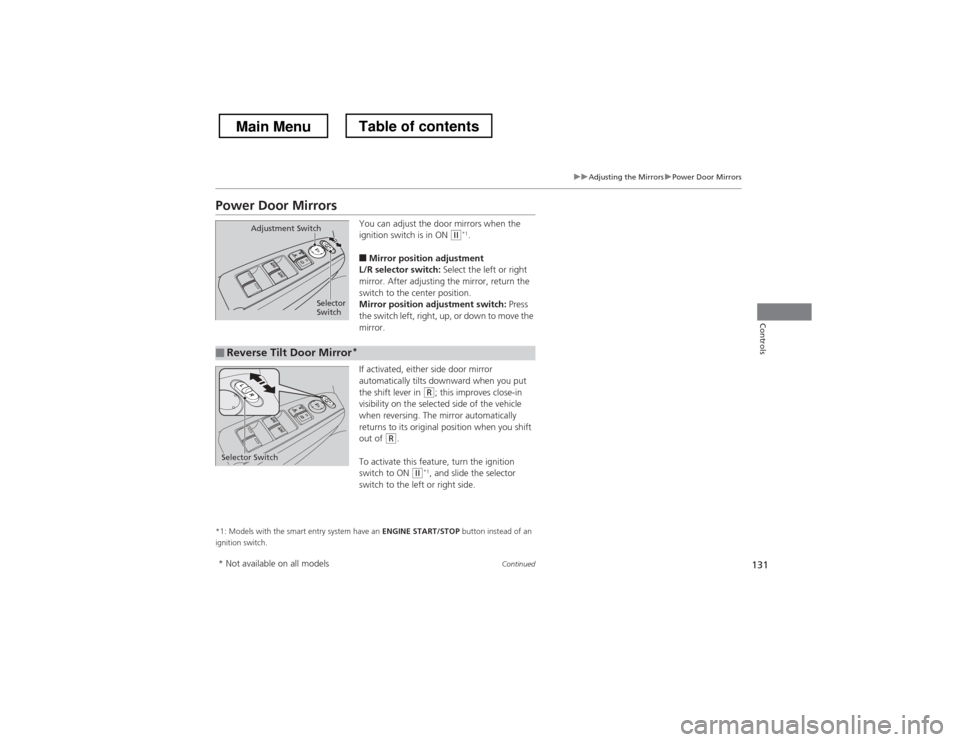
■ Mirror position adjustment
L/R selector switch: Select the left or right
mirror. After adjusting the mirror, return the
switch to the center position.
Mirror position adjustment switch: Press
the switch left, right, up, or down to move the
mirror.
If activated, either side door mirror
automatically tilts downward when you put
the shift lever in
(R ; this improves close-in
visibility on the selected side of the vehicle
when reversing. The mirror automatically
returns to its original position when you shift
out of
(R .
To activate this feature, turn the ignition
switch to ON
(w *1
, and slide the selector
switch to the left or right side.
*1: Models with the smart entry system have an ENGINE START/STOP button instead of an
ignition switch.
Selector
Switch
Adjustment Switch
■Reverse Tilt Door Mirror
*
Selector Switch
* Not available on all models
Main MenuTable of contents
Page 133 of 573
uuAdjusting the MirrorsuPower Door Mirrors
132
Controls
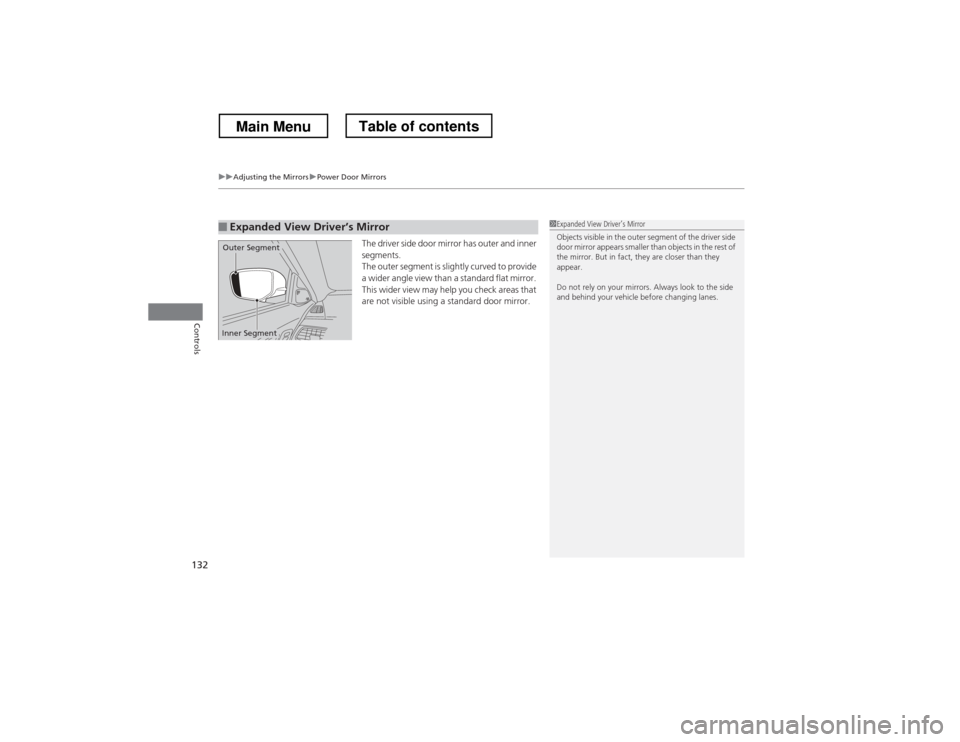
The driver side door mirror has outer and inner segments.
The outer segment is slightly curved to provide
a wider angle view than a standard flat mirror.
This wider view may help you check areas that
are not visible using a standard door mirror.
■Expanded View Driver
Page 309 of 573
308
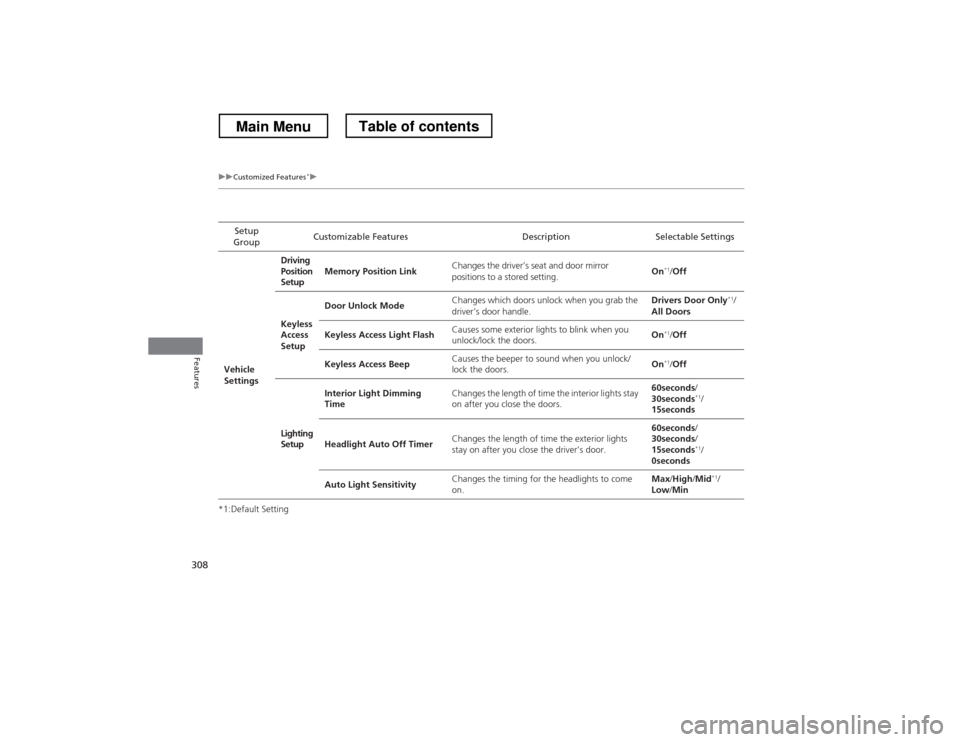
uuCustomized Features*u
Features
*1:Default SettingSetup
Group Customizable Features Description Selectable Settings
Vehicle
Settings Driving
Position
Setup
Memory Position Link
Changes the driver’s seat and door mirror
positions to a stored setting. On
*1
/Off
Keyless
Access
Setup Door Unlock Mode
Changes which doors unlock when you grab the
driver’s door handle. Drivers Door Only
*1
/
All Doors
Keyless Access Light Flash Causes some exterior lights to blink when you
unlock/lock the doors. On
*1
/Off
Keyless Access Beep Causes the beeper to sound when you unlock/lock the doors.
On
*1
/Off
Lighting Setup Interior Light Dimming
Time
Changes the length of time the interior lights stay
on after you close the doors. 60seconds
/
30seconds *1
/
15seconds
Headlight Auto Off Timer Changes the length of time the exterior lights
stay on after you close the driver’s door. 60seconds
/
30seconds /
15seconds *1
/
0seconds
Auto Light Sensitivity Changes the timing for the headlights to come
on. Max
/High /Mid *1
/
Low /Min
Main MenuTable of contents
Page 411 of 573
410
Driving
Before Driving
Driving Preparation
Check the following items before you start driving. •Make sure there are no obstructions on the windows, door mirrors, exterior
lights, or other parts of the vehicle.
uRemove any frost, snow, or ice.uRemove any snow on the roof, as this can slip down and obstruct your field of
vision while driving. If frozen solid, remove ice once it has softened.
uWhen removing ice from around the wheels, be sure not to damage the wheel
or wheel components.
• Make sure the hood is securely closed.
uIf the hood opens while driving, your front view will be blocked.
• Make sure the tires are in good condition.
uCheck air pressure, and check for damage and excessive wear.
2 Checking and Maintaining Tires P. 497
• Make sure there are no people or objects behind or around the vehicle.
uThere are blind spots from the inside.
■Exterior Checks1Exterior Checks
NOTICEWhen doors are frozen shut, use warm water around
the door edges to melt any ice. Do not try to force
them open, as this can damage the rubber trim
around the doors. When done, wipe dry to avoid further freezing.
Do not pour warm water into the key cylinder.
You will be unable to insert key if the water freezes in
the hole.
Heat from the engine and exhaust can ignite
flammable materials left under the hood, causing a
fire. If you’ve parked your vehicle for an extended
period, inspect and remove any debris that may have
collected, such as dried grass and leaves that have
fallen or have been carried in for use as a nest by a
small animal. Also check under the hood for leftover
flammable materials after you or someone else has
performed maintenance on your vehicle.
Main MenuTable of contents
Page 412 of 573
Continued411
uuBefore DrivinguDriving Preparation
Driving
•Store or secure all items on board properly.uCarrying too much cargo, or improp erly storing it, can affect your vehicle’s
handling, stability, stopping distance, and tires, and make it unsafe. 2 Maximum Load Limit P. 413
• Do not pile items higher than the seat height.
uThey can block your view and may be thrown forward in the event of sudden
braking.
• Do not place anything in the front seat footwells. Make sure to secure the floor mat.
uAn object or unsecured floor mat can interfere with your brake and accelerator
pedal operation while driving.
• If you have any animals on board, do not let them move around in the vehicle.
uThey may interfere with driving and a crash could occur.
• Securely close and lock all doors and the tailgate.
2 Locking/Unlocking the Doors from the Inside P. 99
• Adjust your seating position properly.
uAdjust the head restraint, too.
2 Adjusting the Seats P. 133
2 Adjusting the Head Restraints P. 136
• Adjust the mirrors and steering wheel properly for your driving.
uAdjust them while sitting in the proper driving position.
2 Adjusting the Steering Wheel P. 129
2 Adjusting the Mirrors P. 130
■Interior Checks1Interior Checks
The headlight aim is set by the factory, and does not
need to be adjusted. However, if you regularly carry
heavy items in the cargo area or tow a trailer, have
the aiming readjusted at a dealer or by a qualified
technician.
Main MenuTable of contents
Page 417 of 573
uuTowing a TraileruTowing Preparation
416
Driving
Towing equipment varies by the size of your trailer, how much load you are towing,
and where you are towing. ■ Hitches
The hitch must be of an approved type and properly bolted to the underbody.
■ Safety chains
Always use safety chains when you tow a trailer. Leave enough slack to allow the
trailer to turn corners easily, but do not allow the chains to drag on the ground.
■ Trailer brakes
There are two common types of trailer brakes: surge and electric. Surge brakes are
common for boat trailers, since the brakes will get wet. If you choose electric brakes,
be sure they are electronically actuated. Do not attempt to attach trailer brakes to
your vehicle’s hydraulic system, as it will lower braking effectiveness and create a
potential hazard.
■ Additional towing equipment
Many states and provinces/territories require special outside mirrors when towing a
trailer. Even if mirrors are not required in your locale, you should install special
mirrors if visibility is restricted in any way.
■Towing Equipment and Accessories1Towing Equipment and Accessories
Make sure that all equipment is properly installed and
maintained, and that it meets federal, state, province/
territory, and local regulations.
Consult your trailer sales or rental agency if any other
items are recommended or required for your towing
situation.
The lighting and wiring of trailers can vary by type
and brand. If a connector is required, it should only
be installed by a qualified technician.
Main MenuTable of contents
Page 437 of 573
uuWhen DrivinguForward Collision Warning (FCW)*
436
Driving
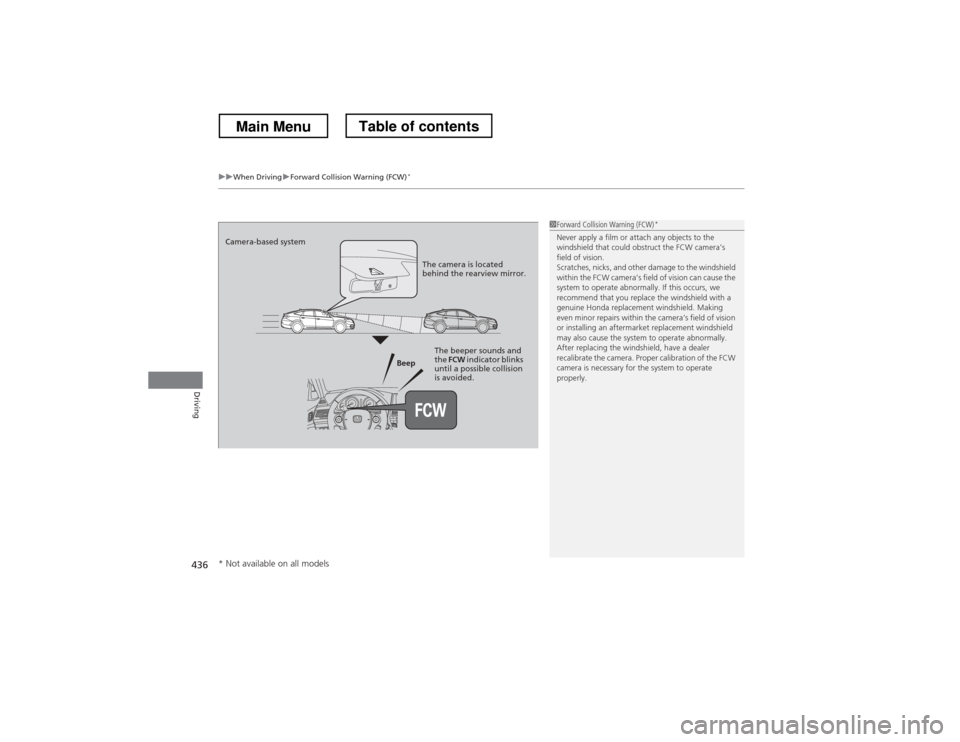
1Forward Collision Warning (FCW) *
Never apply a film or attach any objects to the
windshield that could obstruct the FCW camera’s
field of vision.
Scratches, nicks, and other damage to the windshield
within the FCW camera’s field of vision can cause the
system to operate abnormally. If this occurs, we
recommend that you replace the windshield with a
genuine Honda replacement windshield. Making
even minor repairs within the camera’s field of vision
or installing an aftermarket replacement windshield
may also cause the system to operate abnormally.
After replacing the windshield, have a dealer
recalibrate the camera. Proper calibration of the FCW
camera is necessary for the system to operate properly.
Beep
Camera-based system
The camera is located
behind the rearview mirror.
The beeper sounds and
the FCW indicator blinks
until a possible collision
is avoided.
* Not available on all models
Main MenuTable of contents