mirror HONDA CROSSTOUR 2013 1.G Owner's Manual
[x] Cancel search | Manufacturer: HONDA, Model Year: 2013, Model line: CROSSTOUR, Model: HONDA CROSSTOUR 2013 1.GPages: 573, PDF Size: 25.21 MB
Page 441 of 573
uuWhen DrivinguLane Departure Warning (LDW)*
440
Driving
The system begins to search for lane markings when all the following conditions are met: • The vehicle is traveling between at 40-90 mph (64-145 km/h).
• The vehicle is on a straight or slightly curved road.
• The turn signals are off.
• The brake pedal is not pressed.
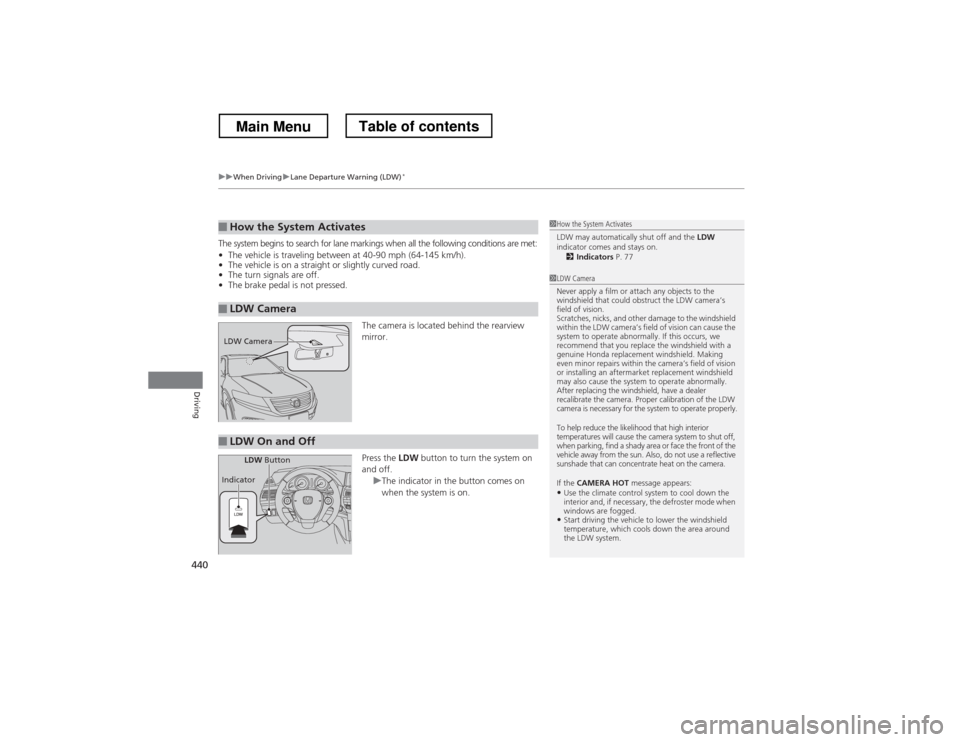
The camera is located behind the rearview mirror. Press the LDW button to turn the system on
and off.
uThe indicator in the button comes on
when the system is on.
■How the System Activates
■LDW Camera
1How the System Activates
LDW may automatically shut off and the LDW
indicator comes and stays on.
2 Indicators P. 77
1LDW Camera
Never apply a film or attach any objects to the
windshield that could obstruct the LDW camera’s
field of vision.
Scratches, nicks, and other damage to the windshield
within the LDW camera’s field of vision can cause the
system to operate abnormally. If this occurs, we
recommend that you replace the windshield with a
genuine Honda replacement windshield. Making
even minor repairs within the camera’s field of vision
or installing an aftermarket replacement windshield
may also cause the system to operate abnormally.
After replacing the windshield, have a dealer
recalibrate the camera. Proper calibration of the LDW
camera is necessary for the system to operate properly.
To help reduce the likelihood that high interior
temperatures will cause the camera system to shut off,
when parking, find a shady area or face the front of the
vehicle away from the sun. Also, do not use a reflective
sunshade that can concentrate heat on the camera.
If the CAMERA HOT message appears:
• Use the climate control system to cool down the
interior and, if necessary, the defroster mode when
windows are fogged.
• Start driving the vehicle to lower the windshield
temperature, which cools down the area around
the LDW system.
LDW Camera
■LDW On and Off
LDW Button
Indicator
Main MenuTable of contents
Page 445 of 573
444
uuWhen DrivinguLaneWatchTM
*
Driving
LaneWatch TM
*
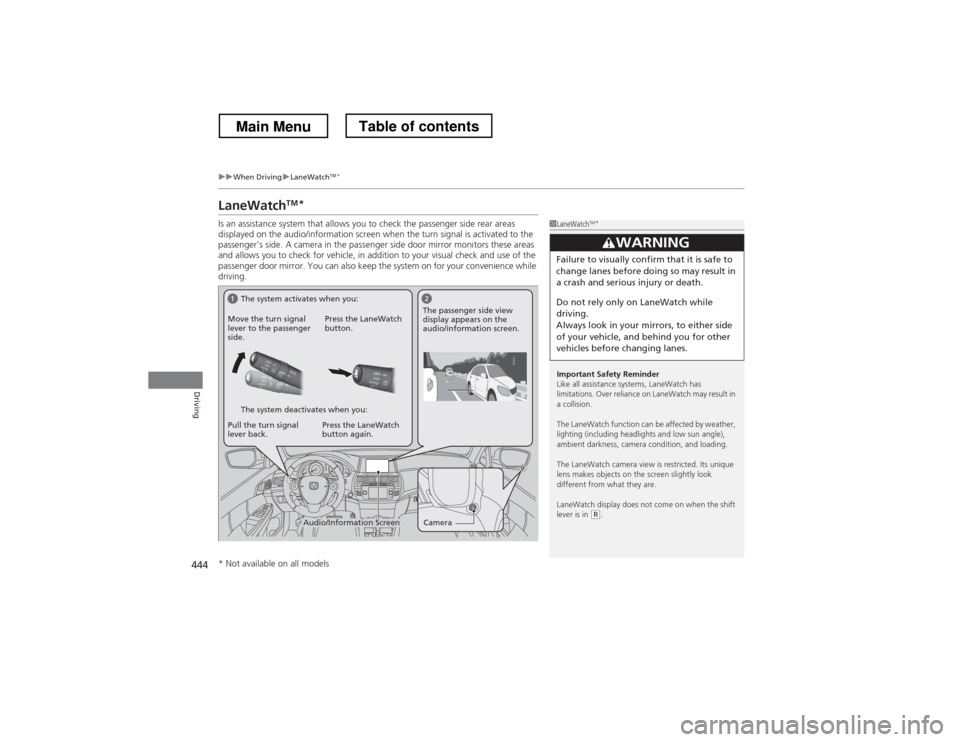
Is an assistance system that allows you to check the passenger side rear areas
displayed on the audio/information screen when the turn signal is activated to the
passenger’s side. A camera in the passenger side door mirror monitors these areas
and allows you to check for vehicle, in addition to your visual check and use of the
passenger door mirror. You can also keep the system on for your convenience while
driving.
1LaneWatch TM
*
Important Safety Reminder
Like all assistance systems, LaneWatch has
limitations. Over reliance on LaneWatch may result in a collision.
The LaneWatch function can be affected by weather,
lighting (including headlights and low sun angle),
ambient darkness, camera condition, and loading.
The LaneWatch camera view is restricted. Its unique
lens makes objects on the screen slightly look
different from what they are.
LaneWatch display does not come on when the shift lever is in
(R .
3WARNING
Failure to visually confirm that it is safe to
change lanes before doing so may result in
a crash and serious injury or death.
Do not rely only on LaneWatch while
driving.
Always look in your mirrors, to either side
of your vehicle, and behind you for other
vehicles before changing lanes.
CameraAudio/Information Screen
Move the turn signal
lever to the passenger
side.
Press the LaneWatch
button.
Pull the turn signal
lever back. Press the LaneWatch button again. The passenger side view
display appears on the
audio/information screen.
The system activates when you:
The system deactivates when you:
* Not available on all models
Main MenuTable of contents
Page 446 of 573
445
uuWhen DrivinguLaneWatchTM
*
Driving
■ Customizing the LaneWatch settings
You can customize the following items using the audio/information screen. • Show with Turn Signal : Selects whether LaneWatch monitor comes on when
you operate the turn signal light lever.
• Reference Lines : Selects whether the reference lines appear on the LaneWatch
monitor.
• Next Maneuver Pop up *
: Selects whether a turn direction screen of the
navigation system interrupts the LaneWatch display.
• Display : Adjusts display settings.
2 Customized Features *
P. 281
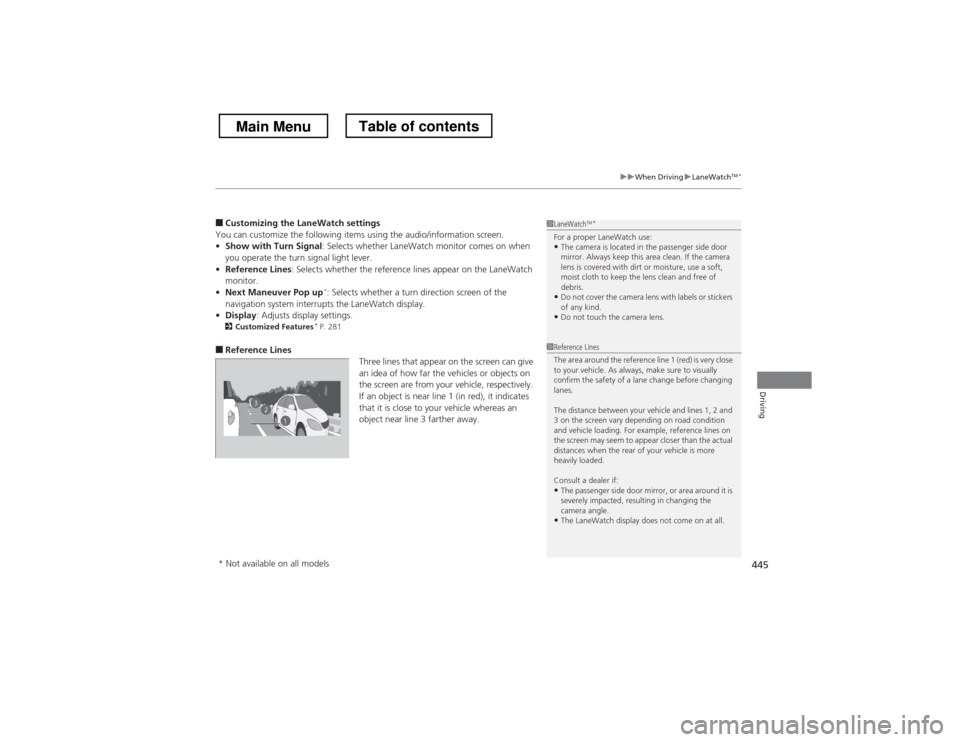
■ Reference Lines
Three lines that appear on the screen can give
an idea of how far the vehicles or objects on
the screen are from your vehicle, respectively.
If an object is near line 1 (in red), it indicates
that it is close to your vehicle whereas an
object near line 3 farther away.1LaneWatchTM
*
For a proper LaneWatch use: • The camera is located in the passenger side door
mirror. Always keep this area clean. If the camera
lens is covered with dirt or moisture, use a soft,
moist cloth to keep the lens clean and free of
debris.
• Do not cover the camera lens with labels or stickers of any kind.
• Do not touch the camera lens.
23
1
1Reference Lines
The area around the reference line 1 (red) is very close
to your vehicle. As always, make sure to visually
confirm the safety of a lane change before changing
lanes.
The distance between your vehicle and lines 1, 2 and
3 on the screen vary depending on road condition
and vehicle loading. For example, reference lines on
the screen may seem to appear closer than the actual
distances when the rear of your vehicle is more heavily loaded. Consult a dealer if:
• The passenger side door mirror, or area around it is
severely impacted, resulting in changing the
camera angle.
• The LaneWatch display does not come on at all.
* Not available on all models
Main MenuTable of contents
Page 455 of 573
454
Driving
Rearview Camera
About Your Rearview Camera
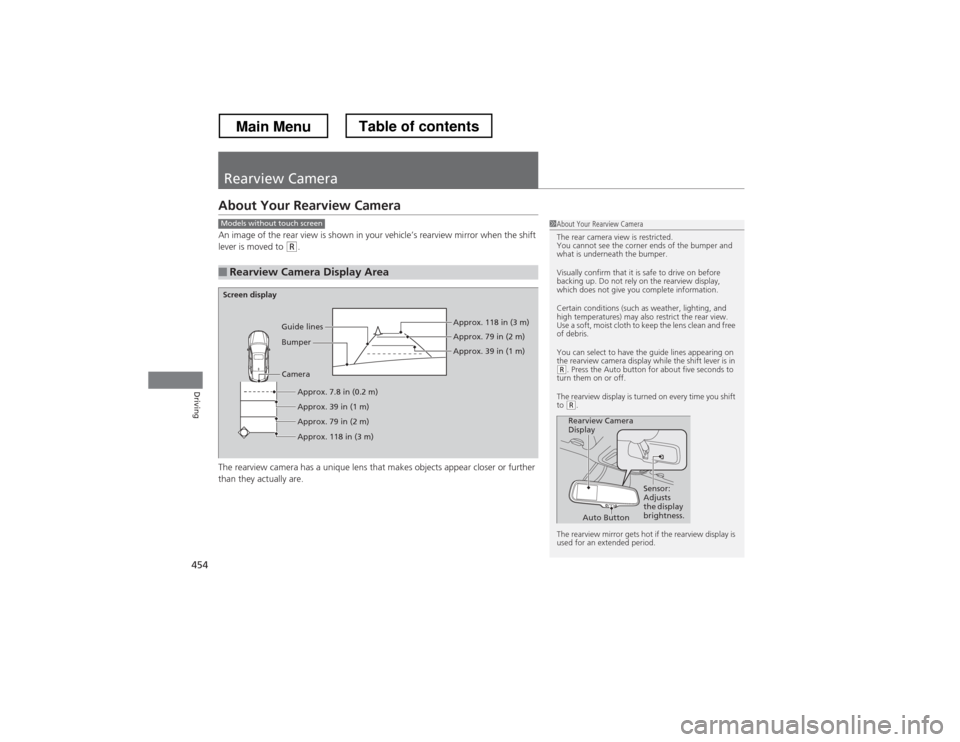
An image of the rear view is shown in your vehicle’s rearview mirror when the shift
lever is moved to
(R.
The rearview camera has a unique lens that makes objects appear closer or further
than they actually are.
■Rearview Camera Display Area
1About Your Rearview Camera
The rear camera view is restricted.
You cannot see the corner ends of the bumper and
what is underneath the bumper.
Visually confirm that it is safe to drive on before
backing up. Do not rely on the rearview display,
which does not give you complete information.
Certain conditions (such as weather, lighting, and
high temperatures) may also restrict the rear view.
Use a soft, moist cloth to keep the lens clean and free
of debris.
You can select to have the guide lines appearing on
the rearview camera display while the shift lever is in
(R . Press the Auto button for about five seconds to
turn them on or off.
The rearview display is turned on every time you shift to
(R .
The rearview mirror gets hot if the rearview display is
used for an extended period.
Rearview Camera
Display Sensor:
Adjusts
the display
brightness.
Auto Button
Models without touch screen
Screen display
CameraApprox. 7.8 in (0.2 m)
Approx. 39 in (1 m)
Approx. 79 in (2 m) Approx. 118 in (3 m) Approx. 118 in (3 m) Approx. 79 in (2 m) Approx. 39 in (1 m)
Bumper
Guide lines
Main MenuTable of contents
Page 513 of 573
512
uuCleaninguExterior Care
Maintenance
Exterior Care
Dust off the vehicle body after you drive.
Regularly inspect your vehicle for scratches on painted surfaces. A scratch on a
painted surface can result in body rust. If you find a scratch, promptly repair it.
Wash the vehicle regularly. Wash more frequently when driving in the following
conditions: •If driving on roads with road salt.
• If driving in coastal areas.
• If tar, soot, bird droppings, insects, or tree sap are stuck to painted surfaces.
Fold in the door mirrors. Make sure to follow the instructions indicated on the
automated car wash. • Keep sufficient distance between the cleaning nozzle and the vehicle body.
• Take particular care around the windows. Standing too close may cause water to
enter the vehicle interior. Do not spray water into the engine compartment.
■Washing the Vehicle
■Using an Automated Car Wash
■Using High Pressure Cleaners
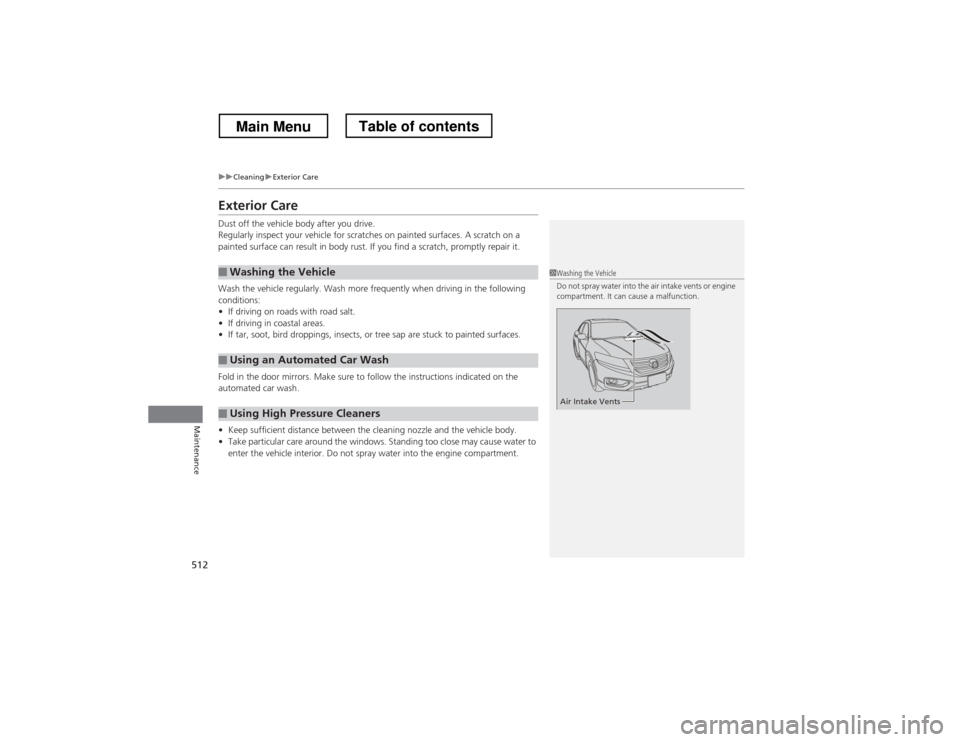
1Washing the Vehicle
Do not spray water into the air intake vents or engine
compartment. It can cause a malfunction.
Air Intake Vents
Main MenuTable of contents
Page 547 of 573
546
Information
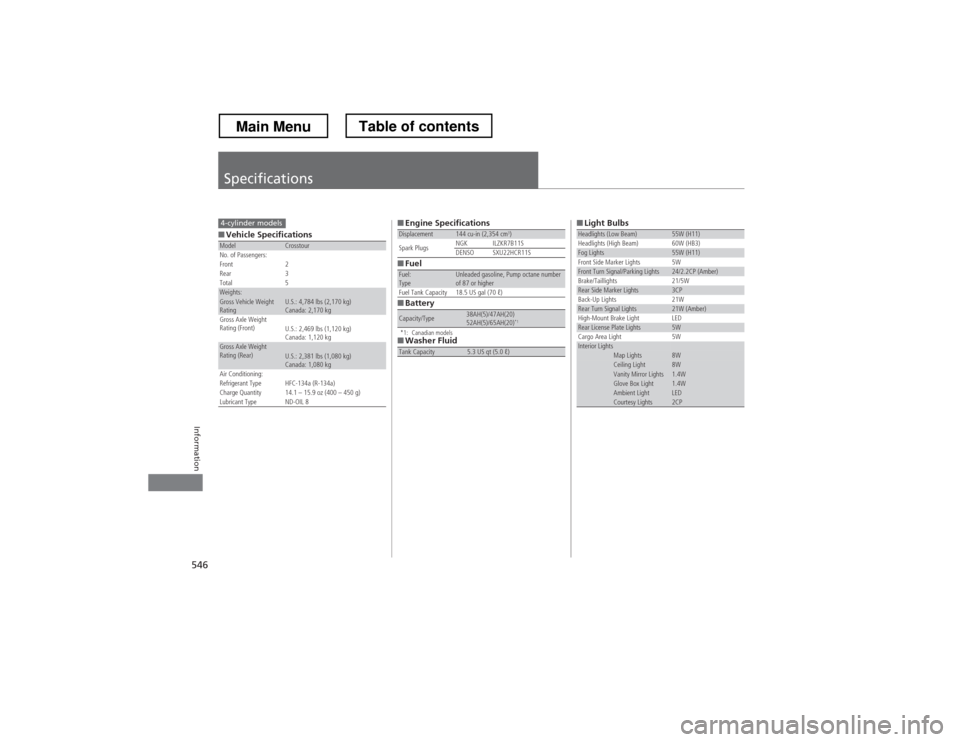
Specifications
■Vehicle SpecificationsModelCrosstour
No. of Passengers:
Front 2
Rear 3
Total 5
Weights:Gross Vehicle Weight
Rating U.S.: 4,784 lbs (2,170 kg)
Canada: 2,170 kg
Gross Axle Weight
Rating (Front)U.S.: 2,469 lbs (1,120 kg)
Canada: 1,120 kg
Gross Axle Weight
Rating (Rear)U.S.: 2,381 lbs (1,080 kg)
Canada: 1,080 kg
Air Conditioning:
Refrigerant Type HFC-134a (R-134a)
Charge Quantity 14.1 – 15.9 oz (400 – 450 g)
Lubricant Type ND-OIL 8
4-cylinder models■Engine Specifications
■Fuel
■Battery
*1: Canadian models
■Washer Fluid
Displacement144 cu-in (2,354 cm 3
)
Spark Plugs NGK ILZKR7B11S
DENSO SXU22HCR11S
Fuel: TypeUnleaded gasoline, Pump octane number
of 87 or higher
Fuel Tank Capacity 18.5 US gal (70 ℓ)
Capacity/Type38AH(5)/47AH(20)
52AH(5)/65AH(20) *1
Tank Capacity5.3 US qt (5.0 ℓ)
■Light BulbsHeadlights (Low Beam)55W (H11)
Headlights (High Beam) 60W (HB3)
Fog Lights55W (H11)
Front Side Marker Lights 5W
Front Turn Signal/Parking Lights24/2.2CP (Amber)
Brake/Taillights 21/5W
Rear Side Marker Lights3CP
Back-Up Lights 21W
Rear Turn Signal Lights21W (Amber)
High-Mount Brake Light LED
Rear License Plate Lights5W
Cargo Area Light 5W
Interior LightsMap Lights8WCeiling Light8WVanity Mirror Lights1.4WGlove Box Light1.4WAmbient LightLEDCourtesy Lights2CP
Main MenuTable of contents
Page 549 of 573
548
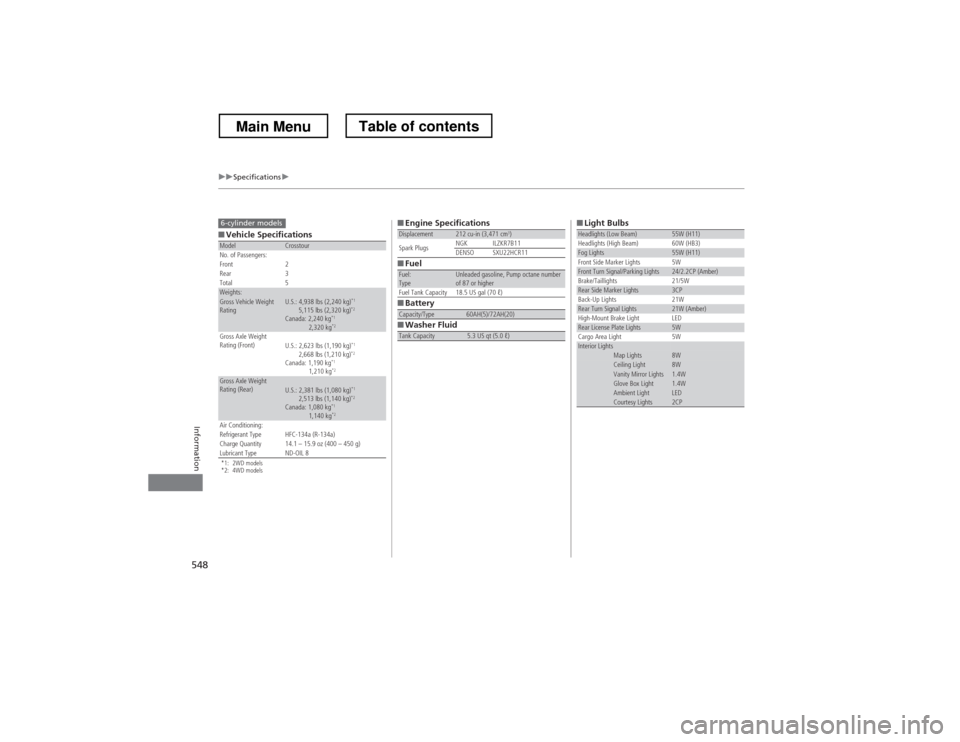
uuSpecificationsu
Information
■Vehicle Specifications
*1: 2WD models
*2: 4WD modelsModelCrosstour
No. of Passengers:
Front 2
Rear 3
Total 5
Weights:Gross Vehicle Weight
Rating U.S.: 4,938 lbs (2,240 kg) *1
5,115 lbs (2,320 kg) *2
Canada: 2,240 kg *1
2,320 kg *2
Gross Axle Weight
Rating (Front)U.S.: 2,623 lbs (1,190 kg)
*1
2,668 lbs (1,210 kg) *2
Canada: 1,190 kg *1
1,210 kg *2
Gross Axle Weight
Rating (Rear)U.S.: 2,381 lbs (1,080 kg) *1
2,513 lbs (1,140 kg) *2
Canada: 1,080 kg *1
1,140 kg *2
Air Conditioning:
Refrigerant Type HFC-134a (R-134a)
Charge Quantity 14.1 – 15.9 oz (400 – 450 g)
Lubricant Type ND-OIL 8
6-cylinder models■Engine Specifications
■Fuel
■Battery
■Washer Fluid
Displacement212 cu-in (3,471 cm 3
)
Spark Plugs NGK ILZKR7B11
DENSO SXU22HCR11
Fuel: TypeUnleaded gasoline, Pump octane number
of 87 or higher
Fuel Tank Capacity 18.5 US gal (70 ℓ)
Capacity/Type60AH(5)/72AH(20)
Tank Capacity5.3 US qt (5.0 ℓ)
■Light BulbsHeadlights (Low Beam)55W (H11)
Headlights (High Beam) 60W (HB3)
Fog Lights55W (H11)
Front Side Marker Lights 5W
Front Turn Signal/Parking Lights24/2.2CP (Amber)
Brake/Taillights 21/5W
Rear Side Marker Lights3CP
Back-Up Lights 21W
Rear Turn Signal Lights21W (Amber)
High-Mount Brake Light LED
Rear License Plate Lights5W
Cargo Area Light 5W
Interior LightsMap Lights8WCeiling Light8WVanity Mirror Lights1.4WGlove Box Light1.4WAmbient LightLEDCourtesy Lights2CP
Main MenuTable of contents
Page 563 of 573
Index
562
Index
Index
A
ABS (Anti-lock Brake System)................... 451
Accessories and Modifications ................. 460
Accessory Power Sockets .......................... 147
Additives Coolant ................................................... 478
Engine Oil ................................................ 472
Washer .................................................... 483
Additives, Engine Oil ................................ 472
Adjusting
Armrest ................................................... 141
Front Seats .............................................. 133
Head Restraints........................................ 136
Mirrors .................................................... 130
Rear Seats................................................ 139
Steering Wheel ........................................ 129
Aha
Page 564 of 573
563
Index
Bluetooth® Audio ............................. 213, 266
Bluetooth ® HandsFreeLink ®.... 320, 332, 367
Booster Seats (For Children) ...................... 65
Brake System ............................................ 449
Anti-lock Brake System (ABS) .................. 451
Brake Assist System................................. 452
Fluid ....................................................... 481
Foot Brake .............................................. 450
Indicator ........................................... 70, 536
Parking Brake.......................................... 449
Brightness Control (Instrument Panel) ... 125
Bulb Replacement .................................... 484
Brake Light, Taillight, Back-Up Light,
Rear Turn Signal Light and Lower Rear
Side Marker Light ................................ 490
Fog Lights ............................................... 486
Front Turn Signal/Parking Light ............... 489
Headlights .............................................. 484
High-Mount Brake Light........ .................. 492
Rear License Plate Light ........................... 492
Side Marker Lights .................................. 488
Bulb Specifications ........................... 546, 548
C
Carbon Monoxide Gas ............................... 66
Cargo Hook .............................................. 149
Carrying Cargo ................................. 411, 413
CD Player .................................. 173, 200, 239
Center Pocket ........................................... 152
Certification Label ................................... 550 Changing Bulbs
......................................... 484
Charging System Indicator ................. 71, 534
Child Safety ................................................. 54
Childproof Door Locks ............................. 100
Child Seat .................................................... 54
Booster Seats............................................. 65
Child Seat for Infants ................................. 56
Child Seat for Small Children ..................... 57
Installing a Child Seat with a Lap/ Shoulder Seat Belt ................................... 61
Larger Children.......................................... 64
Rear-facing Child Seat ............................... 56
Selecting a Child Seat ................................ 58
Childproof Door Locks ............................. 100
Cleaning the Exterior ............................... 512
Cleaning the Interior ................................ 510
Climate Control System ............................ 157
Changing the Mode ................................ 157
Defrosting the Windshield and
Windows ............................................... 159
Dust and Pollen Filter ............................... 509
Recirculation and Fresh Air Mode ............ 158
Recirculation/Fresh Air Mode ................... 157
Sensors.................................................... 162
Synchronized Mode ................................. 161
Using Automatic Climate Control ............ 157
Clock ............................................................ 88
Coat Hook ................................................. 148
Compact Spare Tire .................. 517, 547, 549
Compass ............................................ 405, 407
Console Compartment ............................. 145 Controls
....................................................... 87
Coolant (Engine) ...................................... 478
Adding to the Radiator ............................ 479
Adding to the Reserve Tank..................... 478
Overheating ............................................ 532
Creeping (Automatic Transmission) ........ 425
Cruise Control ........................................... 432
Indicator.................................................... 81
Cup Holders .............................................. 146
Customer Service Information ................. 558
Customized Features ................................ 281
D
Daytime Running Lights .......................... 122
Dead Battery ............................................. 528
Defrosting the Windshield and Windows ......................................... 156, 159
Devices that Emit Radio Waves ............... 551
Dimming
Headlights ............................................... 119
Rearview Mirror....................................... 130
Dipstick (Engine Oil) ................................. 473
Directional Signals (Turn Signal) ............. 119
Display Button .................................. 186, 218
Door Mirrors ............................................. 131
Doors ........................................................... 91
Auto Door Locking .................................. 101
Auto Door Unlocking .............................. 101
Door and Trunk Open Indicator ................. 74
Door Open Indicator.................................. 31
Main Menu
Page 567 of 573
566
Index
Information Display.................................... 84
Instrument Panel ........................................ 69
Brightness Control ................................... 125
Interface Dial ............................................ 215
Interior Lights ........................................... 142
Interior Rearview Mirror .......................... 130
J
Jack (Wheel Nut Wrench) ......................... 521
Jump Starting ............................................ 528
K
Key Number Tag ......................................... 92
Keyless Lockout Prevention ....................... 98
Keys ............................................................. 91
Lockout Prevention .................................... 98
Master Keys ............................................... 91
Number Tag .............................................. 92
Rear Door Won’t Open ............................ 100
Remote Transmitter ................................... 94
Types and Functions .................................. 91
Valet Key ................................................... 92
Won’t Turn ................................................ 22
Kickdown (Automatic Transmission) ....... 425
L
Lane Departure Warning (LDW) .............. 439
LaneWatch