volume HONDA CROSSTOUR 2013 1.G Owner's Guide
[x] Cancel search | Manufacturer: HONDA, Model Year: 2013, Model line: CROSSTOUR, Model: HONDA CROSSTOUR 2013 1.GPages: 573, PDF Size: 25.21 MB
Page 306 of 573
305
uuCustomized Features*u
Continued
Features
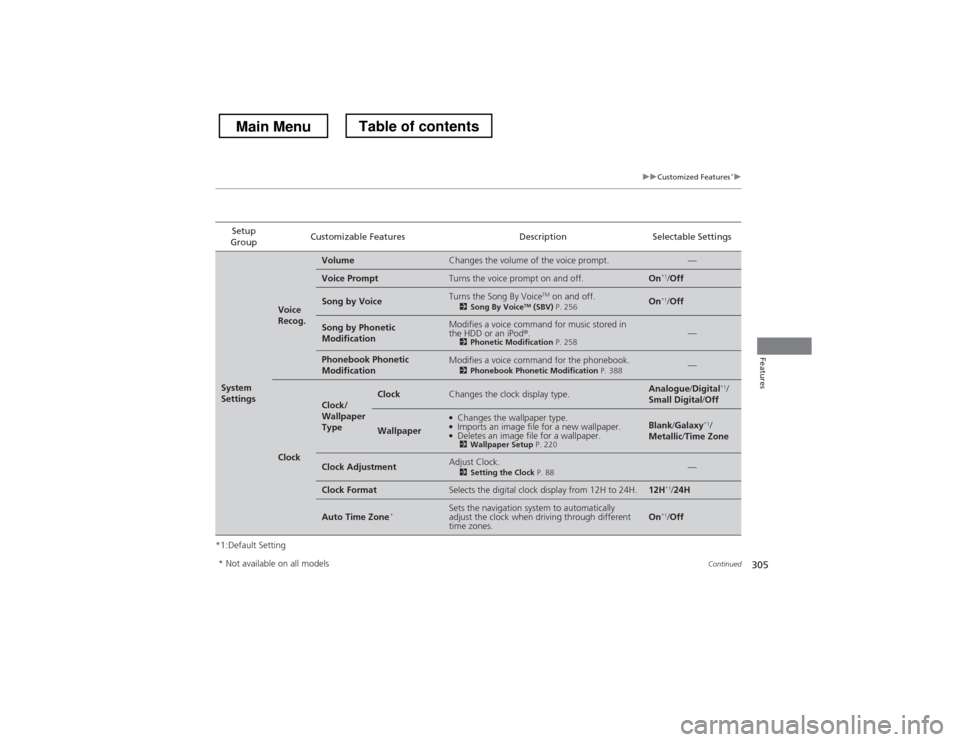
*1:Default SettingSetup
Group Customizable Features Description Selectable Settings
System
Settings
Voice
Recog.
VolumeChanges the volume of the voice prompt.—
Voice PromptTurns the voice prompt on and off.On
*1
/Off
Song by VoiceTurns the Song By Voice TM
on and off.
2 Song By Voice TM
(SBV) P. 256On*1
/Off
Song by Phonetic
ModificationModifies a voice command for music stored in
the HDD or an iPod ®.
2 Phonetic Modification P. 258—
Phonebook Phonetic
ModificationModifies a voice command for the phonebook.
2Phonebook Phonetic Modification P. 388—
Clock
Clock/
Wallpaper
TypeClockChanges the clock display type.Analogue/Digital *1
/
Small Digital /Off
Wallpaper
●
Changes the wallpaper type.
● Imports an image file for a new wallpaper.
● Deletes an image file for a wallpaper.
2 Wallpaper Setup P. 220Blank/Galaxy *1
/
Metallic /Time Zone
Clock AdjustmentAdjust Clock.
2Setting the Clock P. 88—
Clock FormatSelects the digital clock display from 12H to 24H.12H*1
/24H
Auto Time Zone *Sets the navigation system to automatically
adjust the clock when driving through different time zones.On*1
/Off
* Not available on all models
Main MenuTable of contents
Page 321 of 573
320
Features
Bluetooth® HandsFreeLink ®
Bluetooth® HandsFreeLink ® (HFL) allows you to place and receive phone calls using
your vehicle’s audio system, without handling your cell phone.
Using HFL
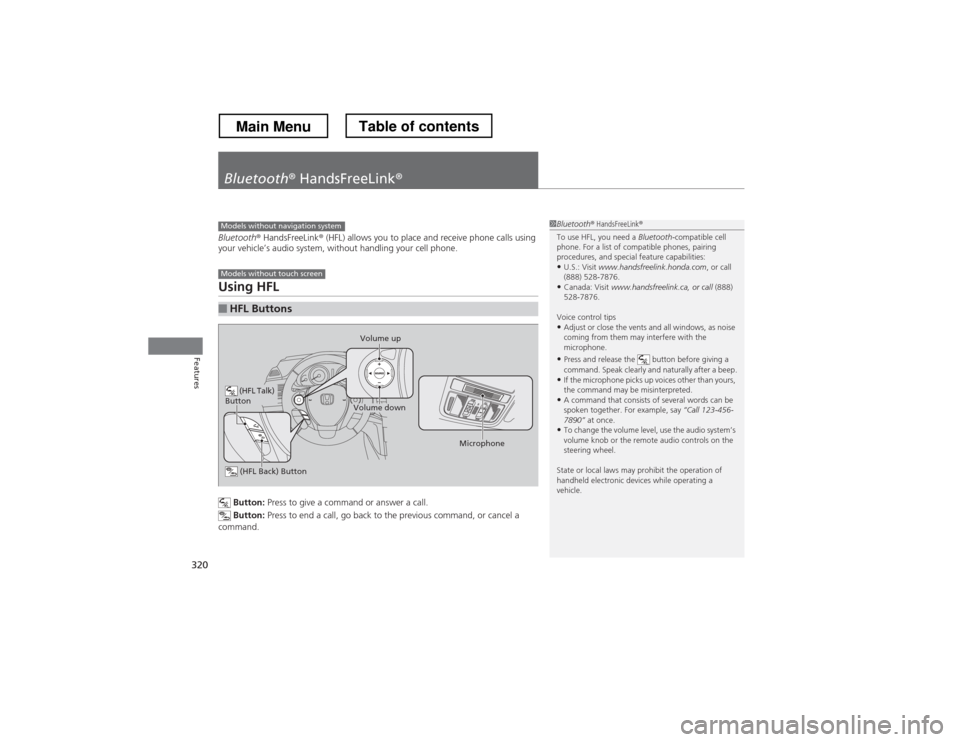
Button: Press to give a command or answer a call.
Button: Press to end a call, go back to the previous command, or cancel a
command.
■HFL Buttons
1Bluetooth ® HandsFreeLink ®
To use HFL, you need a Bluetooth-compatible cell
phone. For a list of compatible phones, pairing
procedures, and special feature capabilities:
• U.S.: Visit www.handsfreelink.honda.com , or call
(888) 528-7876.
• Canada: Visit www.handsfreelink.ca, or call (888)
528-7876.
Voice control tips • Adjust or close the vents and all windows, as noise
coming from them may interfere with the
microphone.
• Press and release the button before giving a
command. Speak clearly and naturally after a beep.
• If the microphone picks up voices other than yours,
the command may be misinterpreted.
• A command that consists of several words can be
spoken together. For example, say “Call 123-456-
7890” at once.
• To change the volume level, use the audio system’s
volume knob or the remote audio controls on the
steering wheel.
State or local laws may prohibit the operation of
handheld electronic devices while operating a
vehicle.Models without navigation system
Models without touch screen
(HFL Talk)
Button
Volume up
Microphone
(HFL Back) Button
Volume down
Main MenuTable of contents
Page 333 of 573
332
Features
Bluetooth® HandsFreeLink ®
Bluetooth® HandsFreeLink ® (HFL) allows you to place and receive phone calls using
your vehicle’s audio system, without handling your cell phone.
Using HFL
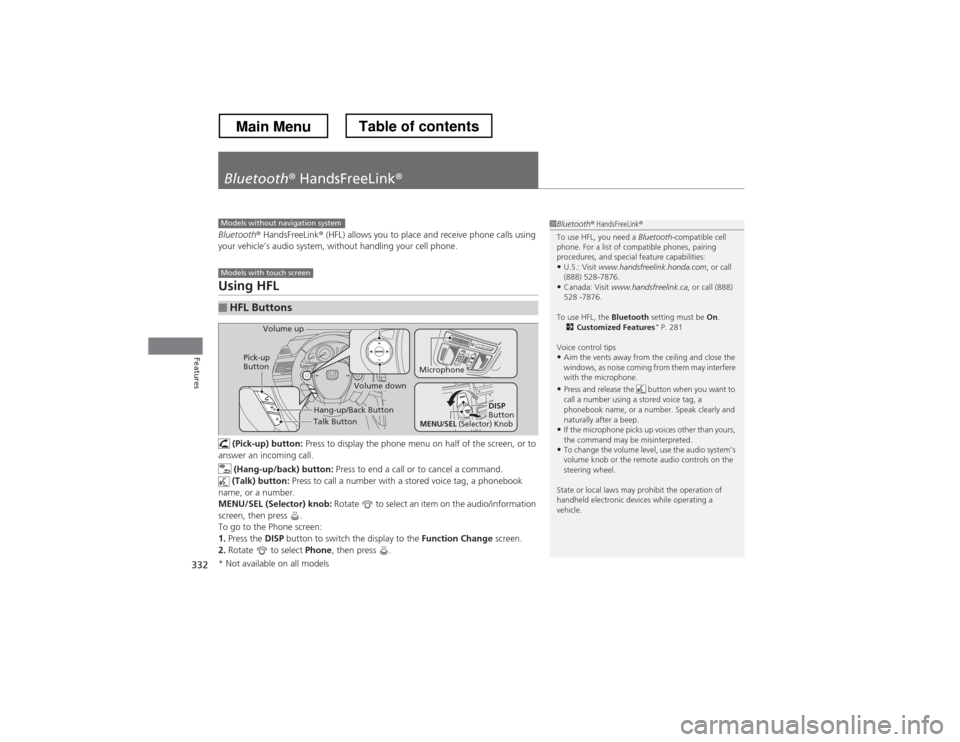
(Pick-up) button: Press to display the phone menu on half of the screen, or to
answer an incoming call.
(Hang-up/back) button: Press to end a call or to cancel a command.
(Talk) button: Press to call a number with a stored voice tag, a phonebook
name, or a number.
MENU/SEL (Selector) knob: Rotate to select an item on the audio/information
screen, then press .
To go to the Phone screen:1. Press the DISP button to switch the display to the Function Change screen.
2. Rotate to select Phone, then press .
■HFL Buttons
1Bluetooth ® HandsFreeLink ®
To use HFL, you need a Bluetooth-compatible cell
phone. For a list of compatible phones, pairing
procedures, and special feature capabilities:
• U.S.: Visit www.handsfreelink.honda.com , or call
(888) 528-7876.
• Canada: Visit www.handsfreelink.ca , or call (888)
528 -7876.
To use HFL, the Bluetooth setting must be On.
2 Customized Features *
P. 281
Voice control tips • Aim the vents away from the ceiling and close the
windows, as noise coming from them may interfere
with the microphone.
• Press and release the button when you want to
call a number using a stored voice tag, a
phonebook name, or a number. Speak clearly and
naturally after a beep.
• If the microphone picks up voices other than yours,
the command may be misinterpreted.
• To change the volume level, use the audio system’s
volume knob or the remote audio controls on the
steering wheel.
State or local laws may prohibit the operation of
handheld electronic devices while operating a
vehicle.Models without navigation system
Models with touch screen
Talk Button
Volume up
Microphone
Hang-up/Back Button
Pick-up
Button
Volume down
DISP
Button
MENU/SEL (Selector) Knob
* Not available on all models
Main MenuTable of contents
Page 368 of 573
367
Continued
Features
Bluetooth
® HandsFreeLink ®
Bluetooth® HandsFreeLink ® (HFL) allows you to place and receive phone calls using
your vehicle’s navigation system, without handling your cell phone.
Using HFL
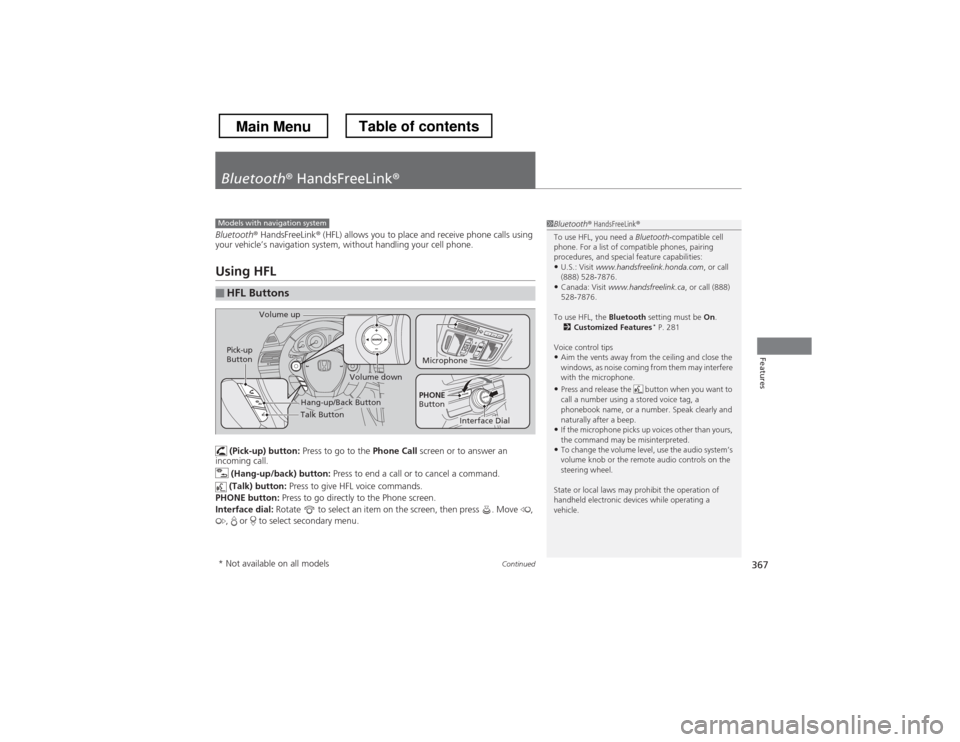
(Pick-up) button: Press to go to the Phone Call screen or to answer an
incoming call.
(Hang-up/back) button: Press to end a call or to cancel a command.
(Talk) button: Press to give HFL voice commands.
PHONE button: Press to go directly to the Phone screen.
Interface dial: Rotate to select an item on the screen, then press . Move ,
, or to select secondary menu.
■HFL Buttons
1Bluetooth ® HandsFreeLink ®
To use HFL, you need a Bluetooth-compatible cell
phone. For a list of compatible phones, pairing
procedures, and special feature capabilities:
• U.S.: Visit www.handsfreelink.honda.com , or call
(888) 528-7876.
• Canada: Visit www.handsfreelink.ca , or call (888)
528-7876.
To use HFL, the Bluetooth setting must be On.
2 Customized Features *
P. 281
Voice control tips • Aim the vents away from the ceiling and close the
windows, as noise coming from them may interfere
with the microphone.
• Press and release the button when you want to
call a number using a stored voice tag, a
phonebook name, or a number. Speak clearly and
naturally after a beep.
• If the microphone picks up voices other than yours,
the command may be misinterpreted.
• To change the volume level, use the audio system’s
volume knob or the remote audio controls on the
steering wheel.
State or local laws may prohibit the operation of
handheld electronic devices while operating a
vehicle.Models with navigation system
Talk Button
Volume up
Microphone
Hang-up/Back Button
Pick-up
Button
Volume down
Interface Dial
PHONE
Button
* Not available on all models
Main MenuTable of contents
Page 457 of 573
456
Driving
Refueling
Fuel Information ■Fuel recommendation
Use of lower octane gasoline can cause a persistent, heavy metallic knocking noise
that can lead to engine damage.
■ Top tier detergent gasoline
Because the level of detergency and additives in gasoline vary in the market, Honda
endorses the use of “TOP TIER Detergent Gasoline” where available to help
maintain the performance and reliability of your vehicle. TOP TIER Detergent
Gasoline meets a new gasoline standard jointly established by leading automotive
manufacturers to meet the needs of today’s advanced engines.
Qualifying gasoline retailers will, in most cases, identify their gasoline as having met
“TOP TIER Detergent Gasoline” standards at the retail location. This fuel is
guaranteed to contain the proper level of detergent additives and be free of metallic
additives. The proper level of detergent additives, and absence of harmful metallic
additives in gasoline, help avoid build-up of deposits in your engine and emission control system.
For further important fuel-related information for your vehicle, or on information on
gasoline that does not contain MMT, visit www.hondacars.com. In Canada, visit
www.honda.ca for additional information on gasoline. For more information on top
tier gasoline, visit www.toptiergas.com .
■ Fuel tank capacity: 18.5 US gal (70 liters)
Unleaded gasoline, pump octane number 87 or higher
1Fuel Information
NOTICEWe recommend quality gasoline containing
detergent additives that help prevent fuel system and
engine deposits. In addition, in order to maintain
good performance, fuel economy, and emissions
control, we strongly recommend the use of gasoline
that does NOT contain harmful manganese-based
fuel additives such as MMT, if such gasoline is available.
Use of gasoline with these additives may adversely
affect performance, and cause the malfunction
indicator lamp on your instrument panel to come on.
If this happens, contact a dealer for service.
Some gasoline today is blended with oxygenates such
as ethanol. Your vehicle is designed to operate on
oxygenated gasoline containing up to 10% ethanol
by volume. Do not use gasoline containing methanol.
If you notice any undesirable operating symptoms, try
another service station or switch to another brand of
gasoline.
Main MenuTable of contents