height HONDA CROSSTOUR 2013 1.G Owners Manual
[x] Cancel search | Manufacturer: HONDA, Model Year: 2013, Model line: CROSSTOUR, Model: HONDA CROSSTOUR 2013 1.GPages: 573, PDF Size: 25.21 MB
Page 37 of 573
uuSeat BeltsuFastening a Seat Belt
36
Safe Driving
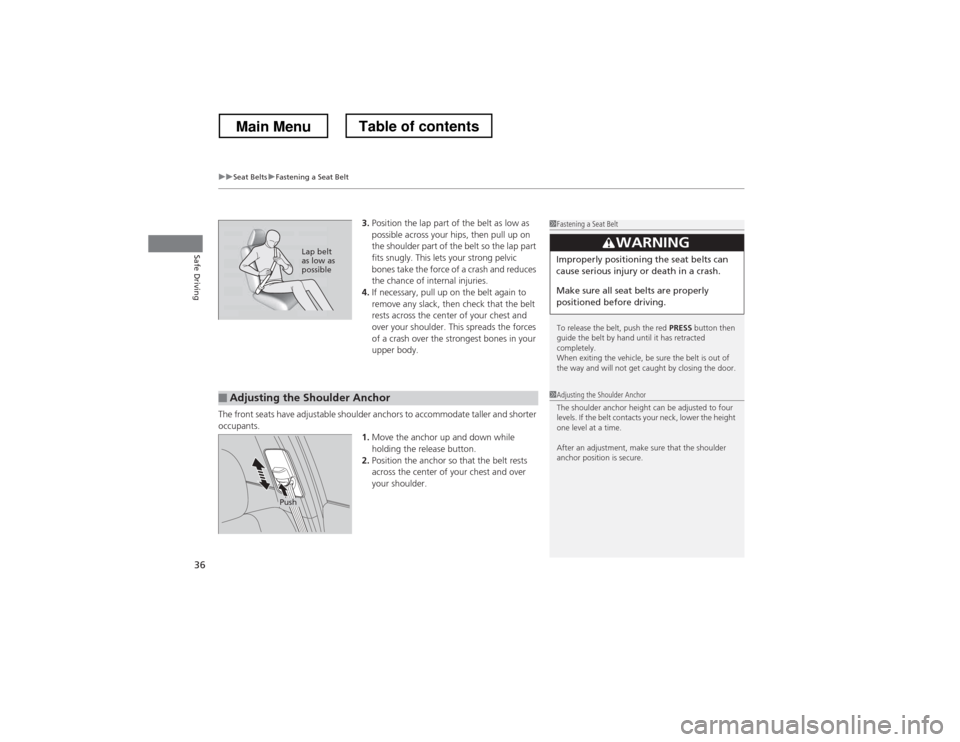
3. Position the lap part of the belt as low as
possible across your hips, then pull up on
the shoulder part of the belt so the lap part
fits snugly. This lets your strong pelvic
bones take the force of a crash and reduces
the chance of internal injuries.
4. If necessary, pull up on the belt again to
remove any slack, then check that the belt
rests across the center of your chest and
over your shoulder. This spreads the forces
of a crash over the strongest bones in your
upper body.
The front seats have adjustable shoulder anchors to accommodate taller and shorter
occupants. 1.Move the anchor up and down while holding the release button.
2. Position the anchor so that the belt rests
across the center of your chest and over
your shoulder.1Fastening a Seat Belt
To release the belt, push the red PRESS button then
guide the belt by hand until it has retracted completely.
When exiting the vehicle, be sure the belt is out of
the way and will not get caught by closing the door.
3WARNING
Improperly positioning the seat belts can
cause serious injury or death in a crash.
Make sure all seat belts are properly
positioned before driving.Lap belt as low as
possible
■Adjusting the Shoulder Anchor1Adjusting the Shoulder Anchor
The shoulder anchor height can be adjusted to four
levels. If the belt contacts your neck, lower the height
one level at a time.
After an adjustment, make sure that the shoulder
anchor position is secure.
Push
Main MenuTable of contents
Page 49 of 573
uuAirbagsuSide Airbags
48
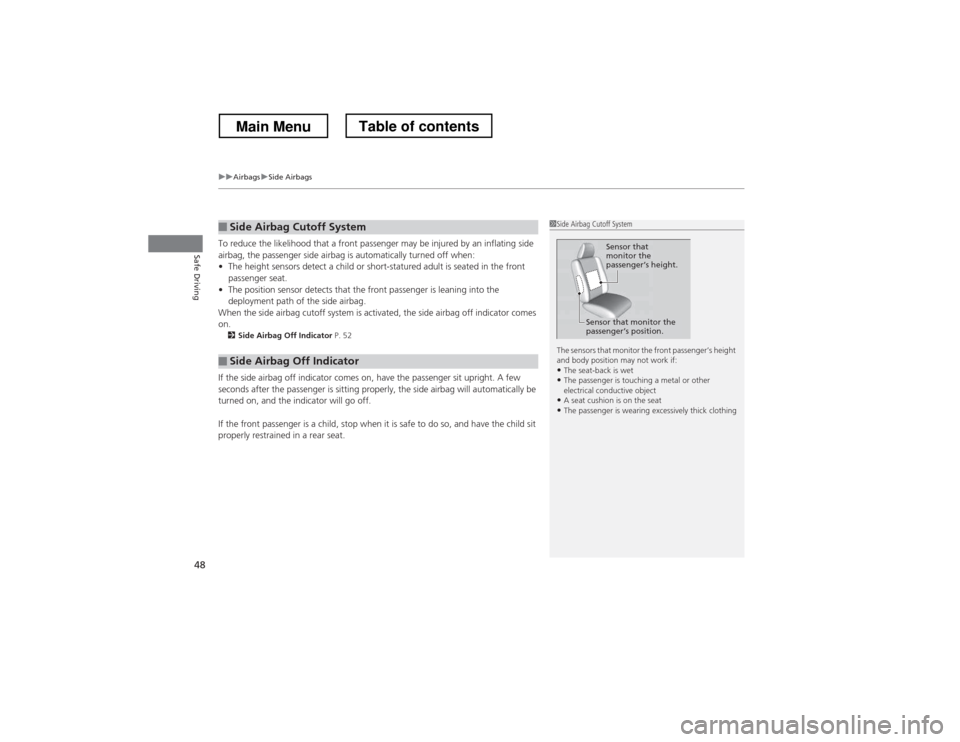
Safe DrivingTo reduce the likelihood that a front passenger may be injured by an inflating side
airbag, the passenger side airbag is automatically turned off when: • The height sensors detect a child or short-statured adult is seated in the front
passenger seat.
• The position sensor detects that the front passenger is leaning into the
deployment path of the side airbag.
When the side airbag cutoff system is activated, the side airbag off indicator comes
on. 2 Side Airbag Off Indicator P. 52
If the side airbag off indicator comes on, have the passenger sit upright. A few
seconds after the passenger is sitting properly, the side airbag will automatically be
turned on, and the indicator will go off.
If the front passenger is a child, stop when it is safe to do so, and have the child sit
properly restrained in a rear seat.
■Side Airbag Cutoff System
■Side Airbag Off Indicator
1Side Airbag Cutoff System
The sensors that monitor the front passenger’s height
and body position may not work if:
• The seat-back is wet
• The passenger is touching a metal or other
electrical conductive object
• A seat cushion is on the seat
• The passenger is wearing excessively thick clothing
Sensor that
monitor the
passenger
Page 57 of 573
56
uuChild SafetyuSafety of Infants and Small Children
Safe Driving
Safety of Infants and Small Children
An infant must be properly restrained in a rear-facing, reclining child seat until the
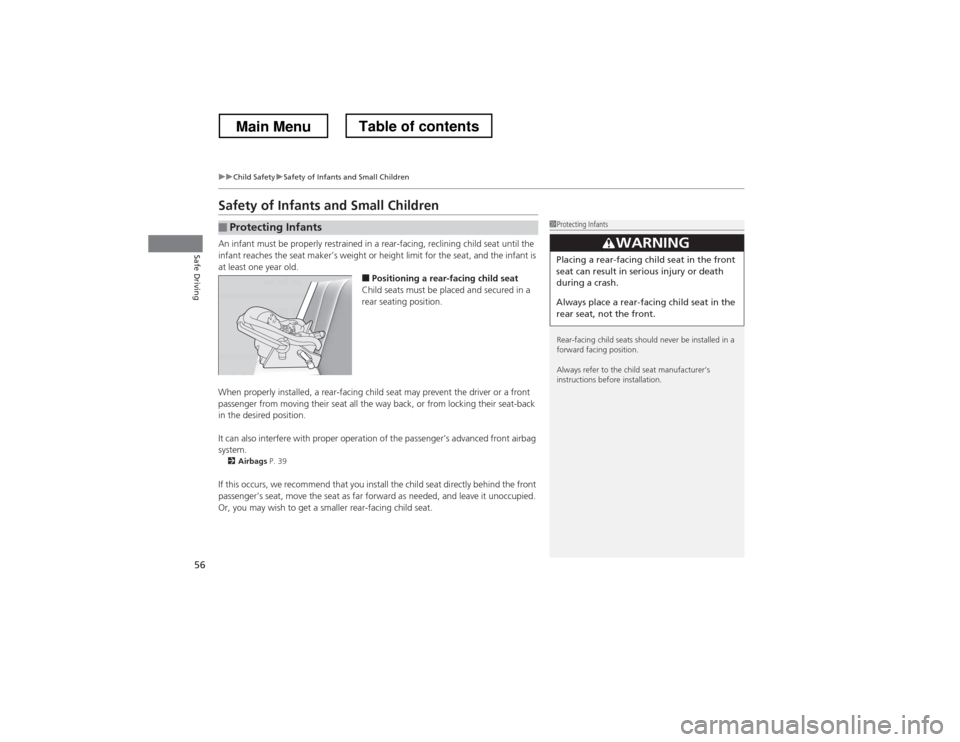
infant reaches the seat maker’s weight or height limit for the seat, and the infant is at least one year old.■Positioning a rear-facing child seat
Child seats must be placed and secured in a
rear seating position.
When properly installed, a rear-facing child seat may prevent the driver or a front
passenger from moving their seat all the way back, or from locking their seat-back
in the desired position.
It can also interfere with proper operation of the passenger’s advanced front airbag system. 2 Airbags P. 39
If this occurs, we recommend that you install the child seat directly behind the front
passenger’s seat, move the seat as far forward as needed, and leave it unoccupied.
Or, you may wish to get a smaller rear-facing child seat.
■Protecting Infants1Protecting Infants
Rear-facing child seats should never be installed in a
forward facing position.
Always refer to the child seat manufacturer’s
instructions before installation.
3WARNING
Placing a rear-facing child seat in the front
seat can result in serious injury or death
during a crash.
Always place a rear-facing child seat in the
rear seat, not the front.
Main MenuTable of contents
Page 58 of 573
Continued57
uuChild SafetyuSafety of Infants and Small Children
Safe DrivingIf a child is at least one year old and within the weight range indicated by the child
seat manufacturer, the child should be properly restrained in a firmly secured
forward-facing child seat.
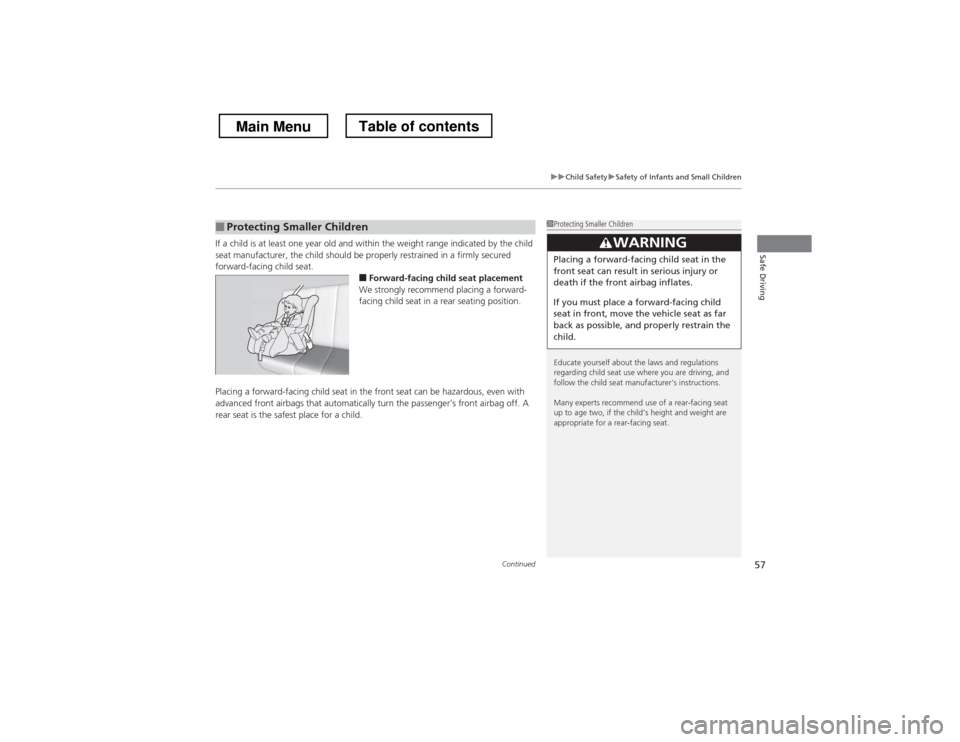
■Forward-facing child seat placement
We strongly recommend placing a forward-
facing child seat in a rear seating position.
Placing a forward-facing child seat in the front seat can be hazardous, even with
advanced front airbags that automatically turn the passenger’s front airbag off. A
rear seat is the safest place for a child.
■Protecting Smaller Children1Protecting Smaller Children
Educate yourself about the laws and regulations
regarding child seat use where you are driving, and
follow the child seat manufacturer’s instructions.
Many experts recommend use of a rear-facing seat
up to age two, if the child’s height and weight are
appropriate for a rear-facing seat.
3WARNING
Placing a forward-facing child seat in the
front seat can result in serious injury or
death if the front airbag inflates.
If you must place a forward-facing child
seat in front, move the vehicle seat as far
back as possible, and properly restrain the
child.
Main MenuTable of contents
Page 130 of 573
129
uuOperating the Switches Around the Steering WheeluAdjusting the Steering Wheel
Controls
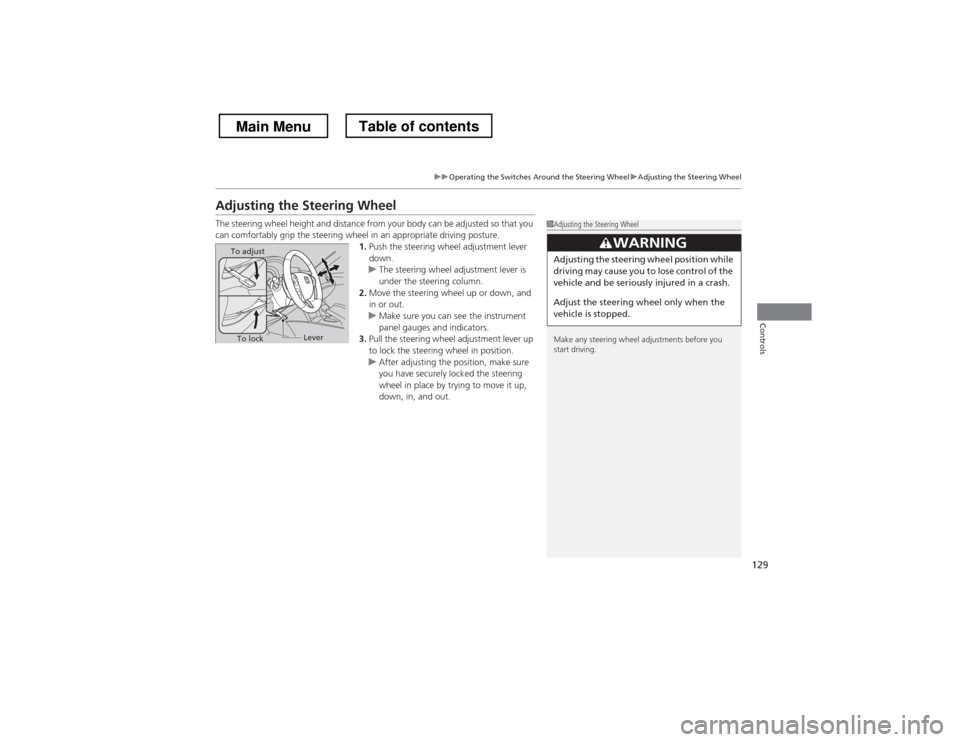
Adjusting the Steering Wheel
The steering wheel height and distance from your body can be adjusted so that you
can comfortably grip the steering wheel in an appropriate driving posture.1.Push the steering wheel adjustment lever
down.
uThe steering wheel adjustment lever is
under the steering column.
2. Move the steering wheel up or down, and
in or out.
uMake sure you can see the instrument
panel gauges and indicators.
3. Pull the steering wheel adjustment lever up
to lock the steering wheel in position.
uAfter adjusting the position, make sure
you have securely locked the steering
wheel in place by trying to move it up,
down, in, and out.
1Adjusting the Steering Wheel
Make any steering wheel adjustments before you
start driving.
3WARNING
Adjusting the steering wheel position while
driving may cause you to lose control of the
vehicle and be seriously injured in a crash.
Adjust the steering wheel only when the
vehicle is stopped.To adjust
To lockLever
Main MenuTable of contents
Page 134 of 573
133
Continued
Controls
Adjusting the Seats
Adjusting the Seat Positions
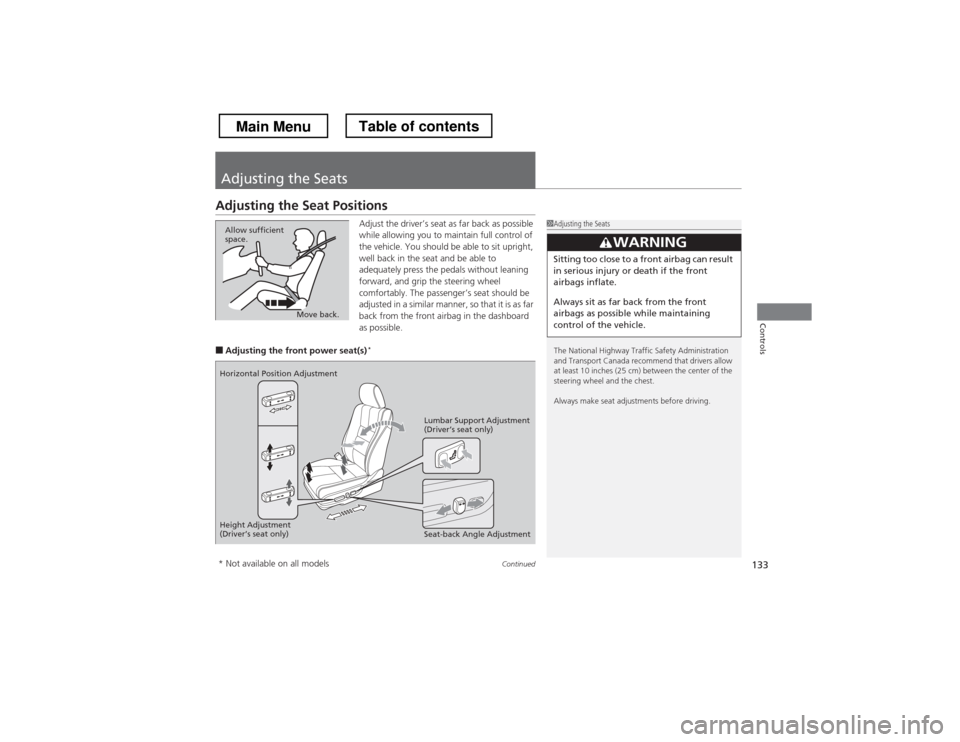
Adjust the driver’s seat as far back as possible
while allowing you to maintain full control of
the vehicle. You should be able to sit upright,
well back in the seat and be able to
adequately press the pedals without leaning
forward, and grip the steering wheel
comfortably. The passenger’s seat should be
adjusted in a similar manner, so that it is as far
back from the front airbag in the dashboard
as possible.
■ Adjusting the front power seat(s) *
1Adjusting the Seats
The National Highway Traffic Safety Administration
and Transport Canada recommend that drivers allow
at least 10 inches (25 cm) between the center of the
steering wheel and the chest.
Always make seat adjustments before driving.
3WARNING
Sitting too close to a front airbag can result
in serious injury or death if the front
airbags inflate.
Always sit as far back from the front
airbags as possible while maintaining
control of the vehicle.
Move back.
Allow sufficient
space.
Horizontal Position Adjustment
Height Adjustment
(Driver
Page 137 of 573
uuAdjusting the SeatsuAdjusting the Seat Positions
136
Controls
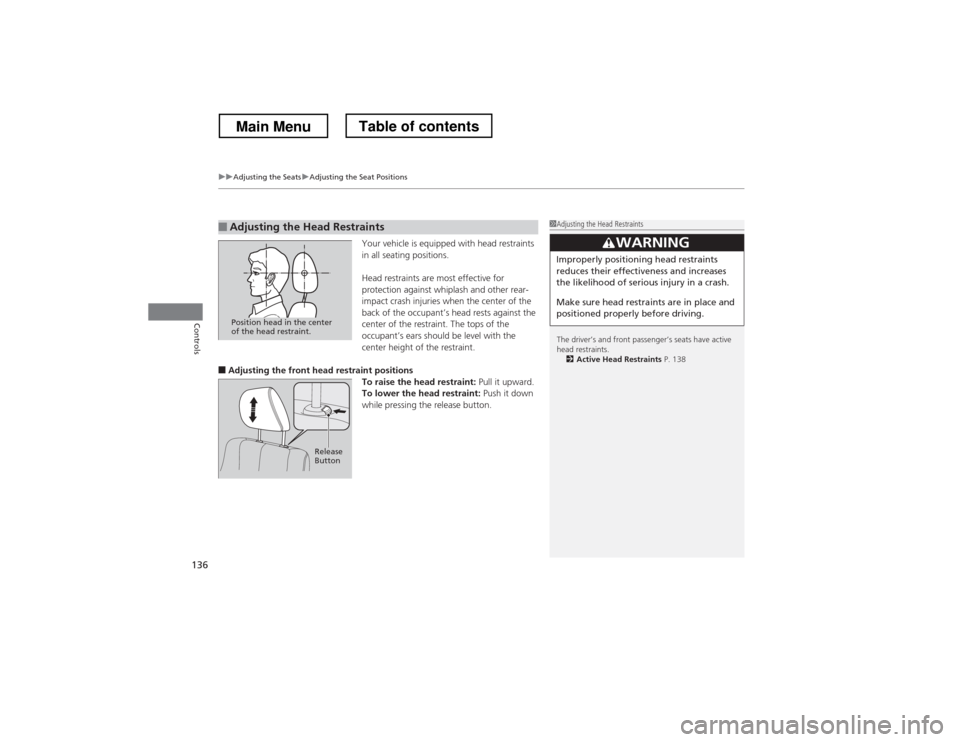
Your vehicle is equipped with head restraints
in all seating positions.
Head restraints are most effective for
protection against whiplash and other rear-
impact crash injuries when the center of the
back of the occupant’s head rests against the
center of the restraint. The tops of the
occupant’s ears should be level with the
center height of the restraint.
■ Adjusting the front head restraint positions
To raise the head restraint: Pull it upward.
To lower the head restraint: Push it down
while pressing the release button.
■Adjusting the Head Restraints1Adjusting the Head Restraints
The driver’s and front passenger’s seats have active head restraints. 2 Active Head Restraints P. 138
3WARNING
Improperly positioning head restraints
reduces their effectiveness and increases
the likelihood of serious injury in a crash.
Make sure head restraints are in place and
positioned properly before driving.
Position head in the center
of the head restraint.
Release
Button
Main MenuTable of contents
Page 138 of 573
Continued137
uuAdjusting the SeatsuAdjusting the Seat Positions
Controls
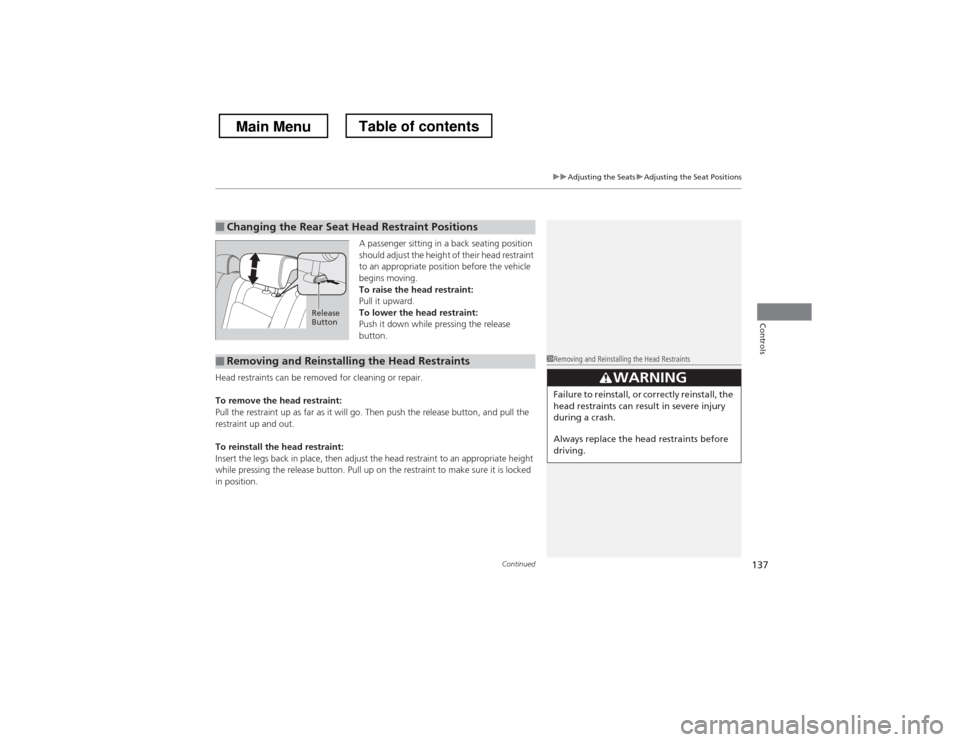
A passenger sitting in a back seating position
should adjust the height of their head restraint
to an appropriate position before the vehicle
begins moving.
To raise the head restraint:
Pull it upward.
To lower the head restraint:
Push it down while pressing the release
button.
Head restraints can be removed for cleaning or repair.
To remove the head restraint:
Pull the restraint up as far as it will go. Then push the release button, and pull the
restraint up and out.
To reinstall the head restraint:
Insert the legs back in place, then adjust the head restraint to an appropriate height
while pressing the release button. Pull up on the restraint to make sure it is locked
in position.
■Changing the Rear Seat Head Restraint Positions
Release
Button
■Removing and Reinstalling the Head Restraints1Removing and Reinstalling the Head Restraints
33WARNING
Failure to reinstall, or correctly reinstall, the
head restraints can result in severe injury
during a crash.
Always replace the head restraints before
driving.
Main MenuTable of contents
Page 412 of 573
Continued411
uuBefore DrivinguDriving Preparation
Driving
•Store or secure all items on board properly.uCarrying too much cargo, or improp erly storing it, can affect your vehicle’s
handling, stability, stopping distance, and tires, and make it unsafe. 2 Maximum Load Limit P. 413
• Do not pile items higher than the seat height.
uThey can block your view and may be thrown forward in the event of sudden
braking.
• Do not place anything in the front seat footwells. Make sure to secure the floor mat.
uAn object or unsecured floor mat can interfere with your brake and accelerator
pedal operation while driving.
• If you have any animals on board, do not let them move around in the vehicle.
uThey may interfere with driving and a crash could occur.
• Securely close and lock all doors and the tailgate.
2 Locking/Unlocking the Doors from the Inside P. 99
• Adjust your seating position properly.
uAdjust the head restraint, too.
2 Adjusting the Seats P. 133
2 Adjusting the Head Restraints P. 136
• Adjust the mirrors and steering wheel properly for your driving.
uAdjust them while sitting in the proper driving position.
2 Adjusting the Steering Wheel P. 129
2 Adjusting the Mirrors P. 130
■Interior Checks1Interior Checks
The headlight aim is set by the factory, and does not
need to be adjusted. However, if you regularly carry
heavy items in the cargo area or tow a trailer, have
the aiming readjusted at a dealer or by a qualified
technician.
Main MenuTable of contents
Page 499 of 573
498
uuChecking and Maintaining TiresuTire and Loading Information Label
Maintenance
Tire and Loading Information Label
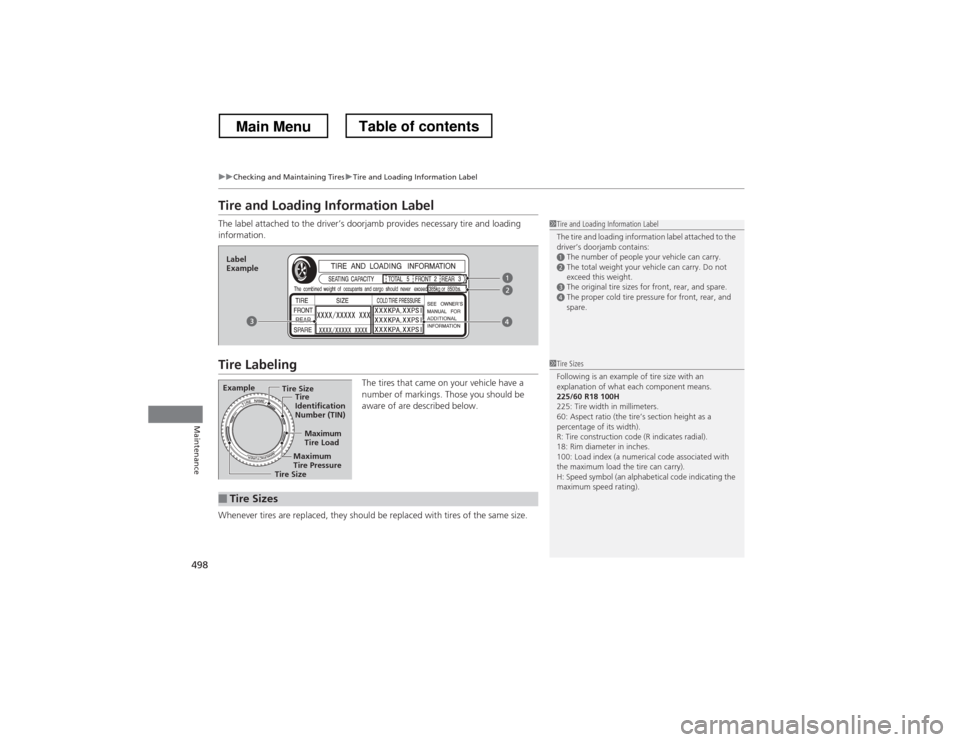
The label attached to the driver’s doorjamb provides necessary tire and loading information.
Tire LabelingThe tires that came on your vehicle have a
number of markings. Those you should be
aware of are described below.
Whenever tires are replaced, they should be replaced with tires of the same size.
1Tire and Loading Information Label
The tire and loading information label attached to the
driver’s doorjamb contains:
aThe number of people your vehicle can carry.bThe total weight your vehicle can carry. Do not
exceed this weight.
cThe original tire sizes for front, rear, and spare.dThe proper cold tire pressure for front, rear, and
spare.
Label
Example
Example Tire Size
Tire
Identification
Number (TIN)
Maximum Tire Load
Maximum Tire Pressure
Tire Size
■Tire Sizes
1Tire Sizes
Following is an example of tire size with an
explanation of what each component means.225/60 R18 100H
225: Tire width in millimeters.
60: Aspect ratio (the tire’s section height as a
percentage of its width).
R: Tire construction code (R indicates radial).
18: Rim diameter in inches.
100: Load index (a numerical code associated with
the maximum load the tire can carry).
H: Speed symbol (an alphabetical code indicating the
maximum speed rating).
Main MenuTable of contents