lights HONDA CROSSTOUR 2013 1.G Owners Manual
[x] Cancel search | Manufacturer: HONDA, Model Year: 2013, Model line: CROSSTOUR, Model: HONDA CROSSTOUR 2013 1.GPages: 573, PDF Size: 25.21 MB
Page 2 of 573
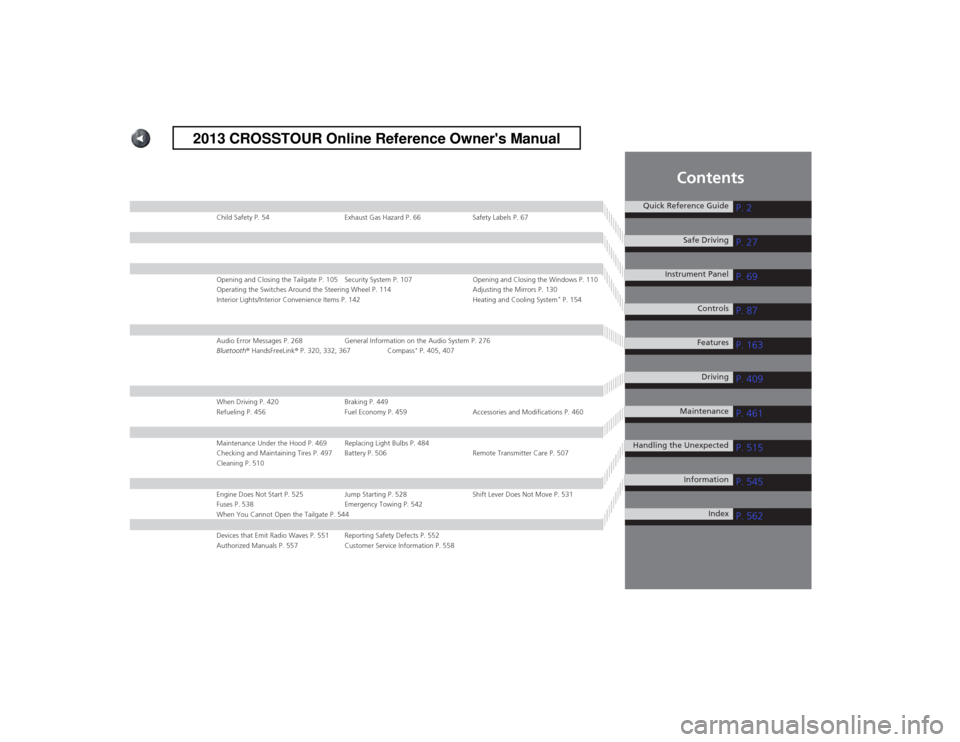
Contents
Child Safety P. 54 Exhaust Gas Hazard P. 66 Safety Labels P. 67
Opening and Closing the Tailgate P. 105 Security System P. 107 Opening and Closing the Windows P. 110
Operating the Switches Around the Steering Wheel P. 114 Adjusting the Mirrors P. 130
Interior Lights/Interior Convenience Items P. 142 Heating and Cooling System*
P. 154
Audio Error Messages P. 268 General Information on the Audio System P. 276
Bluetooth ® HandsFreeLink ® P. 320, 332, 367 Compass *
P. 405, 407
When Driving P. 420 Braking P. 449
Refueling P. 456 Fuel Economy P. 459 Accessories and Modifications P. 460
Maintenance Under the Hood P. 469 Replacing Light Bulbs P. 484
Checking and Maintaining Tires P. 497 Battery P. 506 Remote Transmitter Care P. 507
Cleaning P. 510
Engine Does Not Start P. 525 Jump Starting P. 528 Shift Lever Does Not Move P. 531
Fuses P. 538 Emergency Towing P. 542
When You Cannot Open the Tailgate P. 544
Devices that Emit Radio Waves P. 551 Reporting Safety Defects P. 552
Authorized Manuals P. 557 Customer Service Information P. 558
Quick Reference GuideP. 2
P. 27
P. 69
P. 87
P. 163
P. 409
P. 461
P. 515
P. 545
P. 562
Safe Driving
Instrument Panel Controls
Features Driving
Maintenance
Handling the Unexpected InformationIndex
2013 CROSSTOUR Online Reference Owner's Manual
Page 4 of 573
3
Quick Reference Guide
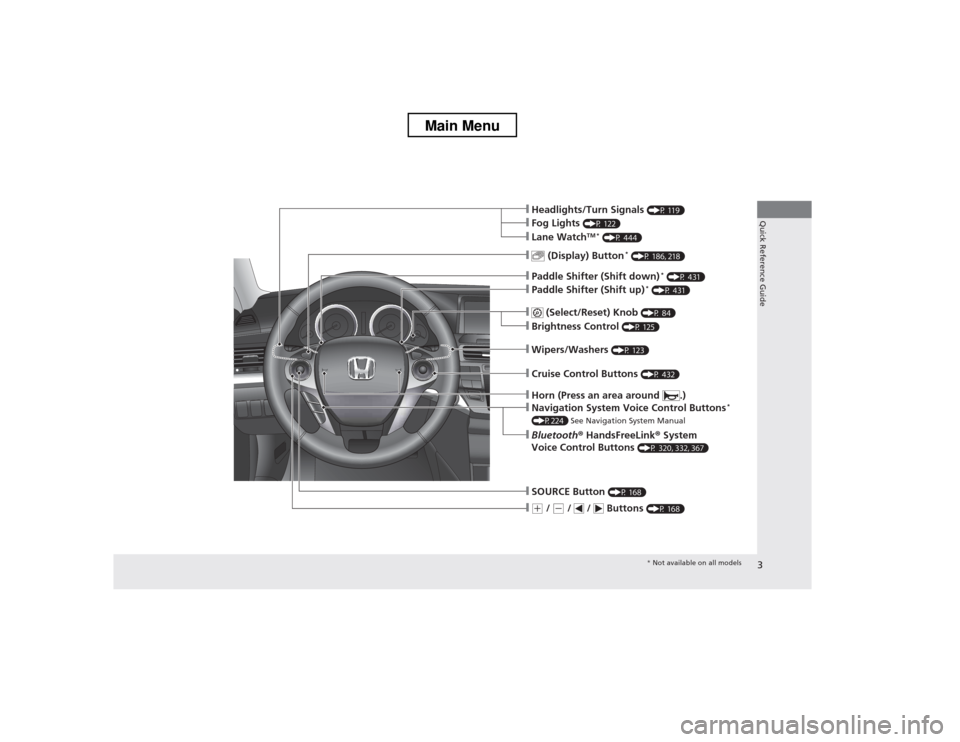
❙Wipers/Washers (P 123)
❙Navigation System Voice Control Buttons *
(P224) See Navigation System Manual
❙(+ / (- / / Buttons (P 168)
❙SOURCE Button (P 168)
❙ (Display) Button *
(P 186, 218)
❙Headlights/Turn Signals (P 119)
❙Fog Lights (P 122)
❙Paddle Shifter (Shift down) *
(P 431)
❙Paddle Shifter (Shift up) *
(P 431)
❙Lane Watch TM *
(P 444)
❙Horn (Press an area around .)
❙Bluetooth ® HandsFreeLink ® System
Voice Control Buttons (P 320, 332, 367)
❙ (Select/Reset) Knob
(P 84)
❙Brightness Control (P 125)
❙Cruise Control Buttons (P 432)
* Not available on all models
Main Menu
Page 6 of 573
5
Quick Reference Guide
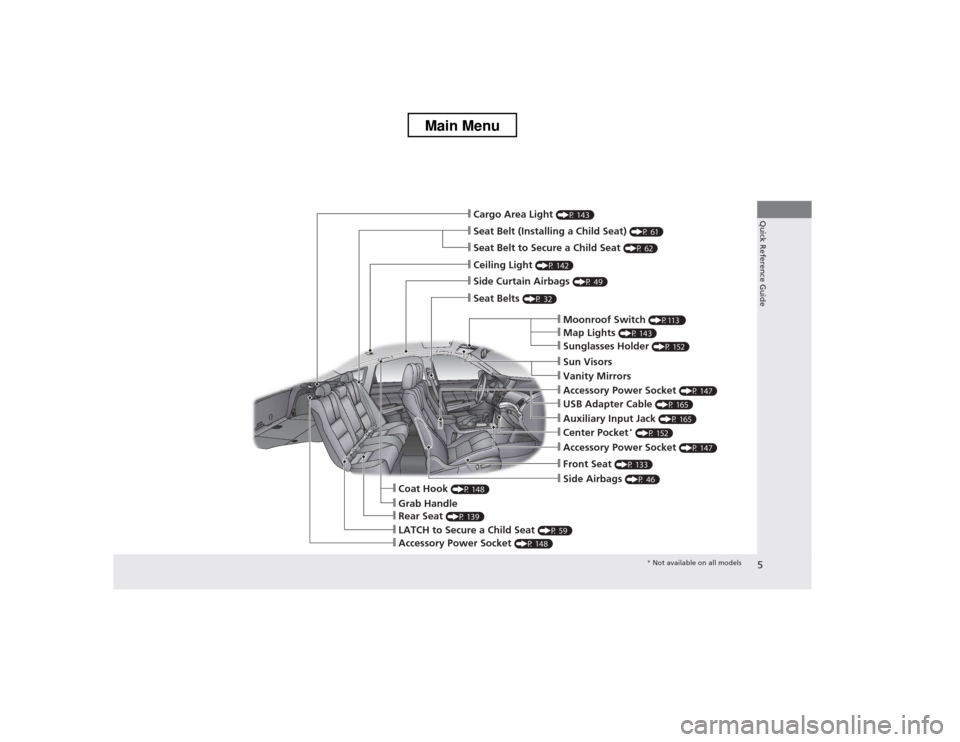
❙Seat Belt (Installing a Child Seat) (P 61)
❙Moonroof Switch (P113 )
❙Map Lights (P 143)
❙Front Seat (P 133)
❙Seat Belts (P 32)
❙Side Airbags (P 46)
❙LATCH to Secure a Child Seat (P 59)
❙Ceiling Light (P 142)
❙Side Curtain Airbags (P 49)
❙Grab Handle
❙Cargo Area Light (P 143)
❙Seat Belt to Secure a Child Seat (P 62)
❙Sunglasses Holder (P 152)
❙Accessory Power Socket (P 147)
❙USB Adapter Cable (P 165)
❙Accessory Power Socket (P 147)
❙Auxiliary Input Jack (P 165)
❙Coat Hook (P 148)
❙Center Pocket *
(P 152)
❙Rear Seat (P 139)
❙Sun Visors
❙Vanity Mirrors
❙Accessory Power Socket (P 148)
* Not available on all models
Main Menu
Page 7 of 573
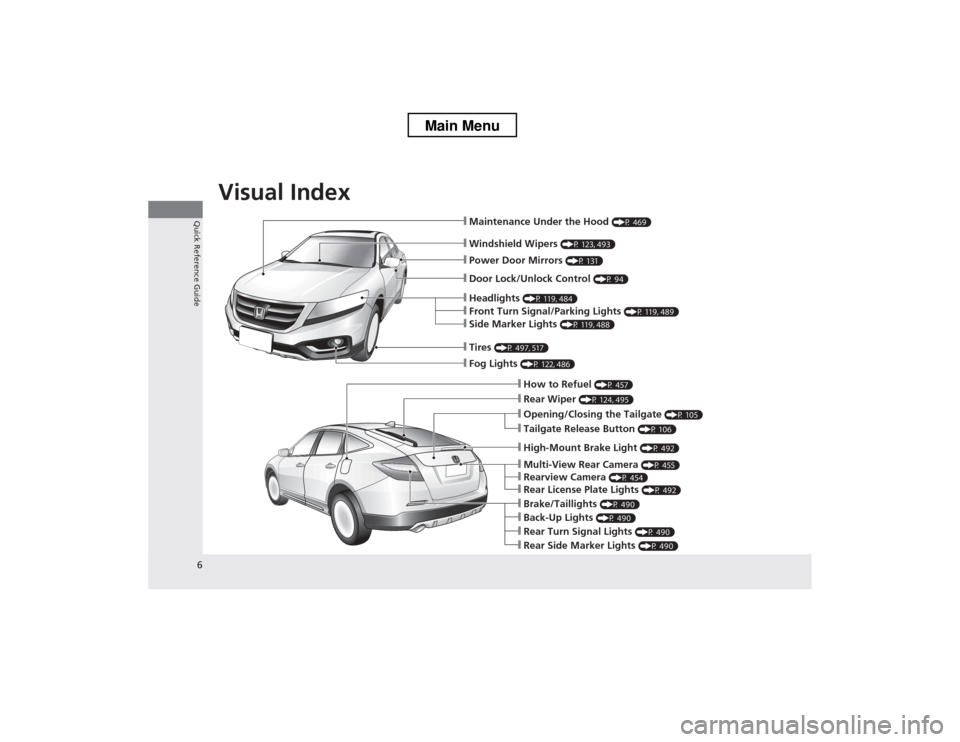
Visual Index
6
Quick Reference Guide
❙Windshield Wipers (P 123, 493)
❙Maintenance Under the Hood (P 469)
❙Fog Lights (P 122, 486)
❙Front Turn Signal/Parking Lights (P 119, 489)
❙Side Marker Lights (P 119, 488)
❙Tires (P 497, 517)
❙How to Refuel (P 457)
❙Opening/Closing the Tailgate (P 105)
❙Rear Wiper (P 124, 495)
❙Back-Up Lights (P 490)
❙Brake/Taillights (P 490)
❙Rear Turn Signal Lights (P 490)
❙Rear Side Marker Lights (P 490)
❙Multi-View Rear Camera (P 455)
❙Rearview Camera (P 454)
❙Rear License Plate Lights (P 492)
❙Headlights (P 119, 484)
❙Power Door Mirrors (P 131)
❙Door Lock/Unlock Control (P 94)
❙High-Mount Brake Light (P 492)
❙Tailgate Release Button (P 106)
Main Menu
Page 9 of 573
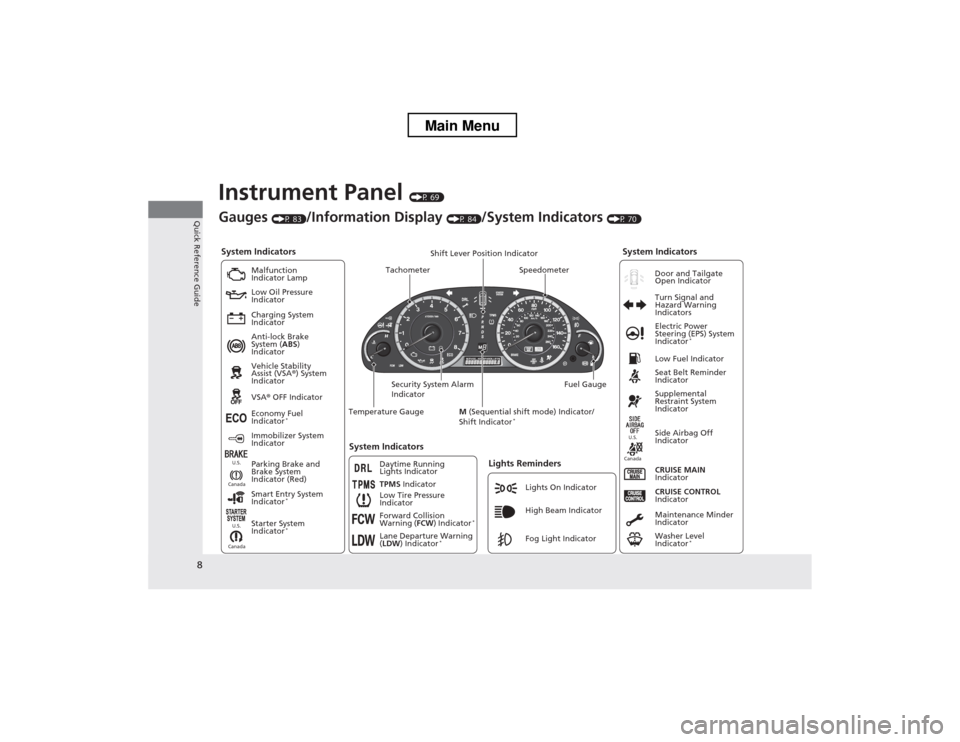
8
Quick Reference Guide
Instrument Panel (P 69)
System Indicators
Malfunction
Indicator Lamp
Low Oil Pressure
Indicator
Charging System
Indicator Anti-lock Brake
System ( ABS)
Indicator Vehicle Stability
Assist (VSA ®) System
Indicator VSA ® OFF Indicator
Low Tire Pressure
IndicatorLights Reminders
Lights On Indicator
High Beam Indicator
Fog Light Indicator
Immobilizer System
Indicator
Seat Belt Reminder
Indicator
System Indicators
CRUISE CONTROL
Indicator
Parking Brake and
Brake System
Indicator (Red) Supplemental
Restraint System
Indicator
Side Airbag Off
Indicator
CRUISE MAIN
Indicator
Tachometer Speedometer
Fuel Gauge
Security System Alarm
Indicator Shift Lever Position Indicator
Low Fuel Indicator
Gauges
(P 83)/Information Display (P 84)/System Indicators (P 70)
Economy Fuel
Indicator *
TPMS Indicator
Maintenance Minder
Indicator
Washer Level
Indicator*
Temperature Gauge
Electric Power
Steering (EPS) System
Indicator
*
Turn Signal and
Hazard Warning
Indicators
System Indicators
Canada U.S.Canada
U.S.
Starter System
Indicator
* Door and Tailgate Open Indicator
Smart Entry System
Indicator *
Canada U.S.Forward Collision
Warning (
FCW) Indicator *
Lane Departure Warning ( LDW ) Indicator *
M
(Sequential shift mode) Indicator/
Shift Indicator *
Daytime Running
Lights Indicator
Main Menu
Page 11 of 573
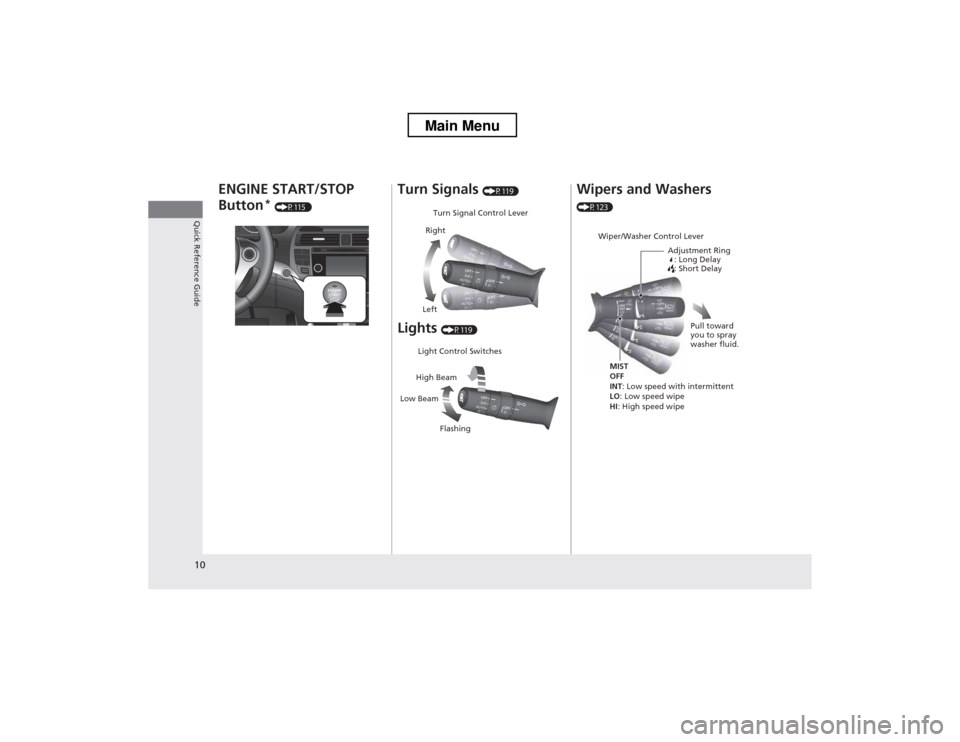
10
Quick Reference Guide
ENGINE START/STOP Button*
(P115 )Turn Signals (P119)
Lights (P119)
Turn Signal Control Lever
Right
Left
Light Control Switches
Low Beam High Beam
Flashing
Wipers and Washers
(P123)
Wiper/Washer Control Lever Adjustment Ring: Long Delay
: Short Delay
MIST OFF
INT : Low speed with intermittent
LO : Low speed wipe
HI : High speed wipe Pull toward
you to spray
washer fluid.
Main Menu
Page 21 of 573
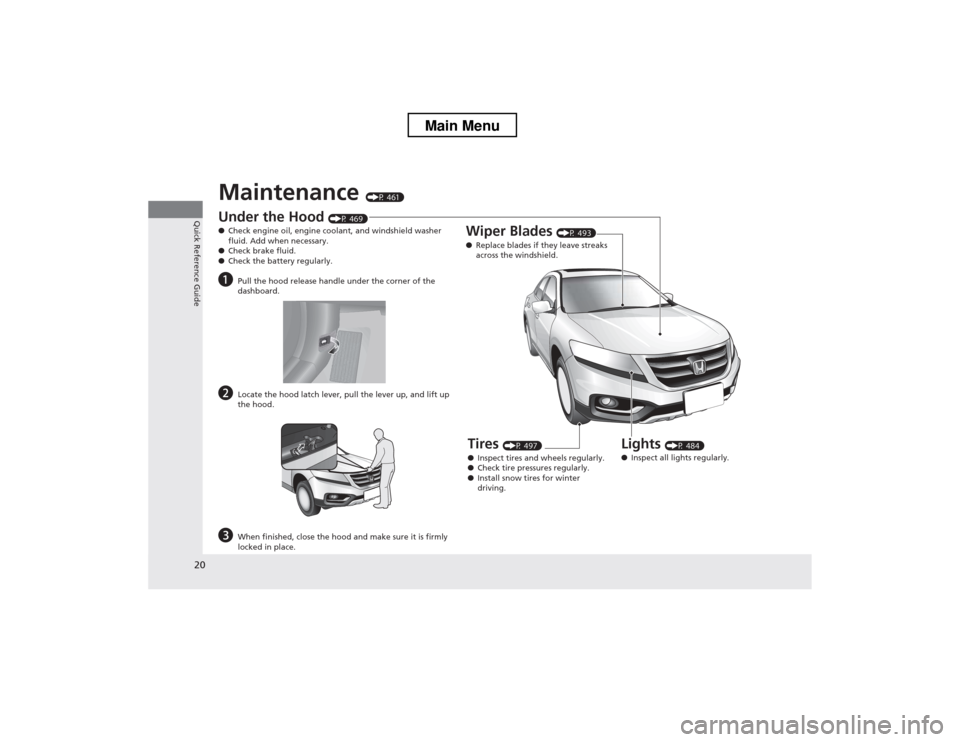
20
Quick Reference Guide
Maintenance (P 461)
Under the Hood (P 469)
● Check engine oil, engine coolant, and windshield washer
fluid. Add when necessary.
● Check brake fluid.
● Check the battery regularly.
a Pull the hood release handle under the corner of the
dashboard.
b Locate the hood latch lever, pull the lever up, and lift up
the hood.
c When finished, close the hood and make sure it is firmly
locked in place.
Lights (P 484)
● Inspect all lights regularly.
Wiper Blades
(P 493)
● Replace blades if they leave streaks
across the windshield.
Tires (P 497)
● Inspect tires and wheels regularly.
● Check tire pressures regularly.
● Install snow tires for winter
driving.
Main Menu
Page 80 of 573
79
uuIndicatorsu
Continued
Instrument Panel
*1:Models with the smart entry system have an ENGINE START/STOP button instead of an ignition switch.
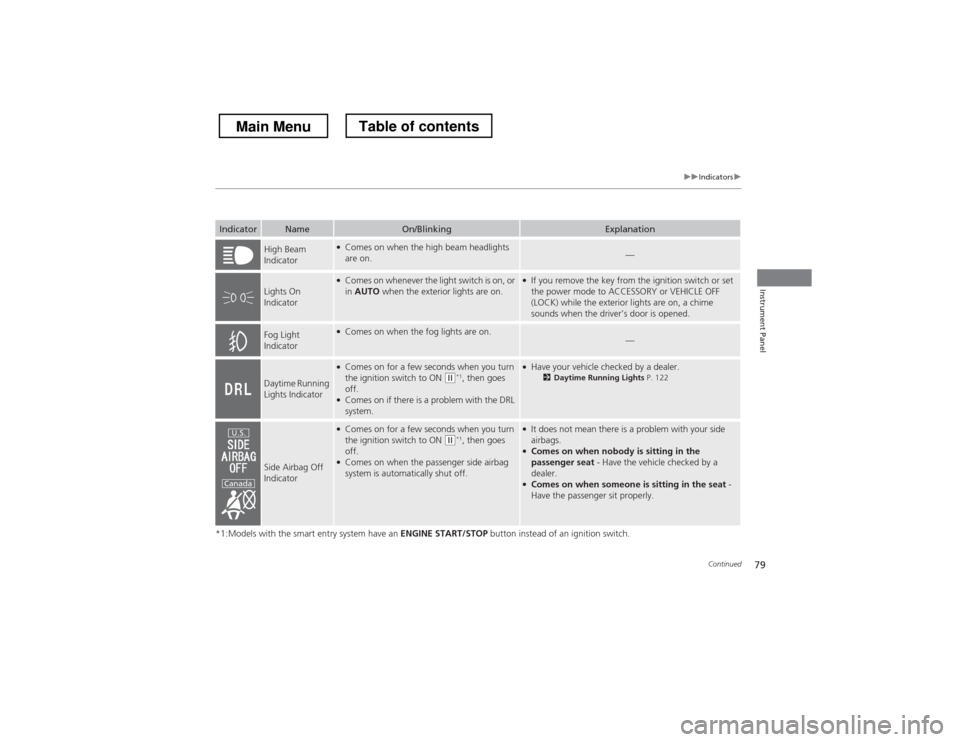
IndicatorNameOn/BlinkingExplanation
High Beam
Indicator●
Comes on when the high beam headlights are on.—
Lights On
Indicator
●Comes on whenever the light switch is on, or in AUTO when the exterior lights are on.●
If you remove the key from the ignition switch or set
the power mode to ACCESSORY or VEHICLE OFF
(LOCK) while the exterior lights are on, a chime
sounds when the driver’s door is opened.
Fog Light
Indicator● Comes on when the fog lights are on.—
Daytime Running
Lights Indicator
●Comes on for a few seconds when you turn
the ignition switch to ON
(w *1
, then goes
off.
● Comes on if there is a problem with the DRL system.
●Have your vehicle checked by a dealer.
2Daytime Running Lights P. 122
Side Airbag Off
Indicator
●
Comes on for a few seconds when you turn
the ignition switch to ON
(w *1
, then goes
off.
● Comes on when the passenger side airbag
system is automatically shut off.
●It does not mean there is a problem with your side airbags.
● Comes on when nobody is sitting in the
passenger seat - Have the vehicle checked by a
dealer.
● Comes on when someone is sitting in the seat -
Have the passenger sit properly.U.S.
Canada
Main MenuTable of contents
Page 88 of 573
87
Controls
This chapter explains how to operate the various controls necessary for driving.
Setting the Clock ................................ 88
Locking and Unlocking the Doors Key Types and Functions ... ................. 91
Low Smart Entry Remote Signal Strength*.. 93Locking/Unlocking the Doors from the
Outside ............................................ 94
Locking/Unlocking the Doors from the
Inside ............................................... 99
Childproof Door Locks ..................... 100
Auto Door Locking/Unlocking .......... 101
Opening and Closing the Tailgate ... 105
Security System ................................ 107
Immobilizer System .......................... 107
Security System Alarm ...................... 107
Opening and Closing the Windows ..... 110
Opening and Closing the Moonroof.. 113Operating the Switches Around the
Steering Wheel
Ignition Switch *
............................... 114
ENGINE START/STOP Button *
........... 115
Ignition Switch and Power Mode Comparison ................................... 118
Turn Signals ..................................... 119
Light Switches.................................. 119
Fog Lights ........................................ 122
Daytime Running Lights ................... 122
Wipers and Washers ........................ 123
Brightness Control ........................... 125
Rear Defogger/Heated Door Mirror Button.. 126Driving Position Memory System *
.... 127 Adjusting the Steering Wheel .......... 129
Adjusting the Mirrors ....................... 130
Interior Rearview Mirror ................... 130
Power Door Mirrors ......................... 131
Adjusting the Seats .......................... 133
Adjusting the Seat Positions ............. 133
Interior Lights/Interior Convenience Items ................................................ 142
Interior Lights .................................. 142
Interior Convenience Items .............. 144
Heating and Cooling System *
......... 154
Using Vents, Heating and A/C.......... 154
Climate Control System *
.................. 157
Using Automatic Climate Control .... 157
Automatic Climate Control Sensors ... 162
* Not available on all models
Main Menu
Page 95 of 573
94
uuLocking and Unlocking the DoorsuLocking/Unlocking the Doors from the Outside
Controls
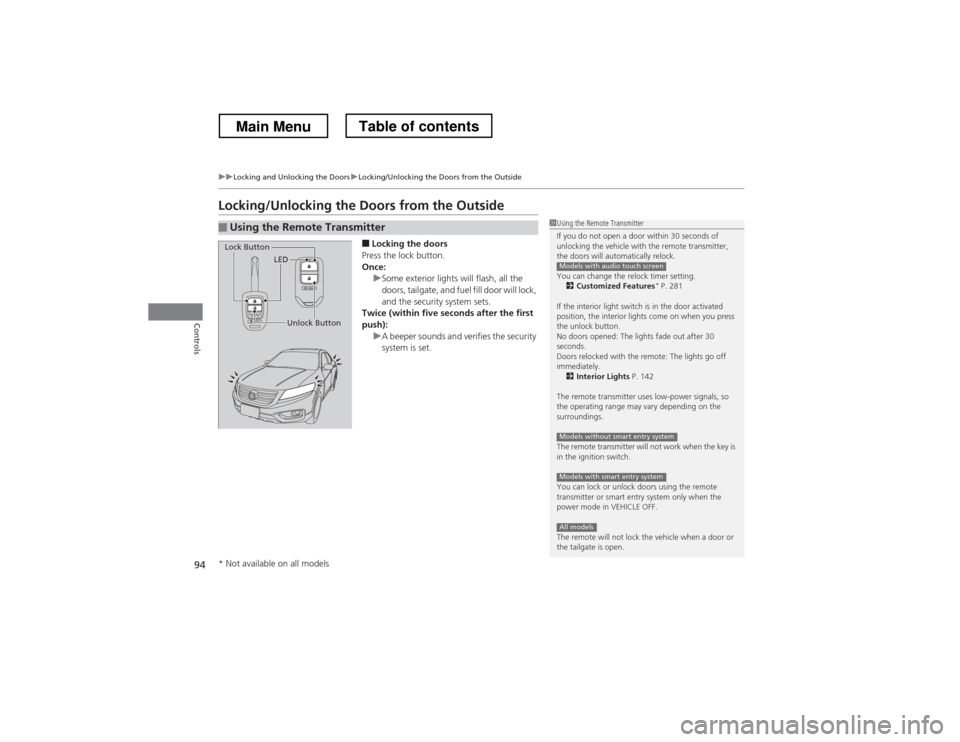
Locking/Unlocking the Doors from the Outside■Locking the doors
Press the lock button.
Once:
uSome exterior lights will flash, all the
doors, tailgate, and fuel fill door will lock,
and the security system sets.
Twice (within five seconds after the first
push):
uA beeper sounds and verifies the security
system is set.
■Using the Remote Transmitter1Using the Remote Transmitter
If you do not open a door within 30 seconds of
unlocking the vehicle with the remote transmitter,
the doors will automatically relock.
You can change the relock timer setting. 2 Customized Features *
P. 281
If the interior light switch is in the door activated
position, the interior lights come on when you press
the unlock button.
No doors opened: The lights fade out after 30
seconds.
Doors relocked with the remote: The lights go off immediately. 2 Interior Lights P. 142
The remote transmitter uses low-power signals, so
the operating range may vary depending on the
surroundings.
The remote transmitter will not work when the key is
in the ignition switch.
You can lock or unlock doors using the remote
transmitter or smart entry system only when the
power mode in VEHICLE OFF.
The remote will not lock the vehicle when a door or
the tailgate is open.
Models with audio touch screen
Models without smart entry system
Models with smart entry system
All models
LED
Unlock Button
Lock Button
* Not available on all models
Main MenuTable of contents