display HONDA CROSSTOUR 2015 1.G User Guide
[x] Cancel search | Manufacturer: HONDA, Model Year: 2015, Model line: CROSSTOUR, Model: HONDA CROSSTOUR 2015 1.GPages: 573
Page 87 of 573
uuGauges and Displays uInformation Display
86
Instrument Panel
Shows the outside temperature in Fahr enheit (U.S.) or Celsius (Canada).
■Adjusting the outside temperature display
Adjust the temperature reading up to ±5°F or ±3°C if the temperature reading
seems incorrect.
1. Turn the ignition switch to ON
(w*1.
2. Press and hold the (Select/Reset) k nob for 10 seconds or more while the
outside temperature is shown on the information display.
u The information display goes into temp erature adjustment mode. The display
starts showing from -5°F to +5°F (U.S.) or -3°C to +3°C (Canada).
3. Release the knob when the ri ght adjustment amount is shown.
u The adjustment is complete.
*1: Models with the smart entry system have an ENGINE START/STOP button instead of an
ignition switch.
■Outside Temperature*1 Outside Temperature*
The temperature sensor is in the front bumper. Road
heat and exhaust from anothe r vehicle can affect the
temperature reading when your vehicle speed is less
than 19 mph (30 km/h).
It may take several minutes for the display to be
updated after the temperature reading has stabilized.
Use the audio/information screen’s customized
features to correct the temperature. 2 Customized Features
* P. 280
Models with audio touch screen
* Not available on all models
15 CROSSTOUR-31TP66500.book 86 ページ 2014年7月31日 木曜日 午後3時23分
Page 89 of 573
88
Controls
Setting the Clock
Clock
You can adjust the time in the clock display with the ignition switch in ON (w*1.
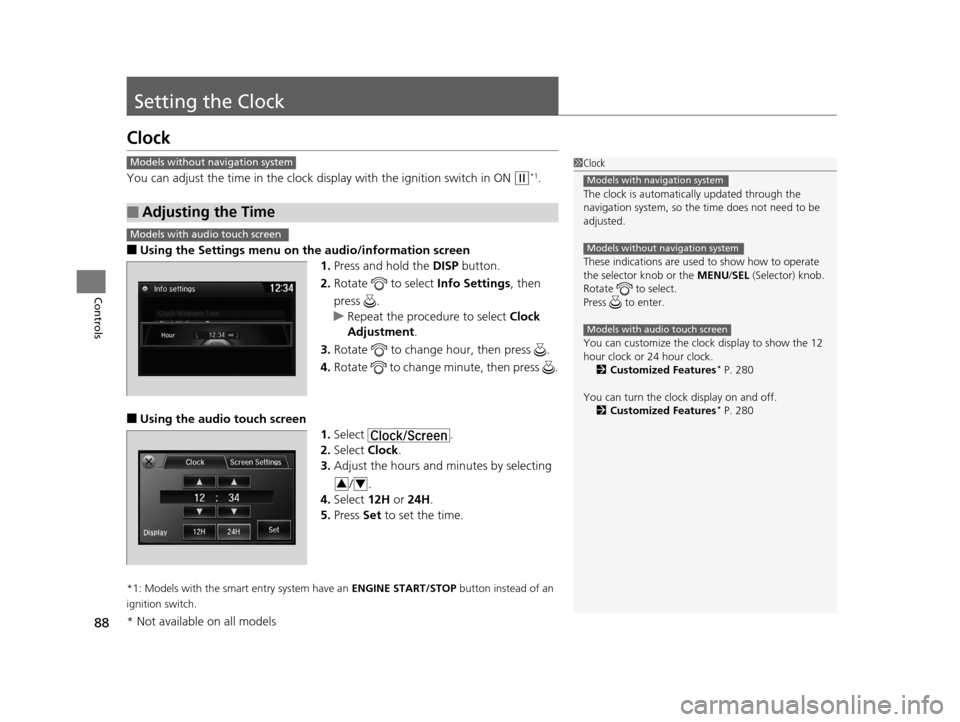
■Using the Settings menu on the audio/information screen
1. Press and hold the DISP button.
2. Rotate to select Info Settings, then
press .
u Repeat the procedure to select Clock
Adjustment .
3. Rotate to change hour, then press .
4. Rotate to change minute, then press .
■Using the audio touch screen
1.Select .
2. Select Clock.
3. Adjust the hours and minutes by selecting
/.
4. Select 12H or 24H .
5. Press Set to set the time.
*1: Models with the smart entry system have an ENGINE START/STOP button instead of an
ignition switch.
■Adjusting the Time
1 Clock
The clock is automatica lly updated through the
navigation system, so the ti me does not need to be
adjusted.
These indications are used to show how to operate
the selector knob or the MENU/SEL (Selector) knob.
Rotate to select.
Press to enter.
You can customize the clock display to show the 12
hour clock or 24 hour clock. 2 Customized Features
* P. 280
You can turn the clock display on and off. 2 Customized Features
* P. 280
Models with navigation system
Models without navigation system
Models with audio touch screen
Models without navigation system
Models with audio touch screen
34
* Not available on all models
15 CROSSTOUR-31TP66500.book 88 ページ 2014年7月31日 木曜日 午後3時23分
Page 90 of 573
Continued89
uuSetting the Clock uClock
Controls
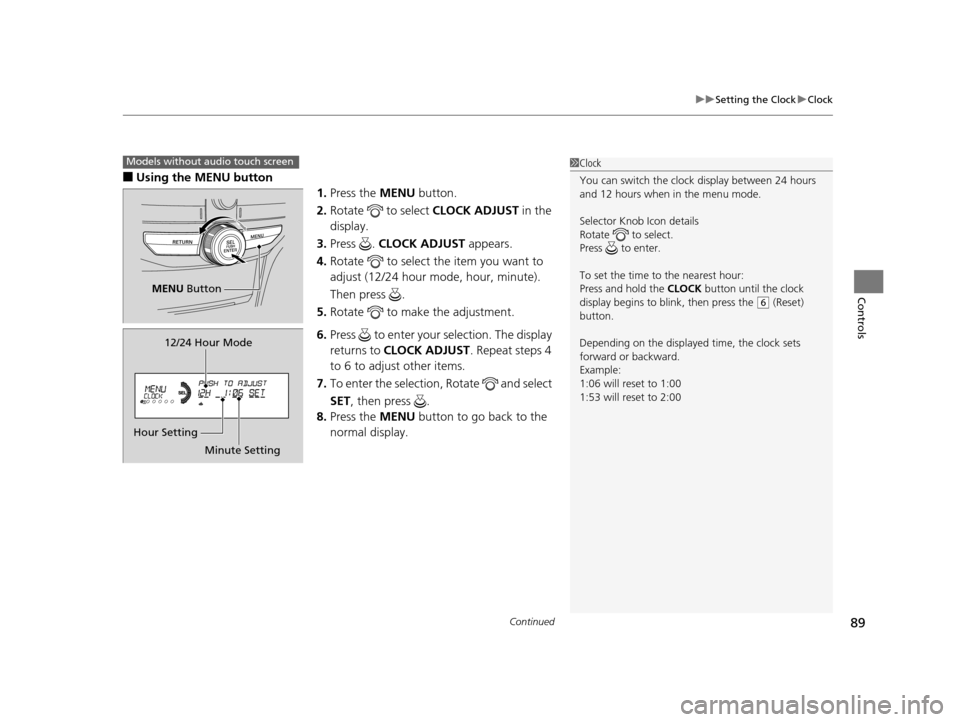
■Using the MENU button
1.Press the MENU button.
2. Rotate to select CLOCK ADJUST in the
display.
3. Press . CLOCK ADJUST appears.
4. Rotate to select the item you want to
adjust (12/24 hour mode, hour, minute).
Then press .
5. Rotate to make the adjustment.
6. Press to enter your selection. The display
returns to CLOCK ADJUST . Repeat steps 4
to 6 to adjust other items.
7. To enter the selection, Rotate and select
SET, then press .
8. Press the MENU button to go back to the
normal display.
1 Clock
You can switch the clock display between 24 hours
and 12 hours when in the menu mode.
Selector Knob Icon details
Rotate to select.
Press to enter.
To set the time to the nearest hour:
Press and hold the CLOCK button until the clock
display begins to blink, then press the
( 6 (Reset)
button.
Depending on the displayed time, the clock sets
forward or backward.
Example:
1:06 will reset to 1:00
1:53 will reset to 2:00
Models without audio touch screen
MENU Button
Minute Setting
Hour Setting 12/24 Hour Mode
15 CROSSTOUR-31TP66500.book 89 ページ 2014年7月31日 木曜日 午後3時23分
Page 91 of 573
90
uuSetting the Clock uClock
Controls
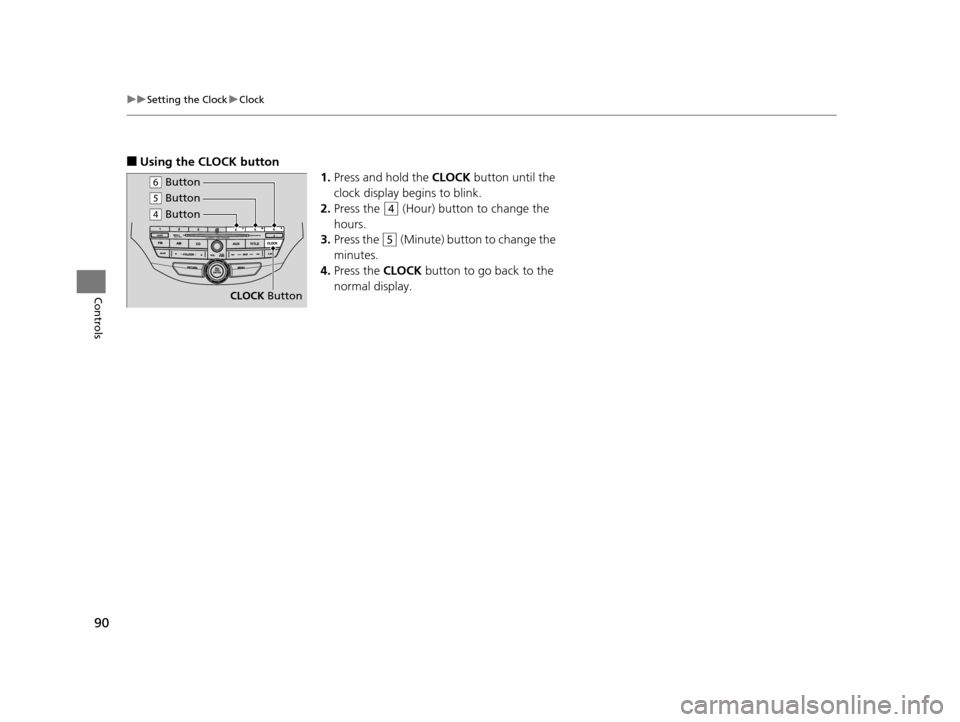
■Using the CLOCK button
1.Press and hold the CLOCK button until the
clock display begins to blink.
2. Press the
(4 (Hour) button to change the
hours.
3. Press the
(5 (Minute) button to change the
minutes.
4. Press the CLOCK button to go back to the
normal display.
CLOCK Button
(6 Button
(4 Button
(5 Button
15 CROSSTOUR-31TP66500.book 90 ページ 2014年7月31日 木曜日 午後3時23分
Page 116 of 573
115
uuOperating the Switches Around the Steering Wheel uENGINE START/STOP Button*
Continued
Controls
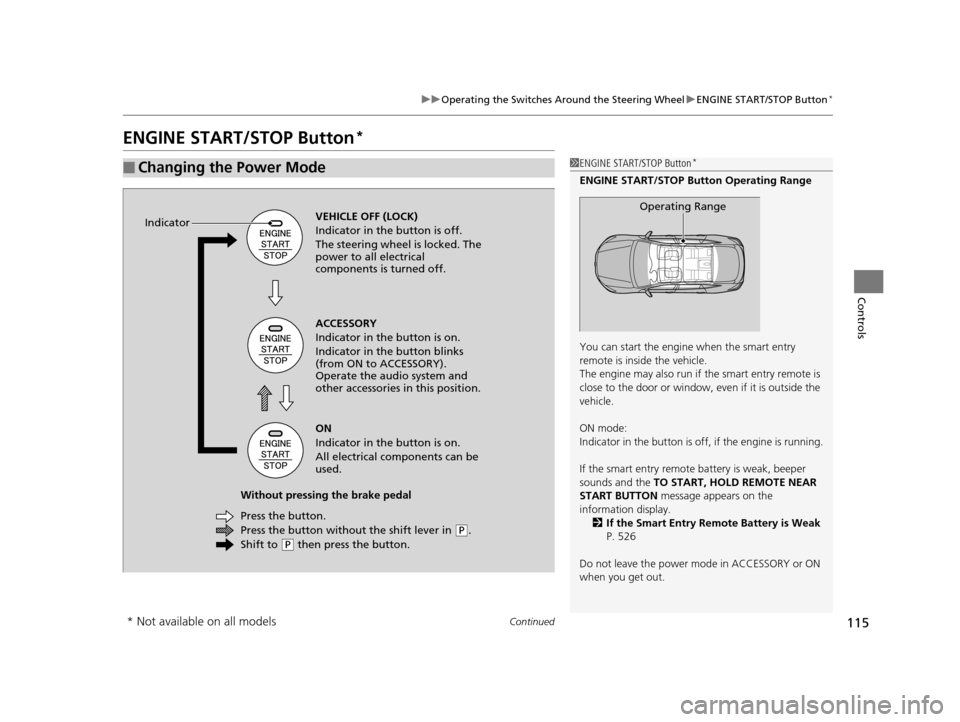
ENGINE START/STOP Button*
■Changing the Power Mode1ENGINE START/STOP Button*
ENGINE START/STOP Button Operating Range
You can start the engine when the smart entry
remote is inside the vehicle.
The engine may also run if the smart entry remote is
close to the door or window, ev en if it is outside the
vehicle.
ON mode:
Indicator in the button is of f, if the engine is running.
If the smart entry remote battery is weak, beeper
sounds and the TO START, HOLD REMOTE NEAR
START BUTTON message appears on the
information display. 2 If the Smart Entry Remote Battery is Weak
P. 526
Do not leave the power mode in ACCESSORY or ON
when you get out.
Operating RangeVEHICLE OFF (LOCK)
Indicator in the button is off.
The steering wheel is locked. The
power to all electrical
components is turned off.
Press the button without the shift lever in
( P.
Shift to
( P then press the button.
Press the button. Without pressing the brake pedal ACCESSORY
Indicator in the button is on.
Indicator in the button blinks
(from ON to ACCESSORY).
Operate the audio system and
other accessories in this position.
ON
Indicator in the button is on.
All electrical components can be
used.
Indicator
* Not available on all models
15 CROSSTOUR-31TP66500.book 115 ページ 2014年7月31日 木曜日 午後3時23分
Page 118 of 573
117
uuOperating the Switches Around the Steering Wheel uENGINE START/STOP Button*
Controls
If you open the driver’s door when the power mode is set to ACCESSORY, a warning
beep sounds.
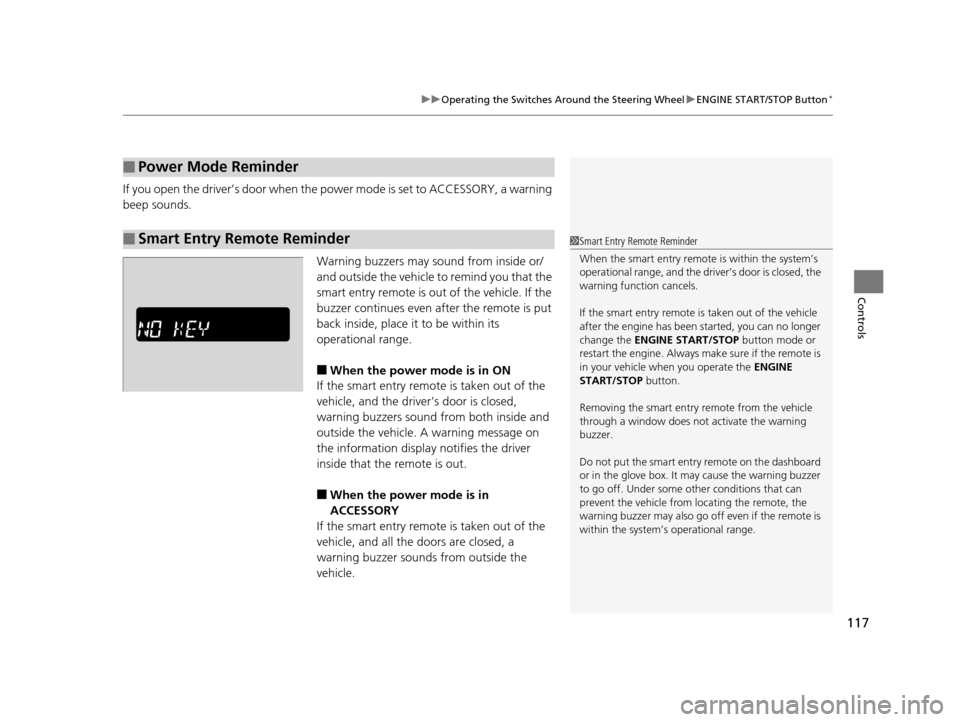
Warning buzzers may sound from inside or/
and outside the vehicle to remind you that the
smart entry remote is out of the vehicle. If the
buzzer continues even after the remote is put
back inside, place it to be within its
operational range.
■When the power mode is in ON
If the smart entry remote is taken out of the
vehicle, and the driver’s door is closed,
warning buzzers sound from both inside and
outside the vehicle. A warning message on
the information display notifies the driver
inside that the remote is out.
■When the power mode is in
ACCESSORY
If the smart entry remote is taken out of the
vehicle, and all the doors are closed, a
warning buzzer sounds from outside the
vehicle.
■Power Mode Reminder
■Smart Entry Remote Reminder1 Smart Entry Remote Reminder
When the smart entry remote is within the system’s
operational range, and the driv er’s door is closed, the
warning function cancels.
If the smart entry remote is taken out of the vehicle
after the engine has been started, you can no longer
change the ENGINE START/STOP button mode or
restart the engine. Always make sure if the remote is
in your vehicle when you operate the ENGINE
START/STOP button.
Removing the smart entry remote from the vehicle
through a window does not activate the warning
buzzer.
Do not put the smart entr y remote on the dashboard
or in the glove box. It may cause the warning buzzer
to go off. Under some other conditions that can
prevent the vehicle from locating the remote, the
warning buzzer may al so go off even if the remote is
within the system’s operational range.
15 CROSSTOUR-31TP66500.book 117 ページ 2014年7月31日 木曜日 午後3時23分
Page 126 of 573
125
uuOperating the Switches Around the Steering Wheel uBrightness Control
Controls
Brightness Control
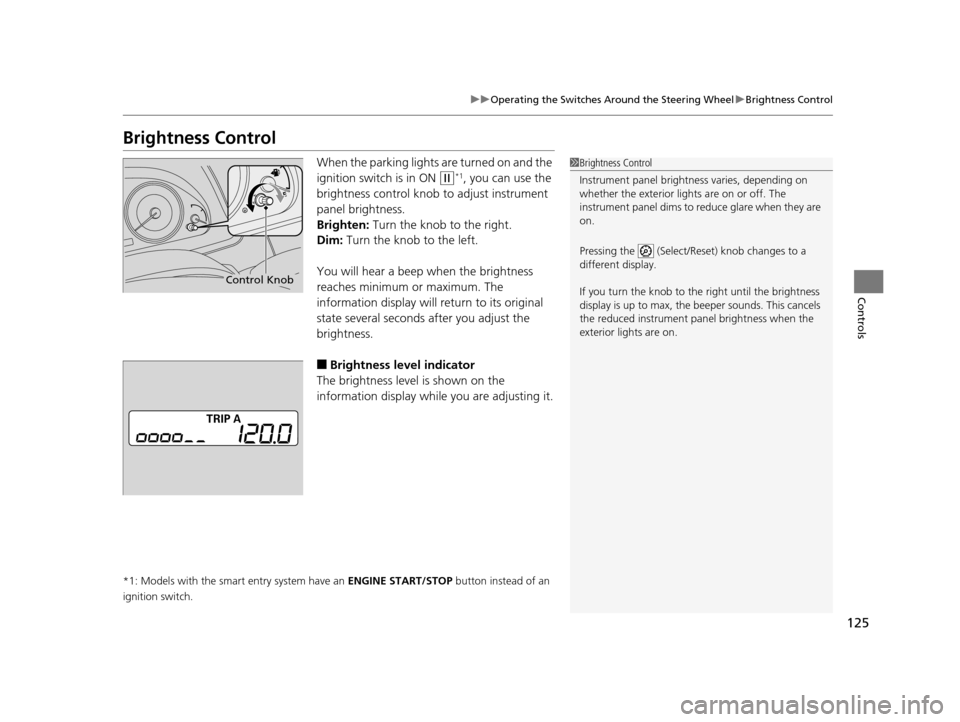
When the parking lights are turned on and the
ignition switch is in ON
(w*1, you can use the
brightness control knob to adjust instrument
panel brightness.
Brighten: Turn the knob to the right.
Dim: Turn the knob to the left.
You will hear a beep when the brightness
reaches minimum or maximum. The
information display will return to its original
state several seconds after you adjust the
brightness.
■Brightness level indicator
The brightness level is shown on the
information display whil e you are adjusting it.
*1: Models with the smart entry system have an ENGINE START/STOP button instead of an
ignition switch.
1 Brightness Control
Instrument panel brightne ss varies, depending on
whether the exterior lights are on or off. The
instrument panel dims to reduce glare when they are
on.
Pressing the (Select/Reset) knob changes to a
different display.
If you turn the knob to the right until the brightness
display is up to max, the beeper sounds. This cancels
the reduced instrument panel brightness when the
exterior lights are on.
Control Knob
15 CROSSTOUR-31TP66500.book 125 ページ 2014年7月31日 木曜日 午後3時23分
Page 131 of 573
130
Controls
Adjusting the Mirrors
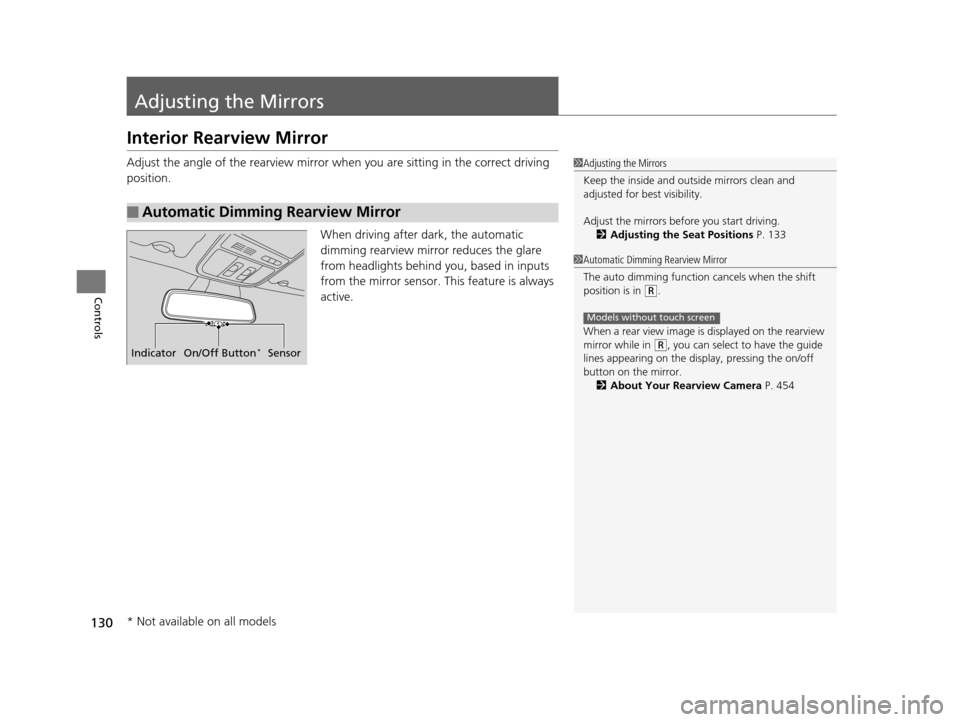
Interior Rearview Mirror
Adjust the angle of the rearview mirror when you are sitting in the correct driving
position.
When driving after dark, the automatic
dimming rearview mirror reduces the glare
from headlights behind you, based in inputs
from the mirror sensor. This feature is always
active.
■Automatic Dimming Rearview Mirror
1Adjusting the Mirrors
Keep the inside and out side mirrors clean and
adjusted for best visibility.
Adjust the mirrors befo re you start driving.
2 Adjusting the Seat Positions P. 133
Indicator On/Off Button*Sensor
1Automatic Dimming Rearview Mirror
The auto dimming function cancels when the shift
position is in
(R.
When a rear view image is displayed on the rearview
mirror while in
( R, you can select to have the guide
lines appearing on the display, pressing the on/off
button on the mirror.
2 About Your Rearview Camera P. 454
Models without touch screen
* Not available on all models
15 CROSSTOUR-31TP66500.book 130 ページ 2014年7月31日 木曜日 午後3時23分
Page 159 of 573
uuClimate Control System*uUsing Automatic Climate Control
158
Controls
Use the system when the engine is running.
1. Press the AUTO button.
2. Adjust the interior temperature using the dr iver’s side or passenger’s side control
switch.
3. Press the (On/Off) button to cancel.
■Switching between the recirculation and fresh air modes
Press the (recirculation) button and switch the mode depending on
environmental conditions.
Recirculation Mode (indicator on): Recirculates air from the vehicle’s interior through
the system.
Fresh Air Mode (indicator off): Maintains outside ventilation. Keep the system in
fresh air mode in normal situations.
1 Using Automatic Climate Control
If any buttons are presse d while using the climate
control system in auto, the function of the button
that was pressed will take priority.
The AUTO indicator will go off, but functions
unrelated to the button th at was pressed will be
controlled automatically.
To prevent cold air from bl owing in from outside, the
fan may not start i mmediately when the AUTO
button is pressed.
If the interior is very warm, you can cool it down
more rapidly by partial ly opening the windows,
turning the system on auto, and setting the
temperature to low. Change the fresh mode to
recirculation mode until the temperature cools down.
When you set the temperat ure to the lower or upper
limit, Lo or Hi is displayed.
Pressing the button switches the climate
control system between on and off. When turned on,
the system returns to your last selection.
15 CROSSTOUR-31TP66500.book 158 ページ 2014年7月31日 木曜日 午後3時23分
Page 166 of 573
165
uuAudio System uUSB Adapter Cable
Features
USB Adapter Cable
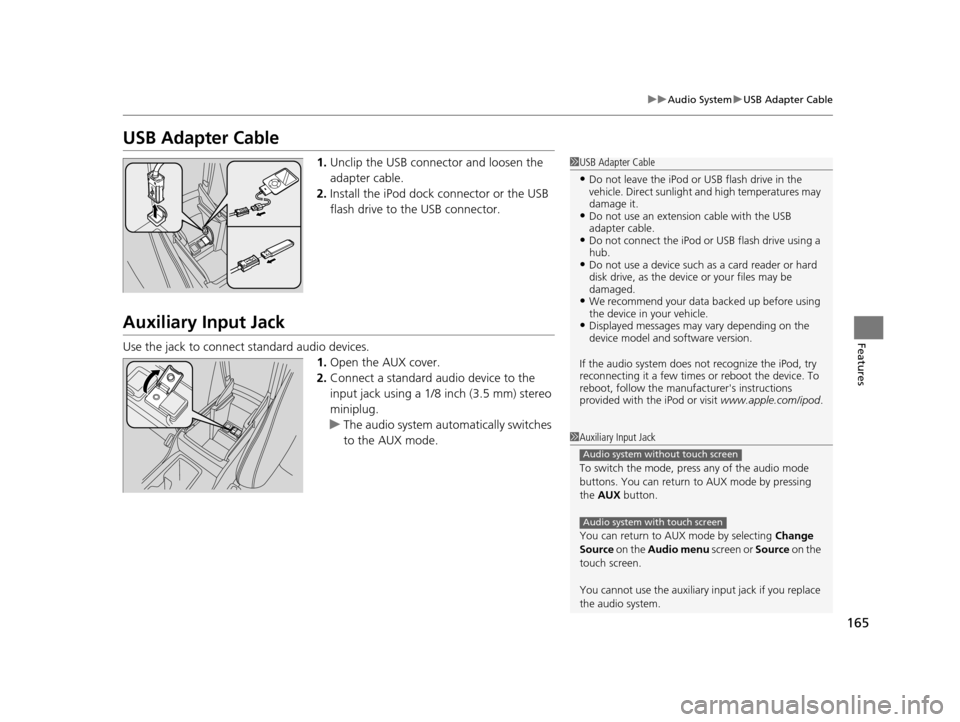
1. Unclip the USB connec tor and loosen the
adapter cable.
2. Install the iPod dock connector or the USB
flash drive to the USB connector.
Auxiliary Input Jack
Use the jack to connect standard audio devices.
1.Open the AUX cover.
2. Connect a standard audio device to the
input jack using a 1/8 inch (3.5 mm) stereo
miniplug.
u The audio system auto matically switches
to the AUX mode.
1 USB Adapter Cable
•Do not leave the iPod or USB flash drive in the
vehicle. Direct sunlight and high temperatures may
damage it.
•Do not use an extension cable with the USB
adapter cable.
•Do not connect the iPod or USB flash drive using a
hub.
•Do not use a device such as a card reader or hard
disk drive, as the device or your files may be
damaged.
•We recommend your data backed up before using
the device in your vehicle.
•Displayed messages may vary depending on the
device model and software version.
If the audio system does not recognize the iPod, try
reconnecting it a few times or reboot the device. To
reboot, follow the manufac turer's instructions
provided with the iPod or visit www.apple.com/ipod.
1Auxiliary Input Jack
To switch the mode, pres s any of the audio mode
buttons. You can return to AUX mode by pressing
the AUX button.
You can return to AUX mode by selecting Change
Source on the Audio menu screen or Source on the
touch screen.
You cannot use the auxiliary input jack if you replace
the audio system.
Audio system without touch screen
Audio system with touch screen
15 CROSSTOUR-31TP66500.book 165 ページ 2014年7月31日 木曜日 午後3時23分