display HONDA CROSSTOUR 2015 1.G Owner's Guide
[x] Cancel search | Manufacturer: HONDA, Model Year: 2015, Model line: CROSSTOUR, Model: HONDA CROSSTOUR 2015 1.GPages: 573
Page 181 of 573
uuAudio System Basic Operation uPlaying a USB Flash Drive
180
Features
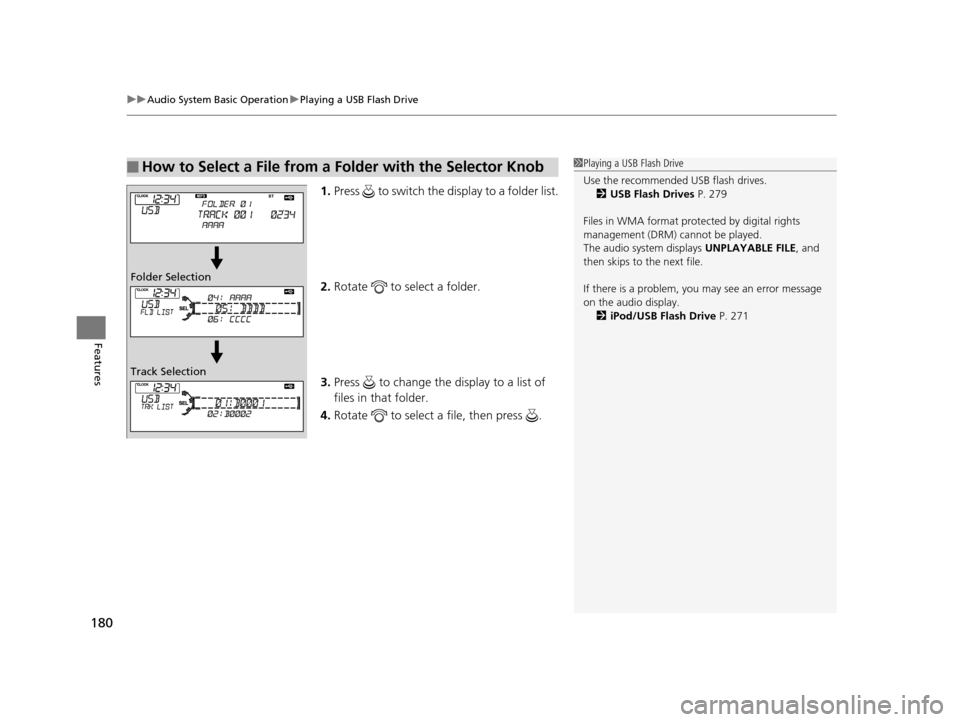
1. Press to switch the display to a folder list.
2. Rotate to select a folder.
3. Press to change the display to a list of
files in that folder.
4. Rotate to select a file, then press .
■How to Select a File from a Folder with the Selector Knob1Playing a USB Flash Drive
Use the recommended USB flash drives.
2 USB Flash Drives P. 279
Files in WMA format prot ected by digital rights
management (DRM) cannot be played.
The audio system displays UNPLAYABLE FILE, and
then skips to the next file.
If there is a problem, you may see an error message
on the audio display. 2 iPod/USB Flash Drive P. 271
Folder Selection
Track Selection
15 CROSSTOUR-31TP66500.book 180 ページ 2014年7月31日 木曜日 午後3時23分
Page 183 of 573
182
Features
Audio System Basic Operation
To use the audio system function, the ignition switch must be in ACCESSORY (q or
ON
(w*1.
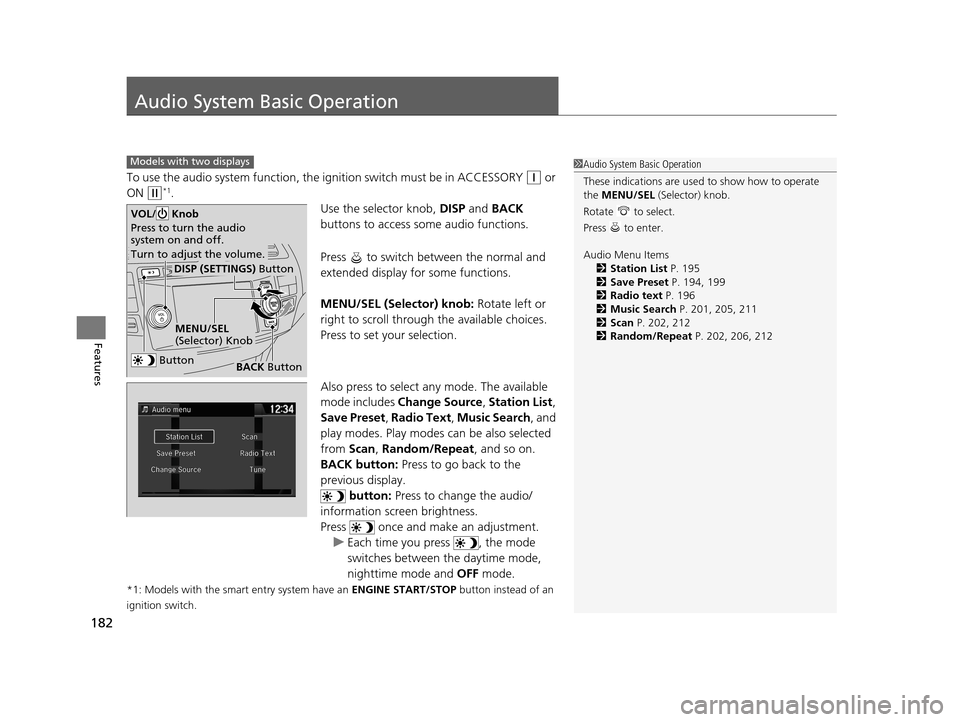
Use the selector knob, DISP and BACK
buttons to access some audio functions.
Press to switch between the normal and
extended display fo r some functions.
MENU/SEL (Selector) knob: Rotate left or
right to scroll through the available choices.
Press to set your selection.
Also press to select any mode. The available
mode includes Change Source , Station List ,
Save Preset , Radio Text , Music Search, and
play modes. Play modes can be also selected
from Scan, Random/Repeat , and so on.
BACK button: Press to go back to the
previous display. button: Press to change the audio/
information screen brightness.
Press once and make an adjustment. u Each time you press , the mode
switches between the daytime mode,
nighttime mode and OFF mode.
*1: Models with the smart entry system have an ENGINE START/STOP button instead of an
ignition switch.
Models with two displays1 Audio System Basic Operation
These indications are used to show how to operate
the MENU/SEL (Selector) knob.
Rotate to select.
Press to enter.
Audio Menu Items 2 Station List P. 195
2 Save Preset P. 194, 199
2 Radio text P. 196
2 Music Search P. 201, 205, 211
2 Scan P. 202, 212
2 Random/Repeat P. 202, 206, 212
Button
MENU/SEL
(Selector) Knob
DISP (SETTINGS) Button
BACK Button
VOL/ Knob
Press to turn the audio
system on and off.
Turn to adjust the volume.
15 CROSSTOUR-31TP66500.book 182 ページ 2014年7月31日 木曜日 午後3時23分
Page 184 of 573
183
uuAudio System Basic Operation uAudio with Touch Screen
Continued
Features
Audio with Touch Screen
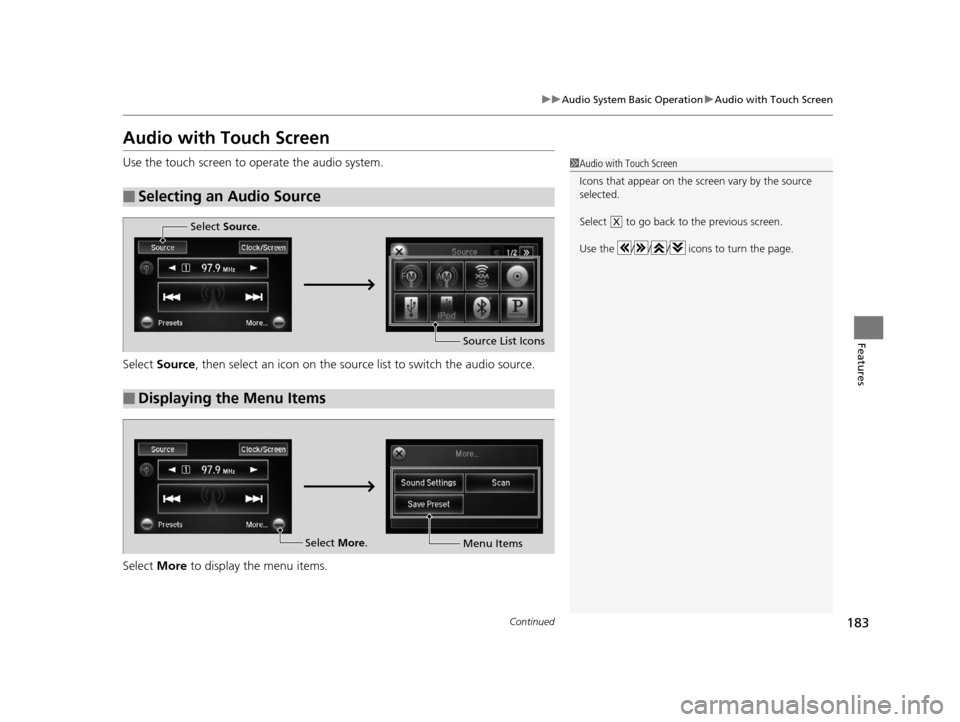
Use the touch screen to operate the audio system.
Select Source , then select an icon on the source list to switch the audio source.
Select More to display the menu items.
■Selecting an Audio Source
1Audio with Touch Screen
Icons that appear on the sc reen vary by the source
selected.
Select to go back to the previous screen.
Use the / / / icons to turn the page.
X
■Displaying the Menu Items
Select Source .
Source List Icons
Select More.
Menu Items
15 CROSSTOUR-31TP66500.book 183 ページ 2014年7月31日 木曜日 午後3時23分
Page 185 of 573
uuAudio System Basic Operation uAudio with Touch Screen
184
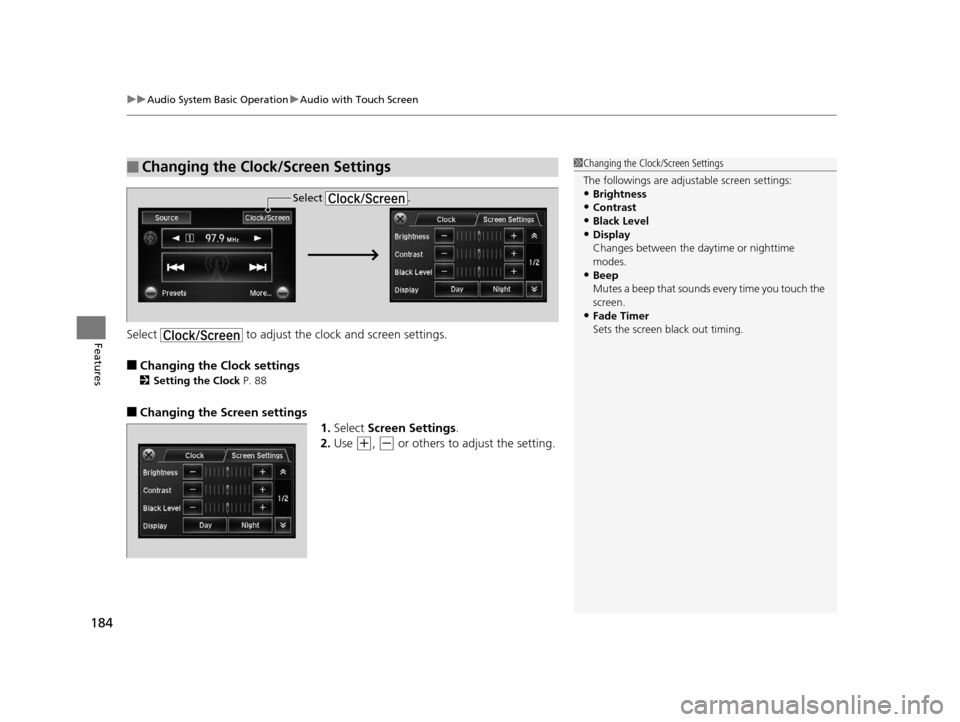
FeaturesSelect to adjust the clock and screen settings.
■Changing the Clock settings
2Setting the Clock P. 88
■Changing the Screen settings
1.Select Screen Settings .
2. Use
(+, (- or others to adjust the setting.
■Changing the Clock/Screen Settings1Changing the Clock/Screen Settings
The followings are adjustable screen settings:
•Brightness
•Contrast
•Black Level•Display
Changes between the da ytime or nighttime
modes.
•Beep
Mutes a beep that sounds every time you touch the
screen.
•Fade Timer
Sets the screen black out timing.
Select .
15 CROSSTOUR-31TP66500.book 184 ページ 2014年7月31日 木曜日 午後3時23分
Page 187 of 573
186
uuAudio System Basic Operation uAudio/Information Screen
Features
Audio/Information Screen
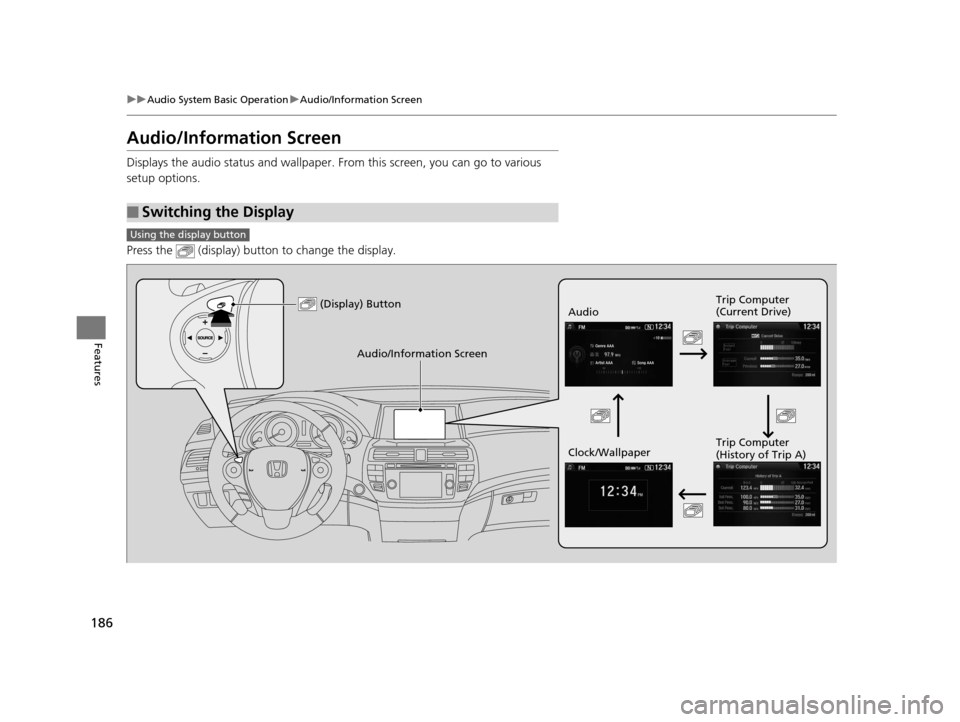
Displays the audio status and wallpaper. From this screen, you can go to various
setup options.
Press the (display) butto n to change the display.
■Switching the Display
Using the display button
(Display) ButtonAudio Trip Computer
(Current Drive)
Clock/Wallpaper Trip Computer
(History of Trip A)
Audio/Information Screen
15 CROSSTOUR-31TP66500.book 186 ページ 2014年7月31日 木曜日 午後3時23分
Page 189 of 573
188
uuAudio System Basic Operation uAudio/Information Screen
Features
■Info
Shows the Trip Computer or Clock/Wallpaper information.
Press , rotate to select an item, then press .
Info menu items
Current Drive (Trip computer)
Shows the range, and instant and average fu el economy of the current trip, as well
as the average fuel economy from your last trip.
History of Trip A (Trip computer)
Shows the range, average fuel economy an d distance traveled for the current trip,
as well as the average fuel economy and distances traveled during the last three
driving cycles.
Each time you reset the trip meter A, the information on the display updates. The
history of the previous th ree driving cycles is kept.
Delete History
1. Rotate to select Delete History, then press .
2. You will receive a confirmation message on the screen. Rotate to select Yes,
then press .
Clock/Wallpaper
Shows the current clock type and wallpaper
Clock/Wallpaper Change
Enters the clock and wallpaper setting menu screen.
15 CROSSTOUR-31TP66500.book 188 ページ 2014年7月31日 木曜日 午後3時23分
Page 190 of 573
Continued189
uuAudio System Basic Operation uAudio/Information Screen
Features
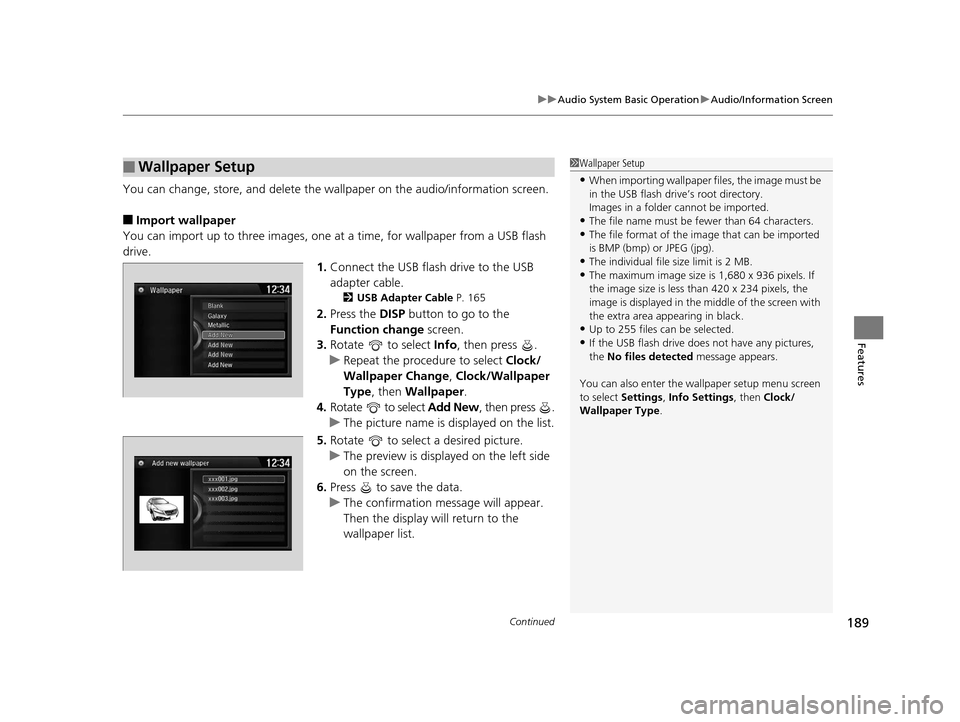
You can change, store, and delete the wa llpaper on the audio/information screen.
■Import wallpaper
You can import up to three images, one at a time, for wallpaper from a USB flash
drive.
1.Connect the USB flash drive to the USB
adapter cable.
2 USB Adapter Cable P. 165
2.Press the DISP button to go to the
Function change screen.
3. Rotate to select Info, then press .
u Repeat the procedure to select Clock/
Wallpaper Change , Clock/Wallpaper
Type, then Wallpaper.
4. Rotate to select Add New, then press .
u The picture name is displayed on the list.
5. Rotate to select a desired picture.
u The preview is displayed on the left side
on the screen.
6. Press to save the data.
u The confirmation message will appear.
Then the display will return to the
wallpaper list.
■Wallpaper Setup1Wallpaper Setup
•When importing wallpaper files, the image must be
in the USB flash drive’s root directory.
Images in a folder cannot be imported.
•The file name must be fewer than 64 characters.•The file format of the im age that can be imported
is BMP (bmp) or JPEG (jpg).
•The individual file size limit is 2 MB.•The maximum image size is 1,680 x 936 pixels. If
the image size is less than 420 x 234 pixels, the
image is displayed in the middle of the screen with
the extra area appearing in black.
•Up to 255 files can be selected.
•If the USB flash drive doe s not have any pictures,
the No files detected message appears.
You can also enter the wallpaper setup menu screen
to select Settings, Info Settings , then Clock/
Wallpaper Type .
15 CROSSTOUR-31TP66500.book 189 ページ 2014年7月31日 木曜日 午後3時23分
Page 191 of 573
uuAudio System Basic Operation uAudio/Information Screen
190
Features
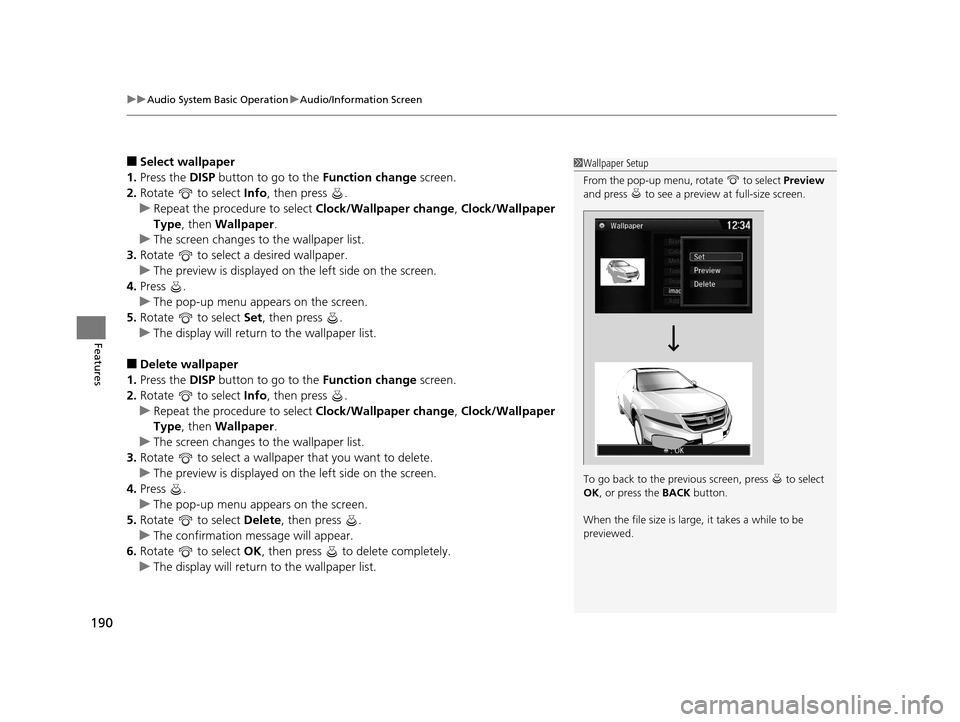
■Select wallpaper
1. Press the DISP button to go to the Function change screen.
2. Rotate to select Info, then press .
u Repeat the procedure to select Clock/Wallpaper change, Clock/Wallpaper
Type, then Wallpaper .
u The screen changes to the wallpaper list.
3. Rotate to select a desired wallpaper.
u The preview is displayed on the left side on the screen.
4. Press .
u The pop-up menu appears on the screen.
5. Rotate to select Set, then press .
u The display will return to the wallpaper list.
■Delete wallpaper
1. Press the DISP button to go to the Function change screen.
2. Rotate to select Info, then press .
u Repeat the procedure to select Clock/Wallpaper change, Clock/Wallpaper
Type, then Wallpaper .
u The screen changes to the wallpaper list.
3. Rotate to select a wallpaper that you want to delete.
u The preview is displayed on the left side on the screen.
4. Press .
u The pop-up menu appears on the screen.
5. Rotate to select Delete, then press .
u The confirmation message will appear.
6. Rotate to select OK, then press to delete completely.
u The display will return to the wallpaper list.
1Wallpaper Setup
From the pop-up menu, rotate to select Preview
and press to see a preview at full-size screen.
To go back to the previous screen, press to select
OK , or press the BACK button.
When the file size is large, it takes a while to be
previewed.
15 CROSSTOUR-31TP66500.book 190 ページ 2014年7月31日 木曜日 午後3時23分
Page 193 of 573
192
uuAudio System Basic Operation uDisplay Setup
Features
Display Setup
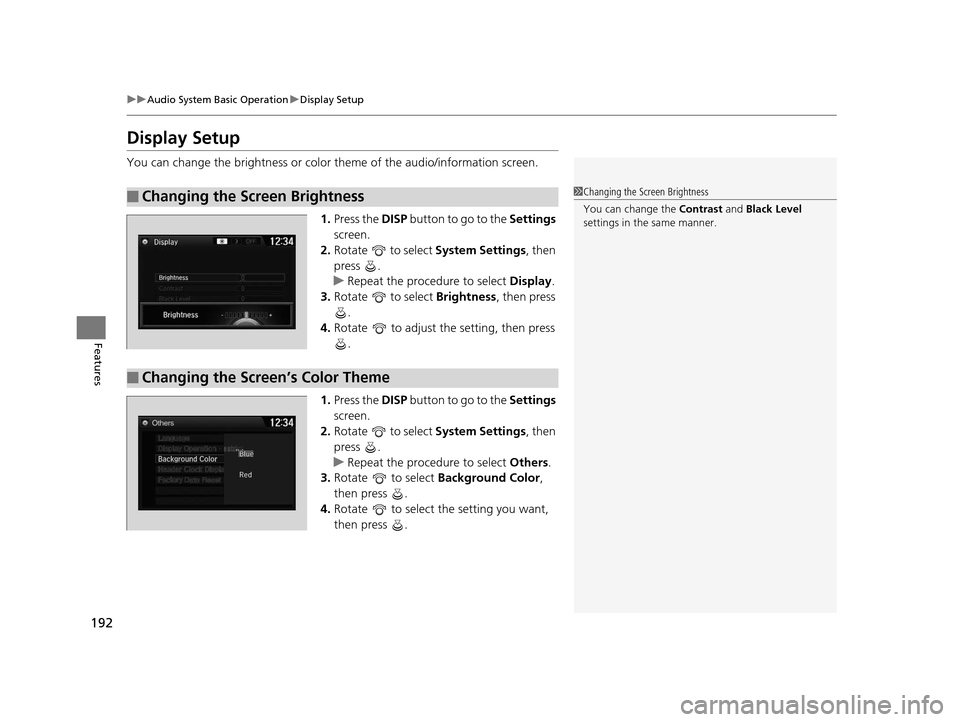
You can change the brightness or color theme of the audio/information screen.
1. Press the DISP button to go to the Settings
screen.
2. Rotate to select System Settings, then
press .
u Repeat the procedure to select Display.
3. Rotate to select Brightness , then press
.
4. Rotate to adjust the setting, then press
.
1. Press the DISP button to go to the Settings
screen.
2. Rotate to select System Settings, then
press .
u Repeat the procedure to select Others.
3. Rotate to select Background Color,
then press .
4. Rotate to select the setting you want,
then press .
■Changing the Screen Brightness1Changing the Screen Brightness
You can change the Contrast and Black Level
settings in the same manner.
■Changing the Screen’s Color Theme
15 CROSSTOUR-31TP66500.book 192 ページ 2014年7月31日 木曜日 午後3時23分
Page 194 of 573
193
uuAudio System Basic Operation uPlaying AM/FM Radio
Continued
Features
Playing AM/FM Radio
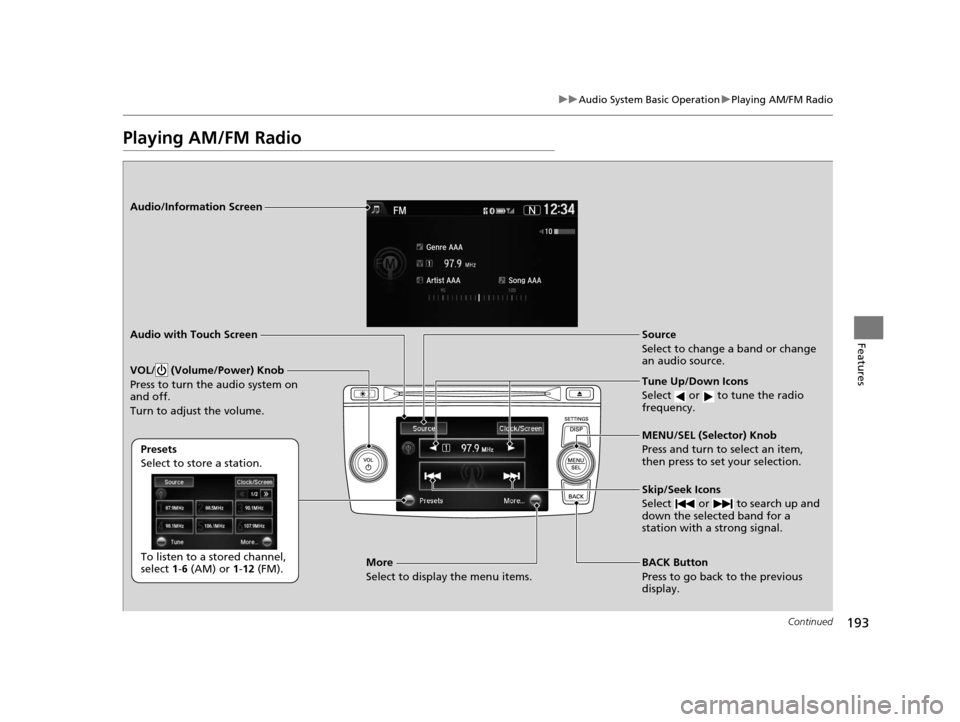
Audio/Information Screen
Audio with Touch Screen
Tune Up/Down Icons
Select or to tune the radio
frequency.
BACK Button
Press to go back to the previous
display. MENU/SEL (Selector) Knob
Press and turn to select an item,
then press to set your selection.
VOL/ (Volume/Power) Knob
Press to turn the audio system on
and off.
Turn to adjust the volume.
Source
Select to change a band or change
an audio source.
To listen to a stored channel,
select 1-6 (AM) or 1- 12 (FM).
Presets
Select to store a station.
Skip/Seek Icons
Select or to search up and
down the selected band for a
station with a strong signal.More
Select to display the menu items.
15 CROSSTOUR-31TP66500.book 193 ページ 2014年7月31日 木曜日 午後3時23分