display HONDA CROSSTOUR 2015 1.G Manual Online
[x] Cancel search | Manufacturer: HONDA, Model Year: 2015, Model line: CROSSTOUR, Model: HONDA CROSSTOUR 2015 1.GPages: 573
Page 278 of 573
277
uuGeneral Information on the Audio System uRecommended CDs
Continued
Features
Recommended CDs
• Use only high-quality CD-R or CD-RW discs labeled for audio use.
• Use only CD-R or CD-RW discs on wh ich the recordings are closed.
• Play only standard round-shaped CDs.
• Some software files may not allow for audio play or text data display.
• Some versions of MP3, WMA, or AAC formats may be unsupported.1Recommended CDs
A Dual-disc cannot play on th is audio unit. If recorded
under certain conditions, a CD-R or CD-RW may not
play either.
Manufactured under license under U.S. Patent Nos:
5,956,674; 5,974,380; 6,487,535 & other U.S. and
worldwide patents issued & pending. DTS, the
Symbol, & DTS and the Symbol together are
registered trademarks & DTS 2.0 Channel is a
trademark of DTS, Inc. Product includes software.
©DTS, Inc. All Rights Reserved.
■CDs with MP3, WMA, or AAC files
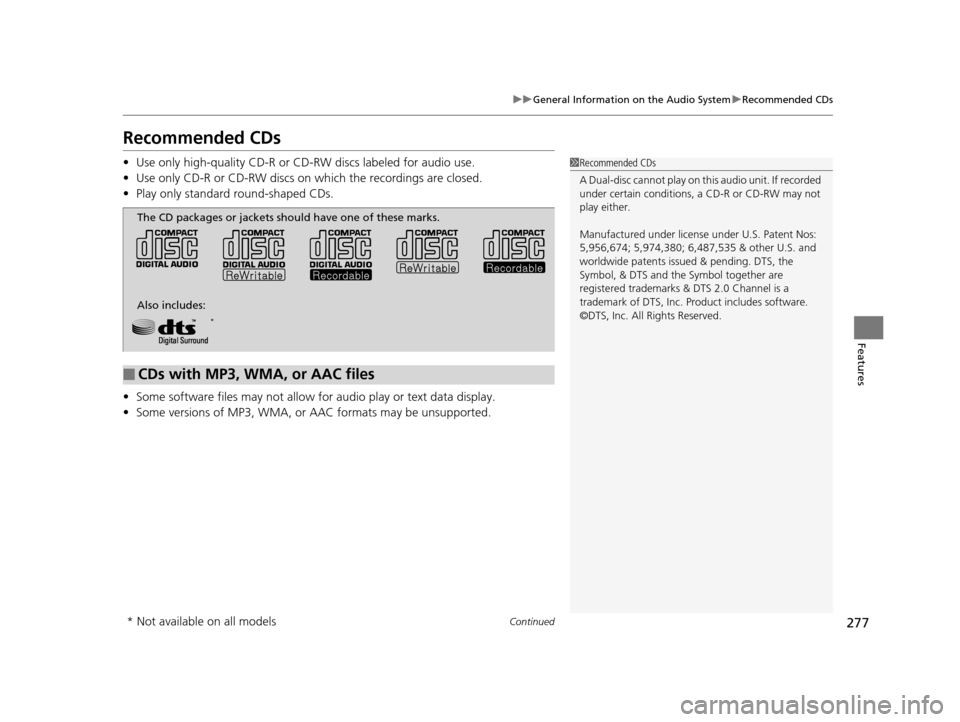
The CD packages or jackets should have one of these marks.
Also includes:
*
* Not available on all models
15 CROSSTOUR-31TP66500.book 277 ページ 2014年7月31日 木曜日 午後3時23分
Page 280 of 573
279
uuGeneral Information on the Audio System uCompatible iPod and USB Flash Drives
Features
Compatible iPod and USB Flash Drives
*1:Models with Audio system with touch screen.
• Use a recommended USB flash drive of 256 MB or higher.
• Some digital audio players may not be compatible.
• Some USB flash drives (e.g., a device with security lockout) may not work.
• Some software files may not allow for audio play or text data display.
• Some versions of MP3, WMA, or AAC formats may be unsupported.
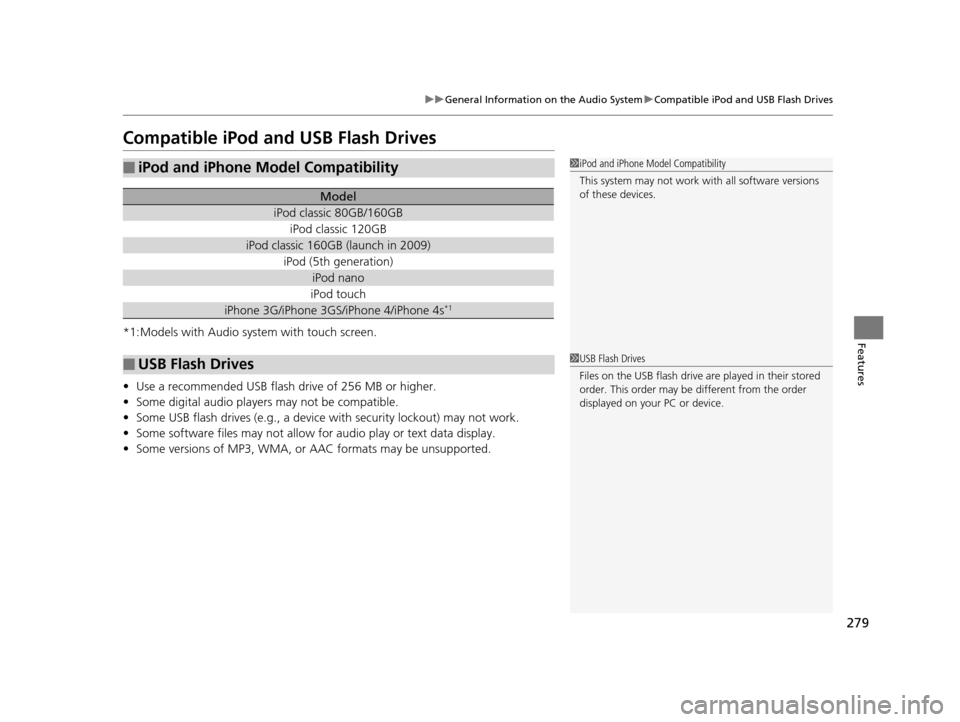
■iPod and iPhone Model Compatibility
Model
iPod classic 80GB/160GB
iPod classic 120GB
iPod classic 160GB (launch in 2009)
iPod (5th generation)
iPod nano
iPod touch
iPhone 3G/iPhone 3GS/iPhone 4/iPhone 4s*1
■USB Flash Drives
1iPod and iPhone Model Compatibility
This system may not work with all software versions
of these devices.
1USB Flash Drives
Files on the USB flash drive are played in their stored
order. This order may be different from the order
displayed on your PC or device.
15 CROSSTOUR-31TP66500.book 279 ページ 2014年7月31日 木曜日 午後3時23分
Page 283 of 573
282
uuCustomized Features*u
Features
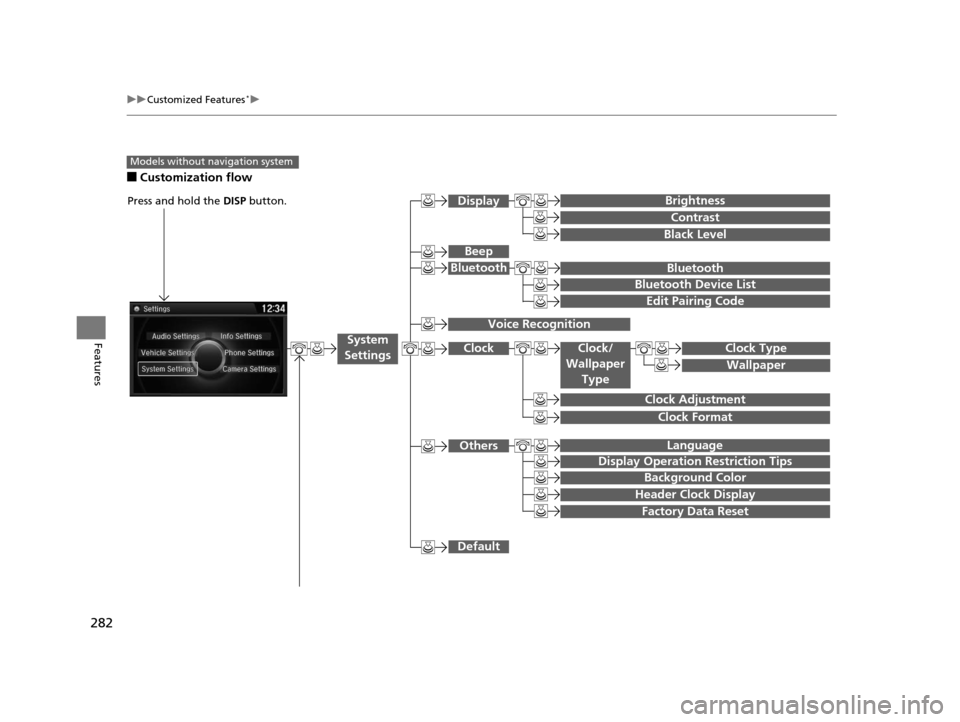
■Customization flow
Models without navigation system
Clock Format
Background Color
Header Clock Display
Factory Data Reset
Clock Adjustment
Press and hold the DISP button.
Language
Default
Edit Pairing Code
Bluetooth
Bluetooth Device List
Brightness
Contrast
Black Level
Beep
Clock/
Wallpaper TypeClock Type
Wallpaper
System
Settings
Bluetooth
Display
Clock
Others
Display Operation Restriction Tips
Voice Recognition
15 CROSSTOUR-31TP66500.book 282 ページ 2014年7月31日 木曜日 午後3時23分
Page 284 of 573
283
uuCustomized Features*u
Continued
Features
“Trip B” Reset Timing
Adjust Outside Temp. Display
“Trip A” Reset Timing
Keyless Access Light Flash
Auto Light Sensitivity
Auto Door Lock
Auto Door Unlock
Forward Collision Warning
Distance*
Door Unlock Mode
Interior Light Dimming Time
Headlight Auto Off Timer
Memory Position Link
Key And Remote Unlock Mode
Keyless Lock Answer Back
Security Relock Timer
Maintenance Reset
Default All
Vehicle
Settings
Driver Assist System Setup*
Meter
Setup
Driving Position Setup*
Keyless Access Setup
Lighting Setup
Door
Setup
Maintenance Info.
Keyless Access Beep
* Not available on all models
15 CROSSTOUR-31TP66500.book 283 ページ 2014年7月31日 木曜日 午後3時23分
Page 287 of 573
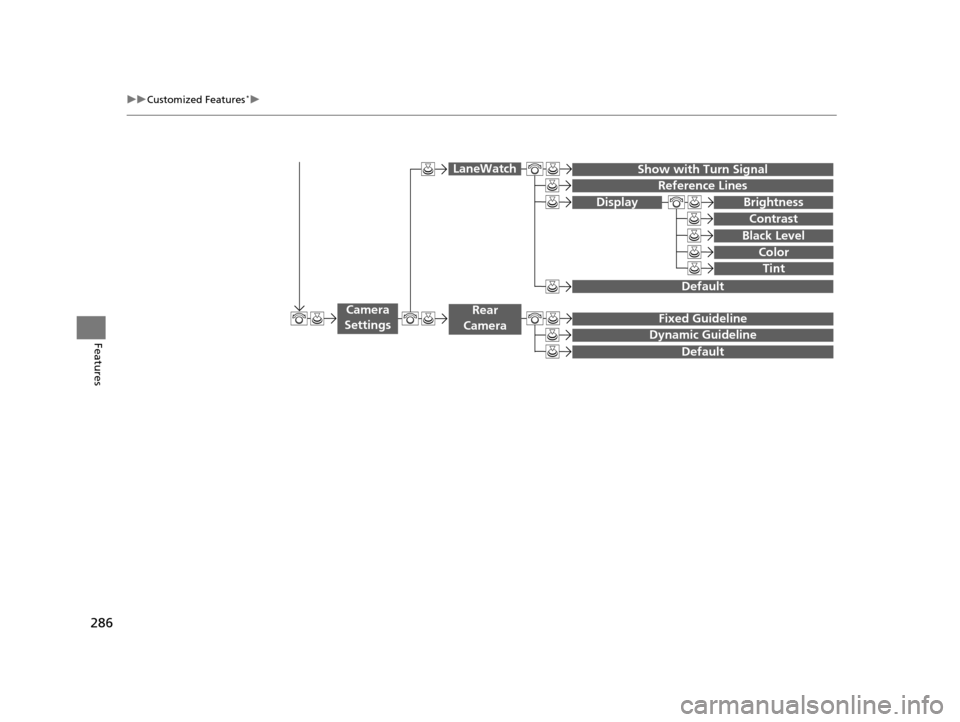
286
uuCustomized Features*u
Features
Display
Show with Turn Signal
Reference Lines
Default
Default
Fixed Guideline
Dynamic Guideline
Camera
Settings
LaneWatch
Rear
Camera
Brightness
Contrast
Black Level
Color
Tint
15 CROSSTOUR-31TP66500.book 286 ページ 2014年7月31日 木曜日 午後3時23分
Page 288 of 573
287
uuCustomized Features*u
Continued
Features
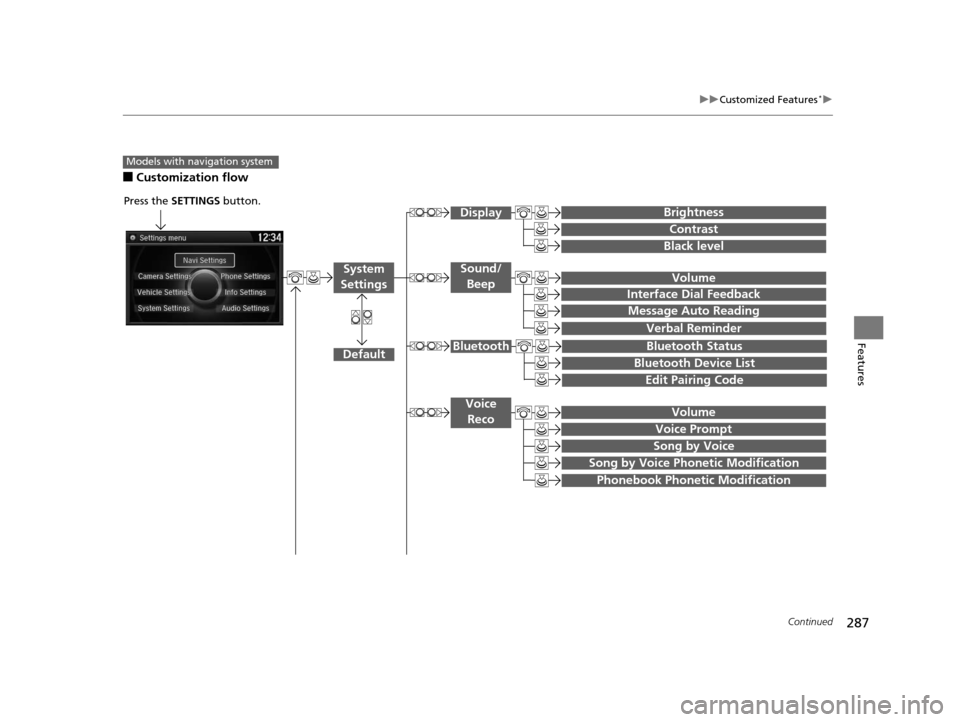
■Customization flow
Models with navigation system
Song by Voice
Song by Voice Phonetic Modification
Phonebook Phonetic Modification
Press the SETTINGS button.
Volume
Voice Prompt
Message Auto Reading
Volume
Interface Dial Feedback
Verbal Reminder
Brightness
Contrast
Black level
Bluetooth Status
Bluetooth Device List
Edit Pairing Code
Default
Sound/Beep
Display
System
Settings
Bluetooth
Voice Reco
15 CROSSTOUR-31TP66500.book 287 ページ 2014年7月31日 木曜日 午後3時23分
Page 289 of 573
288
uuCustomized Features*u
Features
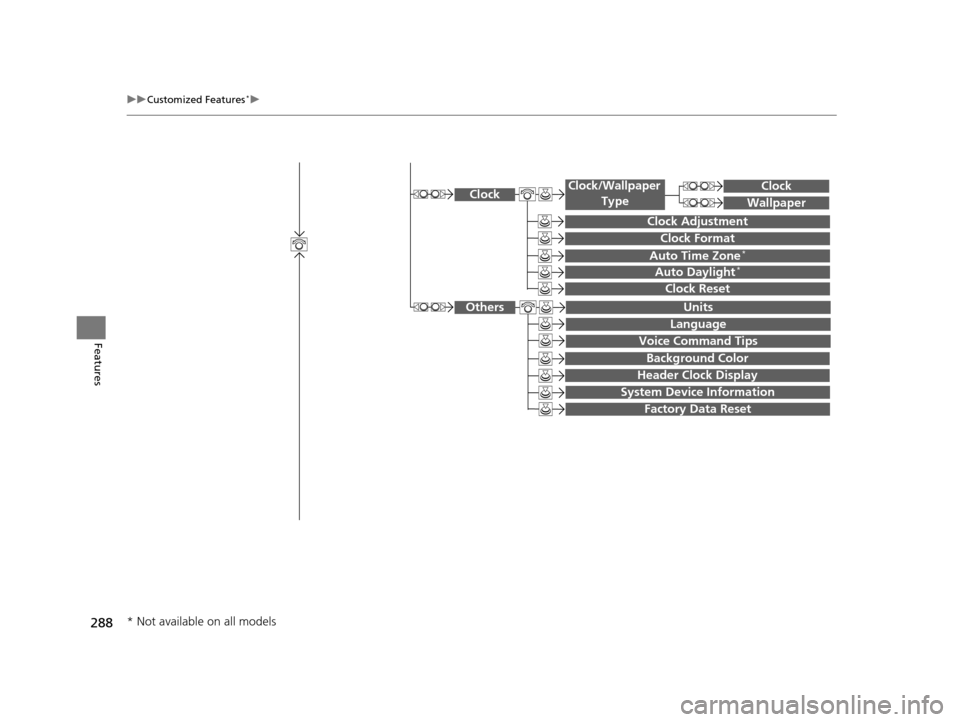
System Device Information
Factory Data Reset
Background Color
Header Clock Display
Clock Reset
Auto Time Zone*
Auto Daylight*
Clock
Clock Adjustment
Clock Format
Clock
Units
Language
Voice Command Tips
Others
Wallpaper
Clock/Wallpaper
Type
* Not available on all models
15 CROSSTOUR-31TP66500.book 288 ページ 2014年7月31日 木曜日 午後3時23分
Page 290 of 573
289
uuCustomized Features*u
Continued
Features
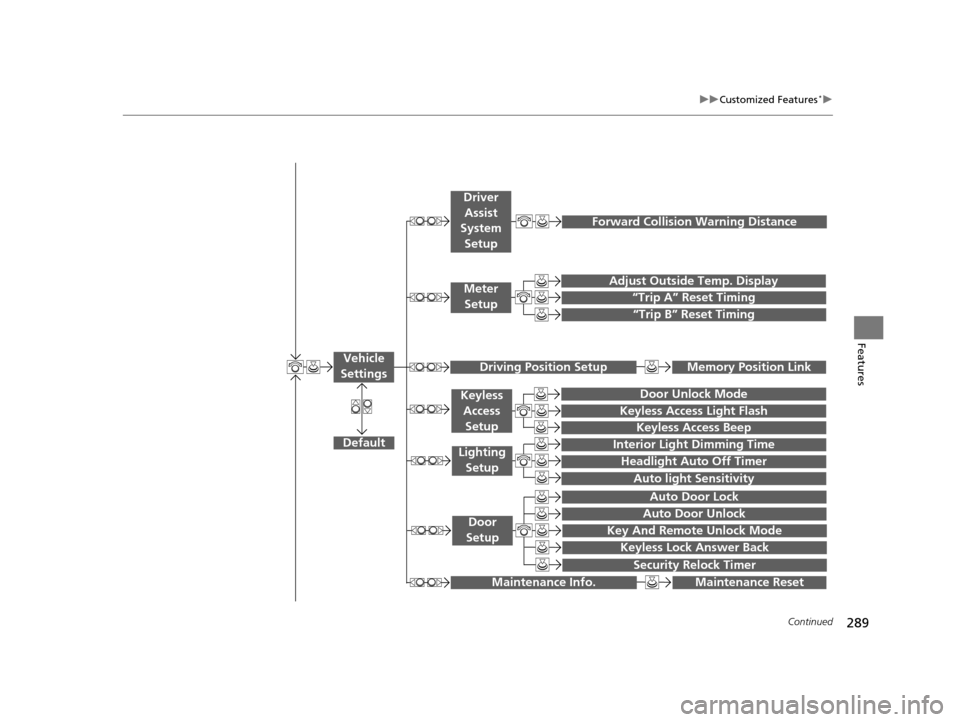
“Trip A” Reset Timing
“Trip B” Reset Timing
Adjust Outside Temp. Display
Forward Collision Warning Distance
Default
Memory Position Link
Door Unlock Mode
Keyless Access Light Flash
Interior Light Dimming Time
Headlight Auto Off Timer
Auto light Sensitivity
Key And Remote Unlock Mode
Keyless Lock Answer Back
Security Relock Timer
Auto Door Lock
Auto Door Unlock
Maintenance Reset
Vehicle
Settings
Meter Setup
Driver Assist
System
Setup
Driving Position Setup
Keyless Access
Setup
Lighting Setup
Door
Setup
Maintenance Info.
Keyless Access Beep
15 CROSSTOUR-31TP66500.book 289 ページ 2014年7月31日 木曜日 午後3時23分
Page 291 of 573
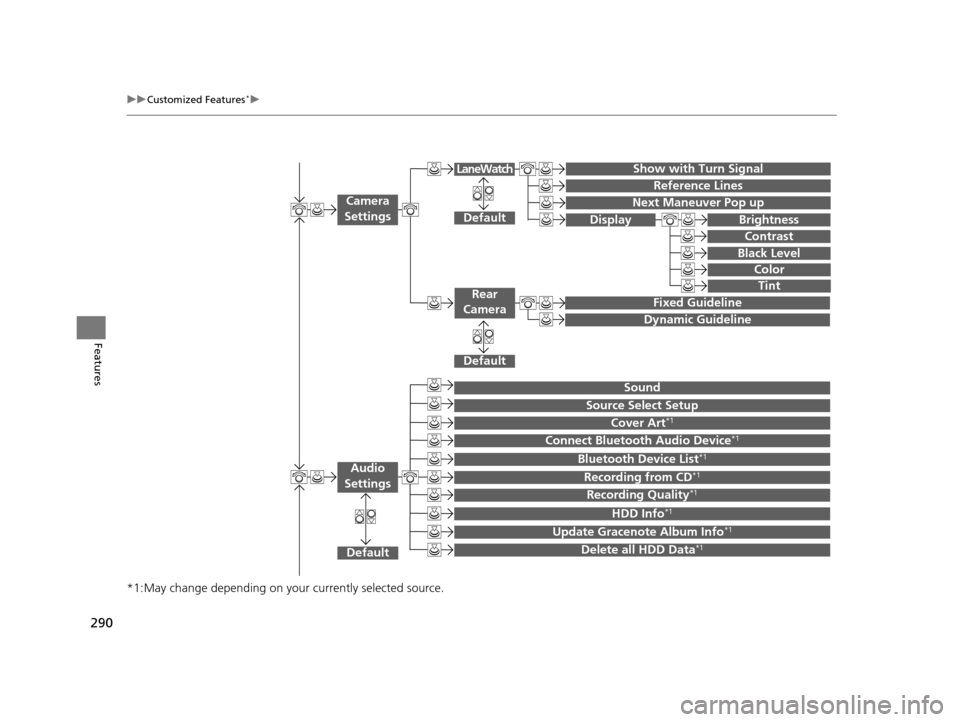
290
uuCustomized Features*u
Features
*1:May change depending on your currently selected source.
Show with Turn Signal
Reference Lines
Next Maneuver Pop up
Default
Fixed Guideline
Dynamic Guideline
Default
Default
Sound
Source Select Setup
Cover Art*1
Connect Bluetooth Audio Device*1
Bluetooth Device List*1
Recording from CD*1
Recording Quality*1
HDD Info*1
Update Gracenote Album Info*1
Delete all HDD Data*1
Camera
Settings
Rear
Camera
LaneWatch
Audio
Settings
Display Brightness
Contrast
Black Level
Color
Tint
15 CROSSTOUR-31TP66500.book 290 ページ 2014年7月31日 木曜日 午後3時23分
Page 294 of 573
293
uuCustomized Features*u
Continued
Features
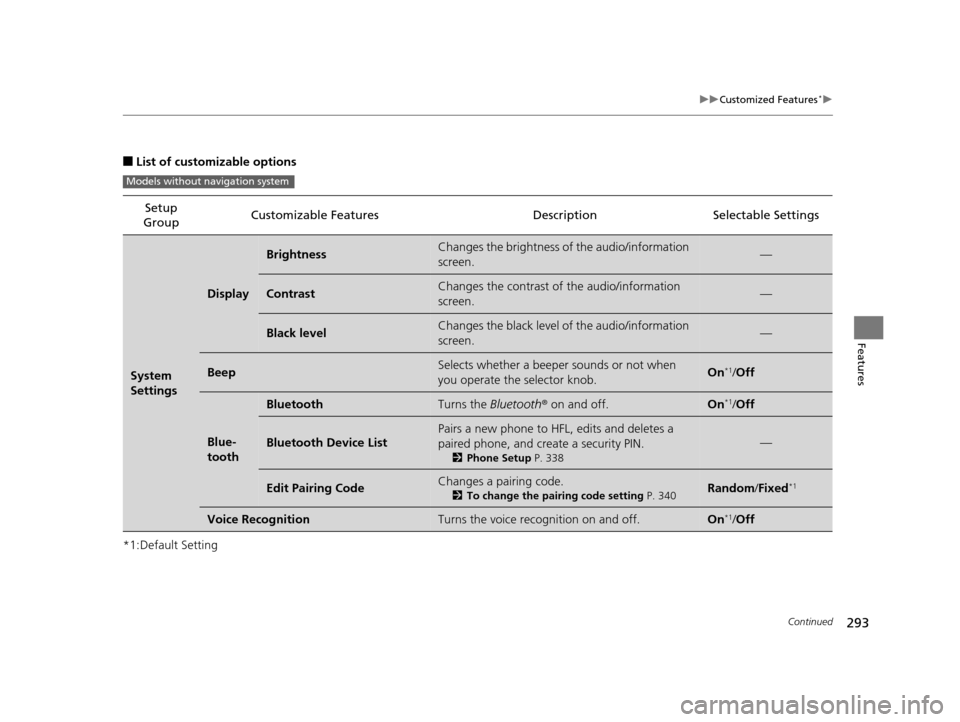
■List of customizable options
*1:Default Setting Setup
Group Customizable Features Description Selectable Settings
System
Settings
Display
BrightnessChanges the brightness of the audio/information
screen.—
ContrastChanges the contrast of the audio/information
screen.—
Black levelChanges the black level of the audio/information
screen.—
BeepSelects whether a beeper
sounds or not when
you operate the selector knob.On*1/ Off
Blue-
tooth
BluetoothTurns the Bluetooth® on and off.On*1/Off
Bluetooth Device List
Pairs a new phone to HFL, edits and deletes a
paired phone, and create a security PIN.
2 Phone Setup P. 338
—
Edit Pairing CodeChanges a pairing code.
2To change the pairing code setting P. 340Random/Fixed*1
Voice RecognitionTurns the voice rec ognition on and off.On*1/Off
Models without navigation system
15 CROSSTOUR-31TP66500.book 293 ページ 2014年7月31日 木曜日 午後3時23分