volume HONDA CRV 2022 User Guide
[x] Cancel search | Manufacturer: HONDA, Model Year: 2022, Model line: CRV, Model: HONDA CRV 2022Pages: 692, PDF Size: 22.05 MB
Page 267 of 692
265
uuAudio System Basic Operation uPlaying a USB Flash Drive
Continued
Features
Playing a USB Flash Drive
Your audio system reads and plays sound files on a USB flash drive in either MP3,
WMA, AAC*1 or WAV format.
Connect your USB flash drive to the USB port, then press the MEDIA button.
2USB Port(s) P. 245
*1:Only AAC format files recorded with iTunes are playable on this unit.
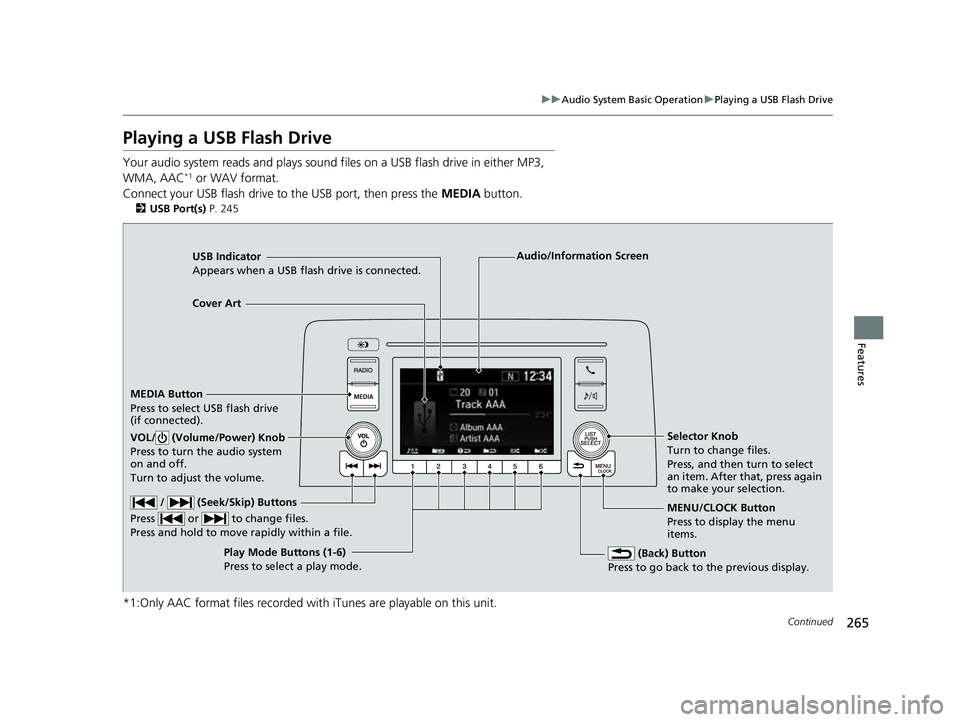
USB Indicator
Appears when a USB flash drive is connected.
MEDIA Button
Press to select USB flash drive
(if connected).
(Back) Button
Press to go back to the previous display.
/ (Seek/Skip) Buttons
Press or to change files.
Press and hold to move rapidly within a file.
VOL/ (Volume/Power) Knob
Press to turn the audio system
on and off.
Turn to adjust the volume.Selector Knob
Turn to change files.
Press, and then turn to select
an item. After that, press again
to make your selection.
MENU/CLOCK Button
Press to display the menu
items.
Audio/Information Screen
Play Mode Buttons (1-6)
Press to s
elect a play mode.
Cover Art
22 CR-V HEV ELP-31TPG6200.book 265 ページ 2021年6月30日 水曜日 午前11時6分
Page 270 of 692
268
uuAudio System Basic Operation uPlaying Bluetooth ® Audio
Features
Playing Bluetooth ® Audio
Your audio system allows you to listen to music from your Bluetooth-compatible
phone.
This function is available when the phone is paired and connected to the vehicle’s
Bluetooth ® HandsFreeLink ® (HFL) system.
2 Phone Setup P. 404
1Playing Bluetooth ® Audio
Not all Bluetooth -enabled phones with streaming
audio capabilities are compatible with the system.
For a list of compatible phones, visit
automobiles.honda.com /handsfreelink/,
or call 1-888-528-7876.
In some states, it may be il legal to perform some data
device functions while driving.
Only one phone can be used with HFL at a time.
When there are more than two paired phones in the
vehicle, the system automatically connects to the
prioritized phone. You can a ssign priority to a phone
in the Priority Device Setup .
2 Customized Features P. 362
If more than one phone is paired to the HFL system,
there will be a delay before the system begins to play.
In some cases, the name of the artist, album, or track
may not appear correctly.
Some functions may not be available on some
devices.
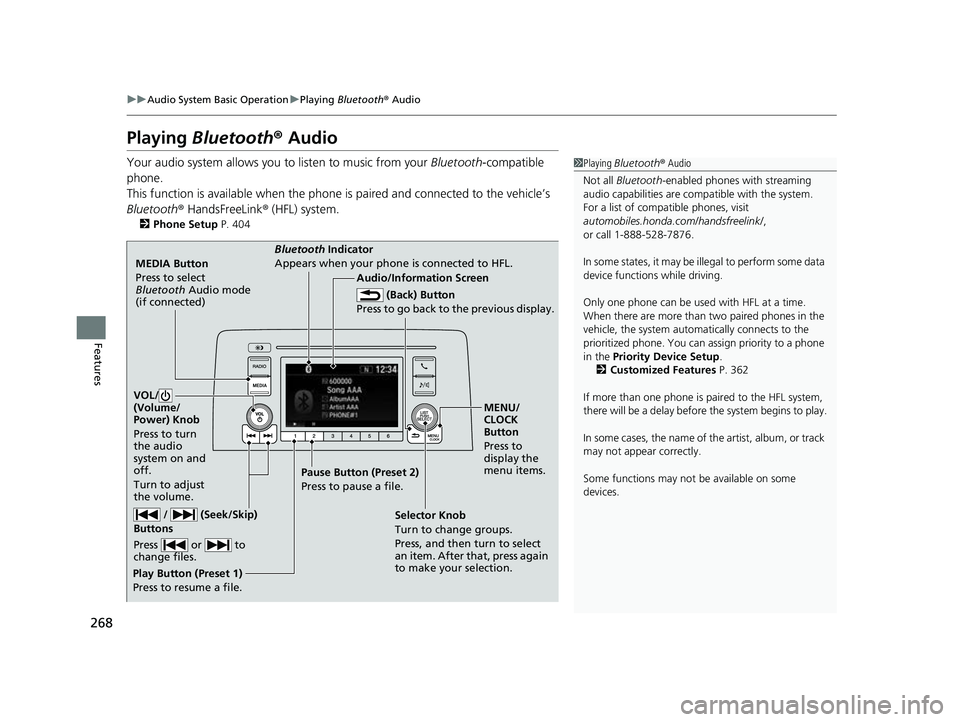
MEDIA Button
Press to select
Bluetooth Audio mode
(if connected)
VOL/
(Volume/
Power) Knob
Press to turn
the audio
system on and
off.
Turn to adjust
the volume.
MENU/
CLOCK
Button
Press to
display the
menu items.
Audio/Information Screen
Bluetooth Ind
icator
Appe ars
when your phone is connected to HFL.
/ (Seek/Skip)
Buttons
Press or to
change files.
Play Button (Preset 1)
Press to resume a file. Pause Button (Preset 2)
Press to pause a file.
Selector Knob
Turn to change groups.
Press, and then turn to select
an item. After that, press again
to make your selection.
(Back) Button
Press to go back to the previous display.
22 CR-V HEV ELP-31TPG6200.book 268 ページ 2021年6月30日 水曜日 午前11時6分
Page 296 of 692
294
uuAudio System Basic Operation uAdjusting the Sound
Features
Adjusting the Sound
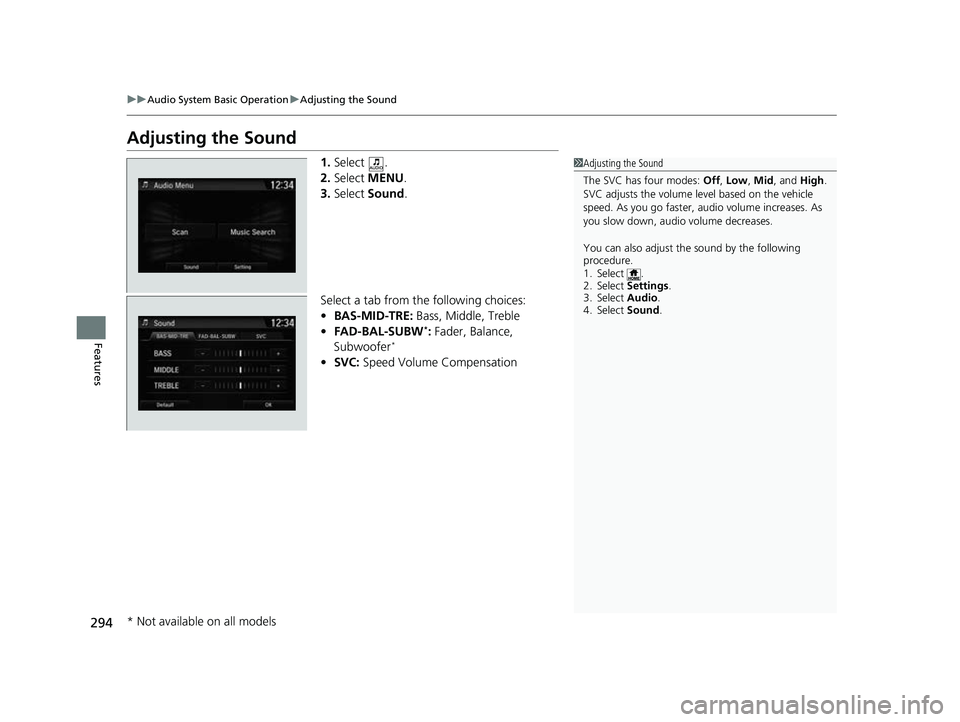
1. Select .
2. Select MENU .
3. Select Sound.
Select a tab from the following choices:
• BAS-MID-TRE: Bass, Middle, Treble
• FAD-BAL-SUBW
*: Fader, Balance,
Subwoofer*
• SVC: Speed Volume Compensation
1Adjusting the Sound
The SVC has four modes: Off, Low , Mid, and High.
SVC adjusts the volume level based on the vehicle
speed. As you go faster, audio volume increases. As
you slow down, audi o volume decreases.
You can also adjust the sound by the following
procedure.
1. Select .
2. Select Settings .
3. Select Audio.
4. Select Sound .
* Not available on all models
22 CR-V HEV ELP-31TPG6200.book 294 ページ 2021年6月30日 水曜日 午前11時6分
Page 303 of 692
301
uuAudio System Basic Operation uPlaying AM/FM Radio
Continued
Features
Playing AM/FM Radio
*1:Some or all of the lists may not be displayed.
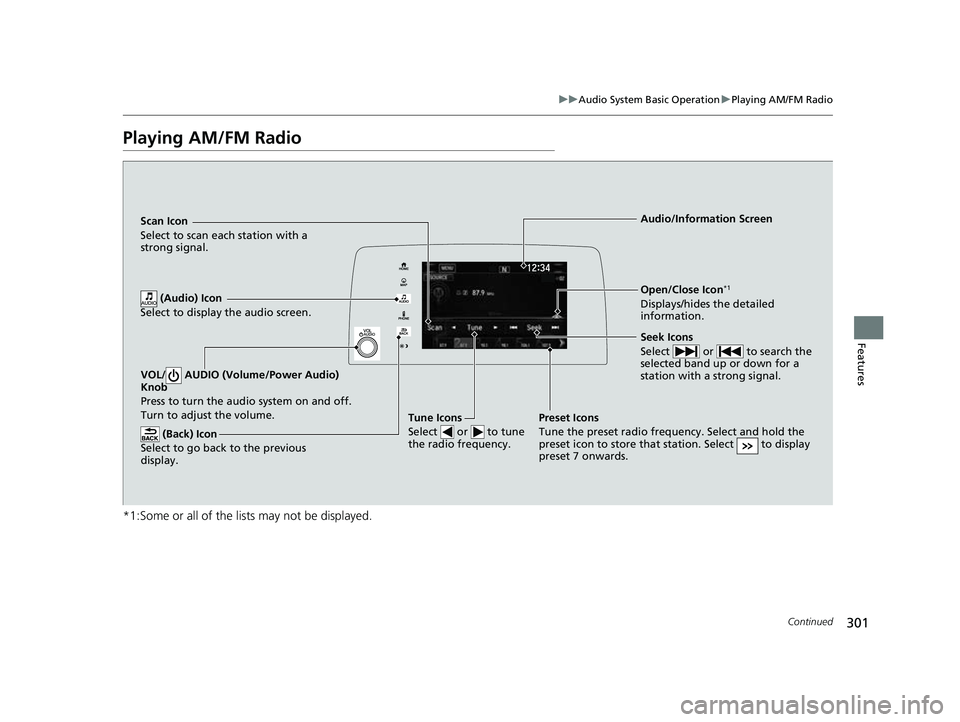
VOL/ AUDIO (Volume/Power Audio)
Knob
Press to turn the a udio system on and off.
Turn to adjust the volume.
(Back) Icon
Select to go back to the previous
display.
Seek Icons
Select or to search the
selected band up or down for a
station with a strong signal.
Open/Close Icon*1
Displays/hides the detailed
information.
(Audio) Icon
Select to display the audio screen.
Tune Icons
Select or to tune
the radio frequency.
Audio/Information Screen
Scan Icon
Select
to scan each station with a
strong signal.
Preset Icons
Tune the preset radio frequency. Select and hold the
preset icon to store that station. Select to display
preset 7 onwards.
22 CR-V HEV ELP-31TPG6200.book 301 ページ 2021年6月30日 水曜日 午前11時6分
Page 307 of 692
305
uuAudio System Basic Operation uPlaying SiriusXM ® Radio
Continued
Features
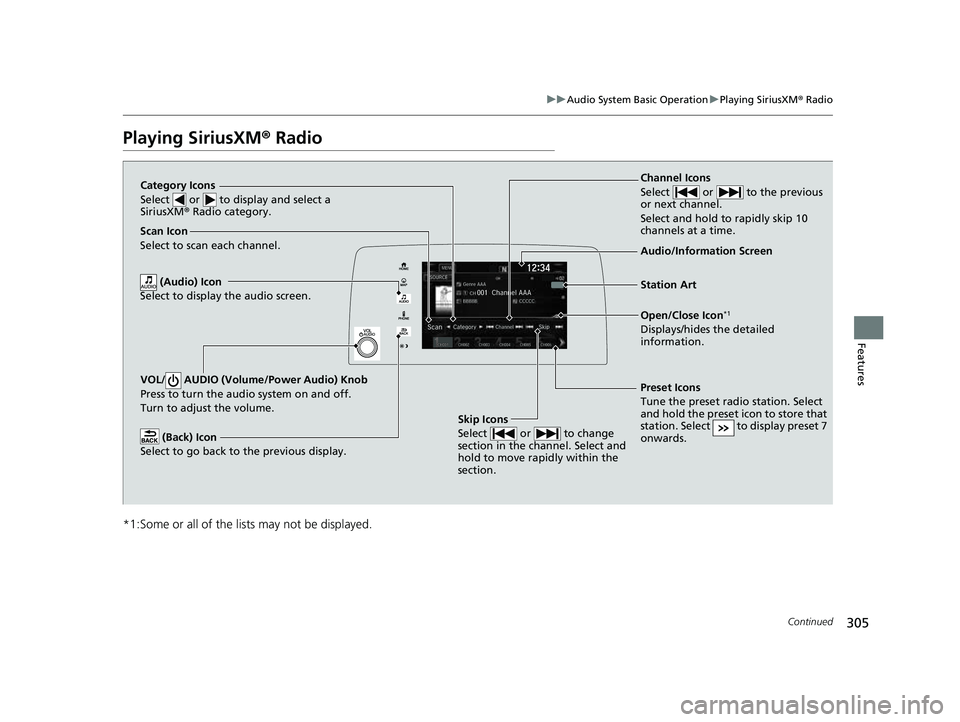
Playing SiriusXM® Radio
*1:Some or all of the lists may not be displayed.
VOL/ AUDIO (Volume/Power Audio) Knob
Press to turn the audio system on and off.
Turn to adjust the volume.
(Back) Icon
Select to go back to the previous display.
Channel Icons
Select or to the previous
or next channel.
Select and hold to rapidly skip 10
channels at a time.
Open/Close Icon*1
Displays/hides the detailed
information.
(Audio) Icon
Select to display the audio screen.
Category Icons
Select or to display and select a
SiriusXM ® Radio category.
Audio/Information Screen
Scan Icon
Select to scan eac
h channel.
Preset Icons
Tune the preset radio station. Select
and hold the preset icon to store that
station. Select to display preset 7
onwards.
Skip Icons
Select or to change
section in the channel. Select and
hold to move rapidly within the
section.
Station Art
22 CR-V HEV ELP-31TPG6200.book 305 ページ 2021年6月30日 水曜日 午前11時6分
Page 314 of 692
312
uuAudio System Basic Operation uPlaying an iPod
Features
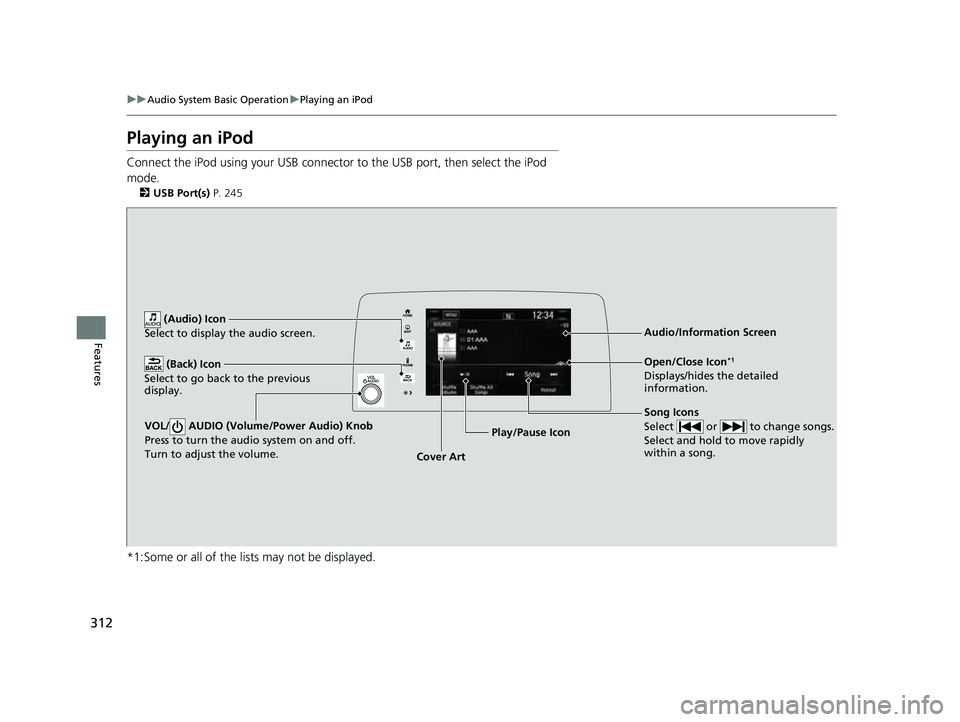
Playing an iPod
Connect the iPod using your USB connector to the USB port, then select the iPod
mode.
2 USB Port(s) P. 245
*1:Some or all of the lists may not be displayed.
VOL/ AUDIO (Volume/Power Audio) Knob
Press to turn the audio system on and off.
Turn to adjust the volume.
(Back) Icon
Select to go back to the previous
display.
Song Icons
Select or to change songs.
Select and hold to move rapidly
within a song.
Open/Close Icon*1
Displays/hides the detailed
information.
(Audio) Icon
Select to display the audio screen.
Cover Art Audio/Information Screen
Play/Pause Icon
22 CR-V HEV ELP-31TPG6200.book 312 ページ 2021年6月30日 水曜日 午前11時6分
Page 321 of 692
319
uuAudio System Basic Operation uPlaying Pandora ®
Continued
Features
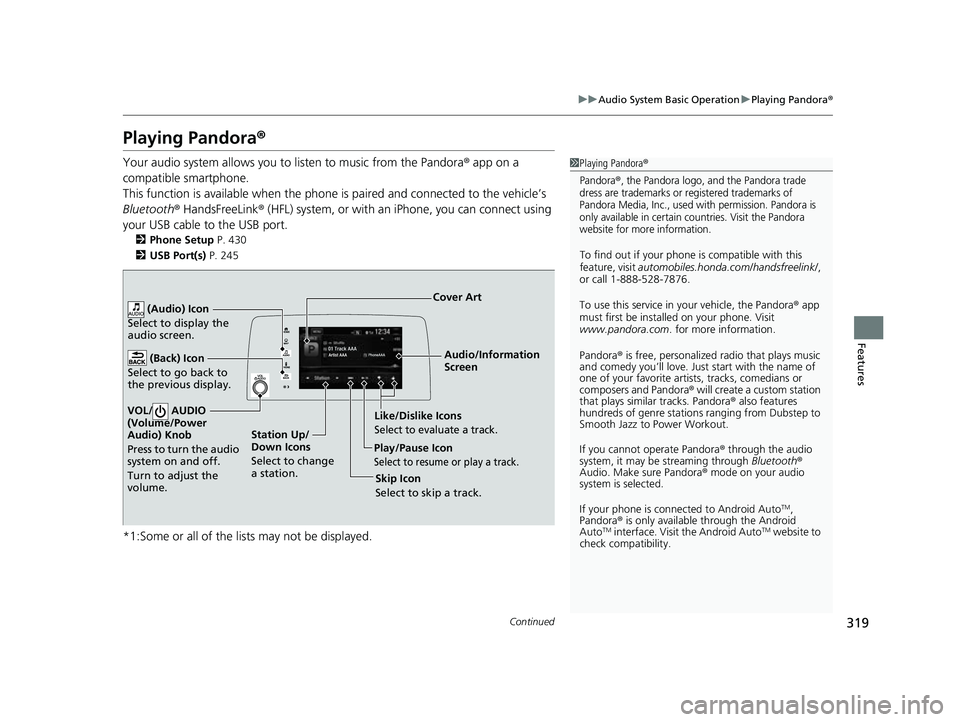
Playing Pandora ®
Your audio system allows you to listen to music from the Pandora ® app on a
compatible smartphone.
This function is available when the phone is paired and connected to the vehicle’s
Bluetooth ® HandsFreeLink ® (HFL) system, or with an iPhone, you can connect using
your USB cable to the USB port.
2 Phone Setup P. 430
2 USB Port(s) P. 245
*1:Some or all of the lists may not be displayed.
1Playing Pandora ®
Pandora®, the Pandora logo, and the Pandora trade
dress are trademarks or registered trademarks of
Pandora Media, Inc., used with permission. Pandora is
only available in certain countries. Visit the Pandora
website for more information.
To find out if your phone is compatible with this
feature, visit automobiles.honda.com/handsfreelink/ ,
or call 1-888-528-7876.
To use this service in your vehicle, the Pandora ® app
must first be installed on your phone. Visit
www.pandora.com . for more information.
Pandora ® is free, personalized radio that plays music
and comedy you’ll love. Just start with the name of
one of your favorite arti sts, tracks, comedians or
composers and Pandora ® will create a custom station
that plays similar tracks. Pandora ® also features
hundreds of genre stations ranging from Dubstep to
Smooth Jazz to Power Workout.
If you cannot operate Pandora ® through the audio
system, it may be streaming through Bluetooth®
Audio. Make sure Pandora ® mode on your audio
system is selected.
If your phone is connected to Android Auto
TM,
Pandora ® is only available through the Android
Auto
TM interface. Visit the Android AutoTM website to
check compatibility.
Audio/Information
Screen
Cover Art
VOL/ AUDIO
(Volume/Po wer
Aud
io) Knob
Press to turn the audio
system on and off.
Turn to adjust the
volume.
(Back) Icon
Select to go back to
the previous display.
(Audio) Icon
Select to display the
audio screen.
Play/Pause Icon
Select to resume or play a track.
Station Up/
Down Icons
Select to change
a station. Skip Icon
Select to skip a track.
Like/Dislike IconsSelect to evaluate a track.
22 CR-V HEV ELP-31TPG6200.book 319 ページ 2021年6月30日 水曜日 午前11時6分
Page 323 of 692
321
uuAudio System Basic Operation uPlaying a USB Flash Drive
Continued
Features
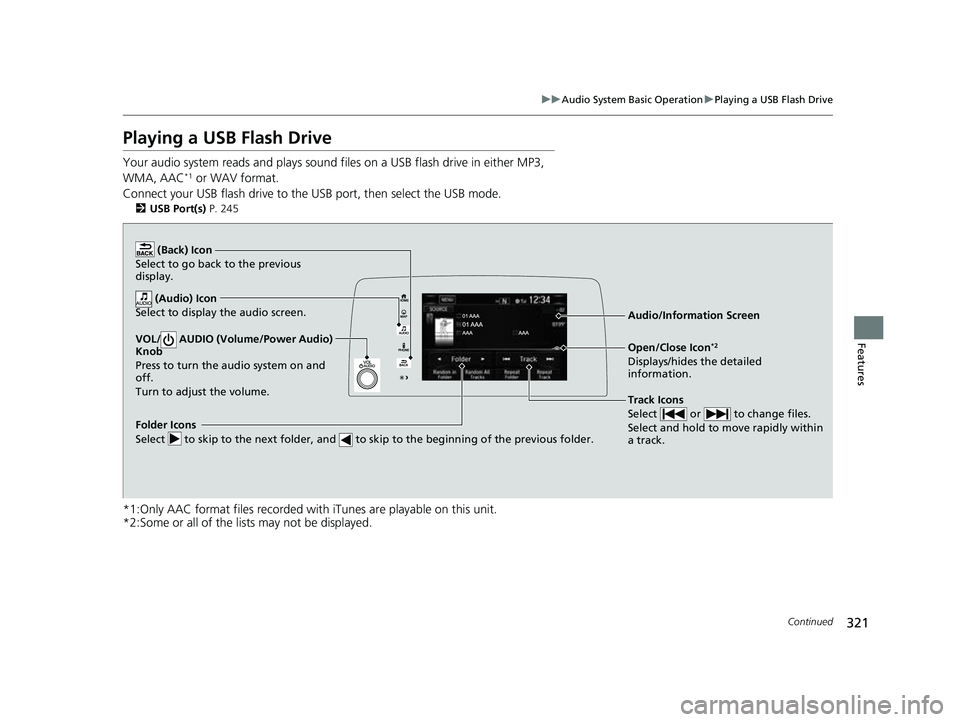
Playing a USB Flash Drive
Your audio system reads and plays sound files on a USB flash drive in either MP3,
WMA, AAC*1 or WAV format.
Connect your USB flash drive to the USB port, then select the USB mode.
2 USB Port(s) P. 245
*1:Only AAC format files recorded with iTunes are playable on this unit.
*2:Some or all of the lists may not be displayed.
VOL/ AUDIO (Volume/Power Audio)
Knob
Press to turn the audio system on and
off.
Turn to adjust the volume.
(Back) Icon
Select to go back to the previous
display.
Track Icons
Select or to change files.
Select and hold to move rapidly within
a track.
Open/Close Icon*2
Displays/hides the detailed
information.
(Audio) Icon
Select to display the audio screen.
Folder Icons
Select to skip to the next folder, and to skip to the beginning of the previous folder.
Audio/Information Screen
22 CR-V HEV ELP-31TPG6200.book 321 ページ 2021年6月30日 水曜日 午前11時6分
Page 326 of 692
324
uuAudio System Basic Operation uPlaying Bluetooth ® Audio
Features
Playing Bluetooth ® Audio
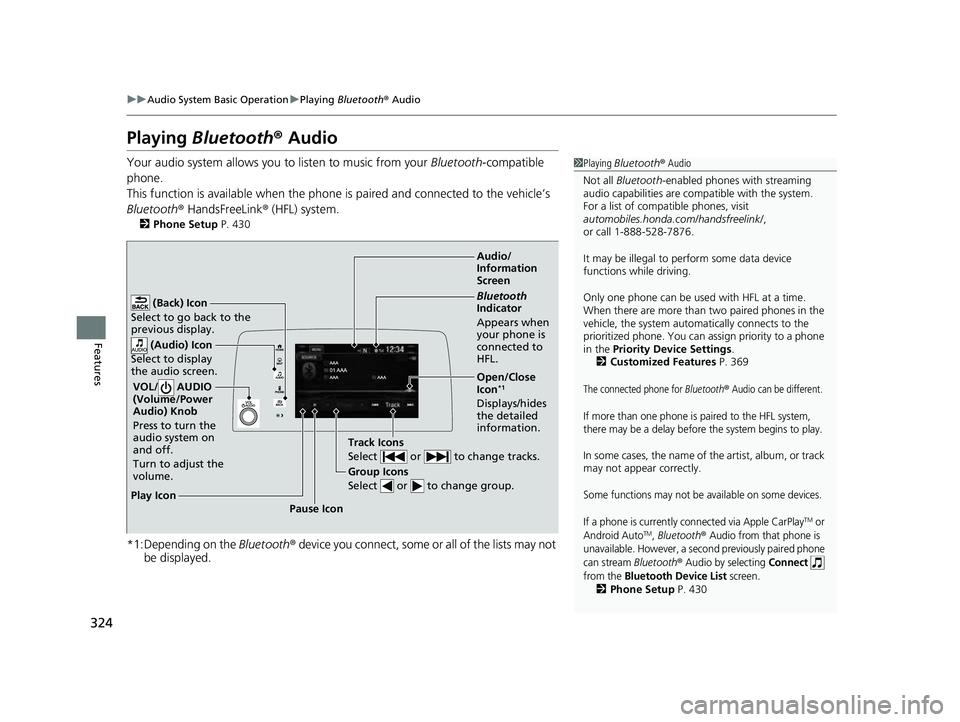
Your audio system allows you to listen to music from your Bluetooth-compatible
phone.
This function is available when the phone is paired and connected to the vehicle’s
Bluetooth ® HandsFreeLink ® (HFL) system.
2 Phone Setup P. 430
*1:Depending on the Bluetooth® device you connect, some or all of the lists may not
be displayed.
1 Playing Bluetooth ® Audio
Not all Bluetooth -enabled phones with streaming
audio capabilities are compatible with the system.
For a list of compatible phones, visit
automobiles.honda.com /handsfreelink/,
or call 1-888-528-7876.
It may be illegal to perform some data device
functions while driving.
Only one phone can be used with HFL at a time.
When there are more than two paired phones in the
vehicle, the system automatically connects to the
prioritized phone. You can a ssign priority to a phone
in the Priority Device Settings .
2 Customized Features P. 369
The connected phone for Bluetooth® Audio can be different.
If more than one phone is paired to the HFL system,
there may be a delay before the system begins to play.
In some cases, the name of the artist, album, or track
may not appear correctly.
Some functions may not be available on some devices.
If a phone is currently connected via Apple CarPlay
TM or
Android AutoTM, Bluetooth® Audio from that phone is
unavailable. However, a second previously paired phone
can stream
Bluetooth® Audio by selecting Connect
from the
Bluetooth Device List screen.2 Phone Setup P. 430
Audio/
Information
Screen
VOL/ AUDIO
(Volu me/Po
wer
Aud
io) Knob
Press to turn the
audio system on
and off.
Turn to adjust the
volume.
(Back) Icon
Select to go back to the
previous display.
(Audio) Icon
Select to display
the audio screen.
Group Icons
Select or to change group.
Pause Icon
Play Icon
Bluetooth
Indicator
Appears when
your phone is
connected to
HFL.
Track Icons
Select or to change tracks.
Open/Close
Icon*1
Displays/hides
the detailed
information.
22 CR-V HEV ELP-31TPG6200.book 324 ページ 2021年6月30日 水曜日 午前11時6分
Page 354 of 692
352
uuGeneral Information on the Audio System uHonda App License Agreement
Features
2. Potential Map Inaccuracy and Route Safety. Maps used by this system may be inaccurate because of changes in roads, traffic controls,
routing, or driving conditions. Always use good judgment and co mmon sense when following suggested routes. Do not follow the ro ute
suggestions if doing so would result in an un safe or illegal driving maneuver, if you would be placed in an unsafe situation, o r if you would
be directed into an area that you consider unsafe. Do not rely on any navigation feat ures included in the system to route you to emergency
services. Not all emergency services such as police, fire stations, hospitals, or clinics are likely to be contained in the map database for such
navigation features. Ask local authorities or an emergency services operator for such locations and routes. The driver is ultimately
responsible for the safe operation of the ve hicle and therefore, must evaluate whether it is safe to follow the suggested directions. Any
navigation features are provided only as an aid. Make your driving decisions based on your observations of local conditions and existing
traffic regulations. Navigation features are not a substitute for your personal judgmen t. Any route suggestions made by the SOFTWARE or
SERVICES should never replace any local traffic regulations or yo ur personal judgment or knowledge of safe driving practices.
3. Speech Recognition:
You acknowledge and understand that HONDA and PROVIDERS may reco rd, retain, and use voices commands
when you use the speech recognition components of the SOFTWARE or SERVICES. You and all VEHICLE operators and passengers (a)
consent to the recording and retention of voice commands in su pport of providing speech recognition components and (b) release HONDA
and PROVIDERS from all claims, liabilities, and losses that may result from any use of such recorded voice commands. Recognitio n errors
are inherent in speech recognition. It is your responsibility to monitor any speech recognition functions included in the syste m and address
any errors. Neither HONDA nor PROVIDERS will be liable for any damages arising out of errors in the speech recognition process.
4. Distraction Hazards.
Navigation features may require manua l (non-verbal) input or setup. Attempting to perform such set-up or insert
data while driving can seriously distract your attention and could cause a crash or other serious consequences; the ability to undertake such
interactions may also be limited by state or local law, which la ws you are responsible to know and follow. Even occasional shor t scans of
the screen may be hazardous if your attention has been diverted away from your driving at a crit ical time. Pull over and stop the vehicle in
a safe and legal manner before attempting to access a function of the system requiring prolonged attention. Do not raise the vo lume
excessively. Keep the volume at a level wh ere you can still hear outside traffic and em ergency signals while driving. Driving while unable
to hear these sounds could result in a crash.
22 CR-V HEV ELP-31TPG6200.book 352 ページ 2021年6月30日 水曜日 午前11時6分