volume HONDA CRV 2022 Owner's Manual
[x] Cancel search | Manufacturer: HONDA, Model Year: 2022, Model line: CRV, Model: HONDA CRV 2022Pages: 692, PDF Size: 22.05 MB
Page 355 of 692
353
uuGeneral Information on the Audio System uHonda App License Agreement
Continued
Features
E. Information Collection and Storage
1. Information Collection, Use, Transmission a nd Storage of Data. Consent to Use of Data:
You agree that HONDA and PROVIDERS may
collect and use your information gathered in any manner as part of product support services related to the SOFTWARE or related services.
HONDA may share such information with third parties, including, without limitation, PR OVIDERS, third party software and service s
suppliers, their affiliates and/or their designated agents, solely to improve their products or to provide services or technolo gies to you.
HONDA, third party software and systems supplie rs, their affiliates and/or their designated agent may disclose this information to others,
but not in a form that pe rsonally identifies you.
2. Information Storage.
Depending on the type of mult imedia system you have in your VEHICLE, certain information may be stored for ease
of use of the SOFTWARE including, without limitation, search history, location history in certain applications, previous and sa ved
destinations, map locations within certain applications, and device numbers and contact information.
(a) Vehicle Health Information.
Your VEHICLE may remotely transmit information re garding the status and health of your VEHICLE
(“VEHICLE INFORMATION”) to HO NDA without notification to you. VEHICLE INFO RMATION may contain VEHICLE maintenance and
malfunction status that is derived from VEHICLE diagnostic data and includes, but is not limited to, status of powered doors and windows,
battery life data, battery charging data, VE HICLE speed, coolant temperature, air comp ressor revolution, output power, warning codes,
diagnostic trouble codes, fuel injection volume, and engine rotati ons per minute. VEHICLE HEALTH INFORMATION may be used by HON DA
for research and development, to deliver HONDA SERVICES and informat ion to you, and to contact you, and is retained only for a period
of time necessary to fulfill these goals.
(b) VEHICLE Geolocation Data (non-navigation/map based).
If you opt-in to geolocation-based SERVICES, your vehicle’s geolocation data
(latitude and longitude) will be automatically sent from your VEHICLE to HONDA and PROVIDERS.
(c) You understand that the inputting or uploading of information to your VEHICLE’s multimedia system or the SOFTWARE or SERVIC ES is
at your own risk and that HONDA is not responsible for unauthori zed access to or use of any personal or other information. All information
uploaded to the SOFTWARE and SERVICES may be stored on your VEHICLES’s multimedia system and you understand that the security and
safety of your VEHICLE’s multimedia system is your sole responsibility.
22 CR-V HEV ELP-31TPG6200.book 353 ページ 2021年6月30日 水曜日 午前11時6分
Page 375 of 692
373
uuCustomized Features u
Continued
Features
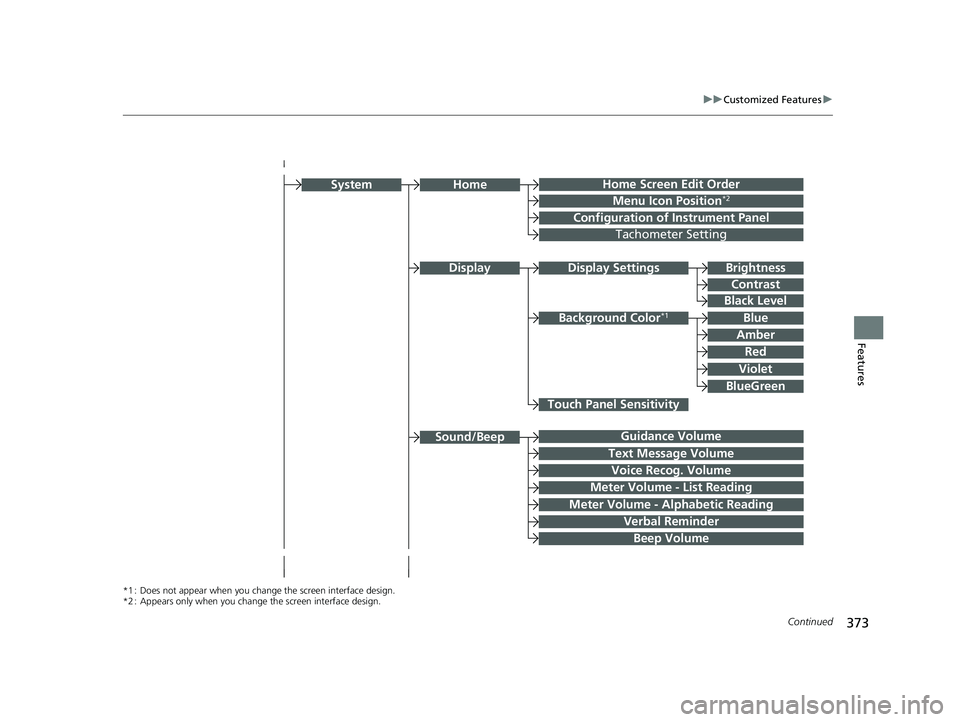
Home Screen Edit Order
Configuration of Instrument Panel
Display Settings
Background Color*1
System
Touch Panel Sensitivity
Brightness
Contrast
Black Level
Blue
Amber
Red
Violet
BlueGreen
Guidance Volume
Text Message Volume
Sound/Beep
Voice Recog. Volume
Verbal Reminder
Beep Volume
Home
Meter Volume - List Reading
Meter Volume - Alphabetic Reading
*1 : Does not appear when you chang e the screen interface design.
*2 : Appears only when you change the screen interface design.
Menu Icon Position*2
Display
Tachometer Setting
22 CR-V HEV ELP-31TPG6200.book 373 ページ 2021年6月30日 水曜日 午前11時6分
Page 376 of 692
374
uuCustomized Features u
Features
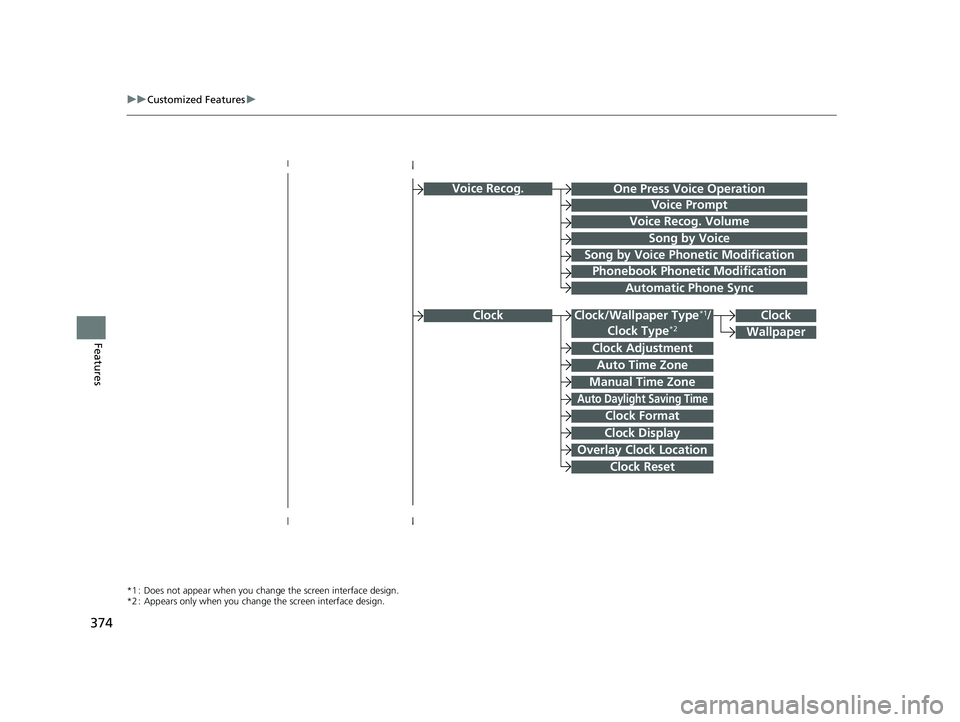
Voice Recog.
Voice Prompt
Voice Recog. Volume
Song by Voice
Song by Voice Phonetic Modification
Phonebook Phonetic Modification
Automatic Phone Sync
Clock Adjustment
Clock Format
Auto Time Zone
Manual Time Zone
Auto Daylight Saving Time
Clock Display
Overlay Clock Location
Clock Reset
Clock
Wallpaper
One Press Voice Operation
*1 : Does not appear when you chang e the screen interface design.
*2 : Appears only when you change the screen interface design.
Clock/Wallpaper Type*1/
Clock Type*2Clock
22 CR-V HEV ELP-31TPG6200.book 374 ページ 2021年6月30日 水曜日 午前11時6分
Page 378 of 692
376
uuCustomized Features u
Features
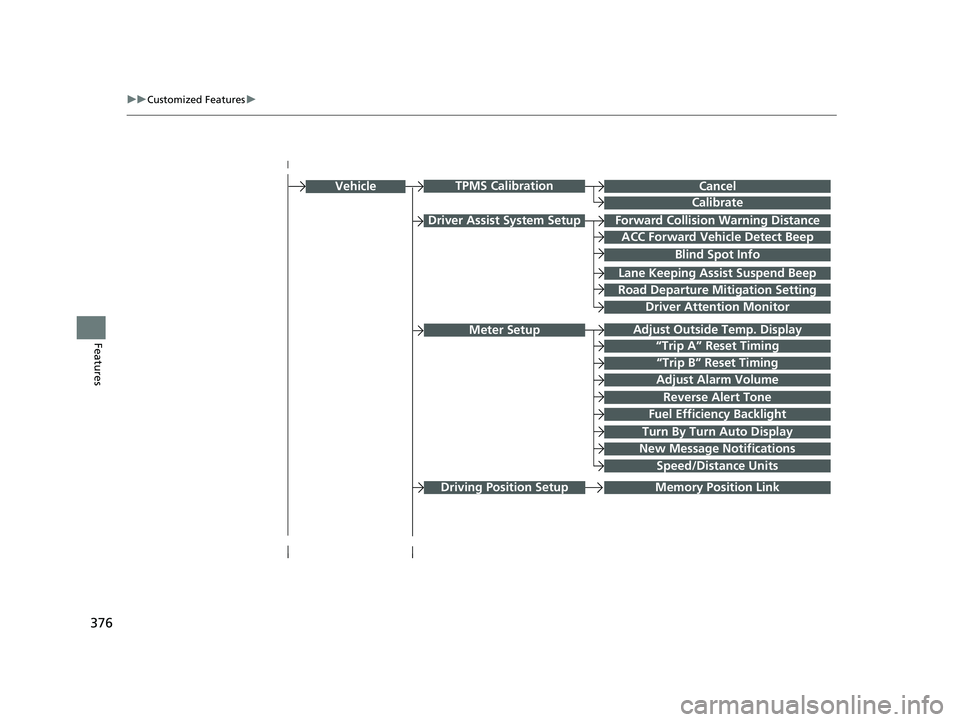
Driver Assist System SetupForward Collision Warning Distance
ACC Forward Vehicle Detect Beep
Lane Keeping Assist Suspend Beep
Road Departure Mitigation Setting
Adjust Outside Temp. Display
“Trip A” Reset Timing
“Trip B” Reset Timing
Vehicle
Meter Setup
Adjust Alarm Volume
New Message Notifications
Reverse Alert Tone
Turn By Turn Auto Display
Speed/Distance Units
CancelTPMS Calibration
Calibrate
Blind Spot Info
Fuel Efficiency Backlight
Memory Position Link
Driver Attention Monitor
Driving Position Setup
22 CR-V HEV ELP-31TPG6200.book 376 ページ 2021年6月30日 水曜日 午前11時6分
Page 387 of 692
385
uuCustomized Features u
Continued
Features
*1:Default Setting
*2:Does not appear when you chan ge the screen interface design.
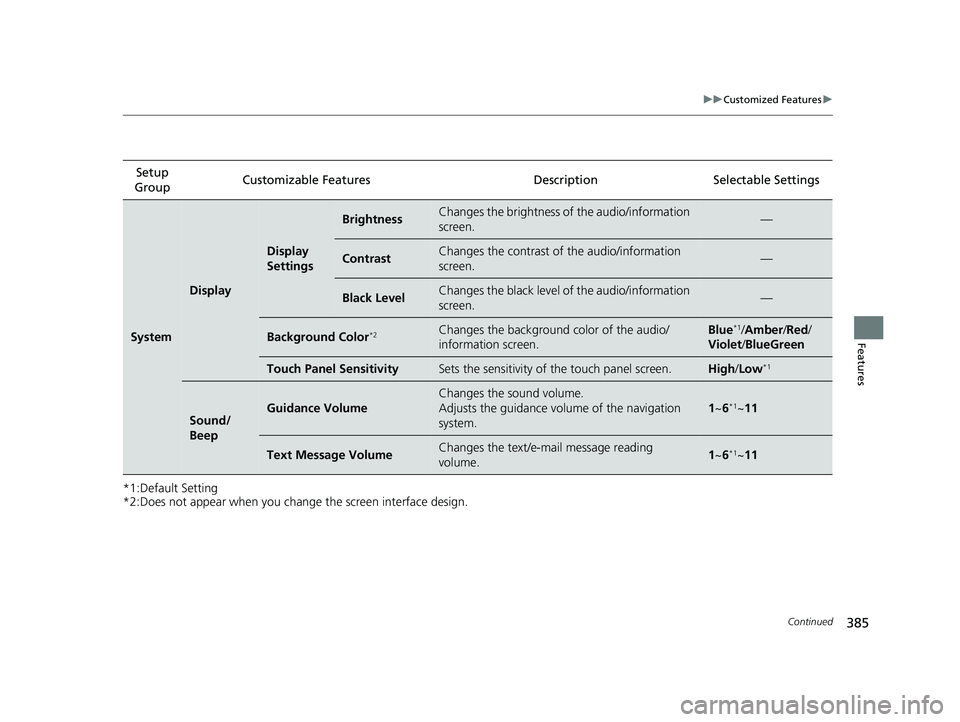
Setup
Group Customizable Features Desc
ription Selectable Settings
System
Display
Display
Settings
BrightnessChanges the brightness of the audio/information
screen.—
ContrastChanges the contrast of the audio/information
screen.—
Black LevelChanges the black level of the audio/information
screen.—
Background Color*2Changes the background color of the audio/
information screen.Blue*1/Amber /Red/
Violet/ BlueGreen
Touch Panel SensitivitySets the sensitivity of the touch panel screen.High/Low*1
Sound/
BeepGuidance Volume
Changes the sound volume.
Adjusts the guidance volume of the navigation
system.
1 ~6*1~11
Text Message VolumeChanges the text/e-mail message reading
volume. 1~6*1~11
22 CR-V HEV ELP-31TPG6200.book 385 ページ 2021年6月30日 水曜日 午前11時6分
Page 388 of 692
386
uuCustomized Features u
Features
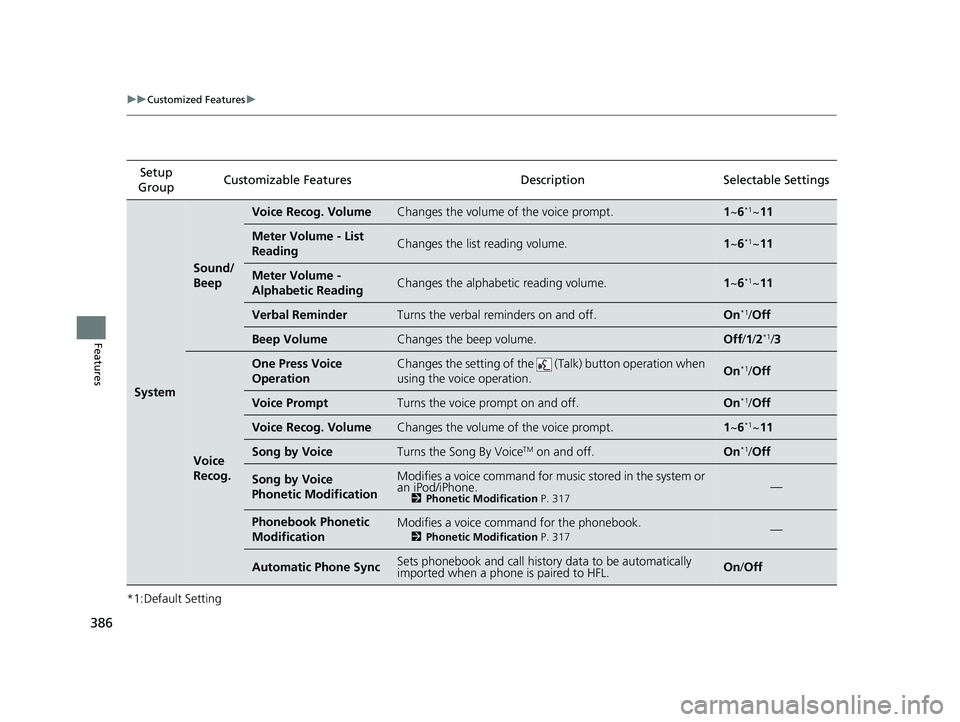
*1:Default SettingSetup
Group Customizable Features
Description Selectable Settings
System
Sound/
Beep
Voice Recog. VolumeChanges the volume of the voice prompt.1~6*1~11
Meter Volume - List
ReadingChanges the list reading volume.1~6*1~11
Meter Volume -
Alphabetic ReadingChanges the alphabetic reading volume.1~6*1~11
Verbal ReminderTurns the verbal reminders on and off.On*1/Off
Beep VolumeChanges the beep volume.Off /1 /2*1/3
Voice
Recog.
One Press Voice
OperationChanges the setting of the (Talk) button operation when
using the voice operation.On*1/ Off
Voice PromptTurns the voice prompt on and off.On*1/Off
Voice Recog. VolumeChanges the volume of the voice prompt.1 ~6*1~11
Song by VoiceTurns the Song By VoiceTM on and off.On*1/Off
Song by Voice
Phonetic ModificationModifies a voice command for mu sic stored in the system or
an iPod/iPhone.
2 Phonetic Modification P. 317—
Phonebook Phonetic
ModificationModifies a voice command for the phonebook.
2Phonetic Modification P. 317—
Automatic Phone SyncSets phonebook and call history data to be automatically
imported when a phone is paired to HFL.On/Off
22 CR-V HEV ELP-31TPG6200.book 386 ページ 2021年6月30日 水曜日 午前11時6分
Page 392 of 692
390
uuCustomized Features u
Features
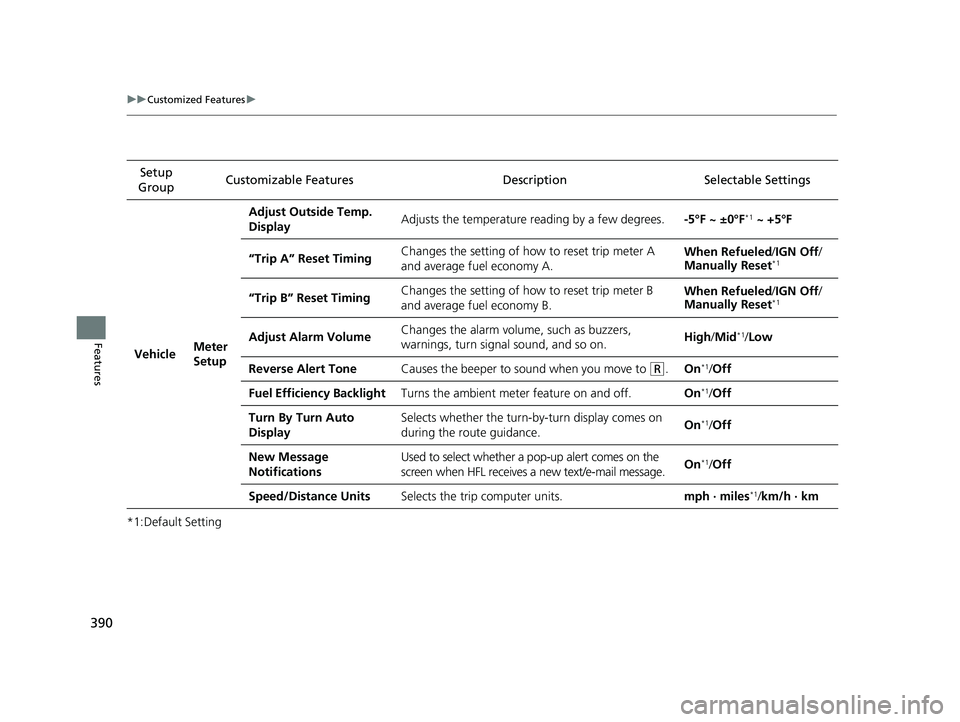
*1:Default SettingSetup
Group Customizable Features Desc
ription Selectable Settings
VehicleMeter
Setup
Adjust Outside Temp.
DisplayAdjusts the temperature reading by a few degrees.-5°F ~ ±0°F*1 ~ +5°F
“Trip A” Reset TimingChanges the setting of how to reset trip meter A
and average fuel economy A.When Refueled /IGN Off /
Manually Reset*1
“Trip B” Reset TimingChanges the setting of how to reset trip meter B
and average fuel economy B.When Refueled /IGN Off /
Manually Reset*1
Adjust Alarm VolumeChanges the alarm volume, such as buzzers,
warnings, turn signal sound, and so on.High /Mid*1/Low
Reverse Alert ToneCauses the beeper to sound when you move to (R.On*1/Off
Fuel Efficiency BacklightTurns the ambient meter feature on and off.On*1/Off
Turn By Turn Auto
DisplaySelects whether the turn-by-turn display comes on
during the route guidance.On*1/Off
New Message
NotificationsUsed to select whether a pop-up alert comes on the
screen when HFL receives a new text/e-mail message.On*1/Off
Speed/Distance UnitsSelects the trip computer units.mph · miles*1/km/h · km
22 CR-V HEV ELP-31TPG6200.book 390 ページ 2021年6月30日 水曜日 午前11時6分
Page 424 of 692
422
Features
Bluetooth® HandsFreeLink ®
Bluetooth® HandsFreeLink ® (HFL) allows you to place and receive phone calls using
your vehicle’s audio system, without handling your cell phone.
Using HFL
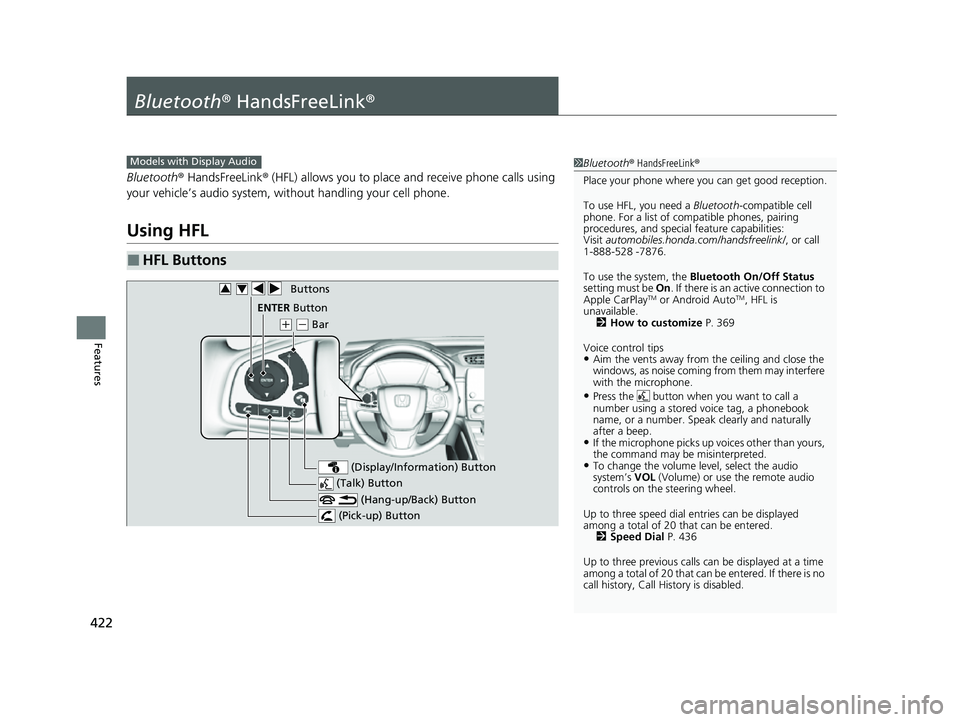
■HFL Buttons
1 Bluetooth ® HandsFreeLink ®
Place your phone where y ou can get good reception.
To use HFL, you need a Bluetooth-compatible cell
phone. For a list of compatible phones, pairing
procedures, and special feature capabilities:
Visit automobiles.honda.com/handsfreelink/ , or call
1-888-528 -7876.
To use the system, the Bluetooth On/Off Status
setting must be On. If there is an active connection to
Apple CarPlay
TM or Android AutoTM, HFL is
unavailable. 2 How to customize P. 369
Voice control tips
•Aim the vents away from the ceiling and close the
windows, as noise coming from them may interfere
with the microphone.
•Press the button when you want to call a
number using a stored voice tag, a phonebook
name, or a number. Spe ak clearly and naturally
after a beep.
•If the microphone picks up vo ices other than yours,
the command may be misinterpreted.
•To change the volume level, select the audio
system’s VOL (Volume) or use the remote audio
controls on the steering wheel.
Up to three speed dial entries can be displayed
among a total of 20 that can be entered. 2 Speed Dial P. 436
Up to three previous calls can be displayed at a time
among a total of 20 that can be entered. If there is no
call history, Call History is disabled.
Models with Display Audio
(Talk) Button
( + (- Bar
(Hang-up/Back) Button
(Pick-up) Button
ENTEq Button
(Display/Information) Button
Buttons34
22 CR-V HEV ELP-31TPG6200.book 422 ページ 2021年6月30日 水曜日 午前11時6分
Page 574 of 692
572
Driving
Refueling
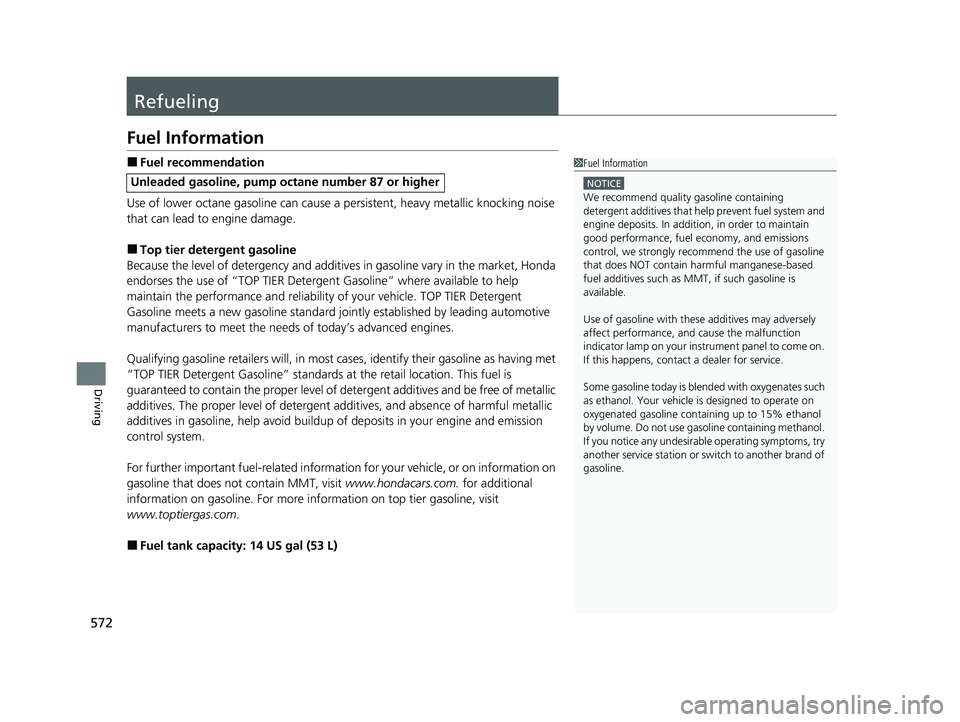
Fuel Information
■Fuel recommendation
Use of lower octane gasoline can cause a persistent, heavy metallic knocking noise
that can lead to engine damage.
■Top tier detergent gasoline
Because the level of detergency and additive s in gasoline vary in the market, Honda
endorses the use of “TOP TIER Deterg ent Gasoline” where available to help
maintain the performance and reliability of your vehicle. TOP TIER Detergent
Gasoline meets a new gasoline standard join tly established by leading automotive
manufacturers to meet the need s of today’s advanced engines.
Qualifying gasoline retailers will, in most cases, identify their gasoline as having met
“TOP TIER Detergent Gasoline” standards at the retail location. This fuel is
guaranteed to contain the proper level of detergent additives and be free of metallic
additives. The proper level of detergent additives, and absence of harmful metallic
additives in gasoline, help avoid buildup of deposits in your engine and emission
control system.
For further important fuel-related information for your vehicle, or on information on
gasoline that does not contain MMT, visit www.hondacars.com. for additional
information on gasoline. For more info rmation on top tier gasoline, visit
www.toptiergas.com .
■Fuel tank capacity: 14 US gal (53 L)
Unleaded gasoline, pump octane number 87 or higher
1Fuel Information
NOTICE
We recommend quality ga soline containing
detergent additives that help prevent fuel system and
engine deposits. In addition, in order to maintain
good performance, fuel economy, and emissions
control, we strongly reco mmend the use of gasoline
that does NOT contain harmful manganese-based
fuel additives such as MMT, if such gasoline is
available.
Use of gasoline with these additives may adversely
affect performance, a nd cause the malfunction
indicator lamp on your inst rument panel to come on.
If this happens, contact a dealer for service.
Some gasoline today is blended with oxygenates such
as ethanol. Your vehicle is designed to operate on
oxygenated gasoline containing up to 15% ethanol
by volume. Do not use ga soline containing methanol.
If you notice any undesira ble operating symptoms, try
another service station or sw itch to another brand of
gasoline.
22 CR-V HEV ELP-31TPG6200.book 572 ページ 2021年6月30日 水曜日 午前11時6分