ima HONDA CRV 2022 Owner's Guide
[x] Cancel search | Manufacturer: HONDA, Model Year: 2022, Model line: CRV, Model: HONDA CRV 2022Pages: 692, PDF Size: 22.05 MB
Page 241 of 692
Continued239
uuClimate Control System uUsing Automatic Climate Control
Controls
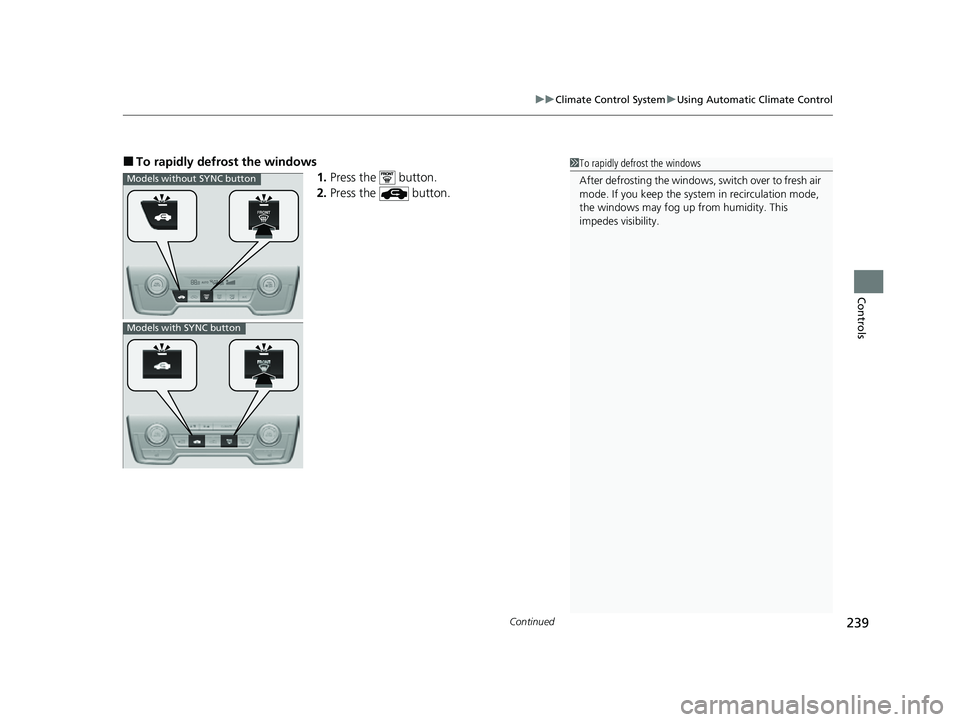
■To rapidly defrost the windows
1.Press the button.
2. Press the button.1To rapidly defrost the windows
After defrosting the windows, switch over to fresh air
mode. If you keep the syst em in recirculation mode,
the windows may fog up from humidity. This
impedes visibility.
Models without SYNC button
Models with SYNC button
22 CR-V HEV ELP-31TPG6200.book 239 ページ 2021年6月30日 水曜日 午前11時6分
Page 242 of 692
uuClimate Control System uUsing Automatic Climate Control
240
Controls
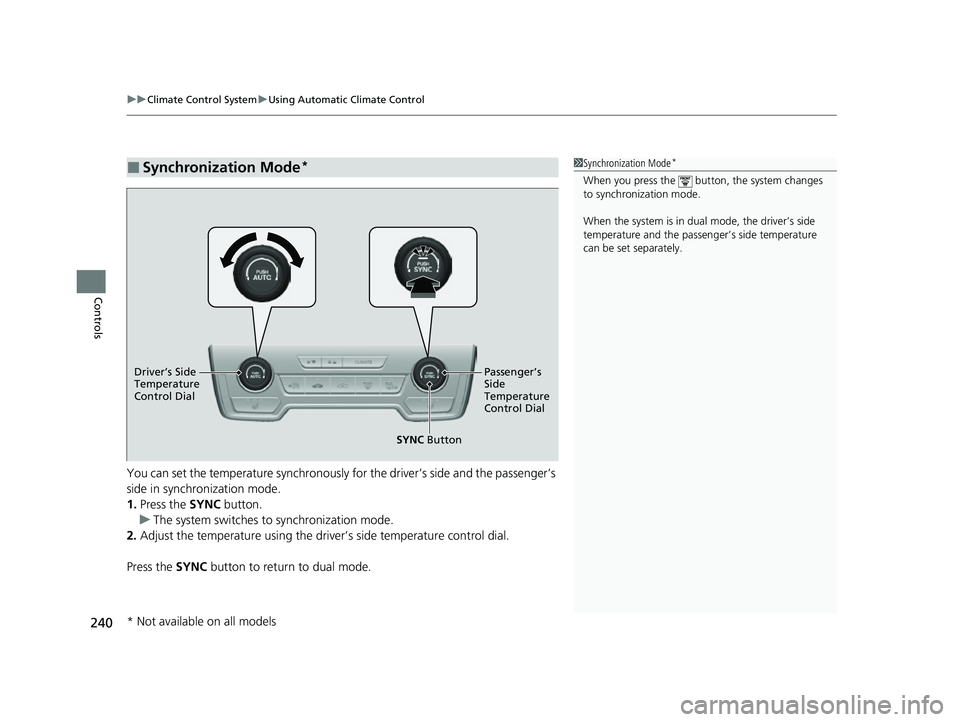
You can set the temperature synchronously fo r the driver’s side and the passenger’s
side in synchronization mode.
1. Press the SYNC button.
u The system switches to synchronization mode.
2. Adjust the temperature using the driv er’s side temperature control dial.
Press the SYNC button to return to dual mode.
■Synchronization Mode*1Synchronization Mode*
When you press the button, the system changes
to synchronization mode.
When the system is in dua l mode, the driver’s side
temperature and the passe nger’s side temperature
can be set separately.
SYNC Button
Driver’s Side
Temperature
Control
Dial Passenger’s
Side
Temperature
Control Dial
* Not available on all models
22 CR-V HEV ELP-31TPG6200.book 240 ページ 2021年6月30日 水曜日 午前11時6分
Page 243 of 692
241
uuClimate Control System uAutomatic Climate Control Sensors
Controls
Automatic Climate Control Sensors
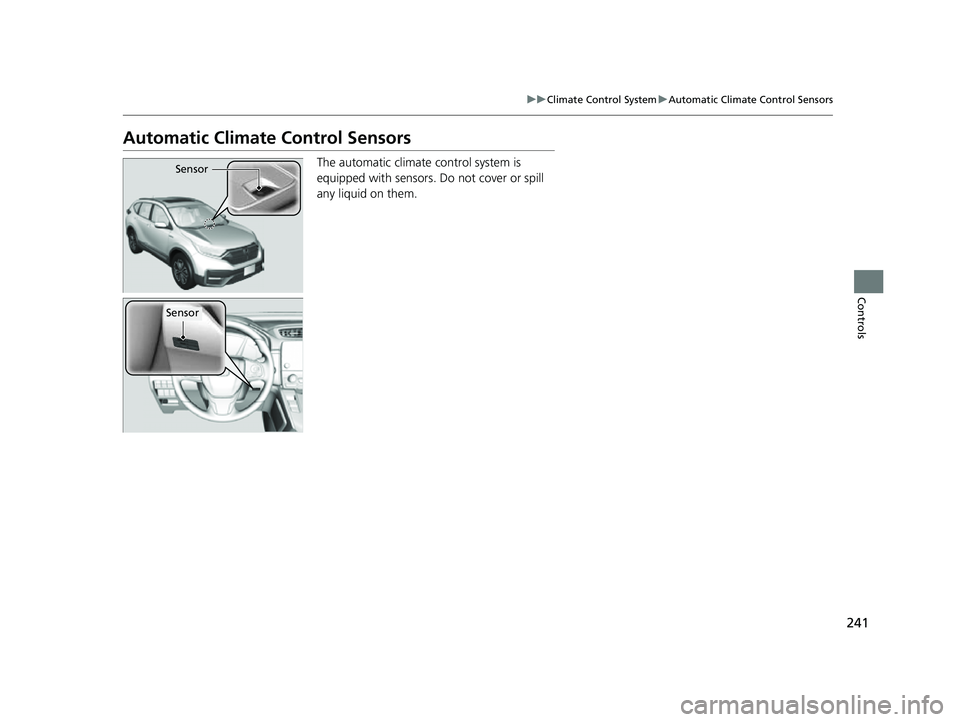
The automatic climate control system is
equipped with sensors. Do not cover or spill
any liquid on them.Sensor
Sensor
22 CR-V HEV ELP-31TPG6200.book 241 ページ 2021年6月30日 水曜日 午前11時6分
Page 255 of 692
253
uuAudio System Basic Operation uAudio/Information Screen
Continued
Features
■Audio
Shows the current audio information.
■Clock/Wallpaper
Shows a clock screen or an image you import.
■Change display
1. Press the MENU/CLOCK button.
2. Rotate to select Settings, then press .
3. Rotate to select Display Change, then press .
4. Rotate to select Wallpaper, then press .
u If you want to return to the audio/information screen, select Audio.
22 CR-V HEV ELP-31TPG6200.book 253 ページ 2021年6月30日 水曜日 午前11時6分
Page 256 of 692
uuAudio System Basic Operation uAudio/Information Screen
254
Features
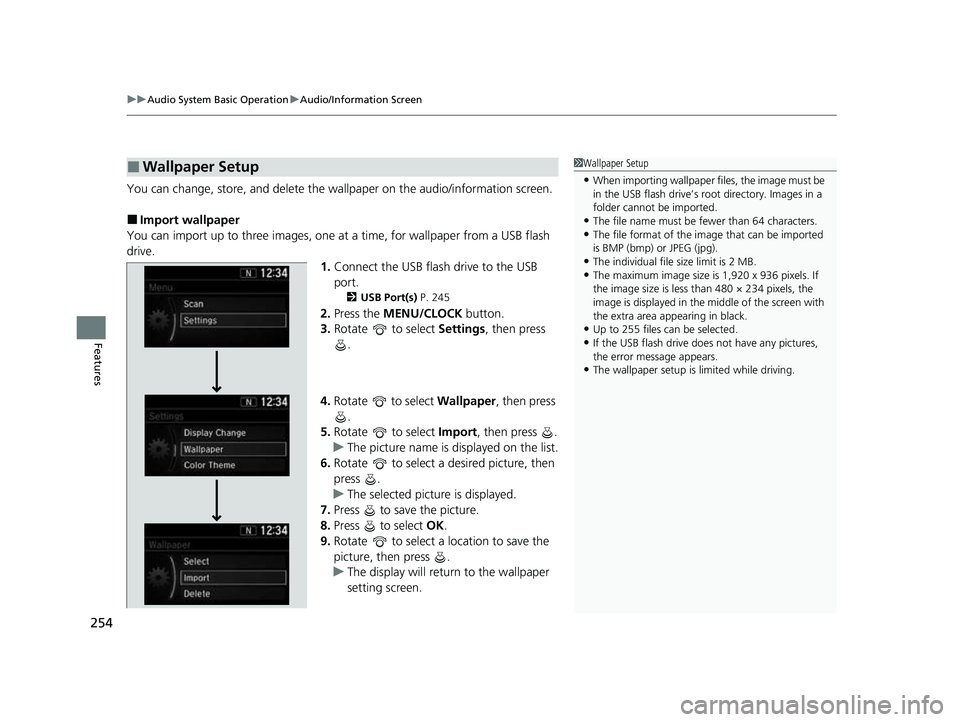
You can change, store, and delete the wallpaper on the audio/information screen.
■Import wallpaper
You can import up to three images, one at a time, for wallpaper from a USB flash
drive. 1.Connect the USB flash drive to the USB
port.
2 USB Port(s) P. 245
2.Press the MENU/CLOCK button.
3. Rotate to select Settings, then press
.
4. Rotate to select Wallpaper , then press
.
5. Rotate to select Import, then press .
u The picture name is displayed on the list.
6. Rotate to select a desired picture, then
press .
u The selected picture is displayed.
7. Press to save the picture.
8. Press to select OK.
9. Rotate to select a location to save the
picture, then press .
u The display will return to the wallpaper
setting screen.
■Wallpaper Setup1Wallpaper Setup
•When importing wallpaper f iles, the image must be
in the USB flash drive’s root directory. Images in a
folder cannot be imported.
•The file name must be fewer than 64 characters.•The file format of the im age that can be imported
is BMP (bmp) or JPEG (jpg).
•The individual file size limit is 2 MB.•The maximum image size is 1,920 x 936 pixels. If
the image size is less than 480 × 234 pixels, the
image is displayed in the middle of the screen with
the extra area appearing in black.
•Up to 255 files can be selected.
•If the USB flash drive doe s not have any pictures,
the error message appears.
•The wallpaper setup is limited while driving.
22 CR-V HEV ELP-31TPG6200.book 254 ページ 2021年6月30日 水曜日 午前11時6分
Page 284 of 692
uuAudio System Basic Operation uAudio/Information Screen
282
Features
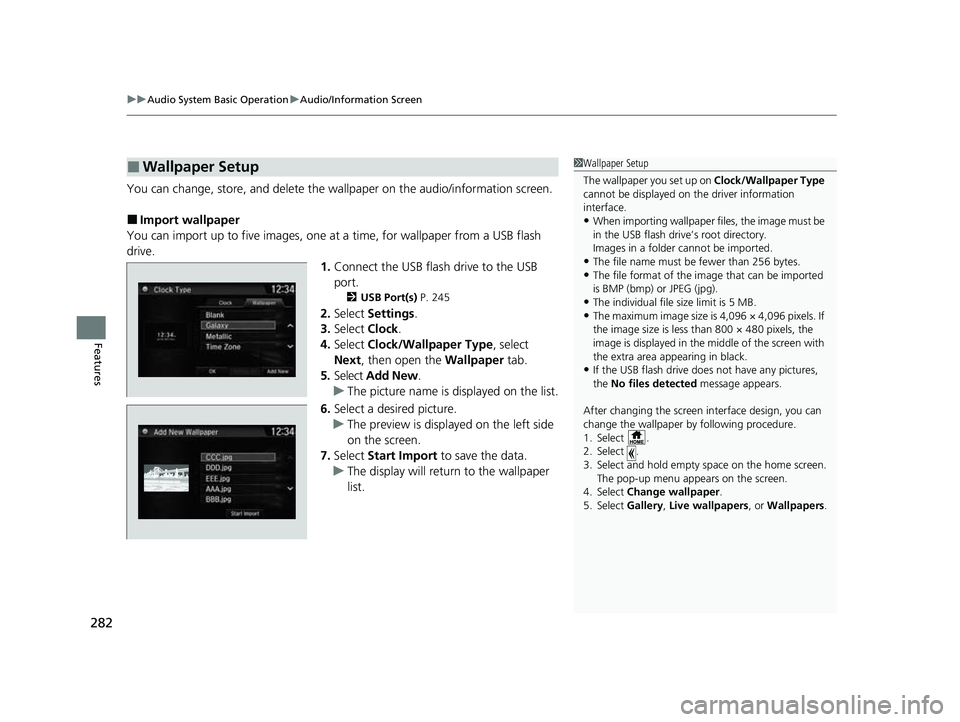
You can change, store, and delete the wallpaper on the audio/information screen.
■Import wallpaper
You can import up to five images, one at a time, for wallpaper from a USB flash
drive. 1.Connect the USB flash drive to the USB
port.
2 USB Port(s) P. 245
2.Select Settings .
3. Select Clock.
4. Select Clock/Wallpaper Type , select
Next, then open the Wallpaper tab.
5. Select Add New .
u The picture name is displayed on the list.
6. Select a desired picture.
u The preview is displayed on the left side
on the screen.
7. Select Start Import to save the data.
u The display will return to the wallpaper
list.
■Wallpaper Setup1Wallpaper Setup
The wallpaper you set up on Clock/Wallpaper Type
cannot be displayed on th e driver information
interface.
•When importing wallpaper f iles, the image must be
in the USB flash drive’s root directory.
Images in a folder cannot be imported.
•The file name must be fewer than 256 bytes.•The file format of the im age that can be imported
is BMP (bmp) or JPEG (jpg).
•The individual file size limit is 5 MB.•The maximum image size is 4,096 × 4,096 pixels. If
the image size is less than 800 × 480 pixels, the
image is displayed in the middle of the screen with
the extra area appearing in black.
•If the USB flash drive doe s not have any pictures,
the No files detected message appears.
After changing the screen interface design, you can
change the wallpaper by following procedure.
1. Select .
2. Select .
3. Select and hold empty space on the home screen. The pop-up menu appears on the screen.
4. Select Change wallpaper .
5. Select Gallery, Live wallpapers , or Wallpapers.
22 CR-V HEV ELP-31TPG6200.book 282 ページ 2021年6月30日 水曜日 午前11時6分
Page 300 of 692
298
uuAudio System Basic Operation uVoice Control Operation
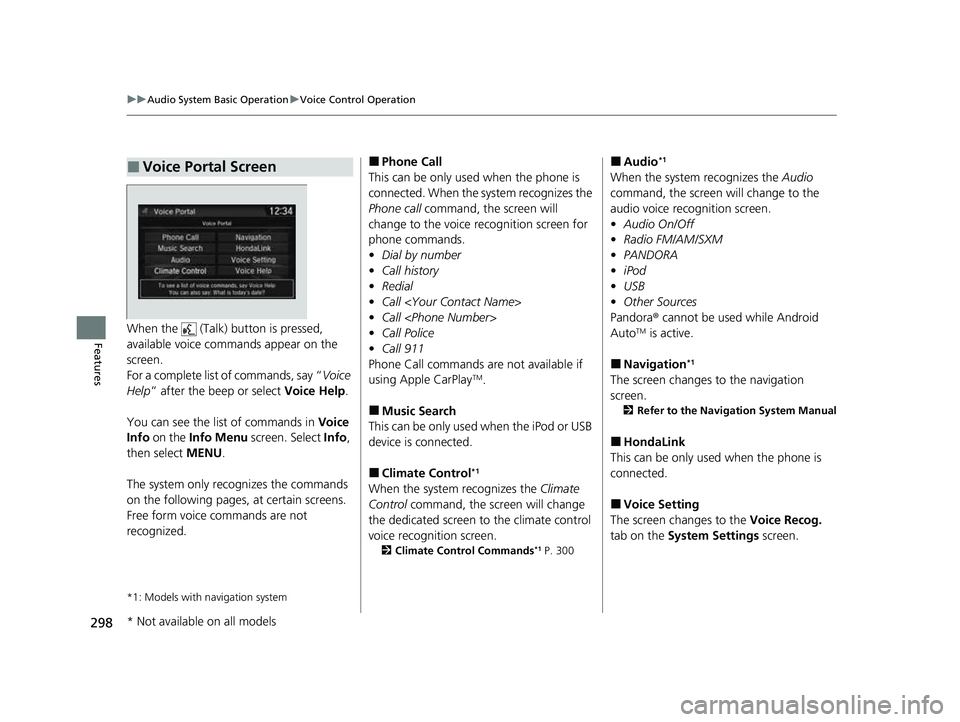
FeaturesWhen the (Talk) button is pressed,
available voice commands appear on the
screen.
For a complete list of commands, say “ Voice
Help ” after the beep or select Voice Help.
You can see the list of commands in Voice
Info on the Info Menu screen. Select Info,
then select MENU.
The system only reco gnizes the commands
on the following pages, at certain screens.
Free form voice commands are not
recognized.
*1: Models with navigation system
■Voice Portal Screen■Phone Call
This can be only used when the phone is
connected. When the sy stem recognizes the
Phone call command, the screen will
change to the voice recognition screen for
phone commands.
• Dial by number
• Call history
• Redial
• Call
• Call
• Call Police
• Call 911
Phone Call commands are not available if
using Apple CarPlay
TM.
■Music Search
This can be only used when the iPod or USB
device is connected.
■Climate Control*1
When the system recognizes the Climate
Control command, the screen will change
the dedicated screen to the climate control
voice recognition screen.
2 Climate Control Commands*1 P. 300
■Audio*1
When the system recognizes the Audio
command, the screen will change to the
audio voice recognition screen.
• Audio On/Off
• Radio FM/AM/SXM
• PANDORA
• iPod
• USB
• Other Sources
Pandora ® cannot be used while Android
Auto
TM is active.
■Navigation*1
The screen changes to the navigation
screen.
2 Refer to the Navigation System Manual
■HondaLink
This can be only used when the phone is
connected.
■Voice Setting
The screen changes to the Voice Recog.
tab on the System Settings screen.
* Not available on all models
22 CR-V HEV ELP-31TPG6200.book 298 ページ 2021年6月30日 水曜日 午前11時6分
Page 301 of 692
299
uuAudio System Basic Operation uVoice Control Operation
Continued
Features
■Voice Help
You can see a list of the available
commands on the screen.
• Useful Commands
• Phone Commands
• Audio Commands
*
•Climate Control Commands*
•General Commands
• Music Search Commands
• On Screen Commands
The system accepts th ese commands on the
voice portal top screen.
• Call
• Call
• What time is it?
• What is today’s date?
*1: Models with navigation system
■Useful Commands
The system accepts these commands on the
dedicated screen for the voice recognition
of the phone.
• Call by number
• Call by name
• Call
• Call
The system accepts these commands on the
dedicated screen for the voice recognition
of the audio.
■Radio FM Commands
• Radio tune to <87.7-107.9> FM
• Radio tune to <87.7 -107.9> HD <1-8>
FM
• Radio FM preset # (#:1-12)
■Radio AM Commands
• Radio tune to <530-1710> AM
• Radio AM preset # (#:1-6)
■Radio SXM Commands
• SXM channel <1-999>
■Phone Commands
■Audio Commands*1
•SXM channel
sports team name>
• Radio SXM preset <1-12>
■Pandora ® Commands
• PANDORA play
■iPod Commands
• iPod play
• iPod play track # (#:1-30)
• Music Search
• What album is this?
• What am I listening to?
■USB Commands
• USB play
• USB play track # (#:1-30)
• Music Search
• What album is this?
• What am I listening to?
■Bluetooth ® audio Commands
• Bluetooth audio play
NOTE:
Bluetooth ® Audio commands may not work
on some phones or Bluetooth® Audio
devices.
* Not available on all models
22 CR-V HEV ELP-31TPG6200.book 299 ページ 2021年6月30日 水曜日 午前11時6分
Page 302 of 692
300
uuAudio System Basic Operation uVoice Control Operation
Features
When On Screen Commands is selected,
the explanation screen is displayed.
The system accepts th ese commands on the
Music Search screen.
■Using Song By Voice
Song By VoiceTM is a feature that allows you
to select music from yo ur iPod or USB device
using Voice Commands. To activate this
mode, you must press the (Talk) button
and say: “ Music search ”.
■Song By Voice Commands
• What am I listening to?
• Who am I listening to?
• Who is this?
• What’s playing?
• Who’s playing?
• What album is this?
*1: Models with navigation system
■On Screen Commands
■Music Search Commands
■Play Commands
• Play artist
• Play track/song
• Play album
• Play genre/category
• Play playlist
• Play composer
■List Commands
• List artist
• List album
• List genre/category
• List playlist
• List composer
• What time is it?
• What is today’s date?
■General Commands
•Climate Control On
• Climate Control Off
• Fan Speed <1-7>
• Temperature max heat
• Temperature max cool
• Temperature <57-87> degrees
• Defrost On
• Defrost Off
• Air conditioner On
• Air conditioner Off
• More
• Vent
• Dash and floor
• Floor vents
• Floor and Defrost
• Climate Control Automatic
• Fan Speed up/down
• Temperature up
• Temperature down
NOTE:
These commands toggl e the function on
and off, so the command may not match
your intended action.
■Climate Control Commands*1
22 CR-V HEV ELP-31TPG6200.book 300 ページ 2021年6月30日 水曜日 午前11時6分
Page 354 of 692
352
uuGeneral Information on the Audio System uHonda App License Agreement
Features
2. Potential Map Inaccuracy and Route Safety. Maps used by this system may be inaccurate because of changes in roads, traffic controls,
routing, or driving conditions. Always use good judgment and co mmon sense when following suggested routes. Do not follow the ro ute
suggestions if doing so would result in an un safe or illegal driving maneuver, if you would be placed in an unsafe situation, o r if you would
be directed into an area that you consider unsafe. Do not rely on any navigation feat ures included in the system to route you to emergency
services. Not all emergency services such as police, fire stations, hospitals, or clinics are likely to be contained in the map database for such
navigation features. Ask local authorities or an emergency services operator for such locations and routes. The driver is ultimately
responsible for the safe operation of the ve hicle and therefore, must evaluate whether it is safe to follow the suggested directions. Any
navigation features are provided only as an aid. Make your driving decisions based on your observations of local conditions and existing
traffic regulations. Navigation features are not a substitute for your personal judgmen t. Any route suggestions made by the SOFTWARE or
SERVICES should never replace any local traffic regulations or yo ur personal judgment or knowledge of safe driving practices.
3. Speech Recognition:
You acknowledge and understand that HONDA and PROVIDERS may reco rd, retain, and use voices commands
when you use the speech recognition components of the SOFTWARE or SERVICES. You and all VEHICLE operators and passengers (a)
consent to the recording and retention of voice commands in su pport of providing speech recognition components and (b) release HONDA
and PROVIDERS from all claims, liabilities, and losses that may result from any use of such recorded voice commands. Recognitio n errors
are inherent in speech recognition. It is your responsibility to monitor any speech recognition functions included in the syste m and address
any errors. Neither HONDA nor PROVIDERS will be liable for any damages arising out of errors in the speech recognition process.
4. Distraction Hazards.
Navigation features may require manua l (non-verbal) input or setup. Attempting to perform such set-up or insert
data while driving can seriously distract your attention and could cause a crash or other serious consequences; the ability to undertake such
interactions may also be limited by state or local law, which la ws you are responsible to know and follow. Even occasional shor t scans of
the screen may be hazardous if your attention has been diverted away from your driving at a crit ical time. Pull over and stop the vehicle in
a safe and legal manner before attempting to access a function of the system requiring prolonged attention. Do not raise the vo lume
excessively. Keep the volume at a level wh ere you can still hear outside traffic and em ergency signals while driving. Driving while unable
to hear these sounds could result in a crash.
22 CR-V HEV ELP-31TPG6200.book 352 ページ 2021年6月30日 水曜日 午前11時6分