change time HONDA CRV 2022 Service Manual
[x] Cancel search | Manufacturer: HONDA, Model Year: 2022, Model line: CRV, Model: HONDA CRV 2022Pages: 692, PDF Size: 22.05 MB
Page 381 of 692
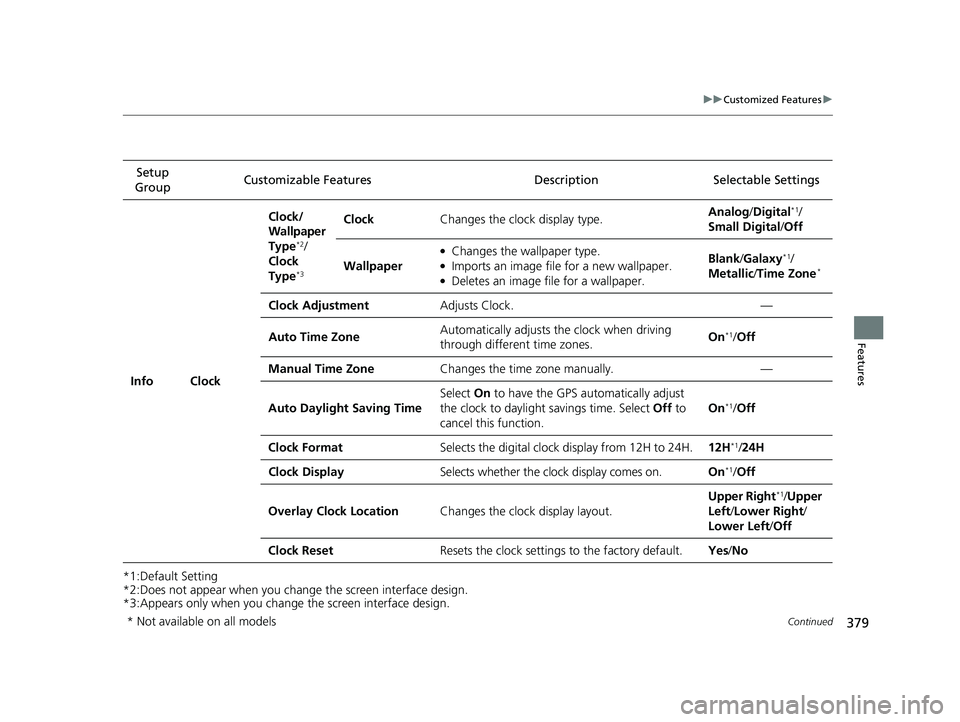
379
uuCustomized Features u
Continued
Features
*1:Default Setting
*2:Does not appear when you chan ge the screen interface design.
*3:Appears only when you change the screen interface design. Setup
Group Customizable Features Description Selectable Settings
Info Clock Clock/
Wallpaper
Type
*2/
Clock
Type
*3
Clock Changes the clock display type. Analog
/Digital*1/
Small Digital /Off
Wallpaper
●Changes the wallpaper type.●Imports an image file for a new wallpaper.●Deletes an image file for a wallpaper. Blank
/Galaxy
*1/
Metallic /Time Zone*
Clock Adjustment Adjusts Clock. —
Auto Time Zone Automatically adjusts the clock when driving
through different time zones. On
*1/
Off
Manual Time Zone Changes the time zone manually. —
Auto Daylight Saving Time Select
On to have the GPS automatically adjust
the clock to daylight savings time. Select Off to
cancel this function. On
*1/
Off
Clock Format Selects the digital clock display from 12H to 24H. 12H
*1/24H
Clock Display Selects whether the clock display comes on. On
*1/Off
Overlay Clock Location Changes the clock display layout. Upper Right
*1/
Upper
Left/ Lower Right/
Lower Left /Off
Clock Reset Resets the clock settings to the factory default. Yes/No
* Not available on all models
22 CR-V HEV ELP-31TPG6200.book 379 ページ 2021年6月30日 水曜日 午前11時6分
Page 385 of 692
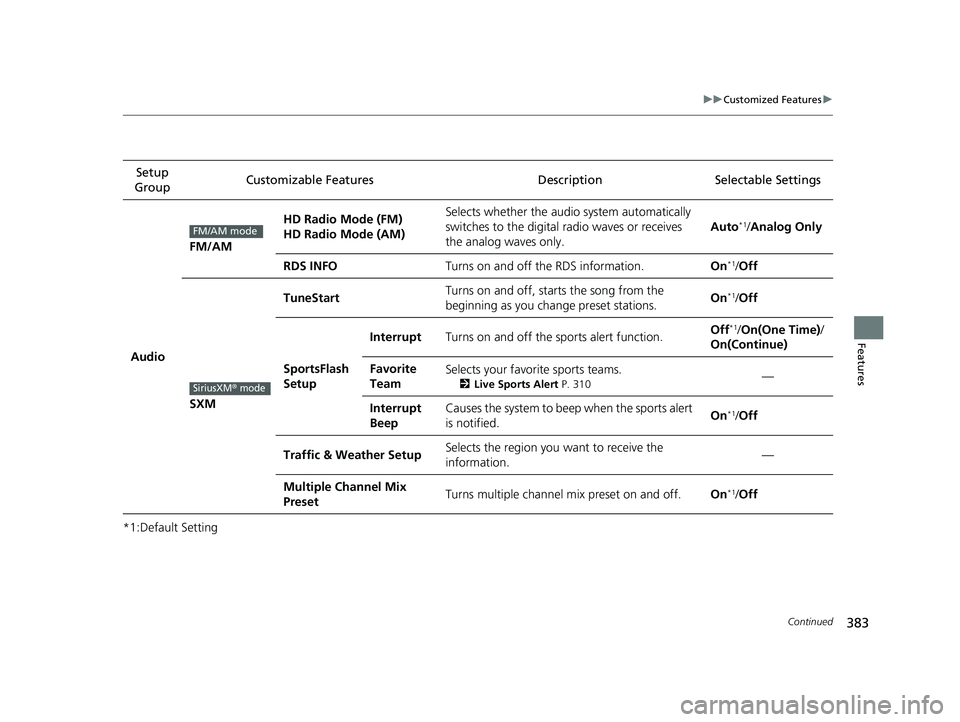
383
uuCustomized Features u
Continued
Features
*1:Default SettingSetup
Group Customizable Features Desc
ription Selectable Settings
Audio
FM/AM
HD Radio Mode (FM)
HD Radio Mode (AM)Selects whether the audio system automatically
switches to the digital radio waves or receives
the analog waves only.
Auto*1/ Analog Only
RDS INFOTurns on and off the RDS information.On*1/Off
SXM
TuneStartTurns on and off, starts the song from the
beginning as you change preset stations.On*1/Off
SportsFlash
Setup
InterruptTurns on and off the sports alert function.Off*1/ On(One Time) /
On(Continue)
Favorite
TeamSelects your favorite sports teams.
2 Live Sports Alert P. 310—
Interrupt
BeepCauses the system to beep when the sports alert
is notified.On*1/ Off
Traffic & Weather SetupSelects the region you want to receive the
information.—
Multiple Channel Mix
PresetTurns multiple channel mix preset on and off.On*1/Off
FM/AM mode
SiriusXM® mode
22 CR-V HEV ELP-31TPG6200.book 383 ページ 2021年6月30日 水曜日 午前11時6分
Page 389 of 692
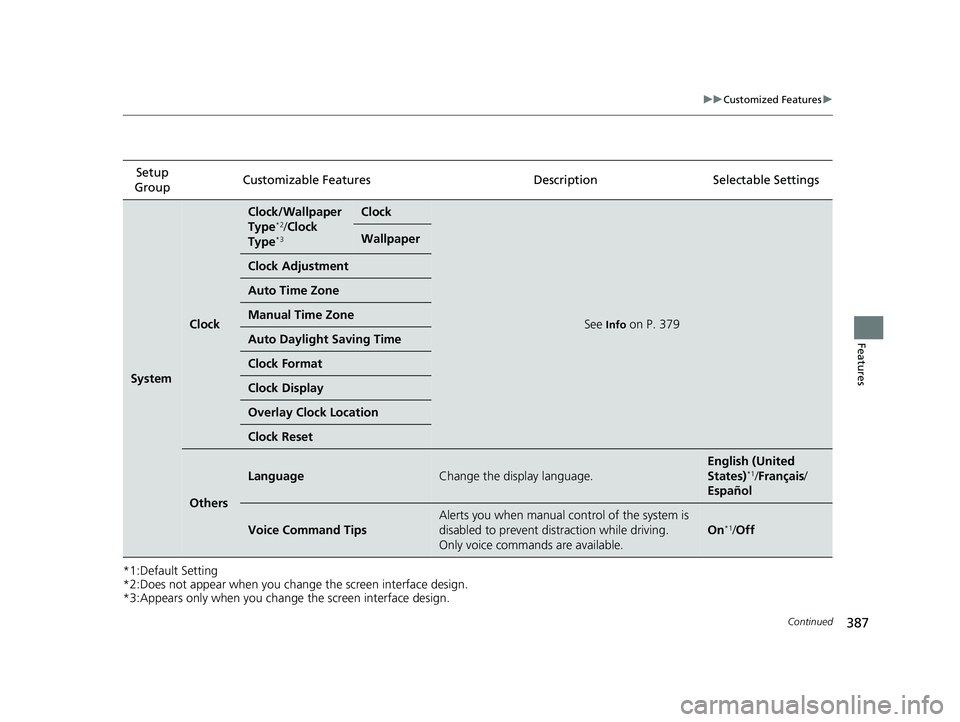
387
uuCustomized Features u
Continued
Features
*1:Default Setting
*2:Does not appear when you chan ge the screen interface design.
*3:Appears only when you change the screen interface design. Setup
Group Customizable Featur
es Description Selectable Settings
System
Clock
Clock/Wallpaper
Type*2/Clock
Type*3
Clock
See Info on P. 379
Wallpaper
Clock Adjustment
Auto Time Zone
Manual Time Zone
Auto Daylight Saving Time
Clock Format
Clock Display
Overlay Clock Location
Clock Reset
Others
LanguageChange the display language.
English (United
States)*1/Français /
Español
Voice Command Tips
Alerts you when manual co ntrol of the system is
disabled to prevent distraction while driving.
Only voice commands are available.
On*1/ Off
22 CR-V HEV ELP-31TPG6200.book 387 ページ 2021年6月30日 水曜日 午前11時6分
Page 390 of 692
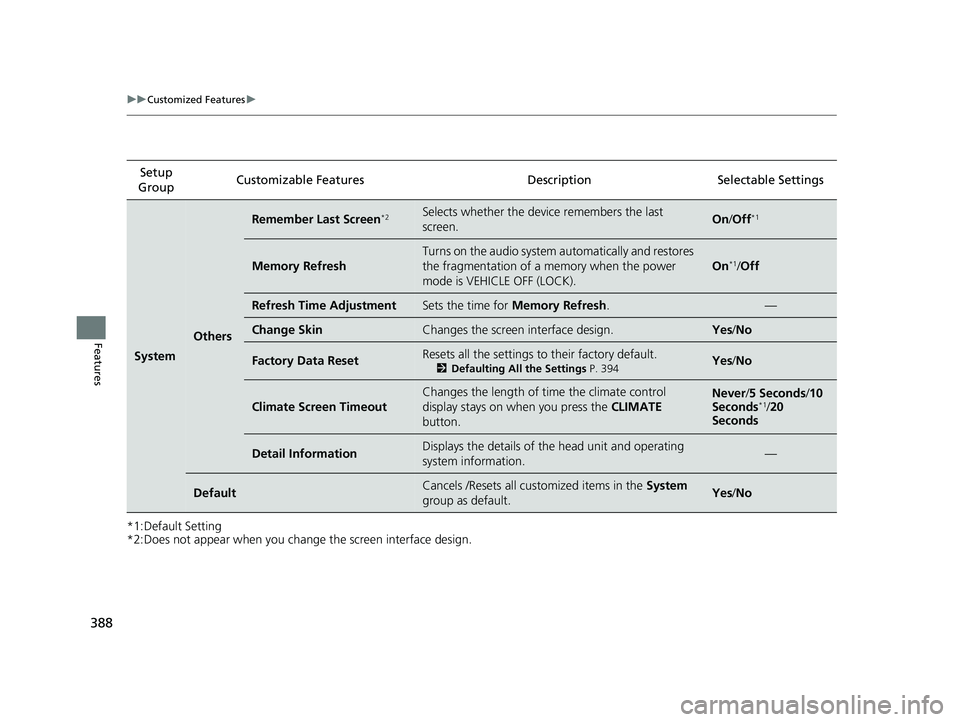
388
uuCustomized Features u
Features
*1:Default Setting
*2:Does not appear when you change the screen interface design.Setup
Group Customizable Features Desc
ription Selectable Settings
System
Others
Remember Last Screen*2Selects whether the device remembers the last
screen.On/Off*1
Memory Refresh
Turns on the audio system automatically and restores
the fragmentation of a memory when the power
mode is VEHICLE OFF (LOCK).
On*1/Off
Refresh Time AdjustmentSets the time for Memory Refresh . —
Change SkinChanges the screen interface design.Yes/No
Factory Data ResetResets all the settings to their factory default.
2 Defaulting All the Settings P. 394Yes/No
Climate Screen Timeout
Changes the length of time the climate control
display stays on when you press the CLIMATE
button.Never /5 Seconds /10
Seconds*1/ 20
Seconds
Detail InformationDisplays the details of the head unit and operating
system information.—
DefaultCancels /Resets all customized items in the System
group as default.Yes /No
22 CR-V HEV ELP-31TPG6200.book 388 ページ 2021年6月30日 水曜日 午前11時6分
Page 393 of 692
391
uuCustomized Features u
Continued
Features
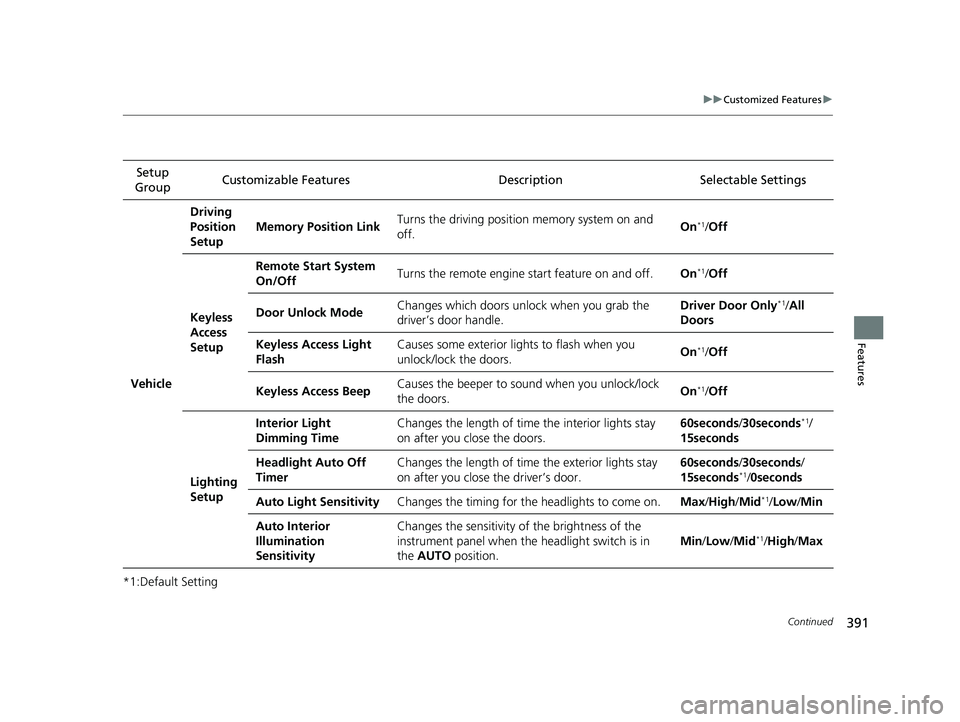
*1:Default SettingSetup
Group Customizable Features Descri
ption Selectable Settings
Vehicle
Driving
Position
Setup
Memory Position LinkTurns the driving position memory system on and
off.On*1/ Off
Keyless
Access
Setup
Remote Start System
On/OffTurns the remote engine start feature on and off.On*1/Off
Door Unlock ModeChanges which doors unlock when you grab the
driver’s door handle.Driver Door Only*1/ All
Doors
Keyless Access Light
FlashCauses some exterior li ghts to flash when you
unlock/lock the doors.On*1/ Off
Keyless Access BeepCauses the beeper to sound when you unlock/lock
the doors.On*1/Off
Lighting
Setup
Interior Light
Dimming TimeChanges the length of time the interior lights stay
on after you close the doors.60seconds /30seconds*1/
15seconds
Headlight Auto Off
TimerChanges the length of time the exterior lights stay
on after you close the driver’s door.60seconds /30seconds/
15seconds*1/ 0seconds
Auto Light SensitivityChanges the timing for th e headlights to come on.Max/High /Mid*1/Low/ Min
Auto Interior
Illumination
SensitivityChanges the sensitivity of the brightness of the
instrument panel when the headlight switch is in
the AUTO position.
Min/Low/Mid*1/High /Max
22 CR-V HEV ELP-31TPG6200.book 391 ページ 2021年6月30日 水曜日 午前11時6分
Page 394 of 692
392
uuCustomized Features u
Features
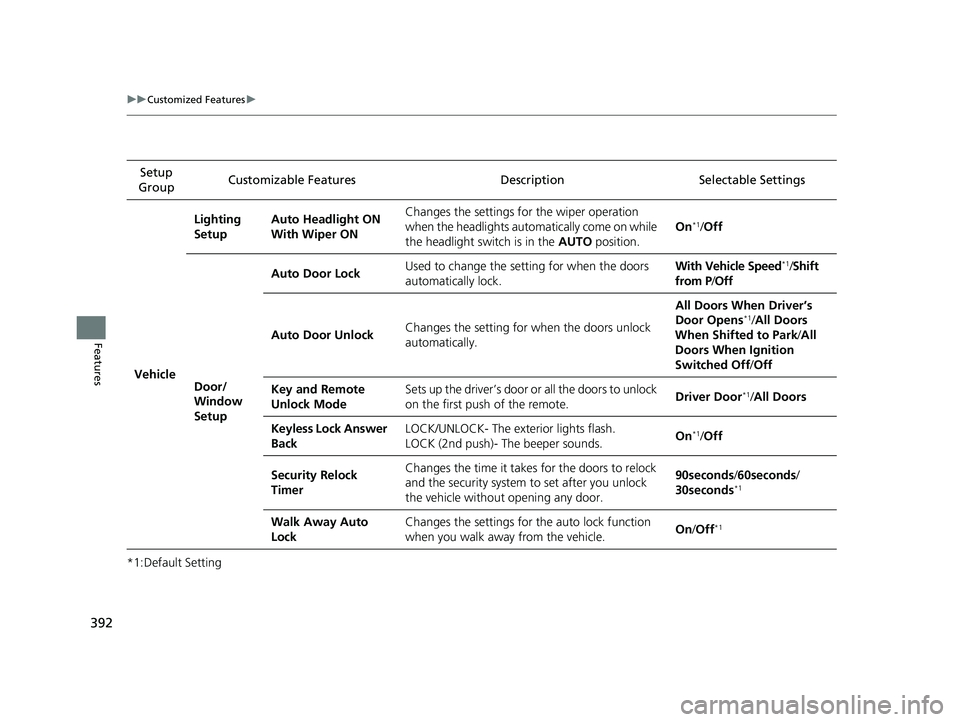
*1:Default SettingSetup
Group Customizable Features Desc
ription Selectable Settings
Vehicle
Lighting
SetupAuto Headlight ON
With Wiper ONChanges the settings for the wiper operation
when the headlights auto matically come on while
the headlight switch is in the AUTO position.
On*1/Off
Door/
Window
Setup
Auto Door LockUsed to change the setting for when the doors
automatically lock.With Vehicle Speed*1/Shift
from P /Off
Auto Door UnlockChanges the setting for when the doors unlock
automatically.
All Doors When Driver’s
Door Opens*1/ All Doors
When Shifted to Park /All
Doors When Ignition
Switched Off /Off
Key and Remote
Unlock ModeSets up the driver’s door or all the doors to unlock
on the first push of the remote.Driver Door*1/All Doors
Keyless Lock Answer
BackLOCK/UNLOCK- The exterior lights flash.
LOCK (2nd push)- The beeper sounds.On*1/Off
Security Relock
TimerChanges the time it takes for the doors to relock
and the security system to set after you unlock
the vehicle without opening any door.90seconds /60seconds /
30seconds*1
Walk Away Auto
LockChanges the settings for the auto lock function
when you walk away from the vehicle.On /Off*1
22 CR-V HEV ELP-31TPG6200.book 392 ページ 2021年6月30日 水曜日 午前11時6分
Page 395 of 692
393
uuCustomized Features u
Features
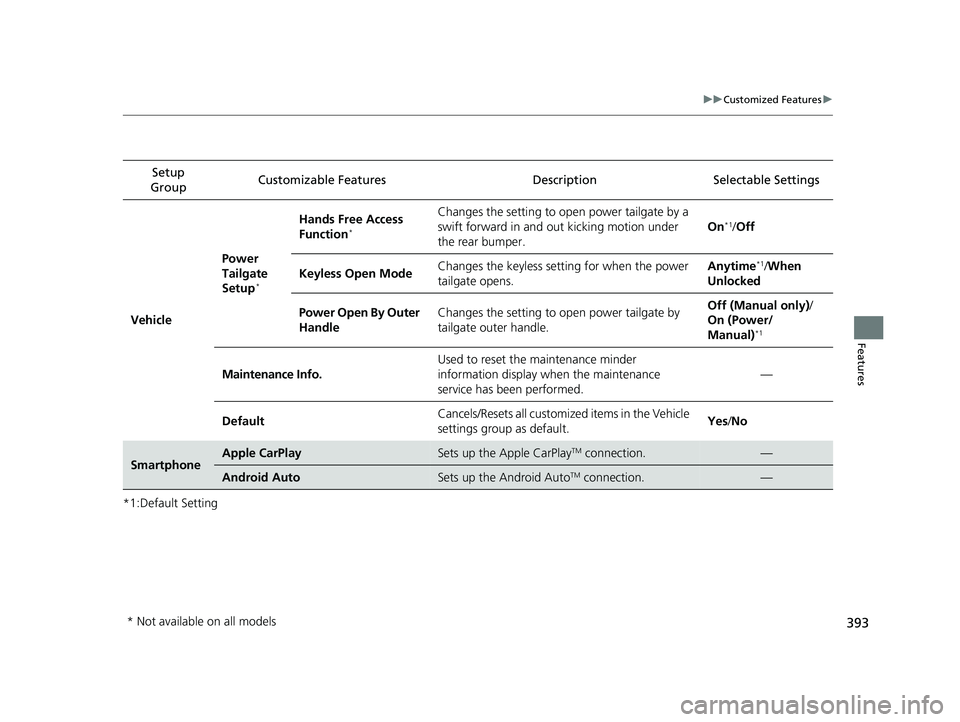
*1:Default SettingSetup
Group Customizable Features Desc
ription Selectable Settings
Vehicle
Power
Tailgate
Setup
*
Hands Free Access
Function*
Changes the setting to open power tailgate by a
swift forward in and out kicking motion under
the rear bumper.
On*1/Off
Keyless Open ModeChanges the keyless setting for when the power
tailgate opens.Anytime*1/When
Unlocked
Power Open By Outer
HandleChanges the setting to open power tailgate by
tailgate outer handle.Off (Manual only) /
On (Power/
Manual)
*1
Maintenance Info.
Used to reset the maintenance minder
information display when the maintenance
service has been performed.
—
DefaultCancels/Resets all customized items in the Vehicle
settings group as default.Yes /No
SmartphoneApple CarPlaySets up the Apple CarPlayTM connection.—
Android AutoSets up the Android AutoTM connection.—
* Not available on all models
22 CR-V HEV ELP-31TPG6200.book 393 ページ 2021年6月30日 水曜日 午前11時6分
Page 424 of 692
422
Features
Bluetooth® HandsFreeLink ®
Bluetooth® HandsFreeLink ® (HFL) allows you to place and receive phone calls using
your vehicle’s audio system, without handling your cell phone.
Using HFL
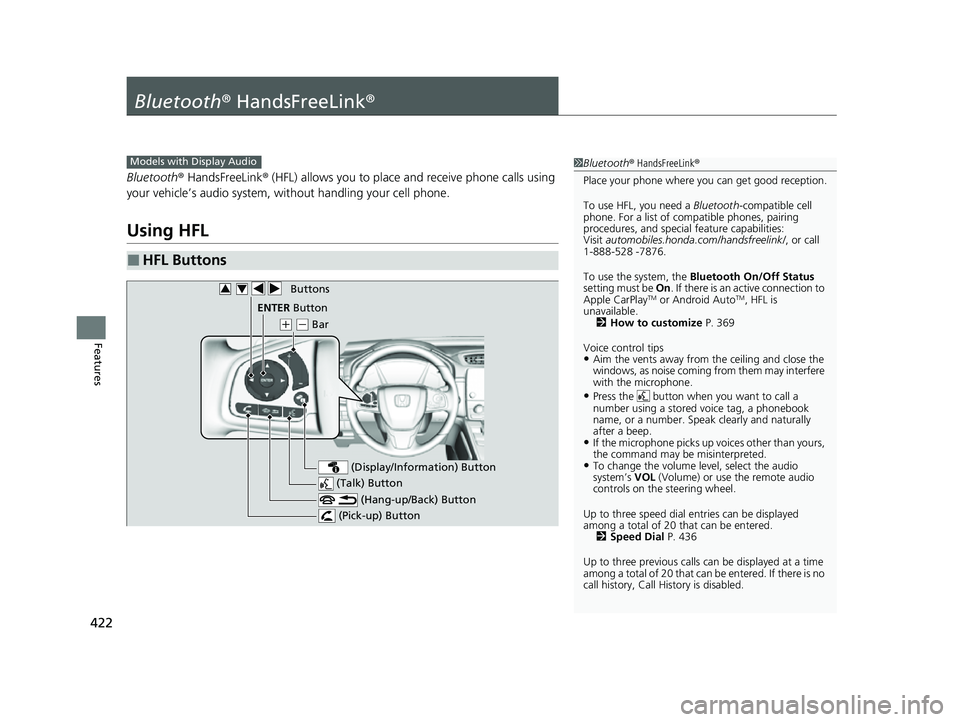
■HFL Buttons
1 Bluetooth ® HandsFreeLink ®
Place your phone where y ou can get good reception.
To use HFL, you need a Bluetooth-compatible cell
phone. For a list of compatible phones, pairing
procedures, and special feature capabilities:
Visit automobiles.honda.com/handsfreelink/ , or call
1-888-528 -7876.
To use the system, the Bluetooth On/Off Status
setting must be On. If there is an active connection to
Apple CarPlay
TM or Android AutoTM, HFL is
unavailable. 2 How to customize P. 369
Voice control tips
•Aim the vents away from the ceiling and close the
windows, as noise coming from them may interfere
with the microphone.
•Press the button when you want to call a
number using a stored voice tag, a phonebook
name, or a number. Spe ak clearly and naturally
after a beep.
•If the microphone picks up vo ices other than yours,
the command may be misinterpreted.
•To change the volume level, select the audio
system’s VOL (Volume) or use the remote audio
controls on the steering wheel.
Up to three speed dial entries can be displayed
among a total of 20 that can be entered. 2 Speed Dial P. 436
Up to three previous calls can be displayed at a time
among a total of 20 that can be entered. If there is no
call history, Call History is disabled.
Models with Display Audio
(Talk) Button
( + (- Bar
(Hang-up/Back) Button
(Pick-up) Button
ENTEq Button
(Display/Information) Button
Buttons34
22 CR-V HEV ELP-31TPG6200.book 422 ページ 2021年6月30日 水曜日 午前11時6分
Page 433 of 692
Continued431
uuBluetooth ® HandsFreeLink ®u HFL Menus
Features
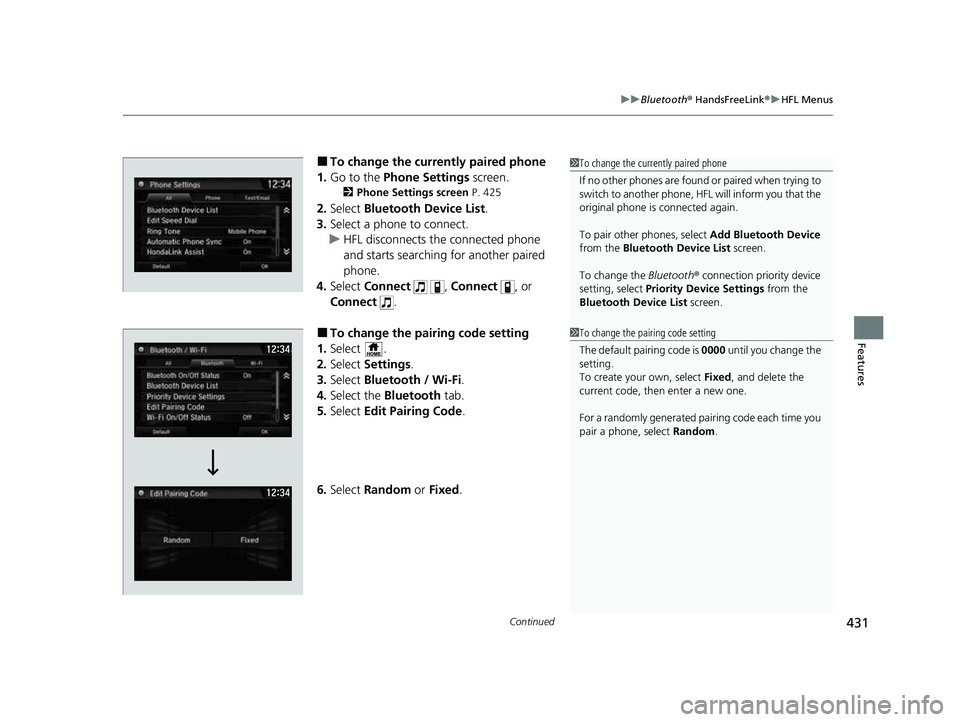
■To change the currently paired phone
1. Go to the Phone Settings screen.
2Phone Settings screen P. 425
2.Select Bluetooth Device List .
3. Select a phone to connect.
u HFL disconnects the connected phone
and starts searching for another paired
phone.
4. Select Connect , Connect , or
Connect .
■To change the pairing code setting
1. Select .
2. Select Settings .
3. Select Bluetooth / Wi-Fi .
4. Select the Bluetooth tab.
5. Select Edit Pairing Code .
6. Select Random or Fixed .
1To change the currently paired phone
If no other phones are found or paired when trying to
switch to another phone, HFL will inform you that the
original phone is connected again.
To pair other phones, select Add Bluetooth Device
from the Bluetooth Device List screen.
To change the Bluetooth ® connection priority device
setting, select Priority Device Settings from the
Bluetooth Device List screen.
1To change the pairing code setting
The default pairing code is 0000 until you change the
setting.
To create your own, select Fixed, and delete the
current code, then enter a new one.
For a randomly generated pair ing code each time you
pair a phone, select Random.
22 CR-V HEV ELP-31TPG6200.book 431 ページ 2021年6月30日 水曜日 午前11時6分
Page 456 of 692
uuBluetooth ® HandsFreeLink ®u HFL Menus
454
Features
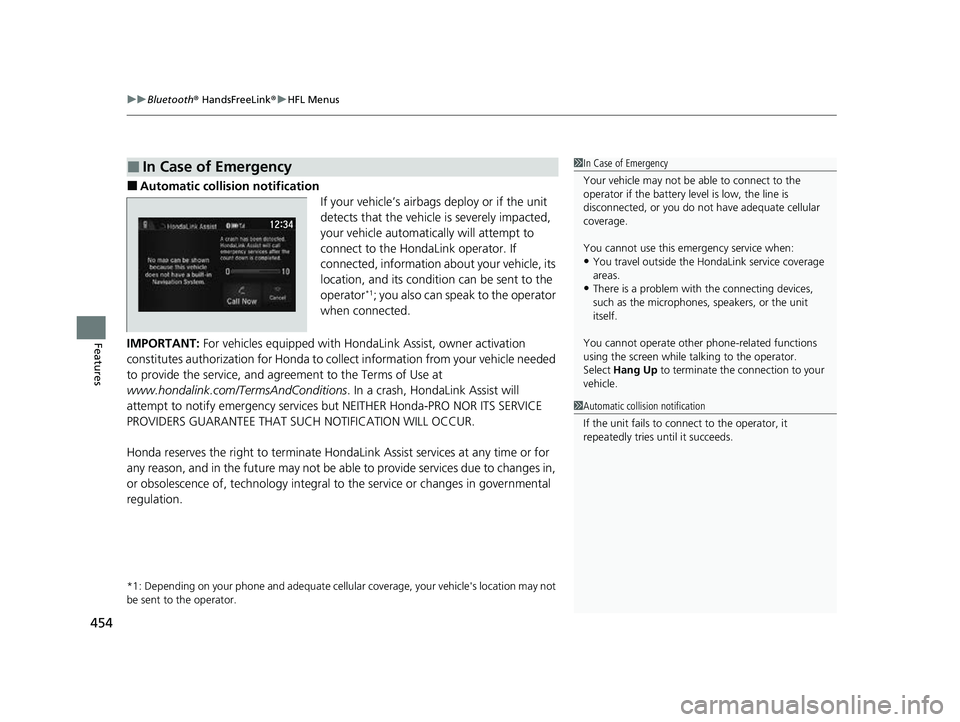
■Automatic collision notification
If your vehicle’s airbags deploy or if the unit
detects that the vehicle is severely impacted,
your vehicle automatically will attempt to
connect to the HondaLink operator. If
connected, information about your vehicle, its
location, and its condition can be sent to the
operator
*1; you also can speak to the operator
when connected.
IMPORTANT: For vehicles equipped with Hond aLink Assist, owner activation
constitutes authorization for Honda to co llect information from your vehicle needed
to provide the service, and agr eement to the Terms of Use at
www.hondalink.com/TermsAndConditions . In a crash, HondaLink Assist will
attempt to notify emergency services but NEITHER Honda-PRO NOR ITS SERVICE
PROVIDERS GUARANTEE THAT S UCH NOTIFICATION WILL OCCUR.
Honda reserves the right to terminate HondaLink Assist services at any time or for
any reason, and in the future may not be ab le to provide services due to changes in,
or obsolescence of, technology integral to the service or changes in governmental
regulation.
*1: Depending on your phone and adequate cellular coverage, y our vehicle's location may not
be sent to the operator.
■In Case of Emergency1 In Case of Emergency
Your vehicle may not be able to connect to the
operator if the battery level is low, the line is
disconnected, or you do not have adequate cellular
coverage.
You cannot use this emergency service when:
•You travel outside the HondaLink service coverage
areas.
•There is a problem with the connecting devices,
such as the microphones, speakers, or the unit
itself.
You cannot operate othe r phone-related functions
using the screen while talking to the operator.
Select Hang Up to terminate the connection to your
vehicle.
1 Automatic collision notification
If the unit fails to connect to the operator, it
repeatedly tries until it succeeds.
22 CR-V HEV ELP-31TPG6200.book 454 ページ 2021年6月30日 水曜日 午前11時6分