app HONDA CRV 2022 Manual Online
[x] Cancel search | Manufacturer: HONDA, Model Year: 2022, Model line: CRV, Model: HONDA CRV 2022Pages: 692, PDF Size: 22.05 MB
Page 285 of 692
Continued283
uuAudio System Basic Operation uAudio/Information Screen
Features
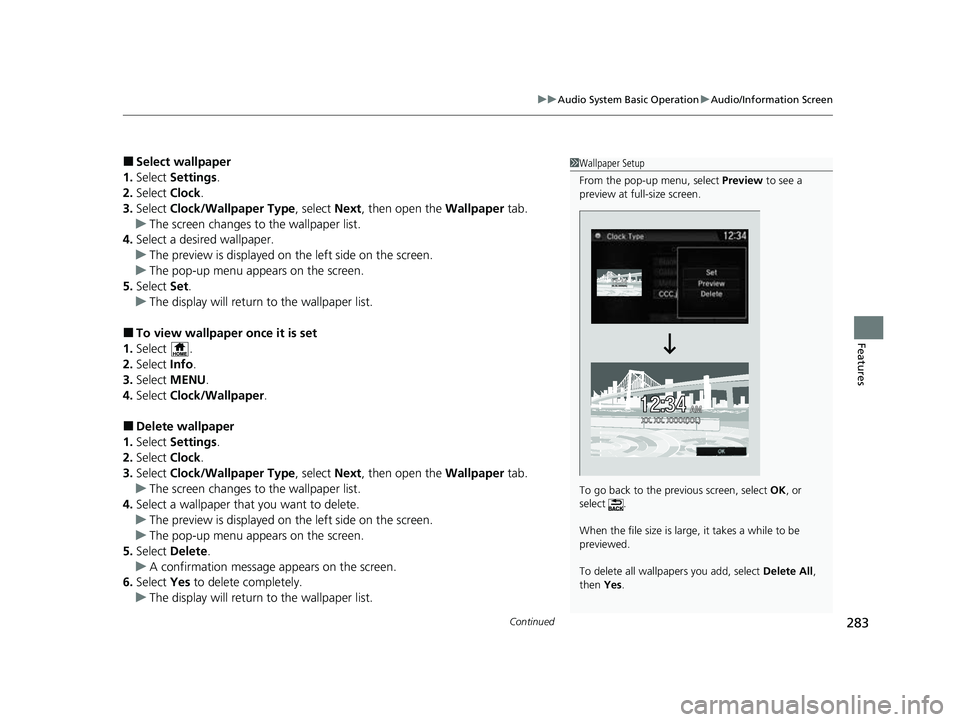
■Select wallpaper
1. Select Settings .
2. Select Clock.
3. Select Clock/Wallpaper Type , select Next, then open the Wallpaper tab.
u The screen changes to the wallpaper list.
4. Select a desired wallpaper.
u The preview is displayed on the left side on the screen.
u The pop-up menu appears on the screen.
5. Select Set.
u The display will return to the wallpaper list.
■To view wallpaper once it is set
1. Select .
2. Select Info.
3. Select MENU .
4. Select Clock/Wallpaper .
■Delete wallpaper
1. Select Settings .
2. Select Clock.
3. Select Clock/Wallpaper Type , select Next, then open the Wallpaper tab.
u The screen changes to the wallpaper list.
4. Select a wallpaper that you want to delete.
u The preview is displayed on the left side on the screen.
u The pop-up menu appears on the screen.
5. Select Delete .
u A confirmation message appears on the screen.
6. Select Yes to delete completely.
u The display will return to the wallpaper list.
1Wallpaper Setup
From the pop-up menu, select Preview to see a
preview at full-size screen.
To go back to the previous screen, select OK, or
select .
When the file size is large, it takes a while to be
previewed.
To delete all wallpapers you add, select Delete All,
then Yes.
22 CR-V HEV ELP-31TPG6200.book 283 ページ 2021年6月30日 水曜日 午前11時6分
Page 287 of 692
Continued285
uuAudio System Basic Operation uAudio/Information Screen
Features
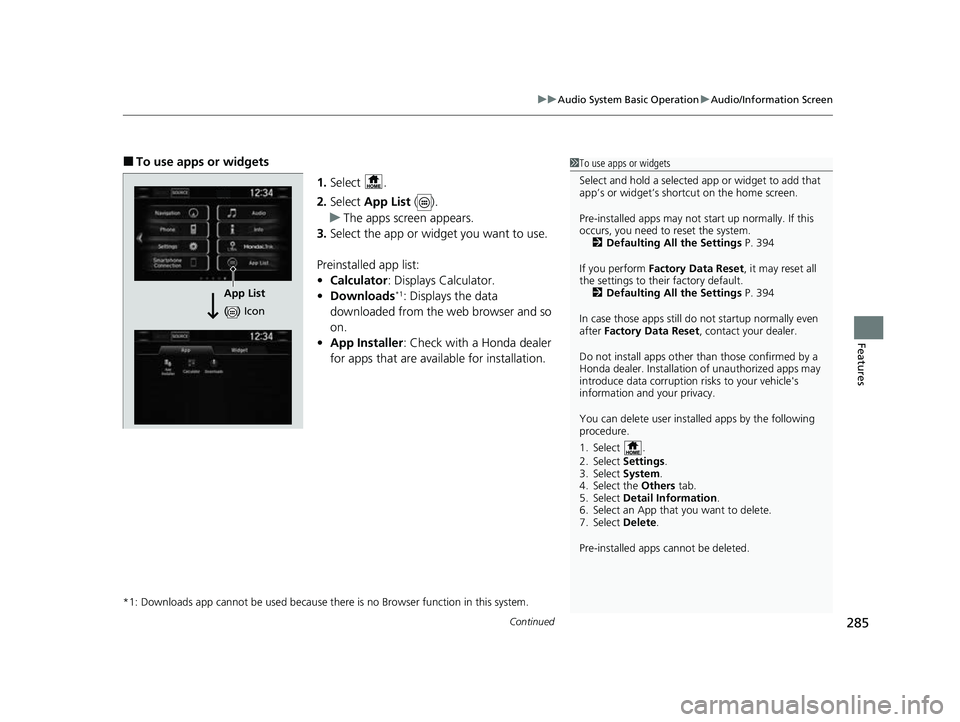
■To use apps or widgets
1.Select .
2. Select App List ().
u The apps screen appears.
3. Select the app or widget you want to use.
Preinstalled app list:
• Calculator : Displays Calculator.
• Downloads
*1: Displays the data
downloaded from the web browser and so
on.
• App Installer : Check with a Honda dealer
for apps that are available for installation.
*1: Downloads app cannot be used because th ere is no Browser function in this system.
1To use apps or widgets
Select and hold a selected app or widget to add that
app’s or widget’s shortcut on the home screen.
Pre-installed apps may not start up normally. If this
occurs, you need to reset the system. 2 Defaulting All the Settings P. 394
If you perform Factory Data Reset , it may reset all
the settings to their factory default. 2 Defaulting All the Settings P. 394
In case those apps still do not startup normally even
after Factory Data Reset , contact your dealer.
Do not install apps other than those confirmed by a
Honda dealer. Installation of unauthorized apps may
introduce data corruption risks to your vehicle's
information and your privacy.
You can delete user installed apps by the following
procedure.
1. Select .
2. Select Settings .
3. Select System .
4. Select the Others tab.
5. Select Detail Information .
6. Select an App that you want to delete.
7. Select Delete .
Pre-installed apps cannot be deleted.
App List
( ) Icon
22 CR-V HEV ELP-31TPG6200.book 285 ページ 2021年6月30日 水曜日 午前11時6分
Page 288 of 692
286
uuAudio System Basic Operation uAudio/Information Screen
Features
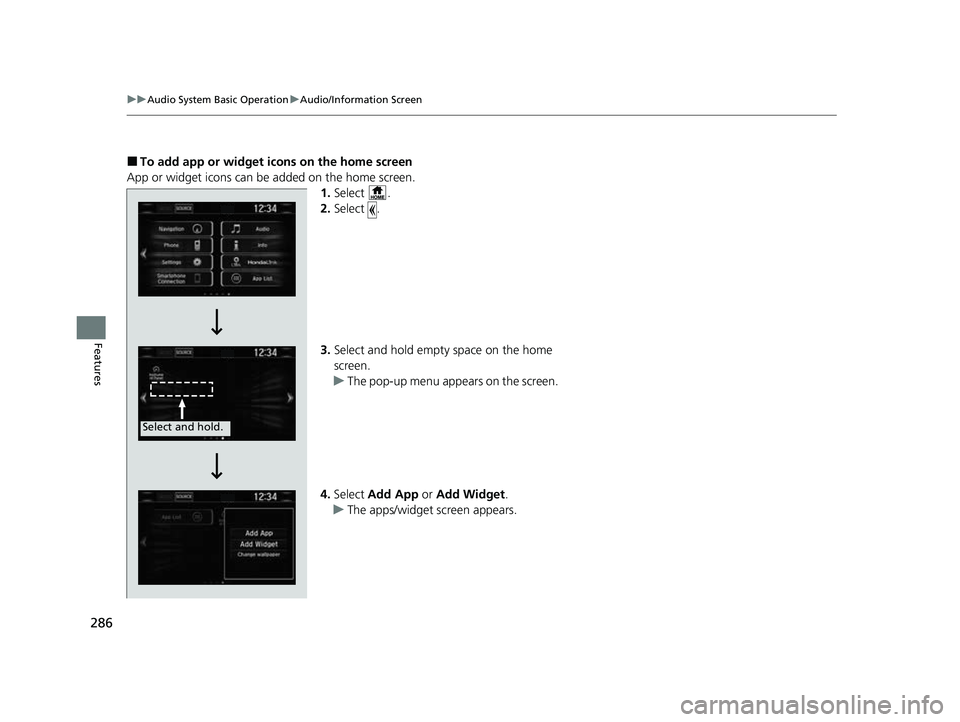
■To add app or widget ic ons on the home screen
App or widget icons can be added on the home screen. 1.Select .
2. Select .
3. Select and hold empty space on the home
screen.
u The pop-up menu appears on the screen.
4. Select Add App or Add Widget .
u The apps/widget screen appears.
Select and hold.
22 CR-V HEV ELP-31TPG6200.book 286 ページ 2021年6月30日 水曜日 午前11時6分
Page 289 of 692
287
uuAudio System Basic Operation uAudio/Information Screen
Continued
Features
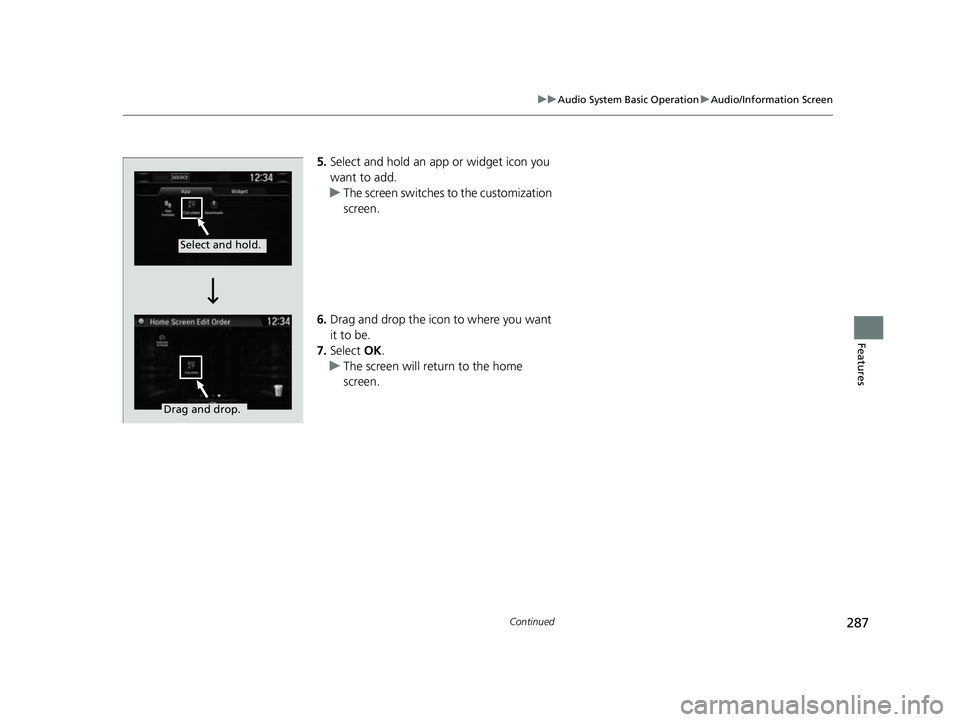
5. Select and hold an app or widget icon you
want to add.
u The screen switches to the customization
screen.
6. Drag and drop the icon to where you want
it to be.
7. Select OK.
u The screen will return to the home
screen.
Select and hold.
Drag and drop.
22 CR-V HEV ELP-31TPG6200.book 287 ページ 2021年6月30日 水曜日 午前11時6分
Page 290 of 692
uuAudio System Basic Operation uAudio/Information Screen
288
Features
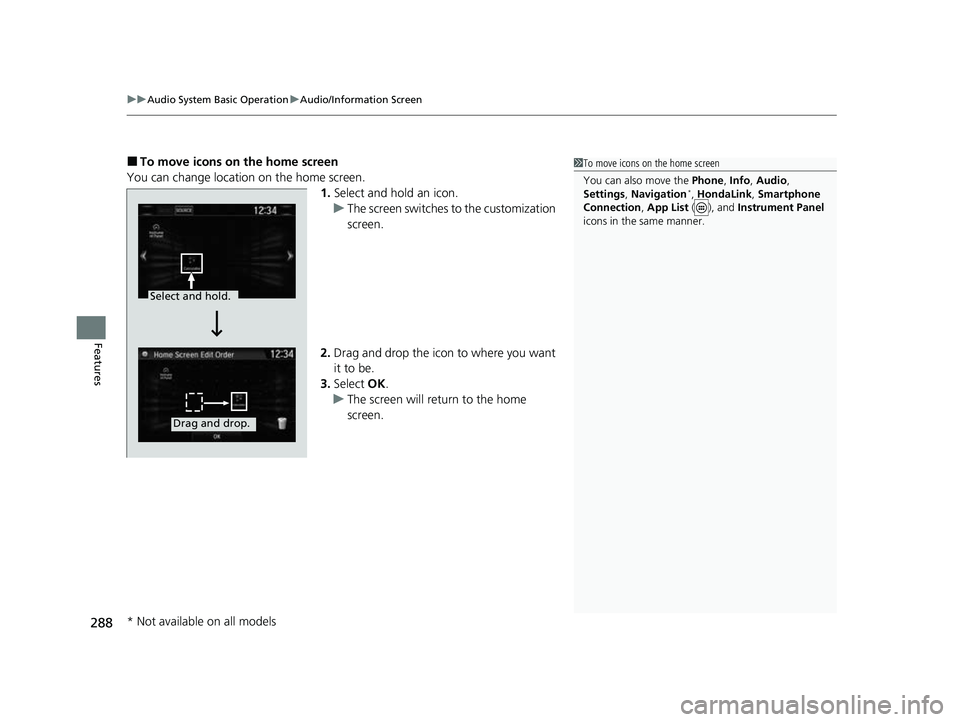
■To move icons on the home screen
You can change location on the home screen. 1.Select and hold an icon.
u The screen switches to the customization
screen.
2. Drag and drop the icon to where you want
it to be.
3. Select OK.
u The screen will return to the home
screen.1To move icons on the home screen
You can also move the Phone, Info, Audio ,
Settings , Navigation
*, HondaLink , Smartphone
Connection , App List ( ), and Instrument Panel
icons in the same manner.
Select and hold.
Drag and drop.
* Not available on all models
22 CR-V HEV ELP-31TPG6200.book 288 ページ 2021年6月30日 水曜日 午前11時6分
Page 291 of 692
Continued289
uuAudio System Basic Operation uAudio/Information Screen
Features
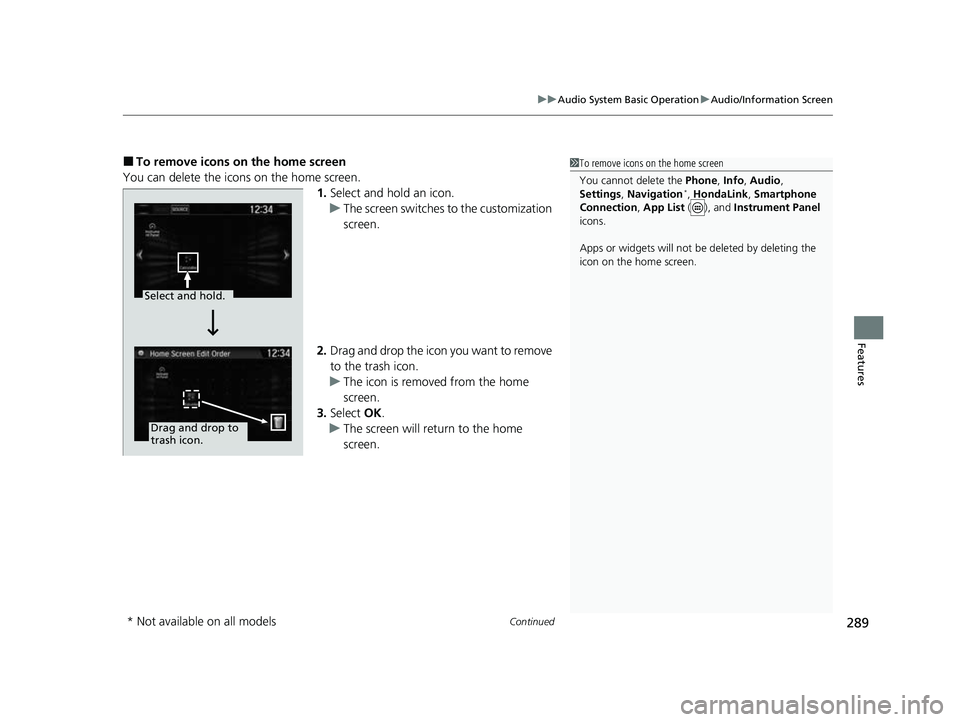
■To remove icons on the home screen
You can delete the icons on the home screen. 1.Select and hold an icon.
u The screen switches to the customization
screen.
2. Drag and drop the icon you want to remove
to the trash icon.
u The icon is removed from the home
screen.
3. Select OK.
u The screen will return to the home
screen.1To remove icons on the home screen
You cannot delete the Phone, Info, Audio ,
Settings , Navigation
*, HondaLink , Smartphone
Connection , App List ( ), and Instrument Panel
icons.
Apps or widgets will not be deleted by deleting the
icon on the home screen.
Select and hold.
Drag and drop to
trash icon.
* Not available on all models
22 CR-V HEV ELP-31TPG6200.book 289 ページ 2021年6月30日 水曜日 午前11時6分
Page 292 of 692
290
uuAudio System Basic Operation uAudio/Information Screen
Features
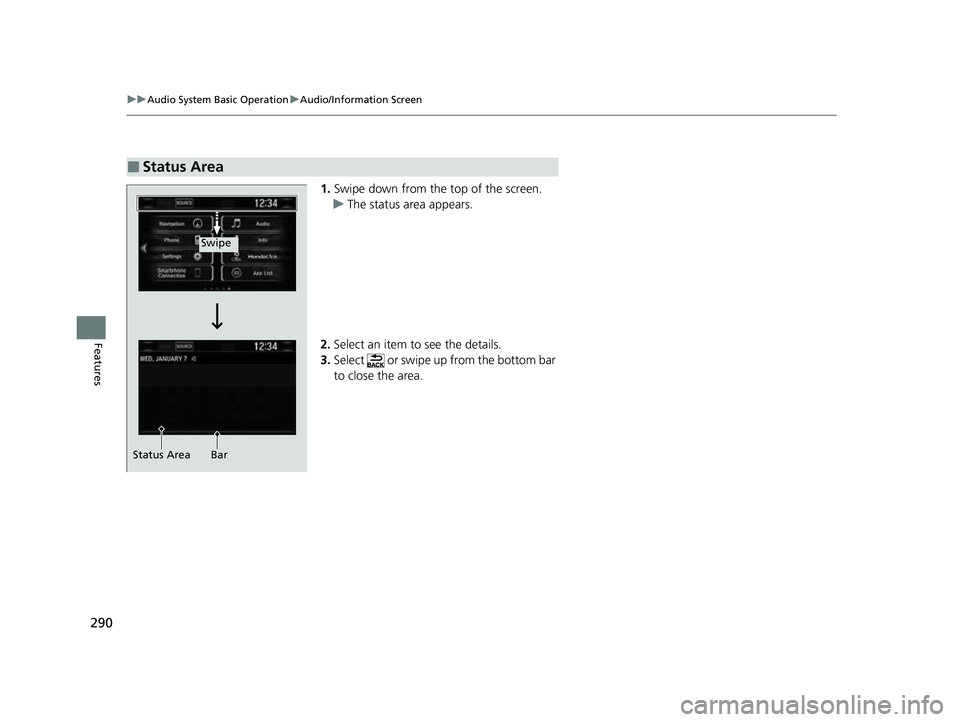
1. Swipe down from the top of the screen.
u The status area appears.
2. Select an item to see the details.
3. Select or swipe up from the bottom bar
to close the area.
■Status Area
Swipe
Status Area Bar
22 CR-V HEV ELP-31TPG6200.book 290 ページ 2021年6月30日 水曜日 午前11時6分
Page 293 of 692
Continued291
uuAudio System Basic Operation uAudio/Information Screen
Features
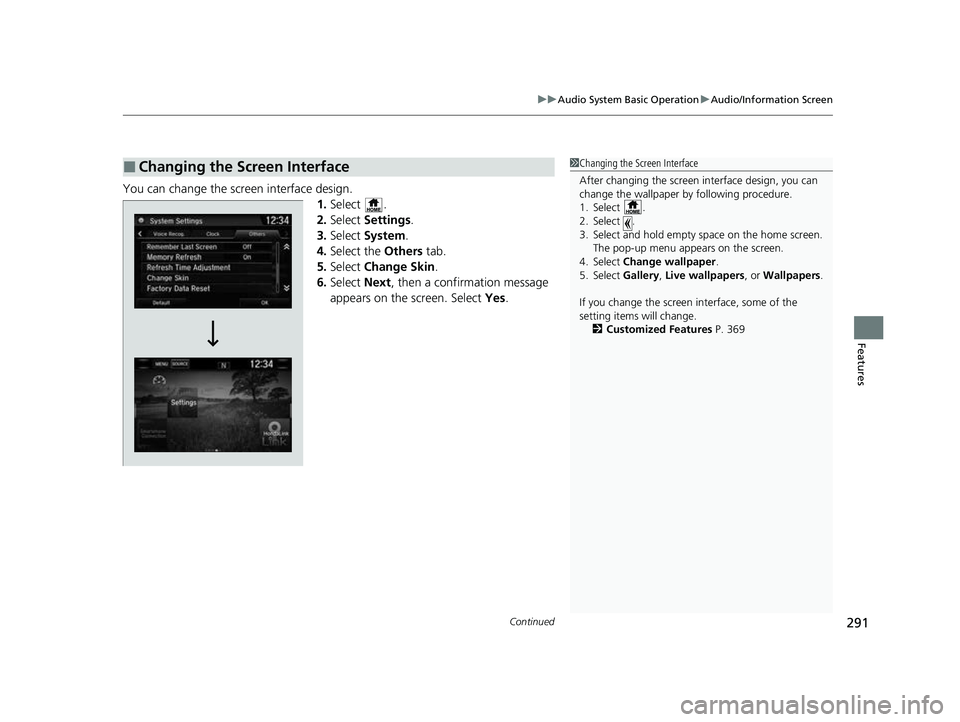
You can change the screen interface design.
1.Select .
2. Select Settings .
3. Select System.
4. Select the Others tab.
5. Select Change Skin.
6. Select Next, then a confirmation message
appears on the screen. Select Yes.
■Changing the Screen Interface1Changing the Screen Interface
After changing the screen interface design, you can
change the wallpaper by following procedure.
1. Select .
2. Select .
3. Select and hold empty space on the home screen.
The pop-up menu appears on the screen.
4. Select Change wallpaper .
5. Select Gallery , Live wallpapers , or Wallpapers .
If you change the screen interface, some of the
setting items will change.
2 Customized Features P. 369
22 CR-V HEV ELP-31TPG6200.book 291 ページ 2021年6月30日 水曜日 午前11時6分
Page 295 of 692
293
uuAudio System Basic Operation uAudio/Information Screen
Features
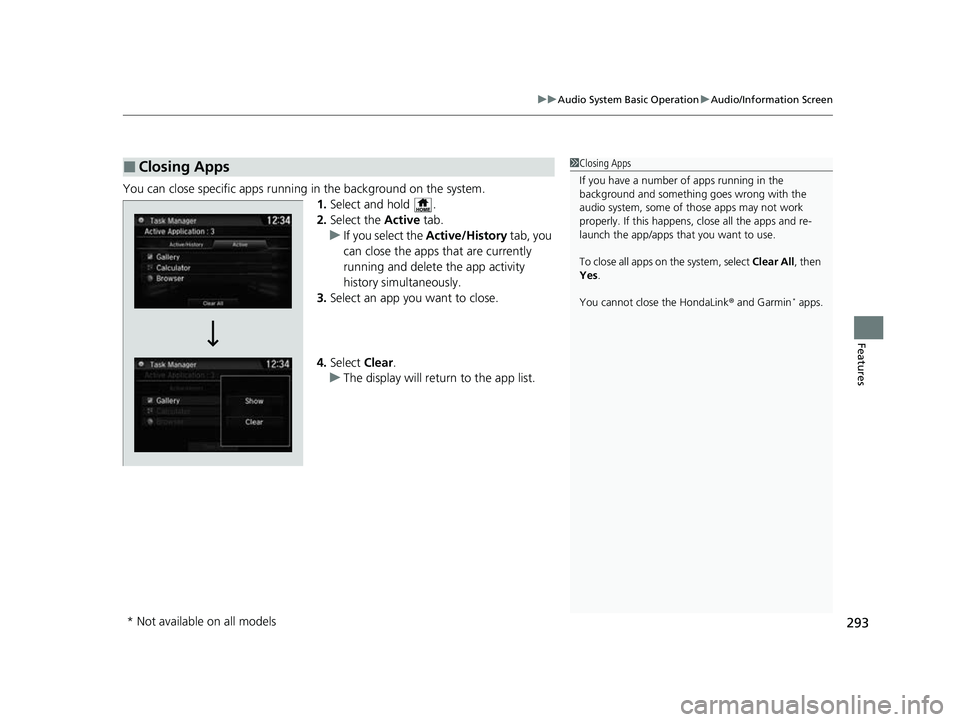
You can close specific apps running in the background on the system.
1.Select and hold .
2. Select the Active tab.
u If you select the Active/History tab, you
can close the apps that are currently
running and delete the app activity
history simultaneously.
3. Select an app you want to close.
4. Select Clear.
u The display will return to the app list.
■Closing Apps1Closing Apps
If you have a number of apps running in the
background and somethi ng goes wrong with the
audio system, some of t hose apps may not work
properly. If this happens, close all the apps and re-
launch the app/apps that you want to use.
To close all apps on the system, select Clear All, then
Yes .
You cannot close the HondaLink ® and Garmin
* apps.
* Not available on all models
22 CR-V HEV ELP-31TPG6200.book 293 ページ 2021年6月30日 水曜日 午前11時6分
Page 298 of 692
uuAudio System Basic Operation uDisplay Setup
296
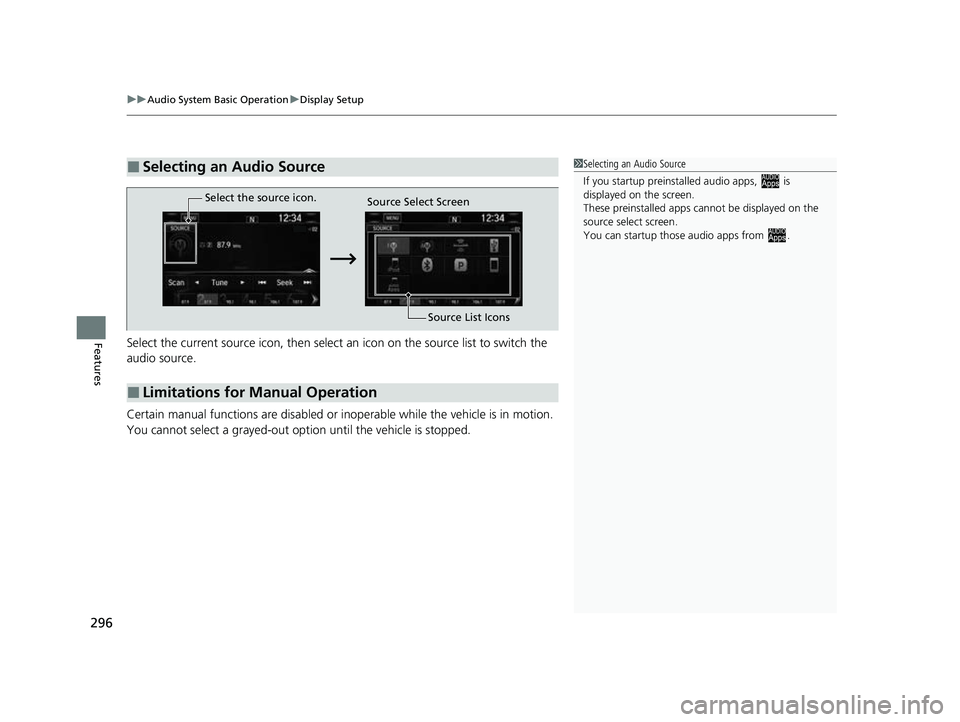
FeaturesSelect the current source icon, then select an icon on the source list to switch the
audio source.
Certain manual functions are disabled or inoperable while the vehicle is in motion.
You cannot select a grayed-out option until the vehicle is stopped.
■Selecting an Audio Source1 Selecting an Audio Source
If you startup preinstalled audio apps, is
displayed on the screen.
These preinstalled apps ca nnot be displayed on the
source select screen.
You can startup thos e audio apps from .
■Limitations for Manual Operation
Select the source icon.
Source Select Screen
Source List Icons
22 CR-V HEV ELP-31TPG6200.book 296 ページ 2021年6月30日 水曜日 午前11時6分