audio HONDA CRV 2023 Owners Manual
[x] Cancel search | Manufacturer: HONDA, Model Year: 2023, Model line: CRV, Model: HONDA CRV 2023Pages: 719, PDF Size: 13.43 MB
Page 366 of 719
365
uuGeneral Information on the Audio System uLicense Information
Continued
Features
“Made for iPod,” and “Made for iPhone,” mean that an electronic accessory has
been designed to connect specifically to iP od, or iPhone, respectively, and has been
certified by the developer to meet Appl e performance standards. Apple is not
responsible for the operation of this device or its compliance with safety and
regulatory standards. Please no te that the use of this accessory with iPod, or iPhone,
may affect wireless performance.
Apple, the Apple Logo, iPhone, iPod touch are trademarks of Apple Inc., registered
in the U.S. and other countries. Apple CarPlay, iPod, iPhone, iTunes, Siri and
Lightning are trademarks of Apple Inc. A pp Store is a service mark of Apple Inc.
■Apple
Page 367 of 719
366
uuGeneral Information on the Audio System uLicense Information
Features
Mpeg4 Visual
THIS PRODUCT IS LICENSED UNDER THE MPEG-4 VISUAL PATENT PORTFOLIO
LICENSE FOR THE PERSONAL AND NON-COMMERCIAL USE OF A CONSUMER FOR
(i) ENCODING VIDEO IN COMPLIANCE WITH THE MPEG-4 VISUALA STANDARD
(“MPEG-4 VIDEO”) AND/OR (ii) DECODI NG MPEG-4 VIDEO THAT WAS ENCODED
BY A CONSUMER ENGAGED IN A PERS ONAL AND NONCOMMERCIAL ACTIVITY
AND/OR WAS OBTAINED FROM A VIDEO PR OVIDER LICENSED BY MPEG LA TO
PROVIDE MPEG-4 VIDEO. NO LICENSE IS GRANTED OR SHALL BE IMPLIED FOR ANY
OTHER USE. ADDITIONAL INFORMATION INCLUDING THAT RELATING TO
PROMOTIONAL, INTERNAL AND COMMERCI AL USES AND LICENSING MAY BE
OBTAINED FROM MPEG LA, LLC.
SEE HTTP://WWW.MPEGLA.COM .
VC-1
THIS PRODUCT IS LICENSED UNDER THE VC-1 PATENT PORTFOLIO LICENSE FOR THE
PERSONAL AND NON-COMMERCIAL USE OF A CONSUMER TO (i) ENCODE VIDEO
IN COMPLIANCE WITH THE VC-1 STANDAR D (“VC-1 VIDEO”) AND/OR (ii) DECODE
VC-1 VIDEO THAT WAS ENCODED BY A CONSUMER ENGAGED IN A PERSONAL
AND NON-COMMERCIAL ACTIVITY AND/OR WAS OBTAINED FROM A VIDEO
PROVIDER LICENSED TO PROVIDE VC-1 VI DEO. NO LICENSE IS GRANTED OR SHALL
BE IMPLIED FOR ANY OTHER USE.
ADDITIONAL INFORMATION MAY BE OBTA INED FROM MPEG LA, L.L.C. SEE
HTTP://WWW. MPEGLA.COM .
■MPEG
Page 368 of 719
367
uuGeneral Information on the Audio System uLicense Information
Features
AVC/H.264
THIS PRODUCT IS LICENSED UNDER THE AVC PATENT PORTFOLIO LICENSE FOR THE
PERSONAL AND NONCOMMERCIAL USE OF A CONSUMER TO (i) ENCODE VIDEO IN
COMPLIANCE WITH THE AVC STANDARD (“ AVC VIDEO”) AND/OR (ii) DECODE
AVC VIDEO THAT WAS ENCODED BY A CONSUMER ENGAGED IN A PERSONAL
AND NON-COMMERCIAL ACTIVITY AND/OR WAS OBTAINED FROM A VIDEO
PROVIDER LICENSED TO PROVIDE AVC VIDE O. NO LICENSE IS GRANTED OR SHALL
BE IMPLIED FOR ANY OTHER USE.
ADDITIONAL INFORMATION MAY BE OBTA INED FROM MPEG LA, L.L.C. SEE
HTTP://WWW.MPEGLA.COM .
Page 369 of 719
368
Features
Customized Features
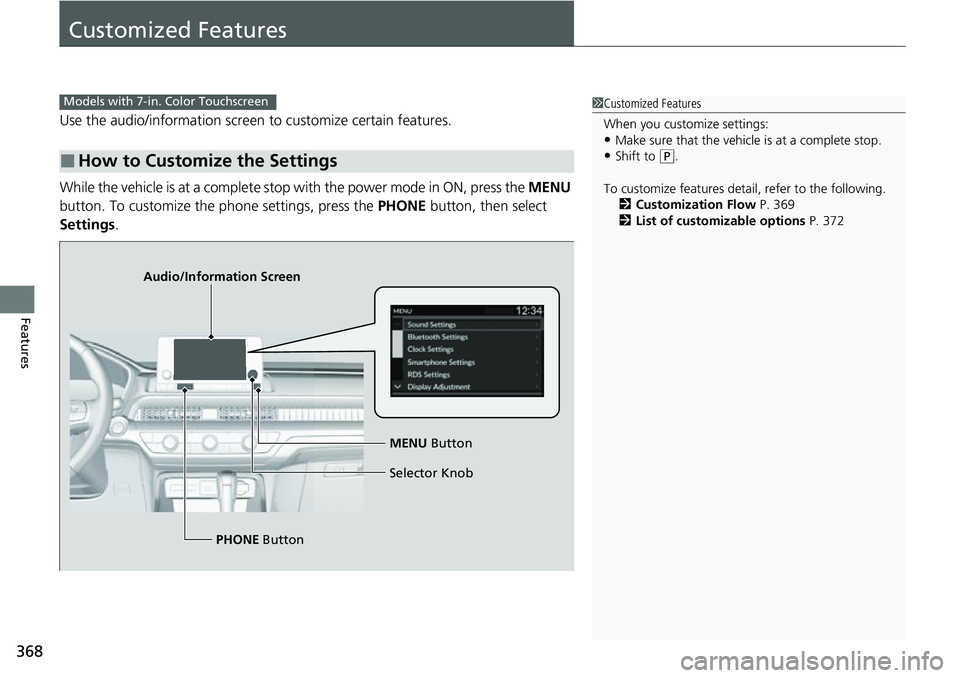
Use the audio/information screen to customize certain features.
While the vehicle is at a complete stop with the power mode in ON, press the MENU
button. To customize the phone settings, press the PHONE button, then select
Settings .
■How to Customize the Settings
1Customized Features
When you customize settings:
•Make sure that the vehicle is at a complete stop.
•Shift to (P.
To customize features detail, refer to the following. 2 Customization Flow P. 369
2 List of customizable options P. 372
Models with 7-in. Color Touchscreen
Audio/Information Screen
MENU Button
Selector Knob
PHONE Button
Page 373 of 719
372
uuCustomized Features u
Features
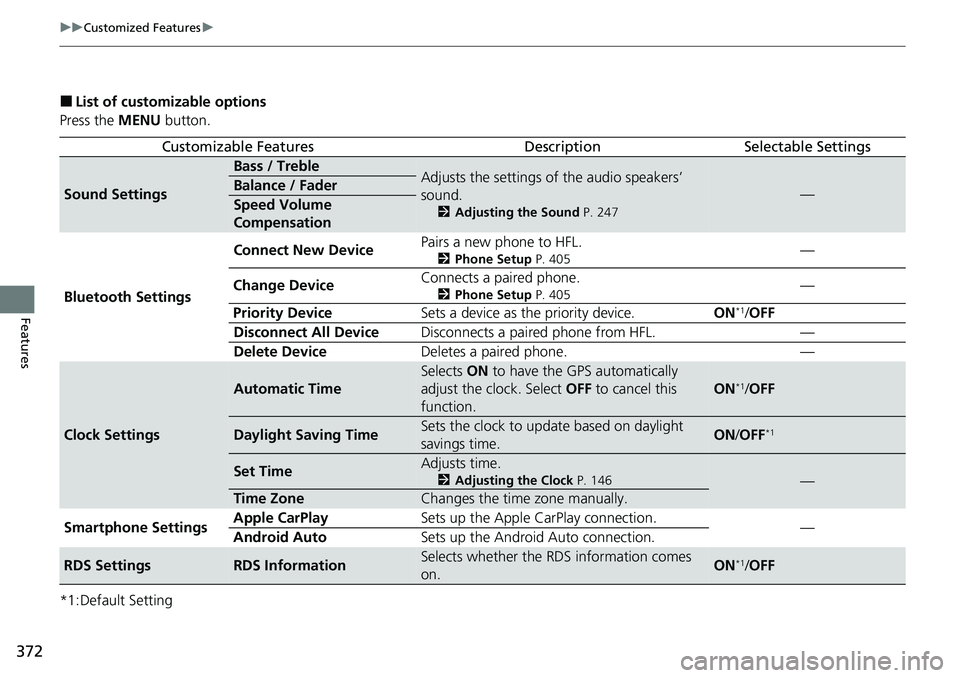
■List of customizable options
Press the MENU button.
*1:Default Setting
Customizable FeaturesDescriptionSelectable Settings
Sound Settings
Bass / TrebleAdjusts the settings of the audio speakers’
sound.
2 Adjusting the Sound P. 247
—Balance / Fader
Speed Volume
Compensation
Bluetooth Settings Connect New Device
Pairs a new phone to HFL.
2
Phone Setup P. 405—
Change Device Connects a paired phone.
2
Phone Setup P. 405—
Priority Device Sets a device as the priority device. ON
*1/OFF
Disconnect All Device Disconnects a paired phone from HFL. —
Delete Device Deletes a paired phone. —
Clock Settings
Automatic Time
Selects ON to have the GPS automatically
adjust the clock. Select OFF to cancel this
function.
ON*1/ OFF
Daylight Saving TimeSets the clock to update based on daylight
savings time.ON /OFF*1
Set TimeAdjusts time.
2 Adjusting the Clock P. 146—
Time ZoneChanges the time zone manually.
Smartphone Settings Apple CarPlay
Sets up the Apple CarPlay connection.
—
Android Auto Sets up the Android Auto connection.
RDS SettingsRDS InformationSelects whether the RDS information comes
on.ON*1/OFF
Page 374 of 719
373
uuCustomized Features u
Continued
Features
*1:Default Setting
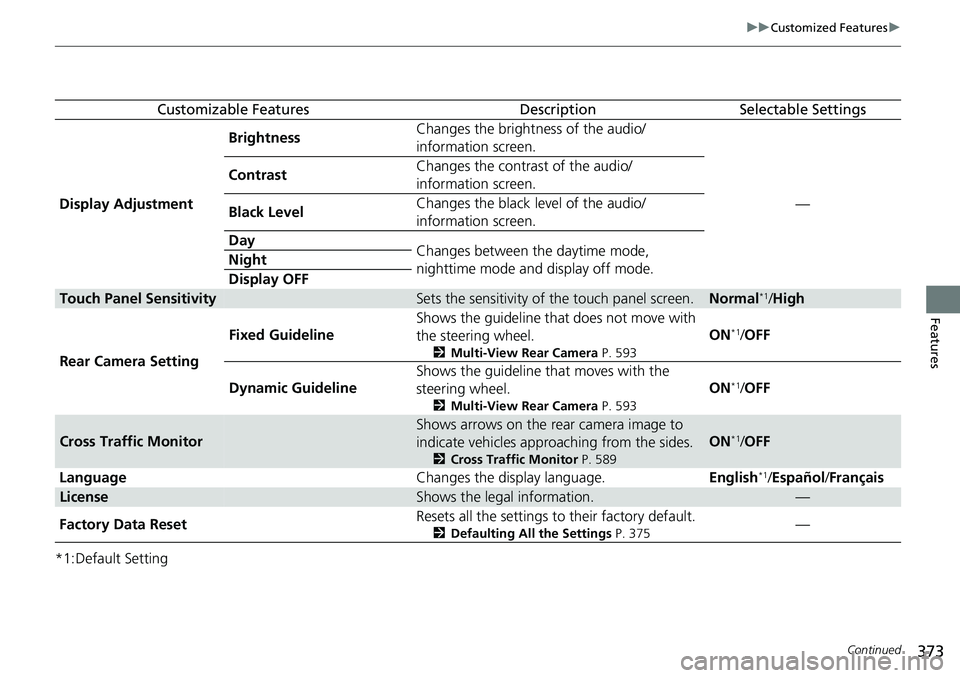
Customizable FeaturesDescriptionSelectable Settings
Display Adjustment Brightness
Changes the brightness of the audio/
information screen.
—
Contrast
Changes the contrast of the audio/
information screen.
Black Level Changes the black level of the audio/
information screen.
Day Changes between the daytime mode,
nighttime mode and display off mode.
Night
Display OFF
Touch Panel SensitivitySets the sensitivity of the touch panel screen.Normal*1/
High
Rear Camera Setting Fixed Guideline
Shows the guideline that
does not move with
the steering wheel.
2 Multi-View Rear Camera P. 593
ON*1/OFF
Dynamic Guideline Shows the guideline th
at moves with the
steering wheel.
2 Multi-View Rear Camera P. 593
ON*1/OFF
Cross Traffic Monitor
Shows arrows on the rear camera image to
indicate vehicles approaching from the sides.
2 Cross Traffic Monitor P. 589
ON*1/OFF
Language Changes the display language.English
*1/Español /Français
LicenseShows the legal information.—
Factory Data Reset Resets all the settings to their factory default.
2
Defaulting All the Settings P. 375—
Page 377 of 719
376
Features
Customized Features
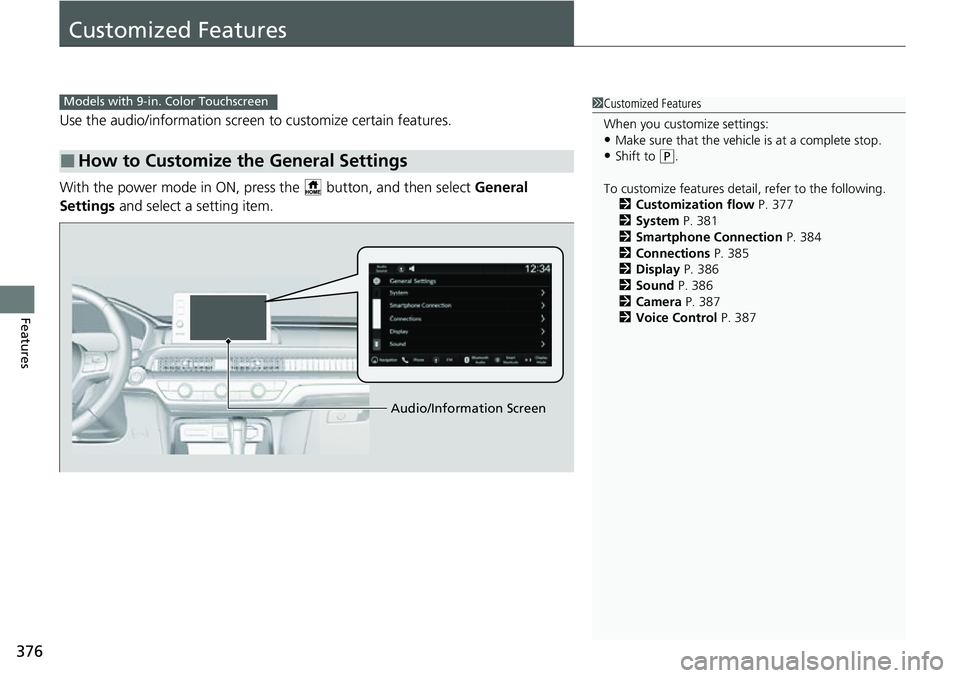
Use the audio/information screen to customize certain features.
With the power mode in ON, pres s the button, and then select General
Settings and select a setting item.
■How to Customize the General Settings
1Customized Features
When you customize settings:
•Make sure that the vehicle is at a complete stop.
•Shift to (P.
To customize features detail, refer to the following. 2 Customization flow P. 377
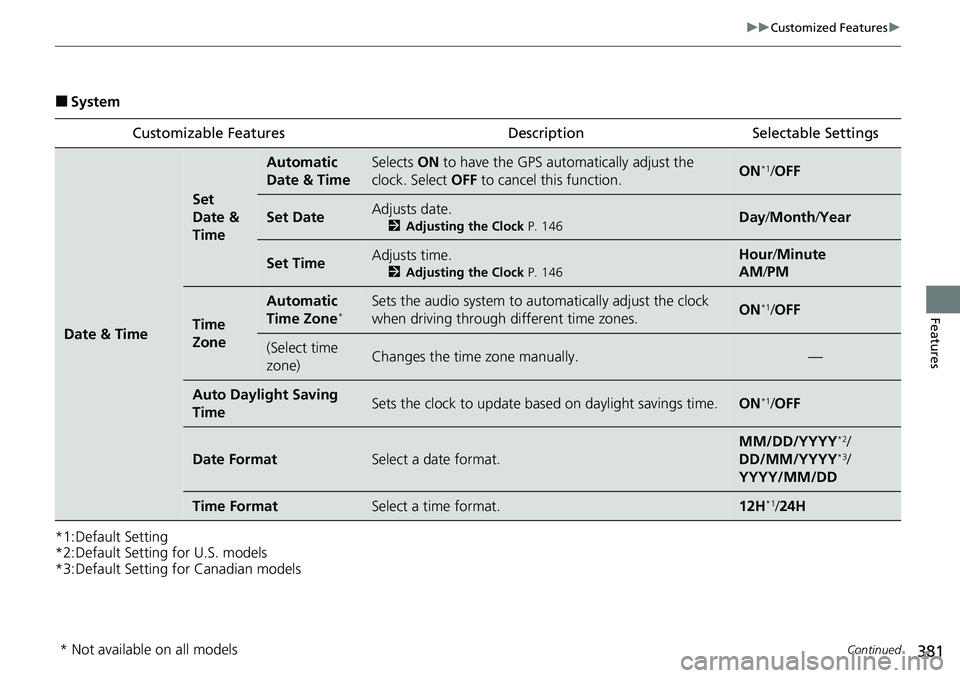
2 System P. 381
2 Smartphone Connection P. 384
2 Connections P. 385
2 Display P. 386
2 Sound P. 386
2 Camera P. 387
2 Voice Control P. 387
Models with 9-in. Color Touchscreen
Audio/Information Screen
Page 381 of 719
380
uuCustomized Features u
Features
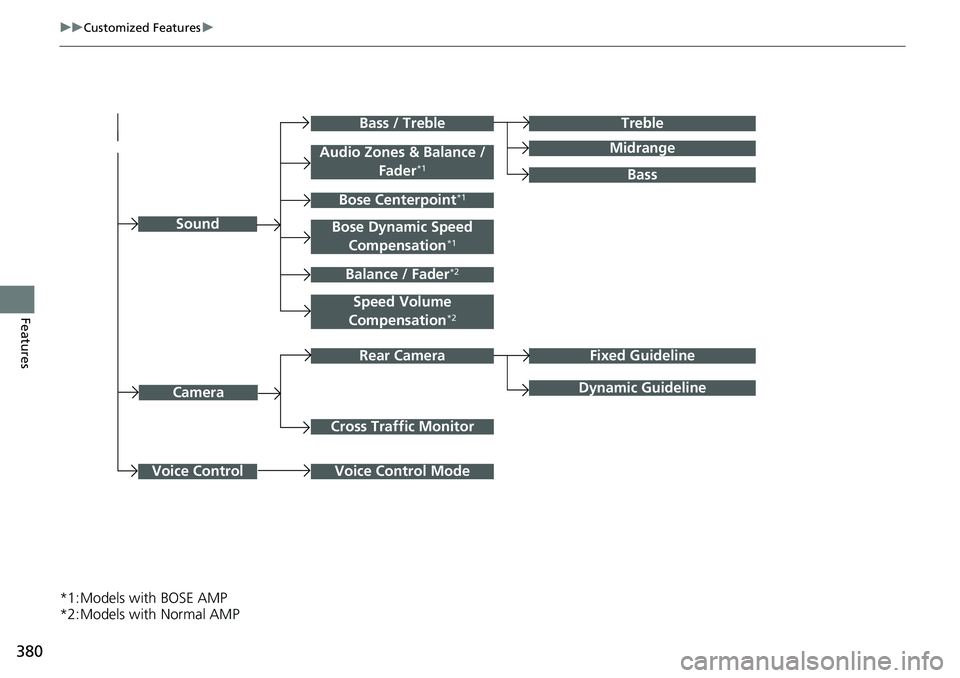
*1:Models with BOSE AMP
*2:Models with Normal AMP
Cross Traffic Monitor
Treble
Midrange
Bass / Treble
Camera
Bass
Fixed Guideline
Dynamic Guideline
Voice Control Mode
Rear Camera
Sound
Voice Control
Speed Volume
Compensation*2
Balance / Fader*2
Audio Zones & Balance / Fader*1
Bose Centerpoint*1
Bose Dynamic Speed Compensation*1
Page 382 of 719
381
uuCustomized Features u
Continued
Features
■System
*1:Default Setting
*2:Default Setting for U.S. models
*3:Default Setting for Canadian models Customizable Features Description Selectable Settings
Date & Time
Set
Date &
Time
Automatic
Date & TimeSelects
ON to have the GPS auto matically adjust the
clock. Select OFF to cancel this function.ON*1/OFF
Set DateAdjusts date.
2 Adjusting the Clock P. 146Day/Month/ Year
Set TimeAdjusts time.
2Adjusting the Clock P. 146
Hour/Minute
AM /PM
Time
Zone
Automatic
Time Zone*Sets the audio system to au tomatically adjust the clock
when driving through different time zones.ON*1/ OFF
(Select time
zone)Changes the time zone manually.—
Auto Daylig ht Saving
TimeSets the clock to update based on daylight savings time.ON*1/ OFF
Date FormatSelect a date format.
MM/DD/YYYY*2/
DD/MM/YYYY*3/
YYYY/MM/DD
Time FormatSelect a time format.12H*1/ 24H
* Not available on all models
Page 383 of 719
382
uuCustomized Features u
Features
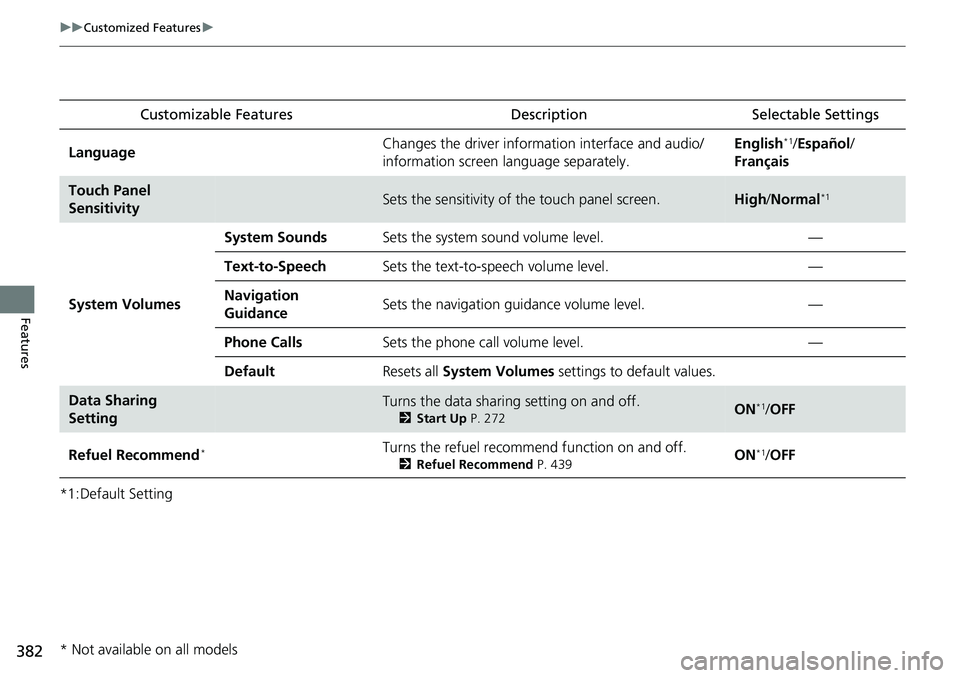
*1:Default SettingCustomizable Features
Description Selectable Settings
LanguageChanges the driver information interface and audio/
information screen language separately.English*1/Español /
Français
Touch Panel
SensitivitySets the sensitivity of the touch panel screen.High /Normal*1
System Volumes
System SoundsSets the system sound volume level.—
Text-to-SpeechSets the text-to-speech volume level.—
Navigation
GuidanceSets the navigation guidance volume level.—
Phone CallsSets the phone call volume level.—
DefaultResets all System Volumes settings to default values.
Data Sharing
SettingTurns the data sharing setting on and off.
2Start Up P. 272ON*1/OFF
Refuel Recommend*Turns the refuel recommend function on and off.
2 Refuel Recommend P. 439ON*1/OFF
* Not available on all models