pairing HONDA CRV 2023 User Guide
[x] Cancel search | Manufacturer: HONDA, Model Year: 2023, Model line: CRV, Model: HONDA CRV 2023Pages: 719, PDF Size: 13.43 MB
Page 401 of 719
400
Features
Bluetooth® HandsFreeLink ®
Bluetooth® HandsFreeLink ® (HFL) allows you to place and receive phone calls using
your vehicle’s audio system, without handling your cell phone.
Using HFL
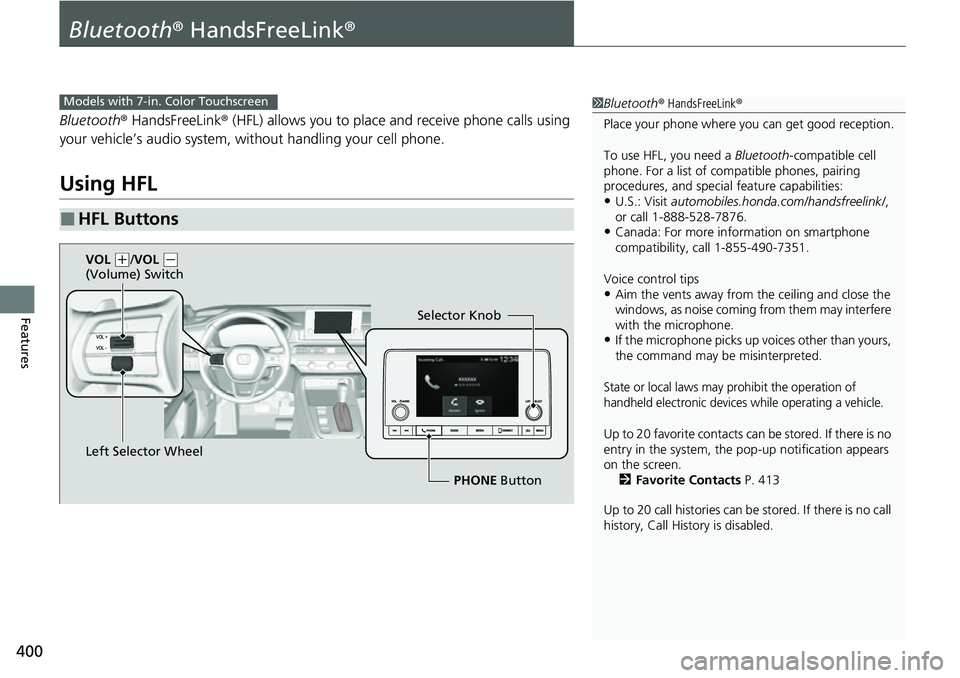
■HFL Buttons
1 Bluetooth ® HandsFreeLink ®
Place your phone where y ou can get good reception.
To use HFL, you need a Bluetooth-compatible cell
phone. For a list of compatible phones, pairing
procedures, and special feature capabilities:
•U.S.: Visit automobiles.honda.com/handsfreelink/ ,
or call 1-888-528-7876.
•Canada: For more info rmation on smartphone
compatibility, call 1-855-490-7351.
Voice control tips
•Aim the vents away from the ceiling and close the
windows, as noise coming from them may interfere
with the microphone.
•If the microphone picks up vo ices other than yours,
the command may be misinterpreted.
State or local laws may prohibit the operation of
handheld electronic devices while operating a vehicle.
Up to 20 favorite contacts ca n be stored. If there is no
entry in the system, the pop-up notification appears
on the screen. 2 Favorite Contacts P. 413
Up to 20 call histories can be stored. If there is no call
history, Call History is disabled.
Models with 7-in. Color Touchscreen
Selector Knob
Left Selector Wheel PHONE Button
VOL
(
+/VOL (-
(Volume) Switch
Page 406 of 719
Continued405
uuBluetooth ® HandsFreeLink ®u HFL Menus
Features
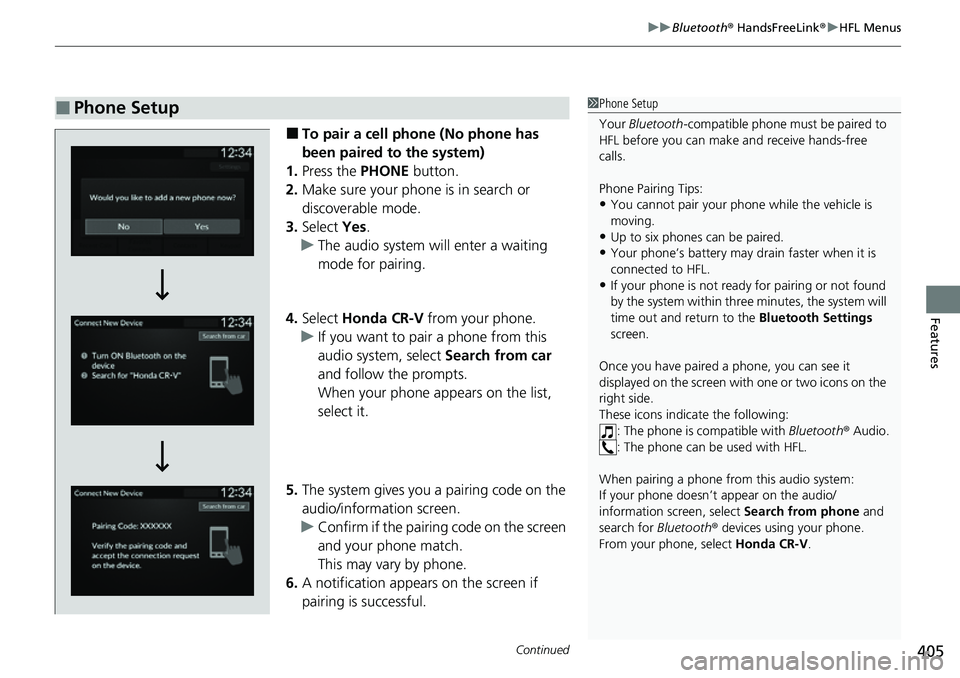
■To pair a cell phone (No phone has
been paired to the system)
1. Press the PHONE button.
2. Make sure your phone is in search or
discoverable mode.
3. Select Yes.
u The audio system will enter a waiting
mode for pairing.
4. Select Honda CR-V from your phone.
u If you want to pair a phone from this
audio system, select Search from car
and follow the prompts.
When your phone appears on the list,
select it.
5. The system gives you a pairing code on the
audio/information screen.
u Confirm if the pairing code on the screen
and your phone match.
This may vary by phone.
6. A notification appears on the screen if
pairing is successful.
■Phone Setup1Phone Setup
Your Bluetooth -compatible phone must be paired to
HFL before you can make and receive hands-free
calls.
Phone Pairing Tips:
•You cannot pair your phone while the vehicle is
moving.
•Up to six phones can be paired.
•Your phone’s battery may dr ain faster when it is
connected to HFL.
•If your phone is not ready for pairing or not found
by the system within three minutes, the system will
time out and return to the Bluetooth Settings
screen.
Once you have paired a phone, you can see it
displayed on the screen with one or two icons on the
right side.
These icons indicate the following: : The phone is compatible with Bluetooth® Audio.
: The phone can be used with HFL.
When pairing a phone from this audio system:
If your phone doesn’t appear on the audio/
information screen, select Search from phone and
search for Bluetooth® devices using your phone.
From your phone, select Honda CR-V .
Page 407 of 719
406
uuBluetooth ® HandsFreeLink ®u HFL Menus
Features
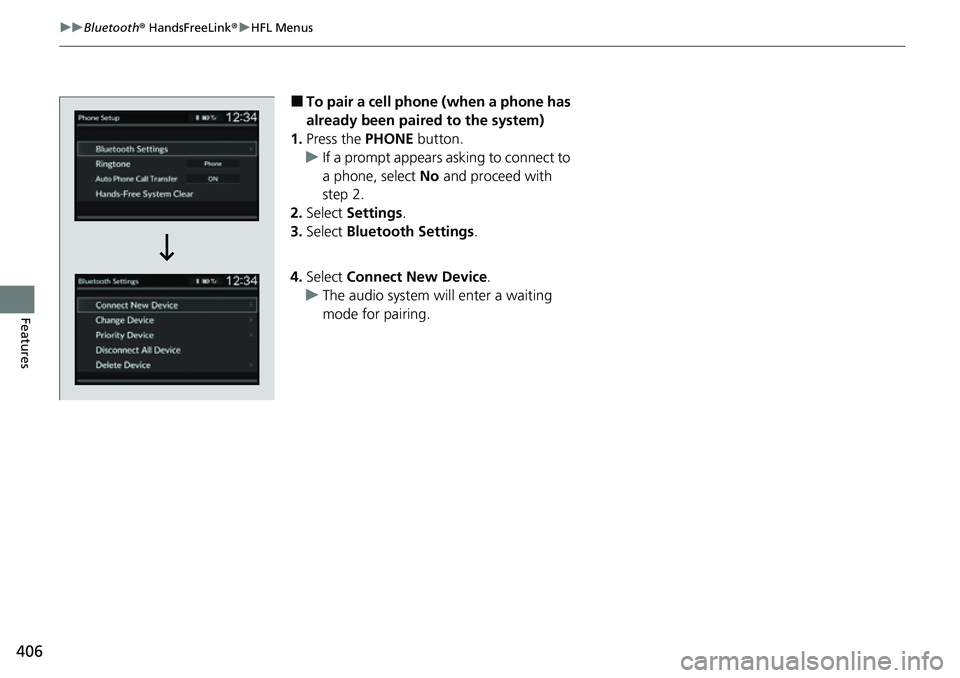
■To pair a cell phone (when a phone has
already been paired to the system)
1. Press the PHONE button.
u If a prompt appears asking to connect to
a phone, select No and proceed with
step 2.
2. Select Settings .
3. Select Bluetooth Settings .
4. Select Connect New Device .
u The audio system will enter a waiting
mode for pairing.
Page 408 of 719
407
uuBluetooth ® HandsFreeLink ®u HFL Menus
Continued
Features
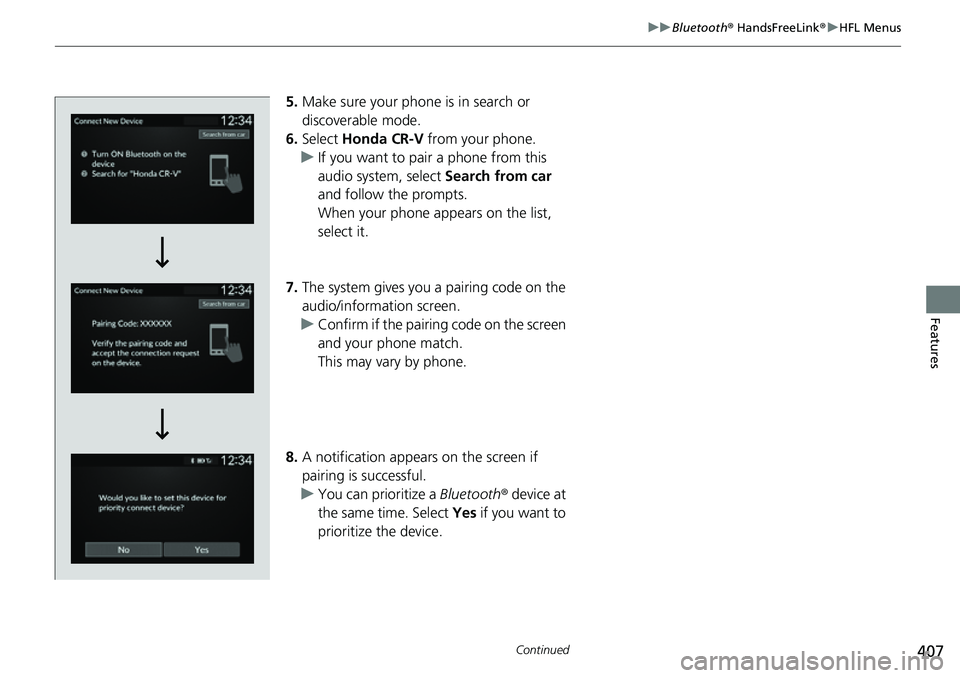
5. Make sure your phone is in search or
discoverable mode.
6. Select Honda CR-V from your phone.
u If you want to pair a phone from this
audio system, select Search from car
and follow the prompts.
When your phone appears on the list,
select it.
7. The system gives you a pairing code on the
audio/information screen.
u Confirm if the pairing code on the screen
and your phone match.
This may vary by phone.
8. A notification appears on the screen if
pairing is successful.
u You can prioritize a Bluetooth® device at
the same time. Select Yes if you want to
prioritize the device.
Page 421 of 719
420
Features
Bluetooth® HandsFreeLink ®
Bluetooth® HandsFreeLink ® (HFL) allows you to place and receive phone calls using
your vehicle’s audio system, without handling your cell phone.
Using HFL
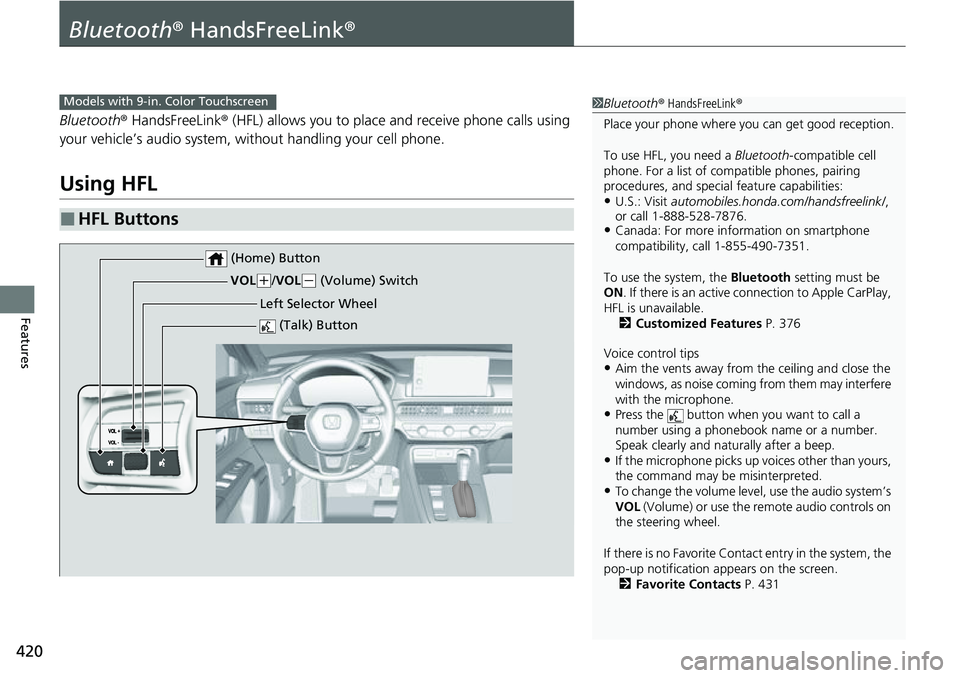
■HFL Buttons
1 Bluetooth ® HandsFreeLink ®
Place your phone where y ou can get good reception.
To use HFL, you need a Bluetooth-compatible cell
phone. For a list of compatible phones, pairing
procedures, and special feature capabilities:
•U.S.: Visit automobiles.honda.com/handsfreelink/ ,
or call 1-888-528-7876.
•Canada: For more info rmation on smartphone
compatibility, call 1-855-490-7351.
To use the system, the Bluetooth setting must be
ON . If there is an active c onnection to Apple CarPlay,
HFL is unavailable. 2 Customized Features P. 376
Voice control tips
•Aim the vents away from the ceiling and close the
windows, as noise coming from them may interfere
with the microphone.
•Press the button when you want to call a
number using a phonebook name or a number.
Speak clearly and naturally after a beep.
•If the microphone picks up vo ices other than yours,
the command may be misinterpreted.
•To change the volume level, use the audio system’s
VOL (Volume) or use the remote audio controls on
the steering wheel.
If there is no Favorite Contact entry in the system, the
pop-up notification appears on the screen. 2 Favorite Contacts P. 431
Models with 9-in. Color Touchscreen
(Talk) Button
Left Selector Wheel
VOL
(
+/ VOL(- (Volume) Switch
(Home) Button
Page 426 of 719
Continued425
uuBluetooth ® HandsFreeLink ®u HFL Menus
Features
■Bluetooth ® setup
You can turn Bluetooth® function on and off.
1. Press the button.
2. Select General Settings .
3. Select Connections .
4. Select Bluetooth .
5. Select Options.
6. Select Bluetooth , then select ON.
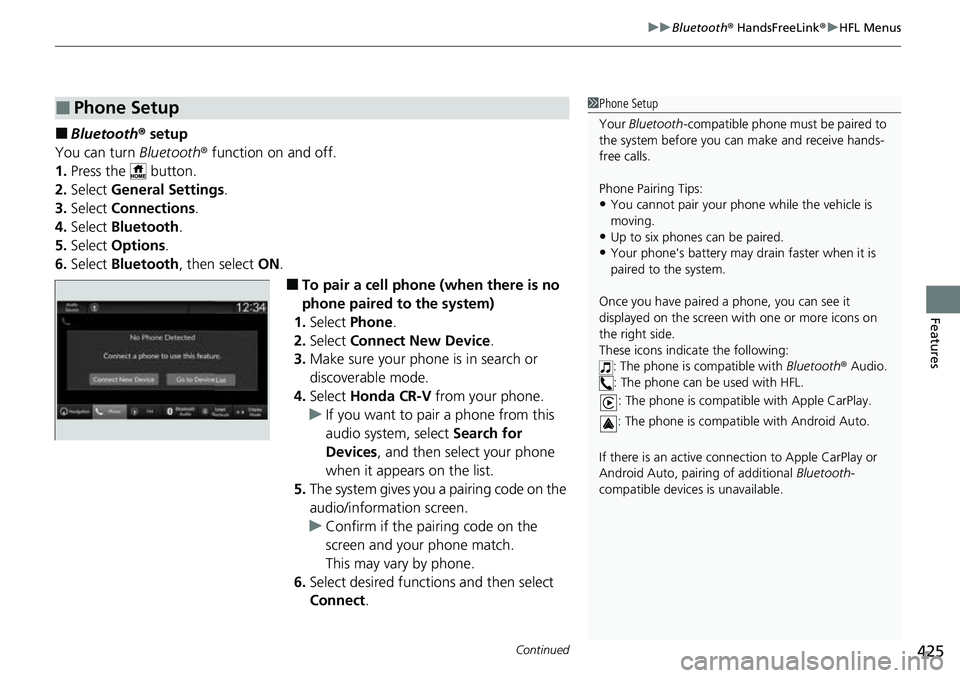
■To pair a cell phone (when there is no
phone paired to the system)
1. Select Phone .
2. Select Connect New Device .
3. Make sure your phone is in search or
discoverable mode.
4. Select Honda CR-V from your phone.
u If you want to pair a phone from this
audio system, select Search for
Devices , and then select your phone
when it appears on the list.
5. The system gives you a pairing code on the
audio/information screen.
u Confirm if the pairing code on the
screen and your phone match.
This may vary by phone.
6. Select desired functions and then select
Connect .
■Phone Setup1Phone Setup
Your Bluetooth -compatible phone must be paired to
the system before you ca n make and receive hands-
free calls.
Phone Pairing Tips:
•You cannot pair your phone while the vehicle is
moving.
•Up to six phones can be paired.
•Your phone's battery may dr ain faster when it is
paired to the system.
Once you have paired a phone, you can see it
displayed on the screen with one or more icons on
the right side.
These icons indicate the following: : The phone is compatible with Bluetooth® Audio.
: The phone can be used with HFL.
: The phone is compatib le with Apple CarPlay.
: The phone is compatible with Android Auto.
If there is an active connection to Appl e CarPlay or
Android Auto, pairing of additional Bluetooth-
compatible devices is unavailable.
Page 427 of 719
426
uuBluetooth ® HandsFreeLink ®u HFL Menus
Features
7. A notification appears on the screen if
pairing is successful.
8. Select OK.
u A confirmation message for phone data
collection appears.
9. Select ON or OFF .
u A confirmation message for HondaLink
Assist appears.
10. Select Yes or No.
Page 654 of 719
653Continued
Handling the Unexpected
If a Tire Goes Flat
Temporarily Repairing a Flat Tire
If the tire has a large cut or is otherwise severely damaged, you will need to have the
vehicle towed. If the tire only has a small puncture, from a nail for instance, you can
use the temporary tire repair kit so that you can drive to the nearest service station
for a more permanent repair.
If a tire goes flat while driving, grasp the steering wheel firmly, and brake gradually
to reduce speed. Then, stop in a safe place.
1. Park the vehicle on a firm, level, non-slippery surface and apply the parking brake.
2. Put the transmission into
(P.
3. Turn on the hazard warning lights an d set the power mode to VEHICLE OFF.
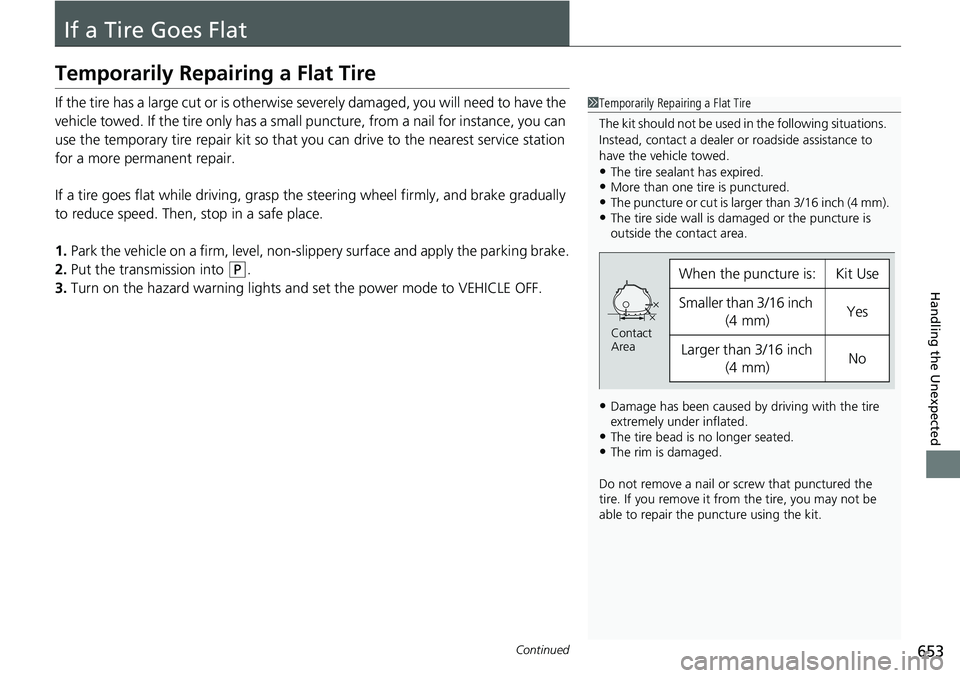
1Temporarily Repairing a Flat Tire
The kit should not be used in the following situations.
Instead, contact a dealer or roadside assistance to
have the vehicle towed.
•The tire sealant has expired.•More than one tire is punctured.•The puncture or cut is larger than 3/16 inch (4 mm).•The tire side wall is da maged or the puncture is
outside the contact area.
•Damage has been caused by driving with the tire
extremely under inflated.
•The tire bead is no longer seated.•The rim is damaged.
Do not remove a nail or screw that punctured the
tire. If you remove it from the tire, you may not be
able to repair the puncture using the kit.
When the puncture is:Kit Use
Smaller than 3/16 inch
(4 mm)Yes
Larger than 3/16 inch (4 mm)No
Contact
Area
Page 655 of 719
uuIf a Tire Goes Flat uTemporarily Repairing a Flat Tire
654
Handling the Unexpected
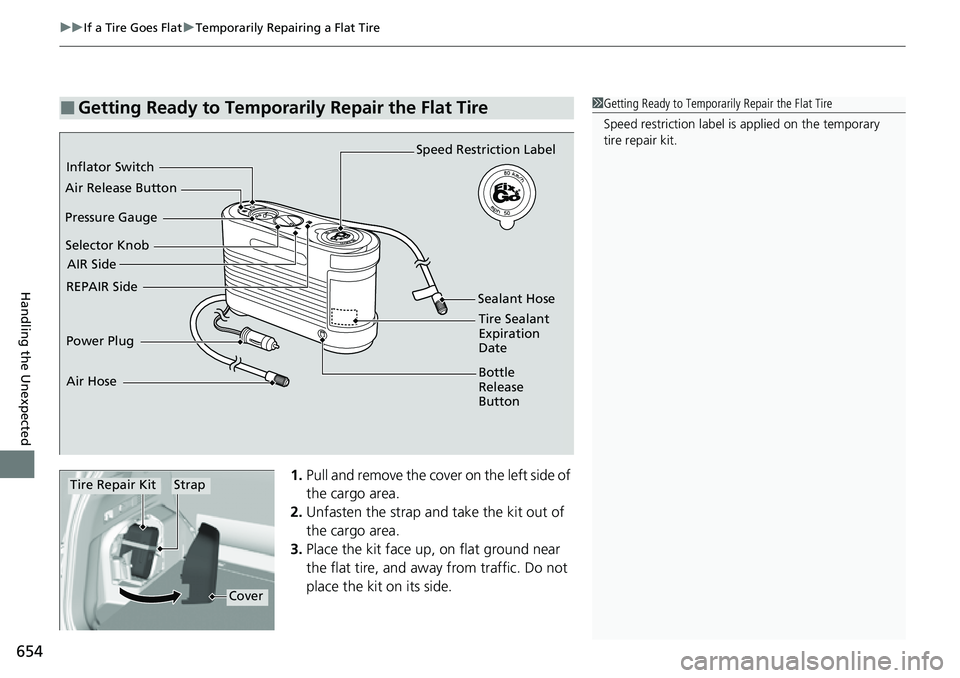
1. Pull and remove the cover on the left side of
the cargo area.
2. Unfasten the strap and take the kit out of
the cargo area.
3. Place the kit face up, on flat ground near
the flat tire, and away from traffic. Do not
place the kit on its side.
■Getting Ready to Temporarily Repair the Flat Tire1Getting Ready to Temporarily Repair the Flat Tire
Speed restriction label is applied on the temporary
tire repair kit.
Selector Knob Speed Restriction Label
Power Plug Sealant Hose
REPAIR Side Inflator Switch
AIR Side
Pressure Gauge
Tire Sealant
Expiration
Date
Air Release Button
Bottle
Release
Button
Air Hose
StrapTire Repair Kit
Cover
Page 656 of 719
Continued655
uuIf a Tire Goes Flat uTemporarily Repairing a Flat Tire
Handling the Unexpected
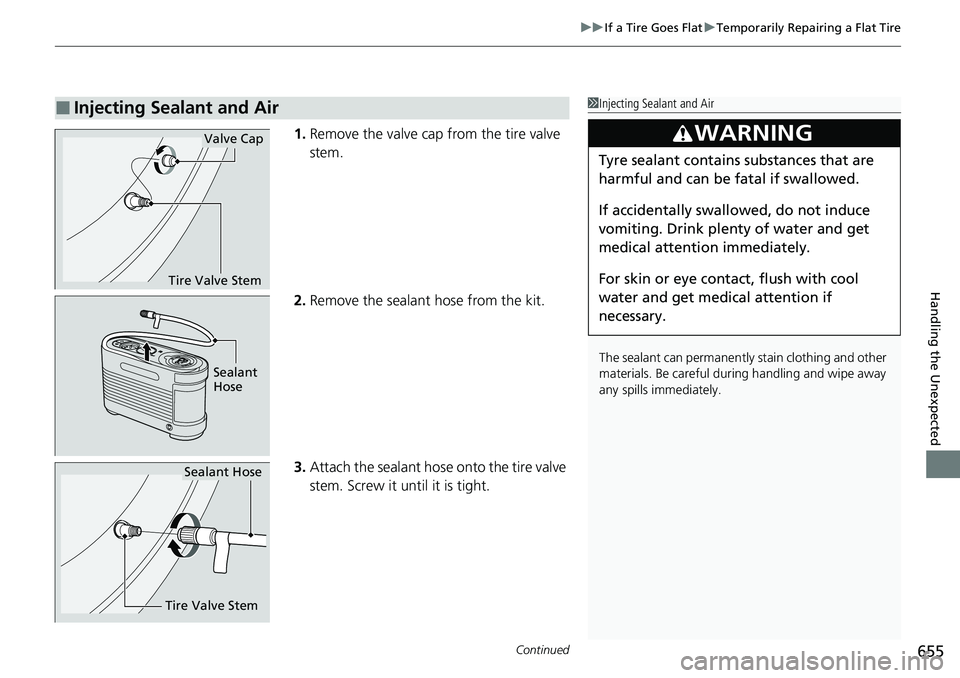
1. Remove the valve cap from the tire valve
stem.
2. Remove the sealant hose from the kit.
3. Attach the sealant hose onto the tire valve
stem. Screw it until it is tight.
■Injecting Sealant and Air1Injecting Sealant and Air
The sealant can permanentl y stain clothing and other
materials. Be careful duri ng handling and wipe away
any spills immediately.
3WARNING
Tyre sealant contains substances that are
harmful and can be fatal if swallowed.
If accidentally swallowed, do not induce
vomiting. Drink plenty of water and get
medical attention immediately.
For skin or eye contact, flush with cool
water and get medical attention if
necessary.
Tire Valve Stem
Valve Cap
Sealant
Hose
Tire Valve Stem
Sealant Hose