fuel HONDA CRV 2023 Owner's Guide
[x] Cancel search | Manufacturer: HONDA, Model Year: 2023, Model line: CRV, Model: HONDA CRV 2023Pages: 719, PDF Size: 13.43 MB
Page 383 of 719
382
uuCustomized Features u
Features
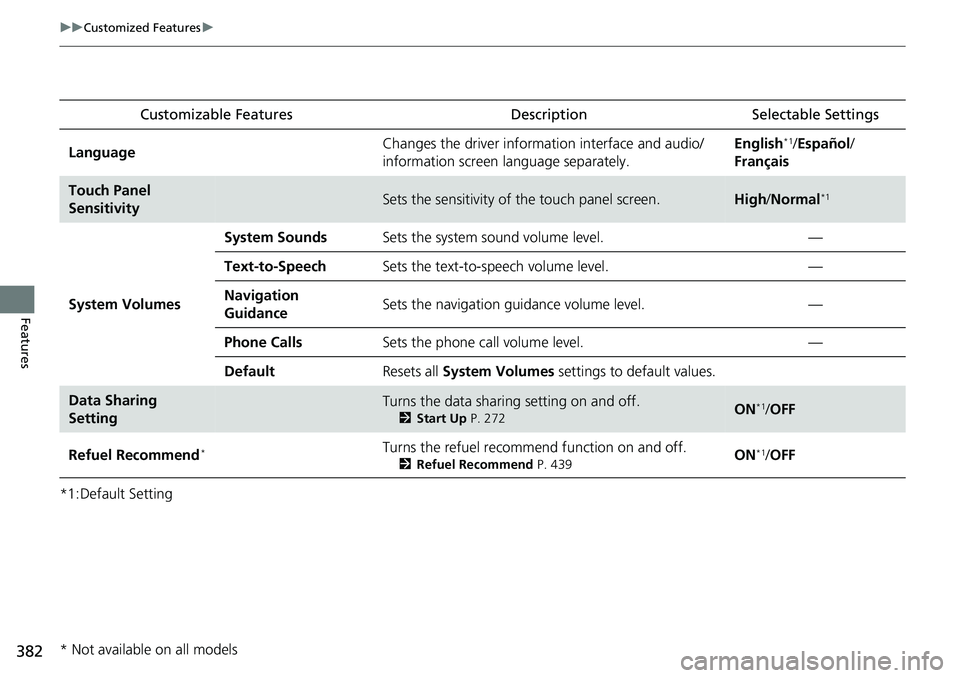
*1:Default SettingCustomizable Features
Description Selectable Settings
LanguageChanges the driver information interface and audio/
information screen language separately.English*1/Español /
Français
Touch Panel
SensitivitySets the sensitivity of the touch panel screen.High /Normal*1
System Volumes
System SoundsSets the system sound volume level.—
Text-to-SpeechSets the text-to-speech volume level.—
Navigation
GuidanceSets the navigation guidance volume level.—
Phone CallsSets the phone call volume level.—
DefaultResets all System Volumes settings to default values.
Data Sharing
SettingTurns the data sharing setting on and off.
2Start Up P. 272ON*1/OFF
Refuel Recommend*Turns the refuel recommend function on and off.
2 Refuel Recommend P. 439ON*1/OFF
* Not available on all models
Page 391 of 719
390
uuCustomized Features u
Features
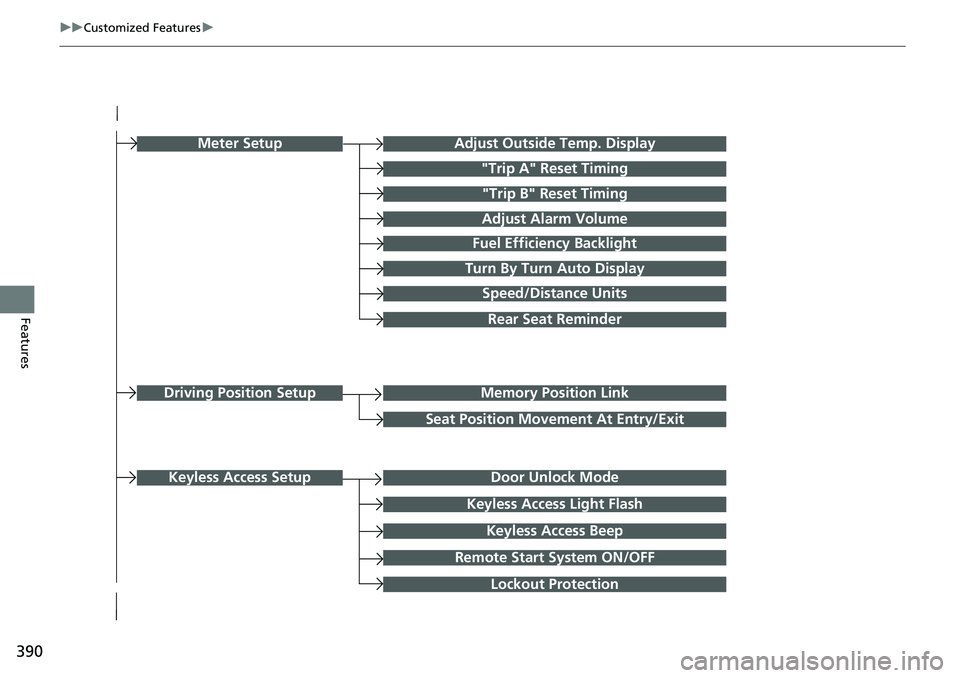
Turn By Turn Auto Display
Speed/Distance Units
Keyless Access Light Flash
Rear Seat Reminder
Door Unlock Mode
Keyless Access Beep
Remote Start System ON/OFF
Lockout Protection
Keyless Access Setup
Meter SetupAdjust Outside Temp. Display
"Trip A" Reset Timing
"Trip B" Reset Timing
Adjust Alarm Volume
Fuel Efficiency Backlight
Memory Position Link
Seat Position Movement At Entry/Exit
Driving Position Setup
Page 395 of 719
394
uuCustomized Features u
Features
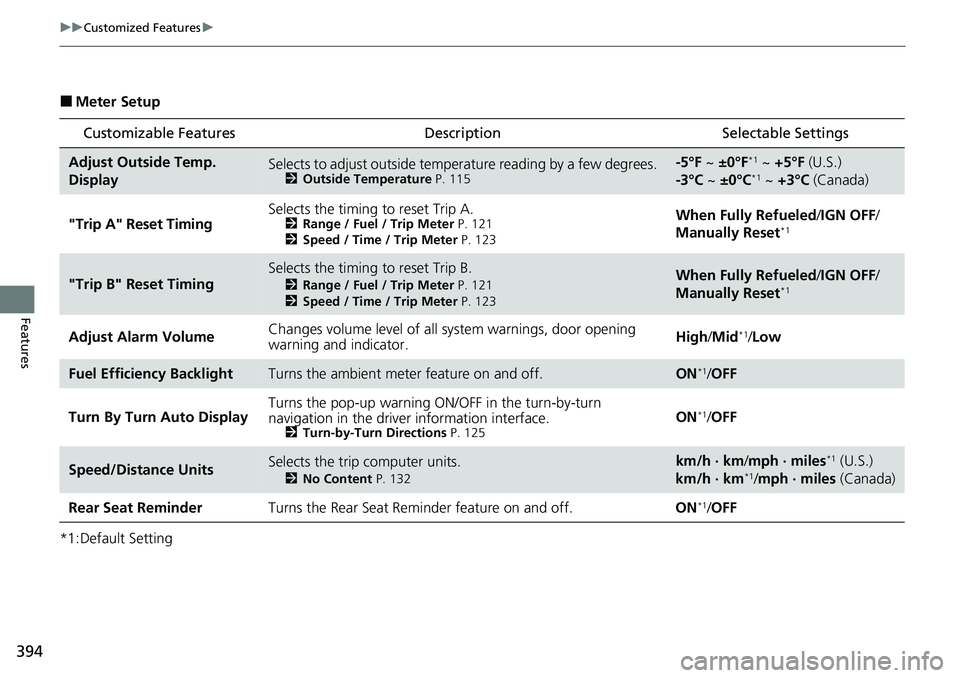
■Meter Setup
*1:Default Setting
Customizable Features Description Selectable Settings
Adjust Outside Temp.
DisplaySelects to adjust outside temperature reading by a few degrees.2Outside Temperature P. 115
-5°F ~ ±0°F*1 ~ +5°F (U.S.)
-3°C ~ ±0°C*1 ~ +3°C (Canada)
"Trip A" Reset Timing Selects the timing to reset Trip A.
2
Range / Fuel / Trip Meter P. 121
2 Speed / Time / Trip Meter P. 123When Fully Refueled /IGN OFF /
Manually Reset*1
"Trip B" Reset TimingSelects the timing to reset Trip B.
2 Range / Fuel / Trip Meter P. 121
2 Speed / Time / Trip Meter P. 123When Fully Refueled /IGN OFF /
Manually Reset*1
Adjust Alarm Volume Changes volume level of all system warnings, door opening
warning and indicator. High/
Mid*1/Low
Fuel Efficiency BacklightTurns the ambient meter feature on and off.ON*1/OFF
Turn By Turn Auto Display Turns the pop-up warning ON/OFF in the turn-by-turn
navigation in the driver
information interface.
2Turn-by-Turn Directions P. 125ON*1/OFF
Speed/Distance UnitsSelects the trip computer units.
2 No Content P. 132
km/h · km/mph · miles*1 (U.S.)
km/h · km*1/ mph · miles (Canada)
Rear Seat Reminder Turns the Rear Seat Reminder feature on and off. ON
*1/OFF
Page 440 of 719
439
Features
Refuel Recommend
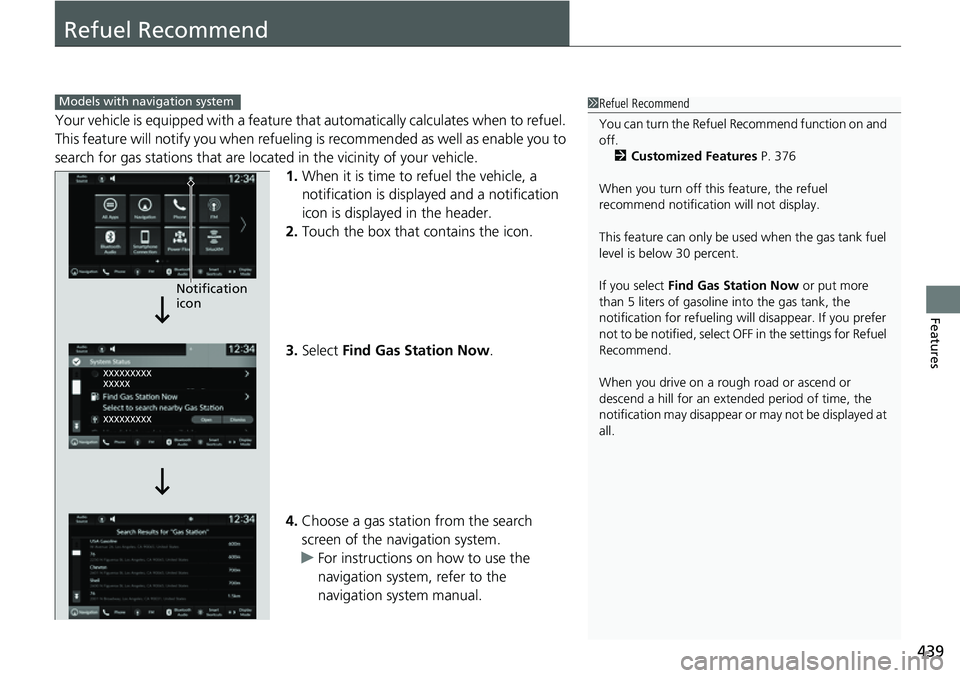
Your vehicle is equipped with a feature that automatically calculates when to refuel.
This feature will notify you when refueling is recommen ded as well as enable you to
search for gas stations that are loca ted in the vicinity of your vehicle.
1. When it is time to refuel the vehicle, a
notification is displayed and a notification
icon is displayed in the header.
2. Touch the box that contains the icon.
3. Select Find Gas Station Now .
4. Choose a gas station from the search
screen of the navigation system.
u For instructions on how to use the
navigation system, refer to the
navigation system manual.
1Refuel Recommend
You can turn the Refuel Recommend function on and
off.
2 Customized Features P. 376
When you turn off this feature, the refuel
recommend notification will not display.
This feature can only be us ed when the gas tank fuel
level is below 30 percent.
If you select Find Gas Station Now or put more
than 5 liters of gasoline into the gas tank, the
notification for refueling will disappear. If you prefer
not to be notified, select O FF in the settings for Refuel
Recommend.
When you drive on a rough road or ascend or
descend a hill for an ex tended period of time, the
notification may disappear or may not be displayed at
all.Models with navigation system
Notification
icon
Page 442 of 719
441
Driving
This chapter discusses driving and refueling.
Before Driving................................... 442
Towing a Trailer ................................ 447
Off-Highway Driving Guidelines ..... 453
When Driving Turning on the Power ...................... 455
Precautions While Driving................. 462
Transmission........................................ 463Shifting ............................................ 464
Deceleration Paddle Selector ............ 466
Acoustic Vehicle Al erting System ...... 469
Drive Mode Switch ........................... 470
Hill Descent Control System ............. 474
Vehicle Stability AssistTM (VSA®), aka Electronic
Stability Control (ESC), System .............. 476
Agile Handling Assist ....................... 478
Real Time AWD with Intelligent Control System
TM*...................................... 479Tire Pressure Monitoring System (TPMS) .... 480Tire Pressure Monitoring System (TPMS) - Required Federal Explanation ......... 485
Blind Spot Information System ......... 487
High Voltage Battery ........................ 491
Honda Sensing ®................................ 492
Collision Mitigati on Braking System
TM
(CMBSTM) ....................................... 495 Low Speed Braking Control
*............ 507
Adaptive Cruise Control (ACC) with Low Speed Follow ................................. 513
Lane Keeping Assist System (LKAS).... 533
Traffic Jam Assist ............................. 545
Road Departure Miti gation System... 554
Traffic Sign Recognition System ....... 562
Front Sensor Camera ....................... 568
Radar Sensor ................................... 570
Sonar Sensors
*................................ 571
Braking .............................................. 572
Parking Your Vehicle ........................ 582
Multi-View Rear Camera .................. 593
Refueling ........................................... 595
Fuel Economy and CO
2 Emissions .... 598
* Not available on all models
Page 474 of 719
473
uuWhen Driving uDrive Mode Switch
Driving
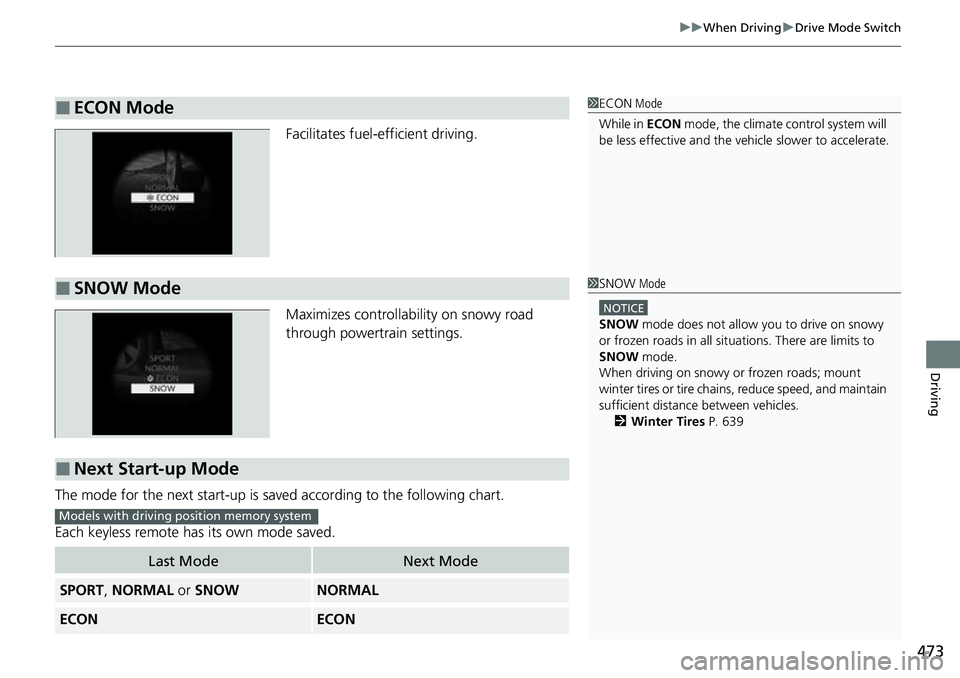
Facilitates fuel-efficient driving.
Maximizes controllability on snowy road
through powertrain settings.
The mode for the next start-up is sa ved according to the following chart.
Each keyless remote has its own mode saved.
■ECON Mode1 ECON Mode
While in ECON mode, the climate control system will
be less effective and the vehi cle slower to accelerate.
■SNOW Mode1SNOW Mode
NOTICE
SNOW mode does not allow you to drive on snowy
or frozen roads in all situations. There are limits to
SNOW mode.
When driving on snowy or frozen roads; mount
winter tires or tire chains , reduce speed, and maintain
sufficient distance between vehicles.
2 Winter Tires P. 639
■Next Start-up Mode
Last ModeNext Mode
SPORT, NORMAL or SNOWNORMAL
ECONECON
Models with driving position memory system
Page 486 of 719
485
uuWhen Driving uTire Pressure Monitoring System (TPMS) - Required Federal Explanation
Continued
Driving
Tire Pressure Monitoring System (TPMS) - Required
Federal Explanation
Each tire, including the spare (if provided), should be checked
monthly when cold and inflated to the inflation pressure
recommended by the vehicle manufa cturer on the vehicle placard
or tire inflation pressure label.
(If your vehicle has tires of a diff erent size than the size indicated
on the vehicle placard or tire inflation pressure label, you should
determine the proper tire inflat ion pressure for those tires.)
As an added safety feature, your vehicle has been equipped with
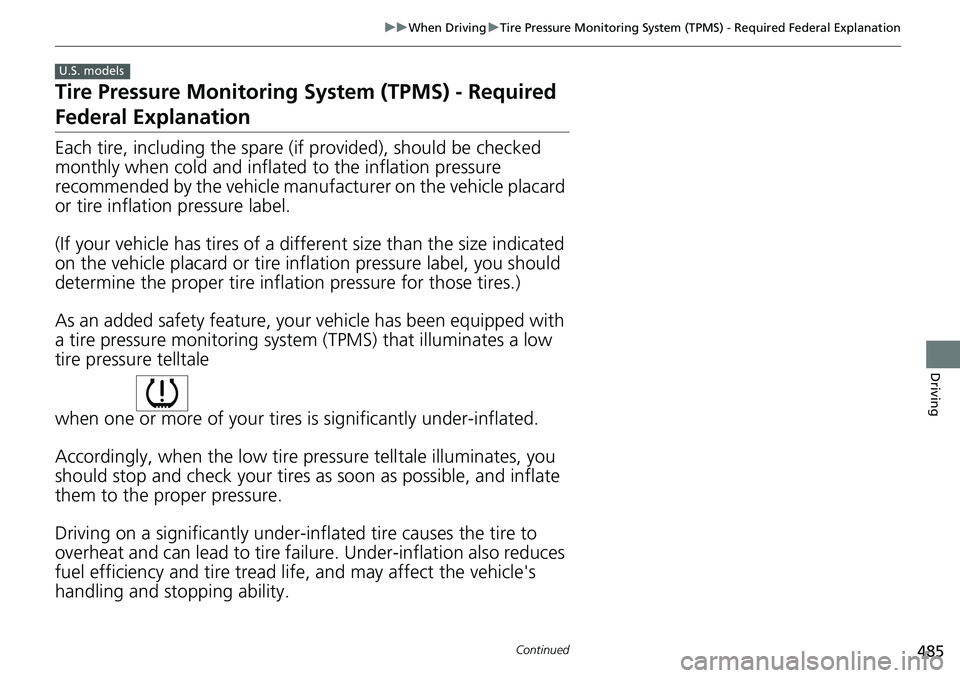
a tire pressure monitoring system (TPMS) that illuminates a low
tire pressure telltale
when one or more of your tires is significantly under-inflated.
Accordingly, when the low tire pressure telltale illuminates, you
should stop and check your tires as soon as possible, and inflate
them to the proper pressure.
Driving on a significantly under-inf lated tire causes the tire to
overheat and can lead to tire fail ure. Under-inflation also reduces
fuel efficiency and tire tread life, and may affect the vehicle's
handling and stopping ability.
U.S. models
Page 596 of 719
595
Driving
Refueling
Fuel Information
■Fuel recommendation
Use of a lower octane gasoline can cause a persistent, heavy metallic knocking noise
that can lead to engine damage.
■Top tier detergent gasoline
Because the level of detergency and additive s in gasoline vary in the market, Honda
endorses the use of “TOP TIER Detergent Gasoline” where available to help
maintain the performance and reliability of your vehicle. TOP TIER Detergent
Gasoline meets a new gasoline standard jointly established by leading automotive
manufacturers to meet the needs of today’s advanced engines.
Qualifying gasoline retailers will, in most cases, identify their gasoline as having met
“TOP TIER Detergent Gasoline” standards at the retail location. This fuel is
guaranteed to contain the proper level of de tergent additives and be free of metallic
additives. The proper level of detergent additives, and absence of harmful metallic
additives in gasoline, help avoid buildup of deposits in your engine and emission
control system.
For further important fuel-related informati on for your vehicle, or on information on
gasoline that does not contain MMT, visit www.hondacars.com. In Canada, visit
www.honda.ca for additional information on gaso line. For more information on top
tier gasoline, visit www.toptiergas.com .
■Fuel tank capacity: 14 US gal (53 L)
Unleaded gasoline, pump octane number 87 or higher
1Fuel Information
NOTICE
We recommend quality ga soline containing
detergent additives that help prevent fuel system and
engine deposits. In addition, in order to maintain
good performance, fuel economy, and emissions
control, we strongly reco mmend the use of gasoline
that does NOT contain harmful manganese-based
fuel additives such as MMT, if such gasoline is
available.
Use of gasoline with these additives may adversely
affect performance, a nd cause the malfunction
indicator lamp on your inst rument panel to come on.
If this happens, contact a dealer for service.
Some gasoline today is blended with oxygenates such
as ethanol. Your vehicle is designed to operate on
oxygenated gasoline containing up to 15% ethanol
by volume. Do not use ga soline containing methanol.
If you notice any undesira ble operating symptoms, try
another service station or sw itch to another brand of
gasoline.
Page 597 of 719
596
uuRefueling uHow to Refuel
Driving
How to Refuel
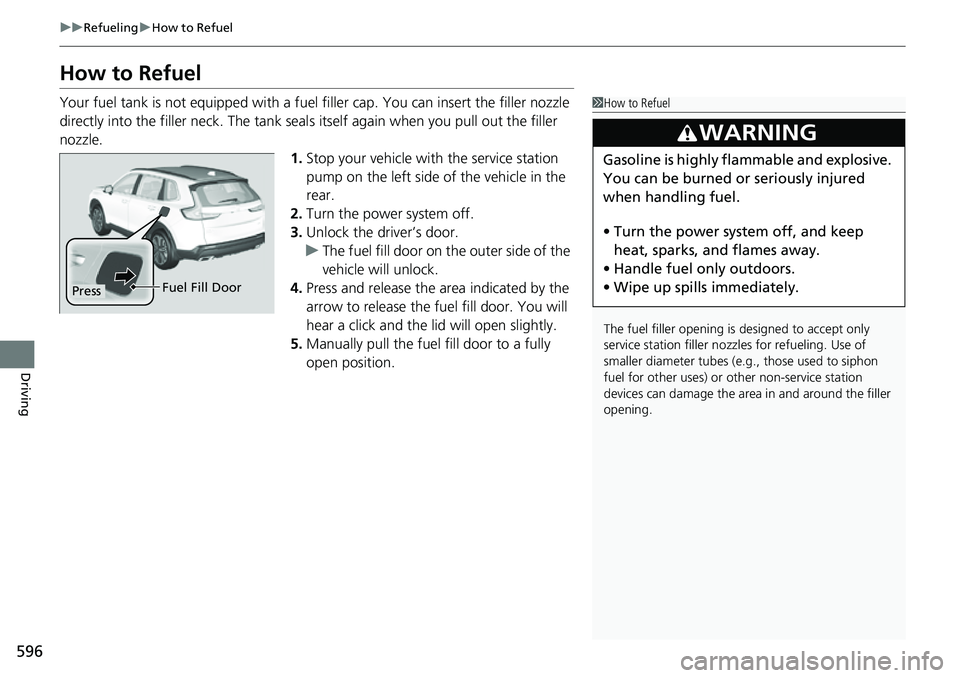
Your fuel tank is not equipped with a fuel filler cap. You can insert the filler nozzle
directly into the filler neck. The tank seal s itself again when you pull out the filler
nozzle.
1.Stop your vehicle with the service station
pump on the left side of the vehicle in the
rear.
2. Turn the power system off.
3. Unlock the driver’s door.
u The fuel fill door on the outer side of the
vehicle will unlock.
4. Press and release the area indicated by the
arrow to release the fu el fill door. You will
hear a click and the lid will open slightly.
5. Manually pull the fuel fill door to a fully
open position.1How to Refuel
The fuel filler opening is designed to accept only
service station filler nozzles for refueling. Use of
smaller diamet er tubes (e.g., those used to siphon
fuel for other uses) or other non-service station
devices can damage the area in and around the filler
opening.
3WARNING
Gasoline is highly flammable and explosive.
You can be burned or seriously injured
when handling fuel.
• Turn the power system off, and keep
heat, sparks, and flames away.
• Handle fuel only outdoors.
• Wipe up spills immediately.
Press Fuel Fill Door
Page 598 of 719
597
uuRefueling uHow to Refuel
Driving
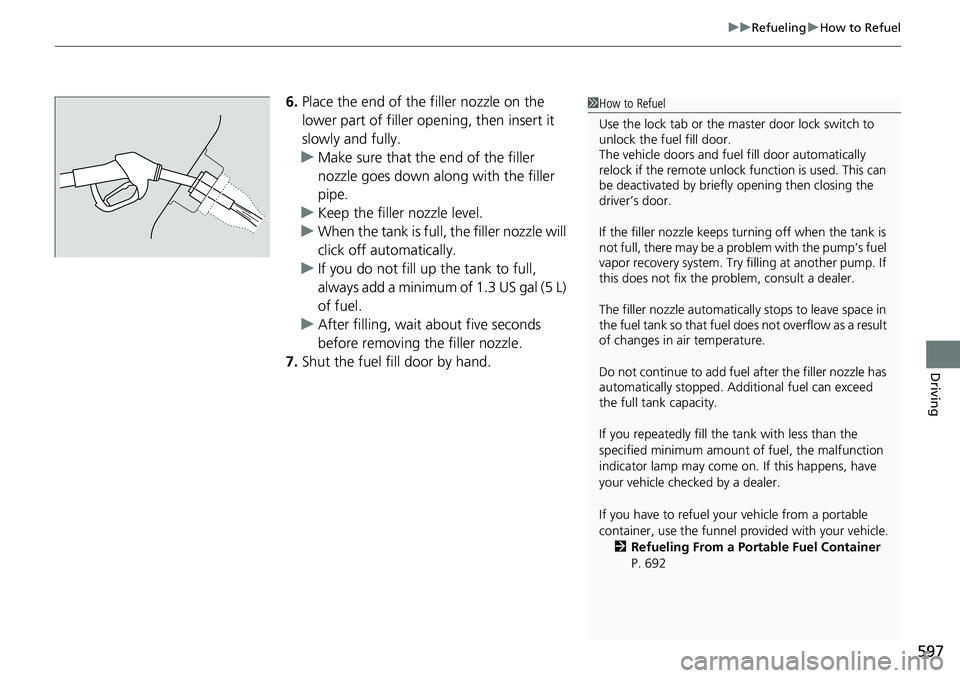
6. Place the end of the filler nozzle on the
lower part of filler opening, then insert it
slowly and fully.
u Make sure that the end of the filler
nozzle goes down along with the filler
pipe.
u Keep the filler nozzle level.
u When the tank is full, the filler nozzle will
click off automatically.
u If you do not fill up the tank to full,
always add a minimum of 1.3 US gal (5 L)
of fuel.
u After filling, wait about five seconds
before removing the filler nozzle.
7. Shut the fuel fill door by hand.1How to Refuel
Use the lock tab or the ma ster door lock switch to
unlock the fuel fill door.
The vehicle doors and fuel fill door automatically
relock if the remote unlock function is used. This can
be deactivated by briefl y opening then closing the
driver’s door.
If the filler nozzle keeps tu rning off when the tank is
not full, there may be a pr oblem with the pump’s fuel
vapor recovery system. Try fi lling at another pump. If
this does not fix the problem, consult a dealer.
The filler nozzle automatically stops to leave space in
the fuel tank so that fuel does not overflow as a result
of changes in air temperature.
Do not continue to add fuel after the filler nozzle has
automatically stopped. Addi tional fuel can exceed
the full tank capacity.
If you repeatedly fill the tank with less than the
specified minimum amount of fuel, the malfunction
indicator lamp may come on. If this happens, have
your vehicle checked by a dealer.
If you have to refuel y our vehicle from a portable
container, use the funnel pr ovided with your vehicle.
2 Refueling From a Portable Fuel Container
P. 692