fuel HONDA CRV 2023 User Guide
[x] Cancel search | Manufacturer: HONDA, Model Year: 2023, Model line: CRV, Model: HONDA CRV 2023Pages: 719, PDF Size: 13.43 MB
Page 115 of 719
114
Instrument Panel
Gauges and Driver Information Interface
Gauges
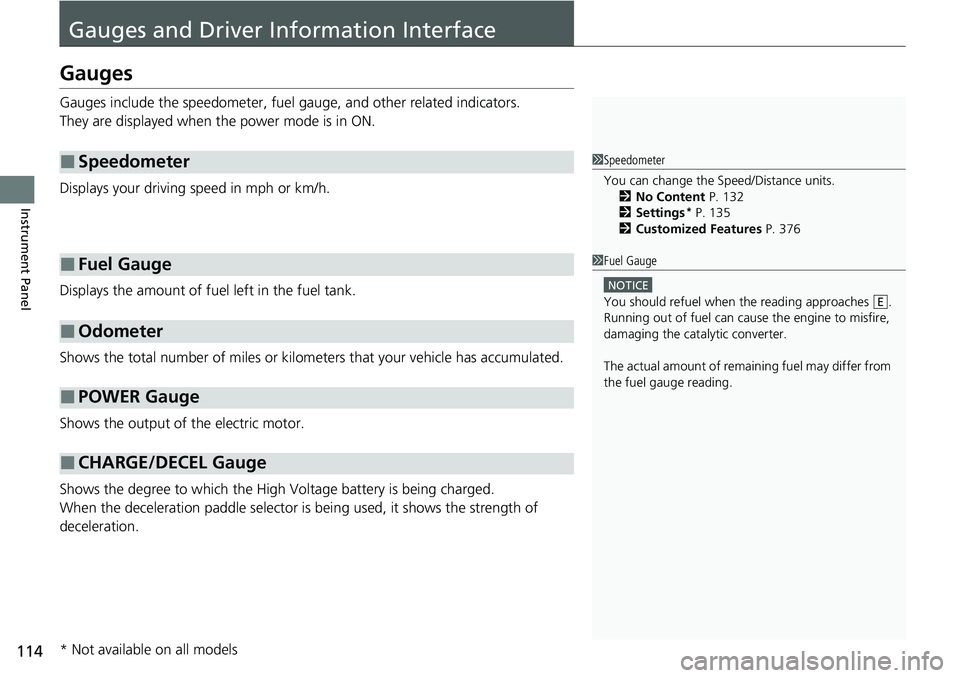
Gauges include the speedometer, fuel gauge, and other related indicators.
They are displayed when the power mode is in ON.
Displays your driving speed in mph or km/h.
Displays the amount of fuel left in the fuel tank.
Shows the total number of miles or kilome ters that your vehicle has accumulated.
Shows the output of the electric motor.
Shows the degree to which the High Voltage battery is being charged.
When the deceleration paddle selector is being used, it shows the strength of
deceleration.
■Speedometer
■Fuel Gauge
■Odometer
■POWER Gauge
■CHARGE/DECEL Gauge
1 Speedometer
You can change the Speed/Distance units.
2 No Content P. 132
2 Settings
* P. 135
2 Customized Features P. 376
1Fuel Gauge
NOTICE
You should refuel when the reading approaches .
Running out of fuel can cause the engine to misfire,
damaging the cata lytic converter.
The actual amount of remain ing fuel may differ from
the fuel gauge reading.E
* Not available on all models
Page 118 of 719
117
uuGauges and Driver Information Interface uDriver Information Interface
Continued
Instrument Panel
Driver Information Interface
The driver information interface shows information such as the estimated travelable
distance and fuel economy of the vehicle. It also displays messages such as warnings
and other helpful information.
When a warning message displays, please check the message and contact a dealer
to have the vehicle inspected if necessary. Please refer to the pages below if the
Engine oil pressure low, Engine temperature too hot or Limited stopping
power! message is displayed.
2If the Engine oil pressure low Warning Appears P. 676
2 Overheating P. 674
2 If the Limited stopping power Warning Appears P. 677
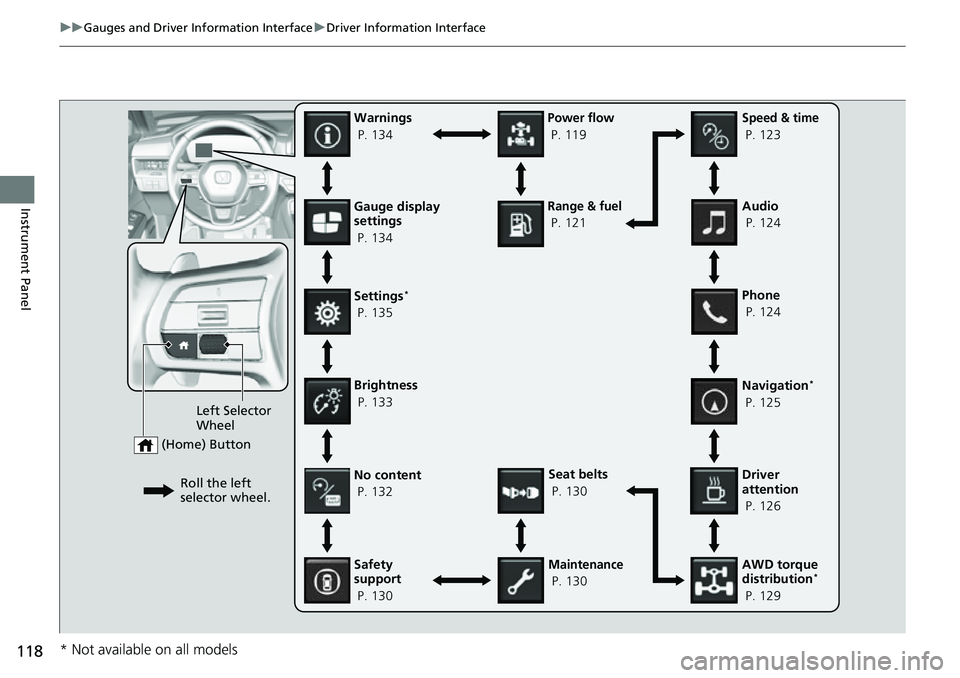
Press the (home) button, then roll the left selector wheel to scroll to the content
you want to see. Press the left sele ctor wheel to see detailed information.
■Switching the Display1Switching the Display
You can add or delete the meter contents.
2 Gauge Display Settings P. 134
Page 119 of 719
118
uuGauges and Driver Information Interface uDriver Information Interface
Instrument PanelGauge display
settings
P. 134
Left Selector
Wheel
(Home) Button
Roll the left
selector wheel.No content
P. 132
Speed & time
P. 123
Warnings
P. 134
Power flow
P. 119
Settings
*
P. 135
Driver
attention
P. 126
Seat belts
P. 130
Safety
support
P. 130
Maintenance
P. 130 Phone
P. 124 Audio
P. 124
Navigation
*
P. 125
AWD torque
distribution
*
P. 129
Brightness
P. 133
Range & fuel
P. 121
* Not available on all models
Page 122 of 719
121
uuGauges and Driver Information Interface uDriver Information Interface
Continued
Instrument Panel
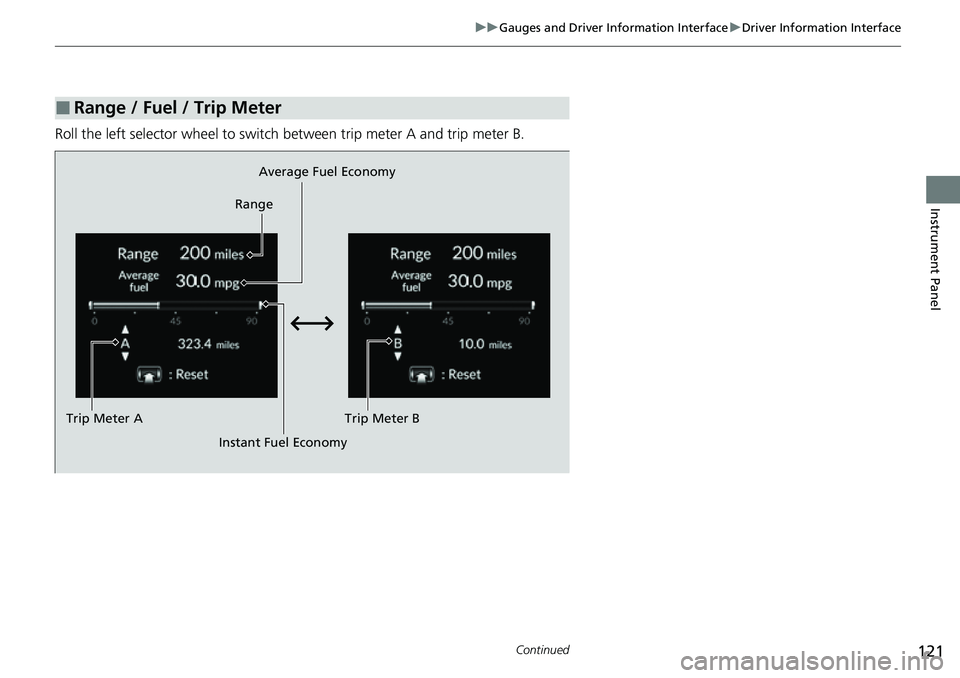
Roll the left selector wheel to switch between trip meter A and trip meter B.
■Range / Fuel / Trip Meter
Average Fuel Economy
Range
Trip Meter B
Instant Fuel Economy
Trip Meter A
Page 123 of 719
uuGauges and Driver Information Interface uDriver Information Interface
122
Instrument Panel
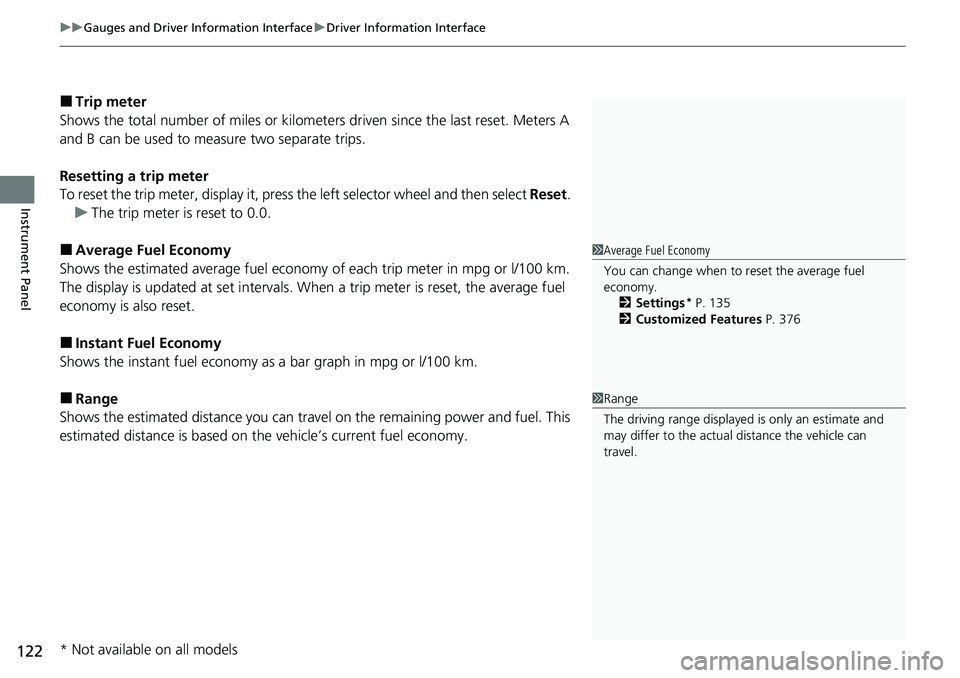
■Trip meter
Shows the total number of miles or kilomete rs driven since the last reset. Meters A
and B can be used to measure two separate trips.
Resetting a trip meter
To reset the trip meter, display it, press the left selector wheel and then select Reset.
u The trip meter is reset to 0.0.
■Average Fuel Economy
Shows the estimated average fuel economy of each trip meter in mpg or l/100 km.
The display is updated at set intervals. When a trip meter is reset, the average fuel
economy is also reset.
■Instant Fuel Economy
Shows the instant fuel economy as a bar graph in mpg or l/100 km.
■Range
Shows the estimated distance you can trave l on the remaining power and fuel. This
estimated distance is based on the vehicle’s current fuel economy.
1 Average Fuel Economy
You can change when to reset the average fuel
economy.
2 Settings
* P. 135
2 Customized Features P. 376
1Range
The driving range displayed is only an estimate and
may differ to the actual distance the vehicle can
travel.
* Not available on all models
Page 139 of 719
138
uuGauges and Driver Information Interface uDriver Information Interface
Instrument Panel
*1:Default Setting Setup Group Customizable Features
Description Selectable Settings
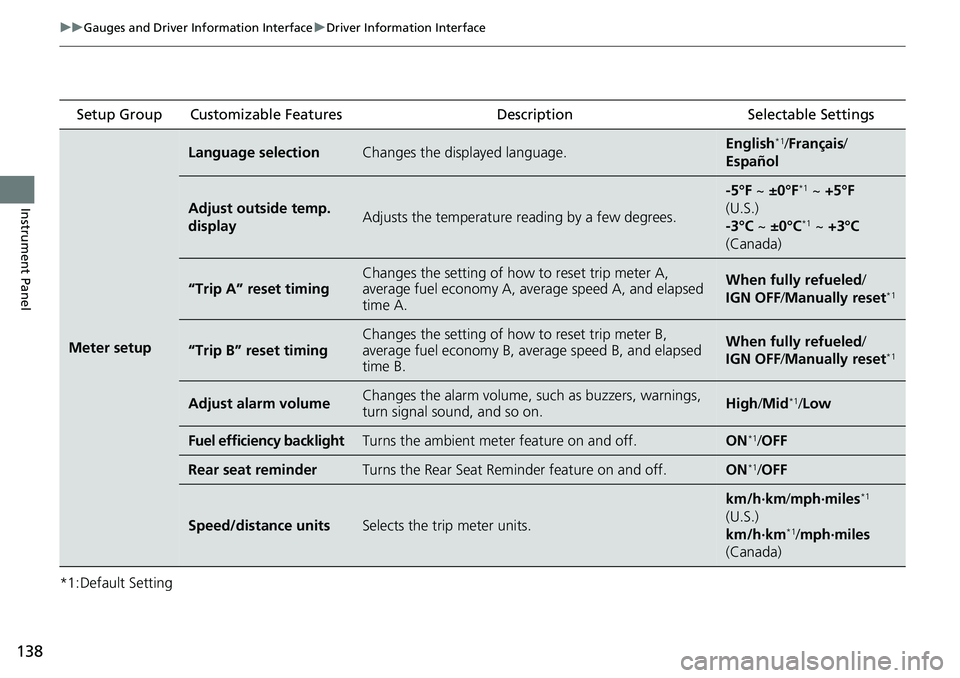
Meter setup
Language selectionChanges the displayed language.English*1/Français /
Español
Adjust outside temp.
displayAdjusts the temperature reading by a few degrees.
-5°F ~ ±0°F*1 ~ +5°F
(U.S.)
-3°C ~ ±0°C
*1 ~ +3°C
(Canada)
“Trip A” reset timingChanges the setting of how to reset trip meter A,
average fuel economy A, average speed A, and elapsed
time A.When fully refueled /
IGN OFF /Manually reset*1
“Trip B” reset timing
Changes the setting of how to reset trip meter B,
average fuel economy B, av erage speed B, and elapsed
time B.When fully refueled /
IGN OFF /Manually reset*1
Adjust alarm volumeChanges the alarm volume, su ch as buzzers, warnings,
turn signal sound, and so on.High /Mid*1/Low
Fuel efficiency backlightTurns the ambient meter feature on and off.ON*1/OFF
Rear seat reminderTurns the Rear Seat Reminder feature on and off.ON*1/OFF
Speed/distance unitsSelects the trip meter units.
km/h∙km/ mph∙miles*1
(U.S.)
km/h∙km
*1/ mph∙miles
(Canada)
Page 143 of 719
142
uuGauges and Driver Information Interface uDriver Information Interface
Instrument Panel
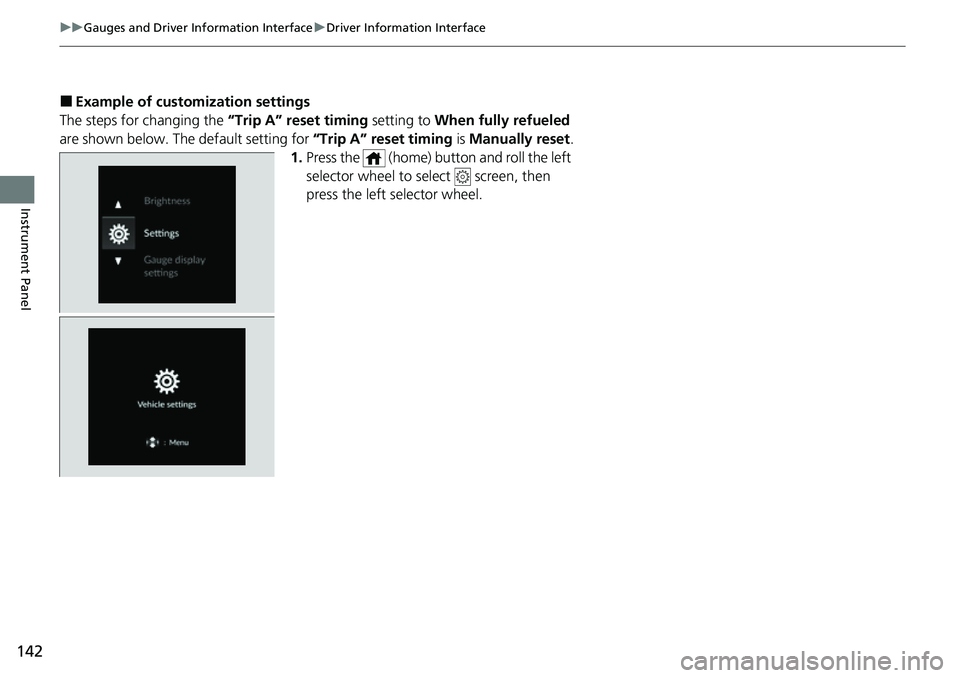
■Example of customization settings
The steps for changing the “Trip A” reset timing setting to When fully refueled
are shown below. The default setting for “Trip A” reset timing is Manually reset.
1. Press the (home) button and roll the left
selector wheel to select screen, then
press the left selector wheel.
Page 144 of 719
143
uuGauges and Driver Information Interface uDriver Information Interface
Continued
Instrument Panel
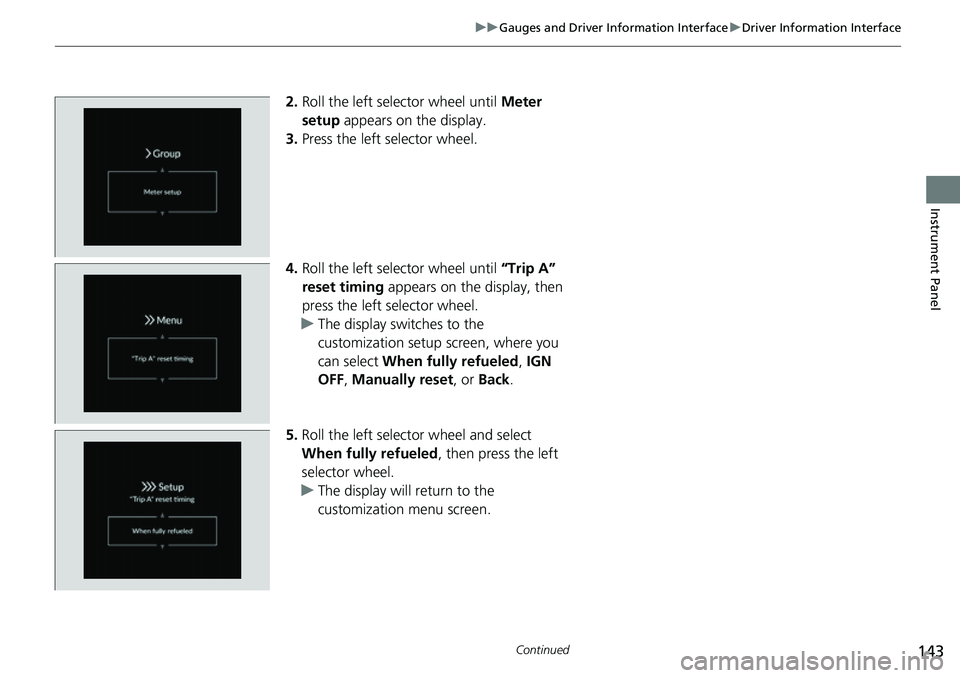
2. Roll the left selector wheel until Meter
setup appears on the display.
3. Press the left selector wheel.
4. Roll the left selector wheel until “Trip A”
reset timing appears on the display, then
press the left selector wheel.
u The display swit ches to the
customization setup screen, where you
can select When fully refueled , IGN
OFF , Manually reset , or Back .
5. Roll the left selector wheel and select
When fully refueled , then press the left
selector wheel.
u The display will return to the
customization menu screen.
Page 149 of 719
148
Controls
Locking and Unlocking the Doors
Key
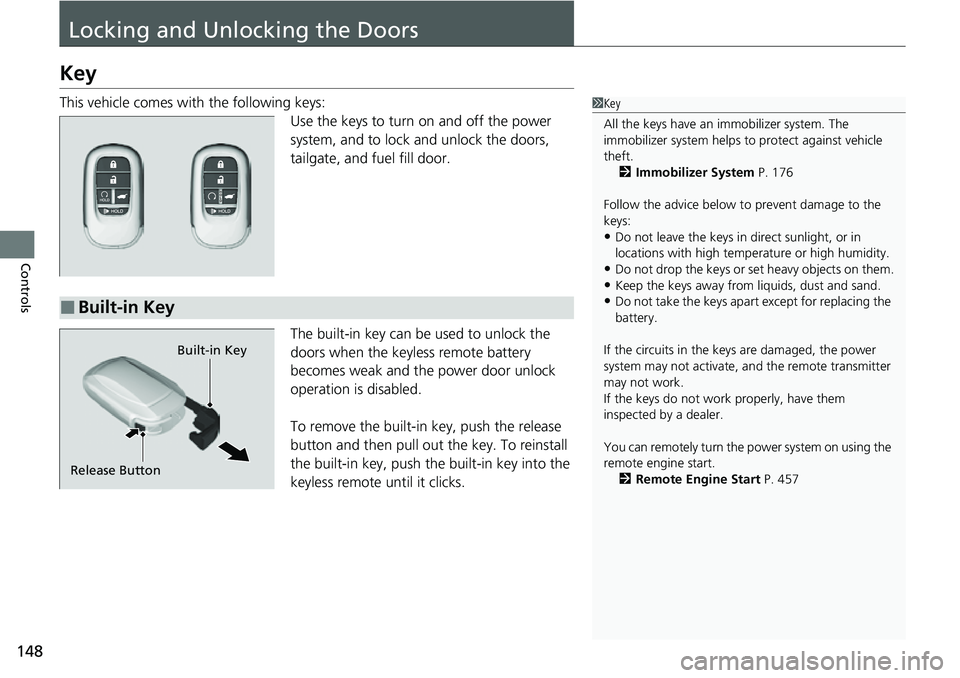
This vehicle comes with the following keys:Use the keys to turn on and off the power
system, and to lock and unlock the doors,
tailgate, and fuel fill door.
The built-in key can be used to unlock the
doors when the keyless remote battery
becomes weak and the power door unlock
operation is disabled.
To remove the built-in key, push the release
button and then pull out the key. To reinstall
the built-in key, push th e built-in key into the
keyless remote until it clicks.1 Key
All the keys have an immobilizer system. The
immobilizer system helps to protect against vehicle
theft. 2 Immobilizer System P. 176
Follow the advice below to prevent damage to the
keys:
•Do not leave the keys in direct sunlight, or in
locations with high temperature or high humidity.
•Do not drop the keys or set heavy objects on them.•Keep the keys away from liquids, dust and sand.
•Do not take the keys apart except for replacing the
battery.
If the circuits in the keys are damaged, the power
system may not activate, and the remote transmitter
may not work.
If the keys do not work properly, have them
inspected by a dealer.
You can remotely turn the power system on using the
remote engine start. 2 Remote Engine Start P. 457■Built-in Key
Built-in Key
Release Button
Page 151 of 719
150
uuLocking and Unlocking the Doors uLow Keyless Remote Signal Strength
Controls
Low Keyless Remote Signal Strength
The vehicle transmits radio waves to locate the keyless remote to activate the power
system, when locking/unlocking the door, tailgate, and fuel fill door.
In the following cases, activating the power system or locking/unlocking the doors/
tailgate/fuel fill door may be inhibited or operation may be unstable:
• Strong radio waves are being tra nsmitted by nearby equipment.
• You are carrying the keyless remote together with telecommunications
equipment, laptop computers, ce ll phones, or wireless devices.
• A metallic object is touching or covering the keyless remote.1Low Keyless Remote Signal Strength
Communication between the keyless remote and the
vehicle consumes the ke yless remote’s battery.
Battery life is about two years, but this varies
depending on re gularity of use.
The battery is consumed whenever the keyless
remote is receivi ng strong radio wave s. Avoid placing
it near electrical appliances such as televisions and
personal computers.