fuel HONDA CRV 2023 Owner's Manual
[x] Cancel search | Manufacturer: HONDA, Model Year: 2023, Model line: CRV, Model: HONDA CRV 2023Pages: 719, PDF Size: 13.43 MB
Page 152 of 719
151
uuLocking and Unlocking the Doors uLocking/Unlocking the Doors from the Outside
Continued
Controls
Locking/Unlocking the Doors from the Outside
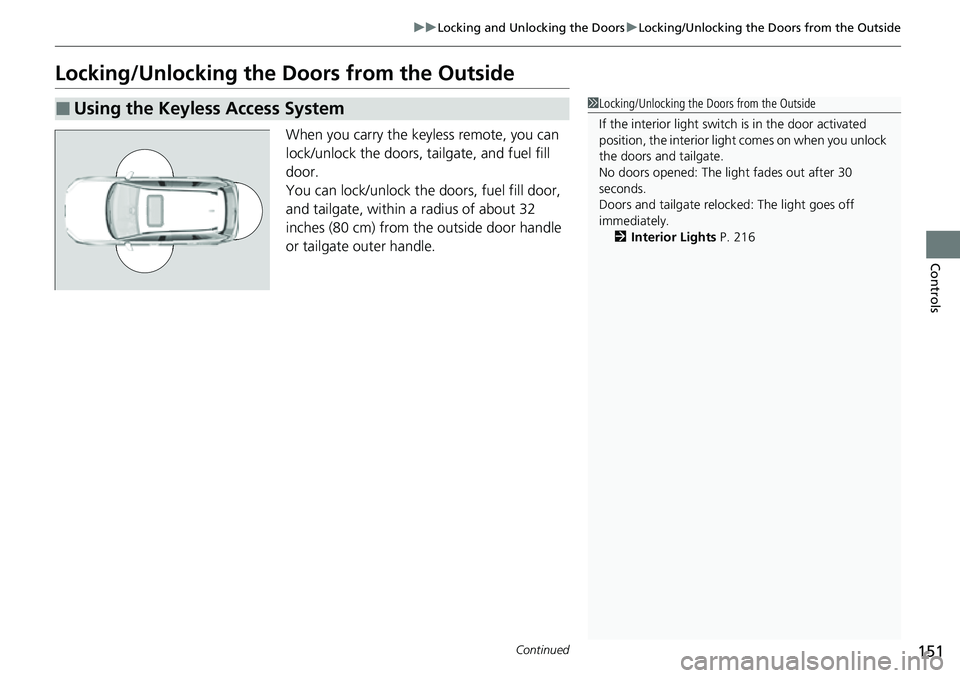
When you carry the keyless remote, you can
lock/unlock the doors, tailgate, and fuel fill
door.
You can lock/unlock the doors, fuel fill door,
and tailgate, within a radius of about 32
inches (80 cm) from the outside door handle
or tailgate outer handle.
■Using the Keyless Access System1Locking/Unlocking the Doors from the Outside
If the interior light switch is in the door activated
position, the interior light comes on when you unlock
the doors and tailgate.
No doors opened: The li ght fades out after 30
seconds.
Doors and tailgate relo cked: The light goes off
immediately. 2 Interior Lights P. 216
Page 154 of 719
Continued153
uuLocking and Unlocking the Doors uLocking/Unlocking the Doors from the Outside
Controls
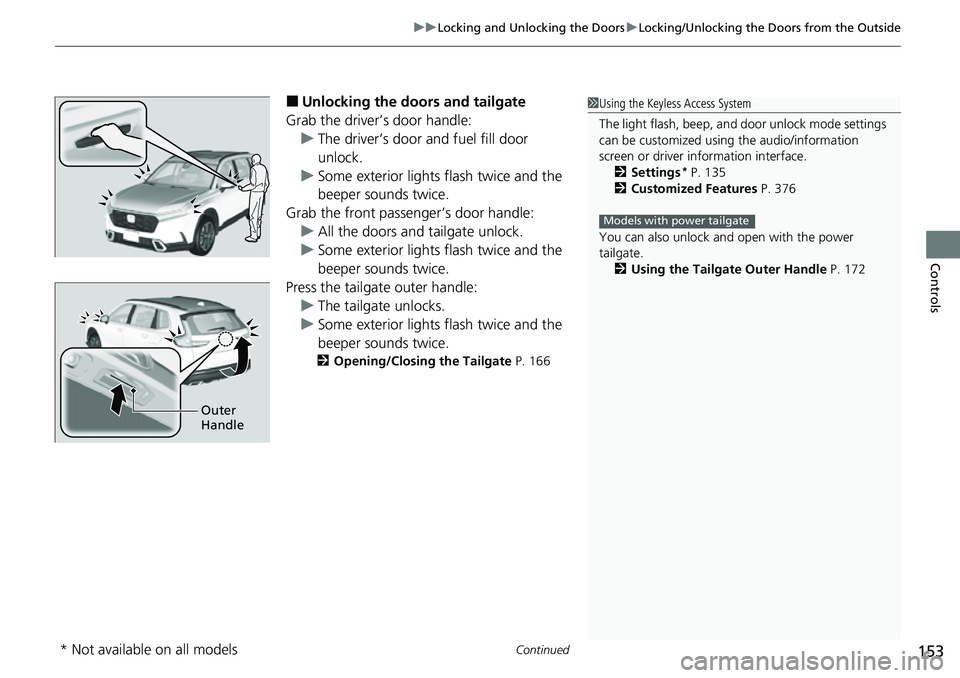
■Unlocking the doors and tailgate
Grab the driver’s door handle: u The driver’s door and fuel fill door
unlock.
u Some exterior lights flash twice and the
beeper sounds twice.
Grab the front passenger’s door handle: u All the doors and tailgate unlock.
u Some exterior lights flash twice and the
beeper sounds twice.
Press the tailgate outer handle: u The tailgate unlocks.
u Some exterior lights flash twice and the
beeper sounds twice.
2 Opening/Closing the Tailgate P. 166
1Using the Keyless Access System
The light flash, beep, a nd door unlock mode settings
can be customized using the audio/information
screen or driver information interface.
2 Settings
* P. 135
2 Customized Features P. 376
You can also unlock and open with the power
tailgate. 2 Using the Tailgate Outer Handle P. 172
Models with power tailgate
Outer
Handle
* Not available on all models
Page 158 of 719
Continued157
uuLocking and Unlocking the Doors uLocking/Unlocking the Doors from the Outside
Controls
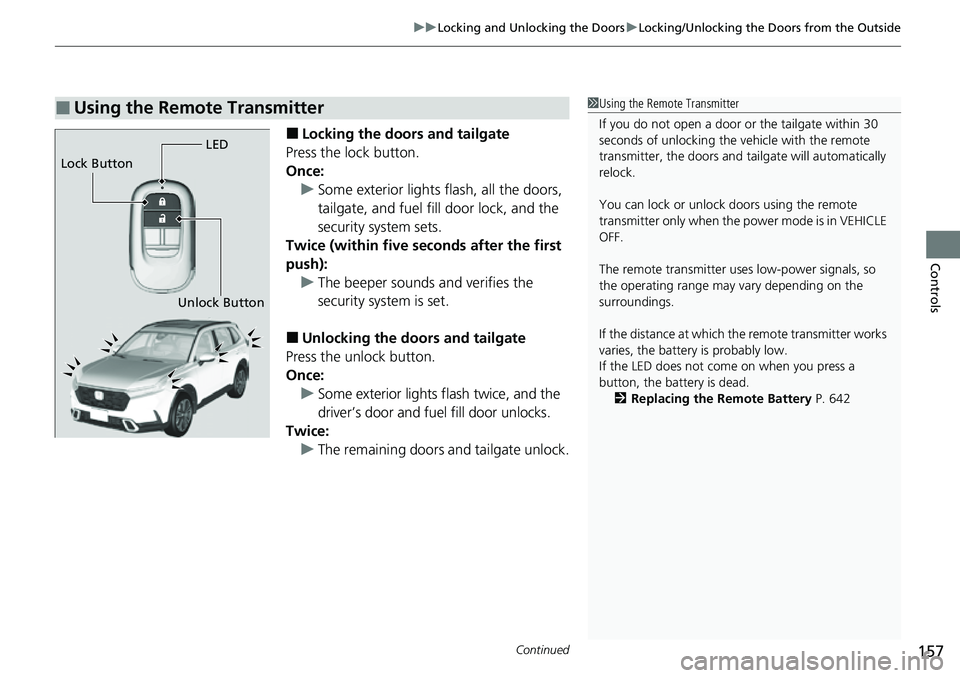
■Locking the doors and tailgate
Press the lock button.
Once: u Some exterior lights flash, all the doors,
tailgate, and fuel fill door lock, and the
security system sets.
Twice (within five se conds after the first
push): u The beeper sounds and verifies the
security system is set.
■Unlocking the doors and tailgate
Press the unlock button.
Once:
u Some exterior lights flash twice, and the
driver’s door and fuel fill door unlocks.
Twice: u The remaining doors and tailgate unlock.
■Using the Remote Transmitter1Using the Remote Transmitter
If you do not open a door or the tailgate within 30
seconds of unlocking the vehicle with the remote
transmitter, the doors and ta ilgate will automatically
relock.
You can lock or unlock doors using the remote
transmitter only when the power mode is in VEHICLE
OFF.
The remote transmitter us es low-power signals, so
the operating range may vary depending on the
surroundings.
If the distance at which the remote transmitter works
varies, the batter y is probably low.
If the LED does not come on when you press a
button, the battery is dead.
2 Replacing the Remote Battery P. 642
LED
Unlock Button
Lock Button
Page 160 of 719
Continued159
uuLocking and Unlocking the Doors uLocking/Unlocking the Doors from the Outside
Controls
If you do not have the key on you, or if fo r some reason you cannot lock a door using
the key, you can lock the door without it.
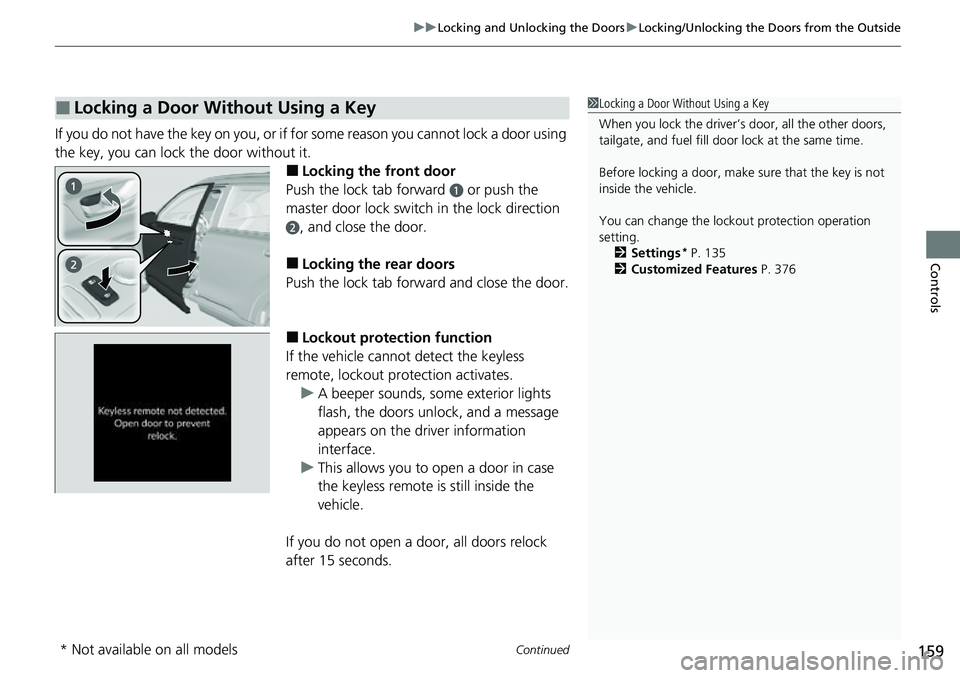
■Locking the front door
Push the lock tab forward
a or push the
master door lock switch in the lock direction
b, and close the door.
■Locking the rear doors
Push the lock tab forward and close the door.
■Lockout protection function
If the vehicle cannot detect the keyless
remote, lockout prot ection activates.
u A beeper sounds, some exterior lights
flash, the doors unlock, and a message
appears on the dr iver information
interface.
u This allows you to open a door in case
the keyless remote is still inside the
vehicle.
If you do not open a door, all doors relock
after 15 seconds.
■Locking a Door Without Using a Key1 Locking a Door Without Using a Key
When you lock the driver’s door, all the other doors,
tailgate, and fuel fill door lock at the same time.
Before locking a door, make sure that the key is not
inside the vehicle.
You can change the lockout protection operation
setting.
2 Settings
* P. 135
2 Customized Features P. 376
* Not available on all models
Page 162 of 719
161
uuLocking and Unlocking the Doors uLocking/Unlocking the Doors from the Inside
Continued
Controls
Locking/Unlocking the Doors from the Inside
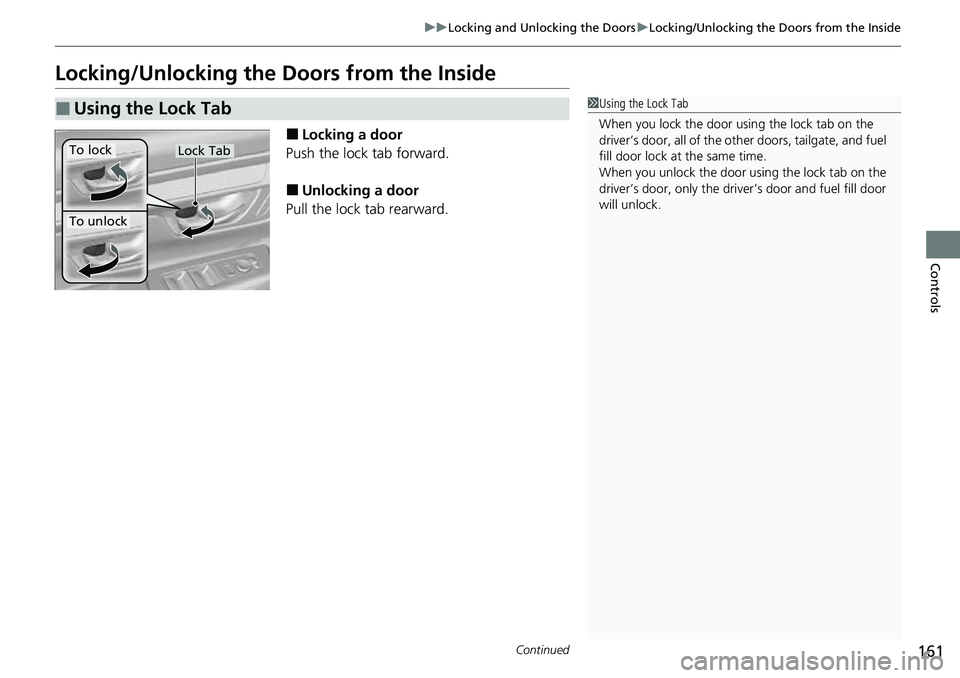
■Locking a door
Push the lock tab forward.
■Unlocking a door
Pull the lock tab rearward.
■Using the Lock Tab1 Using the Lock Tab
When you lock the door using the lock tab on the
driver’s door, all of the ot her doors, tailgate, and fuel
fill door lock at the same time.
When you unlock the door using the lock tab on the
driver’s door, only the driver ’s door and fuel fill door
will unlock.
To unlock
Lock TabTo lock
Page 164 of 719
163
uuLocking and Unlocking the Doors uChildproof Door Locks
Controls
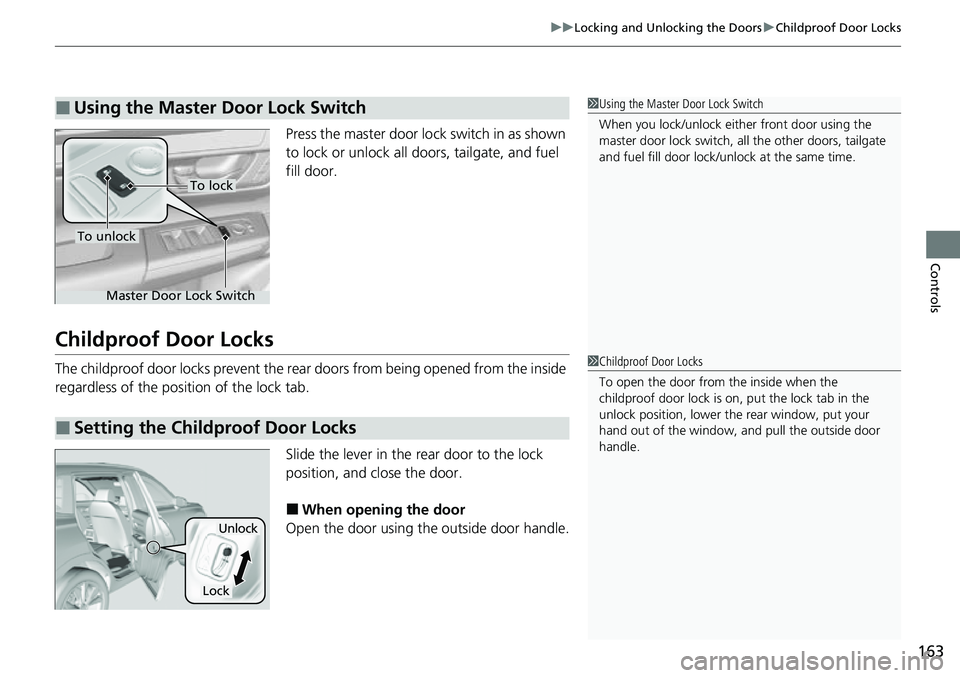
Press the master door lo ck switch in as shown
to lock or unlock all doors, tailgate, and fuel
fill door.
Childproof Door Locks
The childproof door locks prevent the rear doors from being opened from the inside
regardless of the position of the lock tab.
Slide the lever in the rear door to the lock
position, and close the door.
■When opening the door
Open the door using the outside door handle.
■Using the Master Door Lock Switch1 Using the Master Door Lock Switch
When you lock/unlock eith er front door using the
master door lock switch, al l the other doors, tailgate
and fuel fill door lock/unl ock at the same time.
To unlock
Master Door Lock Switch
To lock
■Setting the Childproof Door Locks
1Childproof Door Locks
To open the door from the inside when the
childproof door lock is on, put the lock tab in the
unlock position, lower the rear window, put your
hand out of the window, and pull the outside door
handle.
Lock
Unlock
Page 238 of 719
237
Features
This chapter describes how to operate technology features.
Audio SystemAbout Your Audio System ................ 238
USB Ports ......................................... 239
Audio System Theft Protection ......... 241
Audio Remote Controls .................... 242
Audio System Basic Operation ........ 246
Adjusting the Sound ........................ 247
Display Setup ................................... 248
Playing AM/FM Radio ....................... 249
Playing an iPod ................................ 251
Playing a USB Flash Drive ................. 254
Playing Bluetooth ® Audio ................. 257
Siri Eyes Free .................................... 261
Models with 7-in. Color Touchscreen
Smartphone Voice Recognition ........ 262
Apple CarPlay .................................. 263
Android Auto
TM................................ 267
Audio System Basic Operation ........ 271
Start Up ........................................... 272
Audio/Information Screen ................ 273
System Updates ............................... 284
Adjusting the Sound ........................ 290
Display Setup ................................... 291
Voice Control Operation .................. 293
Playing AM/FM Radio ....................... 296
Playing SiriusXM ® Radio ................... 300
Playing an iPod ................................ 311Models with 9-in. Color Touchscreen
Playing a USB Flash Drive ................. 314
Playing Bluetooth ® Audio ................ 317
HondaLink ®..................................... 320
Smart Shortcuts ............................... 324
Wi-Fi Connection ............................. 327
AT&T Hotspot
*................................ 328
Apple CarPlay .................................. 329
Android Auto
TM............................... 336
Power Flow...................................... 342
Audio Error Messages ...................... 345
General Information on the Audio System ............................................. 347
Customized Features ................ 368, 376
Bluetooth® HandsFreeLink® ..... 400, 420
Refuel Recommend .......................... 439
* Not available on all models
Page 343 of 719
342
uuAudio System Basic Operation uPower Flow
Features
Power Flow
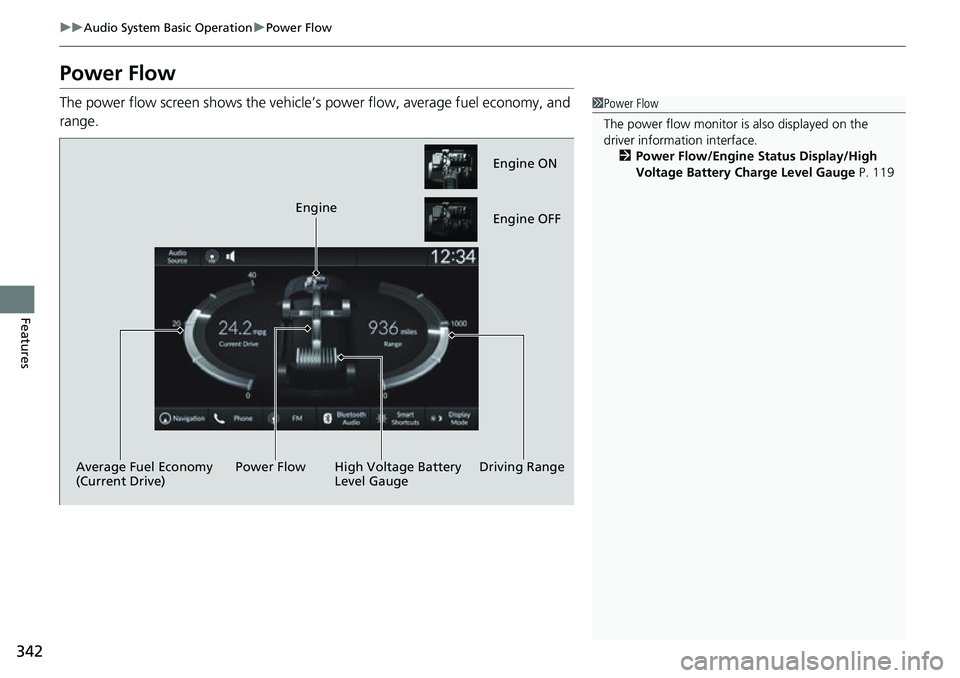
The power flow screen show s the vehicle’s power flow, average fuel economy, and
range.1 Power Flow
The power flow monitor is also displayed on the
driver information interface.
2 Power Flow/Engine Status Display/High
Voltage Battery Charge Level Gauge P. 119
Engine ON
Engine OFF
Driving Range
Engine
High Voltage Battery
Level Gauge
Power Flow
Average Fuel Economy
(Current Drive)
Page 356 of 719
355
uuGeneral Information on the Audio System uHonda App License Agreement
Continued
Features
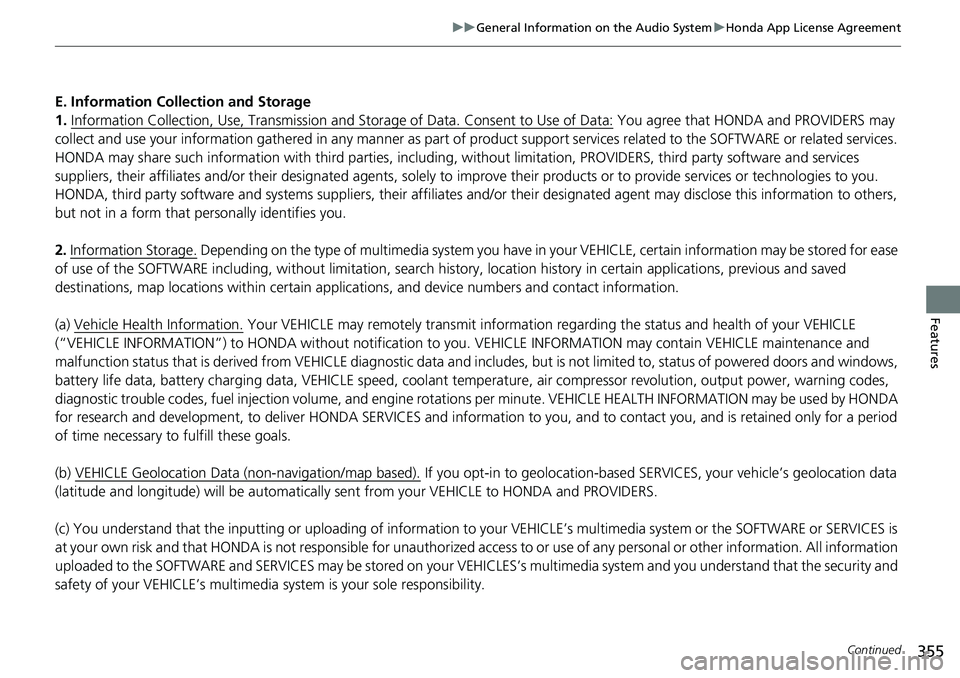
E. Information Collection and Storage
1. Information Collection, Use, Transmission a nd Storage of Data. Consent to Use of Data:
You agree that HONDA and PROVIDERS may
collect and use your information gathered in any manner as part of product support services related to the SOFTWARE or related services.
HONDA may share such information with third parties, including, without limitation, PR OVIDERS, third party software and service s
suppliers, their affiliates and/or their designated agents, solely to improve their products or to provide services or technolo gies to you.
HONDA, third party software and systems supplie rs, their affiliates and/or their designated agent may disclose this information to others,
but not in a form that pe rsonally identifies you.
2. Information Storage.
Depending on the type of mult imedia system you have in your VEHICLE, certain information may be stored for ease
of use of the SOFTWARE including, without limitation, search history, location history in certain applications, previous and sa ved
destinations, map locations within certain applications, and device numbers and contact information.
(a) Vehicle Health Information.
Your VEHICLE may remotely transmit information re garding the status and health of your VEHICLE
(“VEHICLE INFORMATION”) to HO NDA without notification to you. VEHICLE INFO RMATION may contain VEHICLE maintenance and
malfunction status that is derived from VEHICLE diagnostic data and includes, but is not limited to, status of powered doors and windows,
battery life data, battery charging data, VE HICLE speed, coolant temperature, air comp ressor revolution, output power, warning codes,
diagnostic trouble codes, fuel injection volume, and engine rotati ons per minute. VEHICLE HEALTH INFORMATION may be used by HON DA
for research and development, to deliver HONDA SERVICES and informat ion to you, and to contact you, and is retained only for a period
of time necessary to fulfill these goals.
(b) VEHICLE Geolocation Data (non-navigation/map based).
If you opt-in to geolocation-based SERVICES, your vehicle’s geolocation data
(latitude and longitude) will be automatically sent from your VEHICLE to HONDA and PROVIDERS.
(c) You understand that the inputting or uploading of information to your VEHICLE’s multimedia system or the SOFTWARE or SERVIC ES is
at your own risk and that HONDA is not responsible for unauthori zed access to or use of any personal or other information. All information
uploaded to the SOFTWARE and SERVICES may be stored on your VEHICLES’s multimedia system and you understand that the security and
safety of your VEHICLE’s multimedia system is your sole responsibility.
Page 379 of 719
378
uuCustomized Features u
Features
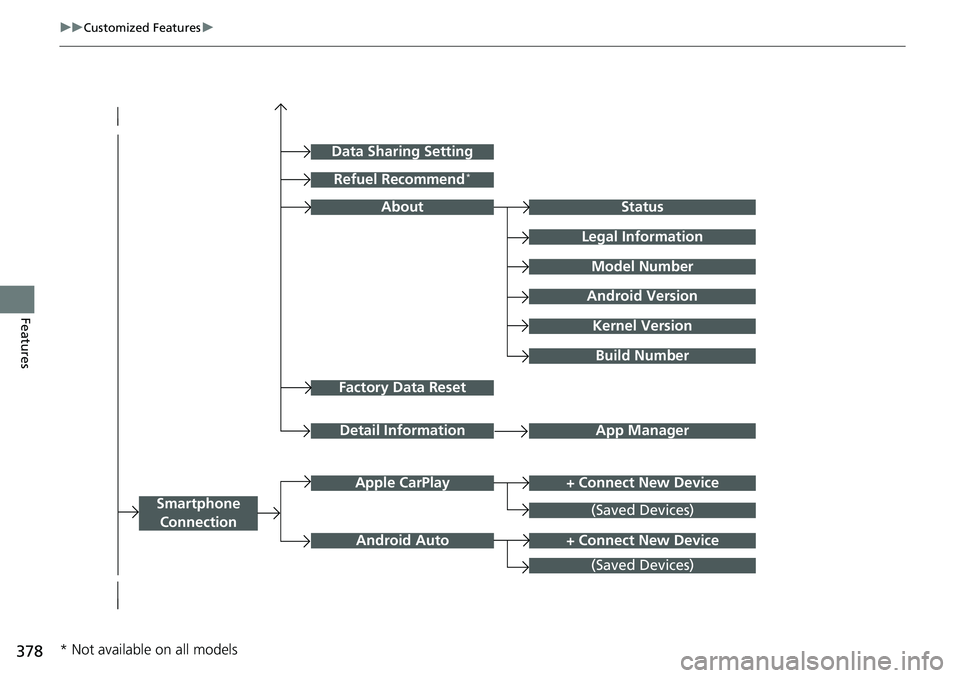
Factory Data Reset
Status
Legal Information
Build Number
Data Sharing Setting
Model Number
Android Version
Kernel Version
App ManagerDetail Information
About
+ Connect New DeviceApple CarPlay
Smartphone
Connection
Android Auto
(Saved Devices)
+ Connect New Device
(Saved Devices)
Refuel Recommend*
* Not available on all models