lights HONDA CRV 2023 Repair Manual
[x] Cancel search | Manufacturer: HONDA, Model Year: 2023, Model line: CRV, Model: HONDA CRV 2023Pages: 719, PDF Size: 13.43 MB
Page 578 of 719
Continued577
uuBraking uBrake System
Driving
Keeps the brake applied after releasing the brake pedal until the accelerator pedal is
pressed. You can use this system while th e vehicle is temporarily stopped, like at
traffic lights and in heavy traffic.
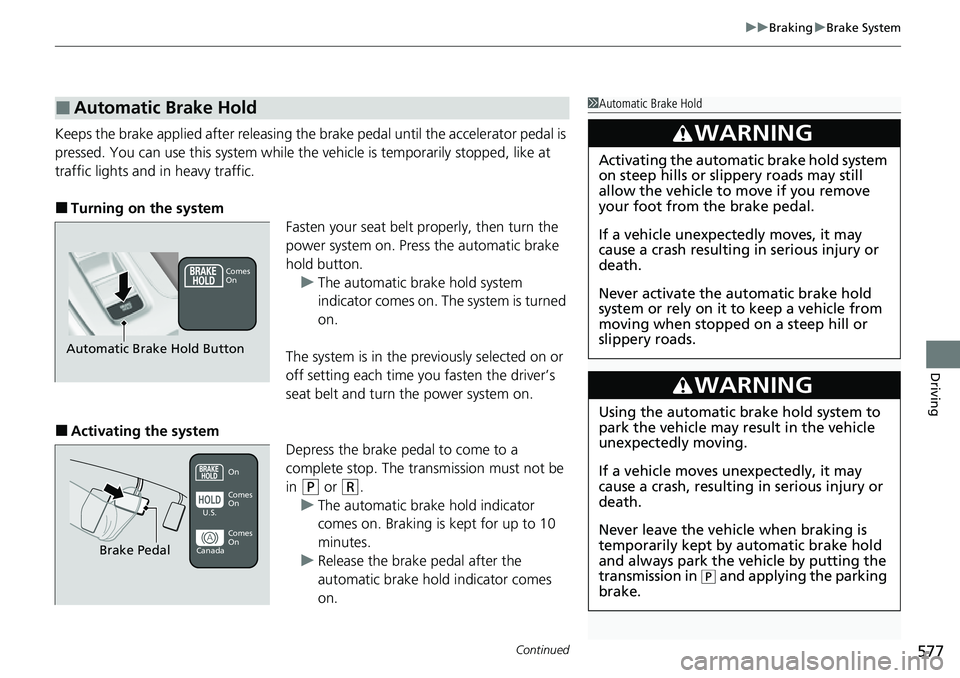
■Turning on the system Fasten your seat belt properly, then turn the
power system on. Press the automatic brake
hold button.u The automatic brake hold system
indicator comes on. The system is turned
on.
The system is in the prev iously selected on or
off setting each time you fasten the driver’s
seat belt and turn the power system on.
■Activating the system Depress the brake pedal to come to a
complete stop. The transmission must not be
in
(P or (R.
u The automatic brake hold indicator
comes on. Braking is kept for up to 10
minutes.
u Release the brake pedal after the
automatic brake hold indicator comes
on.
■Automatic Brake Hold1Automatic Brake Hold
3WARNING
Activating the automatic brake hold system
on steep hills or slippery roads may still
allow the vehicle to move if you remove
your foot from the brake pedal.
If a vehicle unexpectedly moves, it may
cause a crash resulting in serious injury or
death.
Never activate the automatic brake hold
system or rely on it to keep a vehicle from
moving when stopped on a steep hill or
slippery roads.
3WARNING
Using the automatic brake hold system to
park the vehicle may result in the vehicle
unexpectedly moving.
If a vehicle moves unexpectedly, it may
cause a crash, resulting in serious injury or
death.
Never leave the vehicle when braking is
temporarily kept by automatic brake hold
and always park the vehicle by putting the
transmission in
( P and applying the parking
brake.
Comes
On
Automatic Brake Hold Button
On
Brake Pedal
Comes
On Comes
On
U.S.
Canada
Page 601 of 719
600
Maintenance
Before Performing Maintenance
Inspection and Maintenance
For your safety, perform all listed inspections and maintenance to keep your vehicle
in good condition. If you become aware of an y abnormality (noise, smell, insufficient
brake fluid, oil residue on the ground, etc.), have your vehicle inspected by a dealer.
(Note, however, that service at a dealer is not mandatory to keep your warranties in
effect.)
■Routine inspections
Perform inspections before long distance tri ps, when washing the vehicle, or when
refueling.
2 Maintenance P. 37
■Periodic inspections
• Check the brake fluid level monthly.
2 Checking the Brake Fluid P. 621
•Check the tire pressure monthly. Examin e the tread for wear and foreign objects.
2Checking and Maintaining Tires P. 631
•Check the operation of the exterior lights monthly.
2 Replacing Light Bulbs P. 623
•Check the condition of the wiper bl ades at least every six months.
2Checking and Maintaining Wiper Blades P. 627
■Types of Inspection and Maintenance
1Inspection and Maintenance
Maintenance, replacement, or repair of
emissions control devices and systems may be
done by any automotive repair establishment or
individuals using parts that are “certified” to
EPA standards.
According to state and fede ral regulations, failure to
perform maintenance on the maintenance main
items marked with # will not void your emissions
warranties. However, all ma intenance services should
be performed in accordan ce with the intervals
indicated by the driver information interface.
2 Maintenance Service Items P. 607
If you want to perform complex maintenance tasks
that require more skills a nd tools, you can purchase a
subscription to the Service Express website at
www.techinfo.honda.com .
2 Authorized Manuals P. 704
If you want to perform ma intenance yourself, make
sure that you have the necessary tools and skills first.
After performing maintenanc e, update the records in
the separate maintenance booklet.
U.S. models
Page 624 of 719
623
Maintenance
Replacing Light Bulbs
Headlights
Headlights are LED type. Have an authorized Honda dealer inspect and replace the
light assembly.
Front Turn Signal, Parkin g/Daytime Running Lights
Front turn signal, parking/daytime running lights are LED type. Have an authorized
Honda dealer inspect and replace the light assembly.
Front Side Marker Lights
Front side marker lights are LED type. Have an authorized Hond a dealer inspect and
replace the light assembly.
Side Turn Signal/Emer gency Indicator Lights
Door mirror side turn lights are LED type. Have an authorized Honda dealer inspect
and replace the light assembly.
1 Headlights
The headlight aim is set by the factory, and does not
need to be adjusted. Howeve r, if you regularly carry
heavy items in the cargo area or tow a trailer, have
the aiming readjusted at a dealer or by a qualified
technician.
Page 625 of 719
624
uuReplacing Light Bulbs uBrake Light, Taillight, Rear Side Marker Light, and Rear Turn Signal Light Bulbs
Maintenance
Brake Light, Taillight, Rear Side Marker Light, and
Rear Turn Signal Light Bulbs
When replacing, use the following bulbs.
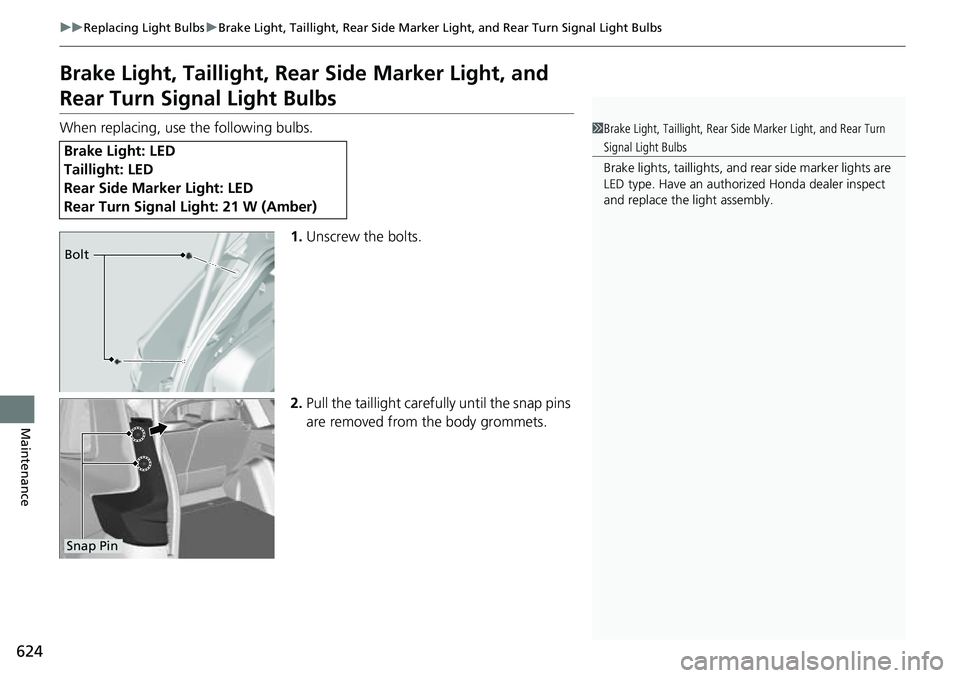
1.Unscrew the bolts.
2. Pull the taillight carefully until the snap pins
are removed from the body grommets.
Brake Light: LED
Taillight: LED
Rear Side Marker Light: LED
Rear Turn Signal Li ght: 21 W (Amber)
1Brake Light, Taillight, Rear Side Marker Light, and Rear Turn
Signal Light Bulbs
Brake lights, taillight s, and rear side marker lights are
LED type. Have an authorized Honda dealer inspect
and replace the light assembly.
Bolt
Snap Pin
Page 627 of 719
626
uuReplacing Light Bulbs uTaillight and Back-Up Lights
Maintenance
Taillight and Back-Up Lights
Taillights and back-up lights are LED type. Ha ve an authorized Honda dealer inspect
and replace the light assembly.
Rear License Plate Light
Rear license plate light is LED type. Have an authorized Honda dealer inspect and
replace the light assembly.
High-Mount Brake Light
High-mount brake light is LED type. Have an authorized Honda dealer inspect and
replace the light assembly.
Page 649 of 719
uuCleaning uExterior Care
648
Maintenance
The inside lenses of exterior lights (headli ghts, brake lights, etc.) may fog temporarily
if you have driven in the rain, or after the vehicle has been run through a car wash.
Dew condensation also may build up inside the lenses when there is a significant
enough difference between the ambient and inside lens temperatures (similar to
vehicle windows fogging up in rainy conditions). These conditions are natural
processes, not structural design problems in the exterior lights.
Lens design characteristics may result in mo isture developing on the light lens frame
surfaces. This also is not a malfunction.
However, if you see large amounts of wa ter accumulation, or large water drops
building up inside the lenses, have your vehicle inspected by a dealer.
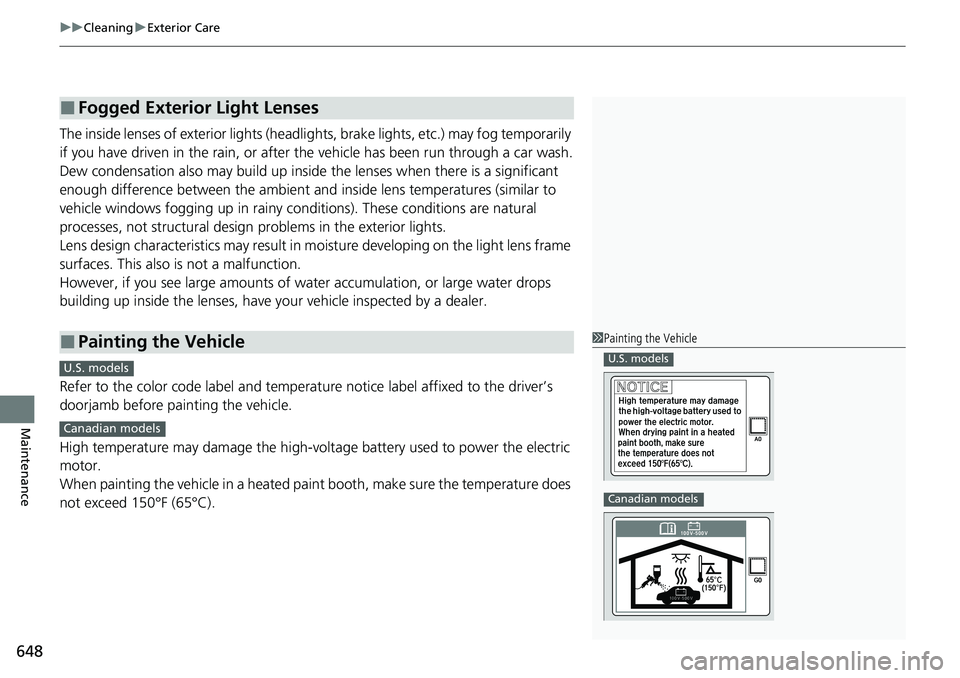
Refer to the color code label and temperat ure notice label affixed to the driver’s
doorjamb before painting the vehicle.
High temperature may damage the high-volt age battery used to power the electric
motor.
When painting the vehicle in a heated paint booth, make sure the temperature does
not exceed 150°F (65°C).
■Fogged Exterior Light Lenses
■Painting the Vehicle1 Painting the Vehicle
U.S. models
Canadian models
C
U.S. models
Canadian models
Page 654 of 719
653Continued
Handling the Unexpected
If a Tire Goes Flat
Temporarily Repairing a Flat Tire
If the tire has a large cut or is otherwise severely damaged, you will need to have the
vehicle towed. If the tire only has a small puncture, from a nail for instance, you can
use the temporary tire repair kit so that you can drive to the nearest service station
for a more permanent repair.
If a tire goes flat while driving, grasp the steering wheel firmly, and brake gradually
to reduce speed. Then, stop in a safe place.
1. Park the vehicle on a firm, level, non-slippery surface and apply the parking brake.
2. Put the transmission into
(P.
3. Turn on the hazard warning lights an d set the power mode to VEHICLE OFF.
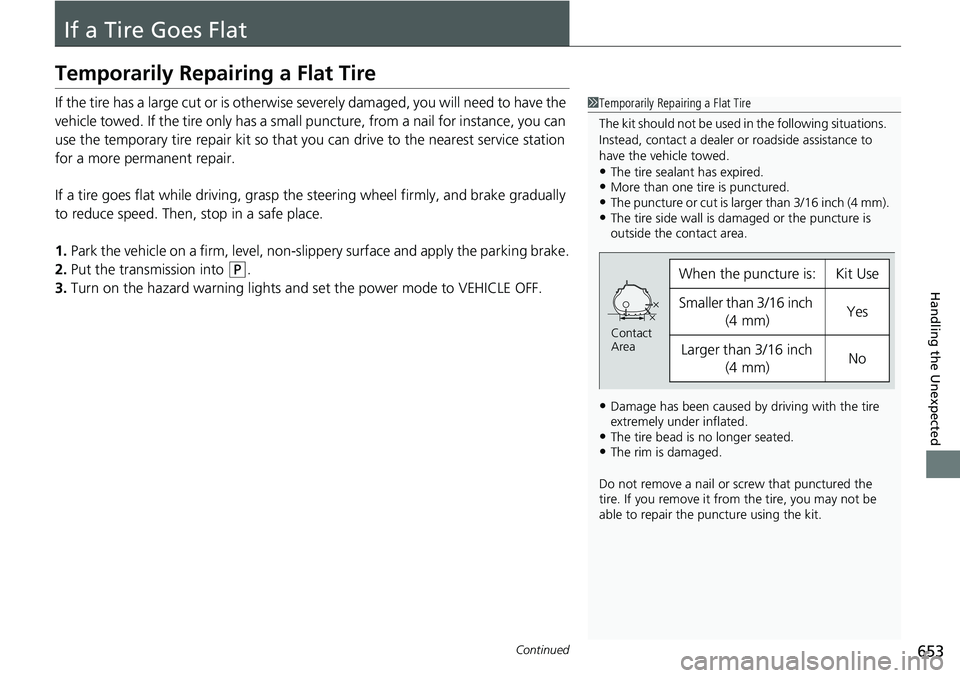
1Temporarily Repairing a Flat Tire
The kit should not be used in the following situations.
Instead, contact a dealer or roadside assistance to
have the vehicle towed.
•The tire sealant has expired.•More than one tire is punctured.•The puncture or cut is larger than 3/16 inch (4 mm).•The tire side wall is da maged or the puncture is
outside the contact area.
•Damage has been caused by driving with the tire
extremely under inflated.
•The tire bead is no longer seated.•The rim is damaged.
Do not remove a nail or screw that punctured the
tire. If you remove it from the tire, you may not be
able to repair the puncture using the kit.
When the puncture is:Kit Use
Smaller than 3/16 inch
(4 mm)Yes
Larger than 3/16 inch (4 mm)No
Contact
Area
Page 672 of 719
671Continued
Handling the Unexpected
If the 12-Volt Battery Is Dead
Jump Starting Procedure
Turn off the power to electric devices, such as audio and lights. Turn off the power
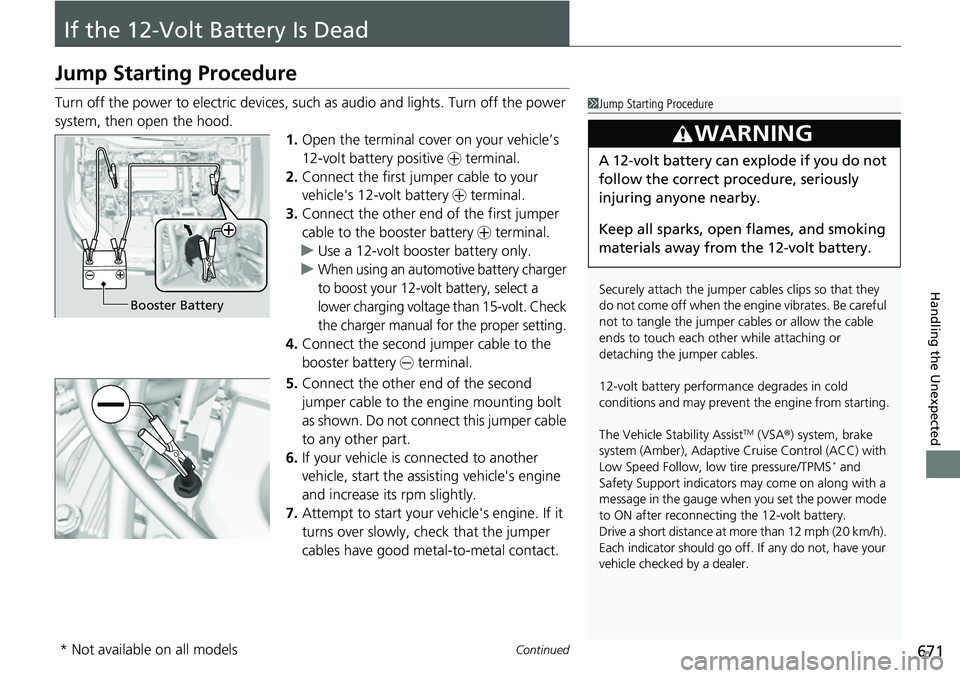
system, then open the hood. 1.Open the terminal cover on your vehicle’s
12-volt battery positive + terminal.
2. Connect the first jumper cable to your
vehicle's 12-volt battery + terminal.
3. Connect the other end of the first jumper
cable to the booster battery + terminal.
u Use a 12-volt booster battery only.
u
When using an automotive battery charger
to boost your 12-volt battery, select a
lower charging voltage than 15-volt. Check
the charger manual for the proper setting.
4. Connect the second jumper cable to the
booster battery - terminal.
5. Connect the other end of the second
jumper cable to the engine mounting bolt
as shown. Do not connect this jumper cable
to any other part.
6. If your vehicle is connected to another
vehicle, start the assisting vehicle's engine
and increase its rpm slightly.
7. Attempt to start your ve hicle's engine. If it
turns over slowly, check that the jumper
cables have good metal-to-metal contact.
1 Jump Starting Procedure
Securely attach the jumper cables clips so that they
do not come off when the e ngine vibrates. Be careful
not to tangle the jumper cables or allow the cable
ends to touch each other while attaching or
detaching the jumper cables.
12-volt battery performa nce degrades in cold
conditions and may prevent the engine from starting.
The Vehicle Stability Assist
TM (VSA ®) system, brake
system (Amber), Adaptive Cruise Control (ACC) with
Low Speed Follow, low tire pressure/TPMS
* and
Safety Support indicators may come on along with a
message in the gauge when you set the power mode
to ON after reconnecting the 12-volt battery.
Drive a short distance at more than 12 mph (20 km/h).
Each indicator should go off. If any do not, have your
vehicle checked by a dealer.
3WARNING
A 12-volt battery can explode if you do not
follow the correct procedure, seriously
injuring anyone nearby.
Keep all sparks, open flames, and smoking
materials away from the 12-volt battery.
Booster Battery
* Not available on all models
Page 675 of 719
674
Handling the Unexpected
Overheating
How to Handle Overheating
Overheating symptoms are as follows:
•The Power system temperature high. Power may be reduced. message
appears on the driver information interface.
• The Engine temperature too hot. Do not drive. Allow engine to cool.
message appears on the driv er information interface.
• Steam or spray comes out of the engine compartment.
The Power system temperature hi gh. Power may be reduced. message
appears on the driver informa tion interface when the power system temperature is
high.
1. Immediately park the vehicle in a safe place.
u Set the parking brake, and put the transmission into
(P. Turn off all accessories
and turn on the hazard warning lights.
2. Keep the power mode in ON, and wait until the message disappears.
u If the message does not disappear, have your vehicle inspected at a dealer.
■First thing to do
1. Immediately park the vehicle in a safe place.
2. Turn off all accessories and turn on the hazard warning lights.
u No steam or spray present: Keep the power system on and open the hood.
u Steam or spray is present: Turn off the power system and wait until it
subsides. Then, open the hood.
■The Power system temperature high. Power may be
reduced. Message Appears on the Driver Information
Interface
■The Engine temperature too hot. Do not drive. Allow engine
to cool. Message Appears on the Driver Information
Interface
1 How to Handle Overheating
NOTICE
Continuing to drive with the Engine temperature
too hot. Do not drive. Allow engine to cool.
message on the driver information interface may
damage the engine.
3WARNING
Steam and spray from an overheated
engine can seri ously scald you.
Do not open the hood if steam is coming
out.
Page 677 of 719
676
Handling the Unexpected
Indicator, Coming On/Blinking
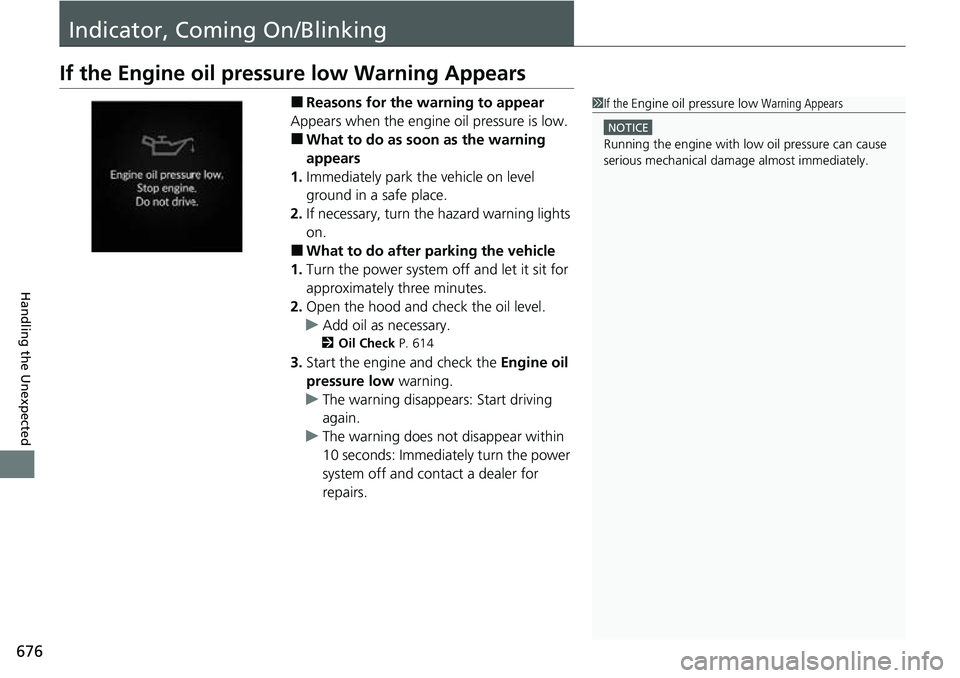
If the Engine oil pressure low Warning Appears
■Reasons for the warning to appear
Appears when the engine oil pressure is low.
■What to do as soon as the warning
appears
1. Immediately park the vehicle on level
ground in a safe place.
2. If necessary, turn the hazard warning lights
on.
■What to do after parking the vehicle
1. Turn the power system off and let it sit for
approximately three minutes.
2. Open the hood and check the oil level.
u Add oil as necessary.
2 Oil Check P. 614
3.Start the engine and check the Engine oil
pressure low warning.
u The warning disappears: Start driving
again.
u The warning does not disappear within
10 seconds: Immediately turn the power
system off and contact a dealer for
repairs.
1If the Engine oil pressure low Warning Appears
NOTICE
Running the engine with low oil pressure can cause
serious mechanical damage almost immediately.