Trip B HONDA CRV 2023 Owners Manual
[x] Cancel search | Manufacturer: HONDA, Model Year: 2023, Model line: CRV, Model: HONDA CRV 2023Pages: 719, PDF Size: 13.43 MB
Page 51 of 719
uuSeat Belts uAbout Your Seat Belts
50
Safe Driving
■Proper use of seat belts
Follow these guidelines for proper use:
• All occupants should sit upright, well back in the seat, and remain in that position
for the duration of the trip. Slouching and leaning reduc e the effectiveness of the
belt and can increase the chance of serious injury in a crash.
• Never place the shoulder part of a lap/shoulder seat belt under your arm or
behind your back. This could cause very serious injuries in a crash.
• Two people should never use the same seat belt. If they do, they could be very
seriously injured in a crash.
• Do not put any accessories on the seat be lts. Devices intended to improve comfort
or reposition the shoulder part of a seat be lt can reduce the protective capability
and increase the chance of serious injury in a crash.1 About Your Seat Belts
If a front or rear seat passenger moves around and
extends the seat belt, the lockable retractor may
activate. If this happens, release the retractor by
unfastening the seat belt and allow the belt to retract
completely. Then, refasten the belt.
Page 53 of 719
uuSeat Belts uAbout Your Seat Belts
52
Safe Driving
■Rear seats
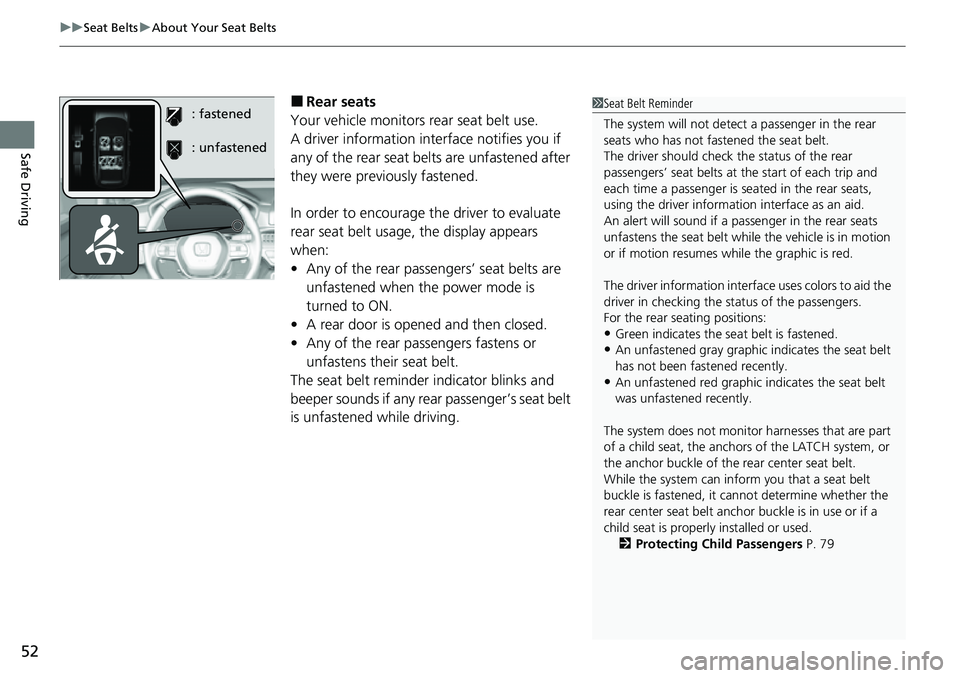
Your vehicle monitors rear seat belt use.
A driver information inte rface notifies you if
any of the rear seat belts are unfastened after
they were previously fastened.
In order to encourage the driver to evaluate
rear seat belt usage, the display appears
when:
• Any of the rear passengers’ seat belts are
unfastened when the power mode is
turned to ON.
• A rear door is opened and then closed.
• Any of the rear passengers fastens or
unfastens their seat belt.
The seat belt reminder indicator blinks and
beeper sounds if any rear passenger’s seat belt
is unfastened while driving.1 Seat Belt Reminder
The system will not detect a passenger in the rear
seats who has not fastened the seat belt.
The driver should check the status of the rear
passengers’ seat belts at th e start of each trip and
each time a passenger is seated in the rear seats,
using the driver information interface as an aid.
An alert will sound if a pa ssenger in the rear seats
unfastens the seat belt whil e the vehicle is in motion
or if motion resumes wh ile the graphic is red.
The driver information interface uses colors to aid the
driver in checking the st atus of the passengers.
For the rear seating positions:
•Green indicates the seat belt is fastened.
•An unfastened gray graphic indicates the seat belt
has not been fastened recently.
•An unfastened red graphic indicates the seat belt
was unfastened recently.
The system does not monito r harnesses that are part
of a child seat, the anchors of the LATCH system, or
the anchor buckle of the rear center seat belt.
While the system can inform you that a seat belt
buckle is fastened, it ca nnot determine whether the
rear center seat belt anchor buckle is in use or if a
child seat is properly installed or used. 2 Protecting Child Passengers P. 79
: fastened
: unfastened
Page 91 of 719
90
uuChild Safety uSafety of Larger Children
Safe Driving
Safety of Larger Children
The following pages give instructions on how to check proper seat belt fit, what kind
of booster seat to use if one is needed, and important precautions for a child who
must sit in front.
When a child is too big for a child seat, secure the child in a rear seat using the lap/
shoulder seat belt. Have the child sit upright and all the way back, then answer the
following questions.
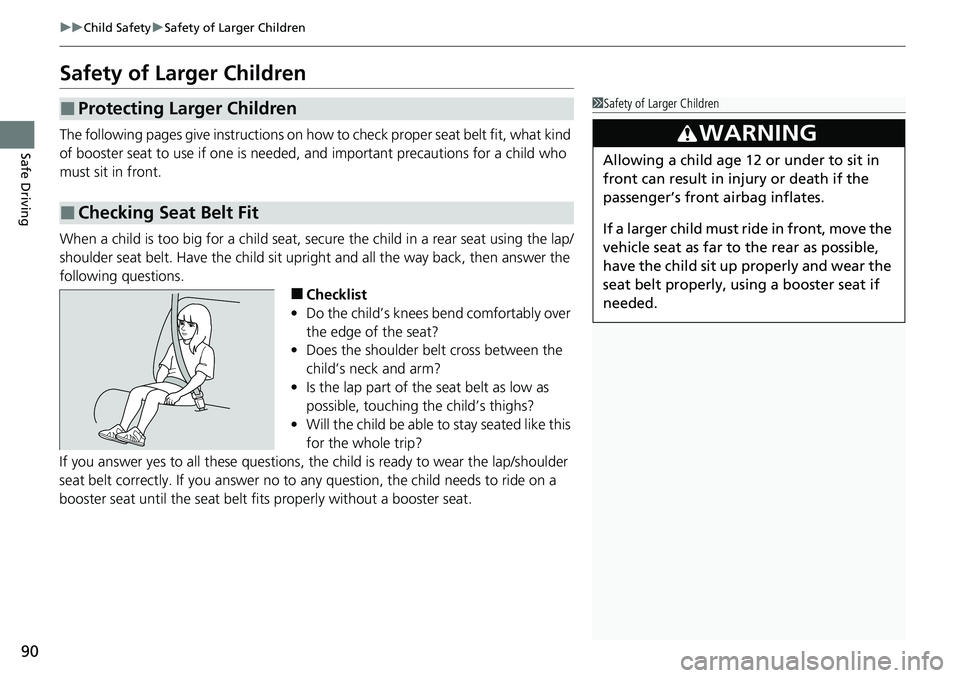
■Checklist
• Do the child’s knees bend comfortably over
the edge of the seat?
• Does the shoulder belt cross between the
child’s neck and arm?
• Is the lap part of the seat belt as low as
possible, touching the child’s thighs?
• Will the child be able to stay seated like this
for the whole trip?
If you answer yes to all thes e questions, the child is read y to wear the lap/shoulder
seat belt correctly. If you answer no to any question, the child needs to ride on a
booster seat until the seat belt fits properly without a booster seat.
■Protecting Larger Children
■Checking Seat Belt Fit
1 Safety of Larger Children
3WARNING
Allowing a child age 12 or under to sit in
front can result in injury or death if the
passenger’s front airbag inflates.
If a larger child must ride in front, move the
vehicle seat as far to the rear as possible,
have the child sit up properly and wear the
seat belt properly, using a booster seat if
needed.
Page 122 of 719
121
uuGauges and Driver Information Interface uDriver Information Interface
Continued
Instrument Panel
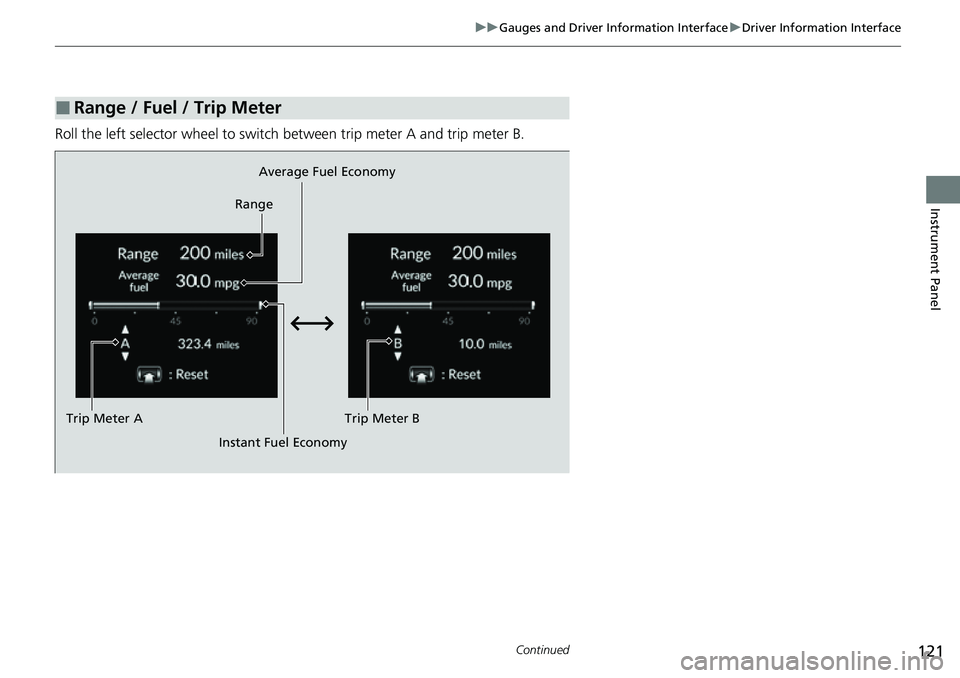
Roll the left selector wheel to switch between trip meter A and trip meter B.
■Range / Fuel / Trip Meter
Average Fuel Economy
Range
Trip Meter B
Instant Fuel Economy
Trip Meter A
Page 123 of 719
uuGauges and Driver Information Interface uDriver Information Interface
122
Instrument Panel
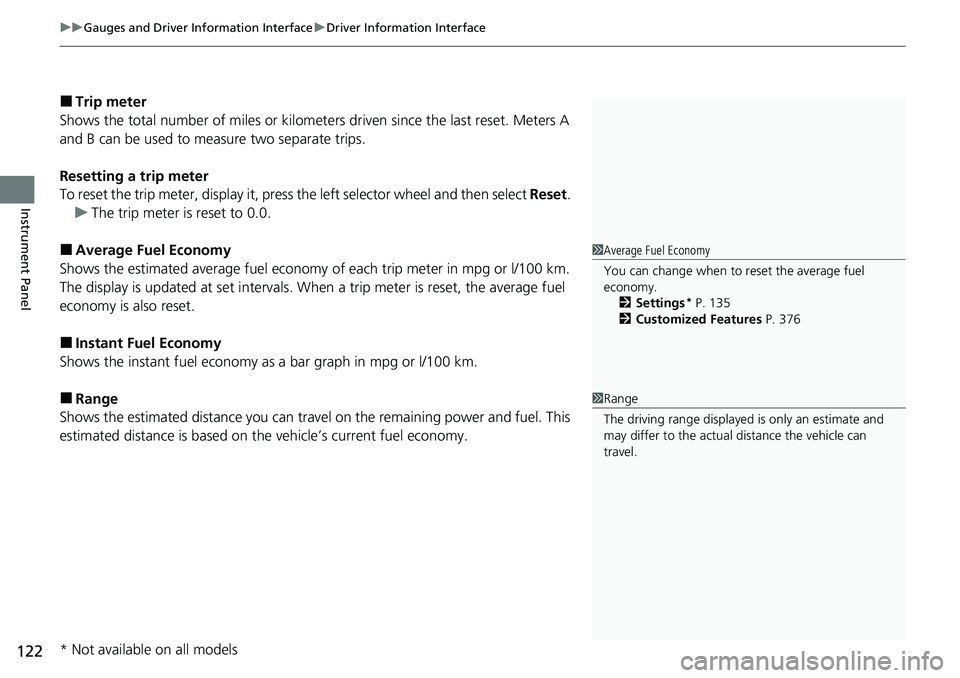
■Trip meter
Shows the total number of miles or kilomete rs driven since the last reset. Meters A
and B can be used to measure two separate trips.
Resetting a trip meter
To reset the trip meter, display it, press the left selector wheel and then select Reset.
u The trip meter is reset to 0.0.
■Average Fuel Economy
Shows the estimated average fuel economy of each trip meter in mpg or l/100 km.
The display is updated at set intervals. When a trip meter is reset, the average fuel
economy is also reset.
■Instant Fuel Economy
Shows the instant fuel economy as a bar graph in mpg or l/100 km.
■Range
Shows the estimated distance you can trave l on the remaining power and fuel. This
estimated distance is based on the vehicle’s current fuel economy.
1 Average Fuel Economy
You can change when to reset the average fuel
economy.
2 Settings
* P. 135
2 Customized Features P. 376
1Range
The driving range displayed is only an estimate and
may differ to the actual distance the vehicle can
travel.
* Not available on all models
Page 124 of 719
123
uuGauges and Driver Information Interface uDriver Information Interface
Continued
Instrument Panel
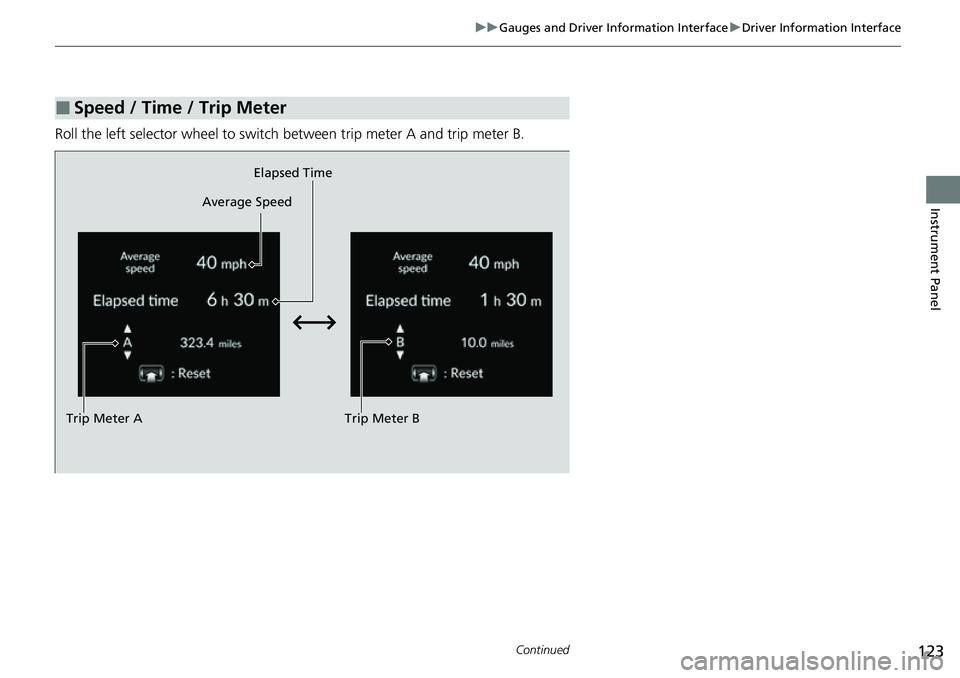
Roll the left selector wheel to switch between trip meter A and trip meter B.
■Speed / Time / Trip Meter
Trip Meter B
Average Speed
Trip Meter A Elapsed Time
Page 125 of 719
uuGauges and Driver Information Interface uDriver Information Interface
124
Instrument Panel
■Trip meter
2 Trip meter P. 122
■Elapsed time
Shows the time elapsed since Trip A or Trip B was reset.
■Average speed
Shows the average speed in mph or km/h since Trip A or Trip B was reset.
Shows the current audio information.
2 Audio System Basic Operation P. 246, 271
Shows the current phone information.
2Bluetooth ® HandsFreeLink ® P. 400, 420
■Audio
■Phone
1 Elapsed time
You can change when to reset the elapsed time.
2 Settings
* P. 135
2 Customized Features P. 376
1Average speed
You can change when to reset the average speed.
2 Settings
* P. 135
2 Customized Features P. 376
* Not available on all models
Page 139 of 719
138
uuGauges and Driver Information Interface uDriver Information Interface
Instrument Panel
*1:Default Setting Setup Group Customizable Features
Description Selectable Settings
Meter setup
Language selectionChanges the displayed language.English*1/Français /
Español
Adjust outside temp.
displayAdjusts the temperature reading by a few degrees.
-5°F ~ ±0°F*1 ~ +5°F
(U.S.)
-3°C ~ ±0°C
*1 ~ +3°C
(Canada)
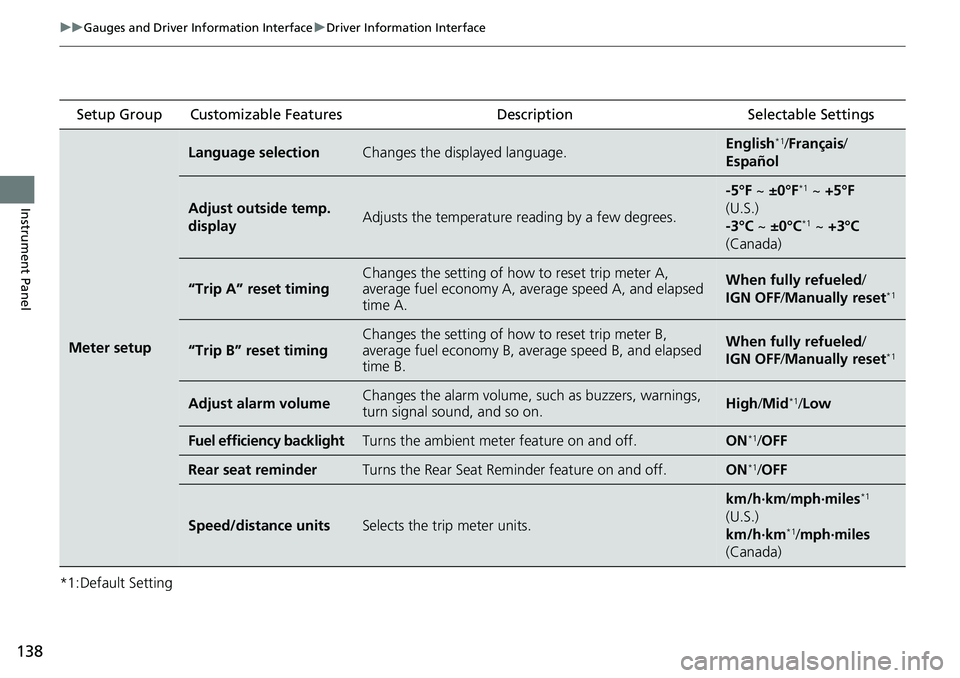
“Trip A” reset timingChanges the setting of how to reset trip meter A,
average fuel economy A, average speed A, and elapsed
time A.When fully refueled /
IGN OFF /Manually reset*1
“Trip B” reset timing
Changes the setting of how to reset trip meter B,
average fuel economy B, av erage speed B, and elapsed
time B.When fully refueled /
IGN OFF /Manually reset*1
Adjust alarm volumeChanges the alarm volume, su ch as buzzers, warnings,
turn signal sound, and so on.High /Mid*1/Low
Fuel efficiency backlightTurns the ambient meter feature on and off.ON*1/OFF
Rear seat reminderTurns the Rear Seat Reminder feature on and off.ON*1/OFF
Speed/distance unitsSelects the trip meter units.
km/h∙km/ mph∙miles*1
(U.S.)
km/h∙km
*1/ mph∙miles
(Canada)
Page 143 of 719
142
uuGauges and Driver Information Interface uDriver Information Interface
Instrument Panel
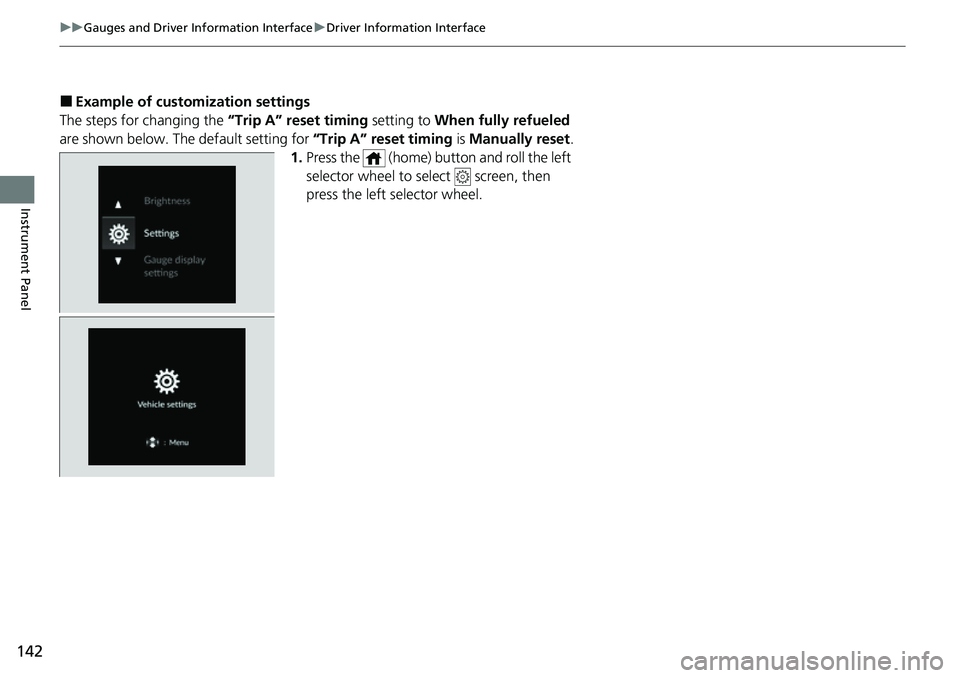
■Example of customization settings
The steps for changing the “Trip A” reset timing setting to When fully refueled
are shown below. The default setting for “Trip A” reset timing is Manually reset.
1. Press the (home) button and roll the left
selector wheel to select screen, then
press the left selector wheel.
Page 144 of 719
143
uuGauges and Driver Information Interface uDriver Information Interface
Continued
Instrument Panel
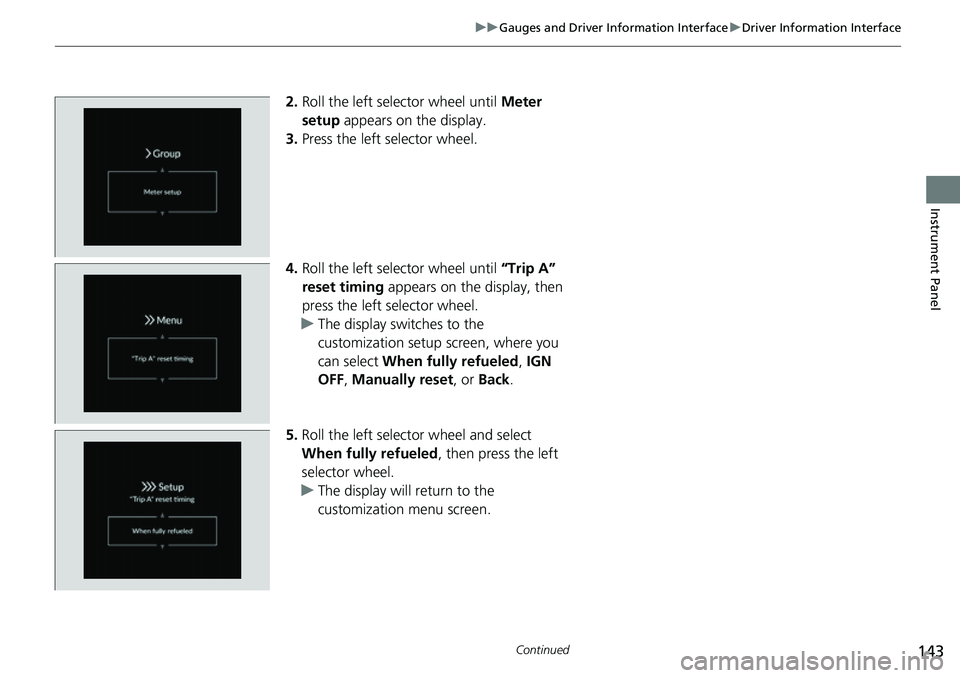
2. Roll the left selector wheel until Meter
setup appears on the display.
3. Press the left selector wheel.
4. Roll the left selector wheel until “Trip A”
reset timing appears on the display, then
press the left selector wheel.
u The display swit ches to the
customization setup screen, where you
can select When fully refueled , IGN
OFF , Manually reset , or Back .
5. Roll the left selector wheel and select
When fully refueled , then press the left
selector wheel.
u The display will return to the
customization menu screen.