brake HONDA ELEMENT 2010 1.G User Guide
[x] Cancel search | Manufacturer: HONDA, Model Year: 2010, Model line: ELEMENT, Model: HONDA ELEMENT 2010 1.GPages: 342, PDF Size: 5.76 MB
Page 74 of 342
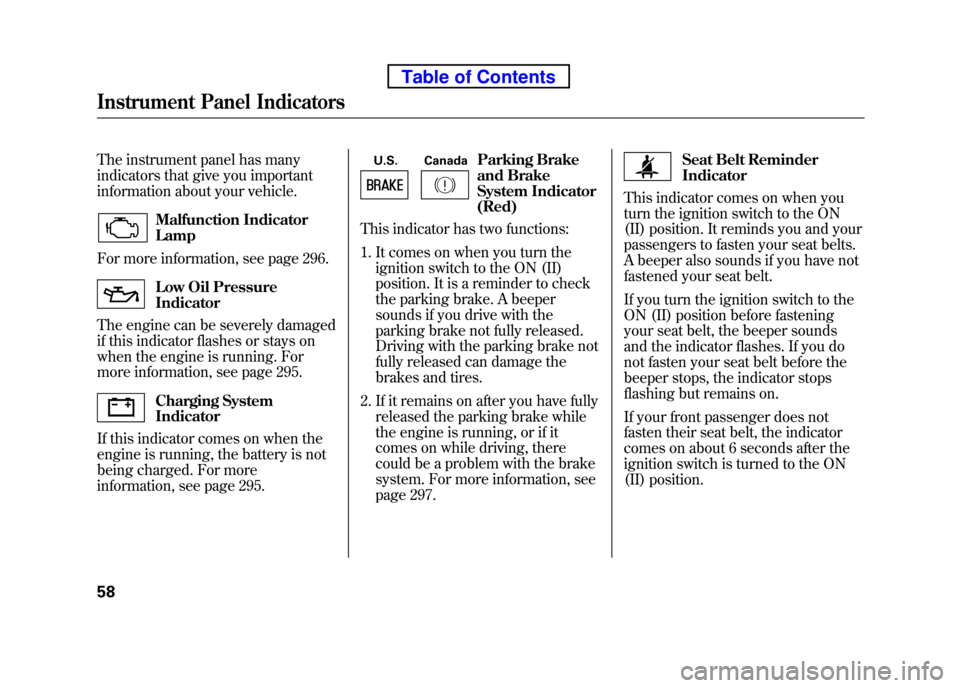
The instrument panel has many
indicators that give you important
information about your vehicle.
Malfunction Indicator Lamp
For more information, see page 296.
Low Oil Pressure Indicator
The engine can be severely damaged
if this indicator flashes or stays on
when the engine is running. For
more information, see page 295.
Charging System Indicator
If this indicator comes on when the
engine is running, the battery is not
being charged. For more
information, see page 295. U.S. Canada
Parking Brake
and Brake
System Indicator(Red)
This indicator has two functions:
1. It comes on when you turn the
ignition switch to the ON (II)
position. It is a reminder to check
the parking brake. A beeper
sounds if you drive with the
parking brake not fully released.
Driving with the parking brake not
fully released can damage the
brakes and tires.
2. If it remains on after you have fully released the parking brake while
the engine is running, or if it
comes on while driving, there
could be a problem with the brake
system. For more information, see
page 297.
Seat Belt Reminder Indicator
This indicator comes on when you
turn the ignition switch to the ON
(II) position. It reminds you and your
passengers to fasten your seat belts.
A beeper also sounds if you have not
fastened your seat belt.
If you turn the ignition switch to the
ON (II) position before fastening
your seat belt, the beeper sounds
and the indicator flashes. If you do
not fasten your seat belt before the
beeper stops, the indicator stops
flashing but remains on.
If your front passenger does not
fasten their seat belt, the indicator
comes on about 6 seconds after the
ignition switch is turned to the ON
(II) position.
Instrument Panel Indicators
58
Table of Contents
Page 75 of 342
If either of you do not fasten your
seat belt while driving, the beeper
will sound and the indicator will flash
again at regular intervals. For more
information, see page 18.
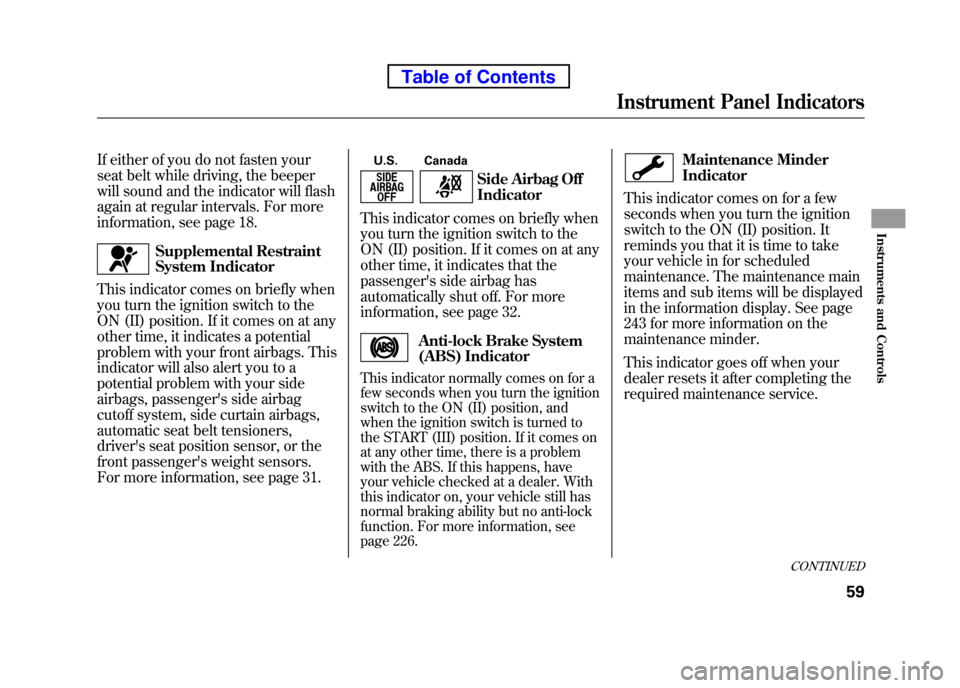
Supplemental Restraint
System Indicator
This indicator comes on briefly when
you turn the ignition switch to the
ON (II) position. If it comes on at any
other time, it indicates a potential
problem with your front airbags. This
indicator will also alert you to a
potential problem with your side
airbags, passenger's side airbag
cutoff system, side curtain airbags,
automatic seat belt tensioners,
driver's seat position sensor, or the
front passenger's weight sensors.
For more information, see page 31. U.S. Canada
Side Airbag Off Indicator
This indicator comes on briefly when
you turn the ignition switch to the
ON (II) position. If it comes on at any
other time, it indicates that the
passenger's side airbag has
automatically shut off. For more
information, see page 32.
Anti-lock Brake System
(ABS) Indicator
This indicator normally comes on for a
few seconds when you turn the ignition
switch to the ON (II) position, and
when the ignition switch is turned to
the START (III) position. If it comes on
at any other time, there is a problem
with the ABS. If this happens, have
your vehicle checked at a dealer. With
this indicator on, your vehicle still has
normal braking ability but no anti-lock
function. For more information, see
page 226.
Maintenance Minder Indicator
This indicator comes on for a few
seconds when you turn the ignition
switch to the ON (II) position. It
reminds you that it is time to take
your vehicle in for scheduled
maintenance. The maintenance main
items and sub items will be displayed
in the information display. See page
243 for more information on the
maintenance minder.
This indicator goes off when your
dealer resets it after completing the
required maintenance service.
CONTINUED
Instrument Panel Indicators
59
Instruments and Controls
Table of Contents
Page 76 of 342

Immobilizer System Indicator
This indicator comes on for a few
seconds when you turn the ignition
switch to the ON (II) position. It will
then go off if you have inserted a
properly coded ignition key. If it is
not a properly coded key, the
indicator will blink, and the engine
will not start (see page 76).
This indicator also blinks several
times when you turn the ignition
switch from the ON (II) position to
the ACCESSORY (I) or LOCK (0) position.Turn Signal and
Hazard WarningIndicators
The left or right turn signal indicator
blinks when you signal a lane change
or turn. If the indicators do not blink
or they blink rapidly, it usually
means one of the turn signal bulbs is
burned out (see page 263). Replace
the bulb as soon as possible, since
other drivers cannot see that you aresignaling.
When you press the hazard warning
button, both turn signal indicators
and all turn signals on the outside of
the vehicle flash.Daytime Running Lights Indicator
If this indicator comes on when the
ignition switch is turned to the ON
(II) position and the parking brake is
released, it means there is a problem
with a circuit. Have your vehicle
checked by your dealer.
Cruise Control Indicator
This indicator comes on when you
set the cruise control. See page 193
for information on operating the
cruise control.
Cruise Main Indicator
This indicator comes on when you
turn on the cruise control system by
pressing the CRUISE button on the
steering wheel (see page 193).
Instrument Panel Indicators
60
Table of Contents
Page 88 of 342
High Beams-Push the lever back
until you hear a click to turn on the
high beams. The blue high beam
indicator will come on (see page 61).
Pull the lever back again to low beams.
To flash the high beams, pull the
lever back lightly, then release it.
The high beams will stay on as long
as you hold the lever back. Daytime Running Lights
With the headlight switch off, the
daytime running lights come on
when you turn the ignition switch to
the ON (II) position and release the
parking brake. They remain on until
you turn the ignition switch off, even
if you set the parking brake.
When the headlights are on, the
daytime running lights are off.Instrument Panel Brightness
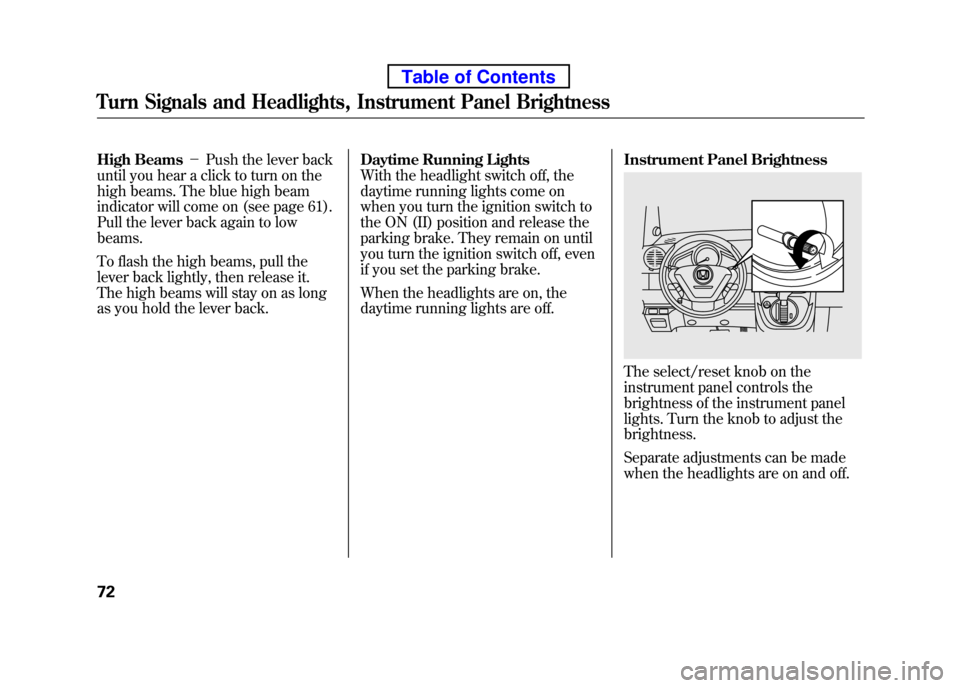
The select/reset knob on the
instrument panel controls the
brightness of the instrument panel
lights. Turn the knob to adjust thebrightness.
Separate adjustments can be made
when the headlights are on and off.
Turn Signals and Headlights, Instrument Panel Brightness
72
Table of Contents
Page 110 of 342
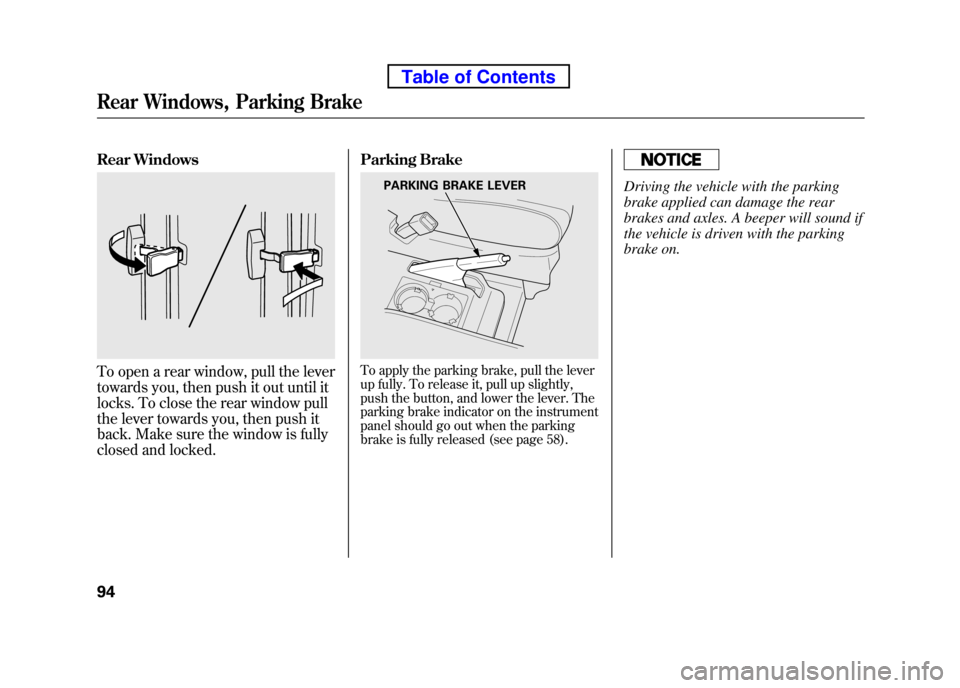
Rear Windows
To open a rear window, pull the lever
towards you, then push it out until it
locks. To close the rear window pull
the lever towards you, then push it
back. Make sure the window is fully
closed and locked.Parking BrakeTo apply the parking brake, pull the lever
up fully. To release it, pull up slightly,
push the button, and lower the lever. The
parking brake indicator on the instrument
panel should go out when the parking
brake is fully released (see page 58).
Driving the vehicle with the parking
brake applied can damage the rear
brakes and axles. A beeper will sound if
the vehicle is driven with the parking
brake on.PARKING BRAKE LEVER
Rear Windows, Parking Brake
94
Table of Contents
Page 210 of 342
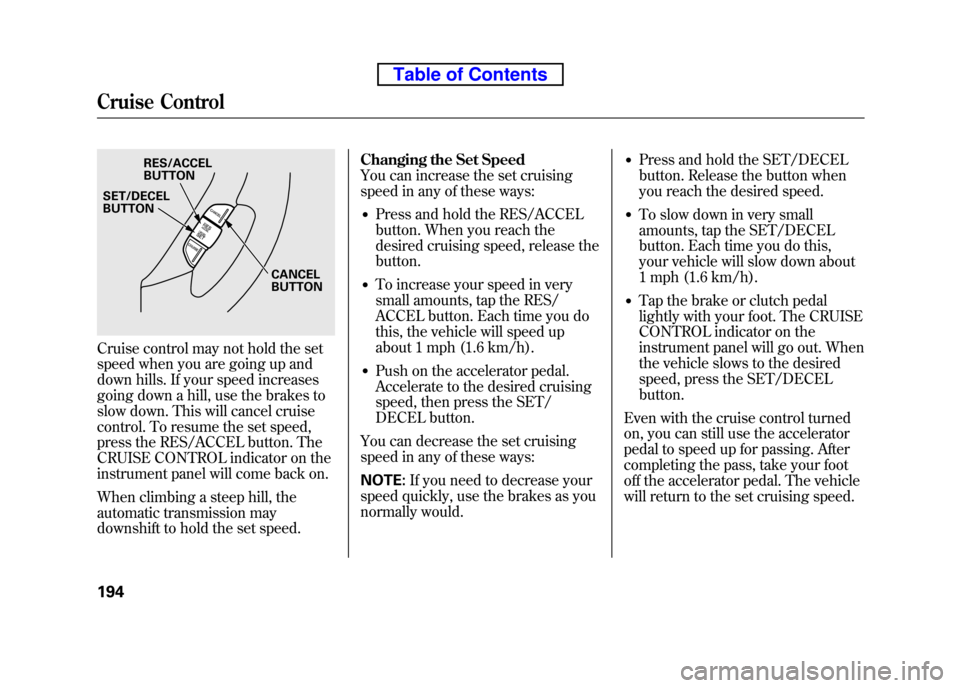
Cruise control may not hold the set
speed when you are going up and
down hills. If your speed increases
going down a hill, use the brakes to
slow down. This will cancel cruise
control. To resume the set speed,
press the RES/ACCEL button. The
CRUISE CONTROL indicator on the
instrument panel will come back on.
When climbing a steep hill, the
automatic transmission may
downshift to hold the set speed.Changing the Set Speed
You can increase the set cruising
speed in any of these ways:
● Press and hold the RES/ACCEL
button. When you reach the
desired cruising speed, release thebutton.
● To increase your speed in very
small amounts, tap the RES/
ACCEL button. Each time you do
this, the vehicle will speed up
about 1 mph (1.6 km/h).
● Push on the accelerator pedal.
Accelerate to the desired cruising
speed, then press the SET/
DECEL button.
You can decrease the set cruising
speed in any of these ways: NOTE: If you need to decrease your
speed quickly, use the brakes as you
normally would. ●
Press and hold the SET/DECEL
button. Release the button when
you reach the desired speed.
● To slow down in very small
amounts, tap the SET/DECEL
button. Each time you do this,
your vehicle will slow down about
1 mph (1.6 km/h).
● Tap the brake or clutch pedal
lightly with your foot. The CRUISE
CONTROL indicator on the
instrument panel will go out. When
the vehicle slows to the desired
speed, press the SET/DECELbutton.
Even with the cruise control turned
on, you can still use the accelerator
pedal to speed up for passing. After
completing the pass, take your foot
off the accelerator pedal. The vehicle
will return to the set cruising speed.
RES/ACCEL BUTTON
CANCELBUTTON
SET/DECELBUTTON
Cruise Control
194
Table of Contents
Page 211 of 342
Resting your foot on the brake or
clutch pedal causes the cruise
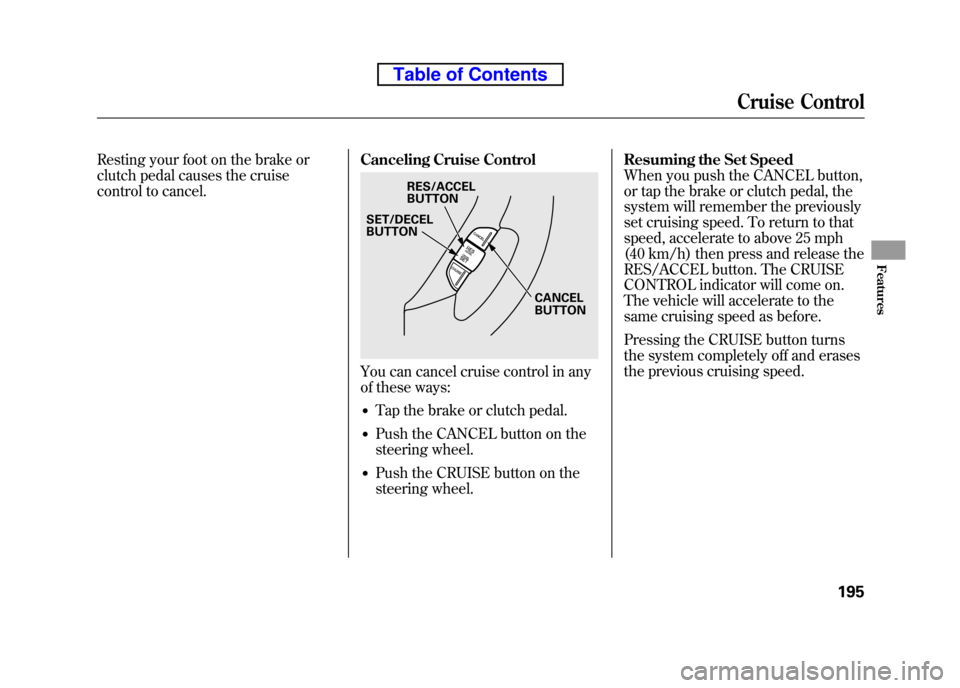
control to cancel.Canceling Cruise Control
You can cancel cruise control in any
of these ways:
● Tap the brake or clutch pedal.
● Push the CANCEL button on the
steering wheel.
● Push the CRUISE button on the
steering wheel. Resuming the Set Speed
When you push the CANCEL button,
or tap the brake or clutch pedal, the
system will remember the previously
set cruising speed. To return to that
speed, accelerate to above 25 mph
(40 km/h) then press and release the
RES/ACCEL button. The CRUISE
CONTROL indicator will come on.
The vehicle will accelerate to the
same cruising speed as before.
Pressing the CRUISE button turns
the system completely off and erases
the previous cruising speed.
RES/ACCEL
BUTTON
CANCELBUTTON
SET/DECELBUTTON
Cruise Control
195
Features
Table of Contents
Page 214 of 342

Break-in Period
Help assure your vehicle's future
reliability and performance by paying
extra attention to how you drive
during the first 600 miles (1,000 km).
During this period:● Avoid full-throttle starts and rapidacceleration.
● Do not change the oil until the
scheduled maintenance time.
● Avoid hard braking for the first 200
miles (300 km).
● Do not tow a trailer.
You should also follow these
recommendations with an
overhauled or exchanged engine, or
when the brakes are replaced. Fuel Recommendation
Your vehicle is designed to operate
on unleaded gasoline with a pump
octane number of 87 or higher. Use
of a lower octane gasoline can cause
a persistent, heavy metallic rapping
noise that can lead to enginedamage.
On vehicles with manual transmission
You may hear a knocking noise from
the engine if you drive the vehicle at
low engine speed (below about 1,000
rpm) in a higher gear. To stop this,
raise the engine speed by shifting to
a lower gear.
We recommend using quality
gasoline containing detergent
additives that help prevent fuel
system and engine deposits.In addition, in order to maintain good
performance, fuel economy, and
emissions control, we strongly
recommend, in areas where it is
available, the use of gasoline that
does NOT contain manganese-based
fuel additives such as MMT.
Use of gasoline with these additives
may adversely affect performance,
and cause the malfunction indicator
lamp on your instrument panel to
come on. If this happens, contact
your authorized dealer for service.
Some gasoline today is blended with
oxygenates such as ethanol or
MTBE. Your vehicle is designed to
operate on oxygenated gasoline
containing up to 10% ethanol by
volume and up to 15% MTBE by
volume. Do not use gasoline
containing methanol.
Break-in Period, Fuel Recommendation
198
Table of Contents
Page 216 of 342
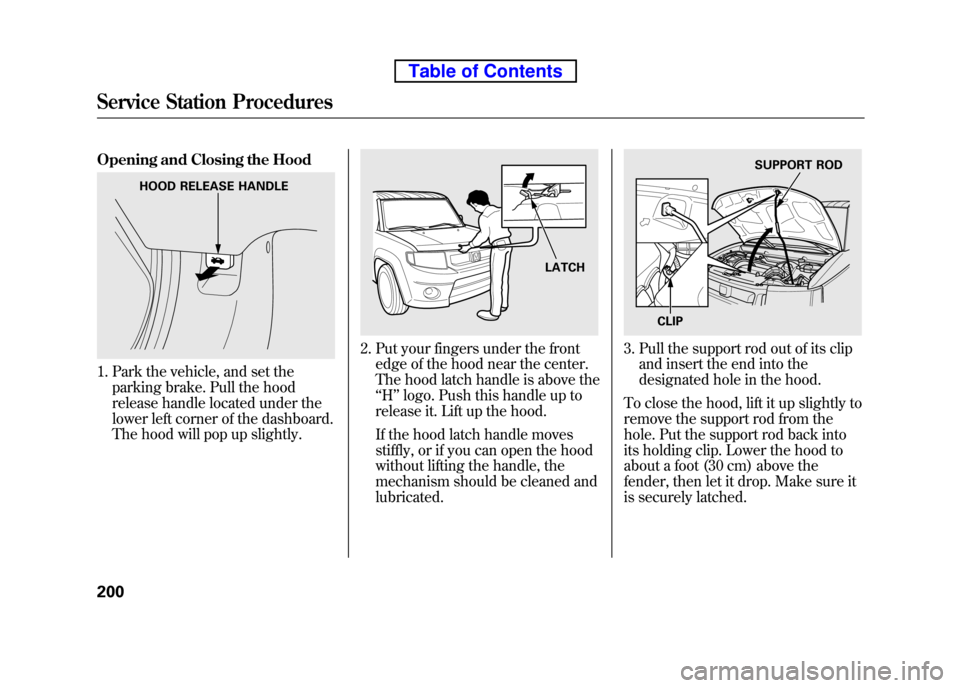
Opening and Closing the Hood
1. Park the vehicle, and set theparking brake. Pull the hood
release handle located under the
lower left corner of the dashboard.
The hood will pop up slightly.
2. Put your fingers under the frontedge of the hood near the center.
The hood latch handle is above the‘‘H ’’logo. Push this handle up to
release it. Lift up the hood.
If the hood latch handle moves
stiffly, or if you can open the hood
without lifting the handle, the
mechanism should be cleaned andlubricated.3. Pull the support rod out of its clip and insert the end into the
designated hole in the hood.
To close the hood, lift it up slightly to
remove the support rod from the
hole. Put the support rod back into
its holding clip. Lower the hood to
about a foot (30 cm) above the
fender, then let it drop. Make sure it
is securely latched.
HOOD RELEASE HANDLE
LATCH
SUPPORT ROD
CLIP
Service Station Procedures
200
Table of Contents
Page 221 of 342
Modifying your vehicle, or installing
some non-Honda accessories, can
make it unsafe. Before you make any
modifications or add any accessories,
be sure to read the following information. Accessories
Your dealer has Honda accessories
that allow you to personalize your
vehicle. These accessories have been
designed and approved for your
vehicle, and are covered by warranty.
Although non-Honda accessories
may fit on your vehicle, they may not
meet factory specifications, and could
adversely affect your vehicle's
handling and stability.
Improper accessories or
modifications can affect your
vehicle's handling, stability, and
performance, and cause a
crash in which you can be hurt
or killed.
Follow all instructions in this
owner's manual regarding
accessories and modifications.
When properly installed, cellular
phones, alarms, two-way radios, and
low-powered audio systems should
not interfere with your vehicle's
computer controlled systems, such
as your airbags, anti-lock brakes, and
tire pressure monitoring system. Before installing any accessory:
● Make sure the accessory does not
obscure any lights, or interfere
with proper vehicle operation or performance.
● Be sure electronic accessories do
not overload electrical circuits (see
page 298) or interfere with the
proper operation of your vehicle.
● Before installing any electronic
accessory, have the installer
contact your dealer for assistance.
If possible, have your dealer
inspect the final installation.
● Do not install accessories on the
side pillars or across the rear
windows. Accessories installed in
these areas may interfere with
proper operation of the side
curtain airbags.
CONTINUED
Accessories and Modifications
205
Before Driving
Table of Contents