lights HONDA ELEMENT 2010 1.G Owner's Manual
[x] Cancel search | Manufacturer: HONDA, Model Year: 2010, Model line: ELEMENT, Model: HONDA ELEMENT 2010 1.GPages: 342, PDF Size: 5.76 MB
Page 112 of 342
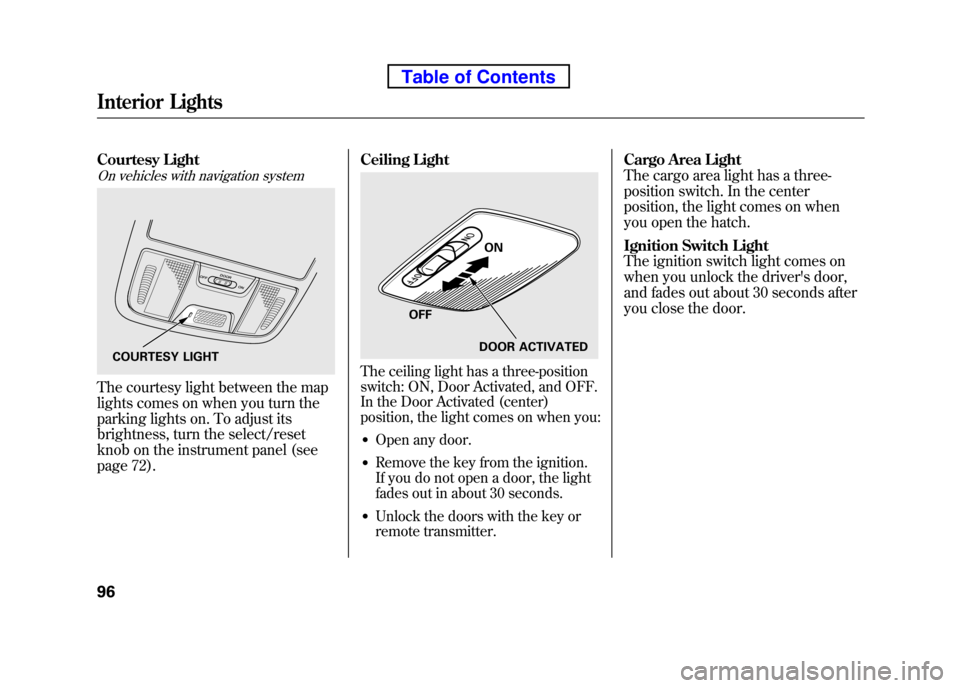
Courtesy Light
On vehicles with navigation system
The courtesy light between the map
lights comes on when you turn the
parking lights on. To adjust its
brightness, turn the select/reset
knob on the instrument panel (see
page 72).Ceiling Light
The ceiling light has a three-position
switch: ON, Door Activated, and OFF.
In the Door Activated (center)
position, the light comes on when you:
● Open any door.
● Remove the key from the ignition.
If you do not open a door, the light
fades out in about 30 seconds.
● Unlock the doors with the key or
remote transmitter. Cargo Area Light
The cargo area light has a three-
position switch. In the center
position, the light comes on when
you open the hatch.
Ignition Switch Light
The ignition switch light comes on
when you unlock the driver's door,
and fades out about 30 seconds after
you close the door.COURTESY LIGHT
ON
OFF DOOR ACTIVATED
Interior Lights
96
Table of Contents
Page 147 of 342

BALANCE-Adjusts the side-to-
side strength of the sound.
To adjust the left/right balance,
touch the L or R icon. SUBWOOFER -Adjusts the
strength of sound from the
subwoofer speaker. To adjust the
sound strength, touch
oron
each side of the adjustment bar.
The right upper display shows you
the current setting of the sound
strength coming from each speaker.
SVC (speed-sensitive volume compensation) -The SVC mode
controls the volume based on vehicle
speed. The faster you go, the louder
the audio volume becomes. As you
slow down, the audio volume
decreases. Touch the appropriate
icon (Low, Mid, Hi, Off) to select the mode. This function is set to Mid as the
default setting when the vehicle
leaves the factory. If you feel the
sound is too loud, choose low. If you
feel the sound is too quiet, choose Hi.
You can also select the icon with the
joystick. Move it up and down to
move the highlighting and scroll
through lists. Select the icon, then
move the joystick left or right to
change the setting.
The system will return to the audio
display about 10 seconds after you
stop adjusting a mode.
Screen Mode
You can select the background
screen to display the sound level.
There are three screen modes: level
(the sound level is shown with the
vertical bars), spectrum analysis (the
sound level appears as ripples of
water), and off. Each time you touch
the background icon, the display changes.
Audio System Lighting
You can use the instrument panel
brightness control knob to adjust the
illumination of the audio system (see
page 72). The audio system
illuminates when the parking lights
are on, even if the radio is off.
Playing the FM/AM Radio (Models with navigation system)
131
Features
Table of Contents
Page 221 of 342

Modifying your vehicle, or installing
some non-Honda accessories, can
make it unsafe. Before you make any
modifications or add any accessories,
be sure to read the following information. Accessories
Your dealer has Honda accessories
that allow you to personalize your
vehicle. These accessories have been
designed and approved for your
vehicle, and are covered by warranty.
Although non-Honda accessories
may fit on your vehicle, they may not
meet factory specifications, and could
adversely affect your vehicle's
handling and stability.
Improper accessories or
modifications can affect your
vehicle's handling, stability, and
performance, and cause a
crash in which you can be hurt
or killed.
Follow all instructions in this
owner's manual regarding
accessories and modifications.
When properly installed, cellular
phones, alarms, two-way radios, and
low-powered audio systems should
not interfere with your vehicle's
computer controlled systems, such
as your airbags, anti-lock brakes, and
tire pressure monitoring system. Before installing any accessory:
● Make sure the accessory does not
obscure any lights, or interfere
with proper vehicle operation or performance.
● Be sure electronic accessories do
not overload electrical circuits (see
page 298) or interfere with the
proper operation of your vehicle.
● Before installing any electronic
accessory, have the installer
contact your dealer for assistance.
If possible, have your dealer
inspect the final installation.
● Do not install accessories on the
side pillars or across the rear
windows. Accessories installed in
these areas may interfere with
proper operation of the side
curtain airbags.
CONTINUED
Accessories and Modifications
205
Before Driving
Table of Contents
Page 231 of 342

You should do the following checks
and adjustments before you drive
your vehicle.1. Make sure all windows, mirrors, and outside lights are clean and
unobstructed. Remove frost, snow,
or ice.
2. Check that the hood is fully closed.
3. Visually check the tires. If a tire looks low, use a gauge to check itspressure.
4. Check that any items you may be carrying are stored properly or
fastened down securely. 5. Check the seat adjustment (see
page 83).
6. Check the adjustment of the inside and outside mirrors (see page 93).
7. Check the steering wheel adjustment (see page 74). 8. Make sure the doors, the hatch,
and the tailgate are securely
closed and locked.
9. Fasten your seat belt. Check that your passengers have fastened
their seat belts (see page 14).
10. When you start the engine, check the gauges and indicators in the
instrument panel (see page 57).
Preparing to Drive
215
Driving
Table of Contents
Page 239 of 342

Always use the parking brake when
you park your vehicle. Make sure the
parking brake is set firmly, or your
vehicle may roll if it is parked on an incline.
If your vehicle has an automatic
transmission, set the parking brake
before you put the transmission in
Park. This keeps the vehicle from
moving and putting pressure on the
parking mechanism in thetransmission.Parking Tips
● Make sure the windows areclosed.
● Turn off the lights.
● Place any packages, valuables, etc.
in the cargo area or take them withyou.
● Lock the doors and the hatch with
the key.
● Never park over dry leaves, tall
grass, or other flammable
materials. The hot three way
catalytic converter could cause
these materials to catch on fire. ●
If the vehicle is facing uphill, turn
the front wheels away from the
curb. If your vehicle has a manual
transmission, put it in first gear.
● If the vehicle is facing downhill,
turn the front wheels toward the
curb. If your vehicle has a manual
transmission, put it in reversegear.
● Make sure the parking brake is
fully released before driving away.
Driving with the parking brake
partially set can overheat or
damage the rear brakes.
Parking
223
Driving
Table of Contents
Page 240 of 342

Your vehicle is equipped with disc
brakes at all four wheels. A power
assist helps reduce the effort needed
on the brake pedal. The emergency
brake assist system increases the
stopping force when you depress the
brake pedal hard in an emergency
situation. The anti-lock brake system
(ABS) helps you retain steering
control when braking very hard.
Resting your foot on the pedal keeps
the brakes applied lightly, builds up
heat, reduces their effectiveness and
reduces brake pad life. In addition,
fuel economy can be reduced. It also
keeps your brake lights on all the
time, confusing drivers behind you.Constant application of the brakes
when going down a long hill builds
up heat and reduces their
effectiveness. Use the engine to
assist the brakes by taking your foot
off the accelerator and downshifting
to a lower gear.
Check your brakes after driving
through deep water. Apply the
brakes moderately to see if they feel
normal. If not, apply them gently and
frequently until they do. Be extra
cautious and alert in your driving.
Braking System Design
The hydraulic system that operates
the brakes has two separate circuits.
Each circuit works diagonally across
the vehicle (the left-front brake is
connected with the right-rear brake,
etc.). If one circuit should develop a
problem, you will still have braking
at two wheels.
Braking System
224
Table of Contents
Page 251 of 342

Trailer Lights
Trailer lights and equipment must
comply with federal, state, provincial,
territorial, and local regulations.
Check with your local trailer dealer
or rental agency for the requirements
in the area where you plan to tow,
and use only equipment designed for
your vehicle.
Since lighting and wiring vary by
trailer type and brand, you should
have a qualified technician install a
suitable connector between the
vehicle and the trailer. Improper
equipment or installation can cause
damage to your vehicle's electrical
system and affect your vehicle warranty.
Additional Towing Equipment
Many states, Canadian provinces and
territories require special outside
mirrors when towing a trailer. Even if
they don't, you should install special
mirrors if you cannot clearly see
behind you, or if the trailer creates a
blind spot.Ask your trailer sales or rental
agency if any other items are
recommended or required for your
towing situation.
CONTINUED
Towing a Trailer
235
Driving
Table of Contents
Page 252 of 342

Pre-Tow Checklist
When preparing to tow, and before
driving away, be sure to check thefollowing:● The vehicle has been properly
serviced, and the tires, brakes,
suspension, cooling system, and
lights are in good operatingcondition.
● The trailer has been properly
serviced and is in good condition.
● All weights and loads are within
limits (see pages 232 and 233).
● The hitch, safety chains, and any
other attachments are secure.
● All items in or on the trailer are
properly secured and cannot shift
while you drive. ●
Your vehicle tires and spare are
properly inflated (see page 271),
and the trailer tires and spare are
inflated as recommended by the
trailer maker. Driving Safely With a Trailer
The added weight, length, and
height of a trailer will affect your
vehicle's handling and performance,
so driving with a trailer requires
some special driving skills andtechniques.
For your safety and the safety of
others, take time to practice driving
maneuvers before heading for the
open road, and follow the guidelinesbelow.
Towing Speeds and Gears
Drive slower than normal in all
driving situations, and obey posted
speed limits for vehicles with trailers.
If you have an automatic
transmission, use the D position
when towing a trailer on level roads.
D3 is the proper shift lever position
to use when towing a trailer in hilly
terrain. (See
‘‘
Driving on Hills’’on the
next page for additional gearinformation.)
Towing a Trailer
236
Table of Contents
Page 257 of 342
This section explains why it is important
to keep your vehicle well maintained and
how to follow basic maintenance safety
precautions.
This section also includes instructions
on how to read the maintenance minder
messages on the information display,
and instructions for simple maintenance
tasks you may want to take care of
yourself.
If you have the skills and tools to
perform more complex maintenance
tasks on your vehicle, you may want to
purchase the service manual. See page
325 for information on how to obtain a
copy, or see your dealer.
U.S. Vehicles:
Maintenance, replacement, or repair
of emissions control devices and
systems may be done by any
automotive repair establishment or
individual using parts that are‘‘certified ’’to EPA standards.Maintenance Safety .....................242
Maintenance Minder ..................
243
Fluid Locations ........................... 250
Adding Engine Oil ......................
251
Changing the Engine Oil and Filter ....................................... 252
Engine Coolant ........................... 254
Windshield Washers ...................255
Transmission Fluid .....................
256
Automatic Transmission Fluid ................................... 256
Manual Transmission Fluid ....257
Rear Differential Fluid .................
258
Brake and Clutch Fluid ...............258
Power Steering Fluid ..................
260
Cleaning the Body Panels ...........260
Lights .......................................... 261
Cleaning the Seat Belts ...............
268
Floor Mats .................................. 268
Dust and Pollen Filter .................
269
Wiper Blades .............................. 269
Wheels ........................................
271
Tires ........................................... 271
Checking the Battery ..................277Vehicle Storage
...........................
278
Maintenance
241
Maintenance
Page 264 of 342

However, service at a dealer is not
mandatory to keep your warranties in
effect. Maintenance may be done by
any qualified service facility or
person who is skilled in this type of
automotive service. Make sure to
have the service facility or person
reset the display as previously
described. Keep all receipts as proof
of completion, and have the person
who does the work fill out your
Honda Service History or Canadian
Maintenance Log. Check your
warranty booklet for moreinformation.
We recommend using Honda parts
and fluids whenever you have
maintenance done. These are
manufactured to the same high
quality standards as the original
components, so you can be confident
of their performance and durability.U.S. Vehicles:
According to state and federal
regulations, failure to perform
maintenance on the items marked with
#will not void your emissions
warranties. However, all
maintenance services should be
performed in accordance with the
intervals indicated by the informationdisplay.
Owner's Maintenance Checks
You should check the following
items at the specified intervals. If you
are unsure of how to perform any
check, turn to the appropriate pagelisted.
● Engine oil level -Check every
time you fill the fuel tank. See page201.
● Engine coolant level -Check the
radiator reserve tank every time
you fill the fuel tank. See page 201. ●
Automatic transmission -Check
the fluid level monthly. See page256.
● Brakes -Check the fluid level
monthly. See page 258.
● Tires -Check the tire pressure
monthly. Examine the tread for
wear and foreign objects. See page271.
● Lights -Check the operation of
the headlights, parking lights,
taillights, high-mount brake light,
and license plate lights monthly.
See page 261.
Maintenance Minder
248
Table of Contents