air conditioning HONDA ELEMENT 2010 1.G Owners Manual
[x] Cancel search | Manufacturer: HONDA, Model Year: 2010, Model line: ELEMENT, Model: HONDA ELEMENT 2010 1.GPages: 342, PDF Size: 5.76 MB
Page 1 of 342

A
Accessories andModifications .......................... 205
ACCESSORY (Ignition Key Position) ................................... 79
Accessory Power Sockets ..........100
Additives, Engine Oil .................252
Adjusting the Steering Wheel ......74
Advanced Airbags ........................27
Airbag (SRS) ............................ 9, 22
Air Conditioning System ............104
Air Pressure, Tires ..............271, 272
Alcohol in Gasoline ....................198
Antifreeze ................................... 254
Anti-lock Brakes (ABS)
Indicator Light ..................59, 225
Operation ................................ 225
Anti-theft, Audio System .............188
Anti-theft Steering Column Lock ......................................... 79
Audio System ............................. 109
Automatic Seat Belt Tensioners ...20
Automatic Speed Control ...........193Automatic Transmission
............
219
Capacity, Fluid ........................309
Checking Fluid Level ..............256
Shifting ................................... 219
Shift Lever Position Indicators ............................ 219
Shift Lever Positions ...............219
Shift Lock Release ...................221
Automatic Transmission Fluid ...256
Auxiliary Input Jack ...................192
B
Battery Charging System Indicator ........................ 58, 295
Jump Starting .......................... 291
Maintenance ........................... 277
Specifications .......................... 310
Before Driving ........................... 197
Belts, Seat ................................ 8, 18
Beverage Holders ........................99
Booster Seats ............................... 50
Brakes Anti-lock Brakes (ABS) ...........225 Break-in, New Linings
.............198
Bulb Replacement ...................266
Fluid ....................................... 258
Parking .................................... 94
System Design ........................224
System Indicator ...............58, 297
Wear Indicators .......................225
Braking System .......................... 224
Break-in, New Vehicle ................198
Brightness Control, Instruments .............................. 72
CONTINUED
Index
I
INDEX
Page 18 of 342

Contents
A convenient reference to the
sections in this manual.
Your Vehicle at a Glance
A quick reference to the main
controls in your vehicle.
Driver and Passenger Safety
Important information about the
proper use and care of your vehicle's
seat belts, an overview of the
supplemental restraint system, and
valuable information on how to
protect children with child restraints.
Instruments and Controls
Explains the purpose of each
instrument panel indicator and
gauge, and how to use the controls
on the dashboard and steeringcolumn. Features
How to operate the heating and air
conditioning system, the audio
system, and other conveniencefeatures.Before Driving
What gasoline to use, how to break-
in your new vehicle, and how to load
luggage and other cargo. Driving
The proper way to start the engine,
shift the transmission, and park; plus
what you need to know if you're
planning to tow a trailer. Maintenance
The maintenance minder shows you
when you need to take your vehicle
to the dealer for maintenance
service. There is also a list of things
to check and instructions on how to
check them.
Taking Care of the Unexpected
This section covers several problems
motorists sometimes experience, and
details how to handle them.
Technical Information
ID numbers, dimensions, capacities,
and technical information.
Warranty and Customer Relations
(U.S. and Canada only)
A summary of the warranties
covering your new vehicle, and how
to contact us for any reason. Refer to
your warranty manual for detailedinformation. Index
Service Information Summary
A summary of the information you
need when you pull up to the fuelpump.
Overview of Contents
2
Page 119 of 342
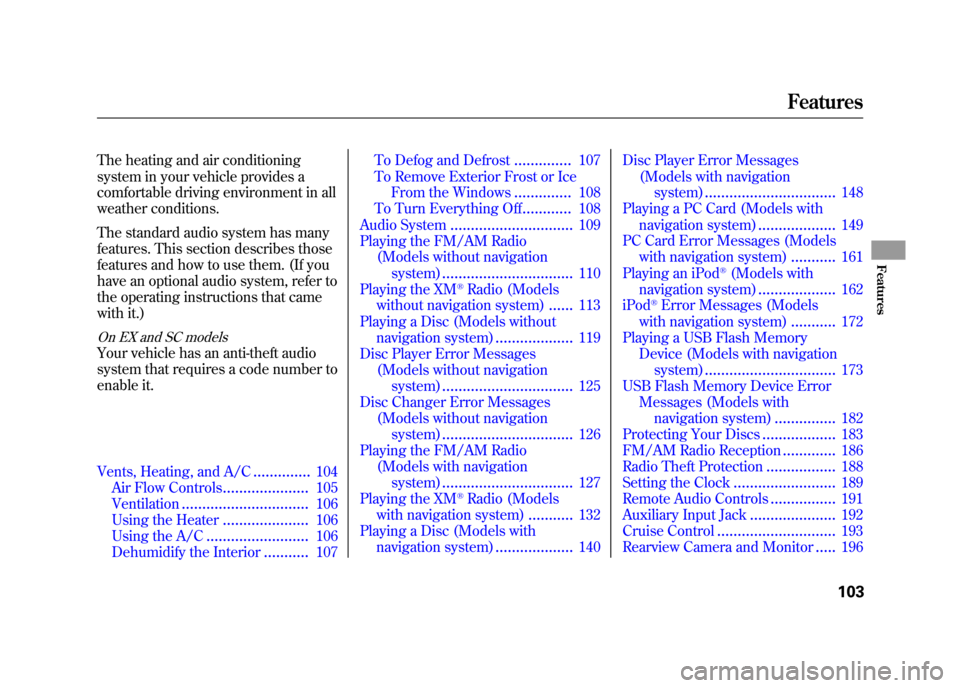
The heating and air conditioning
system in your vehicle provides a
comfortable driving environment in all
weather conditions.
The standard audio system has many
features. This section describes those
features and how to use them. (If you
have an optional audio system, refer to
the operating instructions that came
with it.)
On EX and SC models
Your vehicle has an anti-theft audio
system that requires a code number to
enable it.
Vents, Heating, and A/C..............
104
Air Flow Controls .....................105
Ventilation ............................... 106
Using the Heater .....................106
Using the A/C ......................... 106
Dehumidify the Interior ...........
107 To Defog and Defrost
..............107
To Remove Exterior Frost or Ice From the Windows ..............108
To Turn Everything Off ............108
Audio System .............................. 109
Playing the FM/AM Radio (Models without navigation
system) ................................ 110
Playing the XM
®Radio (Models
without navigation system) ......113
Playing a Disc (Models without navigation system) ...................119
Disc Player Error Messages
(Models without navigationsystem) ................................ 125
Disc Changer Error Messages
(Models without navigationsystem) ................................ 126
Playing the FM/AM Radio
(Models with navigationsystem) ................................ 127
Playing the XM
®Radio (Models
with navigation system) ...........
132
Playing a Disc (Models with navigation system) ...................140Disc Player Error Messages
(Models with navigationsystem) ................................ 148
Playing a PC Card (Models with
navigation system) ...................149
PC Card Error Messages (Models with navigation system) ...........161
Playing an iPod
®(Models with
navigation system) ...................162
iPod
®Error Messages (Models
with navigation system) ...........
172
Playing a USB Flash Memory Device (Models with navigation
system) ................................ 173
USB Flash Memory Device Error
Messages (Models with
navigation system) ...............182
Protecting Your Discs ..................183
FM/AM Radio Reception .............186
Radio Theft Protection .................188
Setting the Clock .........................189
Remote Audio Controls ................191
Auxiliary Input Jack .....................
192
Cruise Control ............................. 193
Rearview Camera and Monitor .....196
Features
103
Features
Page 120 of 342
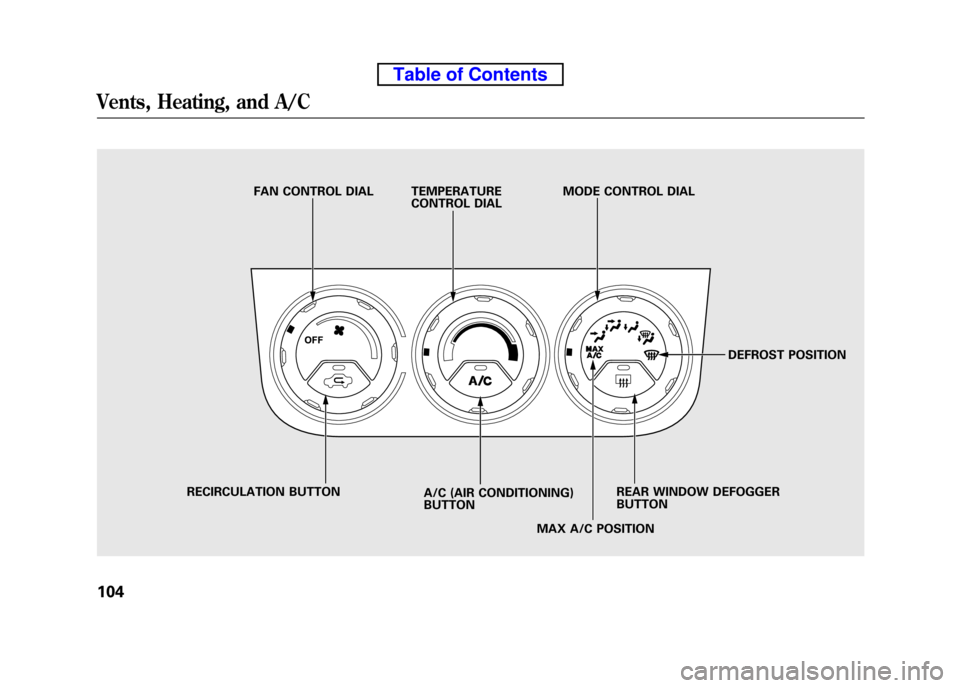
FAN CONTROL DIAL TEMPERATURECONTROL DIALMODE CONTROL DIAL
DEFROST POSITION
REAR WINDOW DEFOGGER BUTTON
MAX A/C POSITION
A/C (AIR CONDITIONING)BUTTON
RECIRCULATION BUTTON
Vents, Heating, and A/C
104
Table of Contents
Page 121 of 342

Air Flow Controls
Fan Control Dial
Turn this dial clockwise to increase
the fan speed and airflow.
Temperature Control Dial
Turning this dial clockwise increases
the temperature of the airflow.
Air Conditioning (A/C) Button
This button turns the air
conditioning on and off. The
indicator in the button is on when the
A/C is on.
Recirculation Button
When the recirculation indicator is
on, air from the vehicle's interior is
sent throughout the system again.
When the indicator is off, air is
brought in from the outside of the
vehicle (fresh air mode).The outside air intakes for the
heating and cooling system are at the
base of the windshield. Keep this
area clear of leaves and other debris.
The system should be left in fresh air
mode under almost all conditions.
Keeping the system in recirculation
mode, particularly with the A/C off,
can cause the windows to fog up.
Switch to recirculation mode when
driving through dusty or smoky
conditions, then return to fresh air mode.
Rear Window Defogger Button
This button turns the rear window
defogger on and off (see page 74).
Mode Control Dial
Use the mode control dial to select
the vents the air flows from. Some air
will flow from the dashboard vents in
all modes.
The system automatically turns
on the A/C and switches to
recirculation mode. Air flows from
the center and side vents in the
dashboard (see page 106).
Air flows from the center and
corner vents in the dashboard.
Airflow is divided between the
vents in the dashboard and the floor vents.
Air flows from the floor vents.
When you select
, the system
automatically switches to fresh air mode.
Airflow is divided between the
floor vents and the defroster vents at
the base of the windshield.
CONTINUED
Vents, Heating, and A/C
105
Features
Table of Contents
Page 122 of 342

Air flows from the defroster
vents at the base of the windshield.
When you select
or, the
system automatically switches to
fresh air mode and turns on the A/C.
The A/C indicator does not come on. Ventilation
The flow-through ventilation system
draws in outside air, circulates it
through the interior, then discharges
it through vents near the tailgate.
1. Set the temperature to the lower limit.
2. Make sure the A/C is off.
3. Select
and fresh air mode.
4. Set the fan to the desired speed. Using the Heater
The heater uses engine coolant to
warm the air. If the engine is cold, it
will be several minutes before you
feel warm air coming from the system.
1. Select
and fresh air mode.
2. Set the fan to the desired speed.
3. Adjust the warmth of the air with the temperature control dial.
Using the A/C
Air conditioning places an extra load
on the engine. Watch the engine
coolant temperature gauge (see page
67). If it moves near the red zone,
turn off the A/C until the gauge
reading returns to normal.
1. Turn on the A/C by pressing the button. The indicator in the button
comes on when a fan speed isselected.
2. Set the temperature to the lower limit. 3. Select
.
4. If the outside air is humid, select recirculation mode. If the outside
air is dry, select fresh air mode.
5. Set the fan to the desired speed.
If the interior is very warm,you can
cool it down more rapidly by partially
opening the windows, turning on the
A/C, and setting the fan to maximum
speed in fresh air mode.
To cool the interior with MAX A/C:
1. Set the mode control dial to MAX A/C.
The system automatically turns on
the A/C, selects
and switches
to recirculation mode.
2. Set the temperature to the lower limit.
3. Set the fan to the desired speed.
Vents, Heating, and A/C
106
Table of Contents
Page 123 of 342
Dehumidify the Interior
Air conditioning, as it cools, removes
moisture from the air. When used in
combination with the heater, it
makes the interior warm and dry and
can prevent the windows from
fogging up.1. Turn the fan on.
2. Turn on the air conditioning.
3. Select
and fresh air mode.
4. Adjust the temperature to your preference.
This setting is suitable for all driving
conditions whenever the outside
temperature is above 32°F (0°C). To Defog and Defrost
To remove fog from the inside of thewindows:
1. Set the fan to the desired speed, or
high for faster defrosting.
2. Select
. The system
automatically switches to fresh air
mode and turns on the A/C. The
A/C indicator will not come on if it
was off to start with.
3. Adjust the temperature control dial so the airflow feels warm.
4. Select
to help clear the rear
window.
5. To increase airflow to the windshield, close the corner vents. When you select
or, the
system automatically turns on the
A/C. This helps to dehumidify the air
and to defog the windshield. In either
mode, you cannot turn off the A/C.
When you switch to another mode,
the A/C returns to its original
setting, either on or off.
Vents, Heating, and A/C
107
Features
Table of Contents
Page 220 of 342
●Minimize the use of the air
conditioning system -The A/C
puts an extra load on the engine
which makes it use more fuel. Use
the fresh-air ventilation when possible.
● Plan and combine trips -
Combine several short trips into
one. A warmed-up engine is more
fuel efficient than a cold one.
Calculating Fuel Economy
Measuring Techniques
Direct calculation is the
recommended source of information
about your actual fuel economy.
Using frequency of fill-ups or taking
fuel gauge readings are NOT
accurate measures of fuel economy.
Fuel economy may improve over the
first several thousand miles.
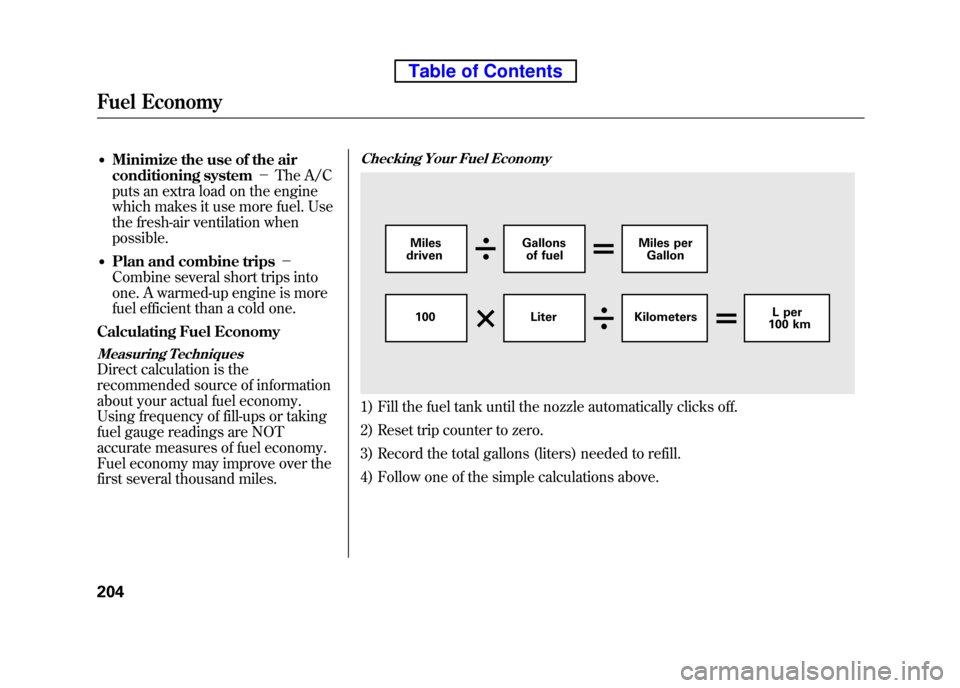
Checking Your Fuel Economy
1) Fill the fuel tank until the nozzle automatically clicks off.
2) Reset trip counter to zero.
3) Record the total gallons (liters) needed to refill.
4) Follow one of the simple calculations above.
100 Liter Kilometers L per
100 km
Miles
driven Gallons
of fuel Miles per
Gallon
Fuel Economy
204
Table of Contents
Page 253 of 342

Making Turns and Braking
Make turns more slowly and wider
than normal. The trailer tracks a
smaller arc than your vehicle, and it
can hit or run over something the
vehicle misses. Allow more time and
distance for braking. Do not brake or
turn suddenly as this could cause the
trailer to jackknife or turn over.
Driving on Hills
When climbing hills, closely watch
your temperature gauge. If it nears
the red (Hot) mark, turn the air
conditioning off, reduce speed and, if
necessary, pull to the side of the road
to let the engine cool.
If the automatic transmission shifts
frequently while going up a hill, shift
to D3.If you must stop when facing uphill,
use the foot brake or parking brake.
Do not try to hold the vehicle in place
by pressing on the accelerator, as
this can cause the automatic
transmission to overheat.
When driving down hills, reduce
your speed, and shift down to second
gear. Do not
‘‘ride ’’the brakes, and
remember, it will take longer to slow
down and stop when towing a trailer.
Handling Crosswinds and Buffeting
Crosswinds and air turbulence
caused by passing trucks can disrupt
your steering and cause the trailer to
sway. When being passed by a large
vehicle, keep a constant speed, and
steer straight ahead. Do not try to
make quick steering or brakingcorrections.
Backing Up
Always drive slowly and have
someone guide you when backing
up. Grip the
bottomof the steering
wheel, then turn the wheel to the left
to get the trailer to move to the left,
and turn the wheel right to move the
trailer to the right.
Parking
Follow all normal precautions when
parking, including firmly setting the
parking brake and putting the
transmission in Park (automatic) or
in 1st or reverse (manual). Also,
place wheel chocks at each of the
trailer's tires.
Towing Your Vehicle
Your vehicle is not designed to be
towed behind a motor home. If your
vehicle needs to be towed in an
emergency, see page 303.
Towing a Trailer
237
Driving
Table of Contents
Page 326 of 342

Air ConditioningRefrigerant type HFC-134a (R-134a)
Charge quantity 17.6 -19.4 oz (500 -550 g)
Lubricant type ND-OIL8
Lights Headlights 12 V -60/55 W (H4/HB2)
Daytime running lights 12 V -60 W (HB3)
Front turn signal/parking lights 12 V -27/8 W (Amber)
Front side marker lights 12 V -3CP
Side turn signal lights 12 V -3CP
Rear turn signal lights 12 V -21 W (Amber)
Rear side marker lights 12 V -3CP
Brake/Taillights 12 V -21/5 W
Back-up lights 12 V -21 CP
License plate lights 12 V -5W
Ceiling light 12 V -8W
ꭧ1
12 V -5Wꭧ2, ꭧ3
Spotlights 12 V -8Wꭧ2, ꭧ3
Cargo area light 12 V -8W
High-mount brake light 12 V -21 W
Battery Capacity 12 V -47 AH/20 HR
12 V -38 AH/5 HR Fuses
Interior See page 301 or the fuse label attached to the inside of the fuse
box door under the steering column.
Under-hood See page 302 or the fuse box cover.
Alignment Toe-in Front 0.0 in (0 mm)
Rear 0.08 in (2.0 mm)
Camber Front -0°13 ’
ꭧ1, ꭧ2
- 0°24 ’ꭧ3
Rear -1°00 ’ꭧ1, ꭧ2
- 1°06 ’ꭧ3
Caster Front 1°50 ’
Tires Size Front/Rear P215/70R16 99S
ꭧ 1, ꭧ2
P225/55R18 97Hꭧ3
Pressure Front 33 psi (230 kPa, 2.3 kgf/cm2)ꭧ 1, ꭧ2
32 psi (220 kPa, 2.2 kgf/cm2)ꭧ 3
Rear 35 psi (240 kPa, 2.4 kgf/cm2)ꭧ1, ꭧ2
32 psi (220 kPa, 2.2 kgf/cm2)ꭧ 3
Spare 60 psi (420 kPa, 4.2 kgf/cm2)
ꭧ 1: LX model
ꭧ 2: EX model
ꭧ 3: SC model
Specifications
310
Table of Contents