AUX HONDA ELEMENT 2011 1.G Owners Manual
[x] Cancel search | Manufacturer: HONDA, Model Year: 2011, Model line: ELEMENT, Model: HONDA ELEMENT 2011 1.GPages: 286, PDF Size: 14.07 MB
Page 109 of 286

The heating and air conditioning
system in your vehicle provides a
comfortable driving environment in
all weather conditions.
The standard audio system has many
features. This section describes
those features and how to use them.
(If you have an optional audio
system, refer to the operating
instructions that came with it.)On EX modelYour vehicle has an anti-theft audio
system that requires a code number
to enable it.Vents, Heating, and A/C
.............
104
Air Flow Controls
....................
105
Ventilation
...............................
106
Using the Heater
.....................
106
Using the A/C
.........................
106
Dehumidify the Interior
..........
107
To Defog and Defrost
..............
107
To Remove Exterior Frost or Ice From the Windows
........
108
To Turn Everything Off
...........
108
Audio System
..............................
109
Playing the AM/FM Radio
..........
110
Playing the XM
®Radio
................
113
Playing a Disc
.............................
119
Disc Player Error Messages
.......
125
Disc Changer Error Messages
................................
126
Protecting Your Discs
.................
127
FM/AM Radio Reception
............
130
Radio Theft Protection
................
132
Setting the Clock
.........................
133
Remote Audio Controls
...............
135
Auxiliary Input Jack
....................
136
Cruise Control
............................
137
Features
103
Features
10/08/06 08:34:41 11 ELEMENT MMC North America Owner's Man 50 31SCV680 enu
Page 125 of 286
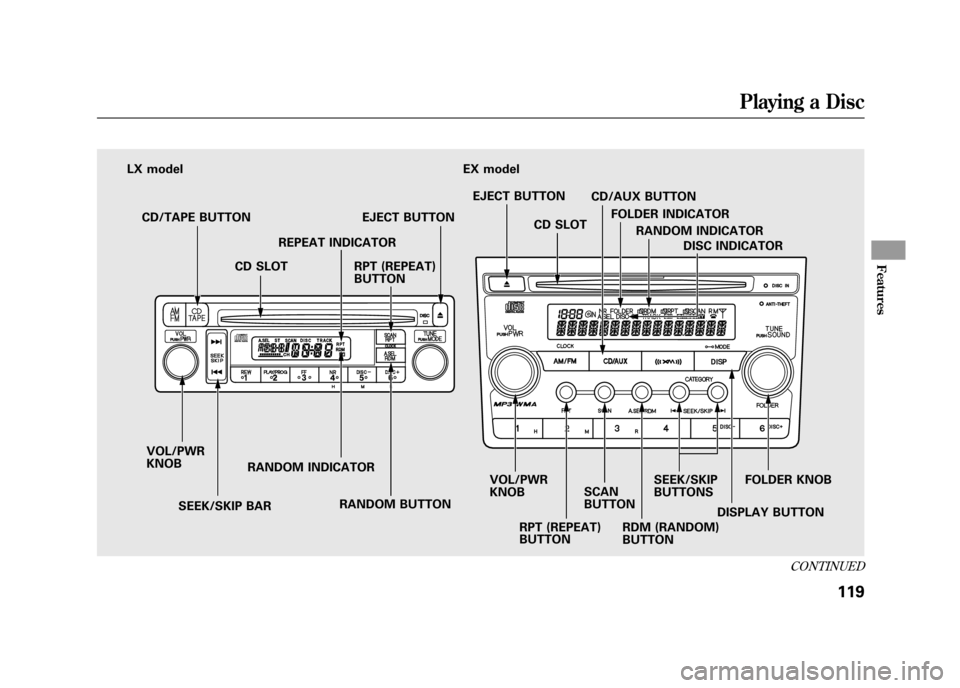
RDM (RANDOM)
BUTTONDISC INDICATOR
FOLDER KNOB
SEEK/SKIP
BUTTONS
RPT (REPEAT)
BUTTON
RANDOM BUTTON
SEEK/SKIP BAR
VOL/PWR
KNOB
RANDOM INDICATORREPEAT INDICATOR
EJECT BUTTON
CD/TAPE BUTTON
CD SLOT CD SLOT
EJECT BUTTON
FOLDER INDICATOR
EX model
LX model
RANDOM INDICATOR
DISPLAY BUTTON
RPT (REPEAT)
BUTTON
SCAN
BUTTONCD/AUX BUTTON
VOL/PWR
KNOB
CONTINUED
Playing a Disc
119
Features
10/08/06 08:34:41 11 ELEMENT MMC North America Owner's Man 50 31SCV680 enu
Page 126 of 286
To Play a Disc
To load or play discs, the ignition
switch must be in the ACCESSORY
(I) or ON (II) position.Do not use discs with adhesive labels.
The label can curl up and cause the
disc to jam in the unit.
You operate the disc player with the
same controls used for the radio. To
select the disc player, press the CD/
TAPE or the CD/AUX button. You
will see‘‘CD ’’in the display. The
number of the track playing is shown
in the display. The system will
continuously play a disc until you
change modes.
Video CDs and DVDs do not work in
this unit.
On EX modelThe disc player can also play CD-Rs
and CD-RWs compressed in MP3 or
WMA formats.
When playing a disc in MP3, you will
see ‘‘MP3 ’’in the display. The folder
and track numbers are displayed.
Each disc can hold up to 400 playable
files within 8 folder layers. A disc can
support a maximum number of 100
folders, and each folder can hold 255
playable files.
When playing a disc in WMA, you
will see ‘‘WMA’’ in the display. The
folder and track numbers are
displayed. Each disc can hold up to
200 files within 16 subdirectories, 8
folder layers. A disc can support a
maximum number of 100 folders, and
each folder can hold 255 playable
files. NOTE:
If a file on an MP3 or WMA
disc is protected by digital rights
management (DRM), the audio unit
displays FORMAT, and then skips to
the next file.
Depending on the software the files
were made with, it may not be
possible to play some files, or display
some text data.
Insert the disc about halfway into the
disc slot. The drive will pull the disc
in the rest of the way and begin to
play it. When the system reaches the
end of the disc, it will return to the
beginning and play the disc again.
To play the radio when a disc is
playing, press the AM/FM button.
Press the CD/TAPE or CD/AUX
button again to switch back to the
CD player.
Playing a Disc12010/08/06 08:34:41 11 ELEMENT MMC North America Owner's Man 50 31SCV680 enu
Page 129 of 286

On EX modelIn MP3/WMA modeFOLDER SCAN -This feature,
when activated, samples all files on
the selected folder in order. To
activate folder scan, press and hold
the SCAN button until you hear a
beep. You will see
SCAN in the
display. The system will then play
the first file for about 10 seconds. If
you do nothing, the system will then
play the first file in each folder for 10
seconds. When it plays a file you
want to continue listening to, press
the SCAN button again.
Pressing either side of the SEEK/
SKIP button or selecting a different
folder with the FOLDER knob also
turns off folder scan. To Stop Playing a Disc
Press the eject button (
)to
remove the disc. If you eject the disc,
but do not remove it from the slot,
the system will automatically reload
the disc after 10 seconds (EX model)
or 15 seconds (LX model) and put it
in pause mode. To begin playing,
press the CD/TAPE or CD/AUX
button.
Press the AM/FM button to switch
to the radio while a disc is playing.
To play the disc, press the CD/TAPE
or CD/AUX button.
If you turn the system off while a disc
is playing, either with the VOL/PWR
knob or by turning off the ignition
switch, the disc will stay in the drive.
When you turn the system back on,
the disc will begin playing where it
left off. Audio System Malfunction
See pages 125 and 126 for
information on error messages.
Protecting Discs
For information on how to handle
and protect discs, see page 127.
CONTINUED
Playing a Disc
123
Features
10/08/06 08:34:41 11 ELEMENT MMC North America Owner's Man 50 31SCV680 enu
Page 142 of 286
In MP3 or WMA mode, you can use
the seek function to select folders.
Press and hold the CH button until
you hear a beep, to skip forward to
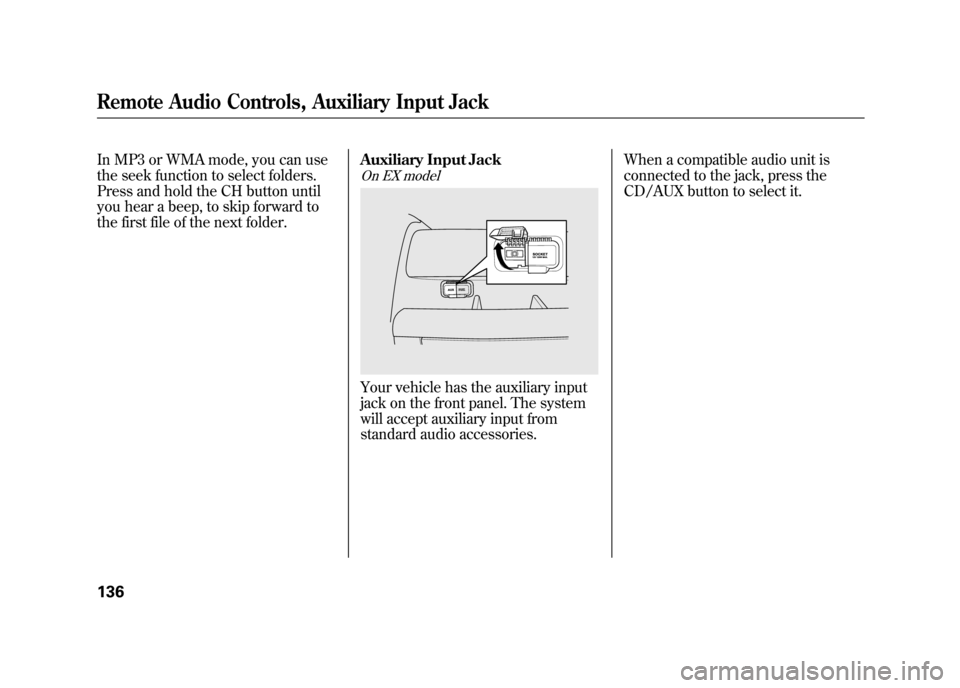
the first file of the next folder.Auxiliary Input Jack
On EX modelYour vehicle has the auxiliary input
jack on the front panel. The system
will accept auxiliary input from
standard audio accessories.When a compatible audio unit is
connected to the jack, press the
CD/AUX button to select it.
Remote Audio Controls, Auxiliary Input Jack13610/08/06 08:34:41 11 ELEMENT MMC North America Owner's Man 50 31SCV680 enu
Page 275 of 286

A
Accessories andModifications
..........................
149
ACCESSORY (Ignition Key Position)
...................................
79
Accessory Power Sockets
..........
100
Additives, Engine Oil
.................
194
Adjusting the Steering Wheel
......
74
Advanced Airbags
........................
26
Airbag (SRS)
............................
9, 22
Air Conditioning System
............
104
Air Pressure, Tires
..............
212, 213
Alcohol in Gasoline
....................
142
Antifreeze
...................................
196
Anti-lock Brakes (ABS) Indicator
............................
59, 168
Operation
................................
167
Anti-theft, Audio System
.............
132
Anti-theft Steering Column Lock
.........................................
79
Audio System
.............................
109
Automatic Seat Belt Tensioners...
20
Automatic Speed Control
...........
137 Automatic Transmission
............
161
Capacity, Fluid
........................
251
Checking Fluid Level
..............
198
Shifting
...................................
161
Shift Lever Position Indicators
............................
161
Shift Lever Positions
...............
161
Shift Lock Release
...................
163
Auxiliary Input Jack
...................
136
B
Battery Charging System
Indicator
........................
58, 235
Jump Starting
..........................
231
Maintenance
...........................
218
Specifications
..........................
252
Before Driving
...........................
141
Belts, Seat
................................
8, 18
Beverage Holders
........................
99
Booster Seats
...............................
50
Brakes
Anti-lock Brakes (ABS)
...........
167
Break-in, New Linings
.............
142 Bulb Replacement
...................
206
Fluid
.......................................
199
Parking
....................................
94
System Design
........................
166
System Indicator
...............
58, 237
Wear Indicators
.......................
167
Braking System
..........................
166
Break-in, New Vehicle
................
142
Brightness Control, Instruments
..............................
72
Bulb Replacement Back-up Lights
........................
206
Brake Lights
...........................
206
Daytime Running Lights
.........
203
Front Parking/Turn Signal Lights
..................................
204
Front Side Marker Lights
........
206
Headlights
..............................
202
High-mount Brake Light
.........
208
Rear Bulbs
..............................
206
Rear License Plate Lights
........
207
Side Turn Signal Lights
...........
204
Specifications
..........................
252
Taillights
.................................
206
Turn Signal Lights
..........
204, 206
CONTINUED
Index
I
INDEX
10/08/06 08:34:41 11 ELEMENT MMC North America Owner's Man 50 31SCV680 enu