ECU HONDA FIT 2010 2.G User Guide
[x] Cancel search | Manufacturer: HONDA, Model Year: 2010, Model line: FIT, Model: HONDA FIT 2010 2.GPages: 351, PDF Size: 5.67 MB
Page 60 of 351
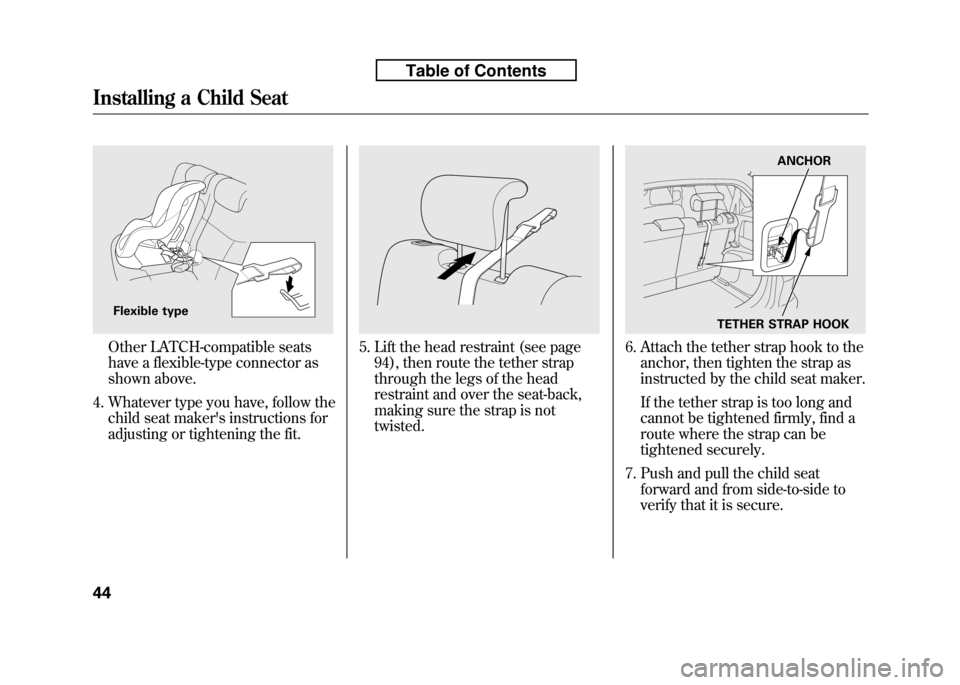
Other LATCH-compatible seats
have a flexible-type connector as
shown above.
4. Whatever type you have, follow the child seat maker's instructions for
adjusting or tightening the fit.5. Lift the head restraint (see page94), then route the tether strap
through the legs of the head
restraint and over the seat-back,
making sure the strap is nottwisted.6. Attach the tether strap hook to theanchor, then tighten the strap as
instructed by the child seat maker.
If the tether strap is too long and
cannot be tightened firmly, find a
route where the strap can be
tightened securely.
7. Push and pull the child seat forward and from side-to-side to
verify that it is secure.
Flexible type
ANCHOR
TETHER STRAP HOOK
Installing a Child Seat
44
Table of Contents
Page 61 of 351
Installing a Child Seat with a Lap/
Shoulder Belt
When not using the LATCH system,
all child seats must be secured to the
vehicle with the lap part of a lap/
shoulder belt.
In addition, the lap/shoulder belts in
all seating positions except the
driver's have a lockable retractor that
must be activated to secure a childseat.
If you intend to install a child seat in
the center seating position of the rear
seat, make sure to push down the
head restraint to the lowest position,
and make sure the detachable seat
belt is securely latched (see page99).
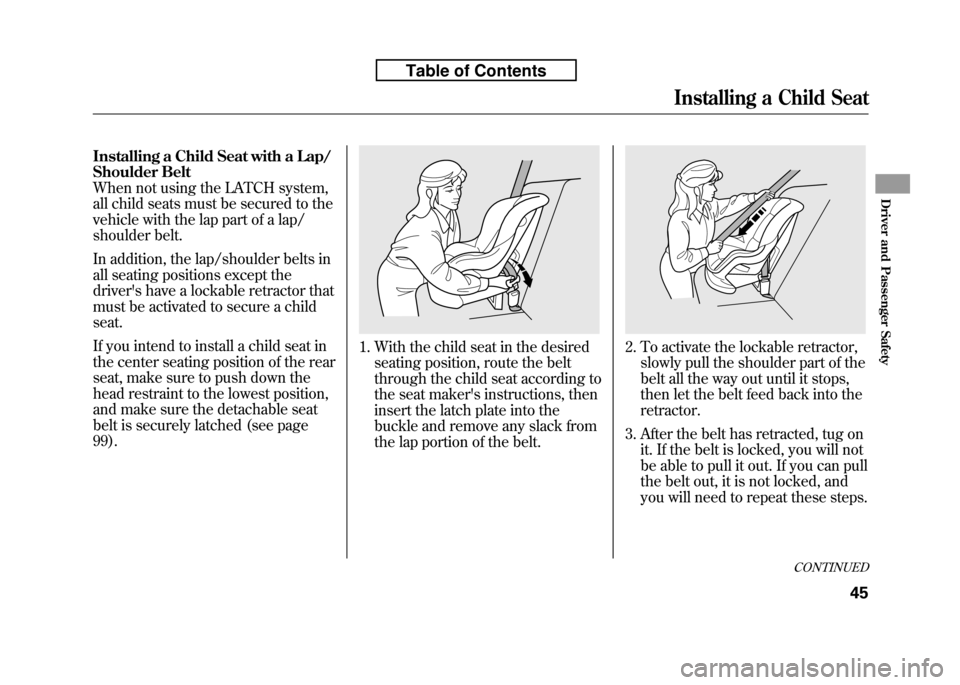
1. With the child seat in the desiredseating position, route the belt
through the child seat according to
the seat maker's instructions, then
insert the latch plate into the
buckle and remove any slack from
the lap portion of the belt.2. To activate the lockable retractor,slowly pull the shoulder part of the
belt all the way out until it stops,
then let the belt feed back into theretractor.
3. After the belt has retracted, tug on it. If the belt is locked, you will not
be able to pull it out. If you can pull
the belt out, it is not locked, and
you will need to repeat these steps.
CONTINUED
Installing a Child Seat
45
Driver and Passenger Safety
Table of Contents
Page 62 of 351
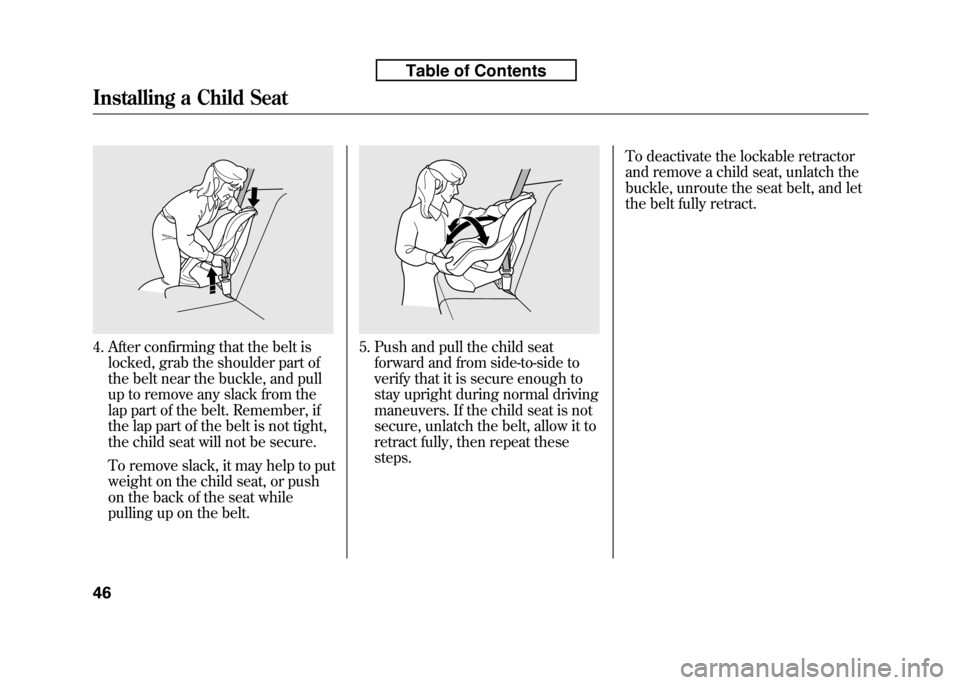
4. After confirming that the belt islocked, grab the shoulder part of
the belt near the buckle, and pull
up to remove any slack from the
lap part of the belt. Remember, if
the lap part of the belt is not tight,
the child seat will not be secure.
To remove slack, it may help to put
weight on the child seat, or push
on the back of the seat while
pulling up on the belt.5. Push and pull the child seatforward and from side-to-side to
verify that it is secure enough to
stay upright during normal driving
maneuvers. If the child seat is not
secure, unlatch the belt, allow it to
retract fully, then repeat thesesteps. To deactivate the lockable retractor
and remove a child seat, unlatch the
buckle, unroute the seat belt, and let
the belt fully retract.
Installing a Child Seat
46
Table of Contents
Page 63 of 351
Installing a Child Seat with a Tether
A child seat with a tether can be
installed in any seating position in
the back seat.
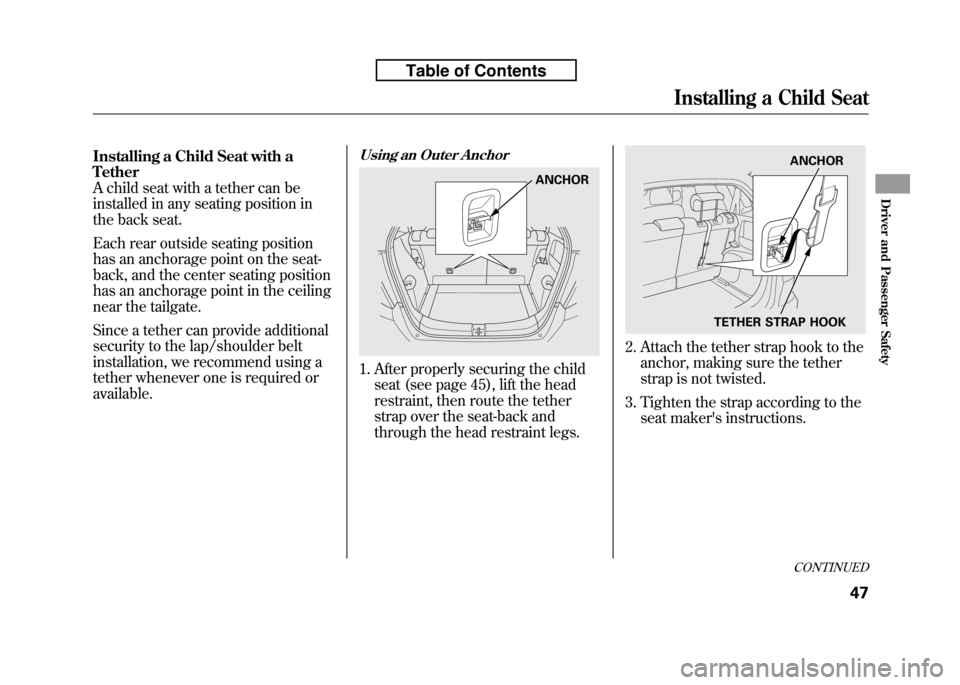
Each rear outside seating position
has an anchorage point on the seat-
back, and the center seating position
has an anchorage point in the ceiling
near the tailgate.
Since a tether can provide additional
security to the lap/shoulder belt
installation, we recommend using a
tether whenever one is required oravailable.Using an Outer Anchor
1. After properly securing the childseat (see page 45), lift the head
restraint, then route the tether
strap over the seat-back and
through the head restraint legs.
2. Attach the tether strap hook to theanchor, making sure the tether
strap is not twisted.
3. Tighten the strap according to the seat maker's instructions.
ANCHOR
TETHER STRAP HOOK ANCHOR
CONTINUED
Installing a Child Seat
47
Driver and Passenger Safety
Table of Contents
Page 64 of 351
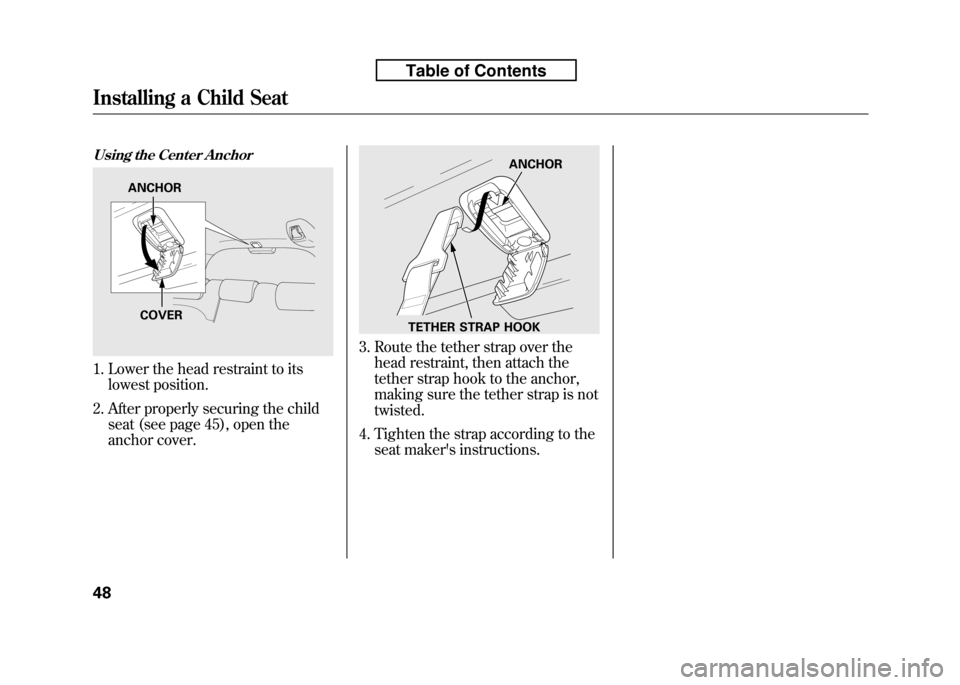
Using the Center Anchor
1. Lower the head restraint to itslowest position.
2. After properly securing the child seat (see page 45), open the
anchor cover.
3. Route the tether strap over thehead restraint, then attach the
tether strap hook to the anchor,
making sure the tether strap is nottwisted.
4. Tighten the strap according to the seat maker's instructions.
ANCHOR
COVER
ANCHOR
TETHER STRAP HOOK
Installing a Child Seat
48
Table of Contents
Page 68 of 351

If you decide that a child can safely
ride up front, be sure to:● Carefully read the owner's manual,
and make sure you understand all
seat belt instructions and all safety information.
● Move the vehicle seat to the rear-
most position.
● Have the child sit up straight, back
against the seat, and feet on or
near the floor.
● Check that the child's seat belt is
properly and securely positioned.
● Supervise the child. Even mature
children sometimes need to be
reminded to fasten the seat belts
or sit properly. Additional Safety Precautions
●
Do not let a child wear a seat belt
across the neck.
This could result
in serious neck injuries during acrash.
●
Do not let a child put the shoulder part of a seat belt behind the back
or under the arm.
This could cause
very serious injuries during a
crash. It also increases the chance
that the child will slide under the
belt in a crash and be injured.
●
Two children should never use the same seat belt.
If they do, they
could be very seriously injured in acrash. ●
Do not put any accessories on a
seat belt.
Devices intended to
improve a child's comfort or
reposition the shoulder part of a
seat belt can make the belt less
effective and increase the chance
of serious injury in a crash.
Protecting Larger Children
52
Table of Contents
Page 75 of 351
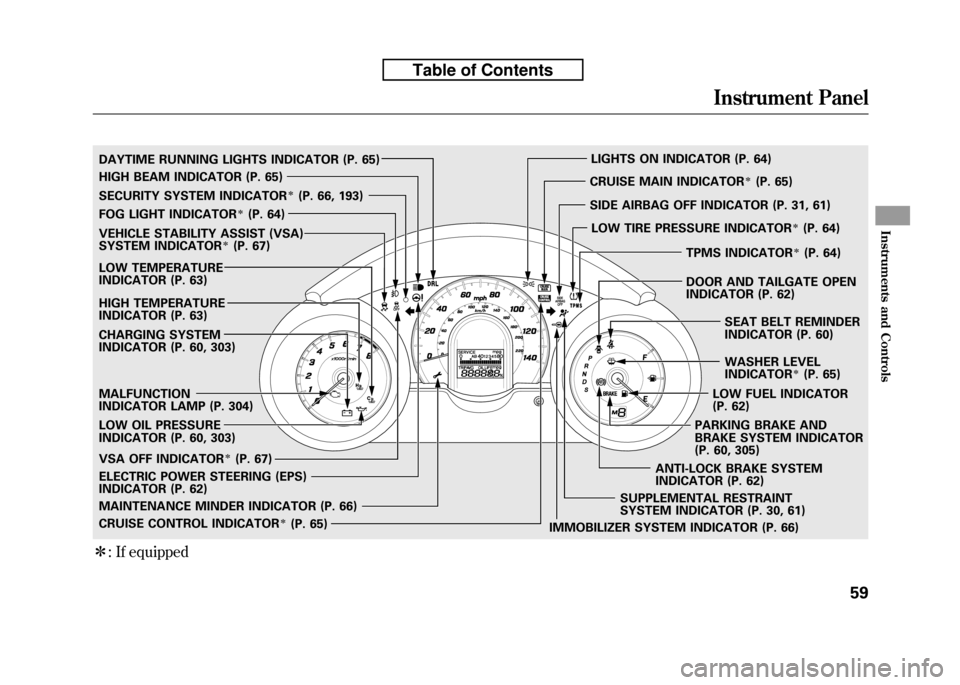
ꭧ: If equipped
SECURITY SYSTEM INDICATORꭧ(P. 66, 193)
WASHER LEVEL
INDICATOR
ꭧ(P. 65)
MALFUNCTION
INDICATOR LAMP (P. 304)
CHARGING SYSTEM
INDICATOR (P. 60, 303)
LOW OIL PRESSURE
INDICATOR (P. 60, 303)
IMMOBILIZER SYSTEM INDICATOR (P. 66)
FOG LIGHT INDICATOR
ꭧ(P. 64)
LIGHTS ON INDICATOR (P. 64)
SUPPLEMENTAL RESTRAINT
SYSTEM INDICATOR (P. 30, 61)
MAINTENANCE MINDER INDICATOR (P. 66) CRUISE MAIN INDICATOR
ꭧ(P. 65)
CRUISE CONTROL INDICATOR
ꭧ(P. 65)
LOW TEMPERATURE
INDICATOR (P. 63)
ELECTRIC POWER STEERING (EPS)
INDICATOR (P. 62)
HIGH BEAM INDICATOR (P. 65)
LOW FUEL INDICATOR
(P. 62)
TPMS INDICATOR
ꭧ(P. 64)
SEAT BELT REMINDER
INDICATOR (P. 60)
PARKING BRAKE AND
BRAKE SYSTEM INDICATOR
(P. 60, 305)
DAYTIME RUNNING LIGHTS INDICATOR (P. 65)
HIGH TEMPERATURE
INDICATOR (P. 63)
VEHICLE STABILITY ASSIST (VSA)
SYSTEM INDICATORꭧ(P. 67)
VSA OFF INDICATOR
ꭧ(P. 67) SIDE AIRBAG OFF INDICATOR (P. 31, 61)
LOW TIRE PRESSURE INDICATOR
ꭧ(P. 64)
ANTI-LOCK BRAKE SYSTEM
INDICATOR (P. 62) DOOR AND TAILGATE OPEN
INDICATOR (P. 62)
Instrument Panel
59
Instruments and Controls
Table of Contents
Page 82 of 351
Maintenance Minder Indicator
This indicator comes on for a few
seconds when you turn the ignition
switch to the ON (II) position. It
reminds you that it is time to take
your vehicle in for scheduled
maintenance. The maintenance main
items and sub items will be displayed
in the information display. See page
245 for more information on the
maintenance minder.
This indicator goes off when your
dealer resets it after completing the
required maintenance service.Immobilizer System Indicator
This indicator comes on briefly when
you turn the ignition switch to the
ON (II) position. It will go off if you
have inserted a properly coded
ignition key. If it is not a properly
coded key, the indicator will blink,
and the engine's fuel system will be
disabled (see page 79). Security System Indicator
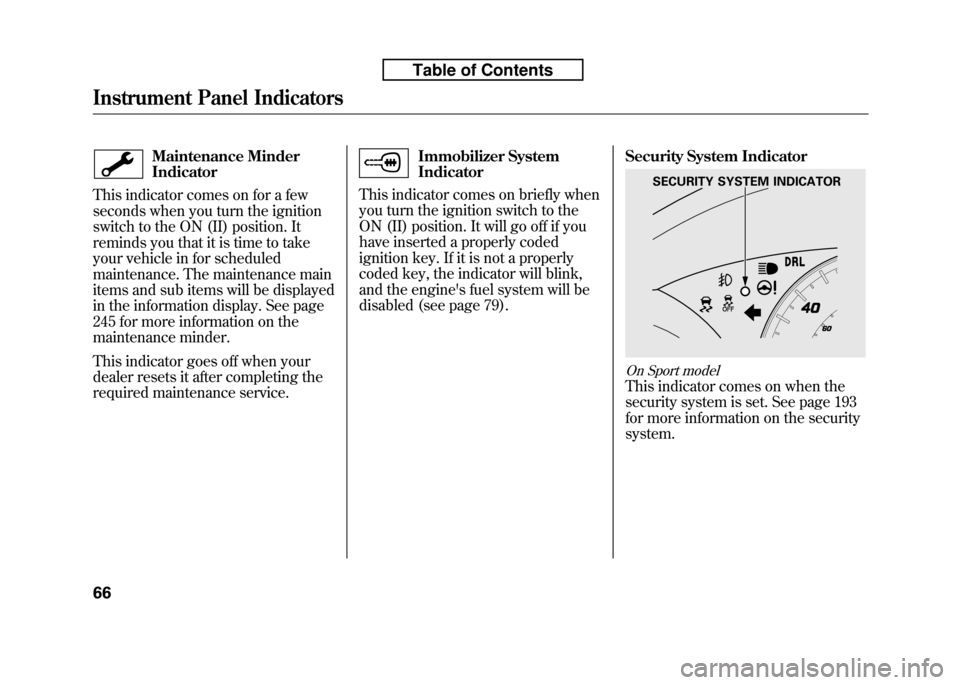
On Sport model
This indicator comes on when the
security system is set. See page 193
for more information on the securitysystem.
SECURITY SYSTEM INDICATOR
Instrument Panel Indicators
66
Table of Contents
Page 93 of 351
Make sure the rear window is clear
and you have good visibility before
starting to drive.
The defogger wires on the inside of
the rear window can be accidentally
damaged. When cleaning the glass,
always wipe side-to-side.
If equipped
Pushing this button also turns the
mirror heaters on or off. For more
information, see page 102.Steering Wheel Adjustments
Make any steering wheel adjustment
before you start driving.
Adjusting the steering wheel
position while driving may
cause you to lose control of the
vehicle and be seriously injured
in a crash.
Adjust the steering wheel only
when the vehicle is stopped.
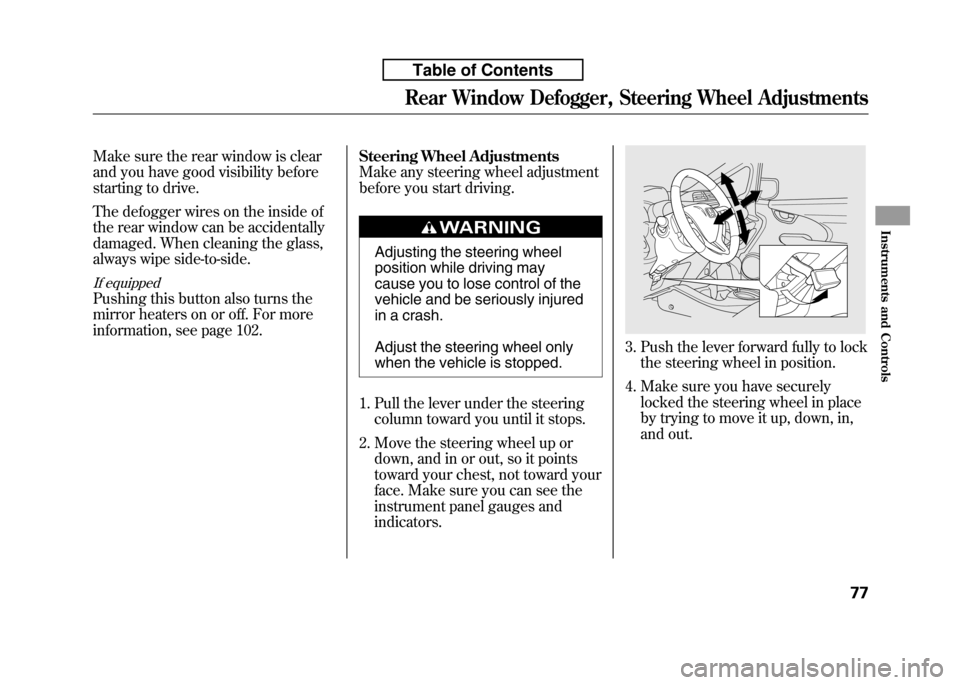
1. Pull the lever under the steering column toward you until it stops.
2. Move the steering wheel up or down, and in or out, so it points
toward your chest, not toward your
face. Make sure you can see the
instrument panel gauges andindicators.
3. Push the lever forward fully to lockthe steering wheel in position.
4. Make sure you have securely locked the steering wheel in place
by trying to move it up, down, in,
and out.
Rear Window Defogger, Steering Wheel Adjustments
77
Instruments and Controls
Table of Contents
Page 106 of 351
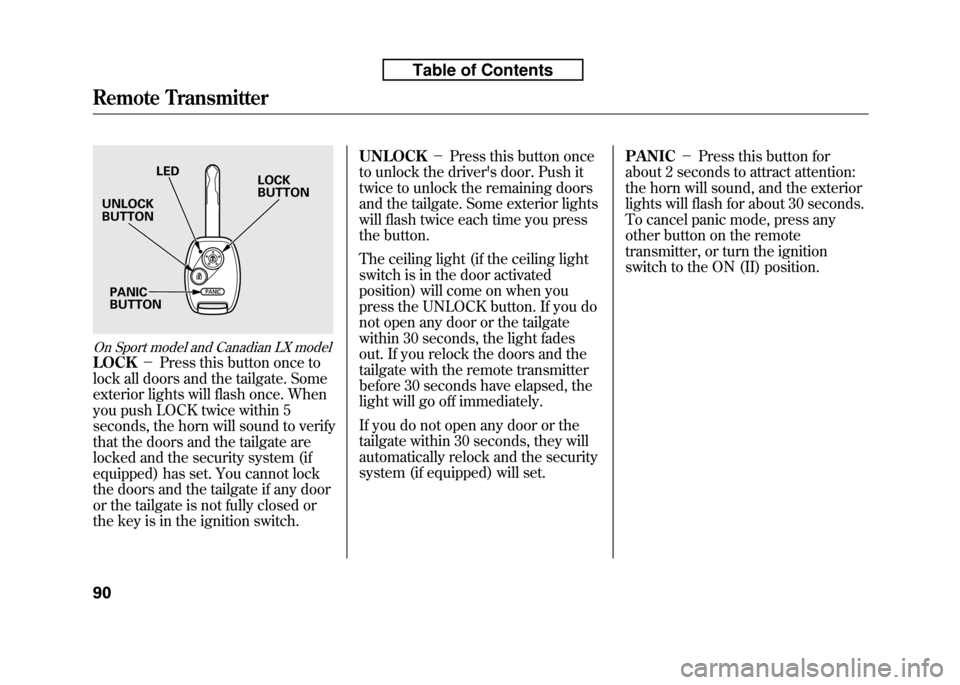
On Sport model and Canadian LX model
LOCK-Press this button once to
lock all doors and the tailgate. Some
exterior lights will flash once. When
you push LOCK twice within 5
seconds, the horn will sound to verify
that the doors and the tailgate are
locked and the security system (if
equipped) has set. You cannot lock
the doors and the tailgate if any door
or the tailgate is not fully closed or
the key is in the ignition switch. UNLOCK
-Press this button once
to unlock the driver's door. Push it
twice to unlock the remaining doors
and the tailgate. Some exterior lights
will flash twice each time you press
the button.
The ceiling light (if the ceiling light
switch is in the door activated
position) will come on when you
press the UNLOCK button. If you do
not open any door or the tailgate
within 30 seconds, the light fades
out. If you relock the doors and the
tailgate with the remote transmitter
before 30 seconds have elapsed, the
light will go off immediately.
If you do not open any door or the
tailgate within 30 seconds, they will
automatically relock and the security
system (if equipped) will set. PANIC
-Press this button for
about 2 seconds to attract attention:
the horn will sound, and the exterior
lights will flash for about 30 seconds.
To cancel panic mode, press any
other button on the remote
transmitter, or turn the ignition
switch to the ON (II) position.
LED
UNLOCK BUTTON
PANICBUTTON LOCKBUTTON
Remote Transmitter
90
Table of Contents