ECU HONDA FIT 2010 2.G Owner's Manual
[x] Cancel search | Manufacturer: HONDA, Model Year: 2010, Model line: FIT, Model: HONDA FIT 2010 2.GPages: 351, PDF Size: 5.67 MB
Page 112 of 351
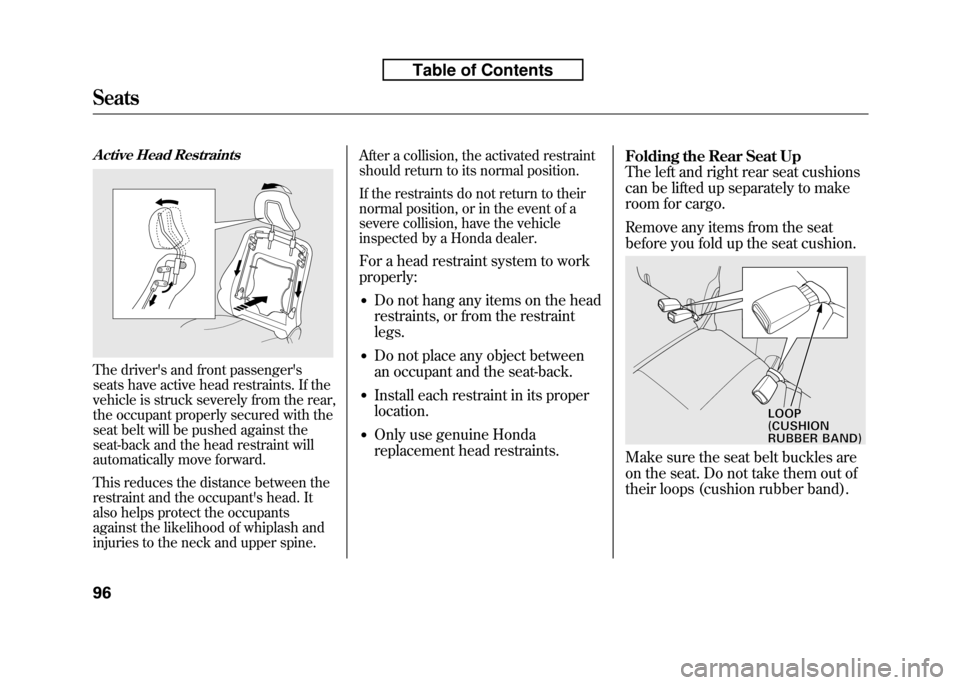
Active Head Restraints
The driver's and front passenger's
seats have active head restraints. If the
vehicle is struck severely from the rear,
the occupant properly secured with the
seat belt will be pushed against the
seat-back and the head restraint will
automatically move forward.
This reduces the distance between the
restraint and the occupant's head. It
also helps protect the occupants
against the likelihood of whiplash and
injuries to the neck and upper spine.After a collision, the activated restraint
should return to its normal position.
If the restraints do not return to their
normal position, or in the event of a
severe collision, have the vehicle
inspected by a Honda dealer.
For a head restraint system to work properly: ● Do not hang any items on the head
restraints, or from the restraintlegs.
● Do not place any object between
an occupant and the seat-back.
● Install each restraint in its properlocation.
● Only use genuine Honda
replacement head restraints. Folding the Rear Seat Up
The left and right rear seat cushions
can be lifted up separately to make
room for cargo.
Remove any items from the seat
before you fold up the seat cushion.
Make sure the seat belt buckles are
on the seat. Do not take them out of
their loops (cushion rubber band).
LOOP(CUSHIONRUBBERBAND)
Seats
96
Table of Contents
Page 114 of 351
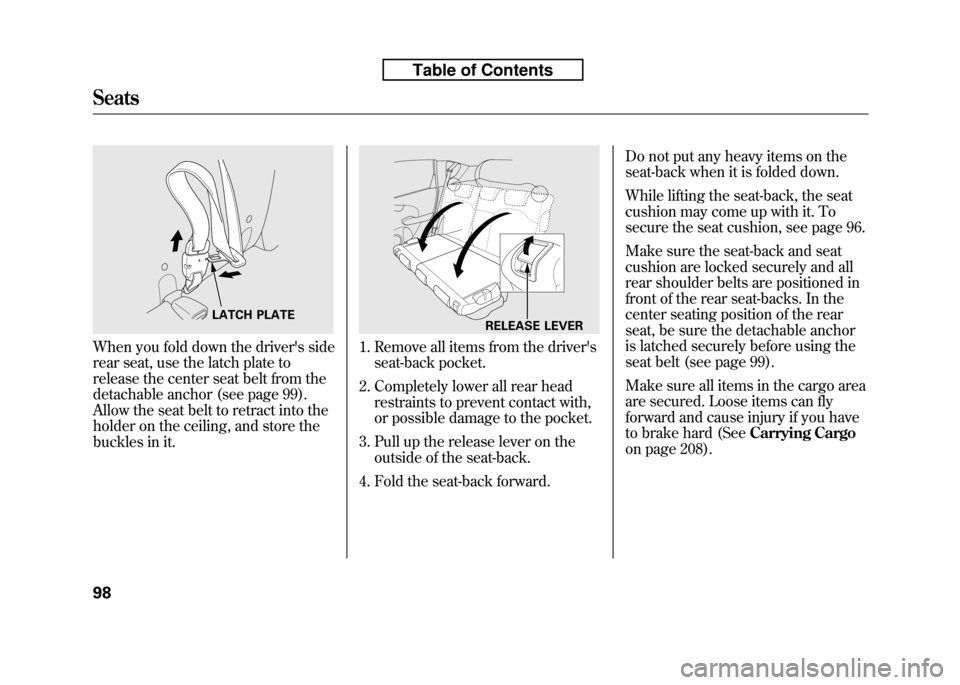
When you fold down the driver's side
rear seat, use the latch plate to
release the center seat belt from the
detachable anchor (see page 99).
Allow the seat belt to retract into the
holder on the ceiling, and store the
buckles in it.1. Remove all items from the driver'sseat-back pocket.
2. Completely lower all rear head restraints to prevent contact with,
or possible damage to the pocket.
3. Pull up the release lever on the outside of the seat-back.
4. Fold the seat-back forward. Do not put any heavy items on the
seat-back when it is folded down.
While lifting the seat-back, the seat
cushion may come up with it. To
secure the seat cushion, see page 96.
Make sure the seat-back and seat
cushion are locked securely and all
rear shoulder belts are positioned in
front of the rear seat-backs. In the
center seating position of the rear
seat, be sure the detachable anchor
is latched securely before using the
seat belt (see page 99).
Make sure all items in the cargo area
are secured. Loose items can fly
forward and cause injury if you have
to brake hard (See
Carrying Cargo
on page 208).
LATCH PLATERELEASE LEVER
Seats
98
Table of Contents
Page 115 of 351
Detachable Anchor
The seat belt in the rear center seat
is equipped with a detachableanchor.
This allows the center seat belt to be
unlatched when the driver's side rear
seat is folded.
Using a seat belt with the
detachable anchor unlatched
increases the chance of serious
injury or death in a crash.
Before using the seat belt,
make sure the detachable
anchor is correctly latched.
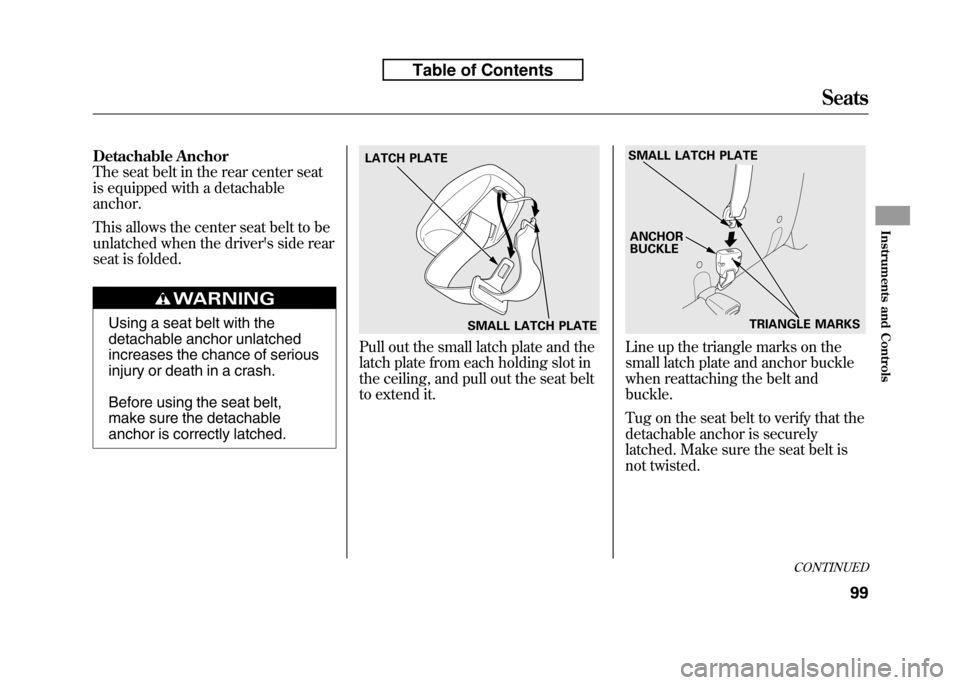
Pull out the small latch plate and the
latch plate from each holding slot in
the ceiling, and pull out the seat belt
to extend it.Line up the triangle marks on the
small latch plate and anchor buckle
when reattaching the belt andbuckle.
Tug on the seat belt to verify that the
detachable anchor is securely
latched. Make sure the seat belt is
not twisted.
SMALL LATCH PLATE
LATCH PLATE
SMALL LATCH PLATE
TRIANGLE MARKS
ANCHOR BUCKLE
CONTINUED
Seats
99
Instruments and Controls
Table of Contents
Page 124 of 351
The heating and air conditioning
system in your vehicle provides a
comfortable driving environment in
all weather conditions.
The standard audio system has many
features. This section describes
those features and how to use them.
Your vehicle has an anti-theft audio
system that requires a code number
to enable it.
The security system helps to
discourage vandalism and theft of
your vehicle.Vents, Heating, and A/C.............
110
Playing the FM/AM Radio (Models without navigationsystem) ...............................
115
Playing a Disc (Models without navigation system) ..................
122
Disc Player Error Messages (Models without navigationsystem) ...............................
128
Playing an iPod
®(Models without
navigation system) ..................
129
iPod
®Error Messages (Models
without navigation system) .....
135
Playing a USB Flash Memory Device (Models without
navigation system) ..............
136
USB Flash Memory Device Error
Messages (Models withoutnavigation system) ..............
142
Playing the AM/FM Radio
(Models with navigation
system) ...............................
143
Playing a Disc (Models with
navigation system) ..................
149Disc Player Error Messages
(Models with navigation
system) ...............................
157
Playing a PC card (Models with
navigation system) ..................
158
Playing an iPod
®(Models with
navigation system) ..................
170
iPod
®Error Messages (Models
with navigation system) ..........
176
Playing a USB Flash Memory
Device (Models withnavigation system) ..............
177
USB Flash Memory Device Error Messages (Models withnavigation system) ..............
183
FM/AM Radio Reception ............
184
Protecting Your Discs .................
186
Remote Audio Controls ...............
189
Auxiliary Input Jack ....................
190
Radio Theft Protection ................
191
Setting the Clock .........................
192
Security System ..........................
193
Cruise Control ............................
194
Features
109
Features
Page 146 of 351
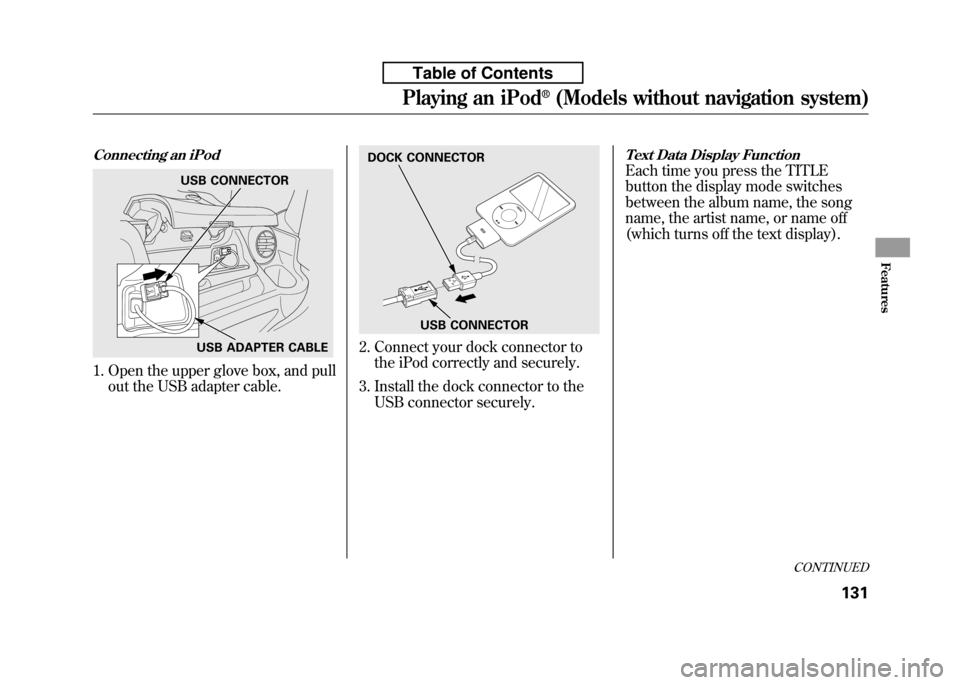
Connecting an iPod
1. Open the upper glove box, and pullout the USB adapter cable.
2. Connect your dock connector tothe iPod correctly and securely.
3. Install the dock connector to the USB connector securely.
Text Data Display Function
Each time you press the TITLE
button the display mode switches
between the album name, the song
name, the artist name, or name off
(which turns off the text display).USB CONNECTOR
USB ADAPTER CABLE
DOCK CONNECTOR
USB CONNECTOR
CONTINUED
Playing an iPod®(Models without navigation system)
131
Features
Table of Contents
Page 152 of 351

To Play a USB Flash Memory Device
This audio system can operate the
audio files on a USB flash memory
device with the same controls used
for the in-dash disc player. To play a
USB flash memory device, connect it
to the USB adapter cable in the
upper glove box, then press the AUX
button. The ignition switch must be
in the ACCESSORY (I) or ON (II)position.
The audio system reads and plays
the audio files on the USB flash
memory device in MP3, WMA orAAC
ꭧformats. Depending on the
format, the display shows MP3,
WMA or AAC when a USB flash
memory device is playing. The USB
flash memory device limit is up to
700 folders or up to 65535 files. ꭧ : Only AAC format files recorded
with iTunes are playable on this
audio unit. The recommended USB flash
memory devices are 256 Mbyte or
higher, and formatted with the FAT
file system. Some digital audio
players may be compatible as well.
Some USB flash memory device
(such as devices with security
lockout features, etc.) will not work
in this audio unit. NOTE:
● Do not use a device such as a card
reader or hard drive as the device
or your files may be damaged.
● Do not connect your USB flash
memory device using a HUB.
● Do not use an extension cable to
the USB adapter cable equipped
with your vehicle.
● Do not keep the USB flash
memory device in the vehicle.
Direct sunlight and high heat will
damage it. ●
We recommend backing up your
data before playing a USB flash
memory device.
● Depending on the type and
number of files, it may take some
time before they begin to play.
● Depending on the software the
files were made with, it may not be
possible to play some files, or
display some text data.
The specifications for compatible
MP3 files are: – Sampling frequency:
32/44.1/48 kHz (MPEG1)
16/22.05/24 kHz (MPEG2)
– Bit rate:
32/40/48/56/64/80/96/112/128/
160/192/224/256/320/VBR kbps(MPEG1)
8/16/24/32/40/48/56/64/80/96/
112/128/144/160/VBR kbps(MPEG2)
CONTINUED
Playing a USB Flash Memory Device (Models without navigation system)
137
Features
Table of Contents
Page 154 of 351
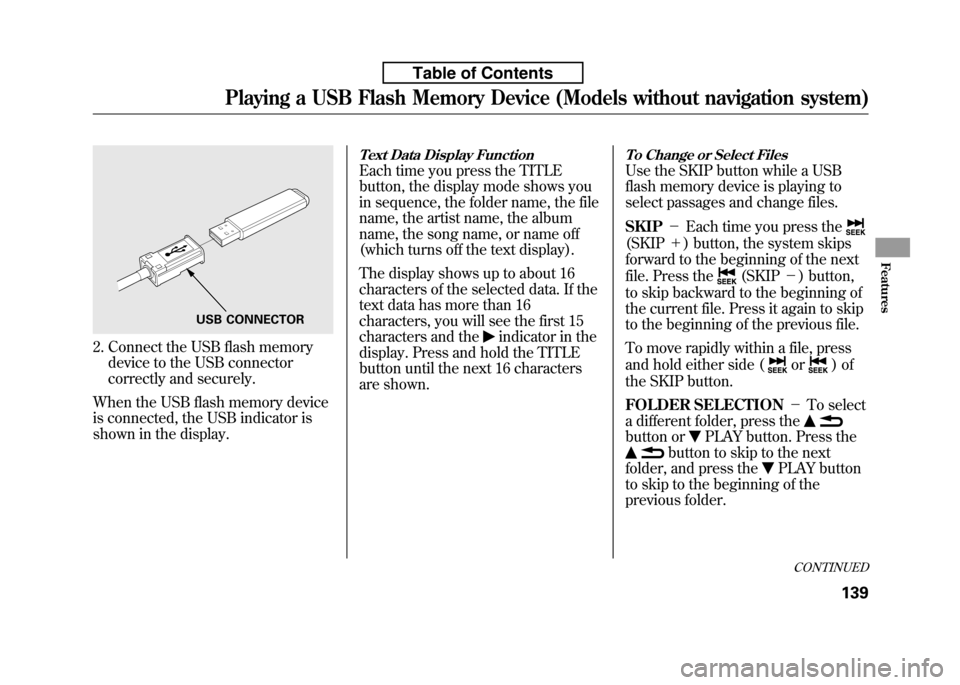
2. Connect the USB flash memorydevice to the USB connector
correctly and securely.
When the USB flash memory device
is connected, the USB indicator is
shown in the display.
Text Data Display Function
Each time you press the TITLE
button, the display mode shows you
in sequence, the folder name, the file
name, the artist name, the album
name, the song name, or name off
(which turns off the text display).
The display shows up to about 16
characters of the selected data. If the
text data has more than 16
characters, you will see the first 15
characters and the
indicator in the
display. Press and hold the TITLE
button until the next 16 characters
are shown.
To Change or Select Files
Use the SKIP button while a USB
flash memory device is playing to
select passages and change files. SKIP -Each time you press the
(SKIP +) button, the system skips
forward to the beginning of the next
file. Press the
(SKIP -) button,
to skip backward to the beginning of
the current file. Press it again to skip
to the beginning of the previous file.
To move rapidly within a file, press
and hold either side (
or)of
the SKIP button.
FOLDER SELECTION -To select
a different folder, press the
button orPLAY button. Press the
button to skip to the next
folder, and press the
PLAY button
to skip to the beginning of the
previous folder.
USB CONNECTOR
CONTINUED
Playing a USB Flash Memory Device (Models without navigation system)
139
Features
Table of Contents
Page 187 of 351
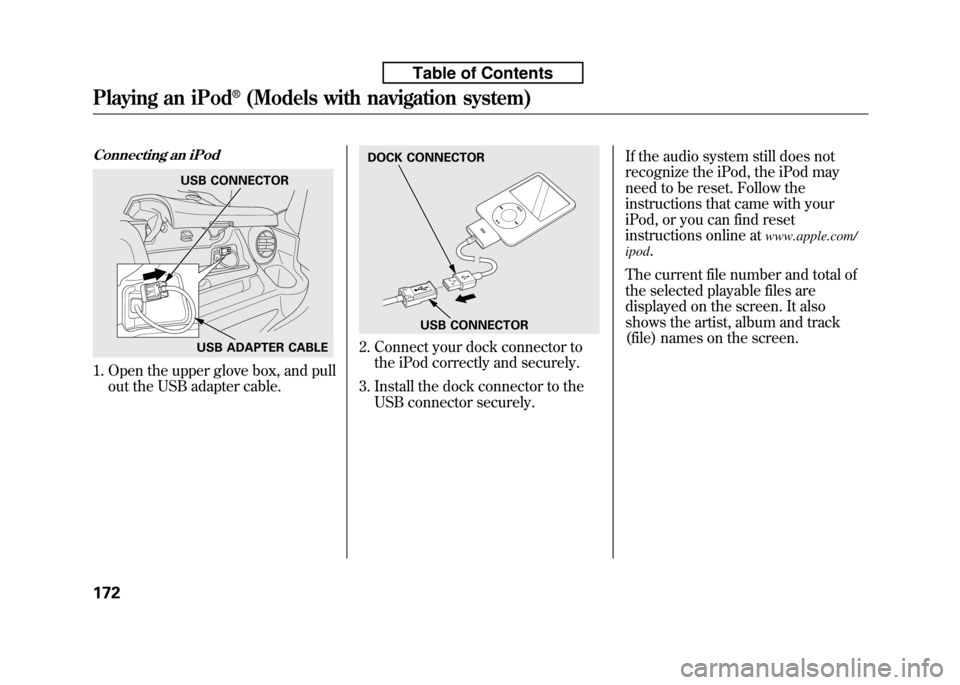
Connecting an iPod
1. Open the upper glove box, and pullout the USB adapter cable.
2. Connect your dock connector tothe iPod correctly and securely.
3. Install the dock connector to the USB connector securely. If the audio system still does not
recognize the iPod, the iPod may
need to be reset. Follow the
instructions that came with your
iPod, or you can find reset
instructions online at
www.apple.com/
ipod .
The current file number and total of
the selected playable files are
displayed on the screen. It also
shows the artist, album and track
(file) names on the screen.
USB CONNECTOR
USB ADAPTER CABLE
DOCK CONNECTOR
USB CONNECTOR
Playing an iPod®(Models with navigation system)
172
Table of Contents
Page 193 of 351

To Play a USB Flash Memory Device
This audio system can operate the
audio files on a USB flash memory
device with the same controls used
for the in-dash disc player. To play a
USB flash memory device, connect it
to the USB adapter cable in the
upper glove box, then press the CD/
AUX button. The ignition switch
must be in the ACCESSORY (I) or
ON (II) position.
The audio system reads and plays
the audio files on the USB flash
memory device in MP3, WMA orAAC
ꭧformats. Depending on the
format, the display shows MP3,
WMA or AAC when a USB flash
memory device is playing. The USB
flash memory device limit is up to
700 folders or up to 65535 files. ꭧ : Only AAC format files recorded
with iTunes are playable on this
audio unit. The recommended USB flash
memory devices are 256 Mbyte or
higher, and formatted with the FAT
file system. Some digital audio
players may be compatible as well.
Some USB flash memory device
(such as devices with security
lockout features, etc.) will not work
in this audio unit. NOTE:
● Do not use a device such as a card
reader or hard drive as the device
or your files may be damaged.
● Do not connect your USB flash
memory device using a HUB.
● Do not use an extension cable to
the USB adapter cable equipped
with your vehicle.
● Do not keep the USB flash
memory device in the vehicle.
Direct sunlight and high heat will
damage it. ●
We recommend backing up your
data before playing a USB flash
memory device.
● Depending on the type and
number of files, it may take some
time before they begin to play.
● Depending on the software the
files were made with, it may not be
possible to play some files, or
display some text data.
Voice Control System
You can select the AUX mode by
using the navigation system voice
control buttons, but cannot operate
the play mode functions.
The specifications for compatible
MP3 files are:
– Sampling frequency:
32/44.1/48 kHz (MPEG1)
16/22.05/24 kHz (MPEG2)
Playing a USB Flash Memory Device (Models with navigation system)
178
Table of Contents
Page 195 of 351
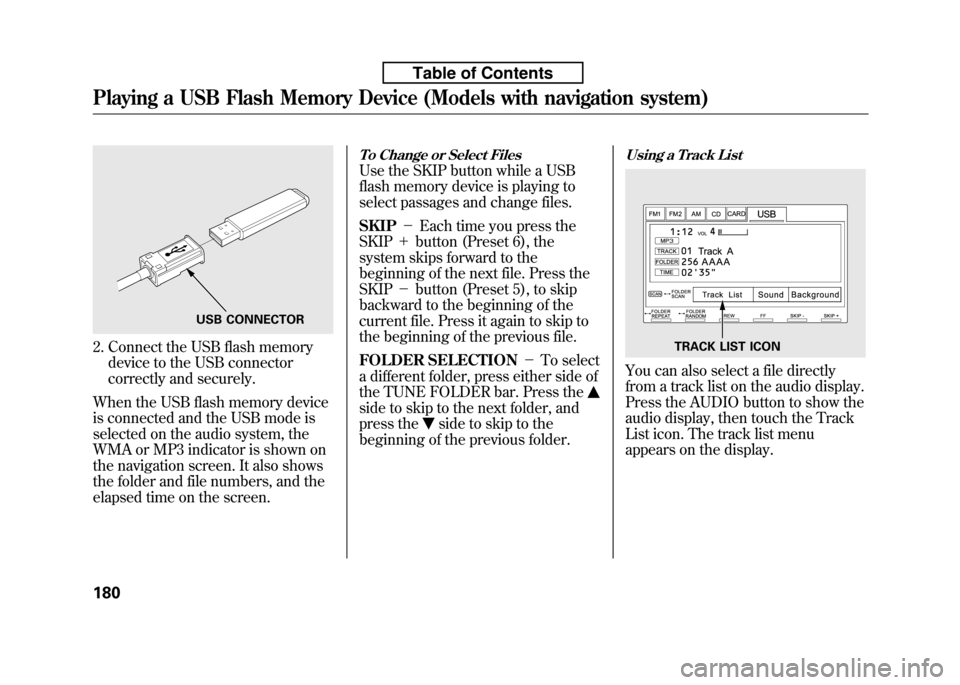
2. Connect the USB flash memorydevice to the USB connector
correctly and securely.
When the USB flash memory device
is connected and the USB mode is
selected on the audio system, the
WMA or MP3 indicator is shown on
the navigation screen. It also shows
the folder and file numbers, and the
elapsed time on the screen.
To Change or Select Files
Use the SKIP button while a USB
flash memory device is playing to
select passages and change files. SKIP -Each time you press the
SKIP +button (Preset 6), the
system skips forward to the
beginning of the next file. Press theSKIP -button (Preset 5), to skip
backward to the beginning of the
current file. Press it again to skip to
the beginning of the previous file.
FOLDER SELECTION -To select
a different folder, press either side of
the TUNE FOLDER bar. Press the
side to skip to the next folder, and
press the
side to skip to the
beginning of the previous folder.
Using a Track List
You can also select a file directly
from a track list on the audio display.
Press the AUDIO button to show the
audio display, then touch the Track
List icon. The track list menu
appears on the display.
USB CONNECTOR
TRACK LIST ICON
Playing a USB Flash Memory Device (Models with navigation system)
180
Table of Contents