key HONDA FIT 2010 2.G User Guide
[x] Cancel search | Manufacturer: HONDA, Model Year: 2010, Model line: FIT, Model: HONDA FIT 2010 2.GPages: 351, PDF Size: 5.67 MB
Page 95 of 351
The immobilizer system protects
your vehicle from theft. If an
improperly coded key (or other
device) is used, the engine's fuel
system is disabled.
When you turn the ignition switch to
the ON (II) position, the immobilizer
system indicator should come on
briefly, then go off. If the indicator
starts to blink, it means the system
does not recognize the coding of the
key. Turn the ignition switch to the
LOCK (0) position, remove the key,
reinsert it, and turn the ignition
switch to the ON (II) position again.
The system may not recognize your
key's coding if another immobilizer
key or other metal object (i.e. key
chain) is near the ignition switch
when you insert the key.If the system repeatedly does not
recognize the coding of your key,
contact your dealer.
Do not attempt to alter this system or
add other devices to it. Electrical
problems could result that may make
your vehicle inoperable.
If you have lost your key and cannot
start the engine, contact your dealer.
Always take the ignition key with you
whenever you leave the vehicle alone.
As required by the FCC:
This device complies with Part 15 of the
FCC rules. Operation is subject to thefollowing two conditions: (1) This devicemay not cause harmful interference, and(2) this device must accept any
interference received, including interference that may cause undesiredoperation.
Changes or modifications not expresslyapproved by the party responsible forcompliance could void the user's
authority to operate the equipment.
This device complies with IndustryCanada Standard RSS-210. Operation is subject to the following two conditions:(1) this device may not cause
interference, and (2) this device mustaccept any interference that may cause undesired operation of the device.
Immobilizer System
79
Instruments and Controls
Table of Contents
Page 96 of 351
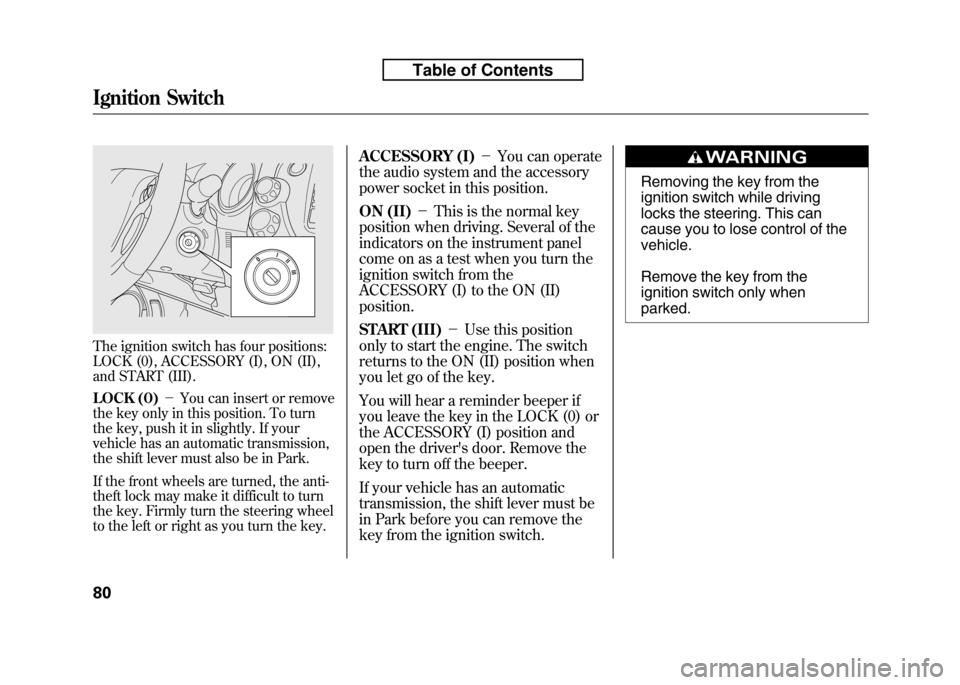
The ignition switch has four positions:
LOCK (0), ACCESSORY (I), ON (II),
and START (III).
LOCK (0)-You can insert or remove
the key only in this position. To turn
the key, push it in slightly. If your
vehicle has an automatic transmission,
the shift lever must also be in Park.
If the front wheels are turned, the anti-
theft lock may make it difficult to turn
the key. Firmly turn the steering wheel
to the left or right as you turn the key. ACCESSORY (I)
-You can operate
the audio system and the accessory
power socket in this position.
ON (II) -This is the normal key
position when driving. Several of the
indicators on the instrument panel
come on as a test when you turn the
ignition switch from the
ACCESSORY (I) to the ON (II)position.
START (III) -Use this position
only to start the engine. The switch
returns to the ON (II) position when
you let go of the key.
You will hear a reminder beeper if
you leave the key in the LOCK (0) or
the ACCESSORY (I) position and
open the driver's door. Remove the
key to turn off the beeper.
If your vehicle has an automatic
transmission, the shift lever must be
in Park before you can remove the
key from the ignition switch.
Removing the key from the
ignition switch while driving
locks the steering. This can
cause you to lose control of thevehicle.
Remove the key from the
ignition switch only whenparked.
Ignition Switch
80
Table of Contents
Page 97 of 351
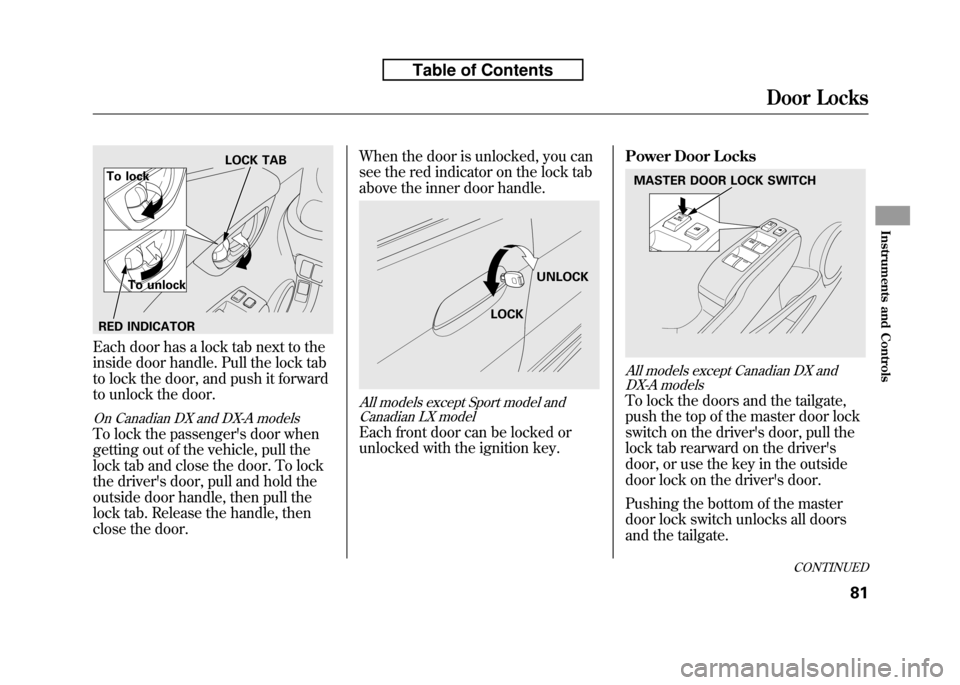
Each door has a lock tab next to the
inside door handle. Pull the lock tab
to lock the door, and push it forward
to unlock the door.
On Canadian DX and DX-A models
To lock the passenger's door when
getting out of the vehicle, pull the
lock tab and close the door. To lock
the driver's door, pull and hold the
outside door handle, then pull the
lock tab. Release the handle, then
close the door.When the door is unlocked, you can
see the red indicator on the lock tab
above the inner door handle.
All models except Sport model and
Canadian LX model
Each front door can be locked or
unlocked with the ignition key. Power Door Locks
All models except Canadian DX and
DX-A models
To lock the doors and the tailgate,
push the top of the master door lock
switch on the driver's door, pull the
lock tab rearward on the driver's
door, or use the key in the outside
door lock on the driver's door.
Pushing the bottom of the master
door lock switch unlocks all doors
and the tailgate.
LOCK TAB
To lock
To unlock
RED INDICATOR
LOCK UNLOCK
MASTER DOOR LOCK SWITCH
CONTINUED
Door Locks
81
Instruments and Controls
Table of Contents
Page 98 of 351
The lock tab on each passenger's
door locks and unlocks only that
door. Pushing forward the lock tab
on the driver's door unlocks only that
door. To unlock only the driver's
door from the outside, turn the key
and release it. If you turn it again, the
remaining doors and the tailgateunlock.
To lock a passenger's door when
getting out of the vehicle, pull the
lock tab rearward and close the door.
To lock the driver's door, remove
key from ignition switch and pull the
lock tab rearward or push the top of
the master door lock switch, then
close the door.Lockout Prevention
If you forget and leave the key in the
ignition switch, lockout prevention
will not allow you to lock the driver's
door. With any door open and the
key in the ignition switch, locking
with master door lock switch is
disabled. If the driver's door is
closed, the lock tab on the driver's
door is not disabled. Pulling the
driver's lock tab rearward will lock all
doors. If you try to lock an open
driver's door by pulling the lock tab
rearward, the driver's door lock tab
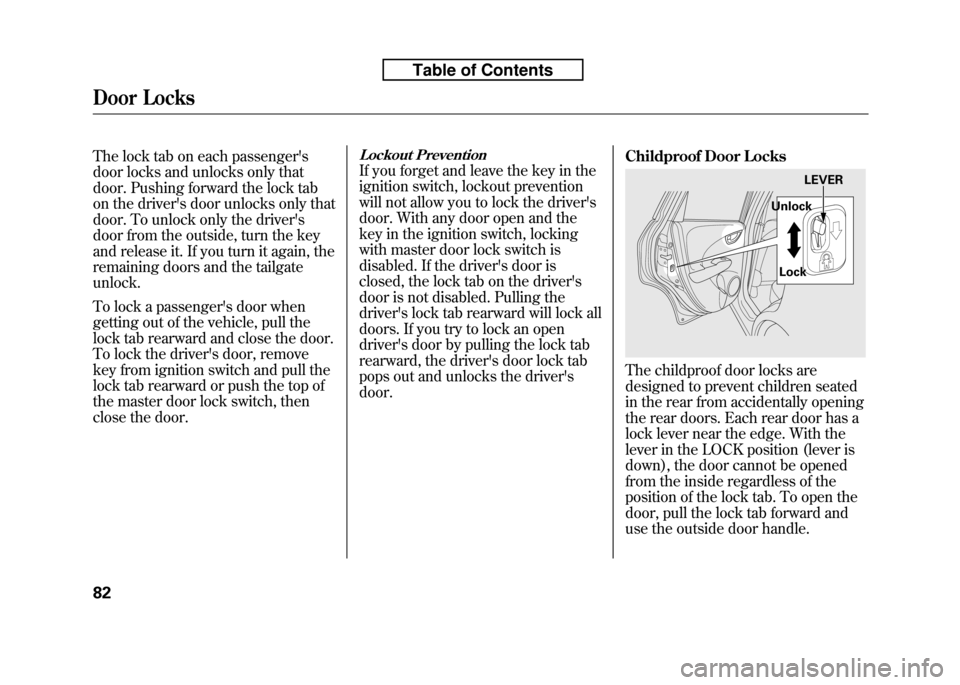
pops out and unlocks the driver'sdoor.Childproof Door Locks
The childproof door locks are
designed to prevent children seated
in the rear from accidentally opening
the rear doors. Each rear door has a
lock lever near the edge. With the
lever in the LOCK position (lever is
down), the door cannot be opened
from the inside regardless of the
position of the lock tab. To open the
door, pull the lock tab forward and
use the outside door handle.
LEVER
Unlock
Lock
Door Locks
82
Table of Contents
Page 104 of 351
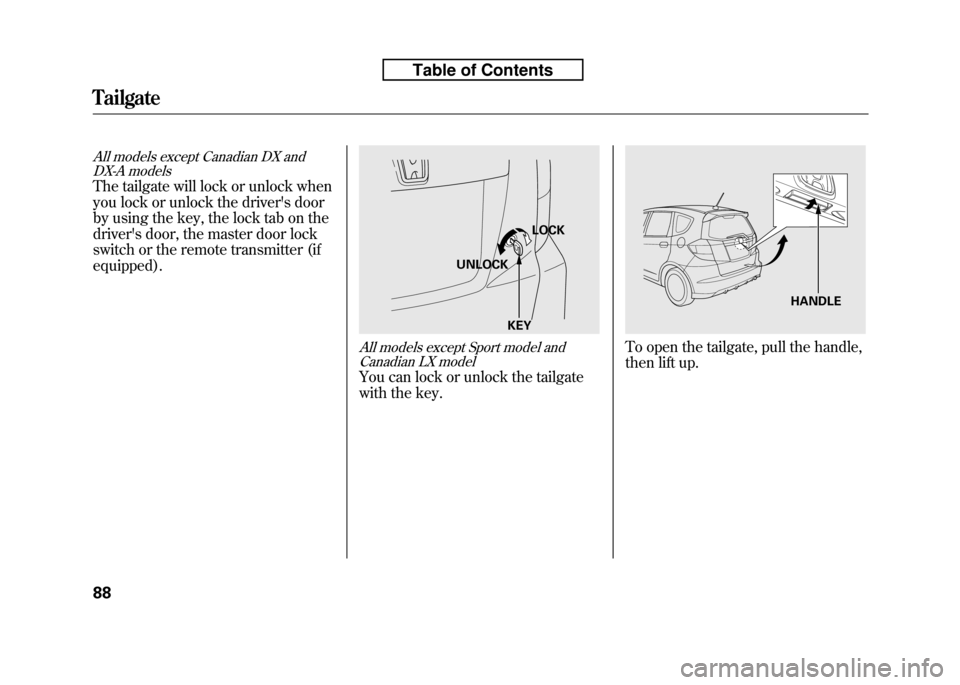
All models except Canadian DX andDX-A models
The tailgate will lock or unlock when
you lock or unlock the driver's door
by using the key, the lock tab on the
driver's door, the master door lock
switch or the remote transmitter (ifequipped).
All models except Sport model and
Canadian LX model
You can lock or unlock the tailgate
with the key.
To open the tailgate, pull the handle,
then lift up.
LOCK
UNLOCK
KEY
HANDLE
Tailgate
88
Table of Contents
Page 106 of 351
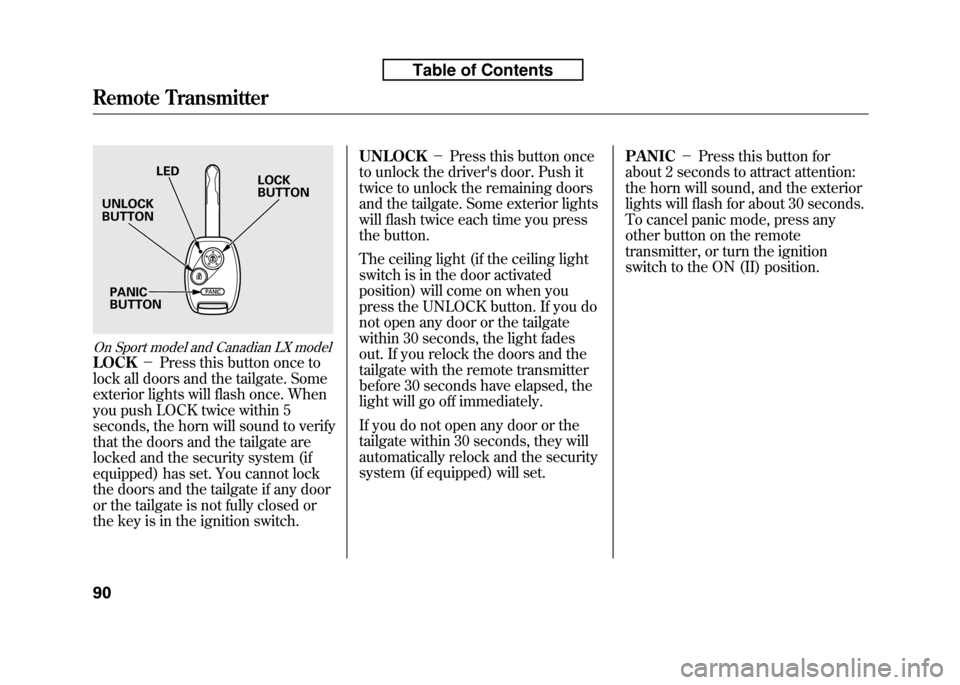
On Sport model and Canadian LX model
LOCK-Press this button once to
lock all doors and the tailgate. Some
exterior lights will flash once. When
you push LOCK twice within 5
seconds, the horn will sound to verify
that the doors and the tailgate are
locked and the security system (if
equipped) has set. You cannot lock
the doors and the tailgate if any door
or the tailgate is not fully closed or
the key is in the ignition switch. UNLOCK
-Press this button once
to unlock the driver's door. Push it
twice to unlock the remaining doors
and the tailgate. Some exterior lights
will flash twice each time you press
the button.
The ceiling light (if the ceiling light
switch is in the door activated
position) will come on when you
press the UNLOCK button. If you do
not open any door or the tailgate
within 30 seconds, the light fades
out. If you relock the doors and the
tailgate with the remote transmitter
before 30 seconds have elapsed, the
light will go off immediately.
If you do not open any door or the
tailgate within 30 seconds, they will
automatically relock and the security
system (if equipped) will set. PANIC
-Press this button for
about 2 seconds to attract attention:
the horn will sound, and the exterior
lights will flash for about 30 seconds.
To cancel panic mode, press any
other button on the remote
transmitter, or turn the ignition
switch to the ON (II) position.
LED
UNLOCK BUTTON
PANICBUTTON LOCKBUTTON
Remote Transmitter
90
Table of Contents
Page 108 of 351
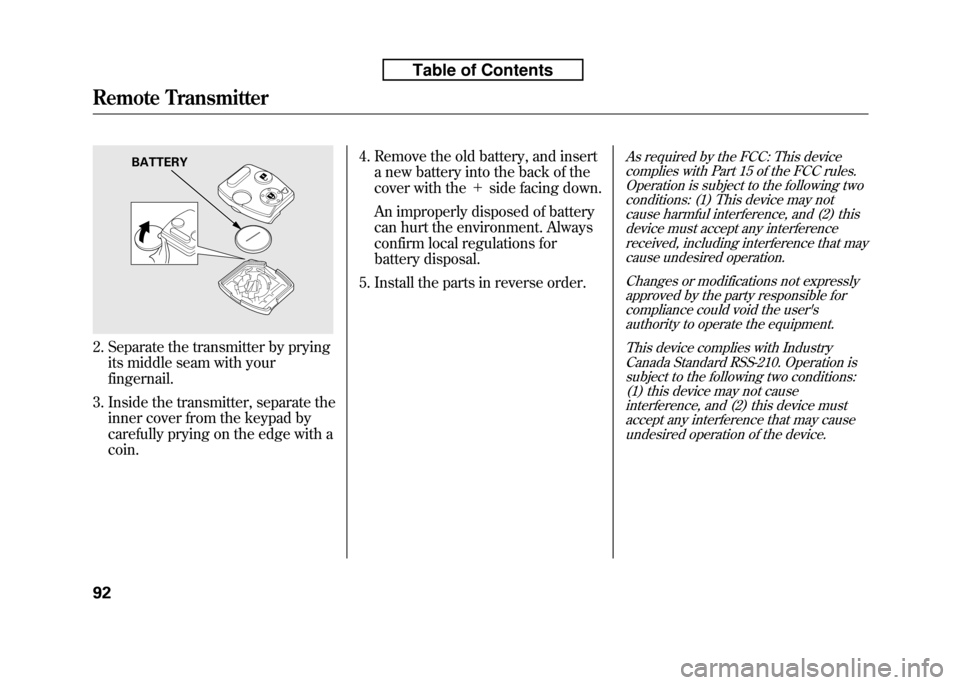
2. Separate the transmitter by pryingits middle seam with your fingernail.
3. Inside the transmitter, separate the inner cover from the keypad by
carefully prying on the edge with acoin. 4. Remove the old battery, and insert
a new battery into the back of the
cover with the +side facing down.
An improperly disposed of battery
can hurt the environment. Always
confirm local regulations for
battery disposal.
5. Install the parts in reverse order.
As required by the FCC: This device complies with Part 15 of the FCC rules.
Operation is subject to the following twoconditions: (1) This device may notcause harmful interference, and (2) thisdevice must accept any interference
received, including interference that may cause undesired operation.
Changes or modifications not expresslyapproved by the party responsible forcompliance could void the user'sauthority to operate the equipment.
This device complies with IndustryCanada Standard RSS-210. Operation is
subject to the following two conditions: (1) this device may not causeinterference, and (2) this device must
accept any interference that may causeundesired operation of the device.BATTERY
Remote Transmitter
92
Table of Contents
Page 123 of 351
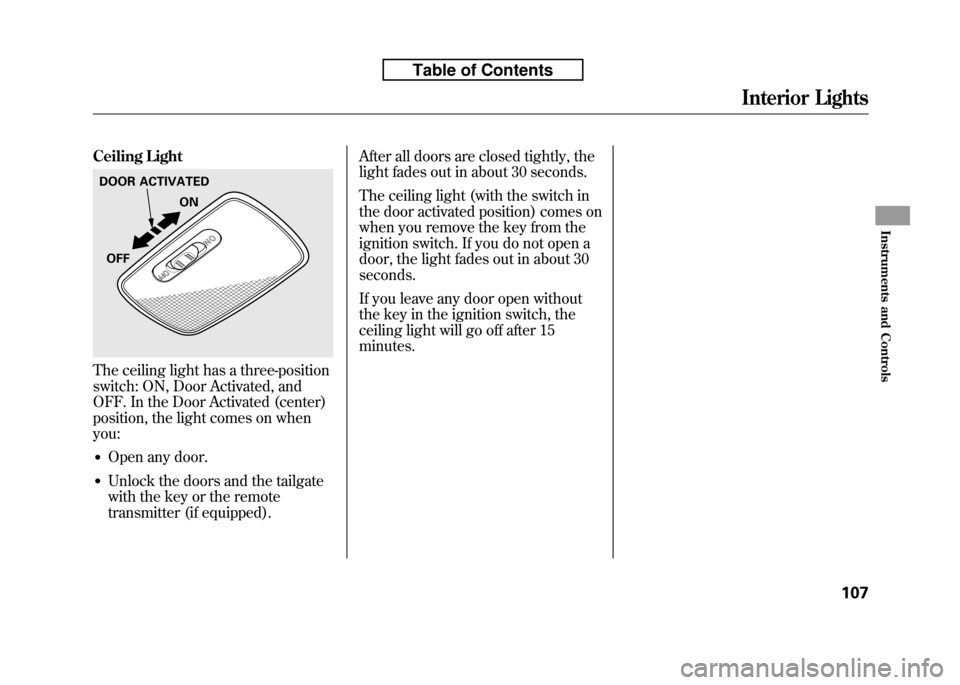
Ceiling Light
The ceiling light has a three-position
switch: ON, Door Activated, and
OFF. In the Door Activated (center)
position, the light comes on whenyou:● Open any door.
● Unlock the doors and the tailgate
with the key or the remote
transmitter (if equipped). After all doors are closed tightly, the
light fades out in about 30 seconds.
The ceiling light (with the switch in
the door activated position) comes on
when you remove the key from the
ignition switch. If you do not open a
door, the light fades out in about 30seconds.
If you leave any door open without
the key in the ignition switch, the
ceiling light will go off after 15minutes.
DOOR ACTIVATED
ON
OFF
Interior Lights
107
Instruments and Controls
Table of Contents
Page 182 of 351
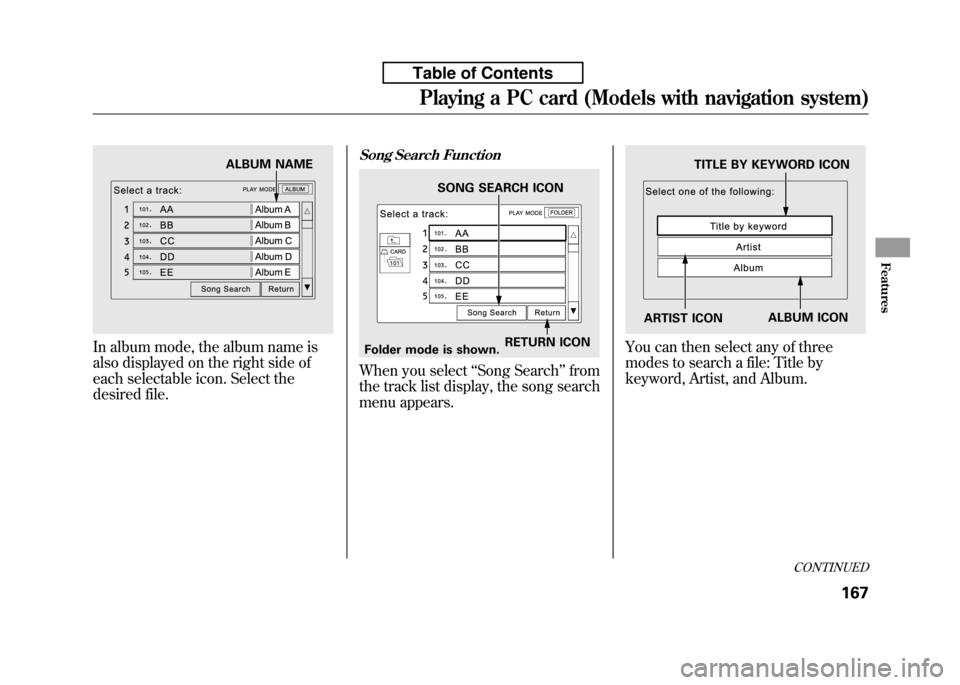
In album mode, the album name is
also displayed on the right side of
each selectable icon. Select the
desired file.
Song Search Function
When you select‘‘Song Search ’’from
the track list display, the song search
menu appears.
You can then select any of three
modes to search a file: Title by
keyword, Artist, and Album.
ALBUM NAME
RETURN ICON
SONG SEARCH ICON
Folder mode is shown.
TITLE BY KEYWORD ICON
ARTIST ICON ALBUM ICON
CONTINUED
Playing a PC card (Models with navigation system)
167
Features
Table of Contents
Page 183 of 351
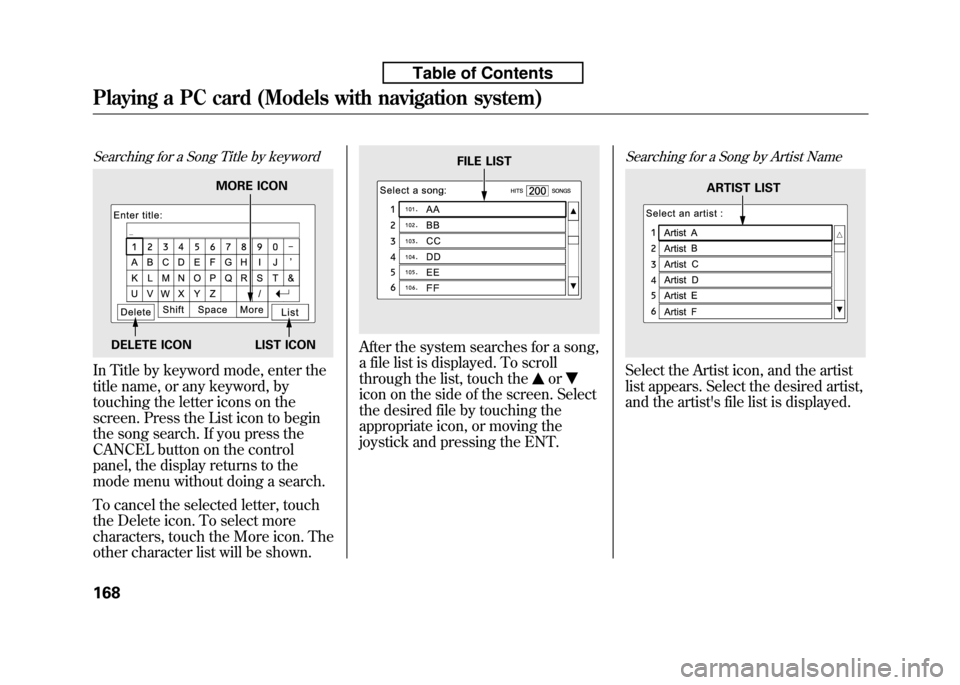
Searching for a Song Title by keyword
In Title by keyword mode, enter the
title name, or any keyword, by
touching the letter icons on the
screen. Press the List icon to begin
the song search. If you press the
CANCEL button on the control
panel, the display returns to the
mode menu without doing a search.
To cancel the selected letter, touch
the Delete icon. To select more
characters, touch the More icon. The
other character list will be shown.
After the system searches for a song,
a file list is displayed. To scroll
through the list, touch the
or
icon on the side of the screen. Select
the desired file by touching the
appropriate icon, or moving the
joystick and pressing the ENT.
Searching for a Song by Artist Name
Select the Artist icon, and the artist
list appears. Select the desired artist,
and the artist's file list is displayed.
MORE ICON
DELETE ICON LIST ICON
FILE LIST
ARTIST LIST
Playing a PC card (Models with navigation system)
168
Table of Contents