reset HONDA FIT 2010 2.G Owners Manual
[x] Cancel search | Manufacturer: HONDA, Model Year: 2010, Model line: FIT, Model: HONDA FIT 2010 2.GPages: 351, PDF Size: 5.67 MB
Page 78 of 351

Anti-lock Brake System
(ABS) Indicator
This indicator normally comes on for
a few seconds when you turn the
ignition switch to the ON (II)
position, and when the ignition
switch is turned to the START (III)
position. If it comes on at any other
time, there is a problem with the
ABS. If this happens, have your
vehicle checked at a dealer. With this
indicator on, your vehicle still has
normal braking ability but no anti-
lock function. For more information,
see page 231.Electric Power Steering
(EPS) Indicator
This indicator normally comes on when
you turn the ignition switch to the ON
(II) position and goes off after the
engine starts. If it comes on at any
other time, there is a problem in the
electric power steering system. If this
happens, stop the vehicle in a safe
place and turn off the engine. Reset the
system by restarting the engine. The
indicator will not turn off immediately.
If it does not go off after driving a short
distance, or comes back on again while
driving, take the vehicle to your dealer
to have it checked. With the indicator
on, the EPS may be turned off, making
the vehicle harder to steer.
If you turn the steering wheel to the
full left or right position repeatedly
while stopping or driving at very low
speed, you may feel slightly harder
steering in order to prevent damage to
the steering box caused by overheating.Low Fuel Indicator
This indicator comes on as a
reminder that you must refuel soon.
When the indicator comes on, there
is about 1.64 US gal (6.2 L) of fuel
remaining in the tank before the
needle reaches E. There is a small
reserve of fuel remaining in the tank
when the needle does reach E.
Door and Tailgate Open Indicator
This indicator comes on if any door
or the tailgate is not closed tightly.
Instrument Panel Indicators
62
Table of Contents
Page 82 of 351
Maintenance Minder Indicator
This indicator comes on for a few
seconds when you turn the ignition
switch to the ON (II) position. It
reminds you that it is time to take
your vehicle in for scheduled
maintenance. The maintenance main
items and sub items will be displayed
in the information display. See page
245 for more information on the
maintenance minder.
This indicator goes off when your
dealer resets it after completing the
required maintenance service.Immobilizer System Indicator
This indicator comes on briefly when
you turn the ignition switch to the
ON (II) position. It will go off if you
have inserted a properly coded
ignition key. If it is not a properly
coded key, the indicator will blink,
and the engine's fuel system will be
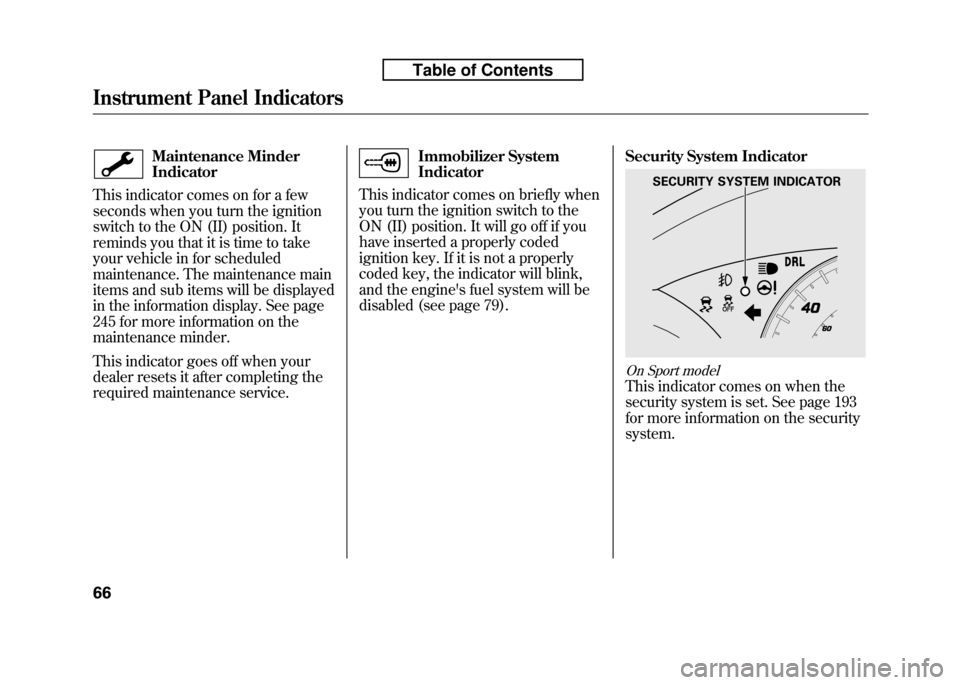
disabled (see page 79). Security System Indicator
On Sport model
This indicator comes on when the
security system is set. See page 193
for more information on the securitysystem.
SECURITY SYSTEM INDICATOR
Instrument Panel Indicators
66
Table of Contents
Page 84 of 351
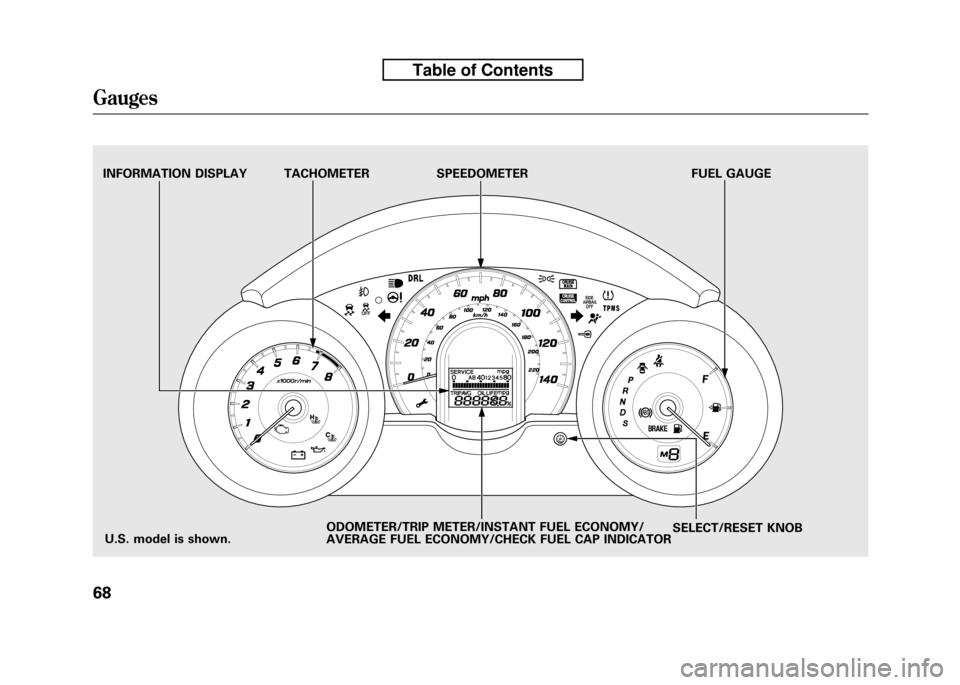
TACHOMETER SPEEDOMETER FUEL GAUGESELECT/RESET KNOB
INFORMATION DISPLAY
ODOMETER/TRIP METER/INSTANT FUEL ECONOMY/
AVERAGE FUEL ECONOMY/CHECK FUEL CAP INDICATOR
U.S. model is shown.
Gauges
68
Table of Contents
Page 85 of 351
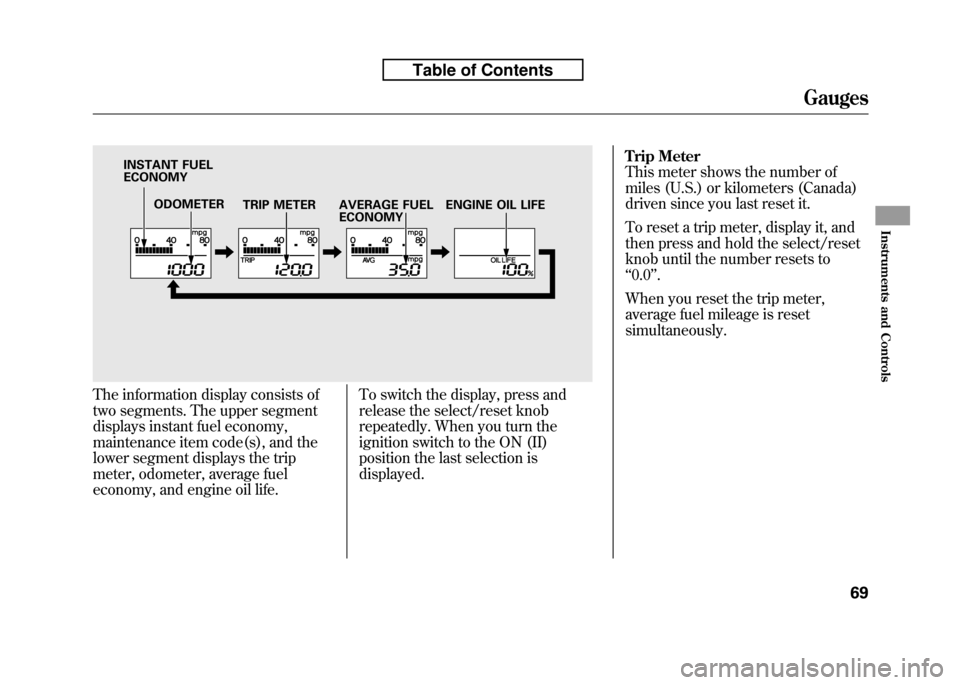
The information display consists of
two segments. The upper segment
displays instant fuel economy,
maintenance item code(s), and the
lower segment displays the trip
meter, odometer, average fuel
economy, and engine oil life.To switch the display, press and
release the select/reset knob
repeatedly. When you turn the
ignition switch to the ON (II)
position the last selection isdisplayed.Trip Meter
This meter shows the number of
miles (U.S.) or kilometers (Canada)
driven since you last reset it.
To reset a trip meter, display it, and
then press and hold the select/reset
knob until the number resets to‘‘
0.0 ’’.
When you reset the trip meter,
average fuel mileage is reset
simultaneously.
ODOMETER TRIP METER
INSTANT FUEL ECONOMY
AVERAGE FUEL ECONOMYENGINE OIL LIFE
Gauges
69
Instruments and Controls
Table of Contents
Page 86 of 351
Instant Fuel Economy
This shows your instant fuel
economy in mpg (U.S.) or l/100 km(Canada).
Average Fuel Economy
This shows your vehicle's average
fuel economy in mpg (U.S.) or 1/100
km (Canada) since you last reset the
trip meter.
When you reset a trip meter, the
average fuel economiy for that trip
meter also resets.Odometer
The odometer shows the total
distance your vehicle has been
driven. It measures miles in U.S.
models and kilometers in Canadian
models. It is illegal under U.S.
federal law and Canadian provincial/
territorial regulations to disconnect,
reset, or alter the odometer with the
intent to change the number of miles
or kilometers indicated.
Fuel Gauge
This shows how much fuel you have.
It may show slightly more or less
than the actual amount. The needle
returns to the bottom after you turn
off the ignition.
Avoid driving with an extremely low
fuel level. Running out of fuel could
cause the engine to misfire, damaging
the catalytic converter.Check Fuel Cap Indicator
If the fuel fill cap is loose or missing,a
‘‘CHECK FUEL CAP ’’message
appears on the information display
after you start the engine. The
message changes from CHECK, to
FUEL, to CAP repeatedly.
Turn the engine off and confirm the
fuel fill cap is installed. If it is, loosen
the cap, then retighten it until it
clicks at least once. You can cycle the
message off of the display by
pressing the select/reset knob
repeatedly, but this message will be
displayed each time the engine is
started. It will take several days of
normal driving for the vehicle to turn
the warning off.
Gauges
70
Table of Contents
Page 130 of 351
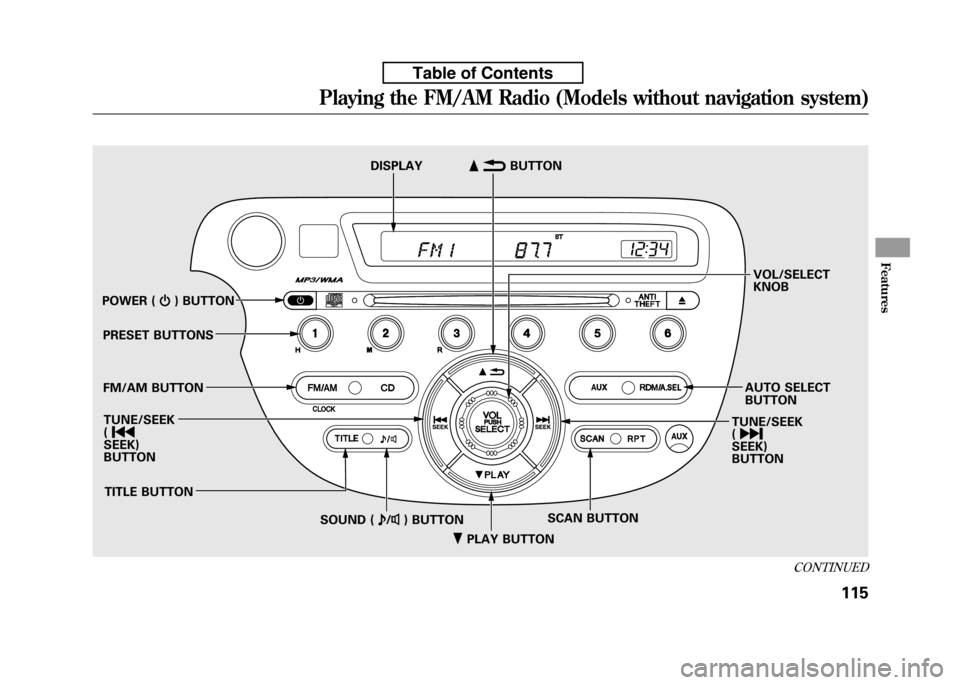
ꂺPLAY BUTTON
POWER (
ꂻ) BUTTON
PRESET BUTTONS
FM/AM BUTTON TUNE/SEEK ( ꀾ
SEEK)
BUTTON
TITLE BUTTON SCAN BUTTON
SOUND ( ꂼ/ꂽ ) BUTTON
DISPLAY
ꂹꂾ
BUTTON
VOL/SELECT KNOB
AUTO SELECT BUTTON
TUNE/SEEK ( ꀽ
SEEK)BUTTON
CONTINUED
Playing the FM/AM Radio (Models without navigation system)
115
Features
Table of Contents
Page 131 of 351

To Play the FM/AM Radio
The ignition switch must be in the
ACCESSORY (I) or ON (II) position.
Turn the system on by pushing the
FM/AM button. Adjust the volume
by turning the VOL/SELECT knob.
The band and frequency that the
radio was last tuned to are displayed.
To change bands, press the FM/AM
button. On the FM band, ST will be
displayed if the station is
broadcasting in stereo. Stereo
reproduction in AM is not available.
To Select a Station
You can use any of five methods to
find radio stations on the selected
band: tune, seek, scan, the preset
buttons, and auto select.TUNE
-Use the TUNE/SEEK
button to tune to a desired
frequency. Press the
button to
tune to a higher frequency, and the
button to tune to a lower
frequency.
You can also operate the tune
function by using the VOL/SELECTknob.
Press the VOL/ SELECT knob and
you will see ‘‘SEL ’’in the display.
Turn the knob right to tune to a
higher frequency, or left to tune to a
lower frequency.
To turn it off, press the VOL/
SELECT knob or
button, or
PLAY button.
The system will return to the normal
display about 10 seconds after you
stop adjusting the tune mode. SEEK
-The SEEK function
searches up and down from the
current frequency to find a station
with a strong signal. To activate it,
press and hold the
orside of
the TUNE/SEEK button until you
hear a beep, then release it. SCAN -The scan function samples
all stations with strong signals on the
selected band. To activate it, press
the SCAN button, then release it.
You will see SCAN in the display.
The system will scan for a station
with a strong signal. When it finds
one, it will stop and play that station
for about 10 seconds.
If you do nothing, the system will
then scan for the next strong station
and play it for 10 seconds. When it
plays a station you want to listen to,
press the SCAN button again.
Playing the FM/AM Radio (Models without navigation system)
116
Table of Contents
Page 132 of 351

PRESET-Each preset button (1 -
6) can store one frequency on AM,
and two frequencies on FM.
1. Select the desired band, AM or
FM. FM1 and FM2 let you store
two frequencies with each presetbutton.
2. Use the tune, seek, or scan function to tune the radio to a
desired station.
3. Pick a preset number (1 -6), and
hold it until you hear a beep.
4. Repeat steps 1 through 3 to store a total of six stations on AM and
twelve stations on FM. AUTO SELECT
-If you are
traveling far from home and can no
longer receive your preset stations,
you can use the auto select feature to
find stations in the local area.
Press the A.SEL button. ‘‘A.SEL ’’
flashes in the display, and the system
goes into scan mode for several
seconds. It stores the frequencies of
six AM and twelve FM stations in the
preset buttons. You will see a
‘‘0 ’’ displayed after
pressing a preset button if auto select
cannot find a strong station for that
preset button.
If you do not like the stations auto
select has stored, you can store other
frequencies on the preset buttons as
previously described.
To turn off auto select, press the A.SEL
(auto select) button. This restores
the presets you originally set.
For information on FM/AM radio
frequencies and reception, see page184.
CONTINUED
Playing the FM/AM Radio (Models without navigation system)
117
Features
Table of Contents
Page 158 of 351
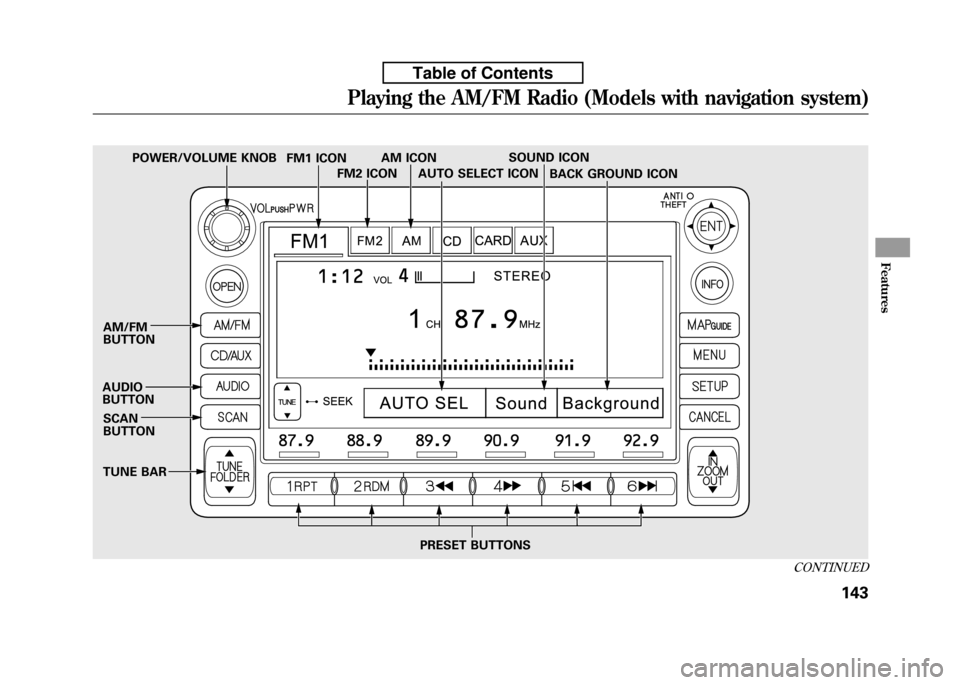
SOUND ICON
SCAN BUTTON
AM/FMBUTTON
AUDIO BUTTON AUTO SELECT ICON
PRESET BUTTONS BACK GROUND ICON
FM1 ICON
TUNE BAR AM ICON
FM2 ICON
POWER/VOLUME KNOB
CONTINUED
Playing the AM/FM Radio (Models with navigation system)
143
Features
Table of Contents
Page 159 of 351

Voice Control System
In addition to the standard audio
controls, the audio system in your
vehicle can be operated using the
voice control system. See the
navigation system manual for
complete details.
To Play the AM/FM Radio
The ignition switch must be in the
ACCESSORY (I) or ON (II) position.
Turn the system on by pushing the
power/volume knob or the AM/FM
button. Adjust the volume by turning
the power/volume knob.
Pushing the AUDIO button will also
turn on the system.You can also operate the audio
system without using the control
icons on the audio screen. Use the
control buttons on the left side of the
screen. The status bar appears on the
bottom of the screen each time you
operate any of the control buttons.
On the navigation screen, you can
also see audio information by
touching the AUDIO INFO icon on
the lower of the screen.
The band and frequency that the
radio was last turned to are
displayed. To change bands, press
the AM/FM button, or touch the
desired band icon (FM1, FM2, or
AM). On the FM band, STEREO will
be displayed if the station is
broadcasting in stereo. Stereo
reproduction on AM is not available.To Select a Station
You can use any of five methods to
find radio stations on the selected
band: tune, seek, scan, the preset
buttons, and auto select. TUNE
-Use the TUNE bar to tune
the radio to a desired frequency.
Press the
side of the bar to tune to
a higher frequency, and press the
side to tune to a lower frequency.
Press and hold the
orside of the
TUNE bar until you hear two beeps
to change the frequency rapidly.
Release the bar when the display
reaches the desired frequency.
Playing the AM/FM Radio (Models with navigation system)
144
Table of Contents