ad blue HONDA FIT 2011 2.G Navigation Manual
[x] Cancel search | Manufacturer: HONDA, Model Year: 2011, Model line: FIT, Model: HONDA FIT 2011 2.GPages: 152, PDF Size: 6.63 MB
Page 105 of 152
Navigation System
Customer Assistance
Changing the DVD
NOTE:
The system’s database is stored on a
removable DVD. The system will not
work without the DVD. Ensure the door
remains closed at all times.
1. Remove the DVD while the ignition switch is in the ACCESSORY (I)
position or in the ON (II) position.
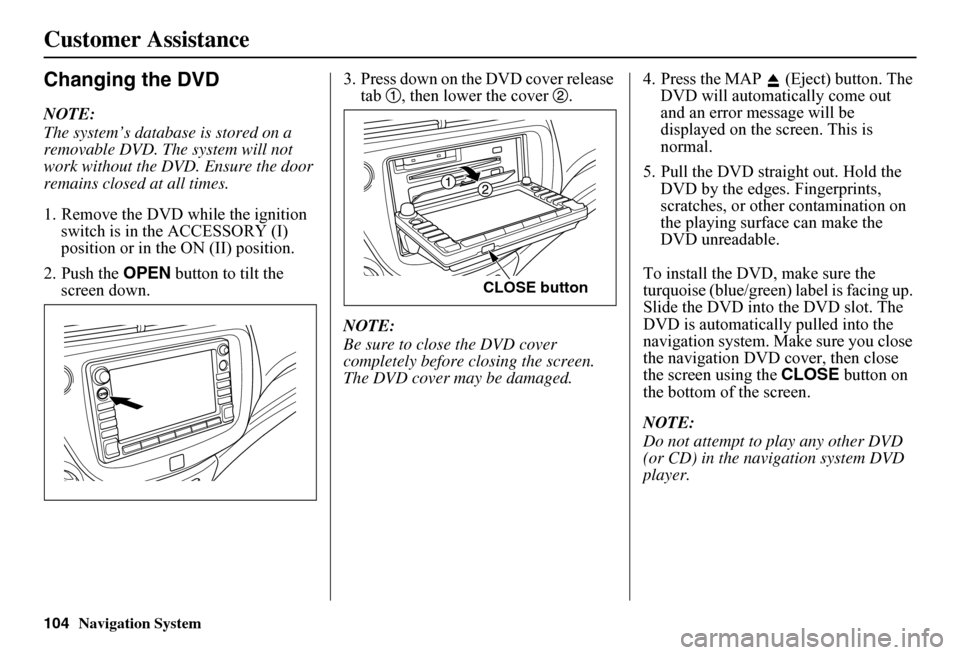
2. Push the OPEN button to tilt the
screen down. 3. Press down on the DVD cover release
tab , then lower the cover .
NOTE:
Be sure to close the DVD cover
completely before closing the screen.
The DVD cover may be damaged. 4. Press the MAP (Eject) button. The
DVD will automatically come out
and an error message will be
displayed on the screen. This is
normal.
5. Pull the DVD straight out. Hold the DVD by the edges. Fingerprints,
scratches, or other contamination on
the playing surface can make the
DVD unreadable.
To install the DVD, make sure the
turquoise (blue/green) label is facing up.
Slide the DVD into the DVD slot. The
DVD is automatically pulled into the
navigation system. Make sure you close
the navigation DVD cover, then close
the screen using the CLOSE button on
the bottom of the screen.
NOTE:
Do not attempt to play any other DVD
(or CD) in the navigation system DVD
player.
CLOSE button
104
Page 113 of 152
112Navigation System
Coverage Areas
West Virginia
Charleston Harper’s Ferry MetroHuntingtonMorgantownParkersburg
Wisconsin
Appleton BeloitEau ClaireGreen BayJanesvilleKenosha CountyLa CrosseMadisonLake GenevaMilwaukee Metro – including Milwaukee, Ozaukee, Washington, and Waukesha CountiesNeenahOshkoshRacineSheboyganWausau
Wyoming
Cheyenne Jackson Ski Resorts
Canada Detailed Coverage Areas
NOTE:
The blue city names are not included in the USA South DVD. To obtain coverage for cities listed in blue, you may purchase the Canada DVD (see page 103, Obtaining a Navigation DVD). DVDs are not available at your dealer.
ALBERTA
Airdrie BanffBeaumontCalgaryCalmarCanmoreChestermereCochraneCrossfieldDevonEdmontonFort SaskatchewanLeducLethbridgeMedicine HatSpruce GroveSt. AlbertStony PlainStrathcona County
BRITISH COLUMBIA
Greater Vancouver
Anmore BelcarraBowen IslandBurnabyCoquitlamDeltaLangleyLangley TwpLions BayMaple RidgeNew WestminsterNorth VancouverNorth Vancouver DistrictPitt MeadowsPort CoquitlamPort MoodyRichmondSurreySquamishVancouverWest VancouverWhite Rock
Whatcom, WA
Point Roberts (Community) also listed in USA Washington St Cities
Page 115 of 152
114Navigation System
Coverage Areas
Grey
Blue Mountains ChatsworthGeorgian BluffsMeafordGrey HighlandsHanoverOwen SoundSouthgateWest Grey
Haldimand
Haldimand
Halton
Burlington Halton MillsMiltonOakville
Hamilton
Hamilton
Kawartha Lakes
Kawartha Lakes
Lambton
Brooke-Alvinston Dawn-EuphemiaEnniskillenLambton ShoresOil Springs
Petrolia Plympton-WyomingPoint EdwardSarniaSt ClairWarwick
Lanark
Beckwith Carleton PlaceDrummond/North ElmsleyLanark HighlandsMississippi MillsMontaguePerthSmiths FallsTay Valley
Leeds and Grenville
Athens AugustaBrockvilleEdwardsburgh/CardinalElizabethtown-KitleyFront of YongeGananoqueLeeds and the Thousand IslandsMerrickville-WolfordNorth GrenvillePrescottRideau LakesWestport
Muskoka
Bracebridge Georgian BayGravenhurstHuntsvilleLake of BaysMuskoka Lakes
Middlesex
Adelaide Metcalfe LondonLucan BiddulphMiddlesex CentreNewburyNorth MiddlesexSouthwest MiddlesexStrathroy-CaradocThames Centre
Niagara
Fort Erie GrimsbyLincolnNiagara-on-the-LakeNiagara FallsPelhamPort ColborneSt CatharinesThoroldWainfleetWellandWest Lincoln
Page 126 of 152
Navigation System125
Frequently Asked Questions
Guidance, Routing
Problem Solution
The navigation does not route me the same way I would go, or the way some other mapping progr am displays. Why is this? The navigation system attempts to generate the optimum route. See Changing the Routing Method on page 46.
Why is the street I’m on not s hown on the map? It has been here for more than a year. The mapping database is constantly undergoing revision. See page 103 for ways to obtain the latest de tailed coverage information.
The vehicle position icon is not following the road, and the “GPS icon” text in the upper left hand corner of the screen is white or missing.
• The GPS antenna (located under th e center of the dashboard) may be blocked by personal items. For best reception, remove items from the dashboard, such as radar detector s, cell phones, or loose articles. • Metallic tinting or other aftermarke t devices can interfere with the GPS reception. Please see your dealer. Also see System Limitations on page 98.
I entered a destination, but th e blue highlighted route and voice guidance stopped, or turned into a blue/pink dashed line before I got to my dest ination. Why is this?
Your route has entered an unverified area. See Unverified Area Routing on page 83.
The map rotates while I make turns. How can I stop this? Select the North-up map orientation by voice, or by touching the map orientation icon on the map screen. See Map Orientation on page 55.
Sometimes, I cannot select between the North-up and Heading-up map orienta tions. Why is this? The Heading-up map orient ation can only be shown in the lower scales (1/20 - 1 mile scales). See Map Scale on page 54.
While driving to my destinati on, the “time to go” display sometimes increases, even though I am getting closer. The “Time to go” is based on actual road speeds. However if your speed slows down when you encounter slower traffic, the system updates the “Time to go” based on your actual spee d to give you a better estimate of arrival time.
The vehicle position icon on the map “lags” a short distance behind, especially when I arrive at an intersection. Is there anything wrong?
No. When at an intersection, the syst em is unaware of the width of the intersecting road. Large differences in vehicle position can indicate a temporary loss of the GPS signal. See GPS Reception Issues on page 98.
Page 134 of 152
Navigation System133
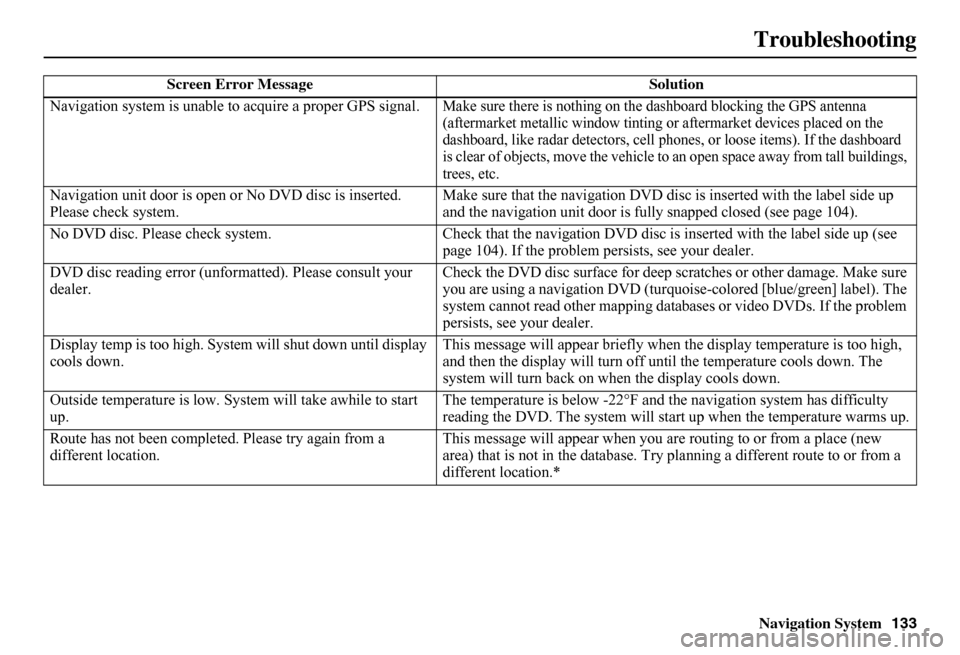
Troubleshooting
Screen Error Message Solution
Navigation system is unable to acquire a proper GPS signal.Make sure there is nothing on the dashboard blocking the GPS antenna (aftermarket metallic wi ndow tinting or aftermarket devices placed on the dashboard, like radar detectors, cell phones, or loose items). If the dashboard is clear of objects, move the vehicle to an open space away from tall buildings, trees, etc.
Navigation unit door is open or No DVD disc is inserted. Please check system. Make sure that the navigation DVD disc is inserted with the label side up and the navigation unit door is fully snapped closed (see page 104).
No DVD disc. Please check system. Check that the navigation DVD disc is inserted with the label side up (see page 104). If the problem persists, see your dealer.
DVD disc reading error (unfor matted). Please consult your dealer. Check the DVD disc surface for deep scratches or other damage. Make sure you are using a navigation DVD (turquoise -colored [blue/green] label). The system cannot read other mapping data bases or video DVDs. If the problem persists, see your dealer.
Display temp is too high. Syst em will shut down until display cools down. This message will appear briefly when the display temperature is too high, and then the display will turn off until the temperature cools down. The system will turn back on when the display cools down.
Outside temperature is low. System will take awhile to start up. The temperature is below -22°F and the navigation system has difficulty reading the DVD. The system will st art up when the temperature warms up.
Route has not been complete d. Please try again from a different location. This message will appear when you are routing to or from a place (new area) that is not in the database. Try planning a different route to or from a different location.*