ECO mode HONDA FIT 2013 3.G User Guide
[x] Cancel search | Manufacturer: HONDA, Model Year: 2013, Model line: FIT, Model: HONDA FIT 2013 3.GPages: 286, PDF Size: 9.38 MB
Page 70 of 286
69
uuIndicatorsu
Continued
Instrument Panel
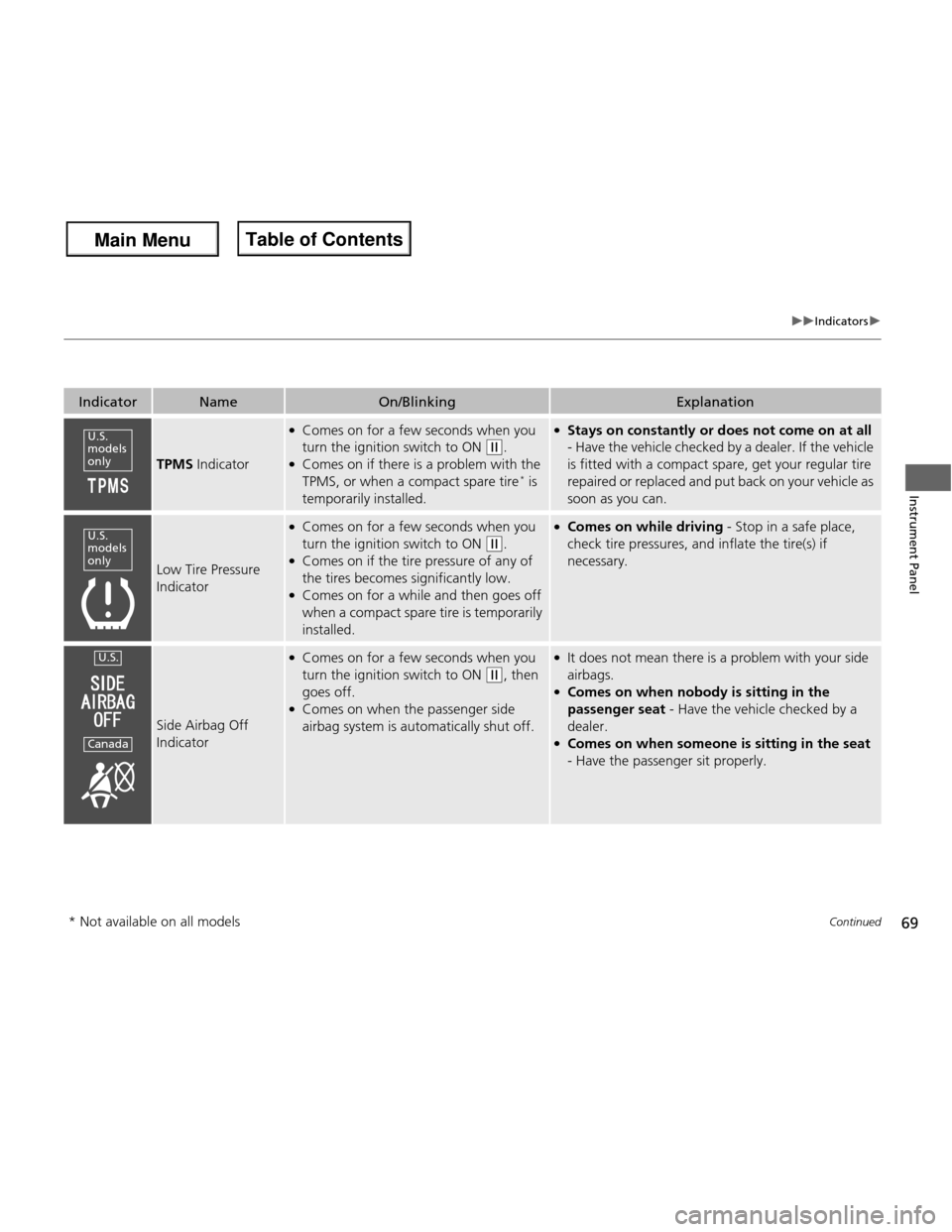
IndicatorNameOn/BlinkingExplanation
TPMS Indicator
●
Comes on for a few seconds when you
turn the ignition switch to ON
(w .
● Comes on if there is a problem with the
TPMS, or when a compact spare tire *
is
temporarily installed.
● Stays on constantly or does not come on at all
- Have the vehicle checked by a dealer. If the vehicle
is fitted with a compact spare, get your regular tire
repaired or replaced and put back on your vehicle as
soon as you can.
Low Tire Pressure
Indicator
● Comes on for a few seconds when you
turn the ignition switch to ON
(w .
● Comes on if the tire pressure of any of
the tires becomes significantly low.
● Comes on for a while and then goes off
when a compact spare tire is temporarily
installed.
● Comes on while driving - Stop in a safe place,
check tire pressures, and inflate the tire(s) if
necessary.
Side Airbag Off
Indicator
● Comes on for a few seconds when you
turn the ignition switch to ON
(w , then
goes off.
● Comes on when the passenger side
airbag system is automatically shut off.
● It does not mean there is a problem with your side airbags.
● Comes on when nobody is sitting in the
passenger seat - Have the vehicle checked by a
dealer.
● Comes on when someon e is sitting in the seat
- Have the passenger sit properly.
U.S.
models only
U.S.
models only
U.S.
Canada
* Not available on all models
Main Menu
Main MenuTable of Contents
Page 71 of 286
70
uuIndicatorsu
Instrument Panel
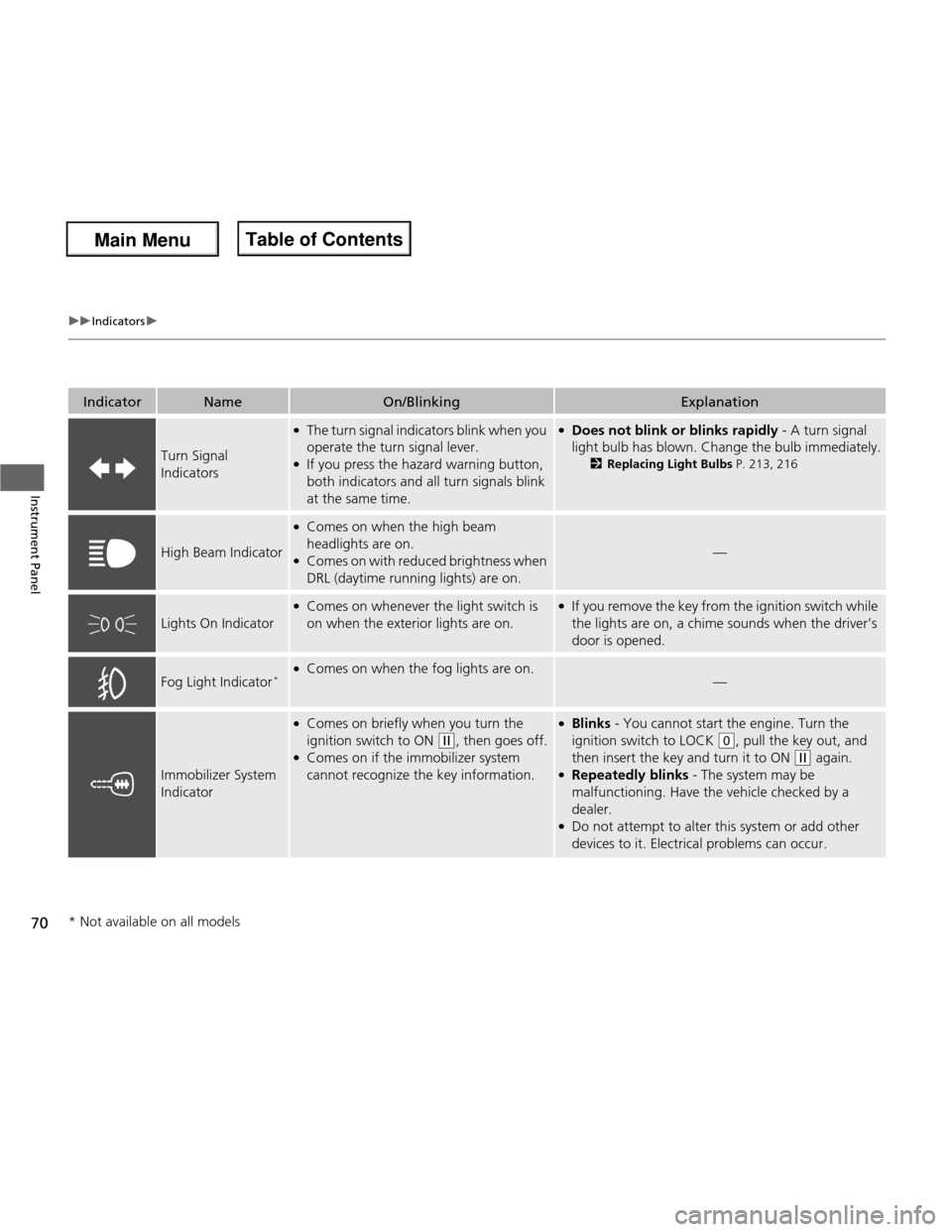
IndicatorNameOn/BlinkingExplanation
Turn Signal Indicators
●The turn signal indicators blink when you
operate the turn signal lever.
● If you press the hazard warning button,
both indicators and all turn signals blink
at the same time.●Does not blink or blinks rapidly - A turn signal
light bulb has blown. Change the bulb immediately. 2Replacing Light Bulbs P. 213, 216
High Beam Indicator
●
Comes on when the high beam
headlights are on.
● Comes on with reduced brightness when DRL (daytime running lights) are on.
—
Lights On Indicator
●Comes on whenever the light switch is
on when the exterior lights are on.●If you remove the key from the ignition switch while
the lights are on, a chime sounds when the driver’s door is opened.
Fog Light Indicator *
●
Comes on when the fog lights are on.
—
Immobilizer System
Indicator
●Comes on briefly when you turn the
ignition switch to ON
(w , then goes off.
● Comes on if the immobilizer system
cannot recognize the key information.
●Blinks - You cannot start the engine. Turn the
ignition switch to LOCK
(0 , pull the key out, and
then insert the key and turn it to ON
(w again.
● Repeatedly blinks - The system may be
malfunctioning. Have the vehicle checked by a dealer.
● Do not attempt to alter this system or add other
devices to it. Electrical problems can occur.
* Not available on all models
Main Menu
Main MenuTable of Contents
Page 72 of 286
71
uuIndicatorsu
Instrument Panel
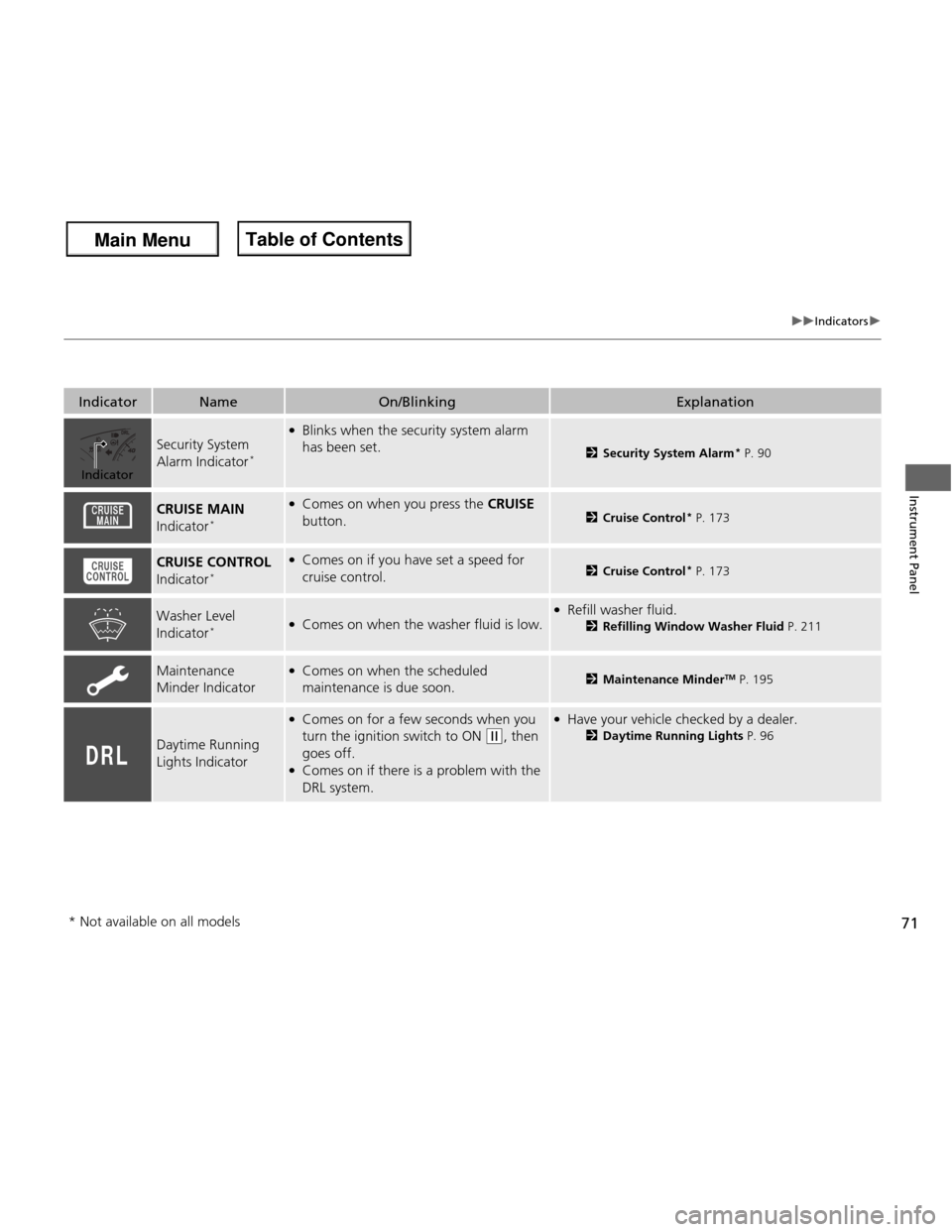
IndicatorNameOn/BlinkingExplanation
Security System
Alarm Indicator*
●
Blinks when the security system alarm has been set.
2 Security System Alarm *
P. 90
CRUISE MAIN
Indicator *●
Comes on when you press the CRUISE
button.
2 Cruise Control *
P. 173
CRUISE CONTROL
Indicator *●
Comes on if y ou have set a speed for
cruise control.2 Cruise Control *
P. 173
Washer Level
Indicator *●
Comes on when the washer fluid is low.● Refill washer fluid.
2Refilling Window Washer Fluid P. 211
Maintenance Minder Indicator●
Comes on when the scheduled
maintenance is due soon.2 Maintenance Minder TM
P. 195
Daytime Running
Lights Indicator
● Comes on for a few seconds when you
turn the ignition switch to ON
(w , then
goes off.
● Comes on if there is a problem with the
DRL system.
● Have your vehicle checked by a dealer.
2Daytime Running Lights P. 96
Indicator
* Not available on all models
Main Menu
Main MenuTable of Contents
Page 80 of 286
79
uuLocking and Unlocking the DoorsuLocking/Unlocking the Doors from the Outside
Continued
Controls
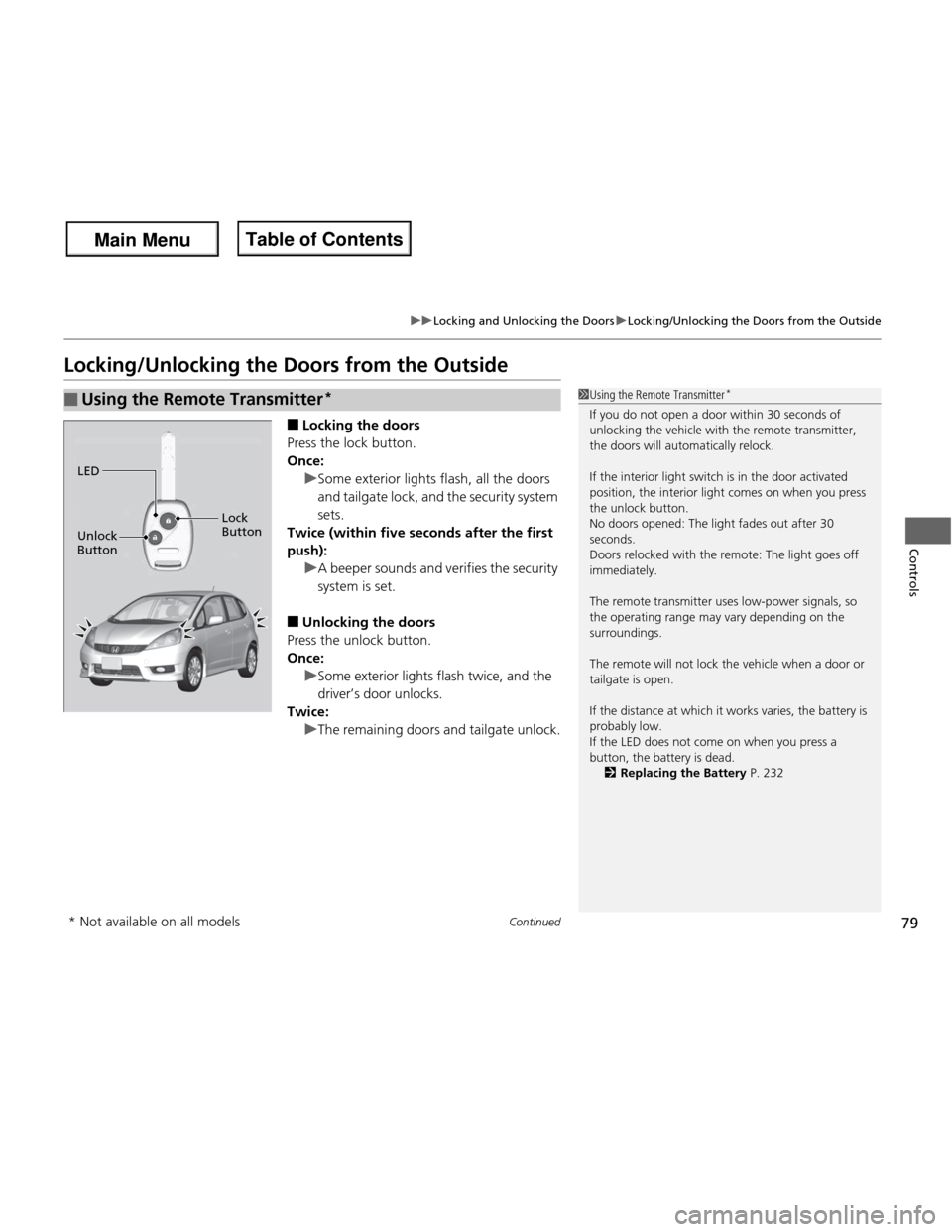
Locking/Unlocking the Doors from the Outside■Locking the doors
Press the lock button.
Once:
uSome exterior lights flash, all the doors
and tailgate lock, and the security system
sets.
Twice (within five seconds after the first push):
uA beeper sounds and verifies the security system is set.
■ Unlocking the doors
Press the unlock button.
Once:
uSome exterior lights flash twice, and the
driver’s door unlocks.
Twice:
uThe remaining doors and tailgate unlock.
■Using the Remote Transmitter *1Using the Remote Transmitter
*
If you do not open a door within 30 seconds of
unlocking the vehicle with the remote transmitter, the doors will automatically relock.
If the interior light switch is in the door activated
position, the interior light comes on when you press the unlock button.
No doors opened: The light fades out after 30
seconds.
Doors relocked with the remote: The light goes off
immediately.
The remote transmitter uses low-power signals, so
the operating range may vary depending on the surroundings.
The remote will not lock the vehicle when a door or tailgate is open.
If the distance at which it works varies, the battery is
probably low.
If the LED does not come on when you press a
button, the battery is dead. 2 Replacing the Battery P. 232
LED
Unlock
Button Lock Button
* Not available on all models
Main Menu
Main MenuTable of Contents
Page 81 of 286
80
uuLocking and Unlocking the DoorsuLocking/Unlocking the Doors from the Outside
Controls
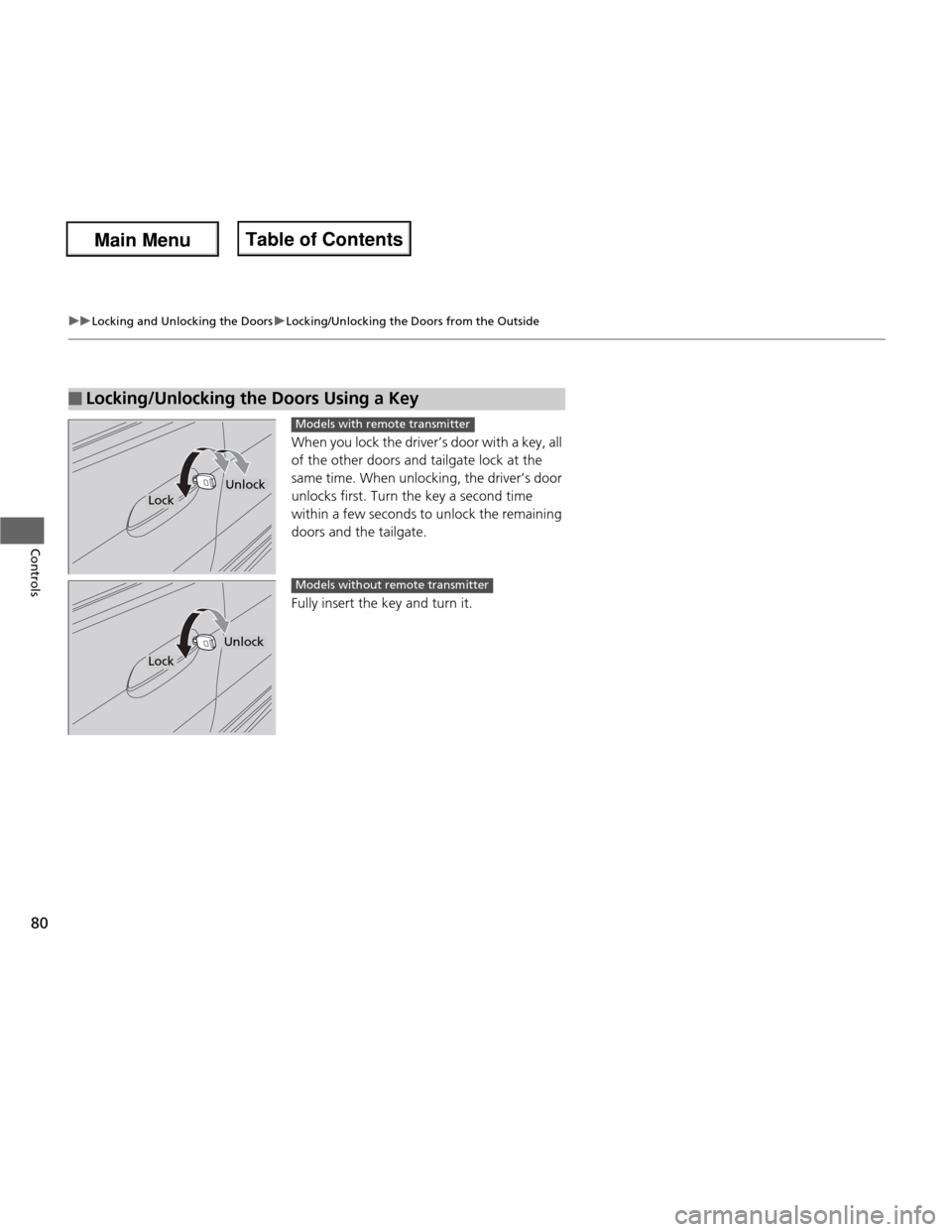
When you lock the driver’s door with a key, all
of the other doors and tailgate lock at the
same time. When unlocking, the driver’s door
unlocks first. Turn the key a second time
within a few seconds to unlock the remaining
doors and the tailgate.
Fully insert the key and turn it.
■Locking/Unlocking the Doors Using a Key
Lock
Unlock
Models with remote transmitter
Lock
Unlock
Models without remote transmitter
Main Menu
Main MenuTable of Contents
Page 87 of 286
86
uuLocking and Unlocking the DoorsuCustomizing the Auto Door Locking/Unlocking Setting*
Controls
*1: Default setting
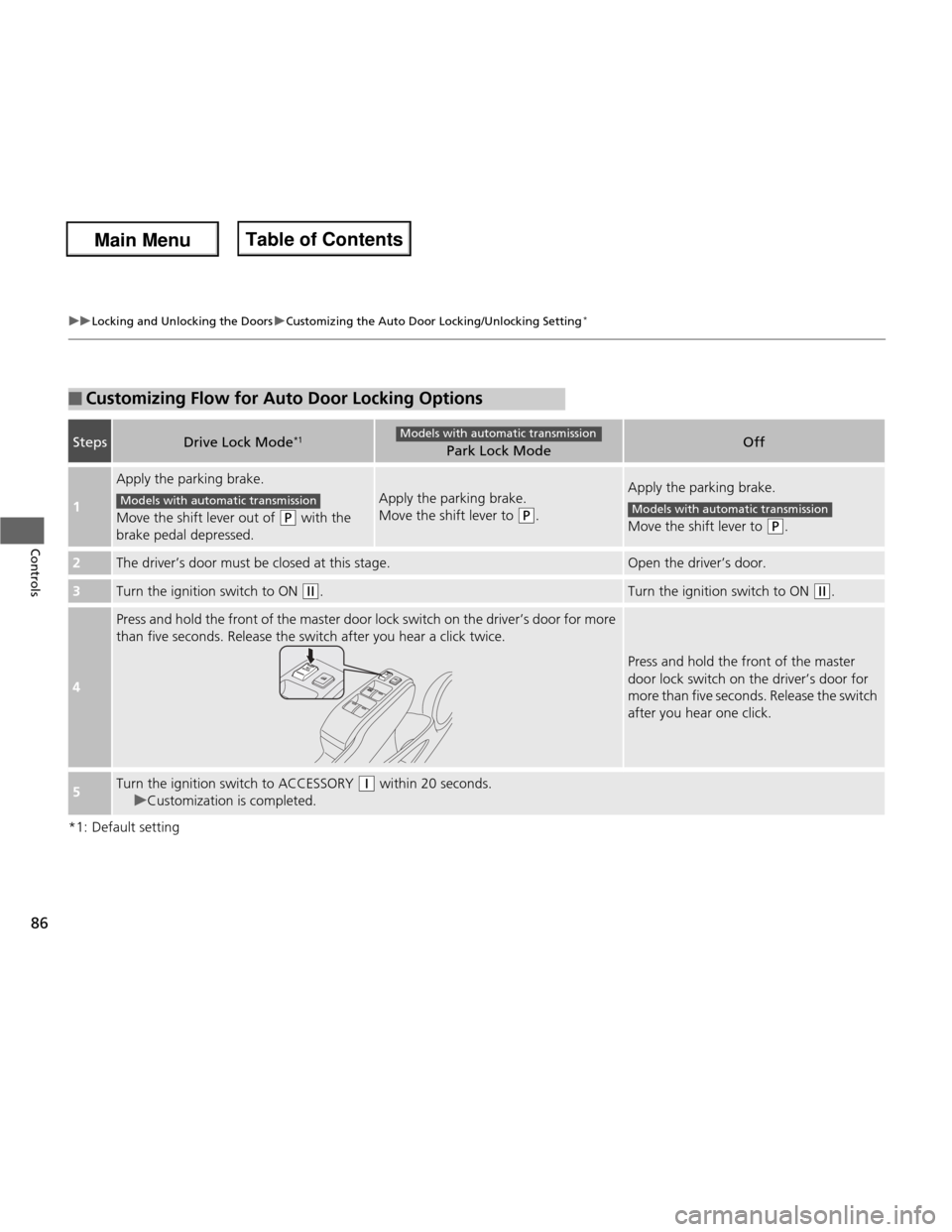
■Customizing Flow for Auto Door Locking Options
StepsDrive Lock Mode*1Park Lock ModeOff
1
Apply the parking brake.
Move the shift lever out of
(P
with the
brake pedal depressed.
Apply the parking brake.
Move the shift lever to
(P .
Apply the parking brake.
Move the shift lever to
(P.
2The driver’s door must be closed at this stage.Open the driver’s door.
3Turn the ignition switch to ON (w.Turn the ignition switch to ON (w.
4
Press and hold the front of the master door lock switch on the driver’s door for more
than five seconds. Release the switch after you hear a click twice.
Press and hold the front of the master
door lock switch on the driver’s door for
more than five seconds. Release the switch
after you hear one click.
5Turn the ignition switch to ACCESSORY (q within 20 seconds.
uCustomization is completed.
Models with automatic transmission
Models with automatic transmissionModels with automatic transmission
Main Menu
Main MenuTable of Contents
Page 88 of 286
87
uuLocking and Unlocking the DoorsuCustomizing the Auto Door Locking/Unlocking Setting*
Controls
*1: Default setting for manual transmission models
*2: Default setting for automatic transmission models
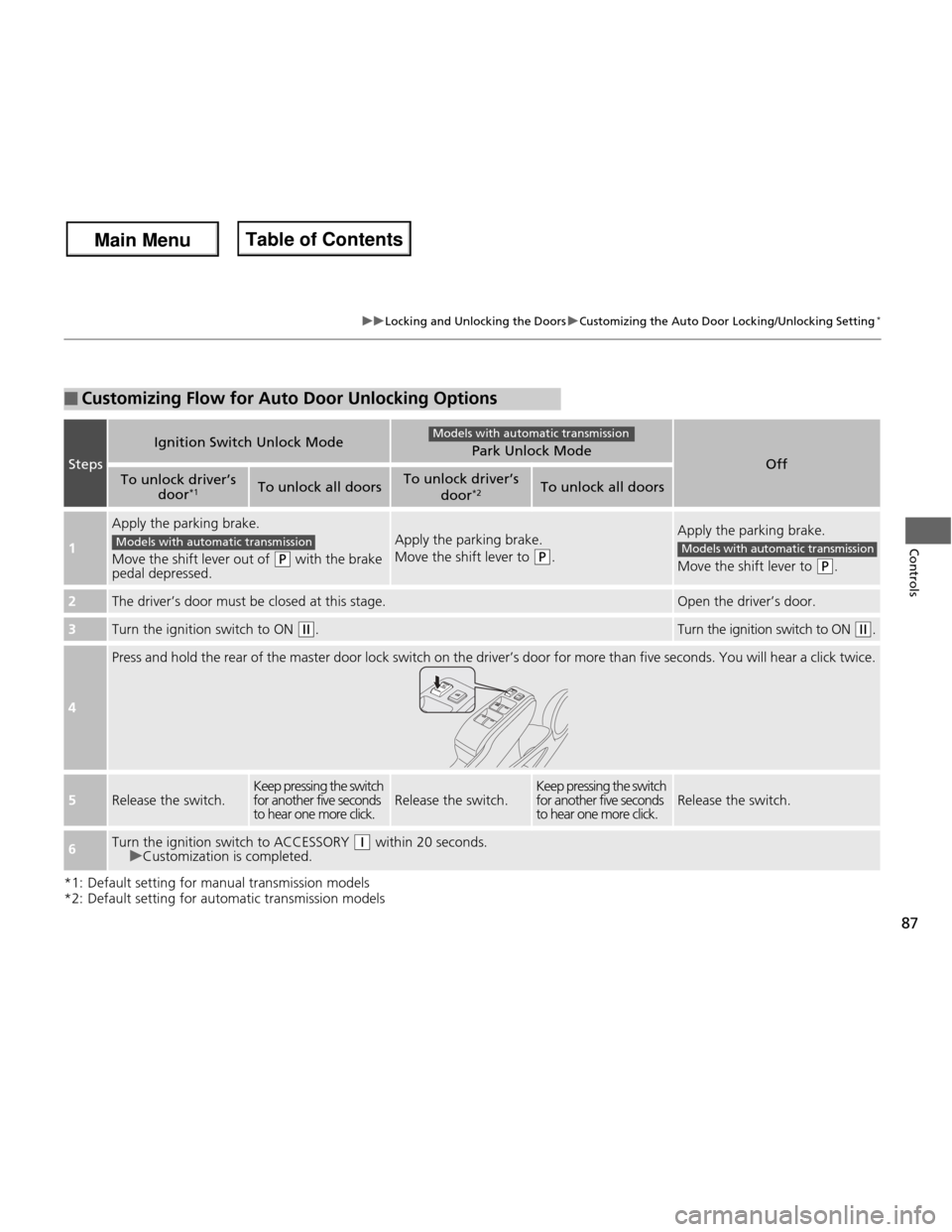
■Customizing Flow for Auto Door Unlocking Options
Steps
Ignition Switch Unlock ModePark Unlock ModeOffTo unlock driver’s
door*1To unlock all doorsTo unlock driver’s
door*2To unlock all doors
1
Apply the parking brake.
Move the shift lever out of
(P
with the brake
pedal depressed.
Apply the parking brake.
Move the shift lever to
(P .
Apply the parking brake.
Move the shift lever to
(P .
2The driver’s door must be closed at this stage.Open the driver’s door.
3Turn the ignition switch to ON (w.Turn the ignition switch to ON (w.
4
Press and hold the rear of the master door lock switch on the driver’s door for more than five seconds. You will hear a click t wice.
5Release the switch.Keep pressing the switch
for another five seconds
to hear one more click.Release the switch.Keep pressing the switch
for another five seconds to hear one more click.Release the switch.
6Turn the ignition switch to ACCESSORY (q within 20 seconds.uCustomization is completed.
Models with automatic transmission
Models with automatic transmissionModels with automatic transmission
Main Menu
Main MenuTable of Contents
Page 92 of 286
91
uuSecurity SystemuSecurity System Alarm*
Controls
■
Setting the security system alarm
The security system alarm automatically sets when the following conditions have
been met: • The ignition switch is in LOCK
(0 , and the key has been removed from the
ignition switch.
• The hood is closed.
• All doors and the tailgate are locked with the key or the remote transmitter.
■ When the security system alarm sets
The security system alarm indicator in the instrument panel blinks. When the
blinking interval changes after about 15 seconds, the security system alarm is set. ■ To cancel the security system alarm
The security system alarm is canceled when the vehicle is unlocked using the key or
remote transmitter. The security system alarm indicator goes off at the same time.
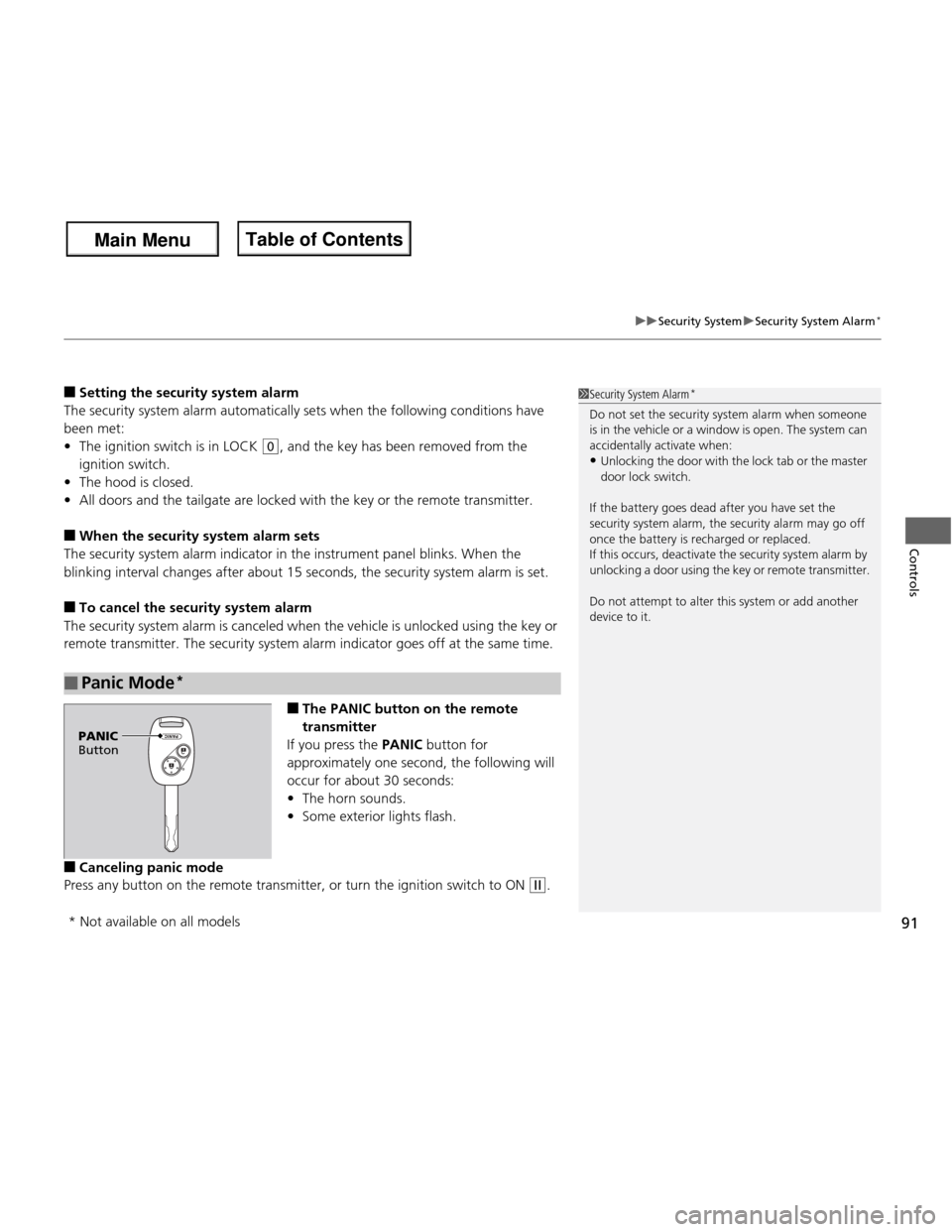
■The PANIC button on the remote
transmitter
If you press the PANIC button for
approximately one second, the following will
occur for about 30 seconds:• The horn sounds.
• Some exterior lights flash.
■ Canceling panic mode
Press any button on the remote transmitter, or turn the ignition switch to ON
(w .
■Panic Mode *
1Security System Alarm
*
Do not set the security system alarm when someone
is in the vehicle or a window is open. The system can
accidentally activate when: • Unlocking the door with the lock tab or the master
door lock switch.
If the battery goes dead after you have set the
security system alarm, the security alarm may go off
once the battery is recharged or replaced.
If this occurs, deactivate the security system alarm by
unlocking a door using the key or remote transmitter.
Do not attempt to alter this system or add another
device to it.
PANIC
Button
* Not available on all models
Main Menu
Main MenuTable of Contents
Page 112 of 286
111
Continued
Controls
Interior Lights/Interior Convenience Items
Interior Lights
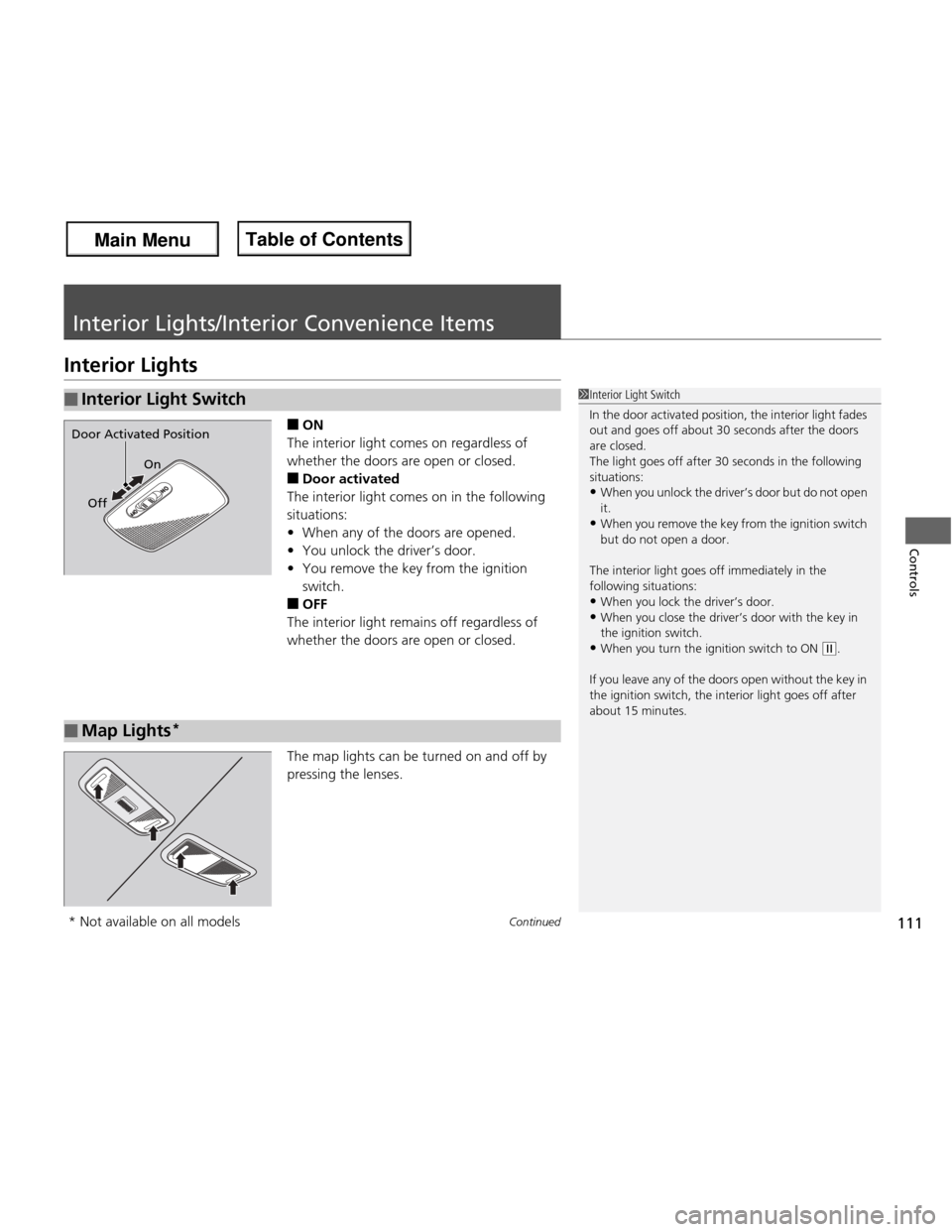
■ON
The interior light comes on regardless of
whether the doors are open or closed. ■ Door activated
The interior light comes on in the following situations: • When any of the doors are opened.
• You unlock the driver’s door.
• You remove the key from the ignition
switch.
■ OFF
The interior light remains off regardless of
whether the doors are open or closed.
The map lights can be turned on and off by
pressing the lenses.
■Interior Light Switch1Interior Light Switch
In the door activated position, the interior light fades
out and goes off about 30 seconds after the doors
are closed.
The light goes off after 30 seconds in the following
situations: • When you unlock the driver’s door but do not open
it.
• When you remove the key from the ignition switch
but do not open a door.
The interior light goes off immediately in the following situations:
• When you lock the driver’s door.
• When you close the driver’s door with the key in
the ignition switch.
• When you turn the ignition switch to ON
(w .
If you leave any of the doors open without the key in
the ignition switch, the interior light goes off after
about 15 minutes.
On
Off
Door Activated Position
■Map Lights *
* Not available on all models
Main Menu
Main MenuTable of Contents
Page 122 of 286
121
Features
This chapter describes how to operate technology features.
Audio System About Your Audio System................ 122
USB Adapter Cable *
........................ 123
Auxiliary Input Jack .......................... 123
Audio Antenna ................................ 124
Audio System Theft Protection ......... 124
Audio System Basic Operation ........ 125
Adjusting the Sound ........................ 126
Playing the FM/AM Radio ................. 127
Playing a CD .................................... 129
Playing an iPod ®*
............................. 131
Playing a USB Flash Drive *
............... 133 Audio Error Messages
CD Player......................................... 135
iPod ®/USB Flash Drive *
..................... 136
General Information on the Audio
SystemRecommended CDs ......................... 137
Compatible iPod ® and USB Flash Drives *
. 139
Bluetooth ® HandsFreeLink ®*
Using HFL ........................................ 140
HFL Menus ...................................... 142
* Not available on all models
Main Menu
Main Menu