Switch ac HONDA FIT 2013 3.G Workshop Manual
[x] Cancel search | Manufacturer: HONDA, Model Year: 2013, Model line: FIT, Model: HONDA FIT 2013 3.GPages: 286, PDF Size: 9.38 MB
Page 127 of 286
126
uuAudio System Basic OperationuAdjusting the Sound
Features
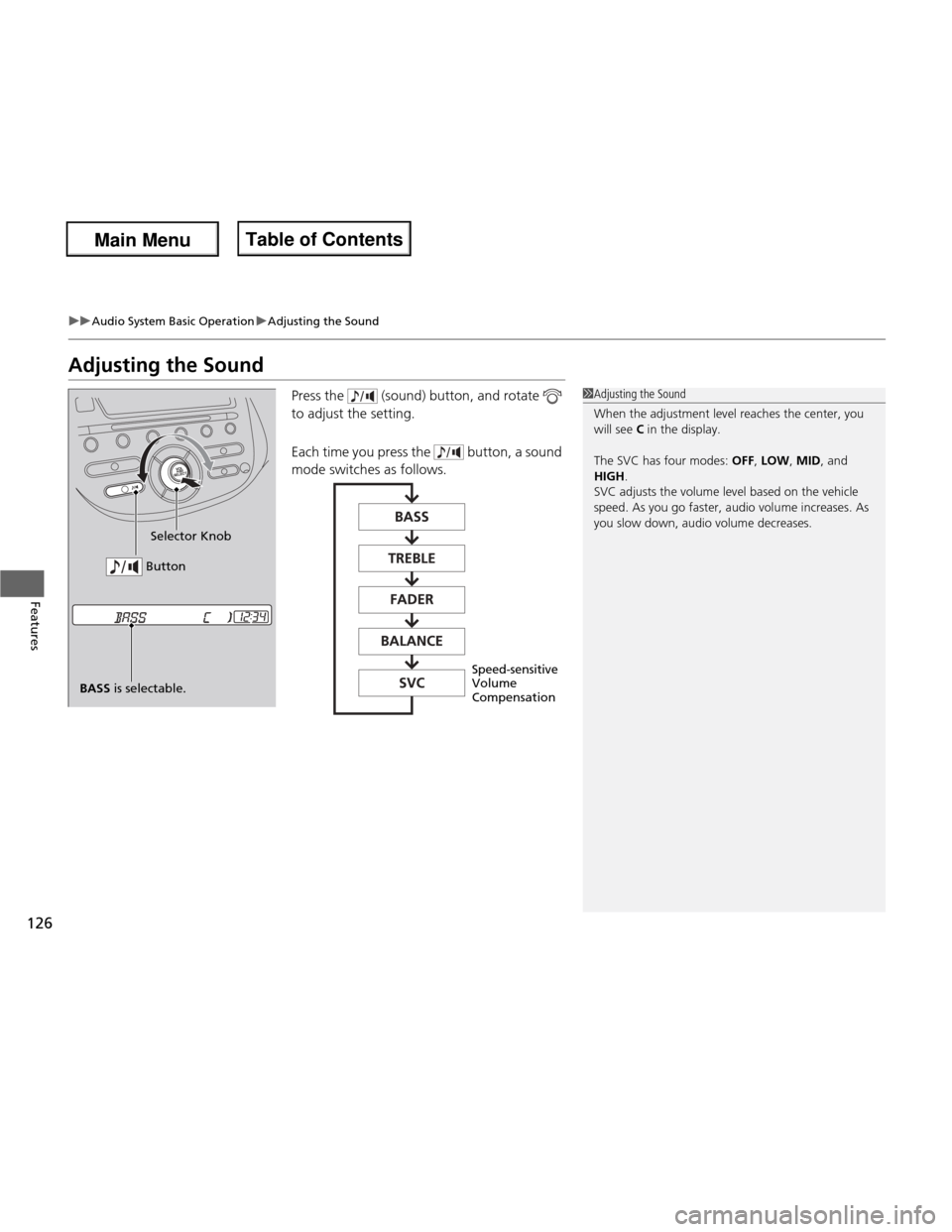
Adjusting the SoundPress the (sound) button, and rotate
to adjust the setting.
Each time you press the button, a sound
mode switches as follows.
1Adjusting the Sound
When the adjustment level reaches the center, you
will see C in the display.
The SVC has four modes: OFF, LOW , MID , and
HIGH .
SVC adjusts the volume level based on the vehicle
speed. As you go faster, audio volume increases. As
you slow down, audio volume decreases.
BASS is selectable. Selector Knob
Button
Speed-sensitive Volume Compensation
Main Menu
Main MenuTable of Contents
Page 128 of 286
127
uuAudio System Basic OperationuPlaying the FM/AM Radio
Continued
Features
Playing the FM/AM Radio
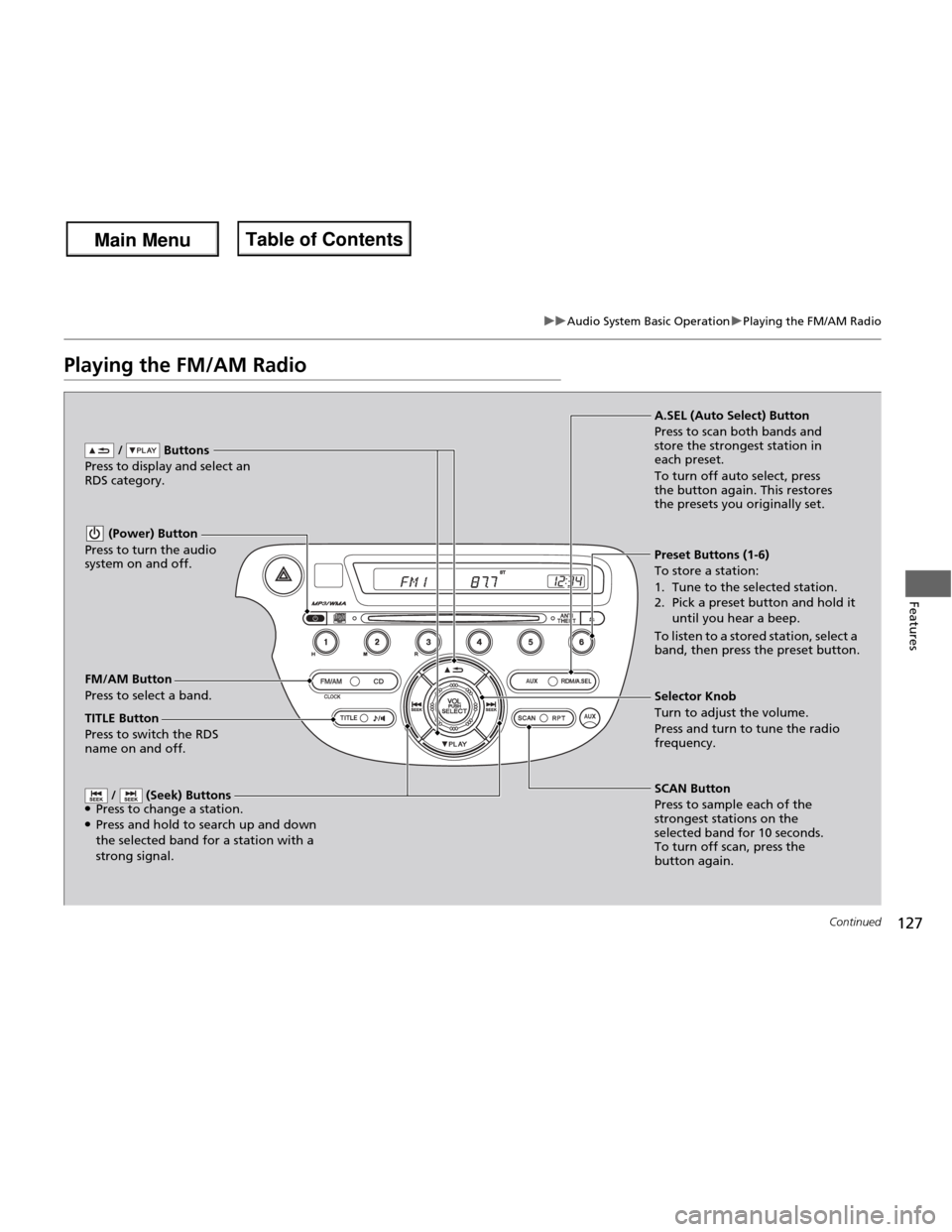
FM/AM Button
Press to select a band. / Buttons
Press to display and select an
RDS category.
SCAN Button
Press to sample each of the
strongest stations on the
selected band for 10 seconds.
To turn off scan, press the
button again.
(Power) Button
Press to turn the audio
system on and off.
Preset Buttons (1-6) To store a station:
1. Tune to the selected station.
2. Pick a preset button and hold it until you hear a beep.
To listen to a stored station, select a
band, then press the preset button.
/ (Seek) Buttons
● Press to change a station.
● Press and hold to search up and down the selected band for a station with a
strong signal.
Selector Knob
Turn to adjust the volume.
Press and turn to tune the radio
frequency.
A.SEL (Auto Select) Button
Press to scan both bands and
store the strongest station in each preset.
To turn off auto select, press
the button again. This restores
the presets you originally set.
TITLE Button
Press to switch the RDS
name on and off.
Main Menu
Main MenuTable of Contents
Page 131 of 286
uuAudio System Basic OperationuPlaying a CD
130
Features
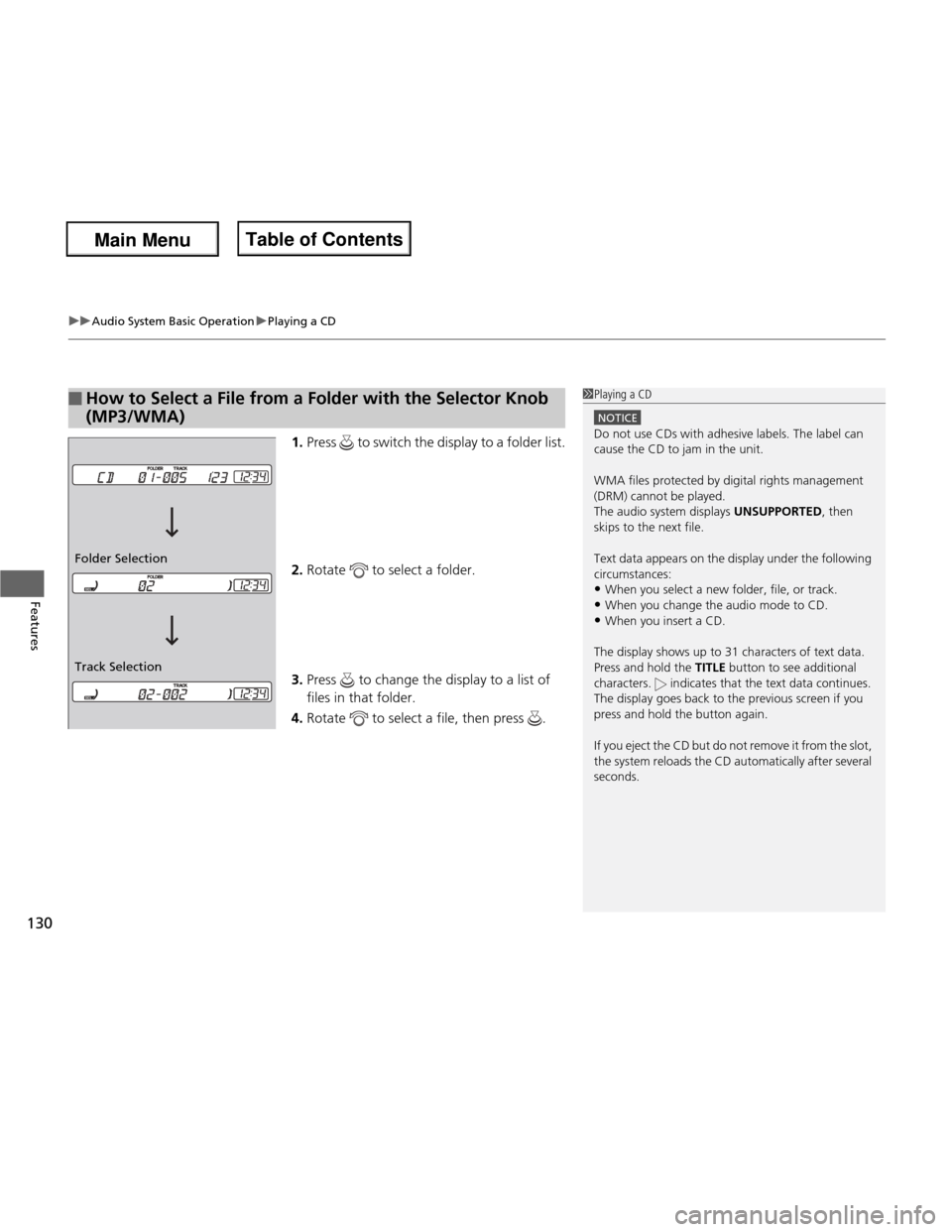
1. Press to switch the display to a folder list.
2. Rotate to select a folder.
3. Press to change the display to a list of
files in that folder.
4. Rotate to select a file, then press .
■How to Select a File from a Folder with the Selector Knob (MP3/WMA)1Playing a CD
NOTICE
Do not use CDs with adhesive labels. The label can cause the CD to jam in the unit.
WMA files protected by digital rights management
(DRM) cannot be played.
The audio system displays UNSUPPORTED, then
skips to the next file.
Text data appears on the display under the following circumstances: • When you select a new folder, file, or track.
• When you change the audio mode to CD.
• When you insert a CD.
The display shows up to 31 characters of text data.
Press and hold the TITLE button to see additional
characters. indicates that the text data continues.
The display goes back to the previous screen if you
press and hold the button again.
If you eject the CD but do not remove it from the slot,
the system reloads the CD automatically after several
seconds.
Track Selection
Folder Selection
Main Menu
Main MenuTable of Contents
Page 135 of 286
uuAudio System Basic OperationuPlaying a USB Flash Drive*
134
Features
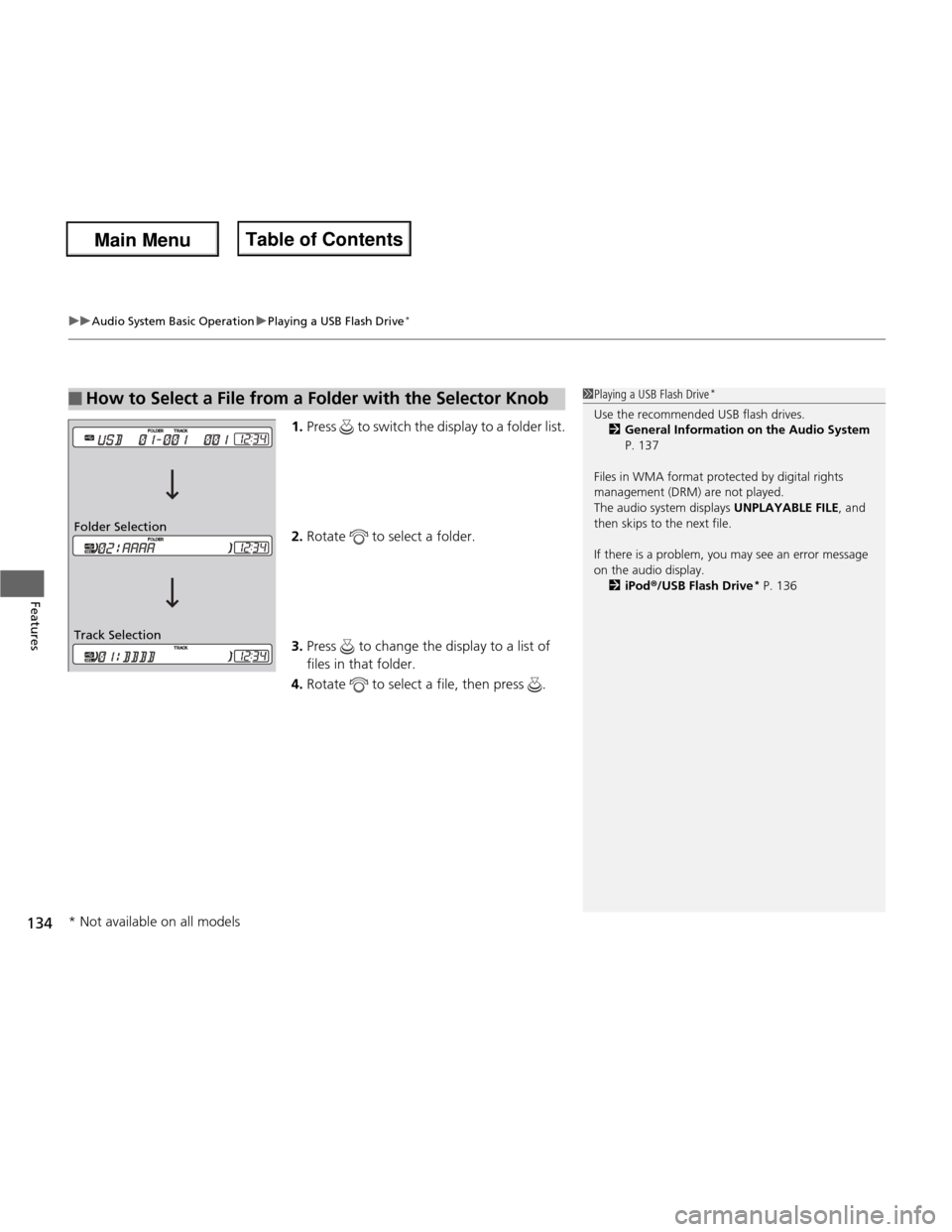
1. Press to switch the display to a folder list.
2. Rotate to select a folder.
3. Press to change the display to a list of
files in that folder.
4. Rotate to select a file, then press .
■How to Select a File from a Folder with the Selector Knob1Playing a USB Flash Drive *
Use the recommended USB flash drives. 2 General Information on the Audio System
P. 137
Files in WMA format protected by digital rights
management (DRM) are not played.
The audio system displays UNPLAYABLE FILE, and
then skips to the next file.
If there is a problem, you may see an error message
on the audio display.
2 iPod ®/USB Flash Drive *
P. 136
Track Selection
Folder Selection
* Not available on all models
Main Menu
Main MenuTable of Contents
Page 143 of 286
142
uuBluetooth® HandsFreeLink ®*uHFL Menus
Features
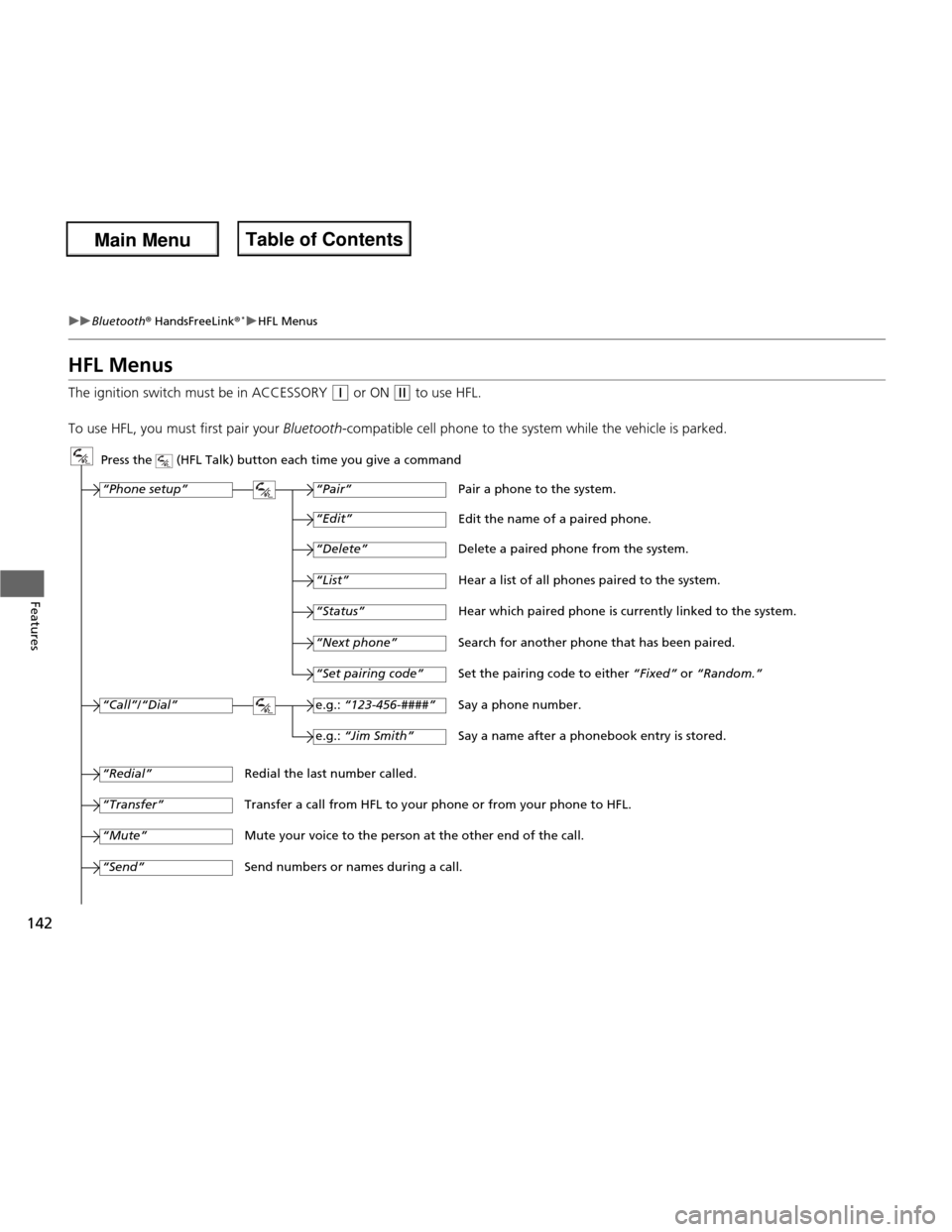
HFL Menus
The ignition switch must be in ACCESSORY
(q
or ON (w to use HFL.
To use HFL, you must first pair your Bluetooth-compatible cell phone to the system while the vehicle is parked.
Press the (HFL Talk) button each time you give a command
“Set pairing code”
Pair a phone to the system.
Edit the name of a paired phone.
Delete a paired phone from the system.
Hear a list of all phones paired to the system.
Hear which paired phone is currently linked to the system.
Search for another phone that has been paired.
Set the pairing code to either “Fixed” or “Random.”
Say a phone number.
Say a name after a phonebook entry is stored.
Redial the last number called.
Transfer a call from HFL to your phone or from your phone to HFL.
Mute your voice to the person at the other end of the call.
Send numbers or names during a call. “Pair”
“Edit”
“Delete”
“List”
“Status”
“Next phone”
e.g.:
“123-456-####”
e.g.: “Jim Smith”
“Phone setup”
“Call” /“Dial”
“Transfer”
“Mute”
“Send”
“Redial”
Main Menu
Main MenuTable of Contents
Page 144 of 286
143
uuBluetooth® HandsFreeLink ®*uHFL Menus
Continued
Features
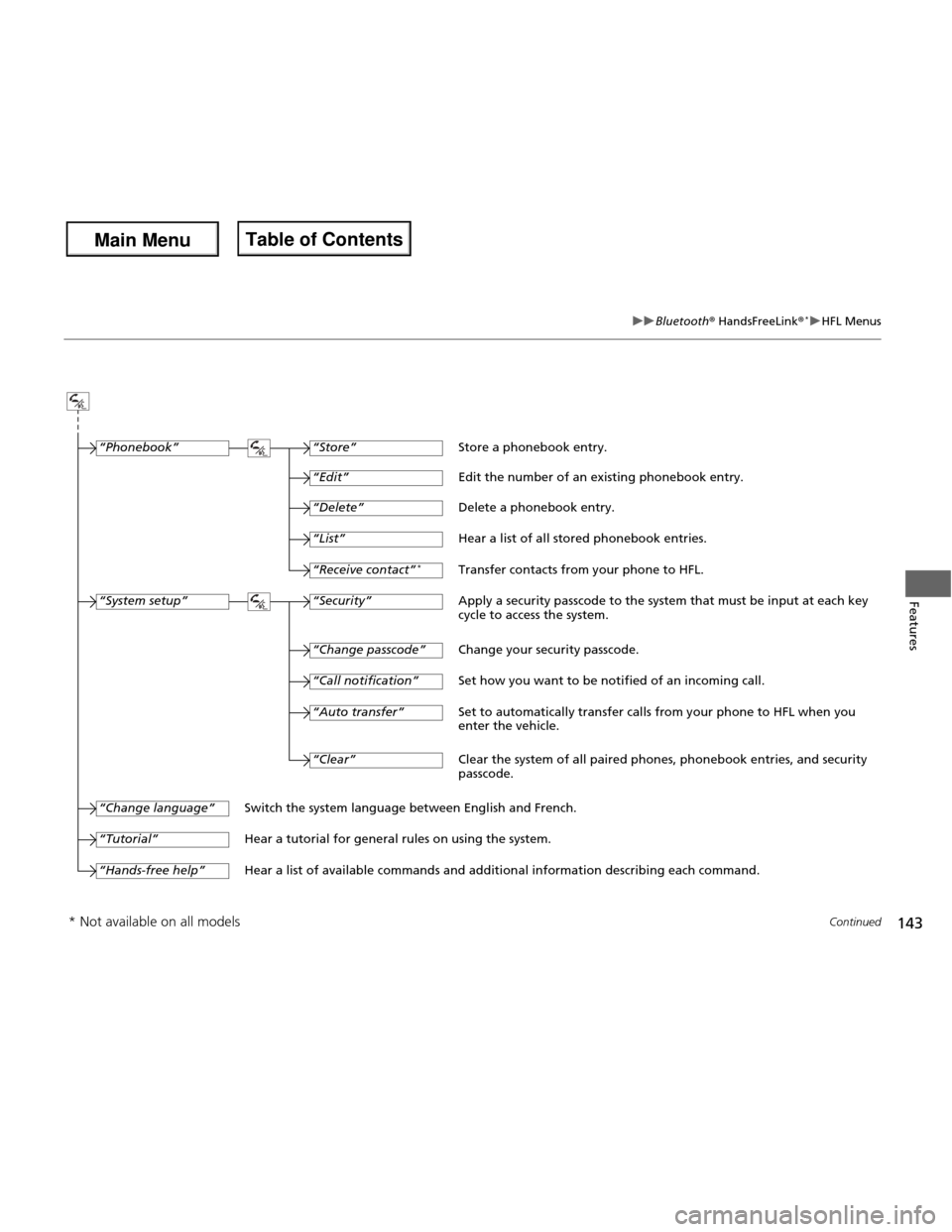
“Change passcode”
Store a phonebook entry.
Edit the number of an existing phonebook entry. Delete a phonebook entry.
Hear a list of all stored phonebook entries.Transfer contacts from your phone to HFL.
Apply a security passcode to the system that must be input at each key
cycle to access the system.
Change your security passcode.
Set how you want to be notified of an incoming call.
Set to automatically transfer calls from your phone to HFL when you
enter the vehicle.
Switch the system language between English and French.
Hear a tutorial for general rules on using the system.
Hear a list of available commands and additional information describing each command. “Store”
“Edit”
“Delete”
“List”
“Receive contact”
*
“Security”
“Call notification”
“Auto transfer”
“Phonebook”
“System setup”
“Change language”
“Tutorial”
“Hands-free help”
Clear the system of all paired phones, phonebook entries, and security passcode.
“Clear”
* Not available on all models
Main Menu
Main MenuTable of Contents
Page 152 of 286
151
uuBluetooth® HandsFreeLink ®*uHFL Menus
Features
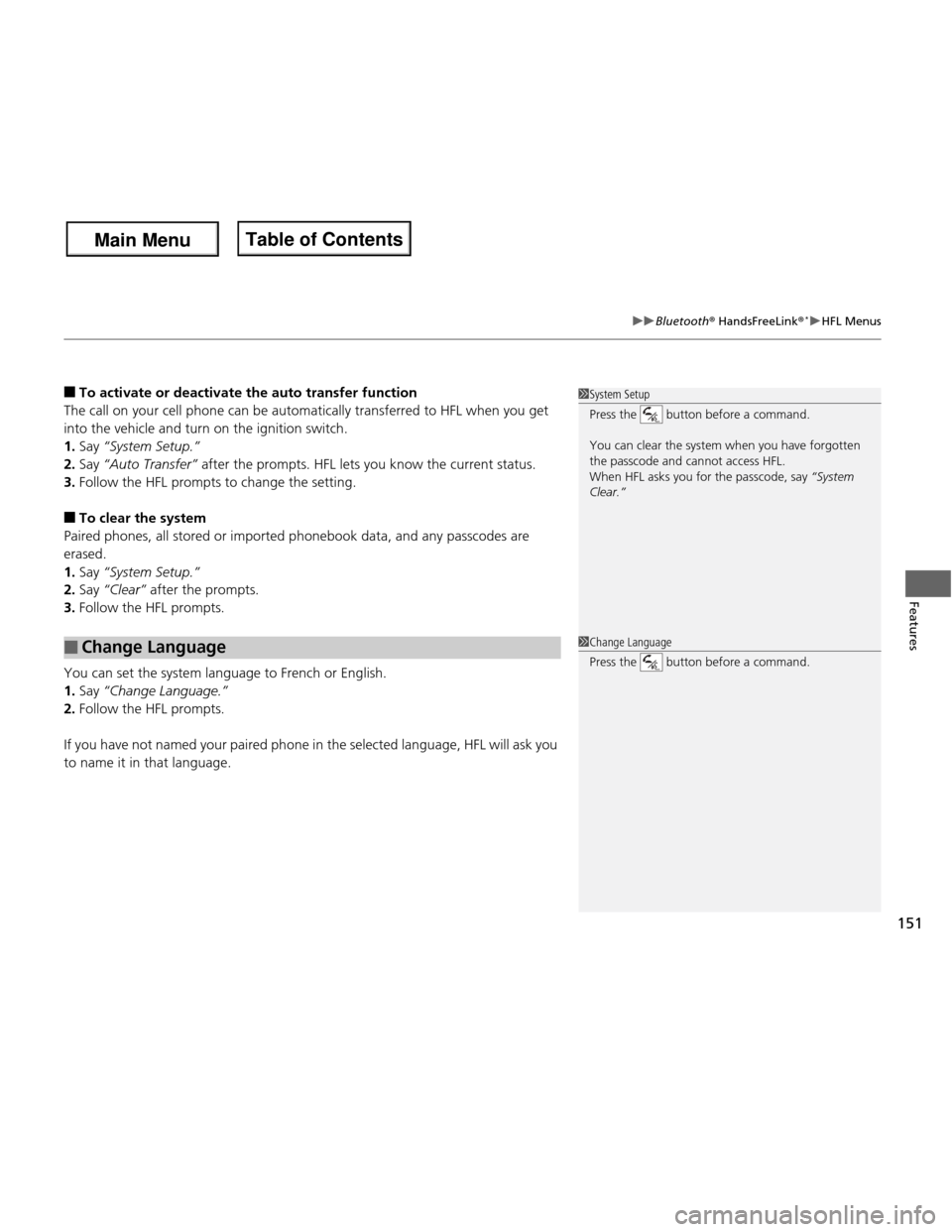
■
To activate or deactiva te the auto transfer function
The call on your cell phone can be automatically transferred to HFL when you get
into the vehicle and turn on the ignition switch. 1. Say “System Setup.
Page 160 of 286
159
Continued
Driving
Towing a Trailer
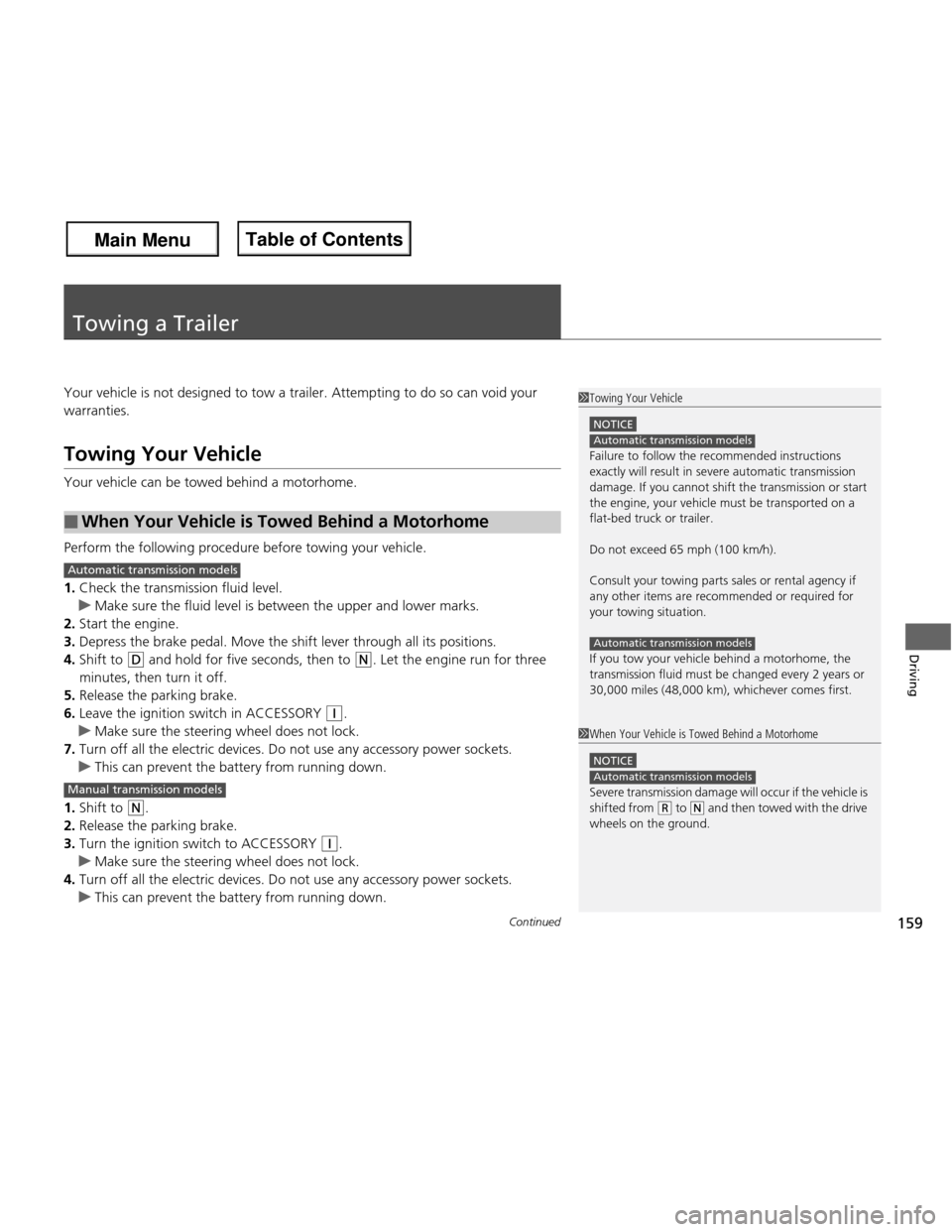
Your vehicle is not designed to tow a trailer. Attempting to do so can void your warranties.
Towing Your Vehicle
Your vehicle can be towed behind a motorhome.
Perform the following procedure before towing your vehicle. 1.
Check the transmission fluid level.
uMake sure the fluid level is between the upper and lower marks.
2. Start the engine.
3. Depress the brake pedal. Move the shift lever through all its positions.
4. Shift to
(D and hold for five seconds, then to (N . Let the engine run for three
minutes, then turn it off.
5. Release the parking brake.
6. Leave the ignition switch in ACCESSORY
(q .
uMake sure the steering wheel does not lock.
7. Turn off all the electric devices. Do not use any accessory power sockets.
uThis can prevent the battery from running down.
1. Shift to
(N .
2. Release the parking brake.
3. Turn the ignition switch to ACCESSORY
(q .
uMake sure the steering wheel does not lock.
4. Turn off all the electric devices. Do not use any accessory power sockets.
uThis can prevent the battery from running down.
■When Your Vehicle is Towed Behind a Motorhome
1Towing Your Vehicle
NOTICE
Failure to follow the recommended instructions
exactly will result in se vere automatic transmission
damage. If you cannot shift the transmission or start
the engine, your vehicle must be transported on a
flat-bed truck or trailer.
Do not exceed 65 mph (100 km/h).
Consult your towing parts sales or rental agency if
any other items are recommended or required for
your towing situation.
If you tow your vehicle behind a motorhome, the
transmission fluid must be changed every 2 years or
30,000 miles (48,000 km), whichever comes first.
Automatic transmission models
Automatic transmission models
1When Your Vehicle is Towed Behind a Motorhome
NOTICE
Severe transmission damage will occur if the vehicle is
shifted from
(R to (N and then towed with the drive
wheels on the ground.
Automatic transmission models
Automatic transmission models
Manual transmission models
Main Menu
Main MenuTable of Contents
Page 163 of 286
uuWhen DrivinguStarting the Engine
162
Driving
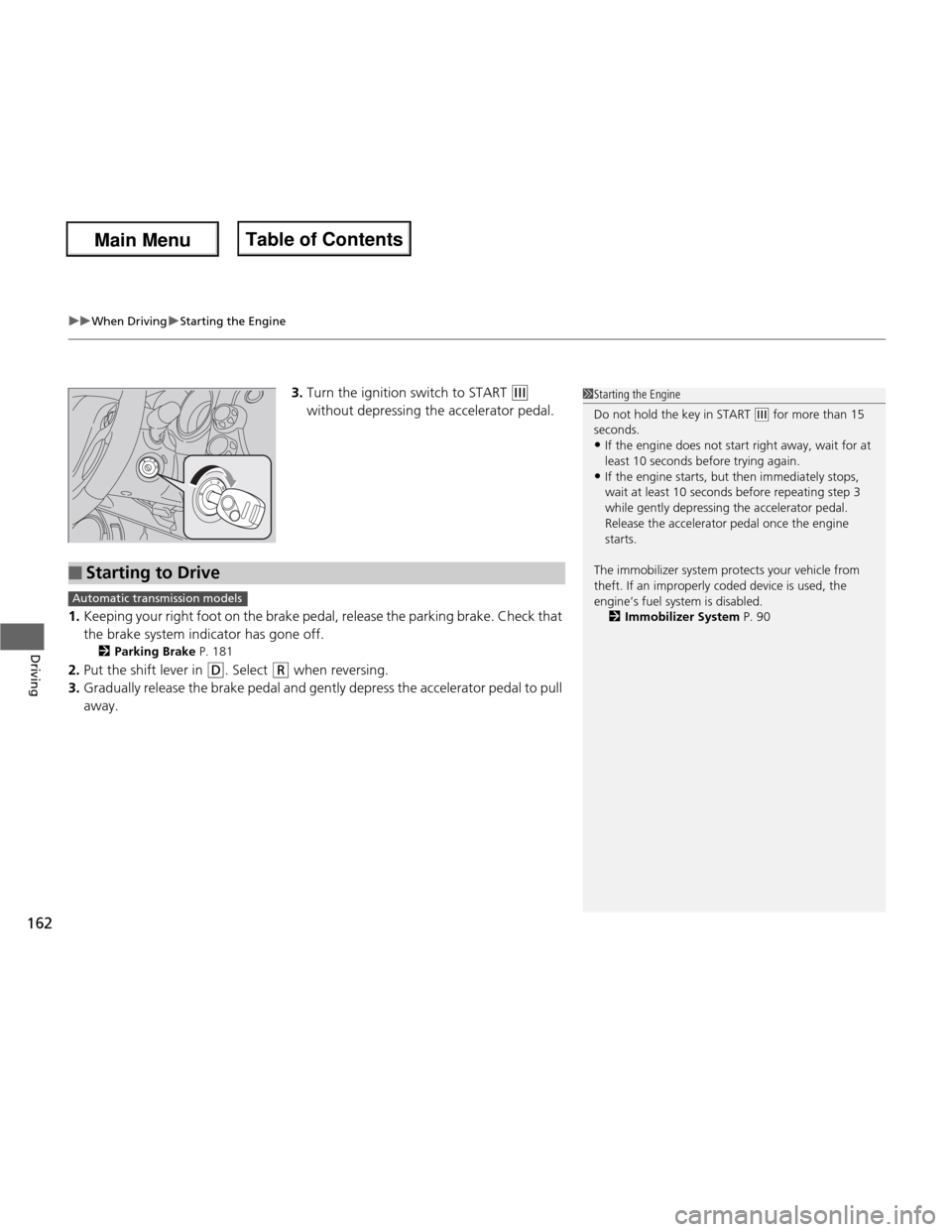
3. Turn the ignition switch to START (e
without depressing the accelerator pedal.
1. Keeping your right foot on the brake pedal, release the parking brake. Check that
the brake system indicator has gone off.
2 Parking Brake P. 181
2. Put the shift lever in
(D . Select (R when reversing.
3. Gradually release the brake pedal and gently depress the accelerator pedal to pull away.
1Starting the Engine
Do not hold the key in START
(e for more than 15
seconds.
• If the engine does not start right away, wait for at least 10 seconds before trying again.
• If the engine starts, but then immediately stops,
wait at least 10 seconds before repeating step 3
while gently depressing the acce lerator pedal.
Release the accelerator pedal once the engine
starts.
The immobilizer system protects your vehicle from
theft. If an improperly coded device is used, the
engine’s fuel system is disabled. 2 Immobilizer System P. 90
■Starting to Drive
Automatic transmission models
Main Menu
Main MenuTable of Contents
Page 164 of 286
163
uuWhen DrivinguPrecautions While Driving
Driving
Precautions While Driving
Avoid driving in deep water and on flooded roads. This can damage the engine,
driveline, or cause electrical component failure.
If there is a strong impact with something under the vehicle, stop in a safe location.
Check the underside of the vehicle for damage or any fluid leaks.
■In Rain
■Other Precautions
1Precautions While Driving
NOTICE
Do not operate the shift lever while pressing the
accelerator pedal. You could damage the
transmission.
If the ignition switch is turned to ACCESSORY
(q or
LOCK (0 while driving, the engine will shut down
and all steering and brake power assist functions will
stop, making it difficult to control the vehicle.
Do not put the shift lever in
(N , as you will lose
engine braking (and acceleration) performance.
During the first 600 miles (1,000 km) of operation,
avoid sudden acceleration or full throttle operation so
as to not damage the engine or powertrain.
Avoid hard braking for the first 200 miles (300 km).
You should also follow this when the brake pads are replaced.
NOTICE
The following can damage the under spoiler: • Parking the vehicle by a parking block
• Parallel parking along the road shoulder
• Driving towards the bottom of a hill
• Driving up or down to a different surface level
(such as a road shoulder)
• Driving on a rutted or bumpy road
• Driving on a road with potholes.
Sport Models
Main Menu
Main MenuTable of Contents