Switch ac HONDA FIT 2013 3.G Owner's Manual
[x] Cancel search | Manufacturer: HONDA, Model Year: 2013, Model line: FIT, Model: HONDA FIT 2013 3.GPages: 286, PDF Size: 9.38 MB
Page 73 of 286
72
Instrument Panel
Gauges and Displays
Gauges
Gauges include the speedometer, tachometer, fuel gauge, and related indicators.
They are displayed when the ignition switch is in ON
(w.
Displays your driving sp eed in mph (U.S.) or km/h (Canada).
Shows the number of engine revolutions per minute.
Displays the amount of fuel left in the fuel tank.
■Speedometer
■Tachometer
■Fuel Gauge1Fuel Gauge
NOTICE
You should refuel when the reading approaches .
Running out of fuel can cause the engine to misfire,
damaging the catalytic converter.
The actual amount of remaining fuel may differ from the fuel gauge reading.E
Main Menu
Main MenuTable of Contents
Page 74 of 286
73
uuGauges and DisplaysuInformation Display
Continued
Instrument Panel
Information Display
The information display shows the odometer, trip meter, engine oil life and
maintenance service item codes, and other gauges.
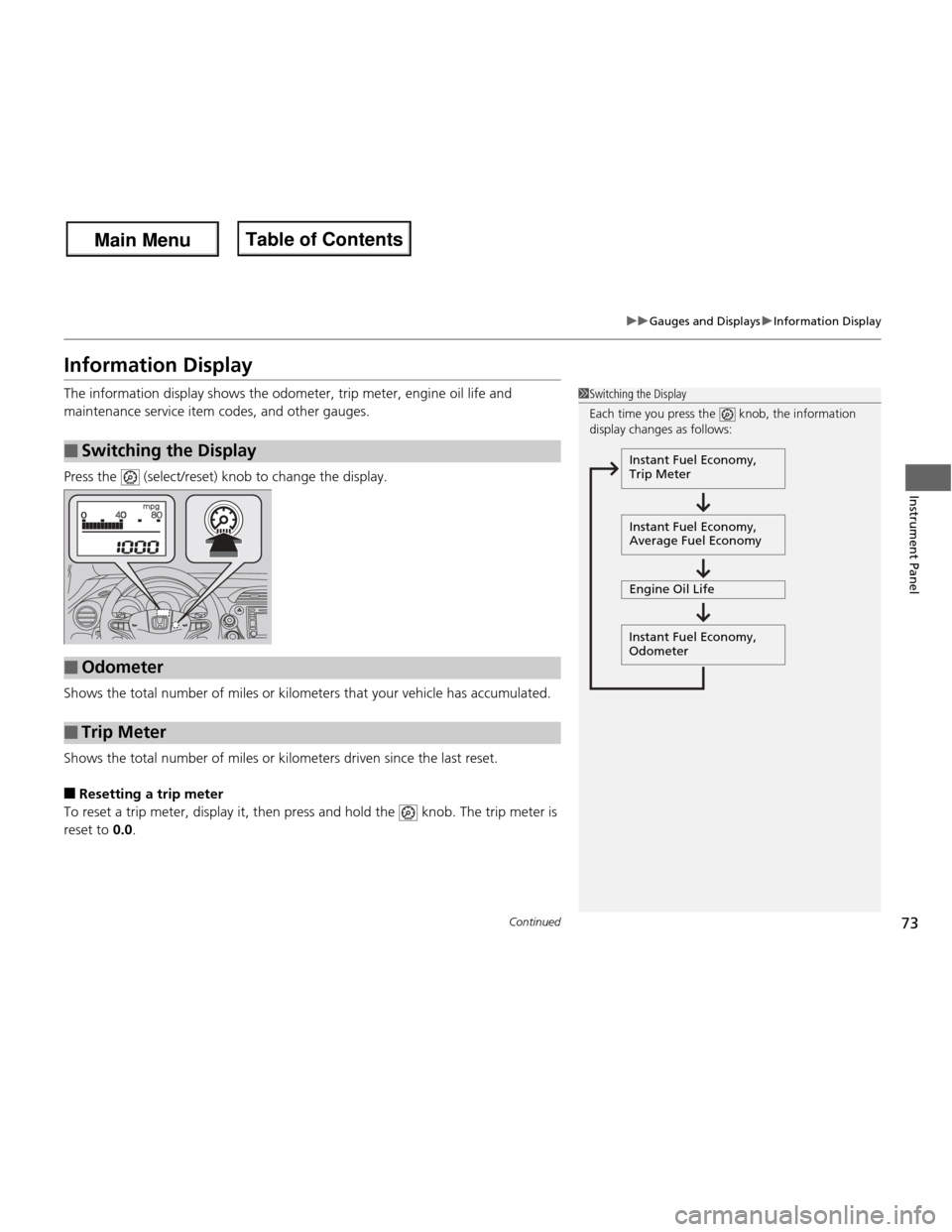
Press the (select/reset) knob to change the display.
Shows the total number of miles or kilometers that your vehicle has accumulated.
Shows the total number of miles or kilometers driven since the last reset. ■ Resetting a trip meter
To reset a trip meter, display it, then press and hold the knob. The trip meter is
reset to 0.0.
■Switching the Display
1Switching the Display
Each time you press the knob, the information
display changes as follows:
Instant Fuel Economy,
Trip Meter
Instant Fuel Economy,
Average Fuel Economy
Engine Oil Life
Instant Fuel Economy, Odometer
■Odometer
■Trip Meter
Main Menu
Main MenuTable of Contents
Page 76 of 286
75
Controls
This chapter explains how to operate the various controls necessary for driving.
Setting the Clock................................ 76
Locking and Unlocking the Doors
Key Types and Functions .................... 77
Locking/Unlocking the Doors from the Outside ............................................ 79
Locking/Unlocking the Doors from the Inside ............................................... 82
Childproof Door Locks ....................... 83
Auto Door Locking/Unlocking *
.......... 84
Opening and Closing the Tailgate Using the Key *
................................... 88
Using the Tailgate Open Handle ......... 89
Security System .................................. 90
Immobilizer System ............................ 90 Security System Alarm
*
...................... 90
Opening and Closing the Windows .. 92
Operating the Switches Around the
Steering Wheel Ignition Switch ................................... 94
Turn Signals ....................................... 95
Light Switches.................................... 95 Fog Lights *
........................................ 96
Daytime Running Lights ..................... 96
Wipers and Washers .......................... 97
Brightness Control ............................. 99
Rear Defogger/Heated Door Mirror *
Button ........................................... 100
Adjusting the Steering Wheel........... 101 Adjusting the Mirrors
....................... 102
Interior Rearview Mirror ................... 102
Power Door Mirrors ......................... 102
Adjusting the Seats .......................... 103
Adjusting the Seat Positions ............. 103
Interior Lights/Interior Convenience Items ................................................ 111
Interior Lights .................................. 111
Interior Convenience Items .............. 113
Heating and Cooling *
....................... 118
Using Vents, Heating and A/C *
........ 118
* Not available on all models
Main Menu
Main Menu
Page 77 of 286
76
Controls
Setting the Clock
Clock
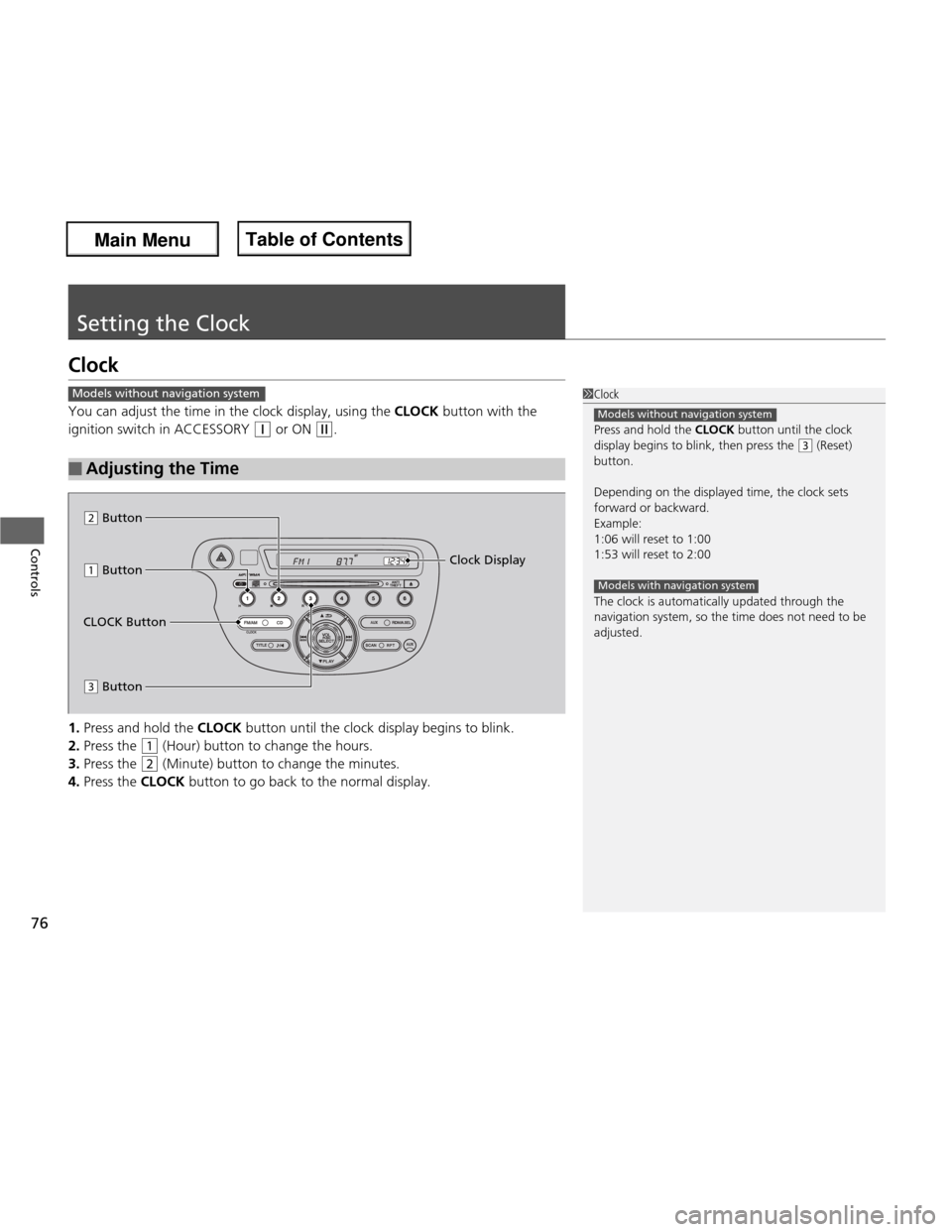
You can adjust the time in the clock display, using the CLOCK button with the
ignition switch in ACCESSORY
(q or ON (w.
1. Press and hold the CLOCK button until the clock dis play begins to blink.
2. Press the
(1 (Hour) button to change the hours.
3. Press the
(2 (Minute) button to change the minutes.
4. Press the CLOCK button to go back to the normal display.
■Adjusting the Time
1Clock
Press and hold the CLOCK button until the clock
display begins to blink, then press the
(3 (Reset)
button.
Depending on the displayed time, the clock sets
forward or backward.
Example: 1:06 will reset to 1:001:53 will reset to 2:00
The clock is automatically updated through the navigation system, so the time does not need to be
adjusted.
Models without navigation system
Models with navigation system
Models without navigation system
(1 Button
(3 Button Clock Display
CLOCK Button
(2 Button
Main Menu
Main MenuTable of Contents
Page 80 of 286
79
uuLocking and Unlocking the DoorsuLocking/Unlocking the Doors from the Outside
Continued
Controls
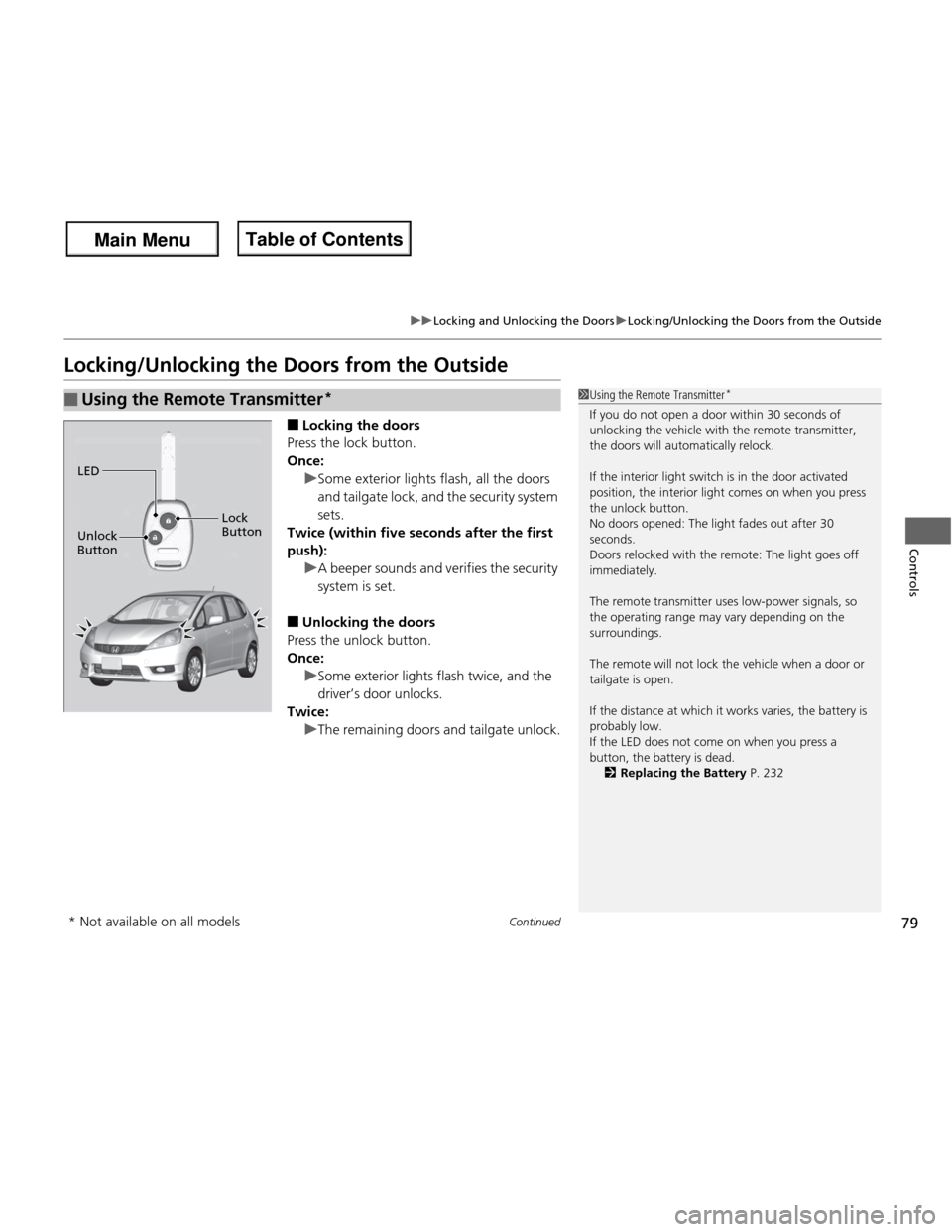
Locking/Unlocking the Doors from the Outside■Locking the doors
Press the lock button.
Once:
uSome exterior lights flash, all the doors
and tailgate lock, and the security system
sets.
Twice (within five seconds after the first push):
uA beeper sounds and verifies the security system is set.
■ Unlocking the doors
Press the unlock button.
Once:
uSome exterior lights flash twice, and the
driver’s door unlocks.
Twice:
uThe remaining doors and tailgate unlock.
■Using the Remote Transmitter *1Using the Remote Transmitter
*
If you do not open a door within 30 seconds of
unlocking the vehicle with the remote transmitter, the doors will automatically relock.
If the interior light switch is in the door activated
position, the interior light comes on when you press the unlock button.
No doors opened: The light fades out after 30
seconds.
Doors relocked with the remote: The light goes off
immediately.
The remote transmitter uses low-power signals, so
the operating range may vary depending on the surroundings.
The remote will not lock the vehicle when a door or tailgate is open.
If the distance at which it works varies, the battery is
probably low.
If the LED does not come on when you press a
button, the battery is dead. 2 Replacing the Battery P. 232
LED
Unlock
Button Lock Button
* Not available on all models
Main Menu
Main MenuTable of Contents
Page 82 of 286
81
uuLocking and Unlocking the DoorsuLocking/Unlocking the Doors from the Outside
Controls
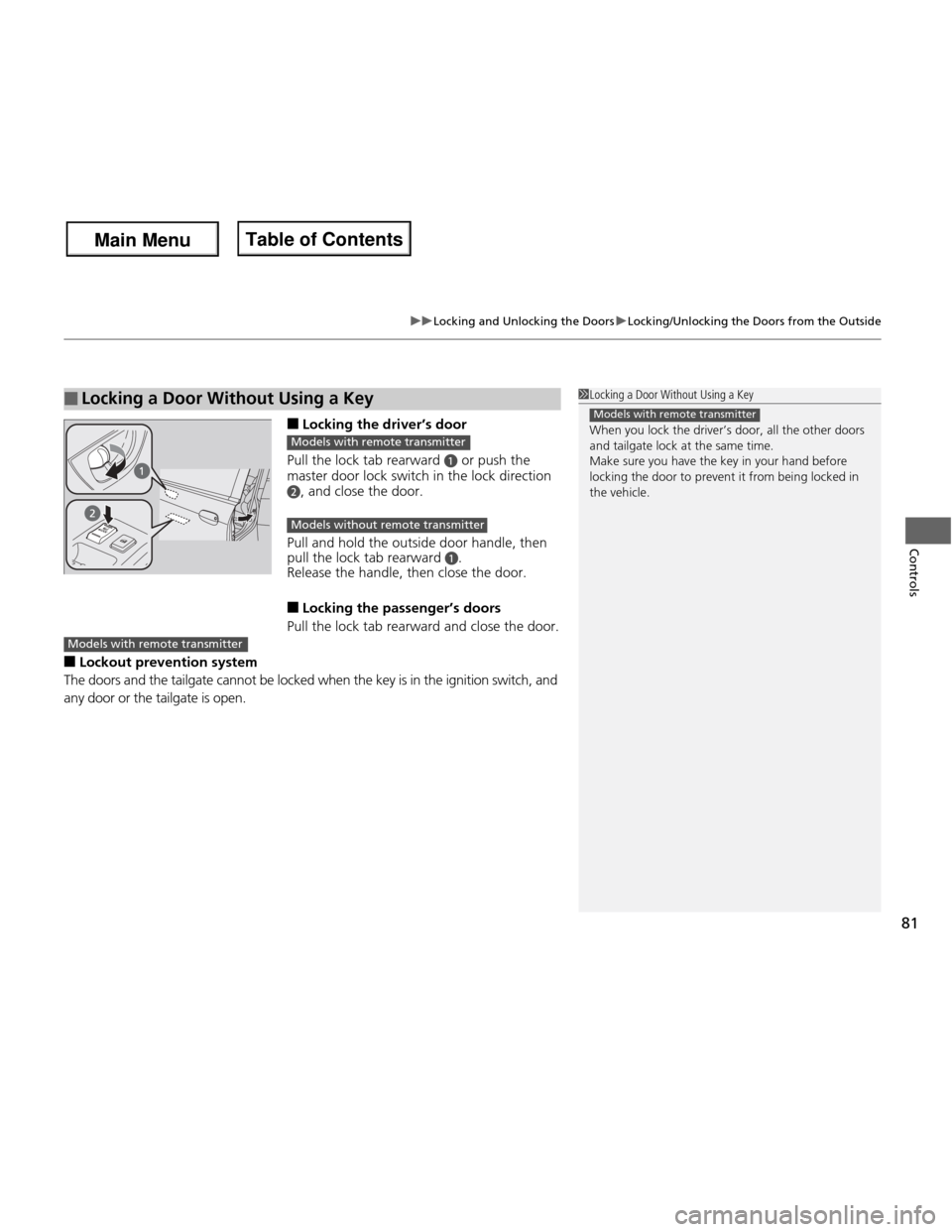
■Locking the driver’s door
Pull the lock tab rearward
a or push the
master door lock switch in the lock direction
b, and close the door.
Pull and hold the outside door handle, then
pull the lock tab rearward
a.
Release the handle, then close the door. ■ Locking the passenger’s doors
Pull the lock tab rearward and close the door.
■ Lockout preventi on system
The doors and the tailgate cannot be locked when the key is in the ignition switch, and
any door or the tailgate is open.
■Locking a Door Without Using a Key1Locking a Door Without Using a Key
When you lock the driver’s door, all the other doors
and tailgate lock at the same time.
Make sure you have the key in your hand before
locking the door to prevent it from being locked in the vehicle.
Models with remote transmitter
Models with remote transmitter
Models without remote transmitter
Models with remote transmitter
Main Menu
Main MenuTable of Contents
Page 83 of 286
82
uuLocking and Unlocking the DoorsuLocking/Unlocking the Doors from the Inside
Controls
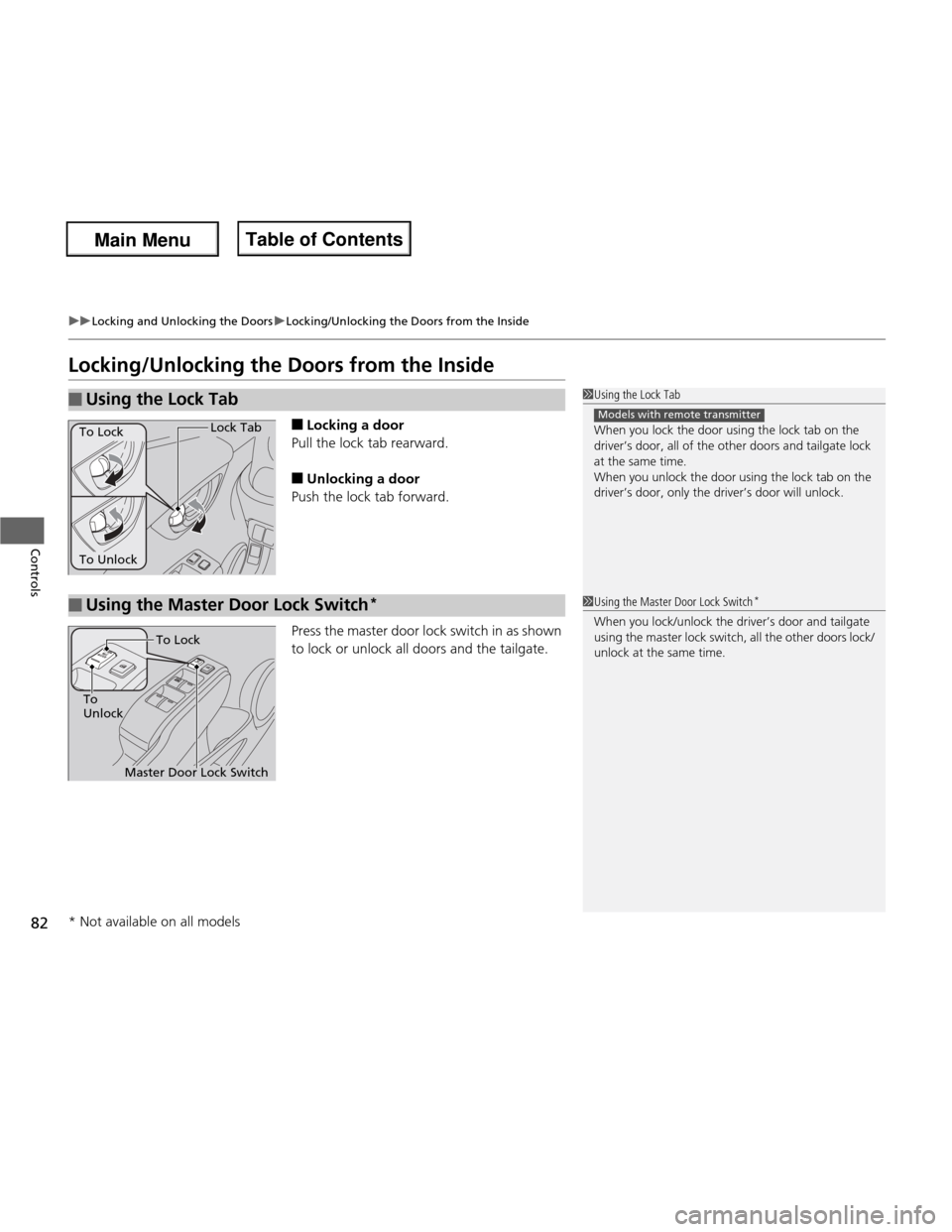
Locking/Unlocking the Doors from the Inside■Locking a door
Pull the lock tab rearward. ■ Unlocking a door
Push the lock tab forward.
Press the master door lock switch in as shown
to lock or unlock all doors and the tailgate.
■Using the Lock Tab1Using the Lock Tab
When you lock the door using the lock tab on the
driver’s door, all of the other doors and tailgate lock
at the same time.
When you unlock the door using the lock tab on the
driver’s door, only the driver’s door will unlock.
Models with remote transmitter
To Unlock Lock Tab
To Lock
■Using the Master Door Lock Switch *1Using the Master Door Lock Switch
*
When you lock/unlock the driver’s door and tailgate
using the master lock switch, all the other doors lock/ unlock at the same time.
Master Door Lock Switch
To
Unlock To Lock
* Not available on all models
Main Menu
Main MenuTable of Contents
Page 85 of 286
84
uuLocking and Unlocking the DoorsuAuto Door Locking/Unlocking*
Controls
Auto Door Locking/Unlocking *
Your vehicle locks all doors and unloc ks the driver’s door automatically when a
certain condition is met. ■ Drive lock mode
All doors lock when the vehicle’s speed reaches about 10 mph (15 km/h). ■ Park unlock mode
The driver’s door unlocks when the shift lever is moved into
(P with the brake pedal
depressed.
■ Ignition switch unlock mode
The driver’s door unlocks when the ignition switch is moved out of ON
(w .
The settings can be changed to unlock all doors.
■Auto Door Locking
■Auto Door Unlocking
1Auto Door Locking/Unlocking *
You can turn off or change to another auto door
locking/unlocking setting using the master door lock
switch. 2 Customizing the Auto Door Locking/
Unlocking Setting *
P. 85
Models with automatic transmission
Models with manual transmission
* Not available on all models
Main Menu
Main MenuTable of Contents
Page 86 of 286
85
uuLocking and Unlocking the DoorsuCustomizing the Auto Door Locking/Unlocking Setting*
Continued
Controls
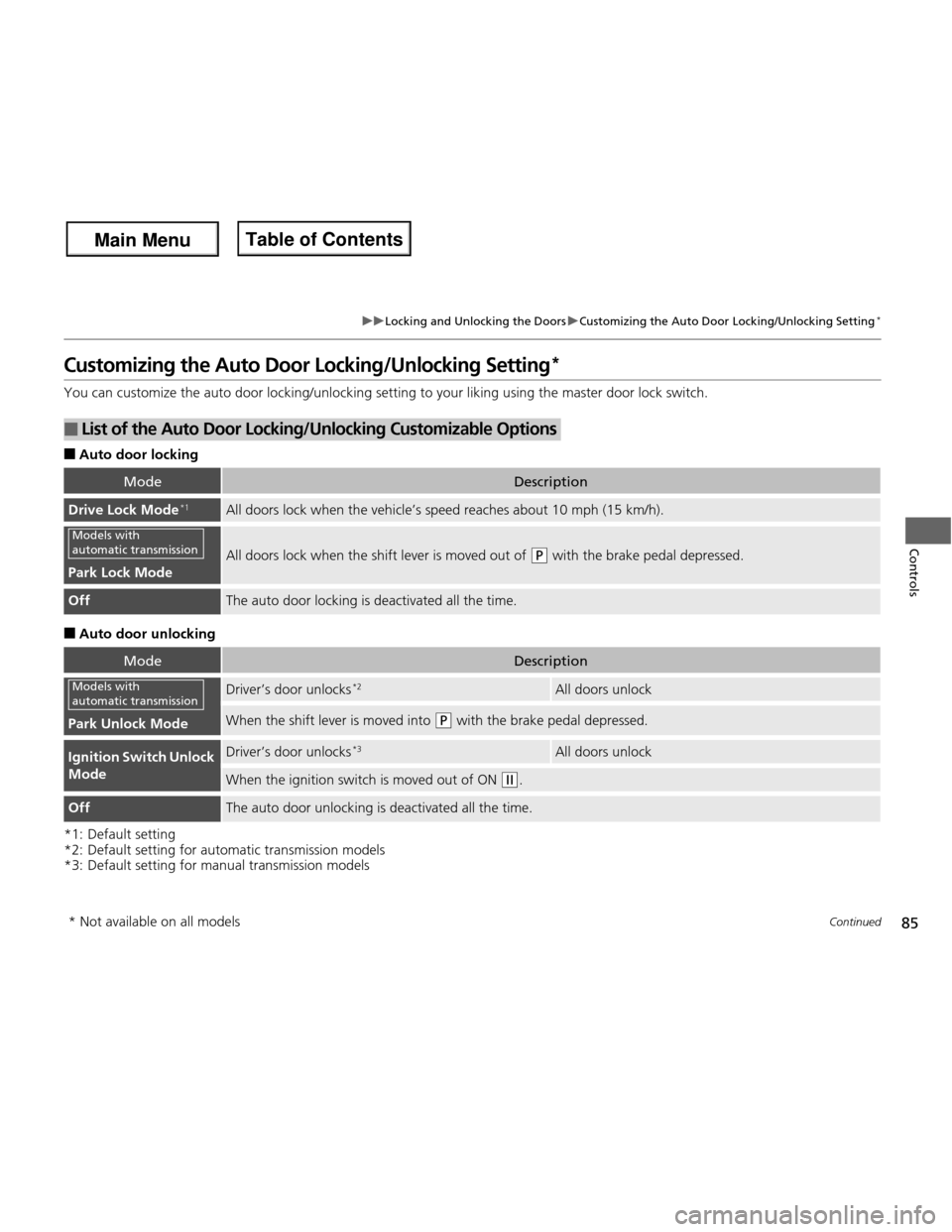
Customizing the Auto Door Locking/Unlocking Setting *
You can customize the auto door locking/unlocking setting to your liking using the master door lock switch. ■ Auto door locking
■ Auto door unlocking
*1: Default setting
*2: Default setting for automatic transmission models
*3: Default setting for manual transmission models
■List of the Auto Door Locking/Unlocking Customizable Options
ModeDescription
Drive Lock Mode*1All doors lock when the vehicle’s speed
reaches about 10 mph (15 km/h).
Park Lock Mode
All doors lock when the shift lever is moved out of (P with the brake pedal depressed.
OffThe auto door locking is deactivated all the time.
ModeDescription
Park Unlock Mode
Driver’s door unlocks *2All doors unlock
When the shift lever is moved into (P
with the brake pedal depressed.
Ignition Switch Unlock
ModeDriver’s door unlocks *3All doors unlock
When the ignition switch is moved out of ON (w
.
OffThe auto door unlocking is deactivated all the time.
Models with
automatic transmission
Models with
automatic transmission
* Not available on all models
Main Menu
Main MenuTable of Contents
Page 87 of 286
86
uuLocking and Unlocking the DoorsuCustomizing the Auto Door Locking/Unlocking Setting*
Controls
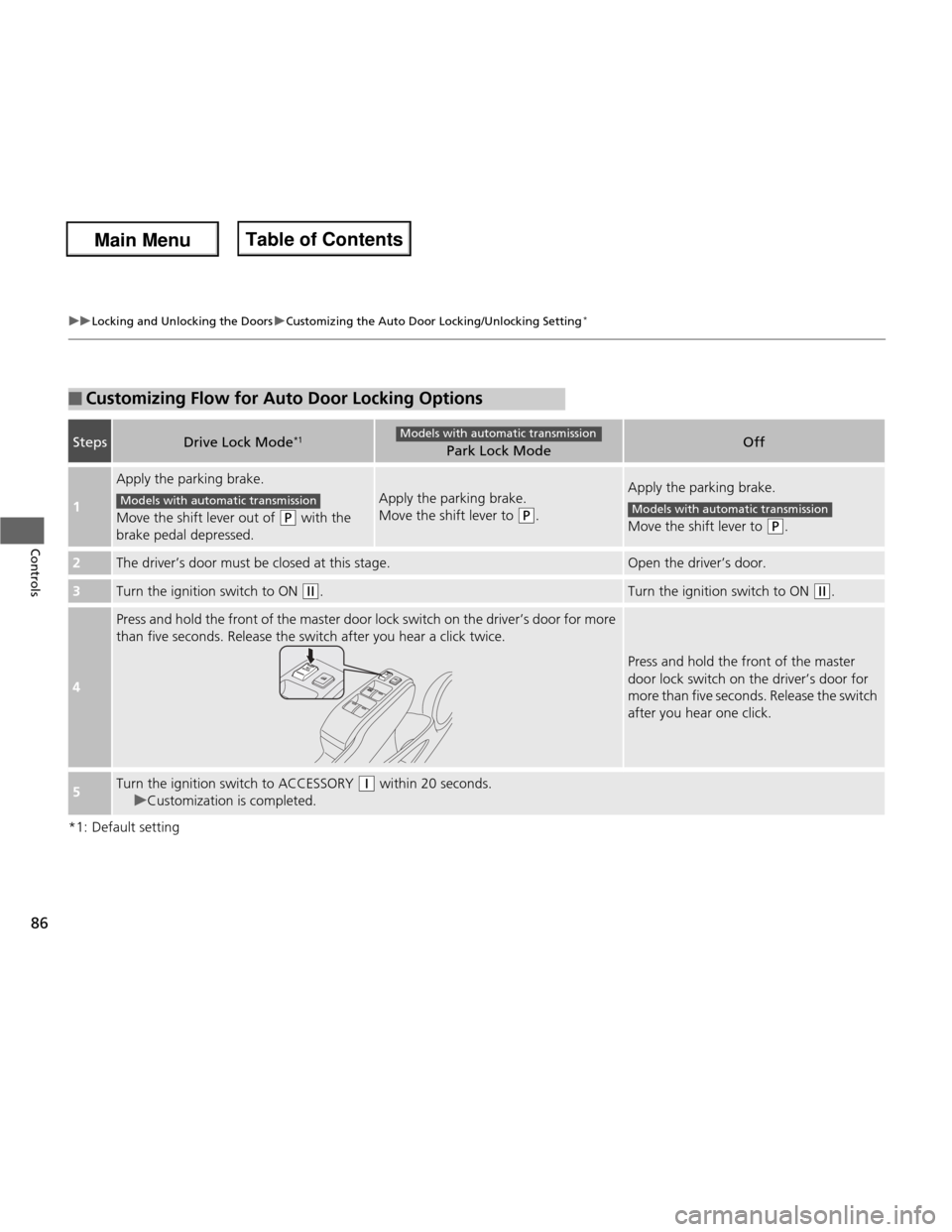
*1: Default setting
■Customizing Flow for Auto Door Locking Options
StepsDrive Lock Mode*1Park Lock ModeOff
1
Apply the parking brake.
Move the shift lever out of
(P
with the
brake pedal depressed.
Apply the parking brake.
Move the shift lever to
(P .
Apply the parking brake.
Move the shift lever to
(P.
2The driver’s door must be closed at this stage.Open the driver’s door.
3Turn the ignition switch to ON (w.Turn the ignition switch to ON (w.
4
Press and hold the front of the master door lock switch on the driver’s door for more
than five seconds. Release the switch after you hear a click twice.
Press and hold the front of the master
door lock switch on the driver’s door for
more than five seconds. Release the switch
after you hear one click.
5Turn the ignition switch to ACCESSORY (q within 20 seconds.
uCustomization is completed.
Models with automatic transmission
Models with automatic transmissionModels with automatic transmission
Main Menu
Main MenuTable of Contents