brake HONDA FIT 2015 3.G User Guide
[x] Cancel search | Manufacturer: HONDA, Model Year: 2015, Model line: FIT, Model: HONDA FIT 2015 3.GPages: 453, PDF Size: 21.19 MB
Page 74 of 453
73
uuIndicators u
Continued
Instrument Panel
*1:Models with the smart entry system have an ENGINE START/STOP button instead of an ignition switch.
IndicatorNameOn/BlinkingExplanation
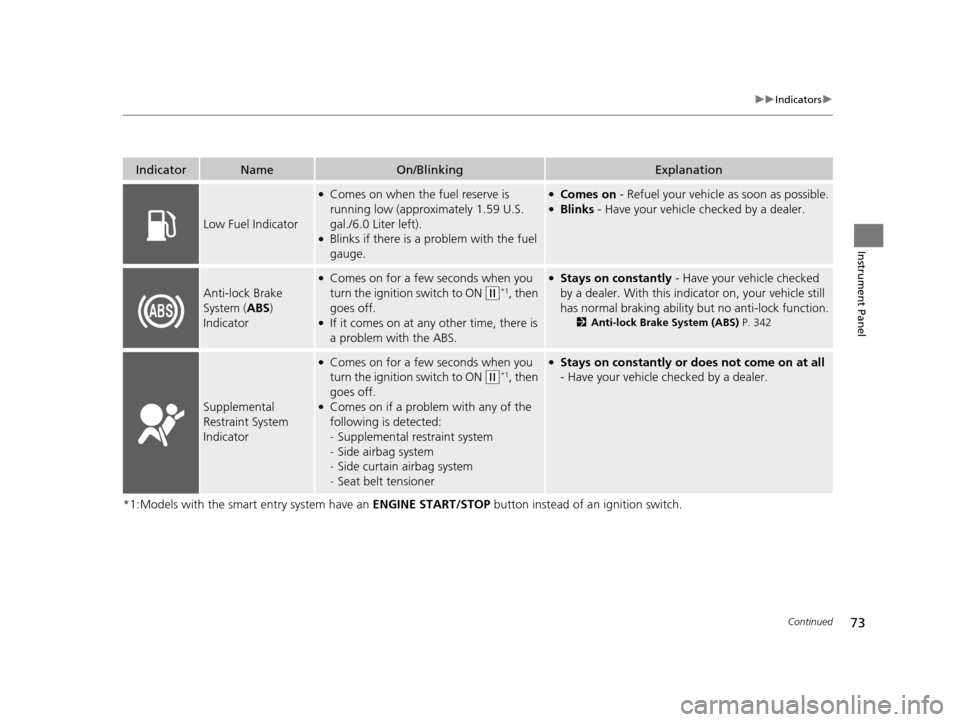
Low Fuel Indicator
●Comes on when the fuel reserve is
running low (approximately 1.59 U.S.
gal./6.0 Liter left).
●Blinks if there is a problem with the fuel
gauge.
●Comes on - Refuel your vehicl e as soon as possible.●Blinks - Have your vehicle checked by a dealer.
Anti-lock Brake
System ( ABS)
Indicator
●Comes on for a few seconds when you
turn the ignition switch to ON
(w*1, then
goes off.
●If it comes on at any other time, there is
a problem with the ABS.
●Stays on constantly - Have your vehicle checked
by a dealer. With this indicator on, your vehicle still
has normal braking ability but no anti-lock function.
2 Anti-lock Brake System (ABS) P. 342
Supplemental
Restraint System
Indicator
●Comes on for a few seconds when you
turn the ignition switch to ON
(w*1, then
goes off.
●Comes on if a problem with any of the
following is detected:
- Supplemental restraint system
- Side airbag system
- Side curtain airbag system
- Seat belt tensioner
●Stays on constantly or does not come on at all
- Have your vehicle checked by a dealer.
15 US FIT-31T5A6000.book 73 ページ 2014年3月6日 木曜日 午後7時5分
Page 78 of 453
77
uuIndicators u
Continued
Instrument Panel
*1:Models with the smart entry system have an ENGINE START/STOP button instead of an ignition switch.
IndicatorNameOn/BlinkingExplanation
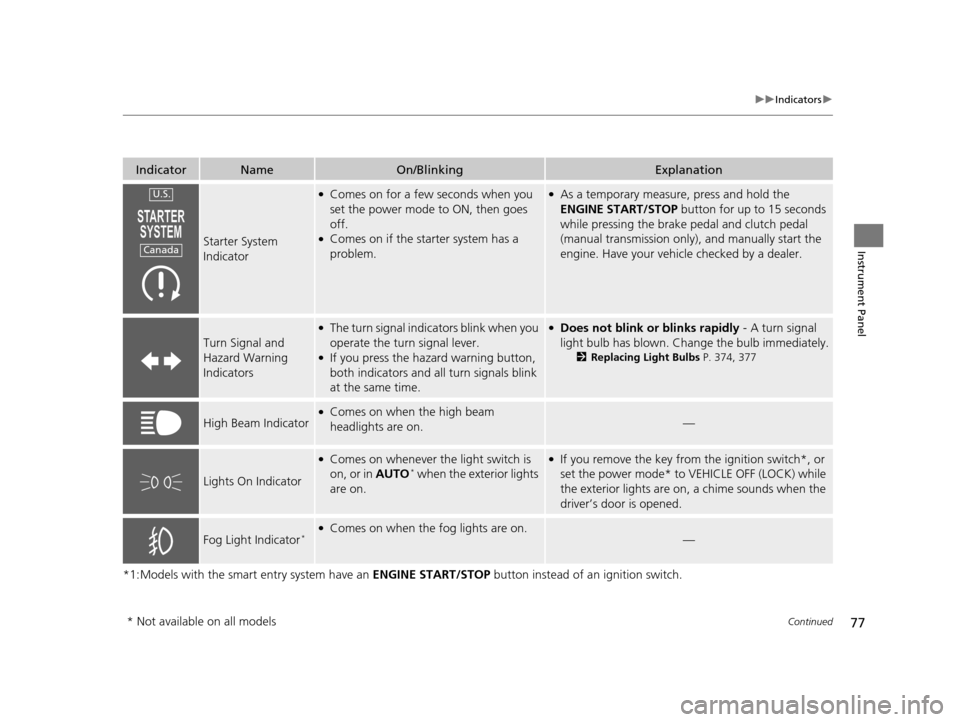
Starter System
Indicator
●Comes on for a few seconds when you
set the power mode to ON, then goes
off.
●Comes on if the starter system has a
problem.
●As a temporary measure, press and hold the
ENGINE START/STOP button for up to 15 seconds
while pressing the brake pedal and clutch pedal
(manual transmission only), and manually start the
engine. Have your vehicle checked by a dealer.
Turn Signal and
Hazard Warning
Indicators
●The turn signal indica tors blink when you
operate the turn signal lever.
●If you press the hazard warning button,
both indicators and al l turn signals blink
at the same time.
●Does not blink or blinks rapidly - A turn signal
light bulb has blown. Change the bulb immediately.
2 Replacing Light Bulbs P. 374, 377
High Beam Indicator●Comes on when the high beam
headlights are on.—
Lights On Indicator
●Comes on whenever the light switch is
on, or in AUTO* when the exterior lights
are on.
●If you remove the key from the ignition switch*, or
set the power mode* to VEHICLE OFF (LOCK) while
the exterior lights are on, a chime sounds when the
driver’s door is opened.
Fog Light Indicator*●Comes on when the fog lights are on.—
U.S.
Canada
* Not available on all models
15 US FIT-31T5A6000.book 77 ページ 2014年3月6日 木曜日 午後7時5分
Page 105 of 453
104
uuLocking and Unlocking the Doors uCustomizing the Auto Door Locking/Unlocking Setting
Controls
Customizing the Auto Door Locking/Unlocking Setting
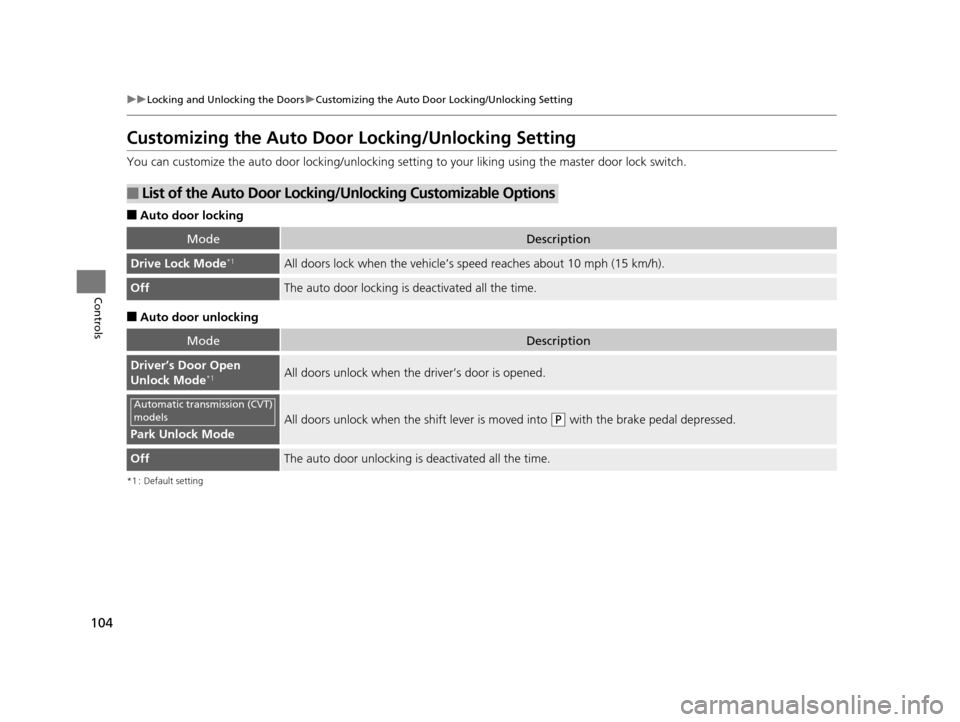
You can customize the auto door locking/unlocking setti ng to your liking using the master door lock switch.
■Auto door locking
■Auto door unlocking
*1 : Default setting
■List of the Auto Door Locking/Unlocking Customizable Options
ModeDescription
Drive Lock Mode*1All doors lock when the vehicle’s speed reaches about 10 mph (15 km/h).
OffThe auto door locking is deactivated all the time.
ModeDescription
Driver’s Door Open
Unlock Mode*1All doors unlock when the driver’s door is opened.
Park Unlock Mode
All doors unlock when the shift lever is moved into (P with the brake pedal depressed.
OffThe auto door unlocking is deactivated all the time.
Automatic transmission (CVT)
models
15 US FIT-31T5A6000.book 104 ページ 2014年3月6日 木曜日 午後7時5分
Page 106 of 453
105
uuLocking and Unlocking the Doors uCustomizing the Auto Door Locking/Unlocking Setting
Continued
Controls
*1 : Default setting
*2 : Models without smart entry system
*3 : Models with smart entry system
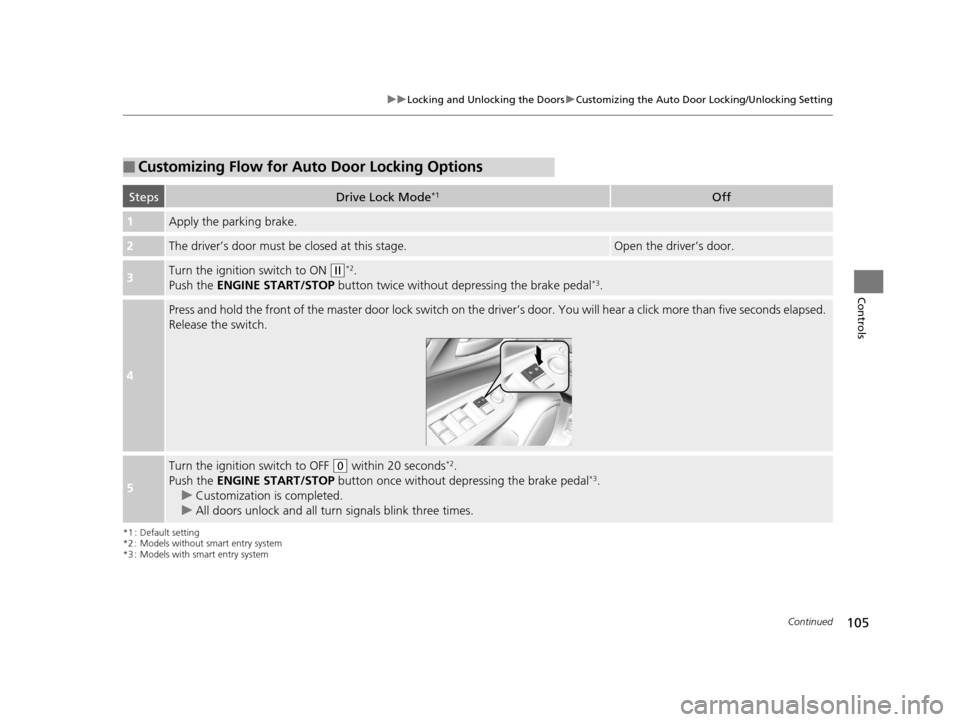
■Customizing Flow for Auto Door Locking Options
StepsDrive Lock Mode*1Off
1Apply the parking brake.
2The driver’s door must be closed at this stage.Open the driver’s door.
3Turn the ignition switch to ON (w*2.
Push the ENGINE START/STOP button twice without depressing the brake pedal*3.
4
Press and hold the front of the master door lock switch on the driver’s door. You will hear a click more than five seconds elapsed.
Release the switch.
5
Turn the ignition switch to OFF (0 within 20 seconds*2.
Push the ENGINE START/STOP button once without depressing the brake pedal*3.
u Customization is completed.
u All doors unlock and all turn signals blink three times.
15 US FIT-31T5A6000.book 105 ページ 2014年3月6日 木曜日 午後7時5分
Page 107 of 453
106
uuLocking and Unlocking the Doors uCustomizing the Auto Door Locking/Unlocking Setting
Controls
*1 : Default setting
*2 : Models without smart entry system
*3 : Models with smart entry system
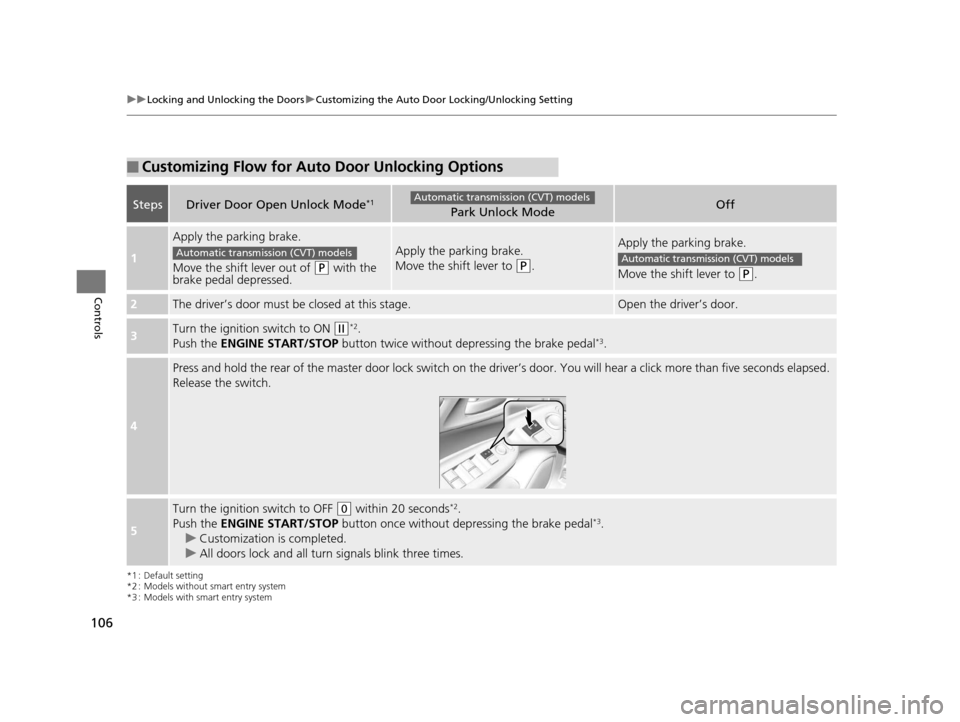
■Customizing Flow for Auto Door Unlocking Options
StepsDriver Door Open Unlock Mode*1Park Unlock ModeOff
1
Apply the parking brake.
Move the shift lever out of
(P with the
brake pedal depressed.
Apply the parking brake.
Move the shift lever to
(P.
Apply the parking brake.
Move the shift lever to
(P.
2The driver’s door must be closed at this stage.Open the driver’s door.
3Turn the ignition switch to ON (w*2.
Push the ENGINE START/STOP button twice without de pressing the brake pedal*3.
4
Press and hold the rear of the master door lock switch on the dr iver’s door. You will hear a click more than five seconds elaps ed.
Release the switch.
5
Turn the ignition switch to OFF (0 within 20 seconds*2.
Push the ENGINE START/STOP button once without depressing the brake pedal*3.
u Customization is completed.
u All doors lock and all turn signals blink three times.
Automatic transmission (CVT) models
Automatic transmission (CVT) modelsAutomatic transmission (CVT) models
15 US FIT-31T5A6000.book 106 ページ 2014年3月6日 木曜日 午後7時5分
Page 118 of 453
117
uuOperating the Switches Around the Steering Wheel uENGINE START/STOP Button
Continued
Controls
ENGINE START/STOP Button
*1 : Except U.S. models with automatic transmission (CVT)
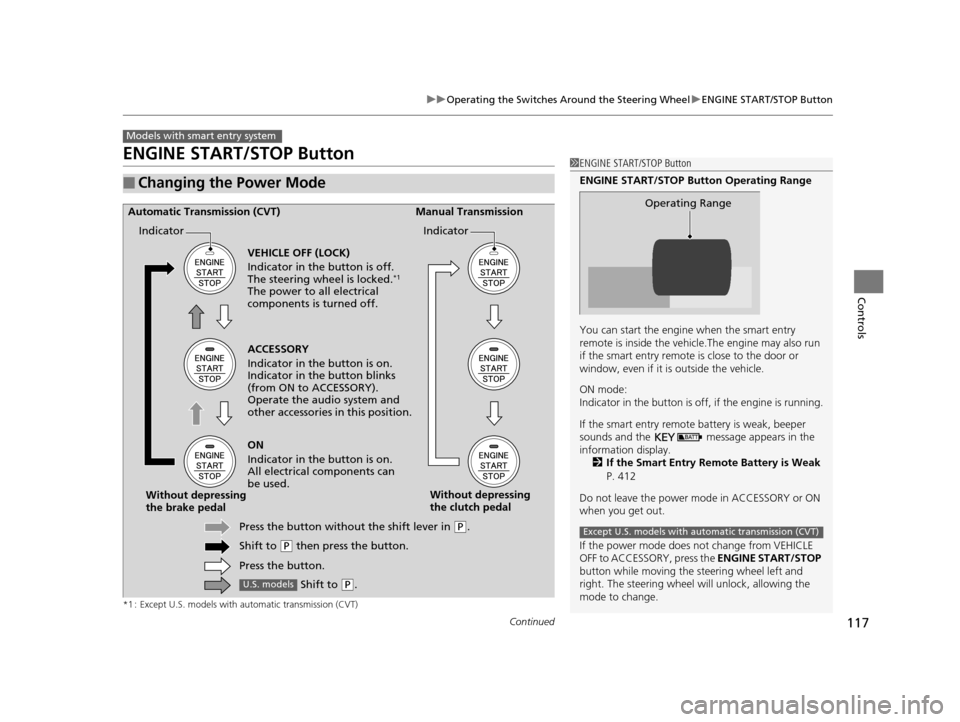
■Changing the Power Mode
Models with smart entry system
1ENGINE START/STOP Button
ENGINE START/STOP Button Operating Range
You can start the engine when the smart entry
remote is inside the vehicl e.The engine may also run
if the smart entry remote is close to the door or
window, even if it is outside the vehicle.
ON mode:
Indicator in the button is of f, if the engine is running.
If the smart entry remote battery is weak, beeper
sounds and the message appears in the
information display. 2 If the Smart Entry Remote Battery is Weak
P. 412
Do not leave the power mode in ACCESSORY or ON
when you get out.
If the power mode does not change from VEHICLE
OFF to ACCESSORY, press the ENGINE START/STOP
button while moving the st eering wheel left and
right. The steering wheel will unlock, allowing the
mode to change.
Operating Range
Except U.S. models with automatic transmission (CVT)
ACCESSORY
Indicator in the button is on.
Indicator in th e button blinks
(from ON to ACCESSORY).
Operate the audio system and
other accessories in this position.
Automatic Transmission (CVT) Manual Transmission
VEHICLE OFF (LOCK)
Indicator in the button is off.
The steering wheel is locked.
*1
The power to all electrical
components is turned off.
ON
Indicator in the button is on.
All electrical components can
be used.
Press the button withou t the shift lever in
(P.
Shift to
( P then press the button.
Press the button.
Without depressing
the brake pedal
Without depressing
the clutch pedal
Indicator Indicator
Shift to (
P.U.S. models
15 US FIT-31T5A6000.book 117 ページ 2014年3月6日 木曜日 午後7時5分
Page 126 of 453
125
uuOperating the Switches Around the Steering Wheel uDaytime Running Lights
Controls
Daytime Running Lights
The high beam headlights come on slight ly dimmer than normal when the following
conditions have been met:
• The ignition switch is in ON
(w*1.
• The headlight switch is off, or in .
• The parking brake is released.
The lights remain on even if you set th e parking brake. Turning off the ignition
switch or setting the power mode to VEHI CLE OFF will turn off the daytime running
lights.
The high beam headlights return to the original brightness once the headlight
switch is turned on.
*1 : Models with the smart entry system have an ENGINE START/STOP button instead of an ignition switch.
15 US FIT-31T5A6000.book 125 ページ 2014年3月6日 木曜日 午後7時5分
Page 142 of 453
Continued141
uuAdjusting the Seats uRear Seats
Controls
The rear seats can be folded down separa tely to allow for additional storage space.
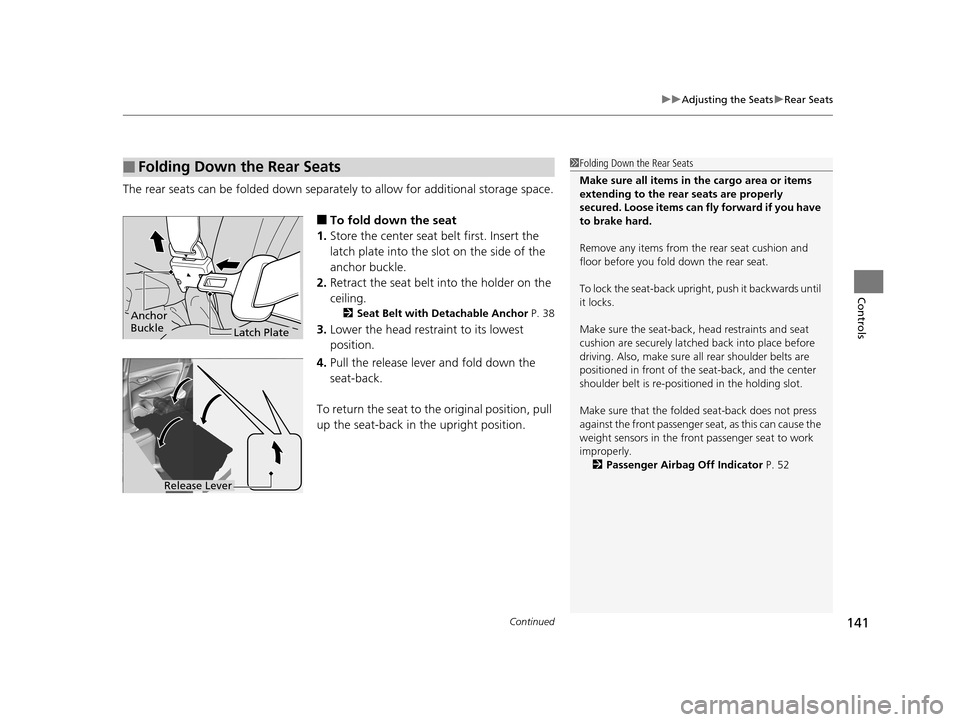
■To fold down the seat
1. Store the center seat belt first. Insert the
latch plate into the slot on the side of the
anchor buckle.
2. Retract the seat belt into the holder on the
ceiling.
2 Seat Belt with Detachable Anchor P. 38
3.Lower the head restraint to its lowest
position.
4. Pull the release lever and fold down the
seat-back.
To return the seat to th e original position, pull
up the seat-back in the upright position.
■Folding Down the Rear Seats1 Folding Down the Rear Seats
Make sure all items in the cargo area or items
extending to the rear seats are properly
secured. Loose items can fly forward if you have
to brake hard.
Remove any items from th e rear seat cushion and
floor before you fold down the rear seat.
To lock the seat-back upri ght, push it backwards until
it locks.
Make sure the seat-back, head restraints and seat
cushion are securely latche d back into place before
driving. Also, make sure all rear shoulder belts are
positioned in front of the seat-back, and the center
shoulder belt is re-posit ioned in the holding slot.
Make sure that the folded seat-back does not press
against the front passenger seat, as this can cause the
weight sensors in the front passenger seat to work
improperly.
2 Passenger Airbag Off Indicator P. 52
Anchor
Buckle
Latch Plate
Release Lever
15 US FIT-31T5A6000.book 141 ページ 2014年3月6日 木曜日 午後7時5分
Page 217 of 453
uuAudio System Basic Operation uPlaying a Video Using the HDMI ®
216
Features
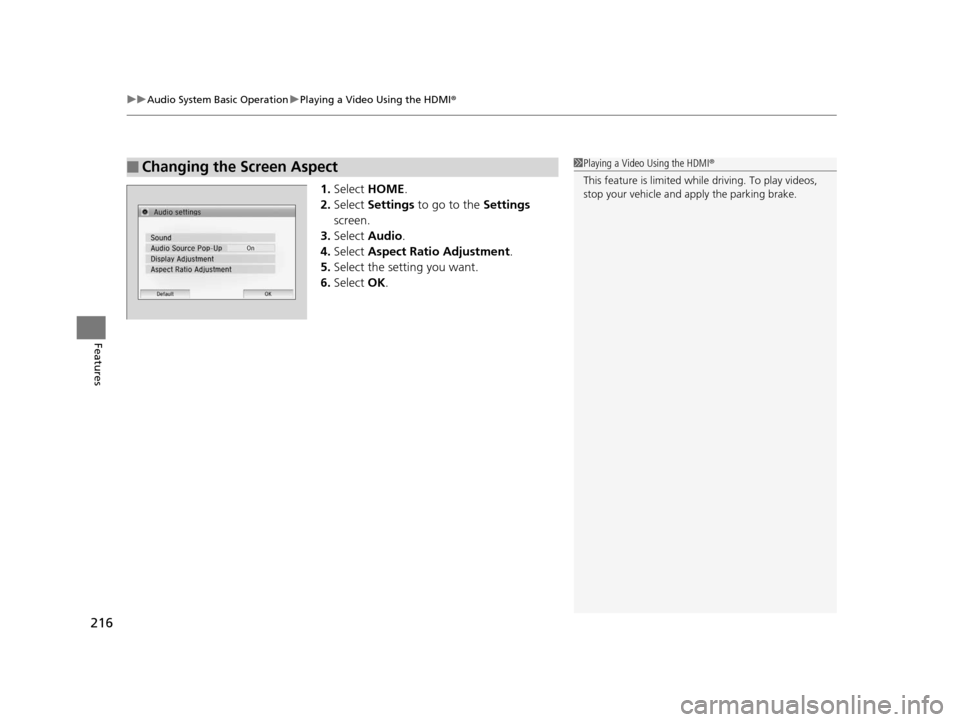
1.Select HOME .
2. Select Settings to go to the Settings
screen.
3. Select Audio .
4. Select Aspect Ratio Adjustment .
5. Select the setting you want.
6. Select OK.
■Changing the Screen Aspect1Playing a Video Using the HDMI®
This feature is limited while driving. To play videos,
stop your vehicle and apply the parking brake.
15 US FIT-31T5A6000.book 216 ページ 2014年3月6日 木曜日 午後7時5分
Page 227 of 453
226
Features
Customized Features
Use the audio/information screen to customize certain features.
See the navigation system ma nual for information of the customized features.
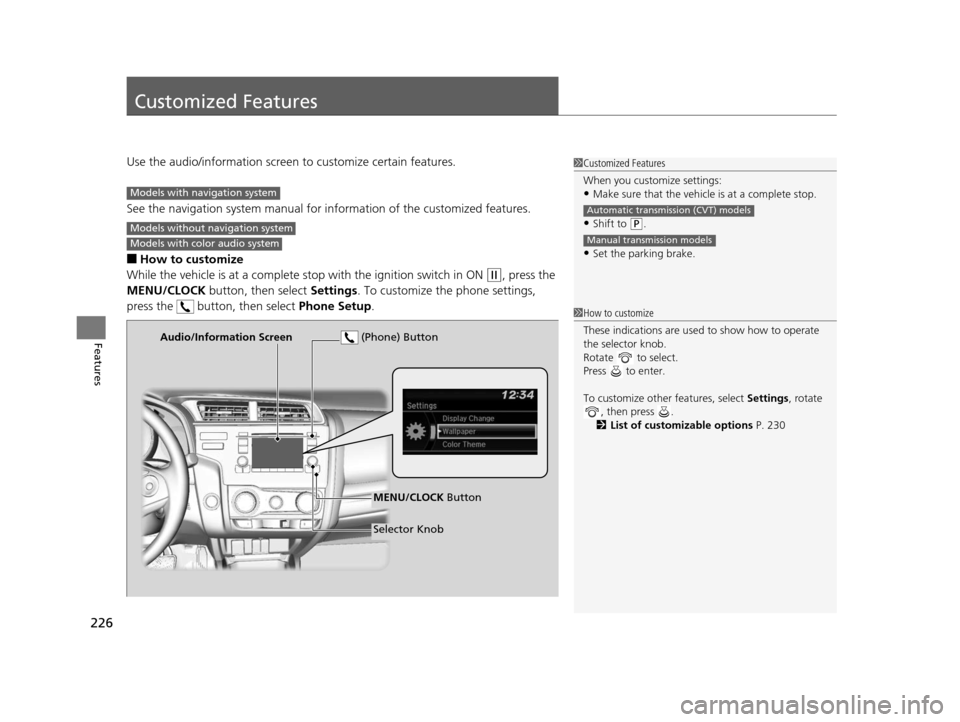
■How to customize
While the vehicle is at a complete stop with the igniti on switch in ON
(w, press the
MENU/CLOCK button, then select Settings. To customize the phone settings,
press the button, then select Phone Setup.
1Customized Features
When you customize settings:
•Make sure that the vehicle is at a complete stop.
•Shift to (P.
•Set the parking brake.
Automatic transmission (CVT) models
Manual transmission models
Models with navigation system
Models without navigation system
Models with color audio system
1 How to customize
These indications are used to show how to operate
the selector knob.
Rotate to select.
Press to enter.
To customize other features, select Settings, rotate
, then press .
2 List of customizable options P. 230
Audio/Information Screen
MENU/CLOCK Button
Selector Knob
(Phone) Button
15 US FIT-31T5A6000.book 226 ページ 2014年3月6日 木曜日 午後7時5分