codes HONDA FIT 2015 3.G Owners Manual
[x] Cancel search | Manufacturer: HONDA, Model Year: 2015, Model line: FIT, Model: HONDA FIT 2015 3.GPages: 453, PDF Size: 21.19 MB
Page 72 of 453
71
uuIndicators u
Continued
Instrument Panel
*1:Models with the smart entry system have an ENGINE START/STOP button instead of an ignition switch.
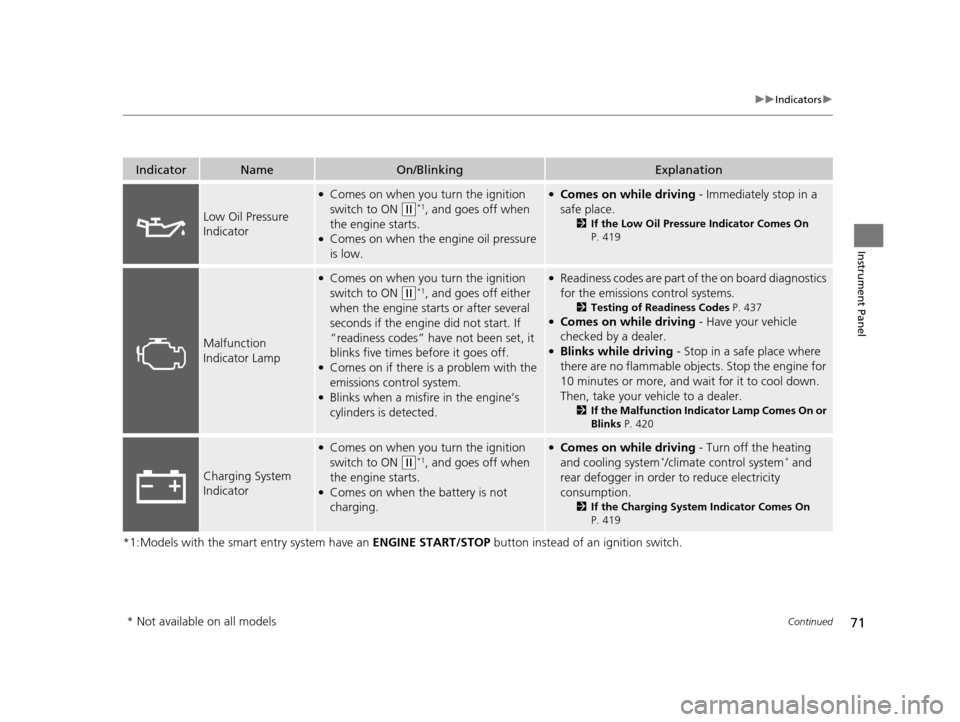
IndicatorNameOn/BlinkingExplanation
Low Oil Pressure
Indicator
●Comes on when you turn the ignition
switch to ON
(w*1, and goes off when
the engine starts.
●Comes on when the engine oil pressure
is low.
●Comes on while driving - Immediately stop in a
safe place.
2 If the Low Oil Pressure Indicator Comes On
P. 419
Malfunction
Indicator Lamp
●Comes on when you turn the ignition
switch to ON
(w*1, and goes off either
when the engine starts or after several
seconds if the engine did not start. If
“readiness codes” have not been set, it
blinks five times before it goes off.
●Comes on if there is a problem with the
emissions control system.
●Blinks when a misfire in the engine’s
cylinders is detected.
●Readiness codes are part of the on board diagnostics
for the emissions control systems.
2 Testing of Readiness Codes P. 437●Comes on while driving - Have your vehicle
checked by a dealer.
●Blinks while driving - Stop in a safe place where
there are no flammable objects. Stop the engine for
10 minutes or more, and wait for it to cool down.
Then, take your vehicle to a dealer.
2 If the Malfunction Indicator Lamp Comes On or
Blinks P. 420
Charging System
Indicator
●Comes on when you turn the ignition
switch to ON
(w*1, and goes off when
the engine starts.
●Comes on when the battery is not
charging.
●Comes on while driving - Turn off the heating
and cooling system*/climate control system* and
rear defogger in order to reduce electricity
consumption.
2 If the Charging System Indicator Comes On
P. 419
* Not available on all models
15 US FIT-31T5A6000.book 71 ページ 2014年3月6日 木曜日 午後7時5分
Page 84 of 453
83
uuGauges and Displays uInformation Display
Continued
Instrument Panel
Information Display
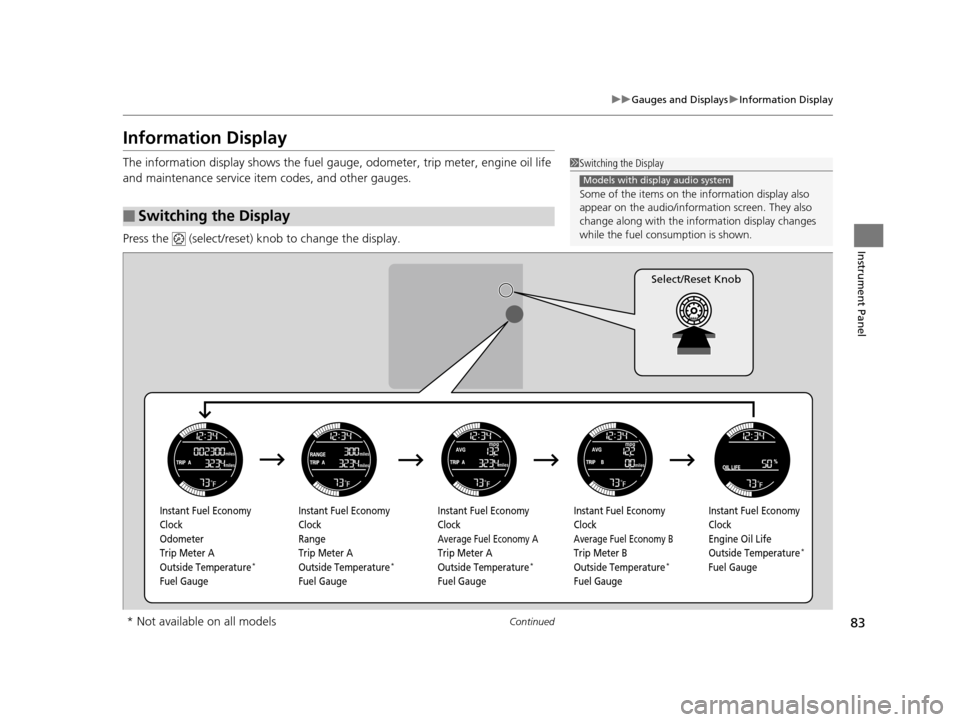
The information display shows the fuel gauge, odometer, trip meter, engine oil life
and maintenance service item codes, and other gauges.
Press the (select/reset) kn ob to change the display.
■Switching the Display
1Switching the Display
Some of the items on the information display also
appear on the audio/information screen. They also
change along with the info rmation display changes
while the fuel consumption is shown.
Models with display audio system
Instant Fuel Economy
Clock
Odometer
Trip Meter A
Outside Temperature
*
Fuel Gauge Instant Fuel Economy
Clock
Range
Trip Meter A
Outside Temperature
*
Fuel Gauge Instant Fuel Economy
Clock
Average Fuel Economy A
Trip Meter A
Outside Temperature*
Fuel GaugeInstant Fuel Economy
Clock
Average Fuel Economy B
Trip Meter B
Outside Temperature*
Fuel GaugeInstant Fuel Economy
Clock
Engine Oil Life
Outside Temperature
*
Fuel Gauge
Select/Reset Knob
* Not available on all models
15 US FIT-31T5A6000.book 83 ページ 2014年3月6日 木曜日 午後7時5分
Page 254 of 453
253
uuBluetooth ® HandsFreeLink ®u HFL Menus
Continued
Features
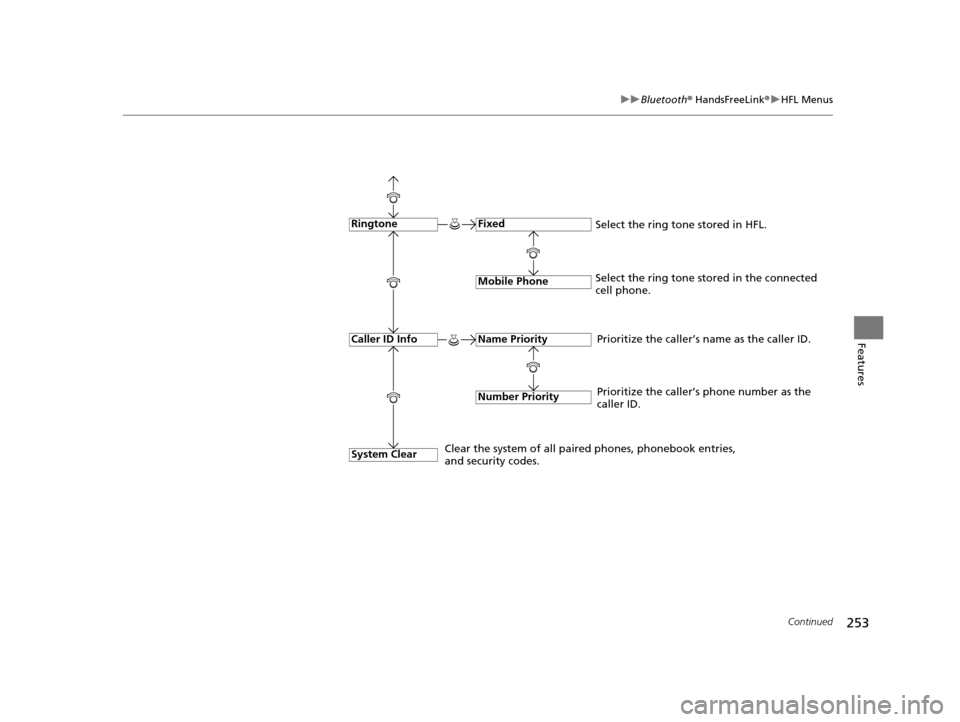
Fixed
Mobile Phone
System Clear
Ringtone
Select the ring tone stored in the connected
cell phone.
Name Priority
Number Priority
Caller ID InfoPrioritize the caller’s name as the caller ID.
Clear the system of all paired phones, phonebook entries,
and security codes. Prioritize the caller’s phone number as the
caller ID.
Select the ring tone stored in HFL.
15 US FIT-31T5A6000.book 253 ページ 2014年3月6日 木曜日 午後7時5分
Page 260 of 453
259
uuBluetooth ® HandsFreeLink ®u HFL Menus
Continued
Features
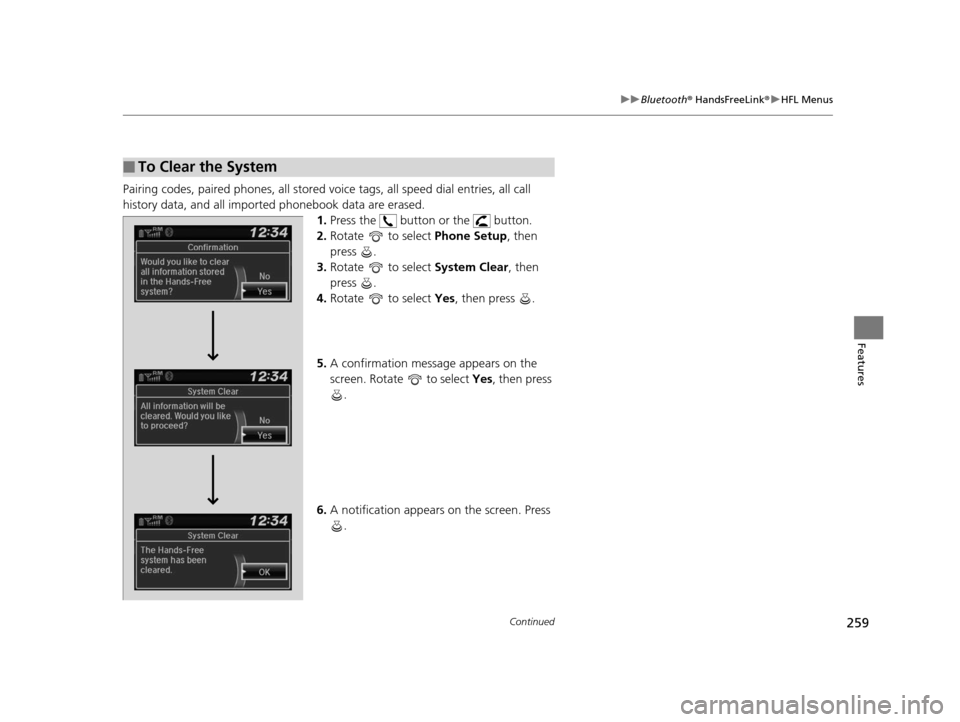
Pairing codes, paired phones, all stored vo ice tags, all speed dial entries, all call
history data, and all imported phonebook data are erased. 1.Press the button or the button.
2. Rotate to select Phone Setup, then
press .
3. Rotate to select System Clear, then
press .
4. Rotate to select Yes, then press .
5. A confirmation message appears on the
screen. Rotate to select Yes, then press
.
6. A notification appears on the screen. Press
.
■To Clear the System
15 US FIT-31T5A6000.book 259 ページ 2014年3月6日 木曜日 午後7時5分
Page 359 of 453
358
uuMaintenance MinderTMuTo Use Maintenance MinderTM
Maintenance
To switch the display, pres s the (select/reset) knob.
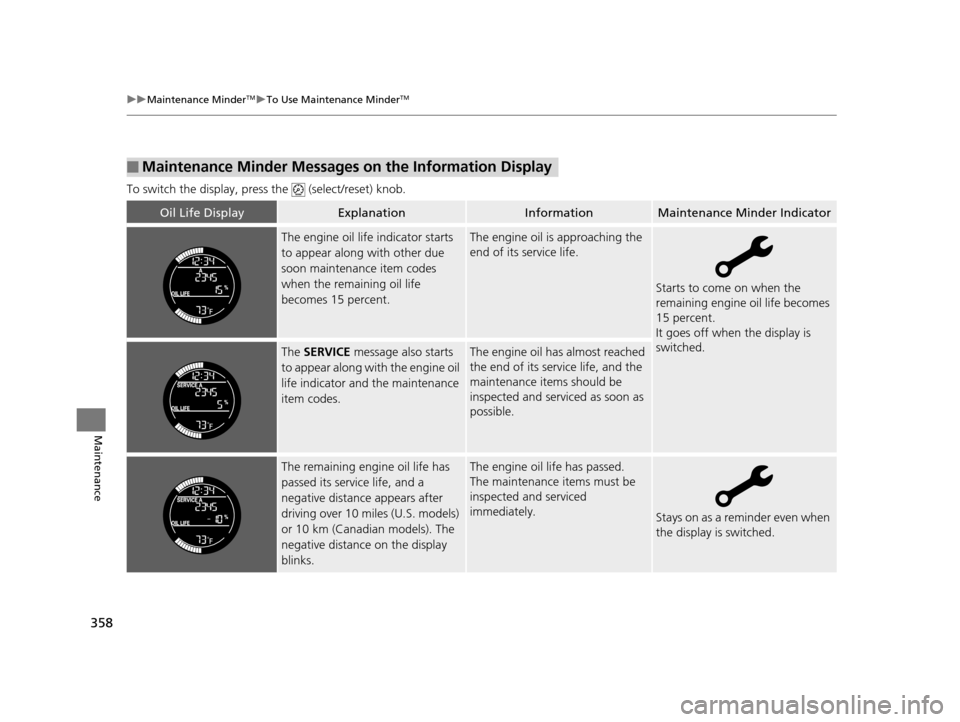
■Maintenance Minder Messages on the Information Display
Oil Life DisplayExplanationInformationMaintenance Minder Indicator
The engine oil life indicator starts
to appear along with other due
soon maintenance item codes
when the remaining oil life
becomes 15 percent.The engine oil is approaching the
end of its service life.
Starts to come on when the
remaining engine oil life becomes
15 percent.
It goes off when the display is
switched.
The SERVICE message also starts
to appear along with the engine oil
life indicator and the maintenance
item codes.The engine oil has almost reached
the end of its service life, and the
maintenance items should be
inspected and serviced as soon as
possible.
The remaining engine oil life has
passed its service life, and a
negative distance appears after
driving over 10 miles (U.S. models)
or 10 km (Canadian models). The
negative distance on the display
blinks.The engine oil life has passed.
The maintenance items must be
inspected and serviced
immediately.
Stays on as a reminder even when
the display is switched.
15 US FIT-31T5A6000.book 358 ページ 2014年3月6日 木曜日 午後7時5分
Page 361 of 453
uuMaintenance MinderTMuTo Use Maintenance MinderTM
360
Maintenance
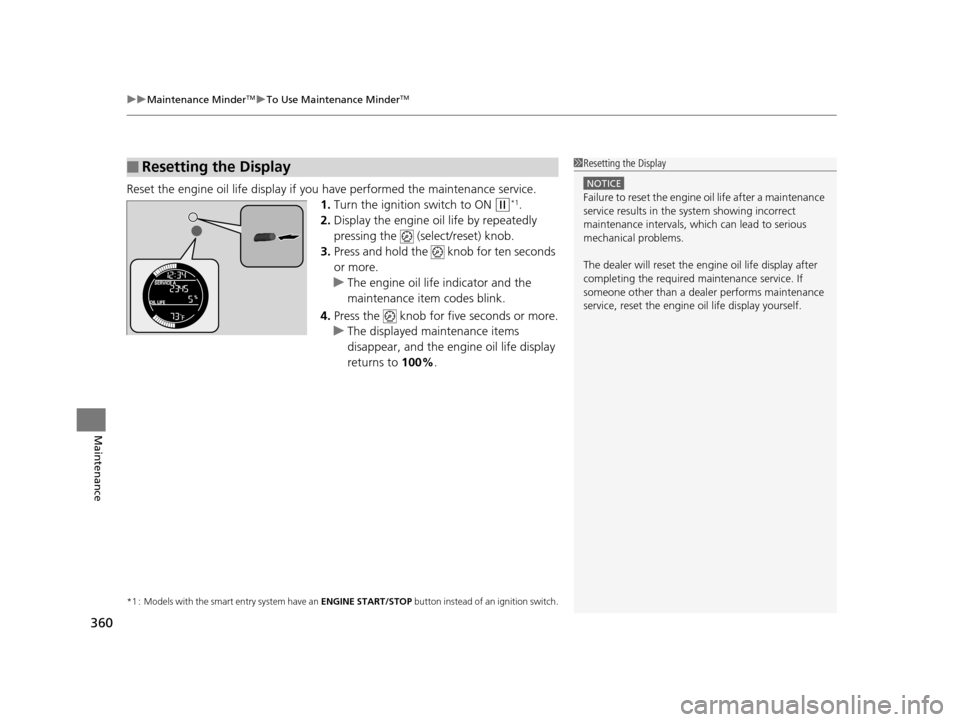
Reset the engine oil life display if you have performed the maintenance service.
1. Turn the ignition switch to ON
(w*1.
2. Display the engine oil life by repeatedly
pressing the (select/reset) knob.
3. Press and hold the knob for ten seconds
or more.
u The engine oil life indicator and the
maintenance item codes blink.
4. Press the knob for five seconds or more.
u The displayed maintenance items
disappear, and the engine oil life display
returns to 100%.
*1 : Models with the smart entry system have an ENGINE START/STOP button instead of an ignition switch.
■Resetting the Display1Resetting the Display
NOTICE
Failure to reset the engine oil life after a maintenance
service results in the sy stem showing incorrect
maintenance intervals, which can lead to serious
mechanical problems.
The dealer will reset the en gine oil life display after
completing the required ma intenance service. If
someone other than a deal er performs maintenance
service, reset the engine oil life display yourself.
15 US FIT-31T5A6000.book 360 ページ 2014年3月6日 木曜日 午後7時5分
Page 432 of 453
431
Information
This chapter includes your vehicle’s specifications, locations of identification numbers, and other
information required by regulation.
Specifications.................................... 432
Identification Numbers Vehicle Identification Number (VIN), Engine Number and Transmission
Number ......................................... 434
Devices that Emit Radio Waves ....... 435
Reporting Safety Defects ................. 436Emissions Testing
Testing of Readiness Codes.............. 437
Warranty Coverages ........................ 439
Authorized Manuals ......................... 441
Customer Service Information ......... 442
15 US FIT-31T5A6000.book 431 ページ 2014年3月6日 木曜日 午後7時5分
Page 438 of 453
437Continued
Information
Emissions Testing
Testing of Readiness Codes
Your vehicle has “Readiness Codes,” as part of the onboard self diagnostic system.
Some states use these codes as a test to see if your vehicle’s emissions components
are working properly.
The codes may not be read properly if testing is performed just after the battery has
gone dead or been disconnected.
To check if they are set, turn the ignition switch to ON
(w*1, without starting the
engine. The malfunction indicator lamp will co me on for several seconds. If it then
goes off, the readiness codes are set. If it blinks five times, the readiness codes are
not set.
If you are required to have your vehicle te sted before the readiness codes are ready,
prepare the vehicle for retest ing by doing the following:
1. Fill the gas tank to approximately 3/4 full.
2. Park the vehicle and leave the engine off for 6 hours or more.
3. Make sure the ambient temperature is between 40°F and 95°F (4°C and 35°C).
4. Start the engine without touching the ac celerator pedal, and let it idle for 20
seconds.
5. Keep the vehicle in
(P (automatic transmission) or (N (manual transmission).
Increase the engine speed to 2,000 rpm, and hold it there for about three
minutes.
6. Let the engine idle with your foot off the accelerator for 20 seconds.
*1:Models with the smart entry system have an ENGINE START/STOP button instead of an ignition switch.
1Testing of Readiness Codes
The readiness codes are erased when the battery is
disconnected, and set again only after several days of
driving under a variety of conditions.
If a testing facility determines that the readiness
codes are not set, you may be requested to return at
a later date to complete the test.
If the testing facility determines the readiness codes
are still not set, see a dealer.
15 US FIT-31T5A6000.book 437 ページ 2014年3月6日 木曜日 午後7時5分
Page 439 of 453
438
uuEmissions Testing uTesting of Readiness Codes
Information
7. Select a nearby, lightly traveled major hi ghway where you can maintain a speed
of 50 to 60 mph (80 to 97 km/h) for at least 20 minutes. Drive on the highway in
(D (automatic) or 5th (manual). Do not us e cruise control. When traffic allows,
drive for 90 seconds without moving the accelerator pedal. (Vehicle speed may
vary slightly; this is okay.) If you cannot do this for a continuous 90 seconds
because of traffic conditions, drive for at least 30 seconds, then repeat it two
more times (for a total of 90 seconds).
8. Drive in city/suburban traffic for at l east 10 minutes. When traffic conditions
allow, let the vehicle coast for several se conds without using the accelerator pedal
or the brake pedal.
9. Park the vehicle and leave the engine off for 30 minutes.
15 US FIT-31T5A6000.book 438 ページ 2014年3月6日 木曜日 午後7時5分
Page 448 of 453
447
Index
E
ECON Button............................................ 328
ECON Mode Indicator ................................ 78
Electric Power Steering (EPS) System Indicator ........................................... 75, 421
Electronic Stability Control (ESC) ............ 332
Emergency ................................................ 428
Emissions Testing (Readiness Codes) ...... 437
Engine Coolant .................................................. 368
Jump Starting ......................................... 414
Number .................................................. 434
Oil .......................................................... 363
Starting........................................... 311, 313
Switch Buzzer ......................................... 116
Engine Coolant ........................................ 368
Adding to the Radiator ........................... 369
Adding to the Reserve Tank .................... 368
High Temperature Indicator ...................... 74
Low Temperature Indicator ....................... 74
Overheating ............................................ 417
Engine Oil ................................................. 363
Adding ................................................... 365
Checking ................................................ 364
Displaying Oil Life ................................... 357
Low Oil Pressure Indicator ................. 71, 419
Recommended Engine Oil ....................... 363
EPS (Electric Power Steering)
System ............................................... 75, 421
Exhaust Gas Hazard (Carbon Monoxide) .................................. 66 Exterior Care (Cleaning)
........................... 400
Exterior Mirrors ........................................ 131
F
Features..................................................... 161
Filters
Dust and Pollen ....................................... 397
Oil ........................................................... 366
Flat Tire ..................................................... 405
Floor Mats ................................................. 398
Fluids Automatic Transmission (CVT) ................. 370
Brake ....................................................... 371
Engine Coolant ........................................ 368
Manual Transmission ............................... 370
Windshield Washer .................................. 372
FM/AM Radio ............................................ 177
Fog Light Indicator ..................................... 77
Folding Down the Rear Seats .................. 141
Foot Brake ................................................. 341
Front Airbags (SRS) ..................................... 44
Front Seats ................................................ 133
Adjusting ................................................. 133
Fuel ...................................................... 21, 347
Economy ................................................. 350
Gauge ....................................................... 85
Low Fuel Indicator ..................................... 73
Recommendation .................................... 347
Refueling ........................................... 21, 347
Fuel Economy ............................................ 350 Fuel Fill Cap
........................................ 21, 349
Message.................................................. 420
Fuel Fill Door ...................................... 21, 348
Fuses .......................................................... 423
Inspecting and Changing......................... 427
Locations................................................. 423
G
Gasoline (Fuel)
Economy ................................................. 350
Gauge ....................................................... 85
Information ............................................. 347
Low Fuel Indicator ..................................... 73
Refueling................................................. 347
Gauges ........................................................ 82
Gear Shift Lever Positions Automatic Transmission .................. 319, 321
Manual Transmission ............................... 326
Glass (care) ................................................ 401
Glove Box .................................................. 146
H
Halogen Bulbs .................................. 373, 375
Handling the Unexpected ........................ 403
HandsFreeLink ® (HFL) ............................... 248
Menus..................................................... 250
Phone Setup.................................... 254, 279
Hazard Warning Button .............................. 4
Head Restraints ........................................ 135
15 US FIT-31T5A6000.book 447 ページ 2014年3月6日 木曜日 午後7時5分