ad blue HONDA FIT 2019 (in English) Owner's Guide
[x] Cancel search | Manufacturer: HONDA, Model Year: 2019, Model line: FIT, Model: HONDA FIT 2019Pages: 599, PDF Size: 53.09 MB
Page 290 of 599
288
uuAudio System Basic Operation uSiri ® Eyes Free
Features
Siri ® Eyes Free
You can talk to Siri ® using the (Talk) button on the steering wheel when your
iPhone is paired to the Bluetooth® HandsFreeLink ® (HFL) System.
2Phone Setup P. 375
■Using Siri® Eyes Free
1 Siri ® Eyes Free
Siri ® is a trademark of Apple Inc.
Check Apple Inc. website for features available for
Siri ®.
We recommend against using Siri ® other than in Siri ®
Eyes Free while operating a vehicle.
1 Using Siri ® Eyes Free
Some commands work only on specific phone
features or apps.
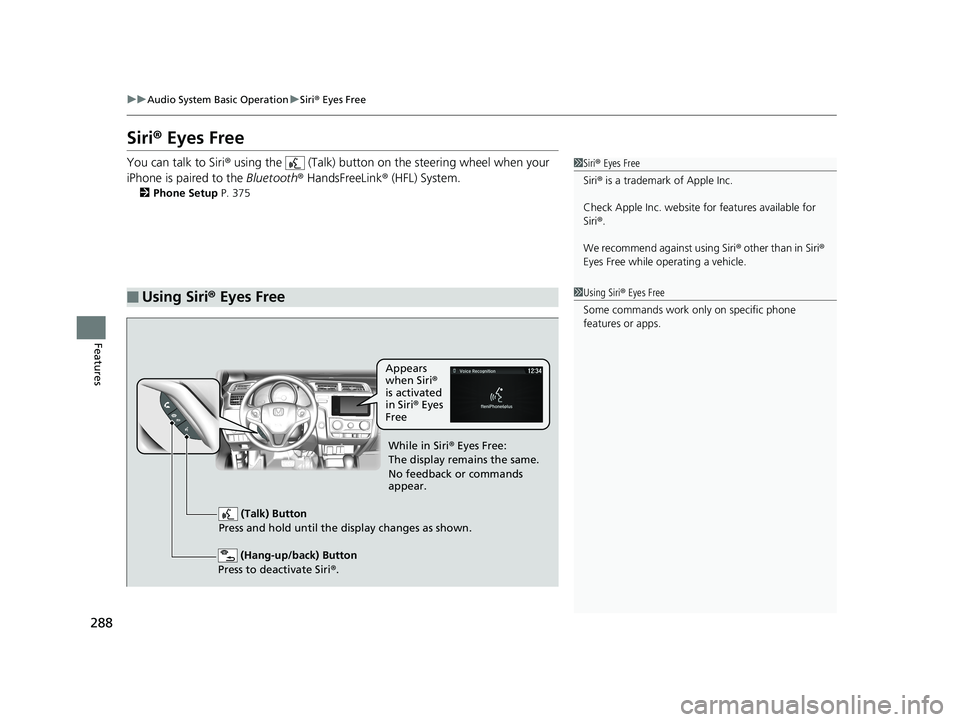
(Hang-up/back) Button
Press to deactivate Siri ®.
(Talk) Button
Press and hold until the display changes as shown.
Appears
when Siri®
is activated
in Siri ® Eyes
Free
While in Siri ® Eyes Free:
The display remains the same.
No feedback or commands
appear.
19 FIT JAZZ-31T5A6400.book 288 ページ 2018年2月26日 月曜日 午後4時30分
Page 291 of 599
289
uuAudio System Basic Operation uApple CarPlayTM
Continued
Features
Apple CarPlayTM
If you connect an Apple CarPlayTM-compatible iPhone to the system via the 1.5A USB
port, you can use the audio/ information touch screen, instead of the iPhone display,
to make a phone call, listen to music, view maps (navigation), and access messages.
2USB Port(s) P. 207
1Apple CarPlayTM
Only iPhone5 or newer versio ns with iOS 8.4 or later
are compatible with Apple CarPlayTM.
Park in a safe place before connecting your iPhone to
Apple CarPlay
TM and when launching any compatible
apps.
To use Apple CarPlay
TM, connect the USB cable to the
1.5A USB port. The USB port located in the center
console storage will not enable Apple CarPlay
TM
operation.
2 USB Port(s) P. 207
To directly access the Apple CarPlay
TM phone
function, select Phone on the home screen. While
connected to Apple CarPlay
TM, calls are only made
through Apple CarPlayTM. If you want to make a call
with Bluetooth ® HandsFreeLink ®, turn Apple
CarPlay
TM OFF or detach the USB cable from your
iPhone.
2 Setting Up Apple CarPlay
TM P. 291
When your iPhone is connected to Apple CarPlay
TM, it
is not possible to use the Bluetooth® Audio or
Bluetooth ® HandsFreeLink ®. However, other
previously paired phones can stream audio via
Bluetooth ® while Apple CarPlay
TM is connected.
2 Phone Setup P. 375
For details on c ountries and regions where Apple
CarPlay
TM is available, as well as information
pertaining to function, refer to the Apple homepage.
19 FIT JAZZ-31T5A6400.book 289 ページ 2018年2月26日 月曜日 午後4時30分
Page 295 of 599
293
uuAudio System Basic Operation uAndroid AutoTM
Continued
Features
Android AutoTM
When you connect an Android phone to the Display Audio system via the 1.5A USB
port, Android AutoTM is automatically initiated. When connected via Android
AutoTM, you can use the audio/information touch screen to access the Phone,
Google Maps (Navigation), Google Play Music, and Google Now functions. When
you first use Android Auto
TM, a tutorial will appear on the screen. We recommend
that you complete this tutorial while safely parked before using Android AutoTM.
2USB Port(s) P. 207
2 Auto Pairing Connection P. 295
1Android AutoTM
To use Android AutoTM, you need to download the
Android AutoTM app from Google Play to your
smartphone.
Only Android 5.0 (Lollipop) or later versions are
compatible with Android Auto
TM. Bluetooth A2DP
cannot be used with Android AutoTM phone.
Park in a safe place befo re connecting your Android
phone to Android Auto
TM and when launching any
compatible apps.
To use Android Auto
TM, connect the USB cable to the
1.5A USB port. The USB port in the center console
storage will not enable Android Auto
TM operation.
2 USB Port(s) P. 207
To directly access the Android Auto
TM phone function,
select Phone on the home screen. While connected to
Android Auto
TM, calls are only ma de through Android
AutoTM. If you want to make a call with Bluetooth®
HandsFreeLink ®, turn Android AutoTM OFF or detach the
USB cable from your Android phone. 2 Auto Pairing Connection P. 295
When your Android phone is connected to Android
Auto
TM, it is not possible to use Bluetooth® Audio or
Bluetooth ® HandsFreeLink ®. However, other
previously paired phones can stream audio via
Bluetooth ® while Android Auto
TM is connected.
2 Phone Setup P. 375
19 FIT JAZZ-31T5A6400.book 293 ページ 2018年2月26日 月曜日 午後4時30分
Page 317 of 599
315
uuAudio Error Messages uPandora ®
Features
Error MessageSolution
Unable to connect to Pandora . When stopped, check your
mobile phone.
●Appears when failed to connect. Check your device and try again.There is no internet connectivity on the phone.
Unable to play Pandora. Please try again later.
Connect Retry
Unable to play Pandora in this country.
●Appears when you travel outside the Pandora ® service coverage
areas. Pandora ® can only be played in U.S. and will not work in
other countries.
Unsupported●Appears when the device is not supported. Use another device.
Unsupported Version●Appears when Pandora ® version is not supported. Update
Pandora® to the latest version.Pandora app version is unsupported. When stopped, please
update the app.
Please make sure the phone’s Blue tooth setting is ON and try
again.●Appears when Pandora ® is unable to play music. Check the
Bluetooth status on your device.
No Data●Appears when no data is available with Pandora® activated.
Reboot the app and reconnect the device.
Incompatible USB device.
See Owner's Manual for details●Appears when an incompatible device is connected. Disconnect
the device. Then turn the audio syst em off, and turn it again. Do
not reconnect the device that caused the error.
19 FIT JAZZ-31T5A6400.book 315 ページ 2018年2月26日 月曜日 午後4時30分
Page 324 of 599
322
uuCustomized Features u
Features
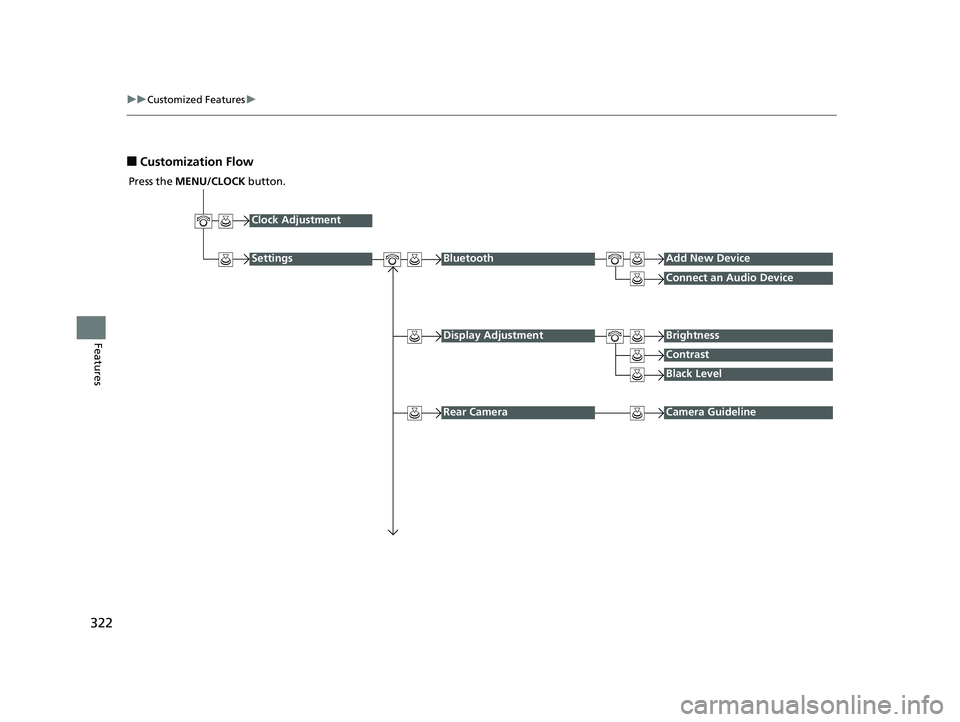
■Customization Flow
Press the MENU/CLOCK button.
Clock Adjustment
SettingsBluetoothAdd New Device
Connect an Audio Device
Display AdjustmentBrightness
Contrast
Black Level
Rear CameraCamera Guideline
19 FIT JAZZ-31T5A6400.book 322 ページ 2018年2月26日 月曜日 午後4時30分
Page 325 of 599
323
uuCustomized Features u
Continued
Features
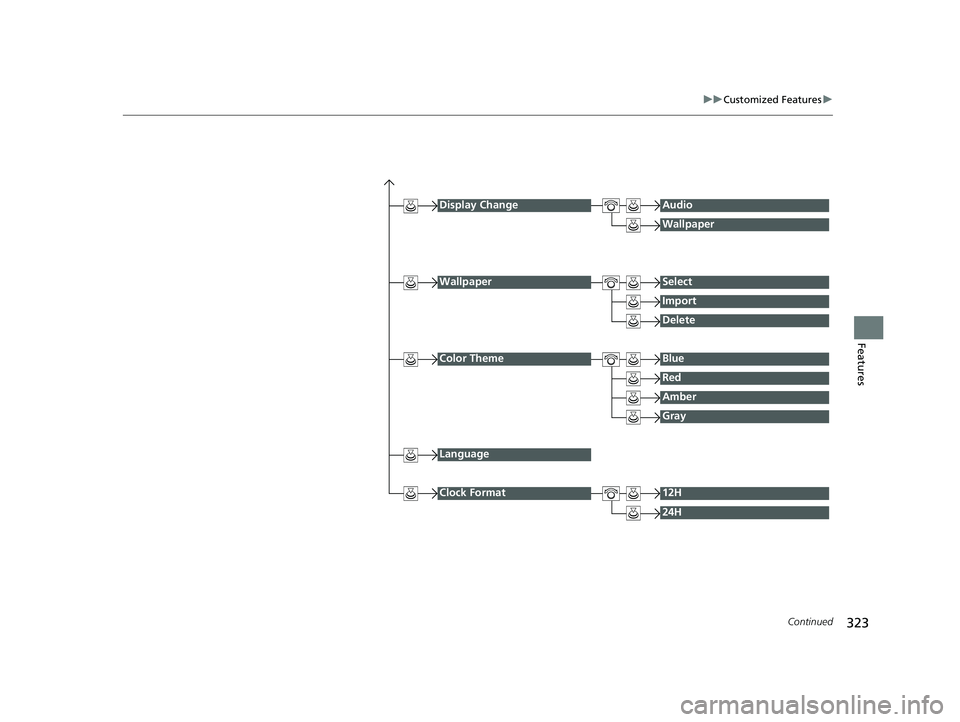
Display ChangeAudio
Wallpaper
WallpaperSelect
Import
Delete
Color ThemeBlue
Red
Amber
Gray
Language
Clock Format12H
24H
19 FIT JAZZ-31T5A6400.book 323 ページ 2018年2月26日 月曜日 午後4時30分
Page 326 of 599
324
uuCustomized Features u
Features
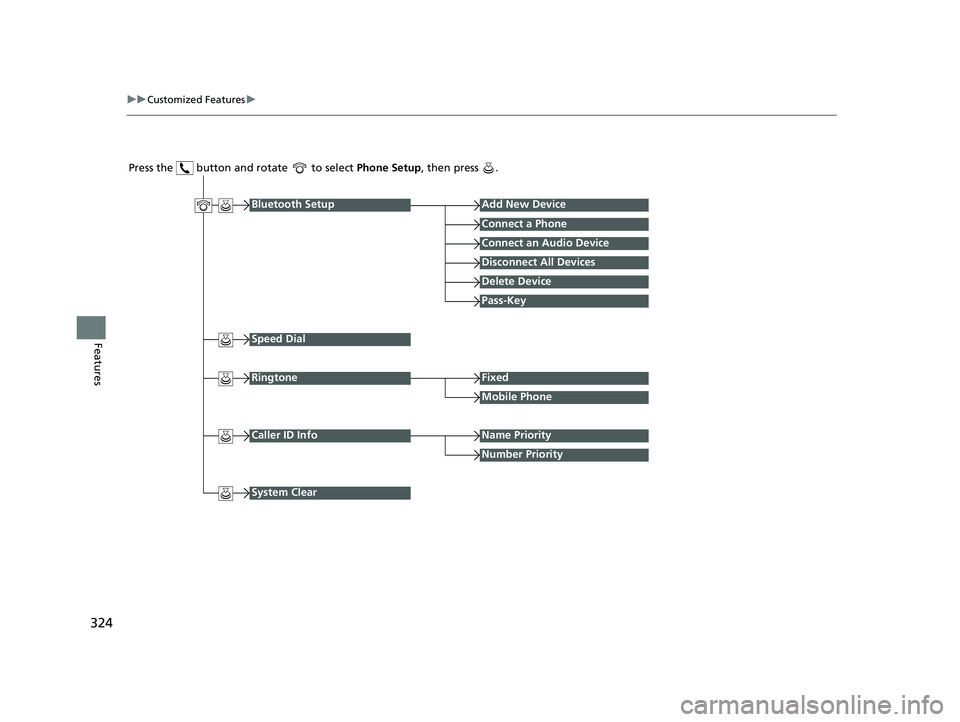
Press the button and rotate to select Phone Setup, then press .
RingtoneFixed
Mobile Phone
Bluetooth SetupAdd New Device
Connect a Phone
Connect an Audio Device
Disconnect All Devices
Delete Device
Pass-Key
Speed Dial
Caller ID InfoName Priority
Number Priority
System Clear
19 FIT JAZZ-31T5A6400.book 324 ページ 2018年2月26日 月曜日 午後4時30分
Page 327 of 599
325
uuCustomized Features u
Continued
Features
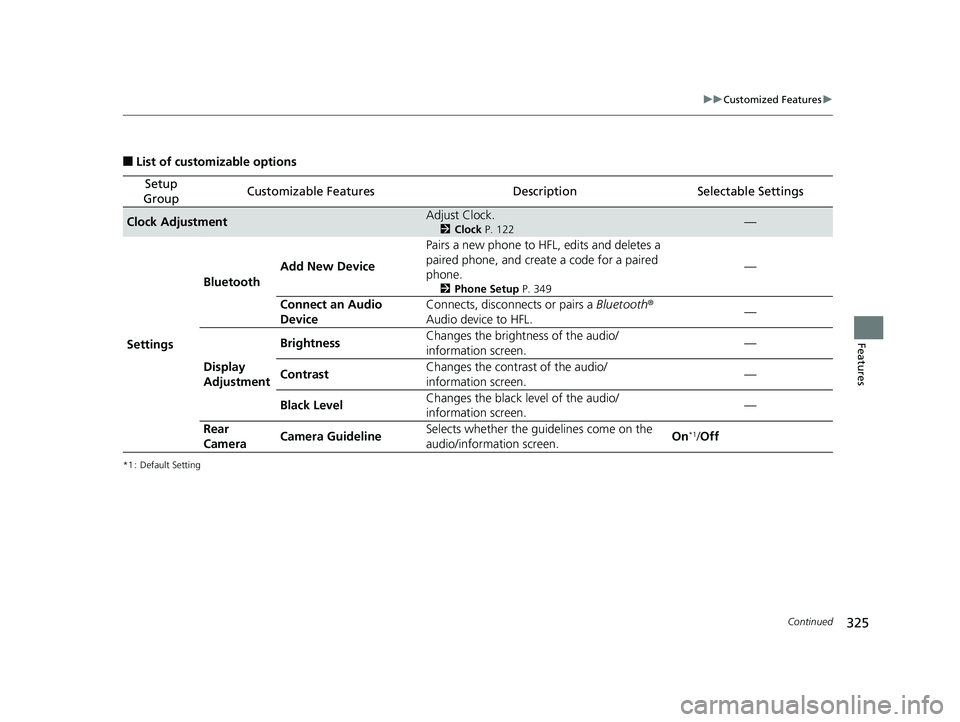
■List of customizable options
*1 : Default Setting
Setup
GroupCustomizable FeaturesDescriptionSelectable Settings
Clock AdjustmentAdjust Clock.
2 Clock P. 122—
Settings Bluetooth
Add New Device Pairs a new phone to HFL, edits and deletes a
paired phone, and create
a code for a paired
phone.
2 Phone Setup P. 349
—
Connect an Audio
Device Connects, disconnects or pairs a
Bluetooth®
Audio device to HFL. —
Display
Adjustment Brightness
Changes the brightness of the audio/
information screen.
—
Contrast Changes the contrast of the audio/
information screen. —
Black Level Changes the black level of the audio/
information screen. —
Rear
Camera Camera Guideline Selects whether the guidelines come on the
audio/information screen.
On
*1/
Off
19 FIT JAZZ-31T5A6400.book 325 ページ 2018年2月26日 月曜日 午後4時30分
Page 328 of 599
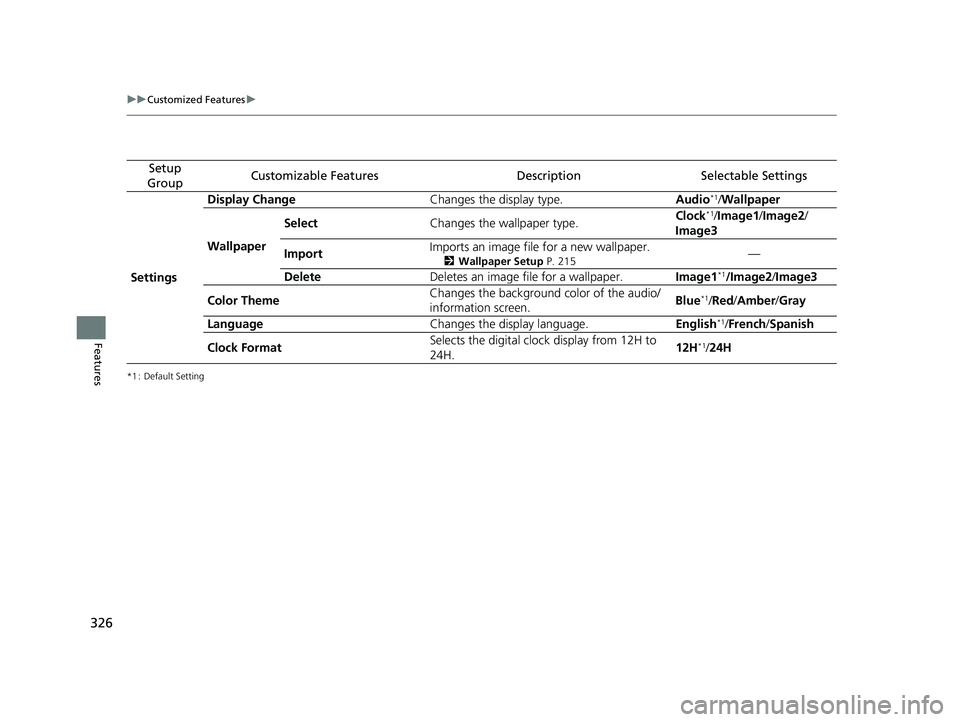
326
uuCustomized Features u
Features
*1 : Default Setting
Setup
GroupCustomizable FeaturesDescriptionSelectable Settings
Settings Display Change
Changes the display type. Audio
*1/Wallpaper
Wallpaper Select
Changes the wallpaper type. Clock*1/
Image1/ Image2/
Image3
Import Imports an image file for a new wallpaper.
2
Wallpaper Setup P. 215—
Delete Deletes an image file for a wallpaper. Image1
*1/Image2/Image3
Color Theme Changes the background color of the audio/
information screen.
Blue
*1/
Red/ Amber /Gray
Language Changes the display language. English
*1/French /Spanish
Clock Format Selects the digital clock display from 12H to
24H. 12H
*1/
24H
19 FIT JAZZ-31T5A6400.book 326 ページ 2018年2月26日 月曜日 午後4時30分
Page 329 of 599
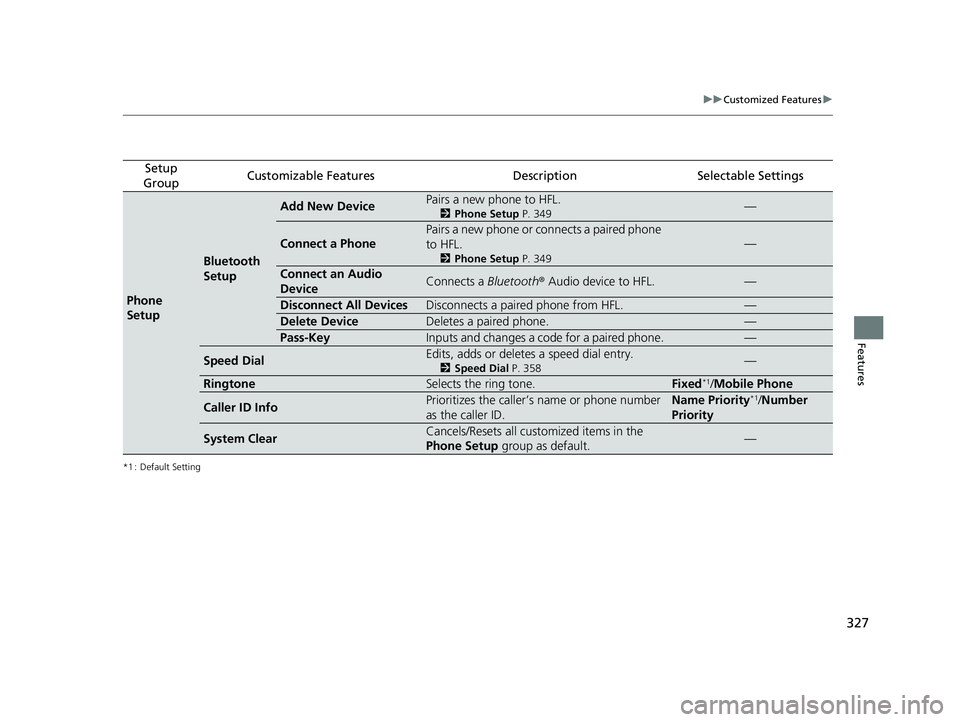
327
uuCustomized Features u
Features
*1 : Default Setting
Setup
GroupCustomizable FeaturesDescriptionSelectable Settings
Phone
Setup
Bluetooth
Setup
Add New DevicePairs a new phone to HFL.
2 Phone Setup P. 349—
Connect a Phone
Pairs a new phone or connects a paired phone
to HFL.
2Phone Setup P. 349
—
Connect an Audio
DeviceConnects a Bluetooth® Audio device to HFL.—
Disconnect All DevicesDisconnects a paired phone from HFL.—
Delete DeviceDeletes a paired phone.—
Pass-KeyInputs and changes a code for a paired phone.—
Speed DialEdits, adds or deletes a speed dial entry.
2Speed Dial P. 358—
RingtoneSelects the ring tone.Fixed*1/Mobile Phone
Caller ID InfoPrioritizes the caller’s name or phone number
as the caller ID.Name Priority*1/Number
Priority
System ClearCancels/Resets all customized items in the
Phone Setup group as default.—
19 FIT JAZZ-31T5A6400.book 327 ページ 2018年2月26日 月曜日 午後4時30分