ad blue HONDA FIT 2019 (in English) Owner's Guide
[x] Cancel search | Manufacturer: HONDA, Model Year: 2019, Model line: FIT, Model: HONDA FIT 2019Pages: 599, PDF Size: 53.09 MB
Page 331 of 599
329
uuCustomized Features u
Continued
Features
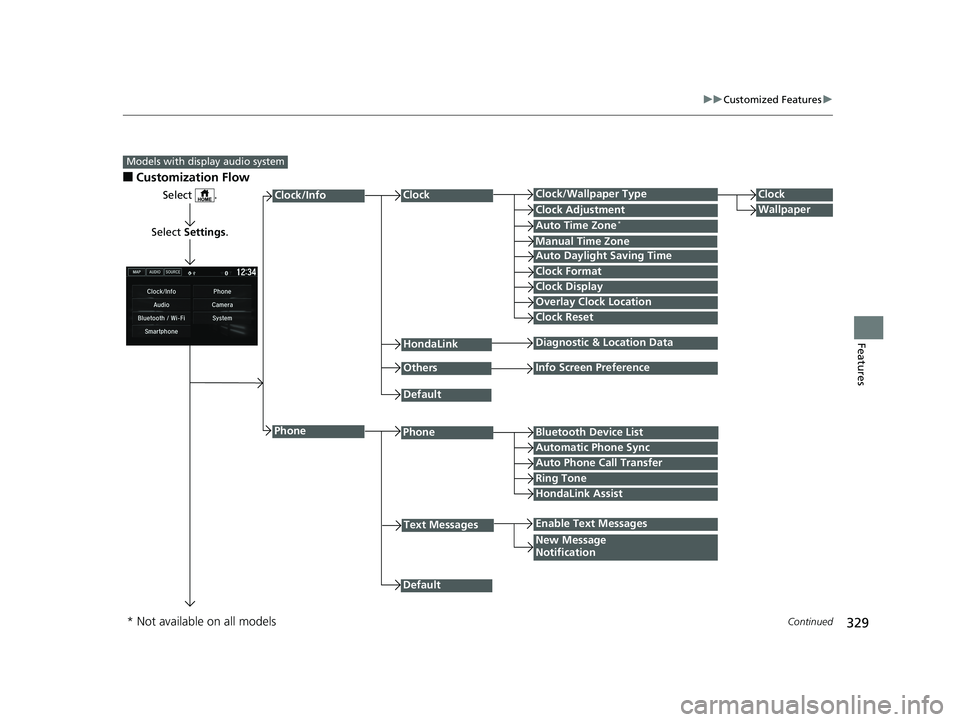
■Customization Flow
Models with display audio system
Select .
Select Settings .
PhoneBluetooth Device List
Manual Time Zone
HondaLink
Auto Time Zone*
Default
New Message
Notification
Phone
Diagnostic & Location Data
Others
Auto Daylight Saving Time
Info Screen Preference
Default
Enable Text Messages
Clock Format
ClockClock/Wallpaper TypeClock
WallpaperClock Adjustment
Clock Display
Overlay Clock Location
Clock Reset
Auto Phone Call Transfer
Text Messages
Automatic Phone Sync
HondaLink Assist
Ring Tone
Clock/Info
* Not available on all models
19 FIT JAZZ-31T5A6400.book 329 ページ 2018年2月26日 月曜日 午後4時30分
Page 332 of 599
330
uuCustomized Features u
Features
*1 : May change depending on your currently selected source.
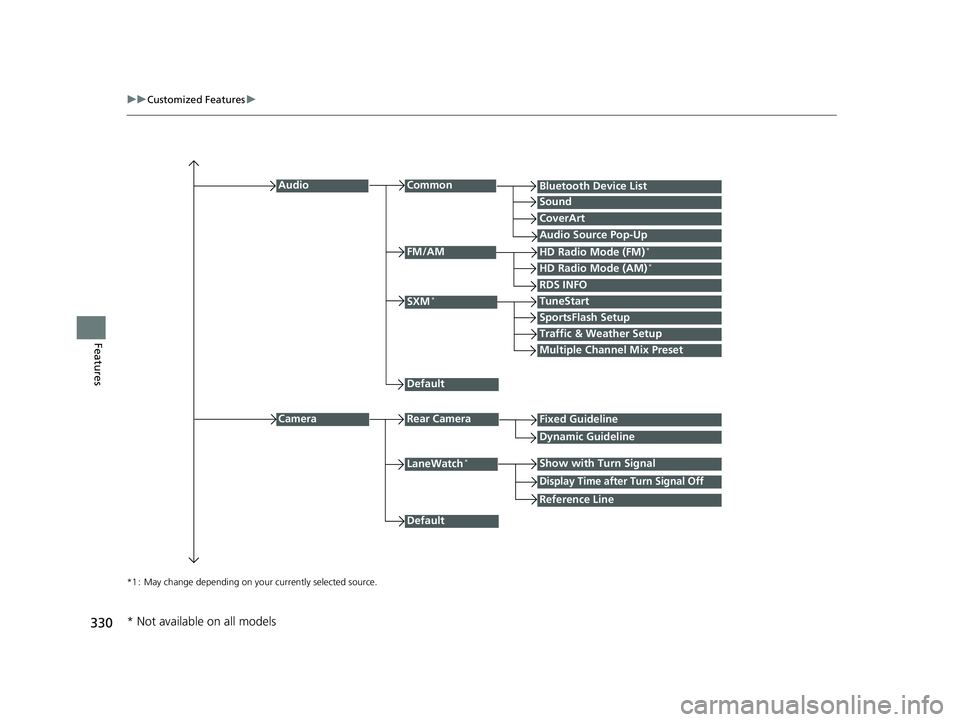
Common
Multiple Channel Mix Preset
Audio
Sound
Audio Source Pop-Up
SXM*
HD Radio Mode (AM)*HD Radio Mode (FM)*
TuneStart
Traffic & Weather Setup
CameraRear Camera
LaneWatch*
Default
CoverArt
RDS INFO
Bluetooth Device List
FM/AM
Fixed Guideline
Dynamic Guideline
Show with Turn Signal
Default
Display Time after Turn Signal Off
Reference Line
SportsFlash Setup
* Not available on all models
19 FIT JAZZ-31T5A6400.book 330 ページ 2018年2月26日 月曜日 午後4時30分
Page 333 of 599
331
uuCustomized Features u
Continued
Features
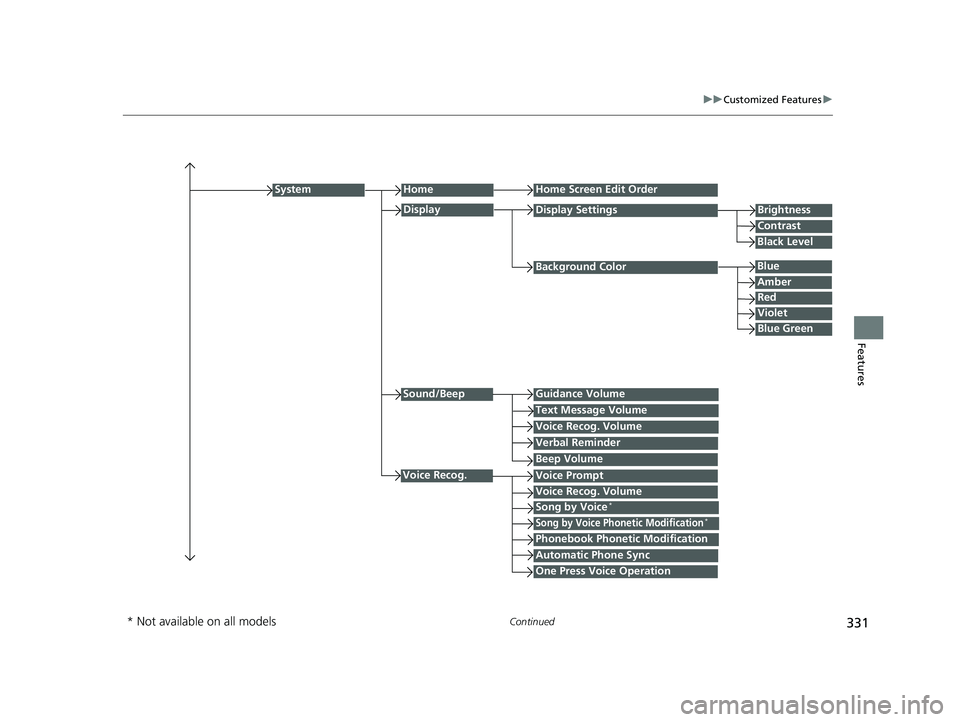
Background Color
HomeHome Screen Edit Order
Brightness
Contrast
Display Settings
Voice Prompt
System
Blue
Display
Voice Recog. Volume
Black Level
Amber
Red
Violet
Blue Green
Sound/BeepGuidance Volume
Text Message Volume
Voice Recog. Volume
Verbal Reminder
Beep Volume
Voice Recog.
Song by Voice*
Song by Voice Phonetic Modification*
Phonebook Phonetic Modification
Automatic Phone Sync
One Press Voice Operation
* Not available on all models
19 FIT JAZZ-31T5A6400.book 331 ページ 2018年2月26日 月曜日 午後4時30分
Page 335 of 599
333
uuCustomized Features u
Continued
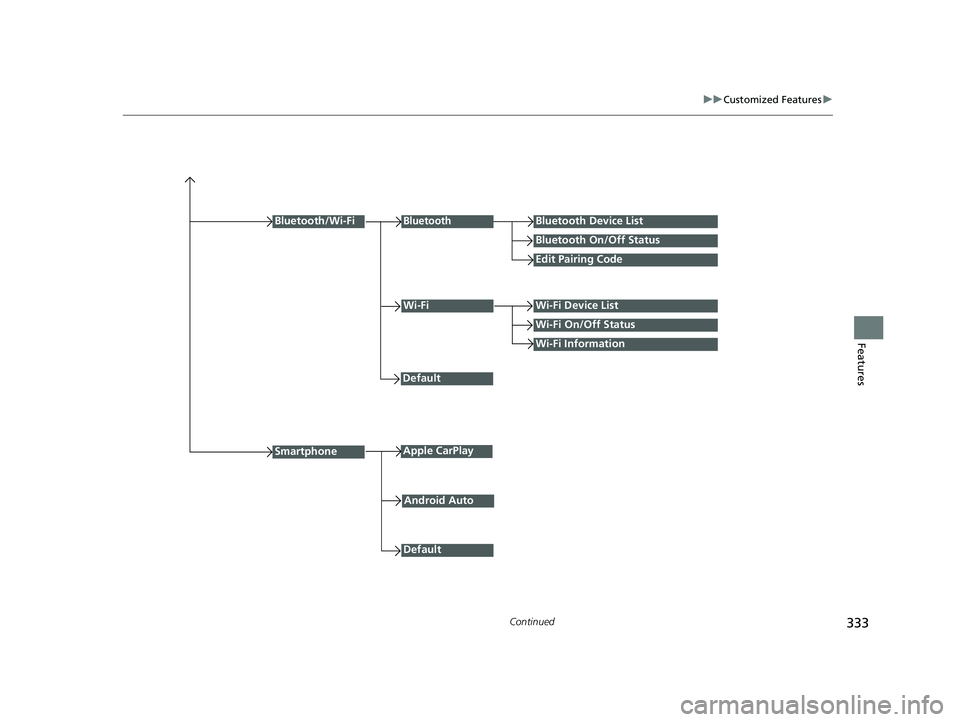
FeaturesWi-Fi Information
Wi-FiWi-Fi Device List
Wi-Fi On/Off Status
Default
Bluetooth/Wi-Fi
Default
BluetoothBluetooth Device List
Bluetooth On/Off Status
Edit Pairing Code
SmartphoneApple CarPlay
Android Auto
19 FIT JAZZ-31T5A6400.book 333 ページ 2018年2月26日 月曜日 午後4時30分
Page 337 of 599
335
uuCustomized Features u
Continued
Features
*1 : Default Setting
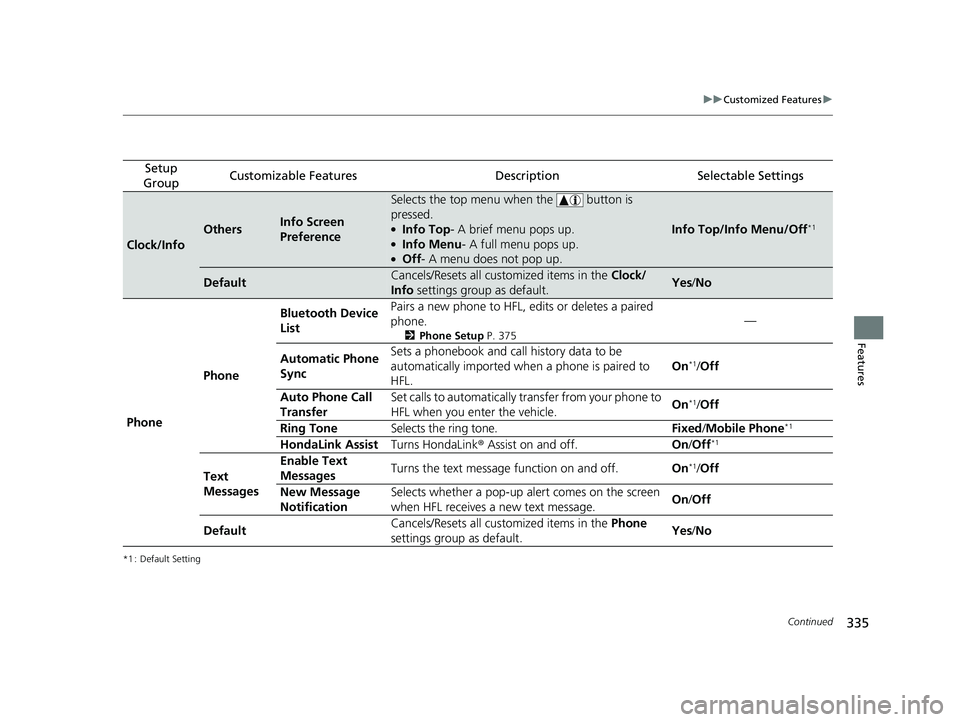
Setup
GroupCustomizable FeaturesDescriptionSelectable Settings
Clock/Info
OthersInfo Screen
Preference
Selects the top menu when the button is
pressed.
●Info Top- A brief menu pops up.●Info Menu - A full menu pops up.●Off- A menu does not pop up.
Info Top/Info Menu/Off*1
DefaultCancels/Resets all customized items in the Clock/
Info settings group as default.Yes/No
Phone Phone Bluetooth Device
List
Pairs a new phone to HFL, edits or deletes a paired
phone.
2
Phone Setup P. 375
—
Automatic Phone
Sync Sets a phonebook and call history data to be
automatically imported when
a phone is paired to
HFL. On
*1/
Off
Auto Phone Call
Transfer Set calls to automatically transfer from your phone to
HFL when you enter the vehicle.
On
*1/
Off
Ring Tone Selects the ring tone. Fixed/Mobile Phone
*1
HondaLink Assist Turns HondaLink® Assist on and off. On/Off*1
Text
Messages Enable Text
Messages
Turns the text message function on and off.
On*1/Off
New Message
Notification Selects whether a pop-up alert comes on the screen
when HFL receives a new text message.
On
/Off
Default Cancels/Resets all customized items in the
Phone
settings group as default. Yes
/No
19 FIT JAZZ-31T5A6400.book 335 ページ 2018年2月26日 月曜日 午後4時30分
Page 338 of 599
336
uuCustomized Features u
Features
*1 : Default Setting
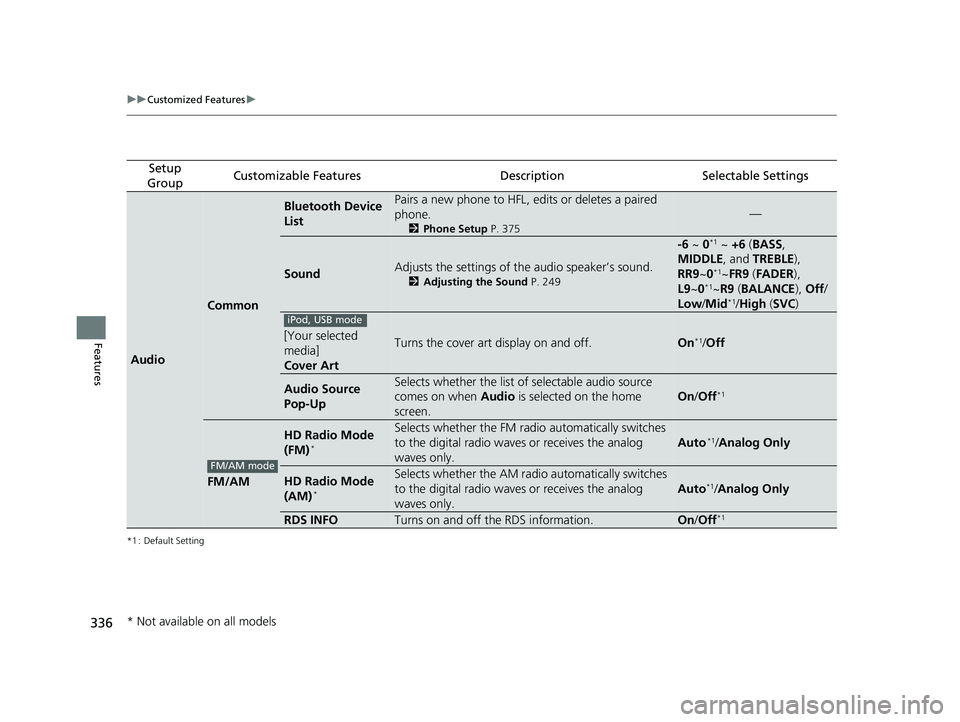
Setup
GroupCustomizable FeaturesDescriptionSelectable Settings
Audio
Common
Bluetooth Device
ListPairs a new phone to HFL, edits or deletes a paired
phone.
2 Phone Setup P. 375
—
SoundAdjusts the settings of the audio speaker’s sound.
2Adjusting the Sound P. 249
-6 ~ 0*1 ~ +6 (BASS ,
MIDDLE , and TREBLE ),
RR9 ~0
*1~FR9 (FADER ),
L9 ~0*1~R9 (BALANCE ), Off /
Low/ Mid*1/High (SVC )
[Your selected
media]
Cover ArtTurns the cover art display on and off.On*1/Off
Audio Source
Pop-UpSelects whether the list of selectable audio source
comes on when Audio is selected on the home
screen.
On /Off*1
FM/AM
HD Radio Mode
(FM)*
Selects whether the FM radio automatically switches
to the digital radio waves or receives the analog
waves only.
Auto*1/ Analog Only
HD Radio Mode
(AM)*
Selects whether the AM radio automatically switches
to the digital radio waves or receives the analog
waves only.
Auto*1/ Analog Only
RDS INFOTurns on and off the RDS information.On /Off*1
iPod, USB mode
FM/AM mode
* Not available on all models
19 FIT JAZZ-31T5A6400.book 336 ページ 2018年2月26日 月曜日 午後4時30分
Page 340 of 599
338
uuCustomized Features u
Features
*1 : Default Setting
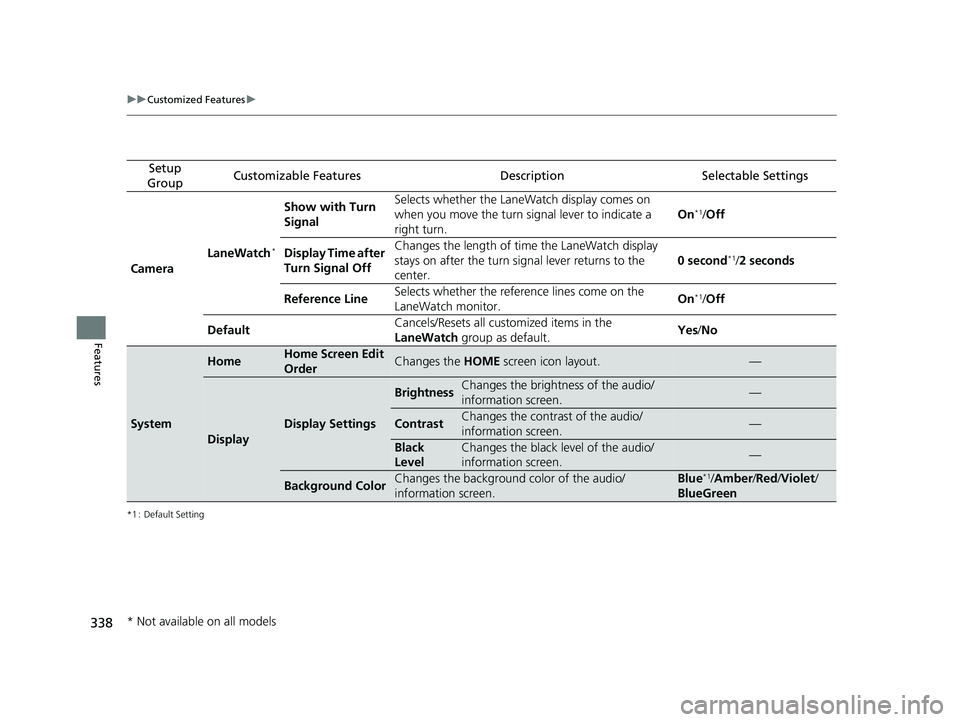
Setup
GroupCustomizable FeaturesDescriptionSelectable Settings
Camera LaneWatch
*
Show with Turn
Signal Selects whether the LaneWatch display comes on
when you move the turn signal lever to indicate a
right turn.
On*1/
Off
Display Time after
Turn Signal Off Changes the length of ti
me the LaneWatch display
stays on after the turn sign al lever returns to the
center. 0 second
*1/
2 seconds
Reference Line Selects whether the reference lines come on the
LaneWatch monitor. On
*1/
Off
Default Cancels/Resets all customized items in the
LaneWatch
group as default. Yes
/No
System
HomeHome Screen Edit
OrderChanges the HOME screen icon layout.—
Display
Display Settings
BrightnessChanges the brightness of the audio/
information screen.—
ContrastChanges the contrast of the audio/
information screen.—
Black
LevelChanges the black level of the audio/
information screen.—
Background ColorChanges the background color of the audio/
information screen.Blue*1/Amber /Red /Violet /
BlueGreen
* Not available on all models
19 FIT JAZZ-31T5A6400.book 338 ページ 2018年2月26日 月曜日 午後4時30分
Page 343 of 599
341
uuCustomized Features u
Features
*1 : Default Setting
*2 : Models with the smart entry system have an ENGINE START/STOP button instead of an ignition switch.
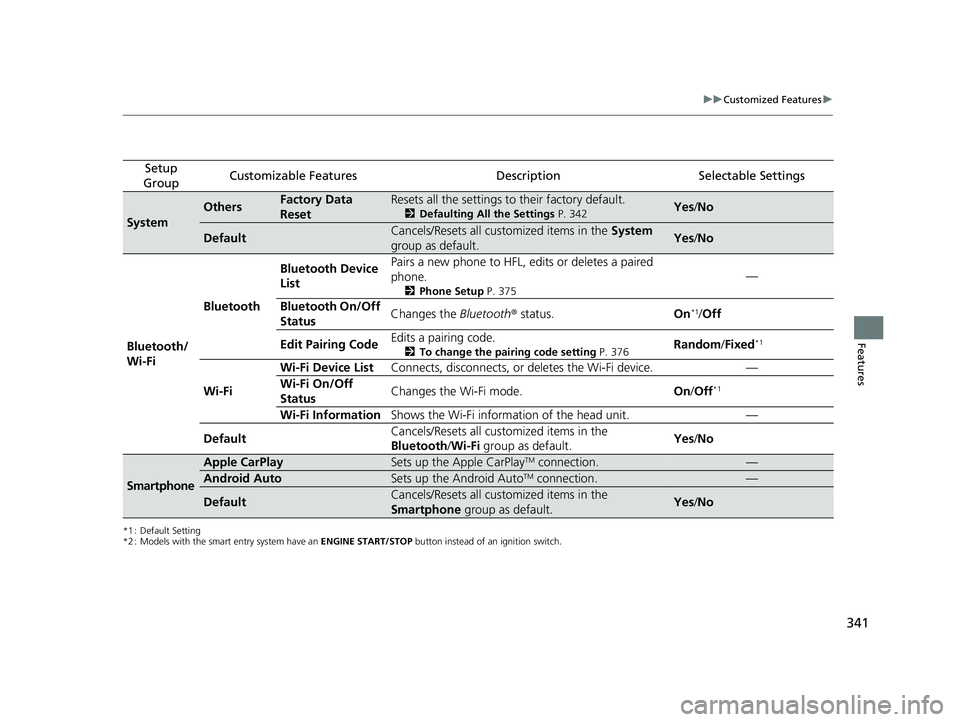
Setup
GroupCustomizable FeaturesDescriptionSelectable Settings
System
OthersFactory Data
ResetResets all the settings to their factory default.
2 Defaulting All the Settings P. 342Yes/No
DefaultCancels/Resets all customized items in the System
group as default.Yes /No
Bluetooth/
Wi-Fi Bluetooth
Bluetooth Device
List
Pairs a new phone to HFL, edits or deletes a paired
phone.
2
Phone Setup P. 375
—
Bluetooth On/Off
Status Changes the
Bluetooth® status. On
*1/Off
Edit Pairing Code Edits a pairing code.
2
To change the pairing code setting P. 376Random/Fixed*1
Wi-Fi Wi-Fi Device List
Connects, disconnects, or deletes the Wi-Fi device. —
Wi-Fi On/Off
Status Changes the Wi-Fi mode.
On/Off*1
Wi-Fi Information Shows the Wi-Fi information of the head unit. —
Default Cancels/Resets all customized items in the
Bluetooth
/Wi-Fi group as default. Yes
/No
Smartphone
Apple CarPlaySets up the Apple CarPlayTM connection.—
Android AutoSets up the Android AutoTM connection.—
DefaultCancels/Resets all customized items in the
Smartphone group as default.Yes/No
19 FIT JAZZ-31T5A6400.book 341 ページ 2018年2月26日 月曜日 午後4時30分
Page 345 of 599
343Continued
Features
Bluetooth® HandsFreeLink ®
Bluetooth® HandsFreeLink ® (HFL) allows you to place and receive phone calls using
your vehicle’s audio system, without handling your cell phone.
Using HFL
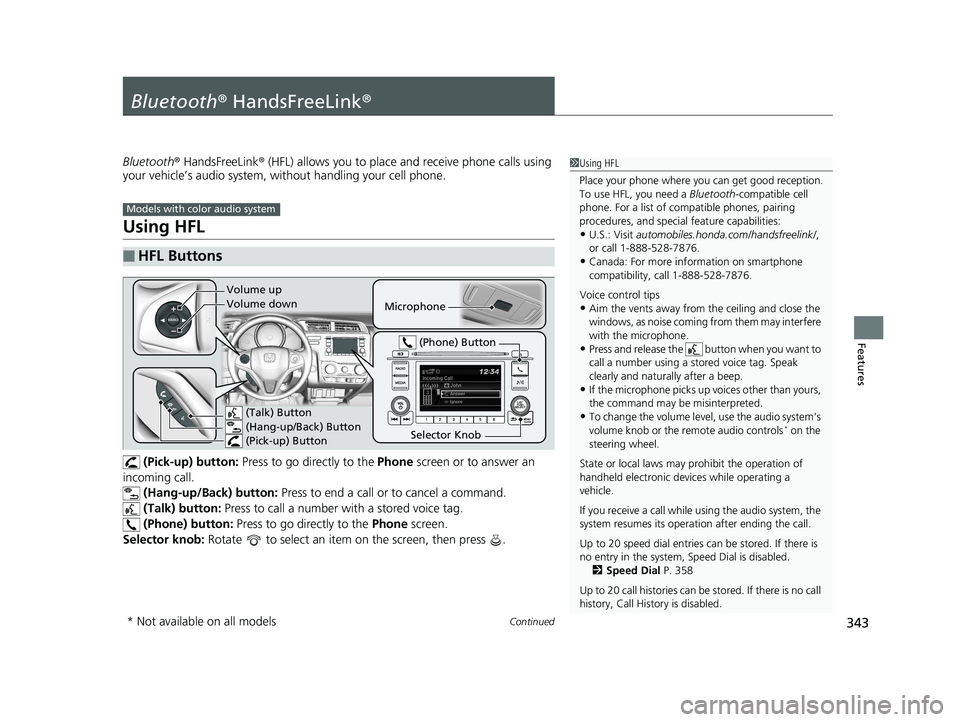
(Pick-up) button: Press to go directly to the Phone screen or to answer an
incoming call. (Hang-up/Back) button: Press to end a call or to cancel a command.
(Talk) button: Press to call a number with a stored voice tag.
(Phone) button: Press to go directly to the Phone screen.
Selector knob: Rotate to select an item on the screen, then press .
■HFL Buttons
1Using HFL
Place your phone where y ou can get good reception.
To use HFL, you need a Bluetooth-compatible cell
phone. For a list of compatible phones, pairing
procedures, and special feature capabilities:
•U.S.: Visit automobiles.honda.com /handsfreelink/,
or call 1-888-528-7876.
•Canada: For more info rmation on smartphone
compatibility, call 1-888-528-7876.
Voice control tips
•Aim the vents away from the ceiling and close the
windows, as noise coming fr om them may interfere
with the microphone.
•Press and release the button when you want to
call a number using a st ored voice tag. Speak
clearly and naturally after a beep.
•If the microphone picks up vo ices other than yours,
the command may be misinterpreted.
•To change the volume level, use the audio system's
volume knob or the remote audio controls* on the
steering wheel.
State or local laws may pr ohibit the operation of
handheld electronic devices while operating a
vehicle.
If you receive a call while using the audio system, the
system resumes its operati on after ending the call.
Up to 20 speed dial entries can be stored. If there is
no entry in the system, Speed Dial is disabled. 2 Speed Dial P. 358
Up to 20 call histories can be stored. If there is no call
history, Call History is disabled.
Models with color audio system
Microphone
(Talk) Button
(Hang-up/Back) Button
(Pick-up) Button
Selector Knob (Phone) Button
Volume up
Volume down
* Not available on all models
19 FIT JAZZ-31T5A6400.book 343 ページ 2018年2月26日 月曜日 午後4時30分
Page 346 of 599
uuBluetooth ® HandsFreeLink ®u Using HFL
344
Features
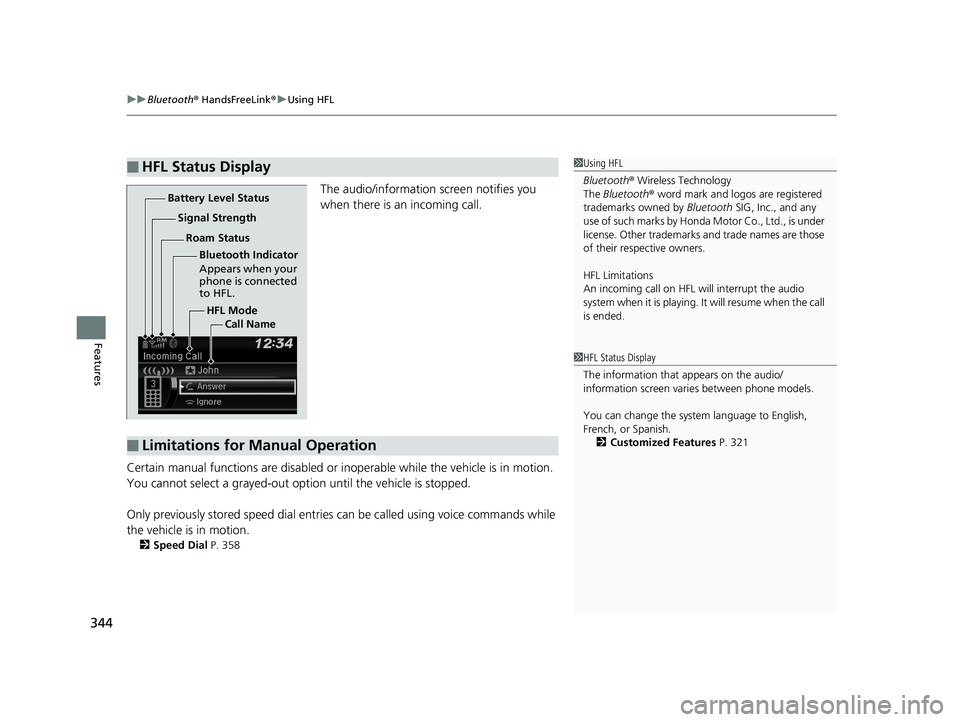
The audio/information screen notifies you
when there is an incoming call.
Certain manual functions are disabled or i noperable while the vehicle is in motion.
You cannot select a grayed-out option until the vehicle is stopped.
Only previously stored speed dial entries can be called using voice commands while
the vehicle is in motion.
2 Speed Dial P. 358
■HFL Status Display1Using HFL
Bluetooth ® Wireless Technology
The Bluetooth ® word mark and logos are registered
trademarks owned by Bluetooth SIG, Inc., and any
use of such marks by Honda Motor Co., Ltd., is under
license. Other trademarks and trade names are those
of their respective owners.
HFL Limitations
An incoming call on HFL will interrupt the audio
system when it is playing. It will resume when the call
is ended.
HFL Mode
Battery Level Status
Signal Strength
Bluetooth Indicator
Appears when your
phone is connected
to HFL.
Roam Status
Call Name
■Limitations for Manual Operation
1HFL Status Display
The information that appears on the audio/
information screen vari es between phone models.
You can change the system language to English,
French, or Spanish. 2 Customized Features P. 321
19 FIT JAZZ-31T5A6400.book 344 ページ 2018年2月26日 月曜日 午後4時30分