ad blue HONDA FIT 2019 (in English) Service Manual
[x] Cancel search | Manufacturer: HONDA, Model Year: 2019, Model line: FIT, Model: HONDA FIT 2019Pages: 599, PDF Size: 53.09 MB
Page 347 of 599
345
uuBluetooth ® HandsFreeLink ®u HFL Menus
Continued
Features
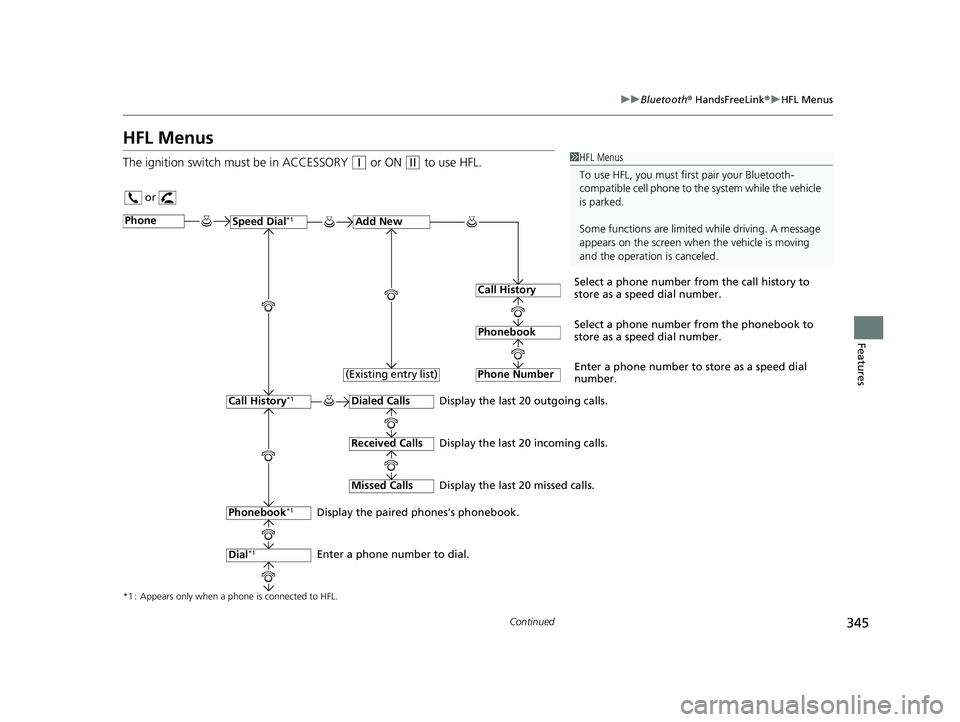
HFL Menus
The ignition switch mu st be in ACCESSORY (q or ON (w to use HFL.1HFL Menus
To use HFL, you must fi rst pair your Bluetooth-
compatible cell phone to th e system while the vehicle
is parked.
Some functions are limited while driving. A message
appears on the screen when the vehicle is moving
and the operation is canceled.
or
Display the last 20 outgoing calls.
Display the last 20 incoming calls.
Display the last 20 missed calls.
*1 : Appears only when a phone is connected to HFL.
PhoneSpeed Dial*1Add New
Select a phone number from the call history to
store as a speed dial number.
Call History
PhonebookSelect a phone number from the phonebook to
store as a speed dial number.
Phone Number
Enter a phone number to store as a speed dial
number.
Dialed Calls
Received Calls
Missed Calls
Phonebook*1
Dial*1
Call History*1
Display the paired phones’s phonebook.
Enter a phone number to dial. (Existing entry list)
19 FIT JAZZ-31T5A6400.book 345 ページ 2018年2月26日 月曜日 午後4時30分
Page 348 of 599
346
uuBluetooth ® HandsFreeLink ®u HFL Menus
Features
*1 : Appears only when a phone is connected to HFL.
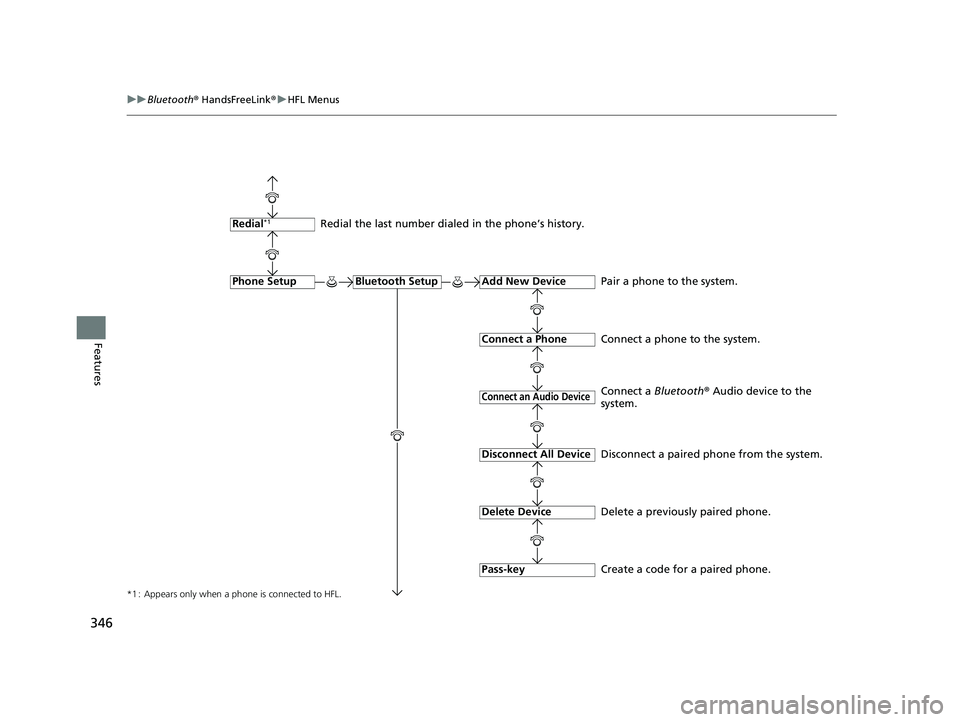
Redial the last number dialed in the phone’s history.
Add New Device
Connect a Phone
Connect an Audio Device
Bluetooth SetupPhone Setup
Redial*1
Pair a phone to the system.
Connect a phone to the system.
Create a code for a paired phone.
Disconnect All Device
Delete Device
Pass-key
Disconnect a paired phone from the system.
Delete a previously paired phone. Connect a
Bluetooth® Audio device to the
system.
19 FIT JAZZ-31T5A6400.book 346 ページ 2018年2月26日 月曜日 午後4時30分
Page 349 of 599
347
uuBluetooth ® HandsFreeLink ®u HFL Menus
Continued
Features
*1 : Appears only when a phone is connected to HFL.
Call History
Phonebook
Phone Number
Speed Dial*1
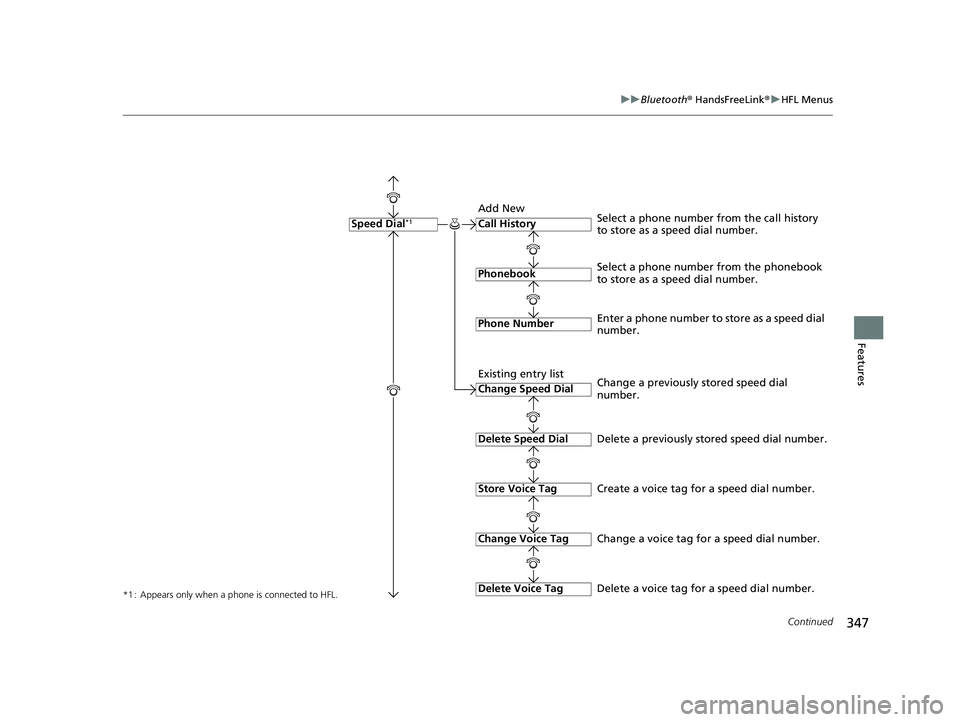
Select a phone number from the phonebook
to store as a speed dial number. Select a phone number from the call history
to store as a speed dial number.
Create a voice tag for a speed dial number.
Change Speed Dial
Delete Speed Dial
Store Voice Tag
Enter a phone number to store as a speed dial
number.
Delete a previously stored speed dial number.
Change Voice Tag
Delete Voice Tag
Change a previously stored speed dial
number.
Change a voice tag for a speed dial number.
Delete a voice tag for a speed dial number.
Add New
Existing entry list
19 FIT JAZZ-31T5A6400.book 347 ページ 2018年2月26日 月曜日 午後4時30分
Page 350 of 599
348
uuBluetooth ® HandsFreeLink ®u HFL Menus
Features
Fixed
Mobile Phone
System Clear
Ringtone
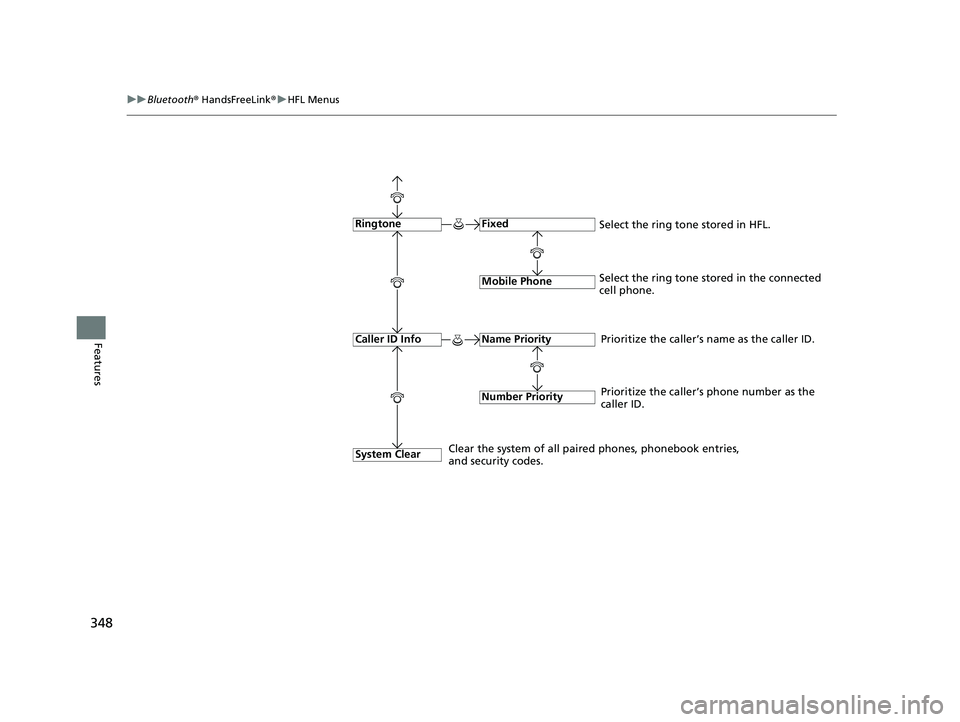
Select the ring tone stored in the connected
cell phone.
Name Priority
Number Priority
Caller ID InfoPrioritize the caller’s name as the caller ID.
Clear the system of all paired phones, phonebook entries,
and security codes. Prioritize the caller’s phone number as the
caller ID.
Select the ring tone stored in HFL.
19 FIT JAZZ-31T5A6400.book 348 ページ 2018年2月26日 月曜日 午後4時30分
Page 351 of 599
Continued349
uuBluetooth ® HandsFreeLink ®u HFL Menus
Features
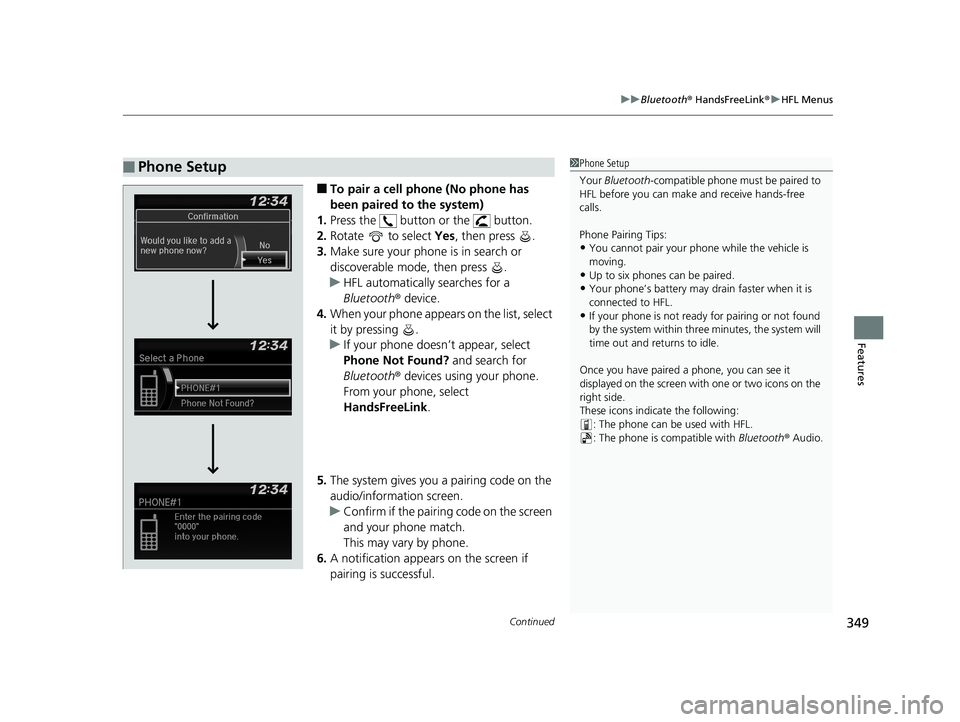
■To pair a cell phone (No phone has
been paired to the system)
1. Press the button or the button.
2. Rotate to select Yes, then press .
3. Make sure your phone is in search or
discoverable mode, then press .
u HFL automatically searches for a
Bluetooth ® device.
4. When your phone appears on the list, select
it by pressing .
u If your phone doesn’t appear, select
Phone Not Found? and search for
Bluetooth ® devices using your phone.
From your phone, select
HandsFreeLink .
5. The system gives you a pairing code on the
audio/information screen.
u Confirm if the pairing code on the screen
and your phone match.
This may vary by phone.
6. A notification appears on the screen if
pairing is successful.
■Phone Setup1Phone Setup
Your Bluetooth -compatible phone must be paired to
HFL before you can make and receive hands-free
calls.
Phone Pairing Tips:
•You cannot pair your phone while the vehicle is
moving.
•Up to six phones can be paired.
•Your phone’s battery may dr ain faster when it is
connected to HFL.
•If your phone is not ready for pairing or not found
by the system within three minutes, the system will
time out and returns to idle.
Once you have paired a phone, you can see it
displayed on the screen with one or two icons on the
right side.
These icons indicate the following: : The phone can be used with HFL.
: The phone is compatible with Bluetooth® Audio.
19 FIT JAZZ-31T5A6400.book 349 ページ 2018年2月26日 月曜日 午後4時30分
Page 352 of 599
350
uuBluetooth ® HandsFreeLink ®u HFL Menus
Features
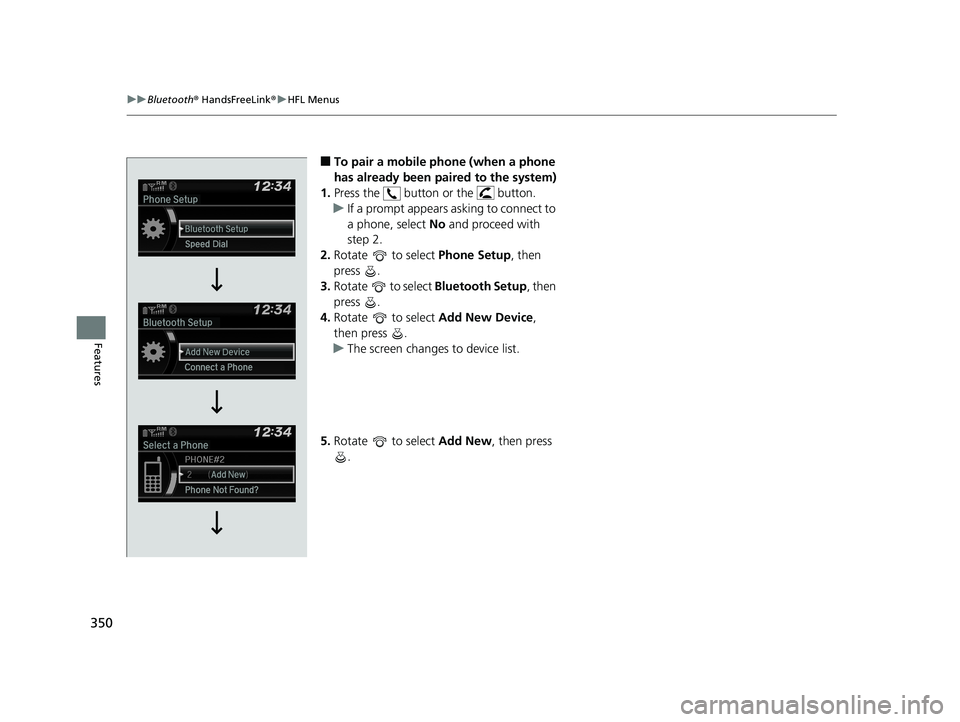
■To pair a mobile phone (when a phone
has already been paired to the system)
1. Press the button or the button.
u If a prompt appears asking to connect to
a phone, select No and proceed with
step 2.
2. Rotate to select Phone Setup, then
press .
3. Rotate to select Bluetooth Setup, then
press .
4. Rotate to select Add New Device,
then press .
u The screen changes to device list.
5. Rotate to select Add New, then press
.
19 FIT JAZZ-31T5A6400.book 350 ページ 2018年2月26日 月曜日 午後4時30分
Page 353 of 599
351
uuBluetooth ® HandsFreeLink ®u HFL Menus
Continued
Features
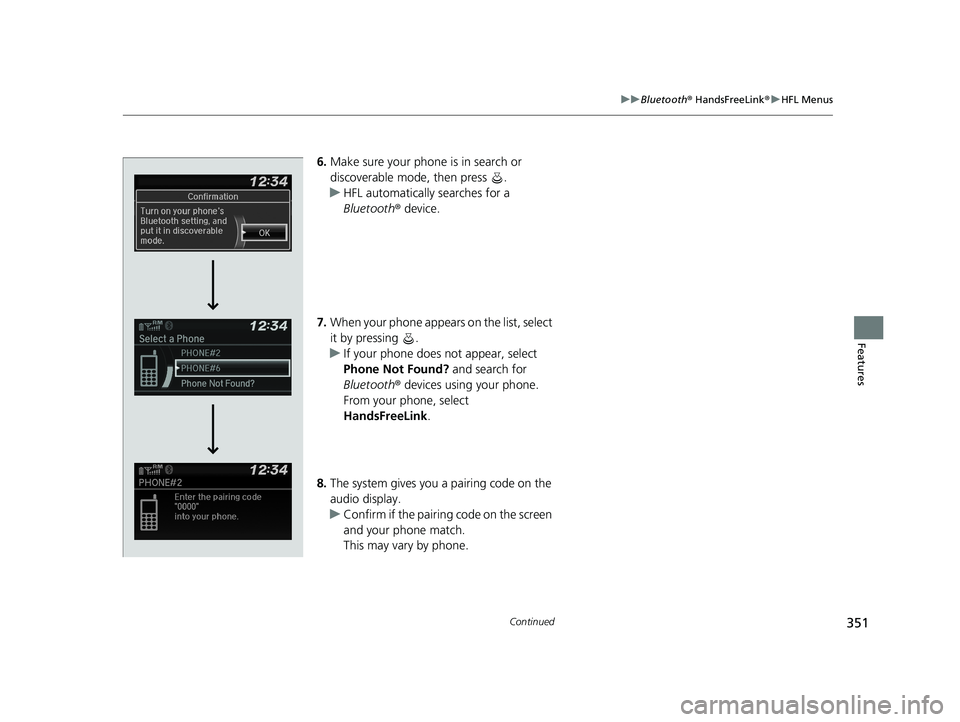
6. Make sure your phone is in search or
discoverable mode, then press .
u HFL automatically searches for a
Bluetooth ® device.
7. When your phone appears on the list, select
it by pressing .
u If your phone does not appear, select
Phone Not Found? and search for
Bluetooth ® devices using your phone.
From your phone, select
HandsFreeLink .
8. The system gives you a pairing code on the
audio display.
u Confirm if the pairing code on the screen
and your phone match.
This may vary by phone.
19 FIT JAZZ-31T5A6400.book 351 ページ 2018年2月26日 月曜日 午後4時30分
Page 354 of 599
352
uuBluetooth ® HandsFreeLink ®u HFL Menus
Features
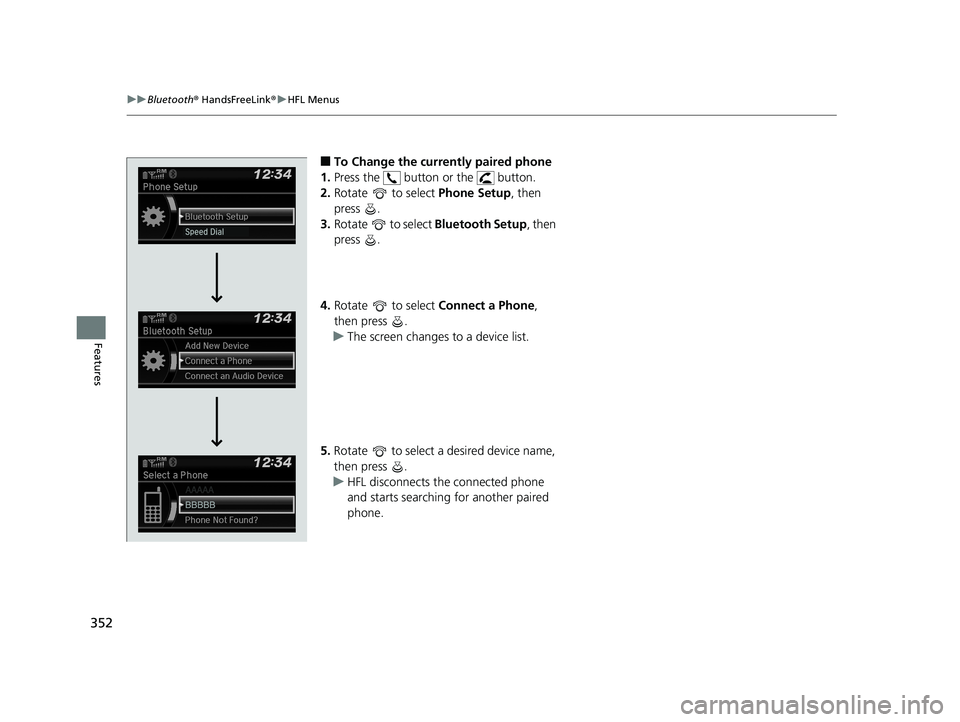
■To Change the currently paired phone
1. Press the button or the button.
2. Rotate to select Phone Setup, then
press .
3. Rotate to select Bluetooth Setup, then
press .
4. Rotate to select Connect a Phone,
then press .
u The screen changes to a device list.
5. Rotate to select a desired device name,
then press .
u HFL disconnects the connected phone
and starts searching for another paired
phone.
19 FIT JAZZ-31T5A6400.book 352 ページ 2018年2月26日 月曜日 午後4時30分
Page 355 of 599
353
uuBluetooth ® HandsFreeLink ®u HFL Menus
Continued
Features
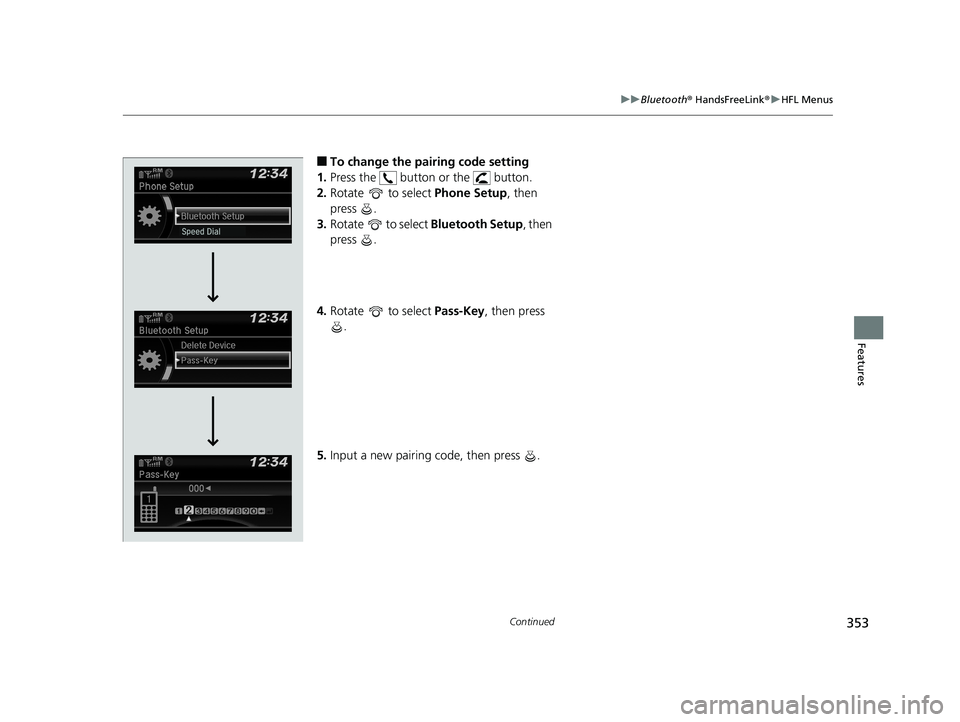
■To change the pairing code setting
1. Press the button or the button.
2. Rotate to select Phone Setup, then
press .
3. Rotate to select Bluetooth Setup , then
press .
4. Rotate to select Pass-Key, then press
.
5. Input a new pairing code, then press .
19 FIT JAZZ-31T5A6400.book 353 ページ 2018年2月26日 月曜日 午後4時30分
Page 356 of 599
354
uuBluetooth ® HandsFreeLink ®u HFL Menus
Features
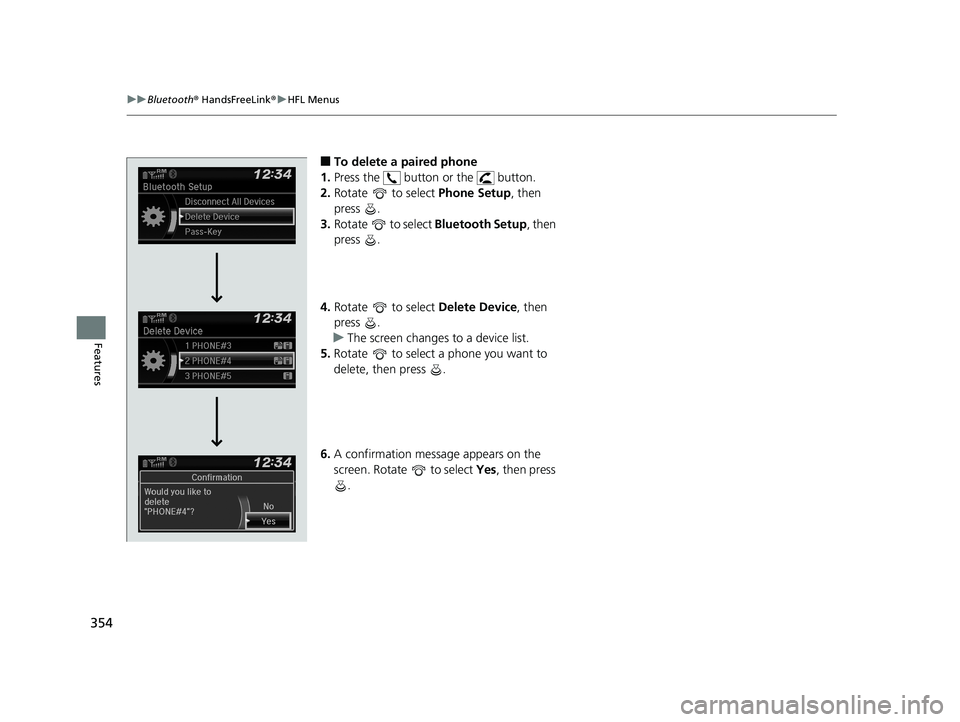
■To delete a paired phone
1. Press the button or the button.
2. Rotate to select Phone Setup, then
press .
3. Rotate to select Bluetooth Setup, then
press .
4. Rotate to select Delete Device, then
press .
u The screen changes to a device list.
5. Rotate to select a phone you want to
delete, then press .
6. A confirmation message appears on the
screen. Rotate to select Yes, then press
.
19 FIT JAZZ-31T5A6400.book 354 ページ 2018年2月26日 月曜日 午後4時30分