power steering HONDA FIT 2020 (in English) User Guide
[x] Cancel search | Manufacturer: HONDA, Model Year: 2020, Model line: FIT, Model: HONDA FIT 2020Pages: 599, PDF Size: 41.91 MB
Page 162 of 599
160
uuOperating the Switches Around the Steering Wheel uLight Switches
Controls
Light Switches
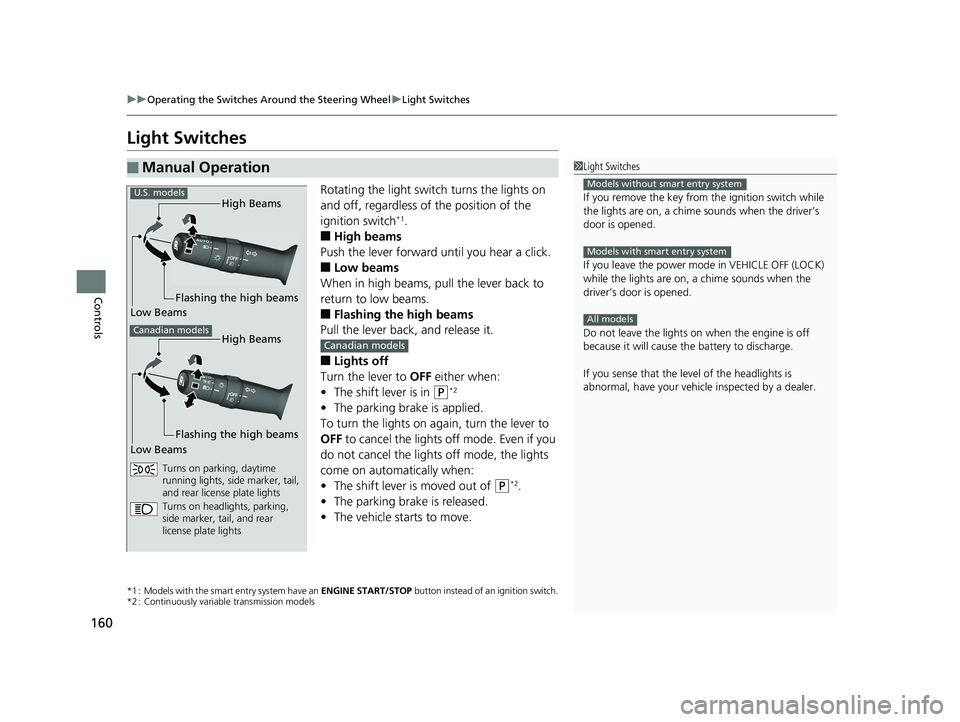
Rotating the light switch turns the lights on
and off, regardless of the position of the
ignition switch
*1.
■High beams
Push the lever forward until you hear a click.
■Low beams
When in high beams, pull the lever back to
return to low beams.
■Flashing the high beams
Pull the lever back, and release it.
■Lights off
Turn the lever to OFF either when:
• The shift lever is in
(P*2
•The parking brake is applied.
To turn the lights on again, turn the lever to
OFF to cancel the lights off mode. Even if you
do not cancel the lights off mode, the lights
come on automatically when:
• The shift lever is moved out of
(P*2.
• The parking brake is released.
• The vehicle starts to move.
*1 : Models with the smart entry system have an ENGINE START/STOP button instead of an ignition switch.
*2 : Continuously variable transmission models
■Manual Operation1 Light Switches
If you remove the key from the ignition switch while
the lights are on, a chime sounds when the driver’s
door is opened.
If you leave the power mode in VEHICLE OFF (LOCK)
while the lights are on, a chime sounds when the
driver’s door is opened.
Do not leave the lights on when the engine is off
because it will cause the battery to discharge.
If you sense that the le vel of the headlights is
abnormal, have your vehicle inspected by a dealer.
Models without smart entry system
Models with smart entry system
All models
High Beams
Flashing the high beams
Low Beams
Turns on parking, daytime
running lights, side marker, tail,
and rear license plate lights
Turns on headlights, parking,
side marker, tail, and rear
license plate lights
U.S. models
Canadian modelsHigh Beams
Flashing the high beams
Low Beams
Canadian models
20 FIT-31T5A6500.book 160 ページ 2019年9月26日 木曜日 午後4時41分
Page 164 of 599
uuOperating the Switches Around the Steering Wheel uLight Switches
162
Controls
The headlights automatically co me on when the wipers are used several times within
a certain number of intervals wi th the headlight switch in AUTO.
The headlights automatically go off a few minutes later if the wipers are stopped.
The headlights, all other exterior lights, an d the instrument panel lights turn off 15
seconds after you remove the key or set the power mode to VEHICLE OFF (LOCK),
take the remote with you, and close the driver's door.
If you turn the igniti on switch to LOCK
(0*1 with the headlight switch on, but do
not open the door, the lights turn off after 10 minutes (3 minutes, if the switch is in
the AUTO position).
The lights turn on again when you unlock or open the driver's door. If you unlock
the door, but do not open it within 15 seconds, the lights go off. If you open the
driver's door, you will hear a lights on reminder chime.
*1 : Models with the smart entry system have an ENGINE START/STOP button instead of an ignition switch.
■Headlight Integration with Wipers*
■Automatic Lighting Off Feature
1Headlight Integration with Wipers*
This feature activates while the headlights are off in
AUTO .
The instrument panel br ightness does not change
when the headlights come on.
At dark ambient light leve ls, the automatic lighting
control feature turns on the headlights, regardless of
the number of wiper sweeps.
* Not available on all models
20 FIT-31T5A6500.book 162 ページ 2019年9月26日 木曜日 午後4時41分
Page 169 of 599
167
uuOperating the Switches Around the Steering Wheel uDaytime Running Lights
Controls
Daytime Running Lights
The high beam headlights come on slightly dimmer than normal when the following
conditions have been met:
• The ignition switch is in ON
(w*1.
• The headlight switch is OFF, or in AUTO or .
• The parking brake is released.
The high beam headlights return to original brightness once the headlight switch is
turned on.
The lights remain on even if you set th e parking brake. Turning off the ignition
switch or setting the power mode to VEHI CLE OFF will turn off the daytime running
lights.
The daytime running lights are off once the h eadlight switch is turned on, or when
the head light switch is in AUTO and it is getting darker outside.
*1 : Models with the smart entry system have an ENGINE START/STOP button instead of an ignition switch.
20 FIT-31T5A6500.book 167 ページ 2019年9月26日 木曜日 午後4時41分
Page 173 of 599
171
uuOperating the Switches Around the Steering Wheel uRear Defogger/Heated Door Mirror* Button
Controls
Rear Defogger/Heated Door Mirror* Button
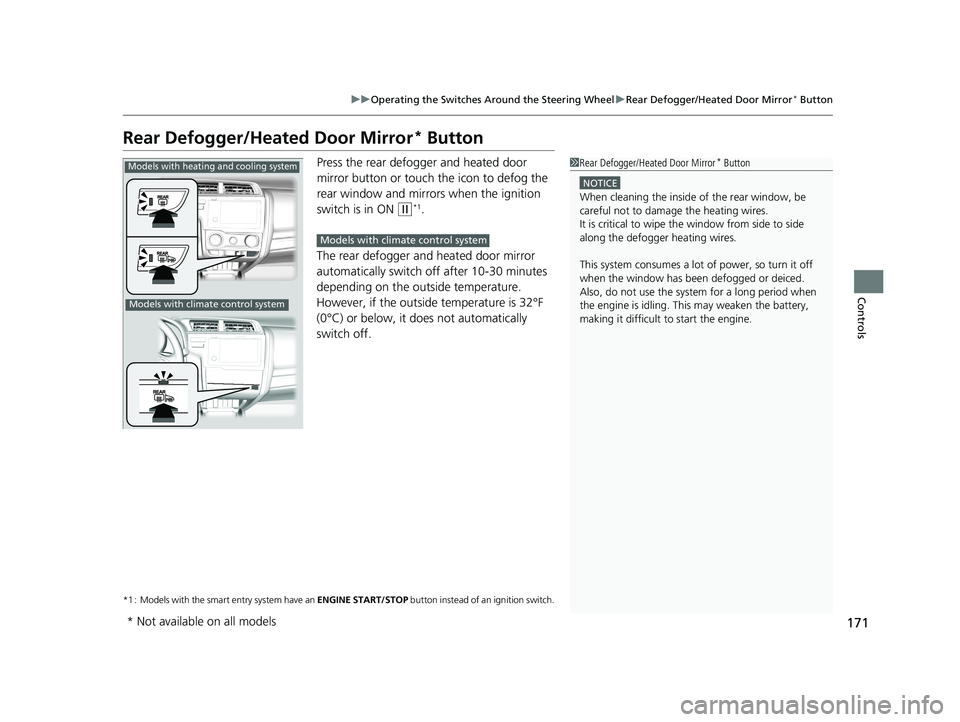
Press the rear defogger and heated door
mirror button or touch the icon to defog the
rear window and mirrors when the ignition
switch is in ON
(w*1.
The rear defogger and heated door mirror
automatically switch of f after 10-30 minutes
depending on the outside temperature.
However, if the outsid e temperature is 32°F
(0°C) or below, it does not automatically
switch off.
*1 : Models with the smart entry system have an ENGINE START/STOP button instead of an ignition switch.
1Rear Defogger/Heated Door Mirror* Button
NOTICE
When cleaning the inside of the rear window, be
careful not to damage the heating wires.
It is critical to wipe the window from side to side
along the defogger heating wires.
This system consumes a lot of power, so turn it off
when the window has been defogged or deiced.
Also, do not use the system for a long period when
the engine is idling. This may weaken the battery,
making it difficult to start the engine.
Models with heating and cooling system
Models with climate control system
Models with climate control system
* Not available on all models
20 FIT-31T5A6500.book 171 ページ 2019年9月26日 木曜日 午後4時41分
Page 408 of 599
406
uuTowing a Trailer uTowing Your Vehicle
Driving
Towing Your Vehicle
Your vehicle is not designed to be towed be hind a motorhome. If your vehicle needs
to be towed in an emergency, refe r to the emergency towing information.
2Emergency Towing P. 571
Your vehicle can be towed behind a motorhome.
Perform the following procedure before towing your vehicle.
1. Shift to
(N.
2. Release the parking brake.
3. Turn the ignition sw itch to ACCESSORY
(q*1.
u Make sure the steering wheel does not lock.
4. Turn off all the electric devices. Do not use any accessory power sockets.
u This can prevent the battery from running down.
*1 : Models with the smart entry system have an ENGINE START/STOP button instead of an ignition switch.
■When Your Vehicle is Towed Behind a Motorhome
1Towing Your Vehicle
Do not exceed 65 mph (100 km/h).
Consult your towing parts sales or rental agency if
any other items are recommended or required for
your towing situation.Continuously variable transmission models
Manual transmission models
20 FIT-31T5A6500.book 406 ページ 2019年9月26日 木曜日 午後4時41分
Page 409 of 599
Continued407
uuTowing a Trailer uTowing Your Vehicle
Driving
■Extended Towing
If you tow more than eight hours in one day, you should repeat the “When Your
Vehicle is Towed Behind a Motorhome” procedure from the previous page at least
every eight hours.
You also need to perform the following procedure to prevent the battery from
running down.
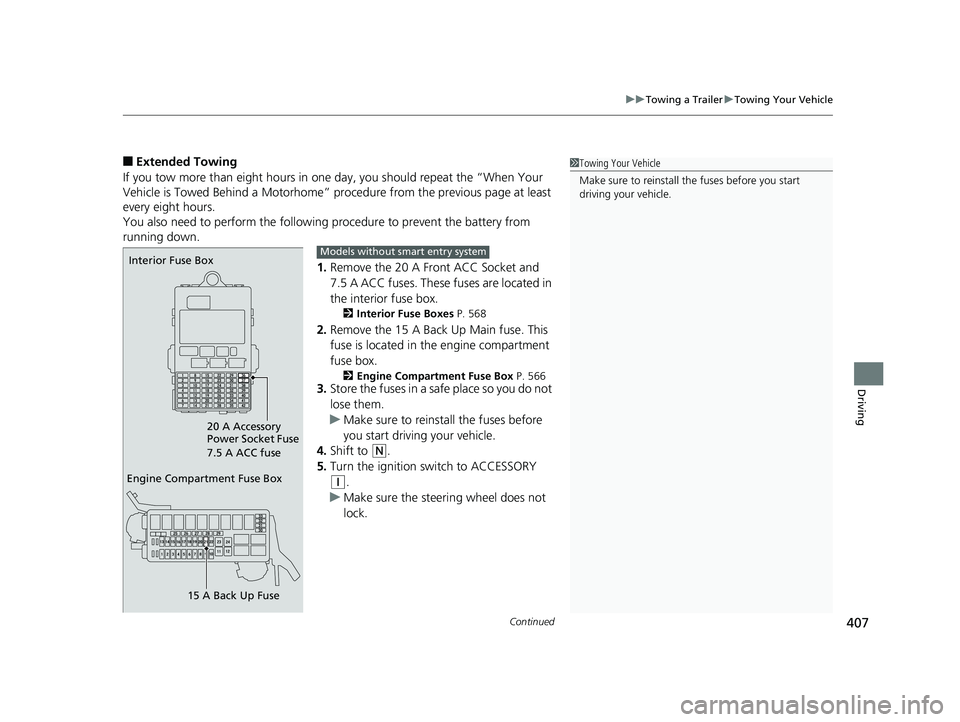
1.Remove the 20 A Front ACC Socket and
7.5 A ACC fuses. These fuses are located in
the interior fuse box.
2 Interior Fuse Boxes P. 568
2.Remove the 15 A Back Up Main fuse. This
fuse is located in the engine compartment
fuse box.
2 Engine Compartment Fuse Box P. 5663.Store the fuses in a safe place so you do not
lose them.
u Make sure to reinstall the fuses before
you start driving your vehicle.
4. Shift to
(N.
5. Turn the ignition switch to ACCESSORY
(q.
u Make sure the steering wheel does not
lock.
1Towing Your Vehicle
Make sure to reinstall the fuses before you start
driving your vehicle.
Engine Compartment Fuse Box
15 A Back Up Fuse
Interior Fuse Box
20 A Accessory
Power Socket Fuse
7.5 A ACC fuseModels without smart entry system
20 FIT-31T5A6500.book 407 ページ 2019年9月26日 木曜日 午後4時41分
Page 410 of 599
408
uuTowing a Trailer uTowing Your Vehicle
Driving
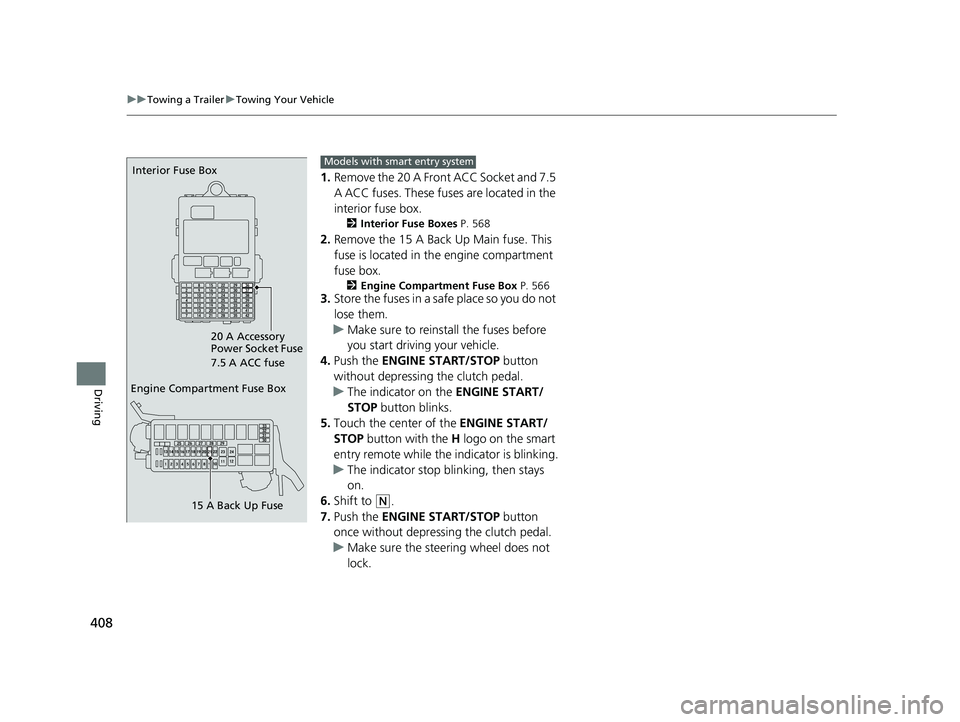
1. Remove the 20 A Front ACC Socket and 7.5
A ACC fuses. These fuses are located in the
interior fuse box.
2 Interior Fuse Boxes P. 568
2.Remove the 15 A Back Up Main fuse. This
fuse is located in th e engine compartment
fuse box.
2 Engine Compartment Fuse Box P. 5663.Store the fuses in a safe place so you do not
lose them.
u Make sure to reinstall the fuses before
you start driving your vehicle.
4. Push the ENGINE START/STOP button
without depressing the clutch pedal.
u The indicator on the ENGINE START/
STOP button blinks.
5. Touch the center of the ENGINE START/
STOP button with the H logo on the smart
entry remote while the indicator is blinking.
u The indicator stop blinking, then stays
on.
6. Shift to
(N.
7. Push the ENGINE START/STOP button
once without depressing the clutch pedal.
u Make sure the steering wheel does not
lock.
Engine Compartment Fuse Box
15 A Back Up Fuse
Interior Fuse Box
20 A Accessory
Power Socket Fuse
7.5 A ACC fuseModels with smart entry system
20 FIT-31T5A6500.book 408 ページ 2019年9月26日 木曜日 午後4時41分
Page 417 of 599
415
uuWhen Driving uPrecautions While Driving
Continued
Driving
Precautions While Driving
Avoid driving in deep water and on flooded roads. This can damage the engine or
driveline, or cause electrical component failure.
■In Rain1Precautions While Driving
NOTICE
Do not operate the shift lever while pressing the
accelerator pedal. You could damage the transmission.
NOTICE
If you repeatedly turn the steering wheel at an
extremely low speed, or hold the steering wheel in
the full left or right position for a while, the electric
power steering (EPS) system heats up. The system
goes into a protective mode, and limits its
performance. The steering wheel becomes harder
and harder to operate. Once the system cools down,
the EPS system is restored.
Repeated operation under these conditions can
eventually damage the system.
If the ignition switch is turned to ACCESSORY
( q*1
while driving, the engine will shut down and all
steering and brake power a ssist functions will stop,
making it difficult to control the vehicle.
Do not put the transmission into
( N, as you will lose
engine braking (and acce leration) performance.
During the first 600 miles (1,000 km) of operation,
avoid sudden acceleration or full throttle operation so
as to not damage the engine or powertrain.
Avoid hard braking for the first 200 miles (300 km).
You should also follow this when the brake pads are
replaced.
*1: Models with the sma rt entry system have an ENGINE
START/STOP button instead of an ignition switch.
20 FIT-31T5A6500.book 415 ページ 2019年9月26日 木曜日 午後4時41分
Page 455 of 599
Continued453
uuWhen Driving uLane Keeping Assist System (LKAS)*
Driving
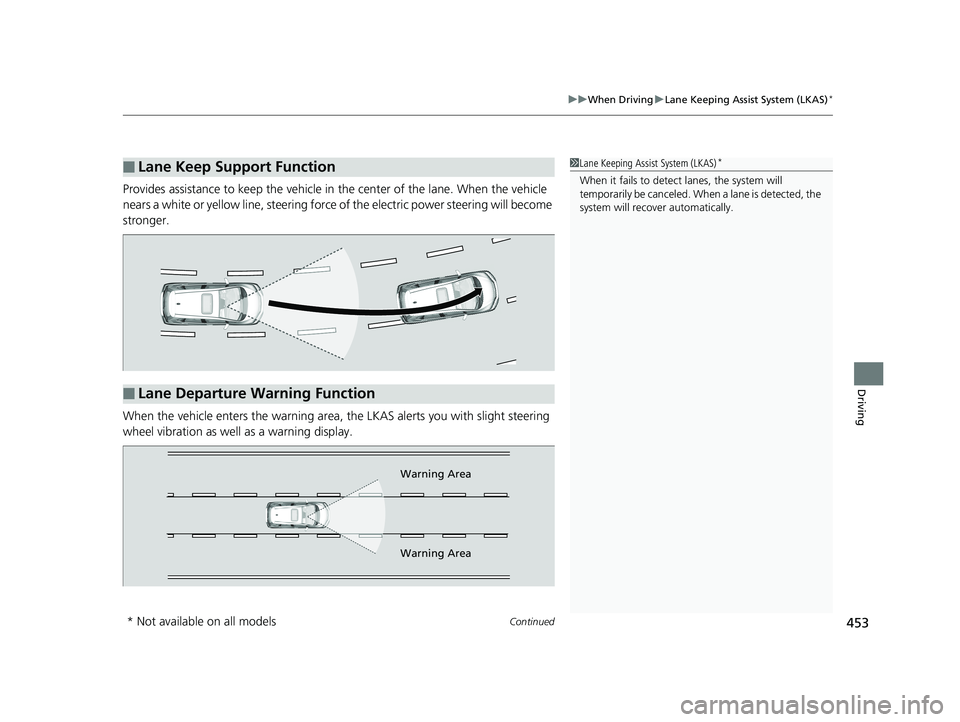
Provides assistance to keep the vehicle in the center of the lane. When the vehicle
nears a white or yellow line, steering force of the electric power steering will become
stronger.
When the vehicle enters the warning area, the LKAS alerts you with slight steering
wheel vibration as well as a warning display.
■Lane Keep Support Function1 Lane Keeping Assist System (LKAS)*
When it fails to detect lanes, the system will
temporarily be canceled. When a lane is detected, the
system will recover automatically.
■Lane Departure Warning Function
Warning Area
Warning Area
* Not available on all models
20 FIT-31T5A6500.book 453 ページ 2019年9月26日 木曜日 午後4時41分
Page 472 of 599
uuBraking uBrake System
470
Driving
Your vehicle is equipped with disc brakes at the front, and drum brakes in the rear
wheels. A vacuum power assist helps reduc e the effort needed on the brake pedal.
The brake assist system increases the st opping force when you depress the brake
pedal hard in an emergenc y situation. The anti-lock brake system (ABS) helps you
retain steering control when braking very hard.
2 Brake Assist System P. 472
2 Anti-lock Brake System (ABS) P. 471
■Foot Brake1Foot Brake
Check the brakes after driving through deep water,
or if there is a buildup of road surface water. If
necessary, dry the brakes by lightly depressing the
pedal several times.
If you hear a continuous me tallic friction sound when
applying the brakes, this is caused by the brake wear
indicator rubbing on the brake rotor and indicates
that the brake pads need to be replaced. Have the
vehicle checked by a deal er. If you hear only an
occasional squeak or squeal when you initially apply
the brake pedal, this may be normal and caused by
high frequency vibr ation of the brake pads against
the rotating brake disc.
Constantly using the brak e pedal while going down a
long hill builds up heat, which reduces the brake
effectiveness. Apply engine braking by taking your
foot off the accelerator pe dal and downshifting to a
lower gear/speed position. With manual transmission
use a lower gear for gr eater engine braking.
Do not rest your foot on the brake pedal while
driving, as it will lightly apply the brakes and cause
them to lose effectiveness over time and reduce pad
life. It will also conf use drivers behind you.
20 FIT-31T5A6500.book 470 ページ 2019年9月26日 木曜日 午後4時41分