remote control HONDA FIT 2020 (in English) User Guide
[x] Cancel search | Manufacturer: HONDA, Model Year: 2020, Model line: FIT, Model: HONDA FIT 2020Pages: 599, PDF Size: 41.91 MB
Page 132 of 599

uuLocking and Unlocking the Doors uLocking/Unlocking the Doors from the Outside
130
Controls
To temporarily deactivate the function:
1. Set the power mode to OFF.
2. Open the driver’s door.
3. Using the master door lock switch, operate
the lock as follows:
Lock Unlock Lock Unlock.
u The beeper sounds and the function is
deactivated.
To restore the function:
• Set the power mode to ON.
• Lock the vehicle without using the auto lock
function
• Walk away at least more than about 5 feet
(1.5 m) away from the vehicle while
carrying the smart entry remote.1 Locking the vehicle (Walk away auto lock)
The auto lock function does not operate when any of
the following conditions are met.
•The smart entry remote is inside the vehicle.
•A door or the hood is not closed.•The power mode is set to any mode other than
OFF.
•The smart entry remote is not located within a
radius of about 5 feet (1 .5 m) from the vehicle
when you get out of the vehicle and close the
doors.
Auto lock function operation stop beeper
After the auto lock function has been activated, the
auto lock operation stop beeper sounds for
approximately two seconds in the following cases.
•The smart entry remote is put inside the vehicle
through a window.
•You are located too close to the vehicle.
If the warning beeper sounds, check that you are
carrying the smart entry remote. Then, open/close a
door and confirm the auto lock activation beeper
sounds once.
20 FIT-31T5A6500.book 130 ページ 2019年9月26日 木曜日 午後4時41分
Page 133 of 599
Continued131
uuLocking and Unlocking the Doors uLocking/Unlocking the Doors from the Outside
Controls
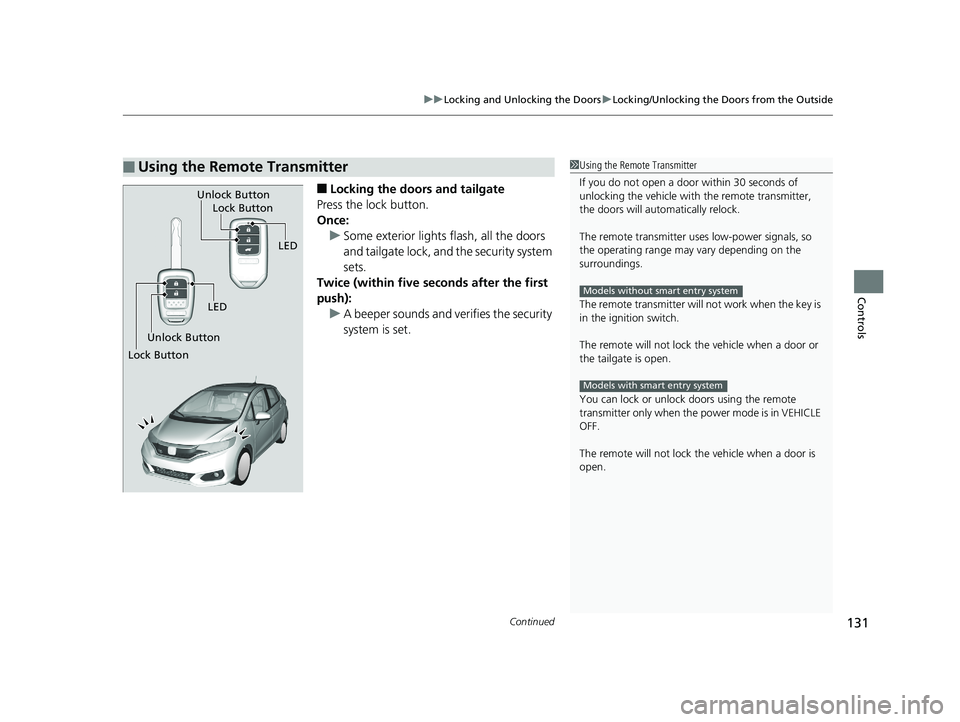
■Locking the doors and tailgate
Press the lock button.
Once: u Some exterior lights flash, all the doors
and tailgate lock, and the security system
sets.
Twice (within five se conds after the first
push):
u A beeper sounds and verifies the security
system is set.
■Using the Remote Transmitter1Using the Remote Transmitter
If you do not open a door within 30 seconds of
unlocking the vehicle with the remote transmitter,
the doors will automatically relock.
The remote transmitter us es low-power signals, so
the operating range may vary depending on the
surroundings.
The remote transmitter will not work when the key is
in the ignition switch.
The remote will not lock th e vehicle when a door or
the tailgate is open.
You can lock or unlock doors using the remote
transmitter only when the power mode is in VEHICLE
OFF.
The remote will not lock th e vehicle when a door is
open.
Models without smart entry system
Models with smart entry system
LED
Unlock Button Lock Button
Unlock Button
LED
Lock Button
20 FIT-31T5A6500.book 131 ページ 2019年9月26日 木曜日 午後4時41分
Page 134 of 599
uuLocking and Unlocking the Doors uLocking/Unlocking the Doors from the Outside
132
Controls
■Unlocking the doors and tailgate
Press the unlock button.
Once: u Some exterior lights flash twice, and the driver’s door unlocks.
Twice: u The remaining doors and tailgate unlock.1Using the Remote Transmitter
If the distance at which the remote transmitter works
varies, the batter y is probably low.
If the LED does not come on when you press a
button, the battery is dead. 2 Replacing the Button Battery P. 536
You can customize the door unlock mode setting. 2 Customized Features P. 111
Models with multi-information display
* Not available on all models
20 FIT-31T5A6500.book 132 ページ 2019年9月26日 木曜日 午後4時41分
Page 136 of 599
uuLocking and Unlocking the Doors uLocking/Unlocking the Doors from the Outside
134
Controls
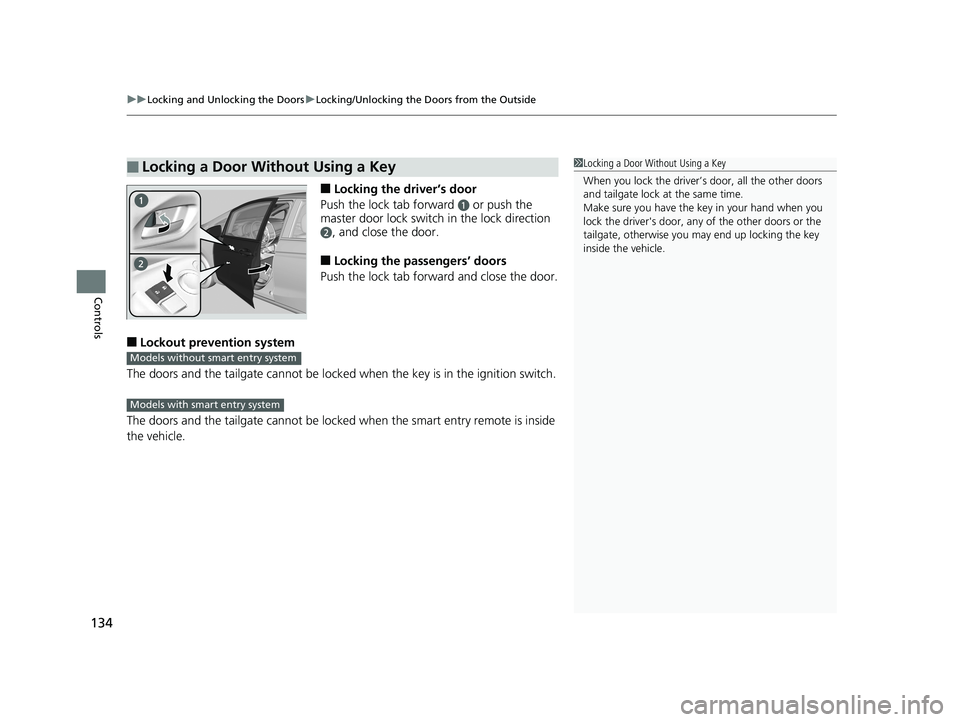
■Locking the driver’s door
Push the lock tab forward
a or push the
master door lock switch in the lock direction
b, and close the door.
■Locking the passengers’ doors
Push the lock tab forward and close the door.
■Lockout prevention system
The doors and the tailgate can not be locked when the key is in the ignition switch.
The doors and the tailgate cannot be locked when the smart entry remote is inside
the vehicle.
■Locking a Door Without Using a Key1 Locking a Door Without Using a Key
When you lock the driver’s door, all the other doors
and tailgate lock at the same time.
Make sure you have the key in your hand when you
lock the driver's door, any of the other doors or the
tailgate, otherwise you may end up locking the key
inside the vehicle.
Models without smart entry system
Models with smart entry system
20 FIT-31T5A6500.book 134 ページ 2019年9月26日 木曜日 午後4時41分
Page 148 of 599
146
uuOpening and Closing the Tailgate uUsing the Tailgate Outer Handle/Release Button
Controls
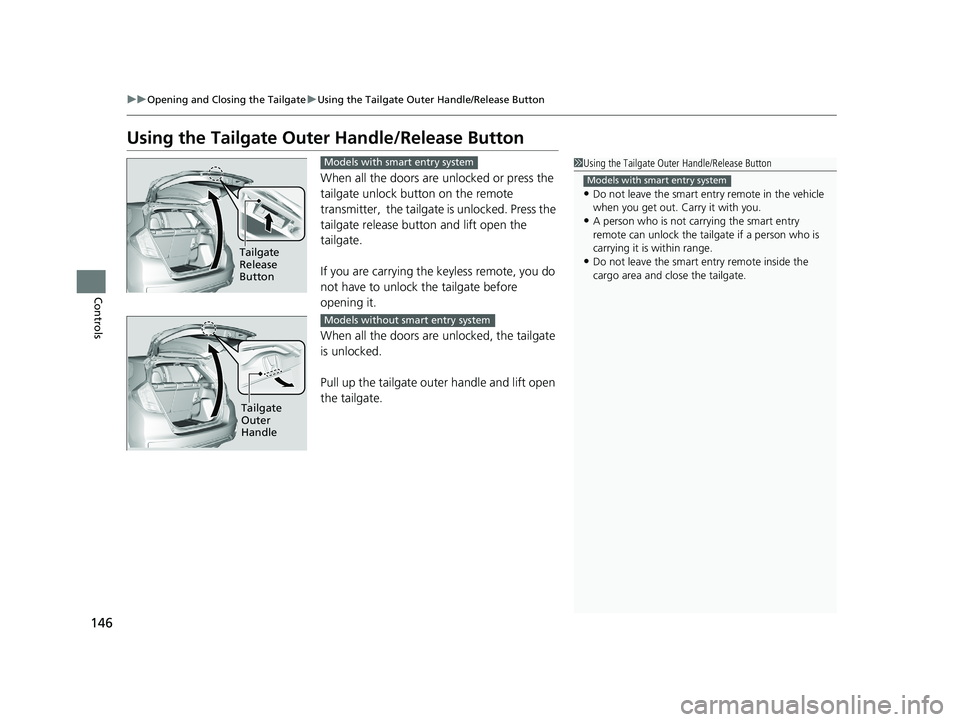
Using the Tailgate Outer Handle/Release Button
When all the doors are unlocked or press the
tailgate unlock button on the remote
transmitter, the tailgate is unlocked. Press the
tailgate release button and lift open the
tailgate.
If you are carrying the keyless remote, you do
not have to unlock the tailgate before
opening it.
When all the doors are unlocked, the tailgate
is unlocked.
Pull up the tailgate outer handle and lift open
the tailgate.
1 Using the Tailgate Outer Handle/Release Button
•Do not leave the smart entry remote in the vehicle
when you get out. Carry it with you.
•A person who is not carrying the smart entry
remote can unlock the tail gate if a person who is
carrying it is within range.
•Do not leave the smart entry remote inside the
cargo area and close the tailgate.
Models with smart entry system
Tailgate
Release
Button
Models with smart entry system
Tailgate
Outer
Handle
Models without smart entry system
20 FIT-31T5A6500.book 146 ページ 2019年9月26日 木曜日 午後4時41分
Page 149 of 599
147
uuOpening and Closing the Tailgate uUsing the Remote Transmitter*
Controls
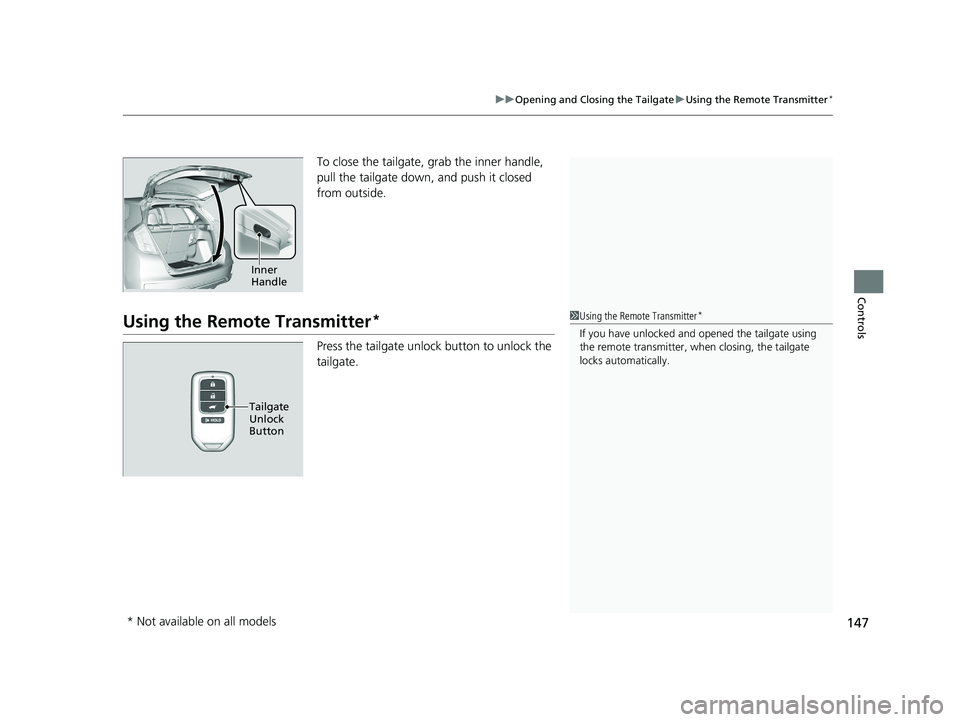
To close the tailgate, grab the inner handle,
pull the tailgate down, and push it closed
from outside.
Using the Remote Transmitter*
Press the tailgate unlock button to unlock the
tailgate.
Inner
Handle
1Using the Remote Transmitter*
If you have unlocked and opened the tailgate using
the remote transmitter, when closing, the tailgate
locks automatically.
Tailgate
Unlock
Button
* Not available on all models
20 FIT-31T5A6500.book 147 ページ 2019年9月26日 木曜日 午後4時41分
Page 150 of 599
148
Controls
Security System
Immobilizer System
The immobilizer system prevents a key that has not been pre-registered from
starting the engine. Each key contains el ectronic transmitters that use electronic
signals to verify the key.
Pay attention to the following when inserti ng the key into the ignition switch or
pressing the ENGINE START/STOP button:
• Do not allow objects that emit strong radio waves near the ignition switch or the
ENGINE START/STOP button.
• Make sure the key is not covered by or touching a metal object.
• Do not bring a key from anot her vehicle’s immobilizer system near the ignition
switch or the ENGINE START/STOP button.
Do not put the key near magnetic items. El ectronic device, such as televisions and
audio systems emit strong magnetic fields . Note that even a key chain can become
magnetic.
Security System Alarm
The security system alarm activates when the tailgate, hood or doors are forcibly
opened. The alarm does not activate if the tailgate or doors are opened with the key,
remote transmitter or smart entry system
*.
However, the alarm goes off when a door is opened with the key, and then the
transmission is taken out of
(P (continuously variable transmission models) or the
hood is opened before the ignition switch is turned to ON
(w*1.
■When the security sy stem alarm activates
The horn sounds intermittently and all of the exterior lights flash.
*1 : Models with the smart entry system have an ENGINE START/STOP button instead of an ignition switch.
1Immobilizer System
NOTICE
Leaving the key in the vehicl e can result in theft or
accidental movement of the vehicle.
Always take the key with you whenever you leave the
vehicle unattended.
Do not alter the system or add other devices to it.
Doing so may damage the system and make your
vehicle inoperable.
1 Security System Alarm
Do not alter the system or add other devices to it.
Doing so may damage the system and make your
vehicle inoperable.
The security alarm continues for a maximum of two
minutes until the security system deactivates.
* Not available on all models
20 FIT-31T5A6500.book 148 ページ 2019年9月26日 木曜日 午後4時41分
Page 151 of 599
Continued149
uuSecurity System uSecurity System Alarm
Controls
■To deactivate the security system alarm
Unlock the vehicle using the key, remote transmitter, smart entry system*, or turn
the ignition switch to ON
(w*1. The system, along with the horn and flashing lights,
is deactivated.
■Setting the security system alarm
The security system alarm automatically sets when the following conditions have
been met:
• The ignition switch is in LOCK
(0*1.
• The hood is closed.
• All doors and the tailgate are locked from outside with the key, remote
transmitter, or smart entry system
*.
• The key has been removed from the ignition switch.
■When the security system alarm sets
The security system alarm in dicator in the instrument panel blinks and the blinking
interval changes after about 15 seconds.
■To cancel the security system alarm
The security system alarm is canceled wh en the vehicle is unlocked using the key,
remote transmitter, smart entry system
*, or when the ignition switch is turned to ON
(w*1. The security system alarm indica tor goes off at the same time.
*1 : Models with the smart entry system have an ENGINE START/STOP button instead of an ignition switch.
1Security System Alarm
Do not set the security system alarm when someone
is in the vehicle or a window is open. The system can
accidentally activate when:
•Unlocking the door with the lock tab.•Opening the hood with the hood release handle.
•Taking the transmission out of ( P.
If the battery goes dead after you have set the
security system alarm, the security alarm may go off
once the battery is re charged or replaced.
If this occurs, deactivate the security system alarm by
unlocking a door using the ke y, remote transmitter,
or smart entry system
*.
Continuously variable transmission models
Models without keyless access system
* Not available on all models
20 FIT-31T5A6500.book 149 ページ 2019年9月26日 木曜日 午後4時41分
Page 152 of 599
150
uuSecurity System uSecurity System Alarm
Controls
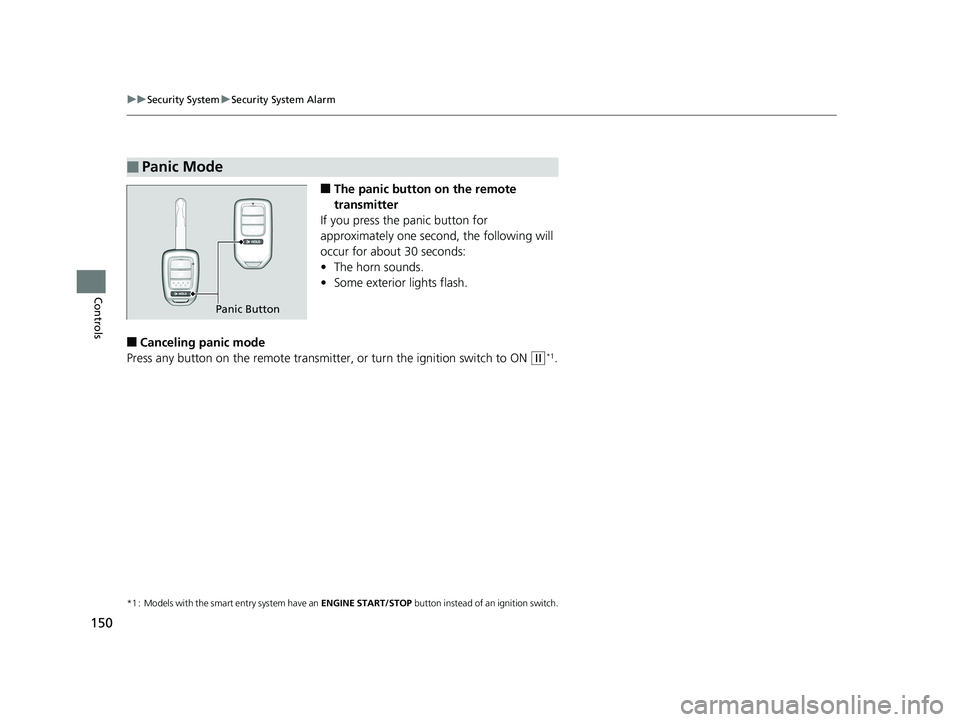
■The panic button on the remote
transmitter
If you press the panic button for
approximately one seco nd, the following will
occur for about 30 seconds:
• The horn sounds.
• Some exterior lights flash.
■Canceling panic mode
Press any button on the remote transmitter, or turn the ignition switch to ON
(w*1.
*1 : Models with the smart entry system have an ENGINE START/STOP button instead of an ignition switch.
■Panic Mode
Panic Button
20 FIT-31T5A6500.book 150 ページ 2019年9月26日 木曜日 午後4時41分
Page 157 of 599
155
uuOperating the Switches Around the Steering Wheel uENGINE START/STOP Button
Continued
Controls
ENGINE START/STOP Button
*1 : Except U.S. models with continuously variable transmission
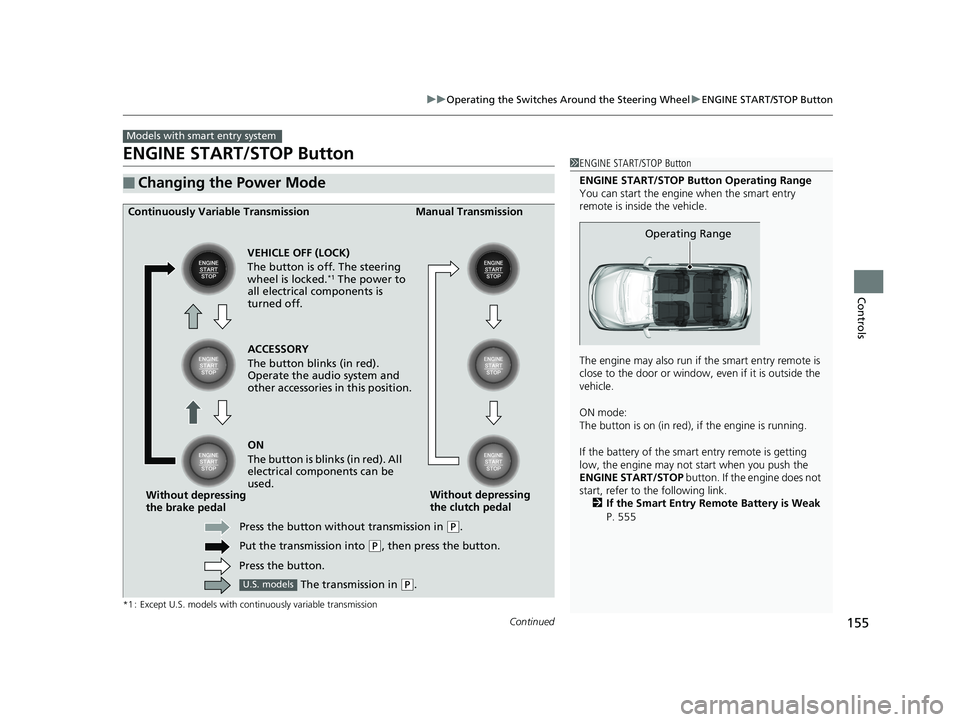
■Changing the Power Mode
Models with smart entry system
1ENGINE START/STOP Button
ENGINE START/STOP Button Operating Range
You can start the engine when the smart entry
remote is inside the vehicle.
The engine may also run if the smart entry remote is
close to the door or window, ev en if it is outside the
vehicle.
ON mode:
The button is on (in red), if the engine is running.
If the battery of the smar t entry remote is getting
low, the engine may not start when you push the
ENGINE START/STOP button. If the engine does not
start, refer to the following link. 2 If the Smart Entry Remote Battery is Weak
P. 555
Operating Range
ACCESSORY
The button blinks (in red).
Operate the audio system and
other accessories in this position.
Continuously Variable Transmission Manual Transmission
VEHICLE OFF (LOCK)
The button is off. The steering
wheel is locked.
*1 The power to
all electrical components is
turned off.
ON
The button is blinks (in red). All
electrical components can be
used.
Press the button without transmission in
( P.
Put the transmission into
( P, then press the button.
Press the button.
Without depressing
the brake pedal
Without depressing
the clutch pedal
The transmission in
( P.U.S. models
20 FIT-31T5A6500.book 155 ページ 2019年9月26日 木曜日 午後4時41分