ECU HONDA FIT 2020 (in English) Owner's Guide
[x] Cancel search | Manufacturer: HONDA, Model Year: 2020, Model line: FIT, Model: HONDA FIT 2020Pages: 599, PDF Size: 41.91 MB
Page 115 of 599
113
uuGauges and Displays uMulti-Information Display*
Continued
Instrument Panel
Exit
4
4
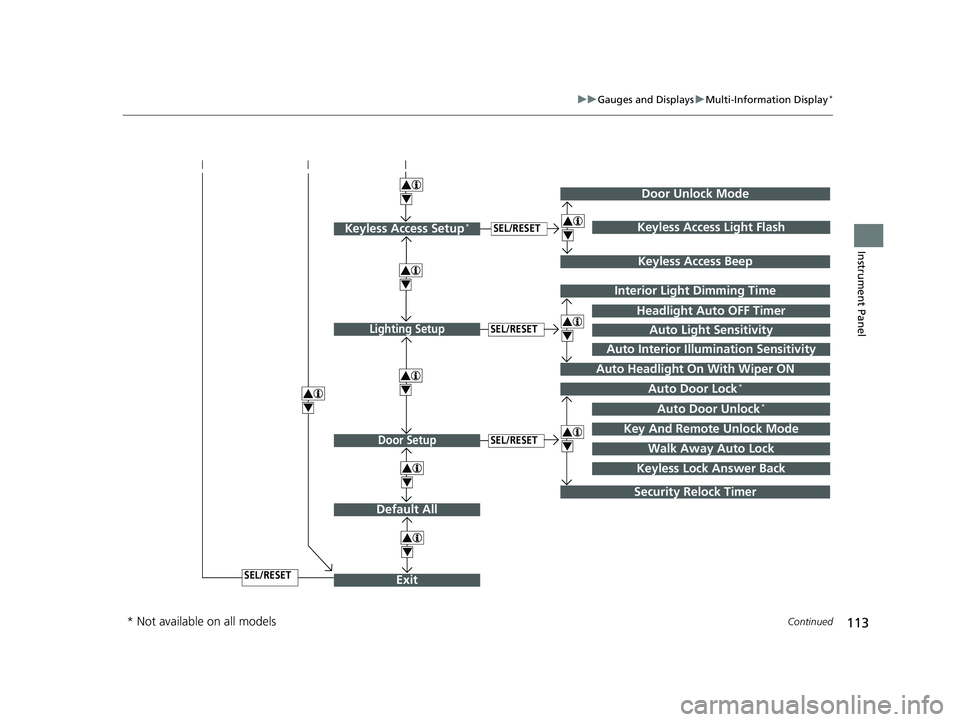
Door Setup
Default All
SEL/RESET
4
SEL/RESET
Lighting SetupSEL/RESET
4Auto Door Lock*
Auto Door Unlock*
Key And Remote Unlock Mode
Walk Away Auto Lock
Interior Light Dimming Time
Headlight Auto OFF Timer
Auto Headlight On With Wiper ON
4
4
Security Relock Timer
Auto Light Sensitivity
Auto Interior Illumination Sensitivity
Keyless Lock Answer Back
Door Unlock Mode
Keyless Access Setup*SEL/RESET
Keyless Access Beep
4Keyless Access Light Flash
4
4
* Not available on all models
20 FIT-31T5A6500.book 113 ページ 2019年9月26日 木曜日 午後4時41分
Page 119 of 599
117
uuGauges and Displays uMulti-Information Display*
Continued
Instrument Panel
*1 : Default Setting
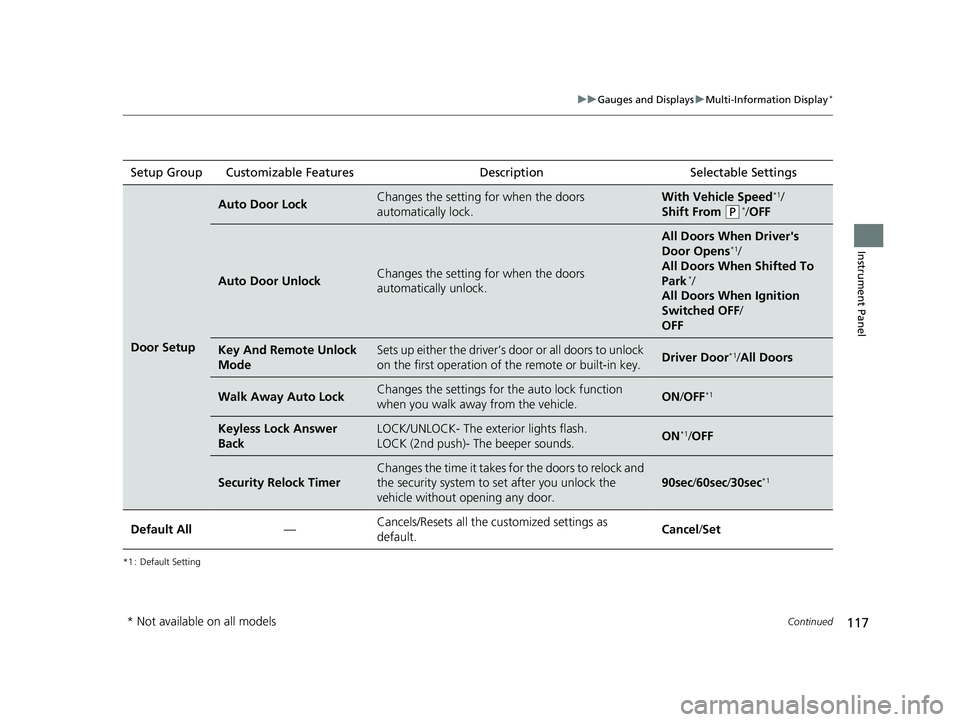
Setup Group Customizable Features Description Selectable Settings
Door Setup
Auto Door LockChanges the setting for when the doors
automatically lock.With Vehicle Speed*1/
Shift From
(P*/ OFF
Auto Door UnlockChanges the setting for when the doors
automatically unlock.
All Doors When Driver's
Door Opens*1/
All Doors When Shifted To
Park
*/
All Doors When Ignition
Switched OFF /
OFF
Key And Remote Unlock
ModeSets up either the driver’s door or all doors to unlock
on the first operation of the remote or built-in key.Driver Door*1/ All Doors
Walk Away Auto LockChanges the settings for the auto lock function
when you walk away from the vehicle.ON /OFF*1
Keyless Lock Answer
BackLOCK/UNLOCK- The exterior lights flash.
LOCK (2nd push)- The beeper sounds.ON*1/OFF
Security Relock Timer
Changes the time it takes for the doors to relock and
the security system to set after you unlock the
vehicle without opening any door.
90sec /60sec /30sec*1
Default All—Cancels/Resets all the customized settings as
default.Cancel /Set
* Not available on all models
20 FIT-31T5A6500.book 117 ページ 2019年9月26日 木曜日 午後4時41分
Page 123 of 599
121
Controls
This chapter explains how to operate the various controls necessary for driving.
Clock............................................................ 122
Locking and Unlocking the Doors Key Types and Functions ........................... 124
Low Smart Entry Remote Signal Strength*.....126Locking/Unlocking the Doors from the Outside ... 127
Locking/Unlocking the Doors from the Inside .....135
Childproof Door Locks .............................. 138
Auto Door Locking/Unlocking*................. 139
Opening and Closing the Tailgate ............ 145
Security System .......................................... 148
Immobilizer System ......... ..................... ..... 148
Security System Alarm ............................... 148
Opening and Closing the Windows .......... 151
Opening and Closing the Moonroof
*....... 153 Operating the Switches Around the Steering
Wheel
Ignition Switch.......................................... 154
ENGINE START/STOP Button ..................... 155
Ignition Switch and Power Mode Comparison ... 158Turn Signals .............................................. 159
Light Switches .......................................... 160
Fog Lights
*............................................... 163
Auto High-Beam*..................................... 164
Daytime Running Lights ............................ 167
Wipers and Washers ................................. 168
Brightness Control .................................... 170
Rear Defogger/Heated Door Mirror* Button ...... 171
Models without smart entry system
Models with smart entry system
Adjusting the Steering Wheel ....................172
Adjusting the Mirrors .................................173
Interior Rearview Mirror .............................173
Power Door Mirrors ...................................173
Adjusting the Seats .................................... 174
Front Seats ................................................174
Rear Seats .................................................178
Interior Lights/Interior Convenience Items....... 186Interior Lights ............................................186
Interior Convenience Items ........................188
Heating and Cooling System
*....................196
Using Vents, Heating and A/C*.................196
Climate Control System*............................199
Using Automatic Climate Control ..............199
Automatic Climate Control Sensors ...........203
* Not available on all models
20 FIT-31T5A6500.book 121 ページ 2019年9月26日 木曜日 午後4時41分
Page 129 of 599
127
uuLocking and Unlocking the Doors uLocking/Unlocking the Doors from the Outside
Continued
Controls
Locking/Unlocking the Doors from the Outside
When you carry the sm art entry remote, you
can lock/unlock the doors and the tailgate.
You can lock/unlock the doors and the
tailgate within a radius of about 32 inches (80
cm) of the outside door handle or tailgate
release button.
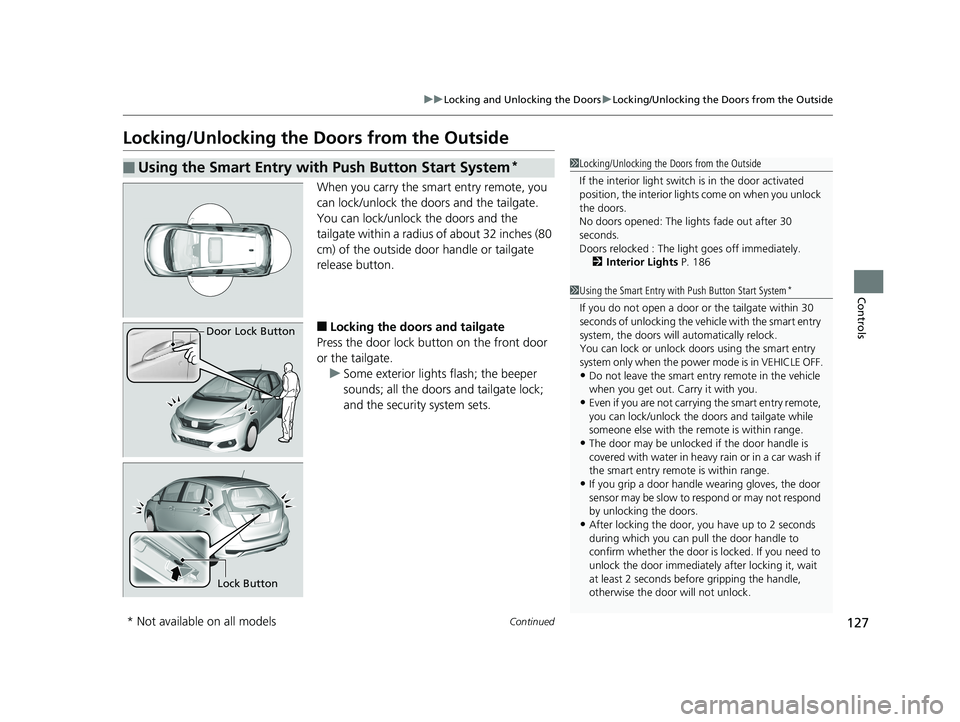
■Locking the doors and tailgate
Press the door lock button on the front door
or the tailgate. u Some exterior lights flash; the beeper
sounds; all the doors and tailgate lock;
and the security system sets.
■Using the Smart Entry with Push Button Start System*1Locking/Unlocking the Doors from the Outside
If the interior light switch is in the door activated
position, the interior lights come on when you unlock
the doors.
No doors opened: The li ghts fade out after 30
seconds.
Doors relocked : The li ght goes off immediately.
2 Interior Lights P. 186
1Using the Smart Entry with Push Button Start System*
If you do not open a door or the tailgate within 30
seconds of unlocking the vehicle with the smart entry
system, the doors will automatically relock.
You can lock or unlock doors using the smart entry
system only when the power mode is in VEHICLE OFF.
•Do not leave the smart entry remote in the vehicle
when you get out. Carry it with you.
•Even if you are not carrying the smart entry remote,
you can lock/unlock the doors and tailgate while
someone else with the remote is within range.
•The door may be unlocked if the door handle is
covered with water in heavy rain or in a car wash if
the smart entry remote is within range.
•If you grip a door handle wearing gloves, the door
sensor may be slow to respond or may not respond
by unlocking the doors.
•After locking the door, you have up to 2 seconds
during which you can pull the door handle to
confirm whether the door is locked. If you need to
unlock the door immediately after locking it, wait
at least 2 seconds befo re gripping the handle,
otherwise the door will not unlock.
Door Lock Button
Lock Button
* Not available on all models
20 FIT-31T5A6500.book 127 ページ 2019年9月26日 木曜日 午後4時41分
Page 133 of 599
Continued131
uuLocking and Unlocking the Doors uLocking/Unlocking the Doors from the Outside
Controls
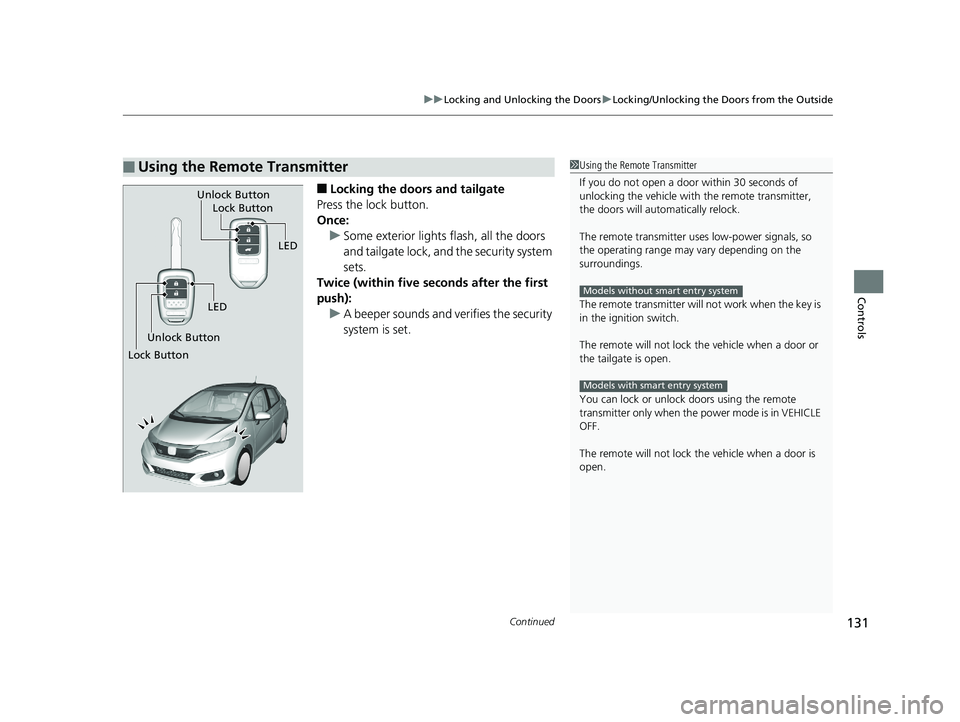
■Locking the doors and tailgate
Press the lock button.
Once: u Some exterior lights flash, all the doors
and tailgate lock, and the security system
sets.
Twice (within five se conds after the first
push):
u A beeper sounds and verifies the security
system is set.
■Using the Remote Transmitter1Using the Remote Transmitter
If you do not open a door within 30 seconds of
unlocking the vehicle with the remote transmitter,
the doors will automatically relock.
The remote transmitter us es low-power signals, so
the operating range may vary depending on the
surroundings.
The remote transmitter will not work when the key is
in the ignition switch.
The remote will not lock th e vehicle when a door or
the tailgate is open.
You can lock or unlock doors using the remote
transmitter only when the power mode is in VEHICLE
OFF.
The remote will not lock th e vehicle when a door is
open.
Models without smart entry system
Models with smart entry system
LED
Unlock Button Lock Button
Unlock Button
LED
Lock Button
20 FIT-31T5A6500.book 131 ページ 2019年9月26日 木曜日 午後4時41分
Page 150 of 599
148
Controls
Security System
Immobilizer System
The immobilizer system prevents a key that has not been pre-registered from
starting the engine. Each key contains el ectronic transmitters that use electronic
signals to verify the key.
Pay attention to the following when inserti ng the key into the ignition switch or
pressing the ENGINE START/STOP button:
• Do not allow objects that emit strong radio waves near the ignition switch or the
ENGINE START/STOP button.
• Make sure the key is not covered by or touching a metal object.
• Do not bring a key from anot her vehicle’s immobilizer system near the ignition
switch or the ENGINE START/STOP button.
Do not put the key near magnetic items. El ectronic device, such as televisions and
audio systems emit strong magnetic fields . Note that even a key chain can become
magnetic.
Security System Alarm
The security system alarm activates when the tailgate, hood or doors are forcibly
opened. The alarm does not activate if the tailgate or doors are opened with the key,
remote transmitter or smart entry system
*.
However, the alarm goes off when a door is opened with the key, and then the
transmission is taken out of
(P (continuously variable transmission models) or the
hood is opened before the ignition switch is turned to ON
(w*1.
■When the security sy stem alarm activates
The horn sounds intermittently and all of the exterior lights flash.
*1 : Models with the smart entry system have an ENGINE START/STOP button instead of an ignition switch.
1Immobilizer System
NOTICE
Leaving the key in the vehicl e can result in theft or
accidental movement of the vehicle.
Always take the key with you whenever you leave the
vehicle unattended.
Do not alter the system or add other devices to it.
Doing so may damage the system and make your
vehicle inoperable.
1 Security System Alarm
Do not alter the system or add other devices to it.
Doing so may damage the system and make your
vehicle inoperable.
The security alarm continues for a maximum of two
minutes until the security system deactivates.
* Not available on all models
20 FIT-31T5A6500.book 148 ページ 2019年9月26日 木曜日 午後4時41分
Page 151 of 599
Continued149
uuSecurity System uSecurity System Alarm
Controls
■To deactivate the security system alarm
Unlock the vehicle using the key, remote transmitter, smart entry system*, or turn
the ignition switch to ON
(w*1. The system, along with the horn and flashing lights,
is deactivated.
■Setting the security system alarm
The security system alarm automatically sets when the following conditions have
been met:
• The ignition switch is in LOCK
(0*1.
• The hood is closed.
• All doors and the tailgate are locked from outside with the key, remote
transmitter, or smart entry system
*.
• The key has been removed from the ignition switch.
■When the security system alarm sets
The security system alarm in dicator in the instrument panel blinks and the blinking
interval changes after about 15 seconds.
■To cancel the security system alarm
The security system alarm is canceled wh en the vehicle is unlocked using the key,
remote transmitter, smart entry system
*, or when the ignition switch is turned to ON
(w*1. The security system alarm indica tor goes off at the same time.
*1 : Models with the smart entry system have an ENGINE START/STOP button instead of an ignition switch.
1Security System Alarm
Do not set the security system alarm when someone
is in the vehicle or a window is open. The system can
accidentally activate when:
•Unlocking the door with the lock tab.•Opening the hood with the hood release handle.
•Taking the transmission out of ( P.
If the battery goes dead after you have set the
security system alarm, the security alarm may go off
once the battery is re charged or replaced.
If this occurs, deactivate the security system alarm by
unlocking a door using the ke y, remote transmitter,
or smart entry system
*.
Continuously variable transmission models
Models without keyless access system
* Not available on all models
20 FIT-31T5A6500.book 149 ページ 2019年9月26日 木曜日 午後4時41分
Page 152 of 599
150
uuSecurity System uSecurity System Alarm
Controls
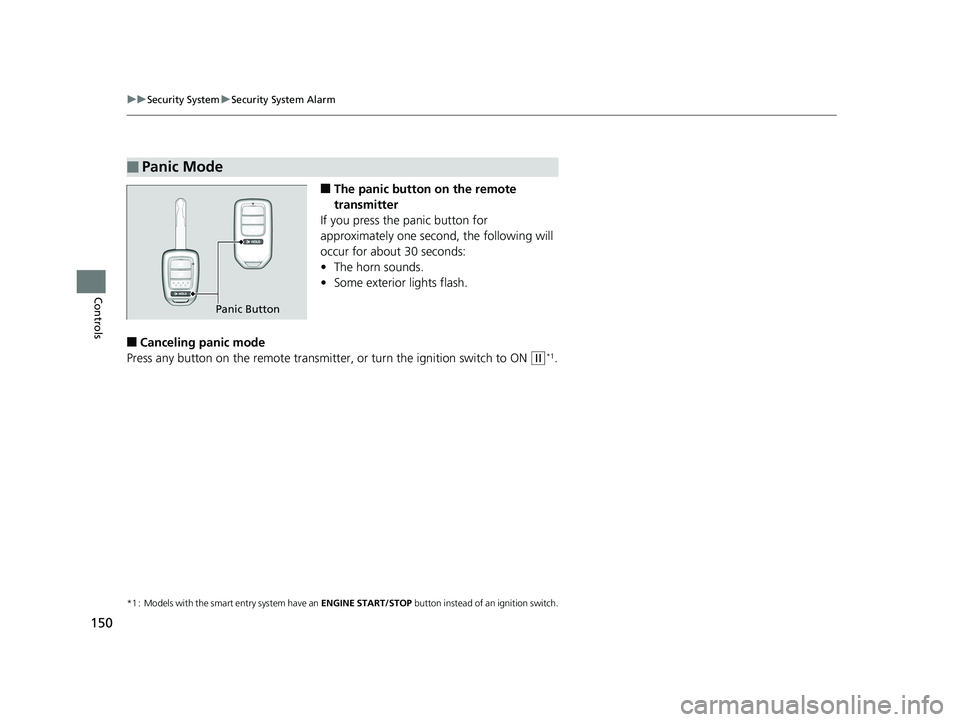
■The panic button on the remote
transmitter
If you press the panic button for
approximately one seco nd, the following will
occur for about 30 seconds:
• The horn sounds.
• Some exterior lights flash.
■Canceling panic mode
Press any button on the remote transmitter, or turn the ignition switch to ON
(w*1.
*1 : Models with the smart entry system have an ENGINE START/STOP button instead of an ignition switch.
■Panic Mode
Panic Button
20 FIT-31T5A6500.book 150 ページ 2019年9月26日 木曜日 午後4時41分
Page 174 of 599
172
uuOperating the Switches Around the Steering Wheel uAdjusting the Steering Wheel
Controls
Adjusting the Steering Wheel
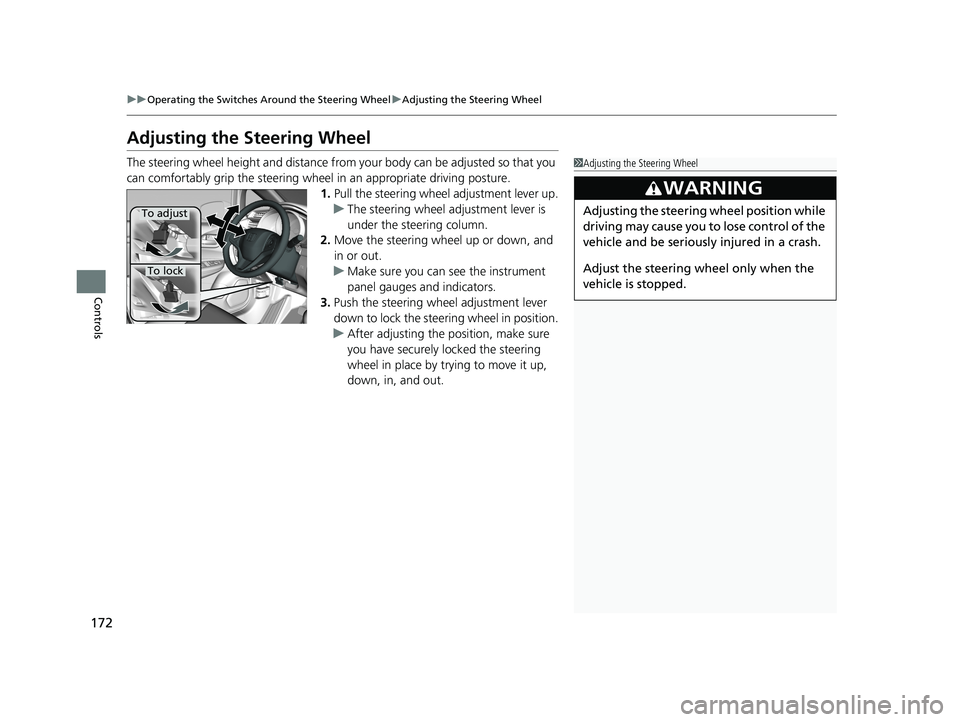
The steering wheel height and distance from your body can be adjusted so that you
can comfortably grip the steering wheel in an appropriate driving posture.
1.Pull the steering wheel adjustment lever up.
u The steering wheel adjustment lever is
under the steering column.
2. Move the steering wheel up or down, and
in or out.
u Make sure you can see the instrument
panel gauges and indicators.
3. Push the steering wheel adjustment lever
down to lock the steering wheel in position.
u After adjusting the position, make sure
you have securely locked the steering
wheel in place by trying to move it up,
down, in, and out.1Adjusting the Steering Wheel
3WARNING
Adjusting the steering wheel position while
driving may cause you to lose control of the
vehicle and be seriously injured in a crash.
Adjust the steering wheel only when the
vehicle is stopped.To adjust
To lock
20 FIT-31T5A6500.book 172 ページ 2019年9月26日 木曜日 午後4時41分
Page 181 of 599
Continued179
uuAdjusting the Seats uRear Seats
Controls
The rear seats can be folded down separa tely to allow for additional storage space.
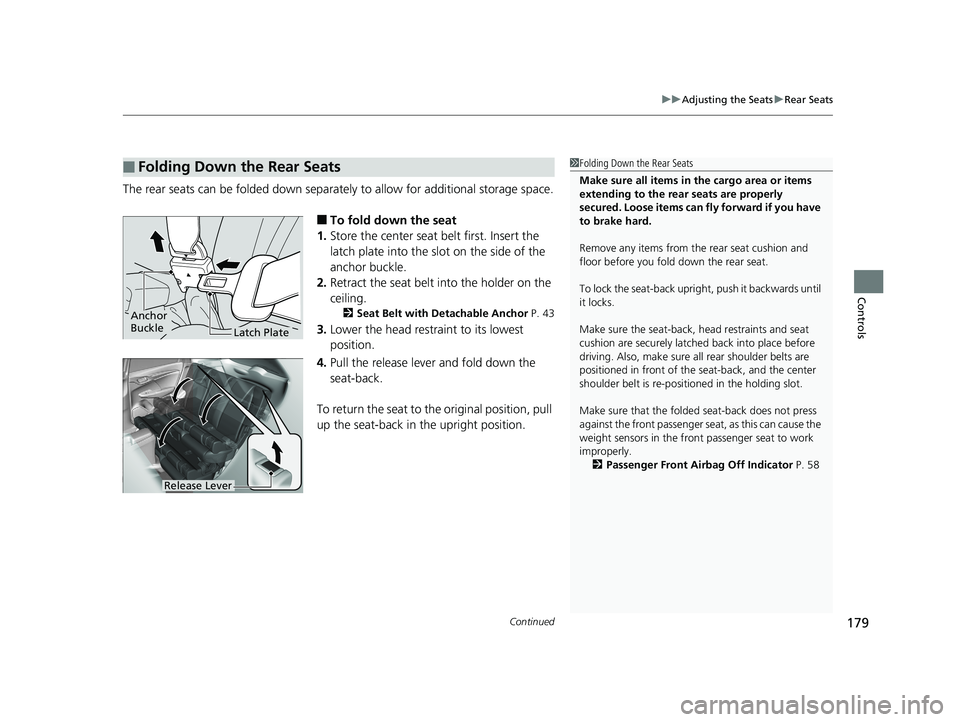
■To fold down the seat
1. Store the center seat belt first. Insert the
latch plate into the slot on the side of the
anchor buckle.
2. Retract the seat belt into the holder on the
ceiling.
2 Seat Belt with Detachable Anchor P. 43
3.Lower the head restraint to its lowest
position.
4. Pull the release lever and fold down the
seat-back.
To return the seat to the original position, pull
up the seat-back in the upright position.
■Folding Down the Rear Seats1 Folding Down the Rear Seats
Make sure all items in the cargo area or items
extending to the rear seats are properly
secured. Loose items can fly forward if you have
to brake hard.
Remove any items from th e rear seat cushion and
floor before you fold down the rear seat.
To lock the seat-back upri ght, push it backwards until
it locks.
Make sure the seat-back, head restraints and seat
cushion are securely latche d back into place before
driving. Also, make sure all rear shoulder belts are
positioned in front of the seat-back, and the center
shoulder belt is re-posit ioned in the holding slot.
Make sure that the folded seat-back does not press
against the front passenger se at, as this can cause the
weight sensors in the front passenger seat to work
improperly.
2 Passenger Front Airbag Off Indicator P. 58
Anchor
Buckle
Latch Plate
Release Lever
20 FIT-31T5A6500.book 179 ページ 2019年9月26日 木曜日 午後4時41分